Accessing and Streaming OHLC Data from APIs and Web-Sockets in R
Read at your own pace. Code execution, quizzes, progress tracking, and the AI tutor are available in the interactive view with JavaScript enabled.
Start With Ingestion
Why this lesson matters
Before you can calculate a 30-minute moving average, compare it with a 60-minute moving average, or feed features into a real-time model, you need one reliable thing: market data arriving in a consistent shape.
In this first lesson, we focus only on the ingestion layer:
- Pulling historical or recent OHLC bars from a REST API
- Receiving live updates from a WebSocket-style stream
- Normalizing both into the same tabular structure
- Thinking about timestamps, symbols, intervals, and data contracts
We will not yet build 30/60-minute calculations or machine learning predictions. Those come in the next lessons. Here, we build the clean data pipe that makes them possible.
Note: your course goal mentions R, but this lesson’s configured programming language is Python. The same architecture applies in R using packages like
httr2,jsonlite,data.table,xts, andwebsocket.
OHLC Data Contract
The table shape we want
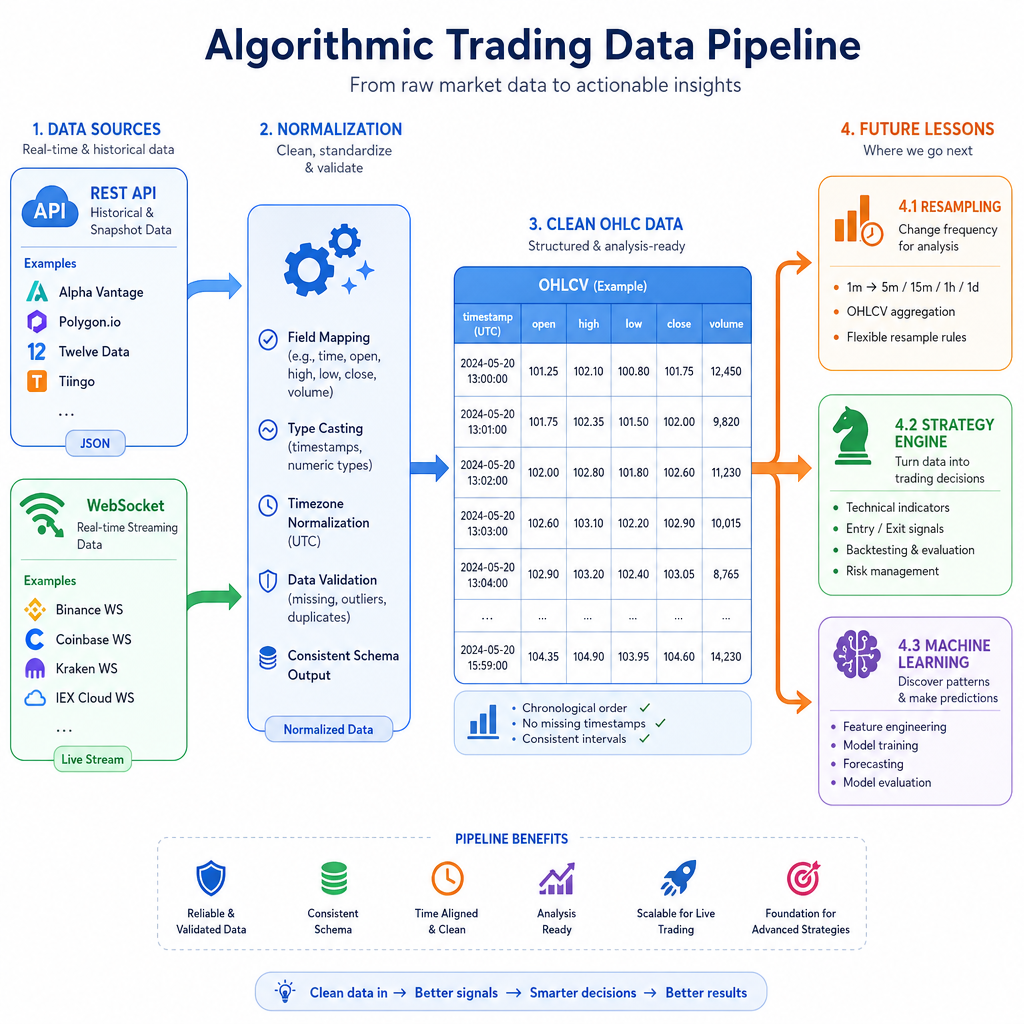
Whether data comes from an API response or a WebSocket event, your trading system should convert it into a predictable data contract.
A practical OHLCV contract is:
column meaningtimestamp
bar start or close time, ideally timezone-aware UTC
symbol
instrument, like AAPL, ES, BTCUSDT
interval
bar size, like 1s, 1m, 5m
open
first price in the bar
high
highest price in the bar
low
lowest price in the bar
close
final/latest price in the bar
volume
traded size during the bar
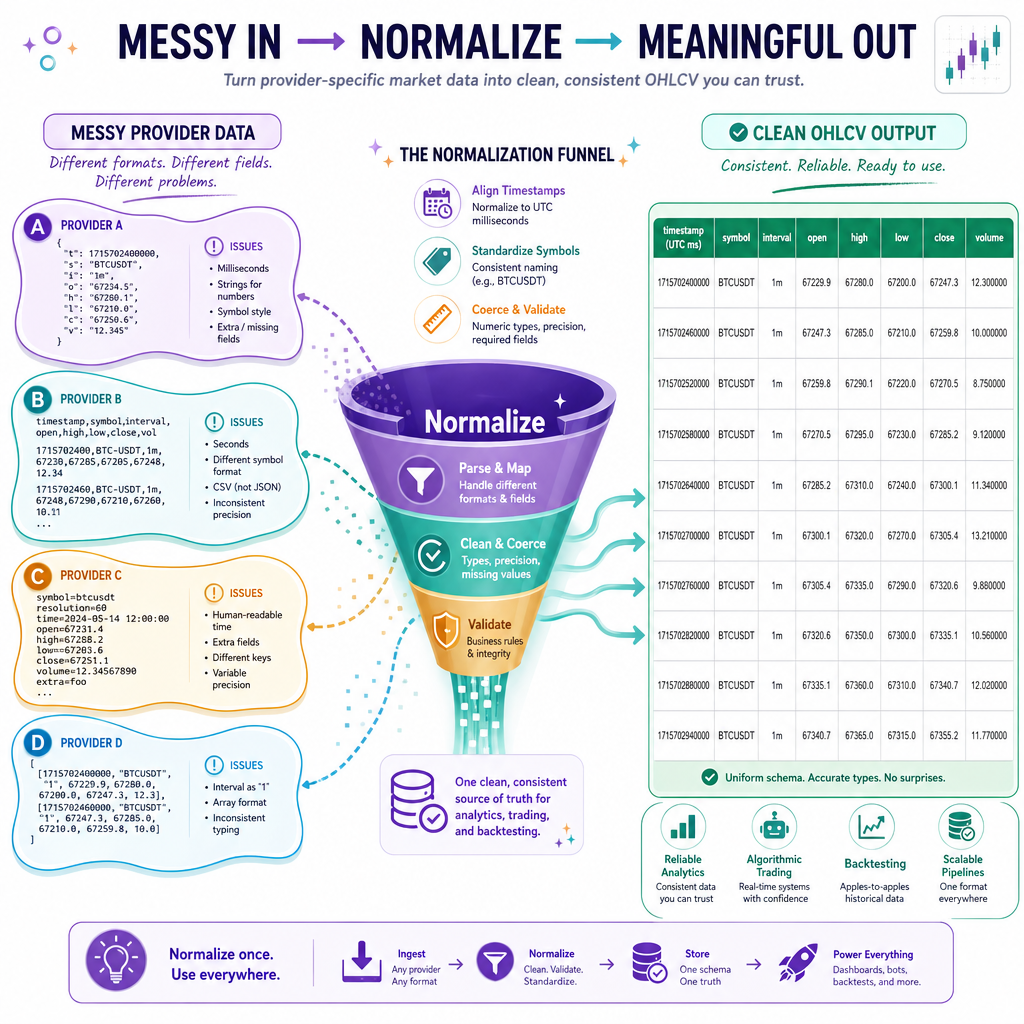
The key mindset: do not let every provider’s format leak into the rest of your system. Normalize once at the boundary.
REST API Pull
REST APIs are snapshots or history
A REST API call is like asking: “Give me the latest bars, or give me bars between these times.”
In production you might call an endpoint with requests.get(...), handle authentication, rate limits, and pagination. For a standalone example, we will mock a typical provider response and normalize it into the contract from the previous screen.
Notice the important step: provider field names like t, o, h, l, c, v become your stable internal names.
```python
import pandas as pd

# Mocked REST API response: similar to what many market-data providers return.
api_response = {
    "symbol": "BTCUSDT",
    "interval": "1m",
    "bars": [
        {"t": "2026-04-27T13:30:00Z", "o": 65000.0, "h": 65020.5, "l": 64980.0, "c": 65010.0, "v": 12.4},
        {"t": "2026-04-27T13:31:00Z", "o": 65010.0, "h": 65040.0, "l": 65005.0, "c": 65035.5, "v": 9.7},
        {"t": "2026-04-27T13:32:00Z", "o": 65035.5, "h": 65050.0, "l": 65015.0, "c": 65020.0, "v": 15.1}
    ]
}

bars = pd.DataFrame(api_response["bars"])
bars = bars.rename(columns={
    "t": "timestamp",
    "o": "open",
    "h": "high",
    "l": "low",
    "c": "close",
    "v": "volume"
})

bars["timestamp"] = pd.to_datetime(bars["timestamp"], utc=True)
bars["symbol"] = api_response["symbol"]
bars["interval"] = api_response["interval"]

bars = bars[["timestamp", "symbol", "interval", "open", "high", "low", "close", "volume"]]

print(bars)
print("\nRows:", len(bars))
print("Latest close:", bars.iloc[-1]["close"])
```
Provider Boundary
You receive OHLC data from two providers. One sends fields named open, high, low, close. Another sends o, h, l, c.
Where should you handle this difference?
WebSocket Stream
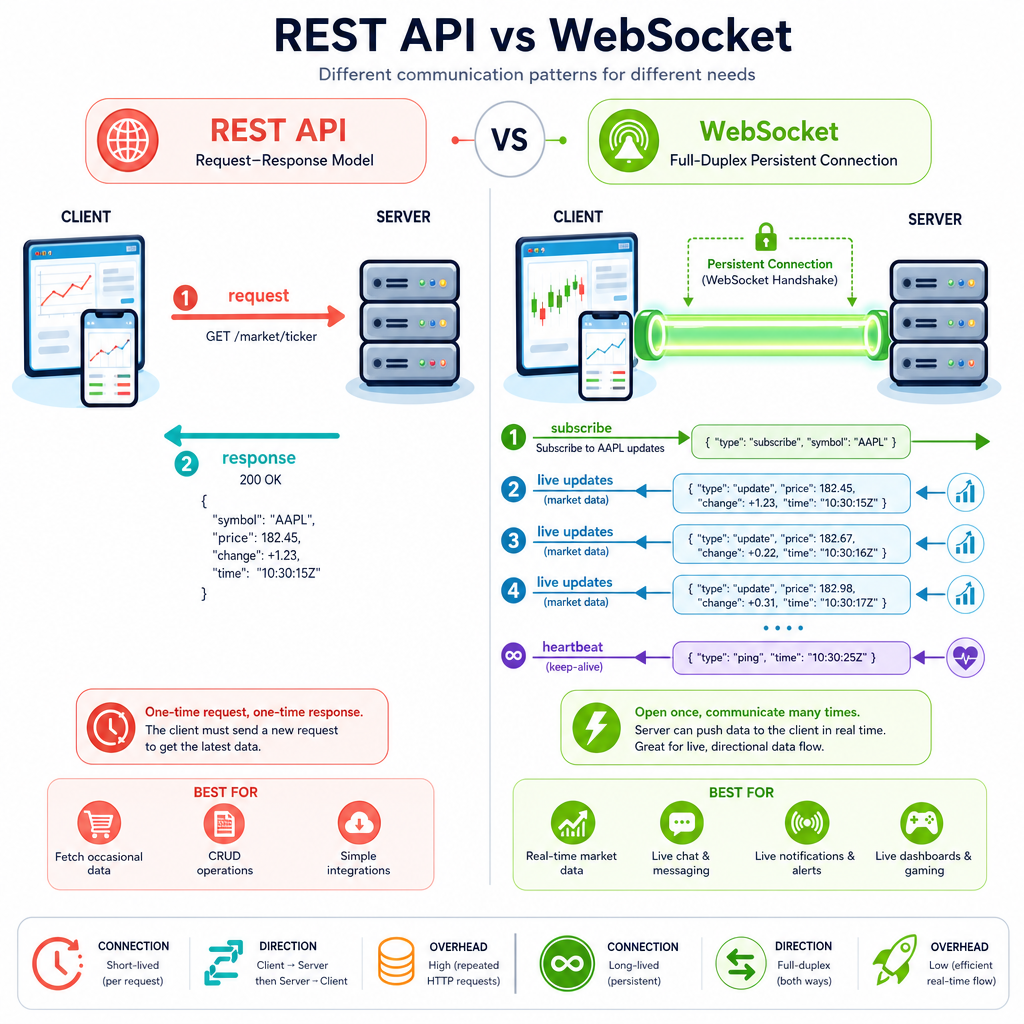
WebSockets are live conversations
A WebSocket is different from a REST API call.
REST:
client -> request bars
client <- receive response
connection usually ends
WebSocket:
client -> subscribe to symbol/channel
client <- update
client <- update
client <- update
...
This matters for trading because a live system needs to react as new market events arrive. WebSocket messages may be:
- Individual trades
- Quote updates
- Partial candle updates
- Completed candle updates
- Heartbeats or status messages
Your first job is not prediction. Your first job is to parse, filter, timestamp, and store the stream safely.
Simulated Live Feed
Practice the streaming pattern
Real WebSocket code depends on the provider, authentication, and subscription format. But the internal pattern is usually the same:
- Connect or subscribe
- Receive a message
- Parse JSON
- Normalize fields
- Append or update your in-memory table
- Trigger downstream logic later
Below is a standalone simulation of a WebSocket-like stream. It emits one-second OHLC updates and appends them into the same contract as the REST example.
```python
import asyncio
import json
import pandas as pd

async def fake_websocket_messages():
    messages = [
        {"event": "bar", "sym": "BTCUSDT", "int": "1s", "ts": "2026-04-27T13:30:01Z", "o": 65010, "h": 65012, "l": 65008, "c": 65011, "v": 0.8},
        {"event": "bar", "sym": "BTCUSDT", "int": "1s", "ts": "2026-04-27T13:30:02Z", "o": 65011, "h": 65018, "l": 65009, "c": 65017, "v": 1.1},
        {"event": "heartbeat", "time": "2026-04-27T13:30:02Z"},
        {"event": "bar", "sym": "BTCUSDT", "int": "1s", "ts": "2026-04-27T13:30:03Z", "o": 65017, "h": 65019, "l": 65013, "c": 65014, "v": 0.6}
    ]
    for msg in messages:
        await asyncio.sleep(0.05)
        yield json.dumps(msg)

def normalize_stream_message(raw):
    msg = json.loads(raw)
    if msg.get("event") != "bar":
        return None
    return {
        "timestamp": pd.to_datetime(msg["ts"], utc=True),
        "symbol": msg["sym"],
        "interval": msg["int"],
        "open": float(msg["o"]),
        "high": float(msg["h"]),
        "low": float(msg["l"]),
        "close": float(msg["c"]),
        "volume": float(msg["v"])
    }

async def main():
    rows = []
    async for raw in fake_websocket_messages():
        row = normalize_stream_message(raw)
        if row is None:
            print("Ignored non-bar message:", raw)
            continue
        rows.append(row)
        print("Appended bar:", row["timestamp"], "close=", row["close"])

    df = pd.DataFrame(rows)
    print("\nCurrent live table:")
    print(df)

asyncio.run(main())
```
Completed Bars
True or false:
A WebSocket message always represents a finalized OHLC candle that should never be updated again.
Quality Checks
Trust, but validate
In dynamic trading systems, bad data is not rare. You may see:
- Missing bars
- Duplicate timestamps
- Out-of-order events
- Negative or zero prices from bad ticks
- Partial bars mixed with final bars
- Timezone mistakes
Before resampling or modeling, add basic checks. Think of this like defensive programming in C++: validate assumptions at the boundary so the rest of the system stays simpler.
```python
import pandas as pd

rows = [
    {"timestamp": "2026-04-27T13:30:01Z", "symbol": "BTCUSDT", "interval": "1s", "open": 10, "high": 12, "low": 9, "close": 11, "volume": 1.0},
    {"timestamp": "2026-04-27T13:30:01Z", "symbol": "BTCUSDT", "interval": "1s", "open": 10, "high": 12, "low": 9, "close": 11, "volume": 1.0},
    {"timestamp": "2026-04-27T13:30:03Z", "symbol": "BTCUSDT", "interval": "1s", "open": 11, "high": 13, "low": 10, "close": -1, "volume": 0.5}
]

df = pd.DataFrame(rows)
df["timestamp"] = pd.to_datetime(df["timestamp"], utc=True)

required = ["timestamp", "symbol", "interval", "open", "high", "low", "close", "volume"]
missing_cols = [c for c in required if c not in df.columns]
duplicate_count = df.duplicated(subset=["timestamp", "symbol", "interval"]).sum()
non_positive_prices = (df[["open", "high", "low", "close"]] <= 0).any(axis=1).sum()

print("Missing columns:", missing_cols)
print("Duplicate timestamp/symbol/interval rows:", duplicate_count)
print("Rows with non-positive prices:", non_positive_prices)

clean = df.drop_duplicates(subset=["timestamp", "symbol", "interval"]).copy()
clean = clean[(clean[["open", "high", "low", "close"]] > 0).all(axis=1)]
clean = clean.sort_values("timestamp")

print("\nCleaned table:")
print(clean)
```
Timestamp Anchor
Fill in the blank:
For real-time trading data, timestamps should usually be normalized to the same timezone, most commonly ____, before joining, resampling, or comparing streams.
Ingestion Blueprint
The pattern to keep
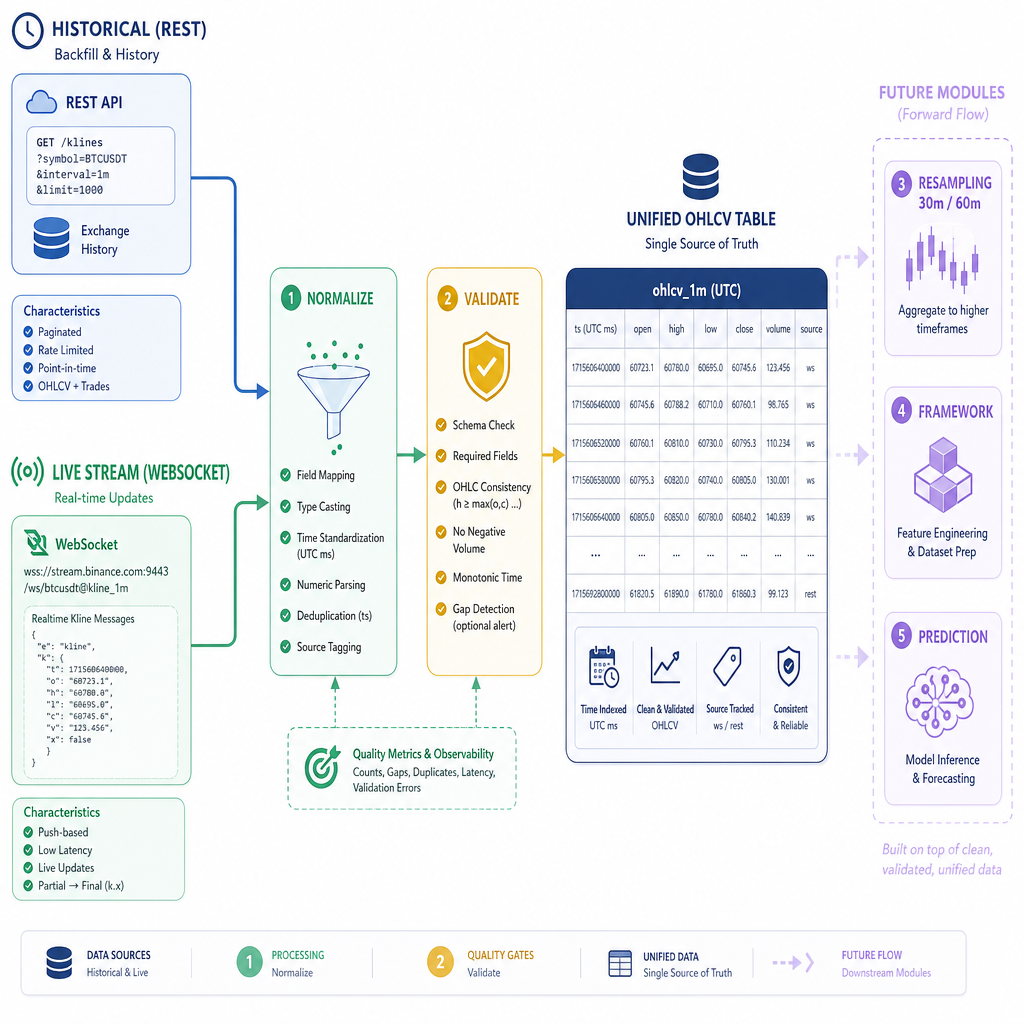
At this point, you have the first piece of a dynamic algo trading system:
REST history  ----\
                  ---> normalize ---> validate ---> OHLCV table
WebSocket live ---/
A clean ingestion layer gives you two major advantages:
- Historical and live data can share the same downstream functions
- Your strategy code does not care which provider produced the data
In the next lesson, Resampling and Aggregating Time-Frame Data in R, we will take this normalized second-level data and convert it into higher time frames like 30-minute and 60-minute bars.