SQL Aggregate Functions
Read at your own pace. Code execution, quizzes, progress tracking, and the AI tutor are available in the interactive view with JavaScript enabled.
Introduction
Aggregate Functions
Introduction
SQL is very often used for gathering and expressing the data in a summary form. This process is known as data aggregation and is conducted with the help of several aggregate functions. In short, an SQL aggregate function outputs a single value by computing some calculations on a given set of input values. These functions perform the operations over entire columns and, in most cases, ignore null values (not applicable only for the COUNT() function). Since these functions are used all the time in SQL, it’s extremely important and beneficial to become as familiar with them as possible. In this tutorial, we will go over five aggregate functions: AVG(), COUNT(), MIN(), MAX(), and SUM().
COUNT
COUNT
The count() aggregate function simply counts the number of rows in a given column or the entire table. It’s important to keep in mind that this function counts only the rows that have a value, i.e. are not null.
Let’s take a look at the syntax of the count() function:
SELECT COUNT(column)
FROM table
WHERE condition;
DISTINCT
This keyword can be used with different aggregations; however, it is most commonly used with the count() function. By using DISTINCT, we get the total number of unique values in a specific column. In order to get such a result, simply put the keyword DISTINCT in front of the column name, like so:
sql
SELECT COUNT(DISTINCT column)
FROM table
WHERE condition;
COUNT and NULL
COUNT and NULL
A small detail that often appears in interviews is the difference between COUNT(*) and COUNT(column).
-
COUNT(*)counts all rows returned by the query. -
COUNT(column)counts only the rows where that specific column is not null. -
COUNT(DISTINCT column)counts only the unique non-null values in that column.
For example, if a table has 10 rows but only 8 rows have a value in the Price column, the results below would be different.
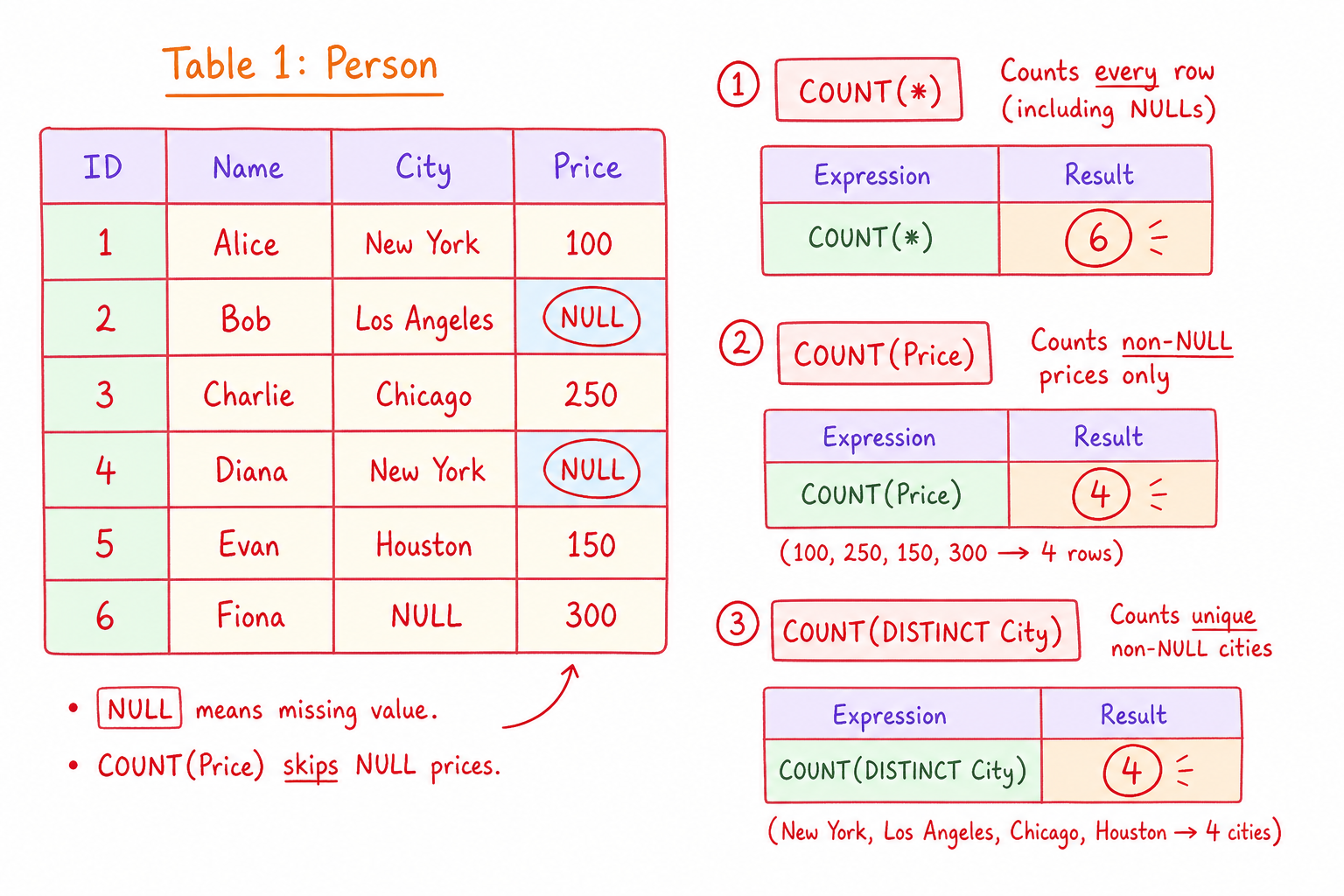
```sql
SELECT COUNT(*) AS TotalRows,
       COUNT(Price) AS RowsWithPrice,
       COUNT(DISTINCT City) AS UniqueCities
FROM Person;
```
SUM
SUM
Sum() is an aggregate function that outputs the sum of all values in a specific column. We should keep in mind that this function can be used only on numerical columns, unlike count(), which can be used on any data type column.
The syntax of the sum() aggregate function looks like this:
sql
SELECT AVG(column)
FROM table
WHERE condition;
Question 1
We can run the SUM() function on a column containing ‘date’ data type values.
Question: Null Values
Suppose a column named Age contains the values 20, 30, NULL, and 40. What would this query return?
SELECT AVG(Age)
FROM Person;
AVG
AVG
This aggregate function is used for calculating the average of the values in a specific column. This is a very useful aggregate function, but it should be noted that it may only be used on columns containing numerical values. What’s more, avg() completely ignores all null values in the column. Sometimes, this is a downside because we may want to treat the nulls as zeroes, in which case, we’ll have to run a command to manually perform that conversion.
The syntax of the avg() function is as follows:
SELECT AVG(column)
FROM table
WHERE condition;
MIN and MAX
MIN and MAX
The min() and max() aggregations are used for returning the minimum and maximum values of a specific column, respectively. They may be used on several different data types. That being said, min() can return the earliest date, lowest number, or the non-numerical value that is closest to the letter ‘A’ in the alphabet. As expected, max() is doing the exact opposite; outputs the highest number, the most recent date, or the non-numerical value that comes closest to the letter "Z" in the alphabet. The syntax shown below is for the min() function, but we may get the maximum by simply replacing the MIN() with the MAX() keyword.
SELECT MIN(column)
 FROM table
 WHERE condition;
Aggregate Functions in Action
Aggregate Functions in Action
In this section, we will work with the table below, named Person:
 Our goal is to write a query that takes into consideration all the abovementioned aggregate functions so that we get a better understanding of how they actually work. Let’s say we want to find out the following (code and result table included):
- The total number of customers (name of the column: NumOfCustomers)
- The date of the first and last order, based on the date ordered (name of the column: DateFirst & DateLast)
- The total average age of the customers (name of the column: AverageAge)
- The total number of items that were being ordered by all customers (name of the column: TotalItems)
SELECT COUNT(Price) AS NumOfCustomers, MIN(DateOfOrder) AS DateFirst, MAX(DateOfOrder) AS DateLast, AVG(Age) AS AverageAge, SUM(NumberOfItems) AS TotalItems
FROM Person;
The resulting table would look like this:

Question 2
What would be the output of the following query:
sql
SELECT MIN(City)
FROM Person;
One Pager Cheat Sheet
One Pager Cheat Sheet
- SQL provides a range of aggregate functions to compute single values from the data collected in a given set of input values, such as
AVG(),COUNT(),MIN(),MAX(), andSUM(), while usually ignoring null values. - The
COUNT()aggregate function returns the number of not null rows in a given column or the entire table and by using the keywordDISTINCTin front of the column name, unique values can be counted. - -
COUNT(*)counts rows, whileCOUNT(column)ignores null values in that column. - The
sum()aggregate function calculates the sum of all values in a numerical column, and its syntax looks likeSELECT SUM(column) FROM table WHERE condition;. - We cannot use SUM() to calculate the sum of
datedata type values since it is only applicable to columns containing numerical values. - -
AVG()ignores null values when calculating the average. - The
AVG()function is used to calculate the average of numerical values in a specific column, while ignoring null values. - The
min()andmax()aggregations are used to return the minimum and maximum values of a specific column for several different data types. - Using
COUNT,MIN,MAX,AVG, andSUMaggregate functions, we can query thePersontable to find out thetotal number of customers,date of the first and last order,average age of the customers, andtotal number of items ordered. - The
MIN()aggregate function returns the smallest value in the "City" column of the "Person" table, which is Berlin.