AJAX and Fetch API
Read at your own pace. Code execution, quizzes, progress tracking, and the AI tutor are available in the interactive view with JavaScript enabled.
From DOM To Data
From page interaction to live data
In DOM Manipulation, you wired user actions to page changes. That gives you a local, interactive UI.
Now we add the next layer: data that lives somewhere else.
AJAX lets a page talk to a server in the background, so the user does not have to reload the whole page. The modern browser tool for this is the Fetch API.
Think of it like upgrading a puzzle game board: the pieces still move in the DOM, but now new clues, scores, inventory, or recommendations can arrive from an API while the player keeps playing.
In this lesson, you will learn how to:
- Request data with
fetch() - Read JSON responses
- Recognize request and response parts
- Handle network and HTTP failures separately
- Connect fetched data back to UI rendering decisions

AJAX Mental Model
AJAX is a pattern, not one method
AJAX stands for Asynchronous JavaScript and XML, but modern AJAX usually means:
JavaScript asks a server for data without navigating away from the current page.
Despite the old name, the data is often JSON, not XML.
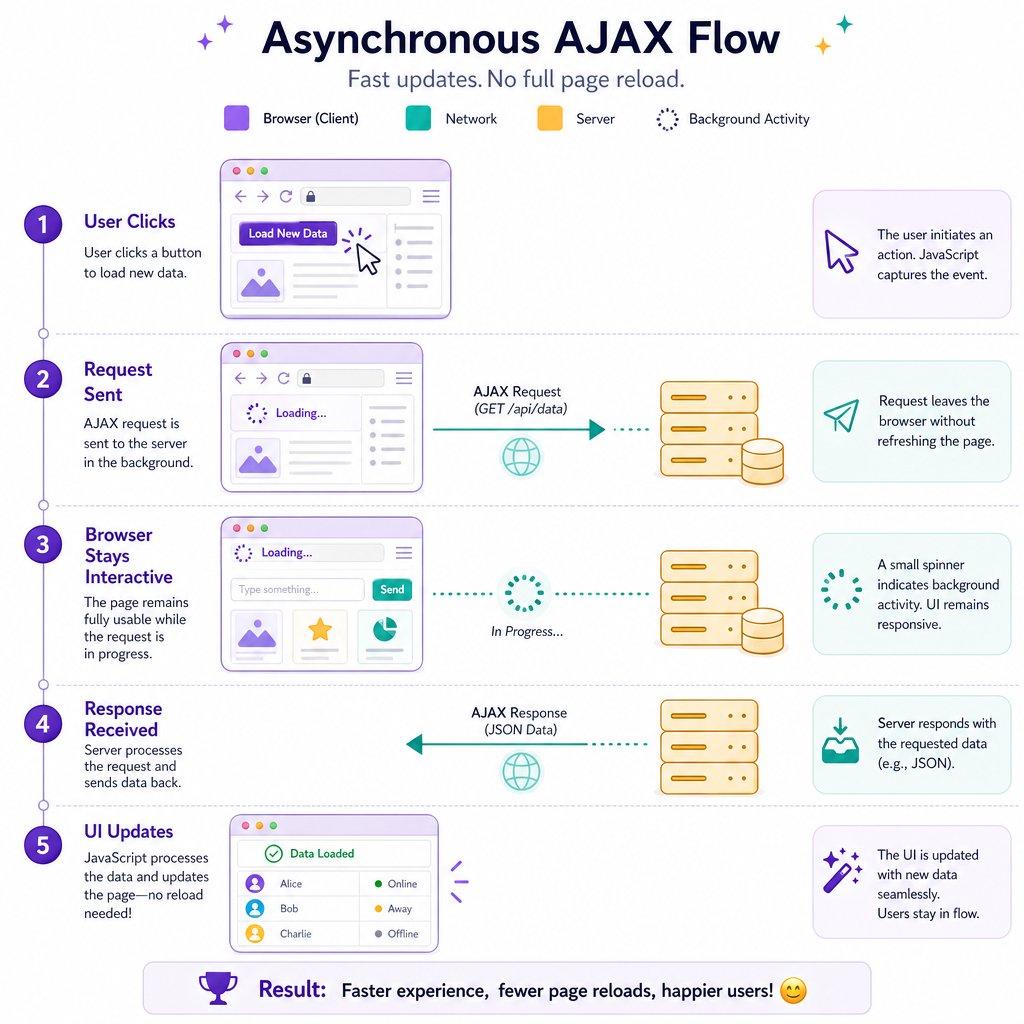
A typical flow looks like this:
User clicks button
      ↓
JavaScript starts request
      ↓
Browser keeps page usable
      ↓
Server sends response
      ↓
JavaScript updates state / DOM
The important shift from the previous lesson is timing. DOM changes were immediate. Network data arrives later, so your code must be organized around eventual completion.
For staff-level frontend interviews, this is not just syntax trivia. You are expected to reason about loading states, failure paths, retries, caching, and what the user sees while the request is in flight.
First Fetch
fetch() returns a Promise
Calling fetch(url) starts a request and gives you a Promise for a Response object.
The response body is not automatically parsed. If the API returns JSON, call response.json(), which also returns a Promise.
This example uses a data: URL so it can run without relying on an external service.
```javascript
var payload = {
  title: "Puzzle Box",
  score: 42
};

var url = "data:application/json," + encodeURIComponent(JSON.stringify(payload));

fetch(url)
  .then(function(response) {
    console.log("Status:", response.status);

    if (!response.ok) {
      throw new Error("HTTP error: " + response.status);
    }

    return response.json();
  })
  .then(function(data) {
    console.log(data.title + " score:", data.score);
  })
  .catch(function(error) {
    console.log("Fetch failed:", error.message);
  });
```
Parsing JSON
When you call response.json() in a Fetch chain, what do you get back?
HTTP Shape
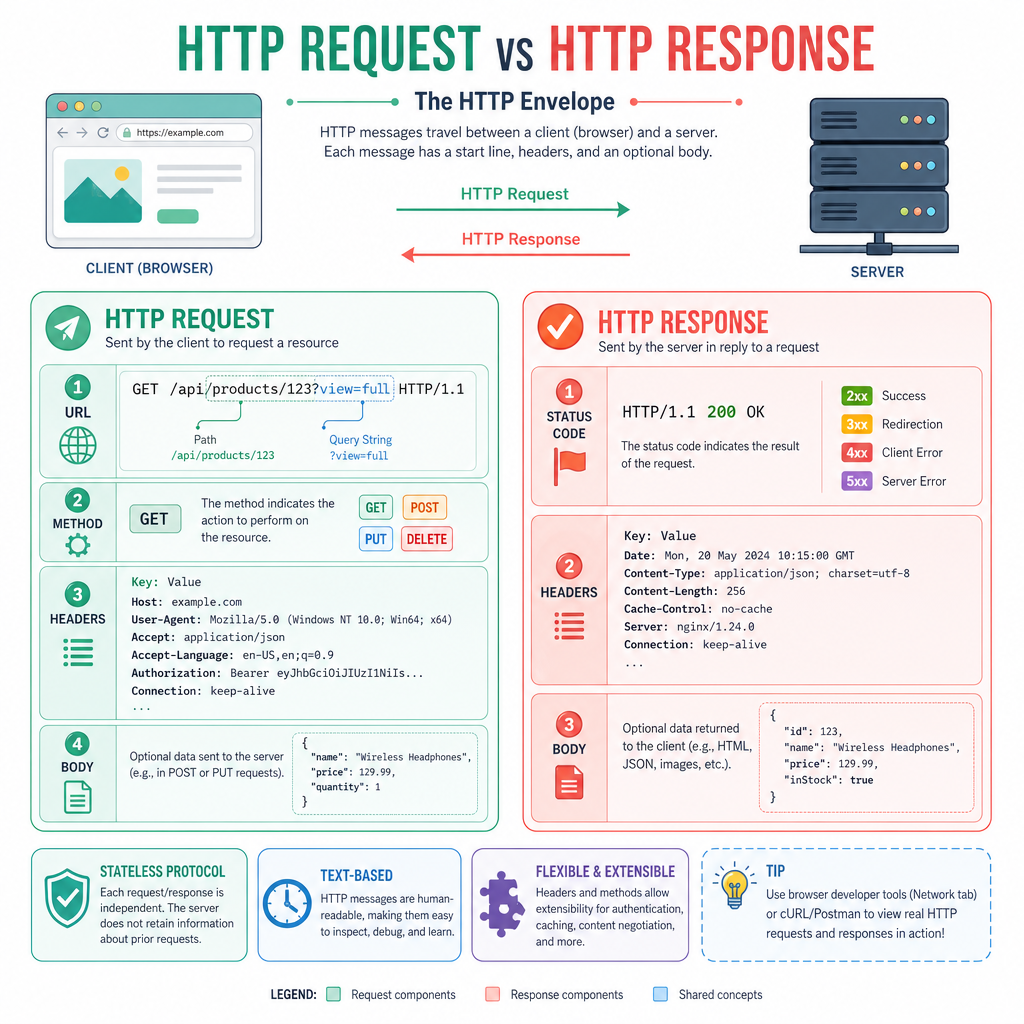
Requests and responses have shape
Fetch is easier when you picture the browser and server exchanging structured messages.
A request commonly includes:
- URL: where the request goes
- Method: what kind of action, such as
GETorPOST - Headers: metadata, such as content type or auth information
- Body: optional data sent to the server
A response commonly includes:
- Status code:
200,404,500, etc. - Headers: response metadata
- Body: often JSON, HTML, text, or a file
Common methods:
Method Usually meansGET
Read data
POST
Create or submit data
PUT / PATCH
Update data
DELETE
Remove data
This is the contract between frontend and backend. Your UI is only as reliable as your handling of that contract.
Failures Are Different
Network failure is not the same as HTTP failure
This is one of the most important Fetch details:
-
fetch()rejects when the browser cannot complete the request, such as no network, blocked request, or invalid URL. -
fetch()usually does not reject just because the server returns404or500.
For HTTP error statuses, check response.ok or response.status yourself.
A good frontend treats these as different product states. A dating-show recap app with no internet, a missing episode, and a server outage should not all show the same vague error.
```javascript
function requireOk(response) {
  if (!response.ok) {
    throw new Error("HTTP " + response.status + " " + response.statusText);
  }

  return response;
}

var fakeNotFound = new Response(
  JSON.stringify({ message: "Episode not found" }),
  {
    status: 404,
    statusText: "Not Found",
    headers: { "Content-Type": "application/json" }
  }
);

Promise.resolve(fakeNotFound)
  .then(requireOk)
  .then(function(response) {
    return response.json();
  })
  .then(function(data) {
    console.log("Data:", data);
  })
  .catch(function(error) {
    console.log("Handled:", error.message);
  });
```
CORS Control
True or false: A frontend can bypass CORS by adding an Access-Control-Allow-Origin header to its own fetch() request.
Data To Markup
Fetch gets data; your UI still decides presentation
After data arrives, you usually transform it into something the page can show.
Because you already covered DOM updates, focus here on the boundary:
- Fetch data
- Validate or shape it
- Render it into the UI
In production, you would also show a loading state before the data arrives and an error state if it fails.
```javascript
var recommendations = [
  { id: 1, title: "The Last Puzzle" },
  { id: 2, title: "Action Movie Night" },
  { id: 3, title: "Reality TV Strategy Guide" }
];

var url = "data:application/json," + encodeURIComponent(JSON.stringify(recommendations));

function renderList(items) {
  return items
    .map(function(item) {
      return "<li data-id=\"" + item.id + "\">" + item.title + "</li>";
    })
    .join("\n");
}

fetch(url)
  .then(function(response) {
    return response.json();
  })
  .then(function(items) {
    var html = "<ul>\n" + renderList(items) + "\n</ul>";
    console.log(html);
  });
```
The Ok Property
In Fetch, the boolean property that is true for HTTP status codes in the 200–299 range is response.____.
Type only the missing property name.
Sending JSON
Sending data uses options
fetch() accepts a second argument: an options object.
That is where you specify the method, headers, and body.
For JSON APIs, the common pattern is:
method: "POST"Content-Type: application/jsonbody: JSON.stringify(data)
The example below builds a request object and logs what would be sent. This keeps the code runnable without depending on a real backend.
```javascript
var move = {
  player: "Ada",
  action: "unlock-door",
  room: "library"
};

var request = new Request("https://game.example/api/moves", {
  method: "POST",
  headers: {
    "Content-Type": "application/json"
  },
  body: JSON.stringify(move)
});

console.log("Method:", request.method);
console.log("Content-Type:", request.headers.get("Content-Type"));

request.clone().text().then(function(body) {
  console.log("Body:", body);
});
```
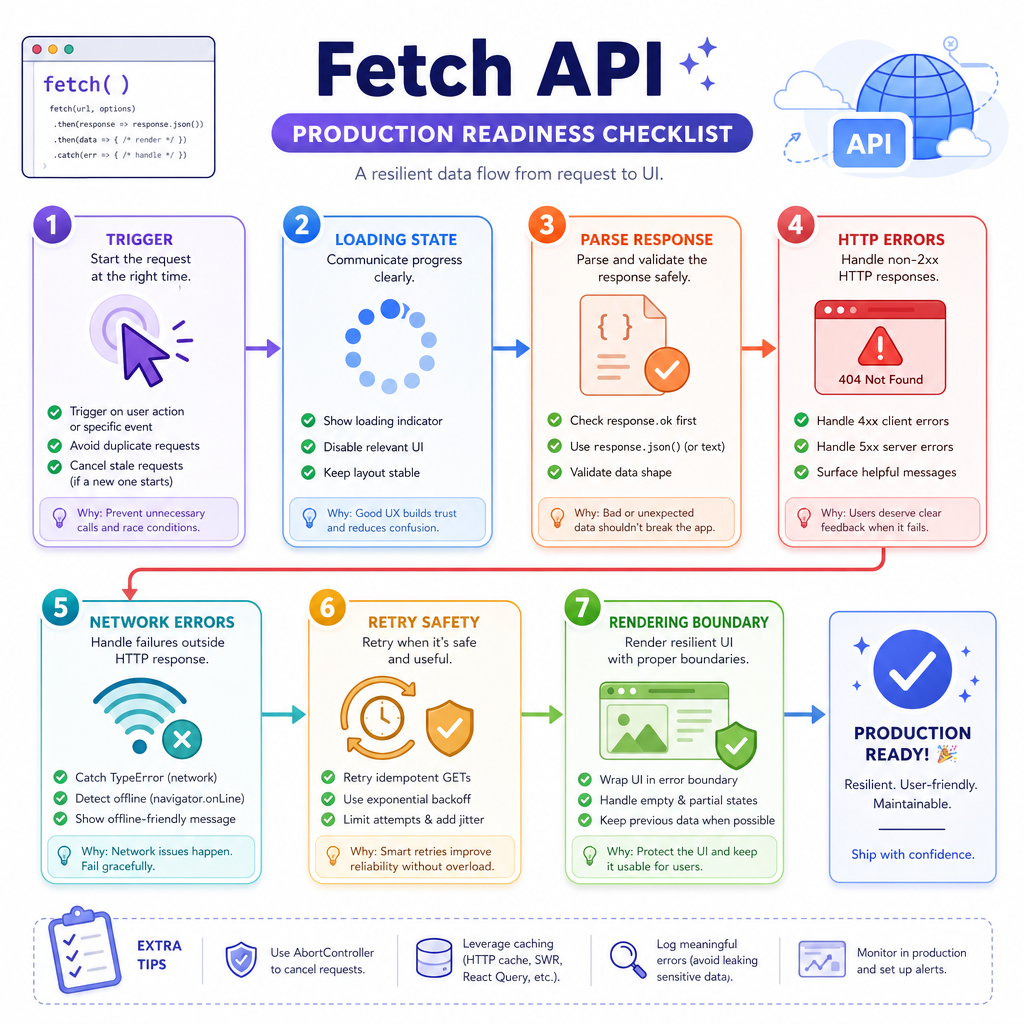
Fetch Checklist
Practical Fetch checklist
When you review or write frontend data-loading code, ask:
- What starts the request? Page load, click, form submit, route change?
- What does the user see while waiting? Empty UI, skeleton, spinner, disabled button?
- How is the response parsed? JSON, text, blob, stream?
-
Are HTTP errors handled? Check
response.okorresponse.status. -
Are network errors handled? Use
.catch()for failed requests. - Can the request be repeated safely? Important for retries and double-clicks.
- What owns rendering? Keep the fetch boundary separate from DOM update decisions when possible.
This is the bridge between JavaScript fundamentals and real frontend applications. Next, you will sharpen your modern JavaScript vocabulary so this kind of code becomes cleaner and more expressive.