Anchors and Boundaries
Read at your own pace. Code execution, quizzes, progress tracking, and the AI tutor are available in the interactive view with JavaScript enabled.
Pin The Match
Why anchors and boundaries matter
In Metacharacters and Character Classes, you learned how to describe what characters can appear. In Quantifiers and Alternation, you controlled how many and which alternative.
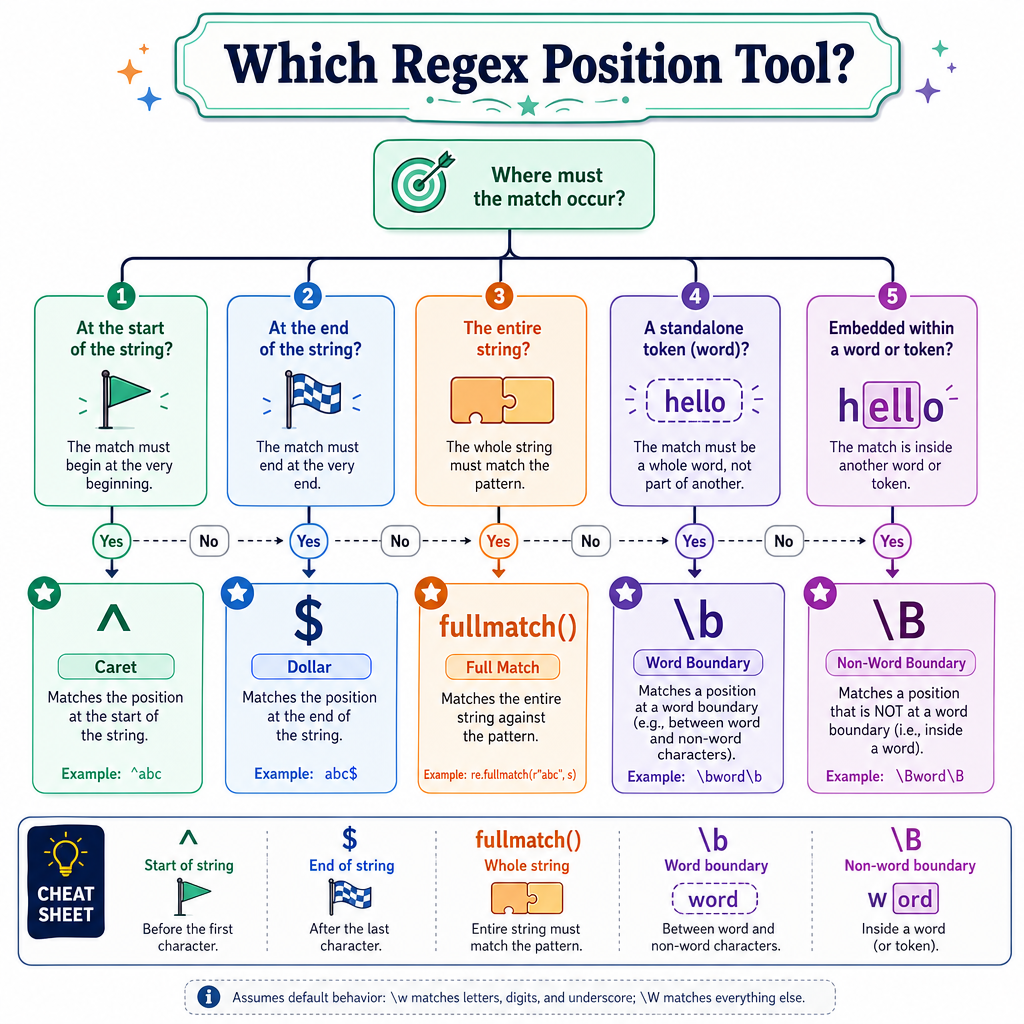
Now we add a new dimension: where the match is allowed to happen.
Anchors and boundaries let you say:
- match only at the start of text
- match only at the end of text
- match only as a standalone word/token
- avoid accidental substring matches
For machine learning workflows, this is especially useful in feature extraction: model as a token is different from remodeling, and error at the beginning of a log line may mean something different from error buried in a sentence.
Start And End
The two core anchors
The most common anchors are:
Anchor Meaning^
start of the string
$
end of the string, or just before a final newline in Python
These do not match characters. They match positions.
Think of them as invisible checkpoints:
^ERROR.*$
|     | |
start | end
      matched content
So ^ERROR means: match ERROR, but only if it begins at the start. OK$ means: match OK, but only if it appears at the end.
```python
import re

texts = [
    "ERROR disk full",
    "prefix ERROR disk full",
    "INFO all systems OK",
    "OK then continue"
]

patterns = [r"^ERROR", r"OK$"]

for pattern in patterns:
    print(f"\nPattern: {pattern}")
    for text in texts:
        print(f"{text!r:26} ->", bool(re.search(pattern, text)))
```
Anchor Check
Which regex best matches only a string whose entire content is exactly ERROR?
Assume the string has no leading/trailing whitespace or newline.
Stricter Anchors
\A, \Z, and fullmatch
Python also gives you stricter tools for whole-string intent:
Tool Meaning\A
absolute start of the string
\Z
absolute end of the string
re.fullmatch()
the entire string must match the pattern
For many validation tasks, re.fullmatch() is clearer than manually writing ^...$.
Use anchors when location matters. Use fullmatch() when the whole input must conform to a pattern.
```python
import re

text = "model_v1\nmodel_v2\n"

patterns = [
    r"\Amodel",
    r"model_v2\Z",
    r"model_v2\n\Z"
]

for pattern in patterns:
    print(f"{pattern!r:18} ->", bool(re.search(pattern, text)))

print("full valid id:", bool(re.fullmatch(r"[a-z]+_\d+", "model_12")))
print("full valid id:", bool(re.fullmatch(r"[a-z]+_\d+", "model_12_extra")))
```
Final Newline
True or false?
In Python, re.search(r"end$", "the end\n") can still succeed because $ may match just before a final newline.
Word Boundaries
\b matches a word edge
A word boundary \b is another zero-width position. It matches the edge between:
- a word character and a non-word character
- a non-word character and a word character
- the start/end of a string next to a word character
In Python regex, “word character” usually means letters, digits, and underscore: [A-Za-z0-9_], plus Unicode word characters in normal string patterns.
Examples:
Pattern Matches Does not match\bcat\b
cat, cat!, (cat)
catalog, bobcat
\bAI\b
AI model
AIM, OpenAI
\berror\b
error:
terror, error_code
Important nuance: underscore is a word character, so \berror\b does not match error_code as a standalone error token.

Token Features
Boundary-aware feature extraction
Suppose you are scanning text for the feature model.
A loose regex like model may be too broad:
modelmodel-basedremodelingpretrained_model
Sometimes that is useful. But if you want the standalone natural-language token model, boundaries reduce false positives.
This is the same mindset you use in ML preprocessing: define the feature precisely enough that it captures the intended signal.
```python
import re

texts = [
    "the model predicts churn",
    "remodeling data pipelines is expensive",
    "model-based features differ from model drift"
]

patterns = {
    "loose": r"model",
    "token": r"\bmodel\b",
    "inside_word": r"\Bmodel\B"
}

for name, pattern in patterns.items():
    print(f"\n{name}: {pattern}")
    for text in texts:
        count = len(re.findall(pattern, text))
        print(f"{count} match(es): {text}")
```
Standalone Token
Write a regex that matches model as a standalone word token, but not inside remodeling or modeling.
Enter only the regex pattern.
Fill in the blank: _____________
Boundary Design
Choosing the right boundary
Anchors and boundaries are design tools. Pick based on the meaning you want:
Goal Useful pattern shape starts with a prefix^prefix
ends with a suffix
suffix$
entire string is valid
re.fullmatch(...) or ^...$
standalone token
\btoken\b
embedded inside a word
\Btoken\B
A practical debugging habit:
- Ask: “Am I matching characters or positions?”
- Test positive examples.
- Test near-misses: prefixes, suffixes, trailing newline, underscores.
- Tighten only as much as the problem requires.
Next lesson, grouping will let us apply structure to larger pieces of a pattern without losing this positional control.
Inside Words
Which regex is designed to find model only when it is embedded inside a larger word, such as remodeling, rather than as standalone model?
Lesson Wrap
What you can do now
You can now control not just what regex matches, but where it matches.
Key takeaways:
-
^anchors to the start. -
$anchors to the end, with Python’s final-newline nuance. -
\Aand\Zrepresent absolute string start/end positions. -
re.fullmatch()is often the clearest way to validate a whole string. -
\bfinds word boundaries for standalone tokens. -
\Bfinds positions that are not word boundaries.
This completes the positional layer of your regex toolkit. Next, we’ll move into Grouping and Capturing, where patterns become easier to organize and reuse.