Asynchronous JavaScript
Read at your own pace. Code execution, quizzes, progress tracking, and the AI tutor are available in the interactive view with JavaScript enabled.
From Values To Time
Why this matters
In Introduction to JavaScript, you built a baseline around values, bindings, functions, objects, arrays, and behavior.
Now we add the dimension that quietly shapes almost every frontend app: time.
Frontend code waits for things constantly:
- API responses
- images, fonts, and game assets
- user clicks and typing
- timers, animations, and navigation
At a staff-level interview, asynchronous JavaScript is rarely about memorizing syntax. It is about explaining what runs now, what runs later, and how your UI stays predictable while waiting.
Think of it like an action movie scene: the hero does not freeze while the safe is being cracked. Other events keep moving.

The Runtime Crew
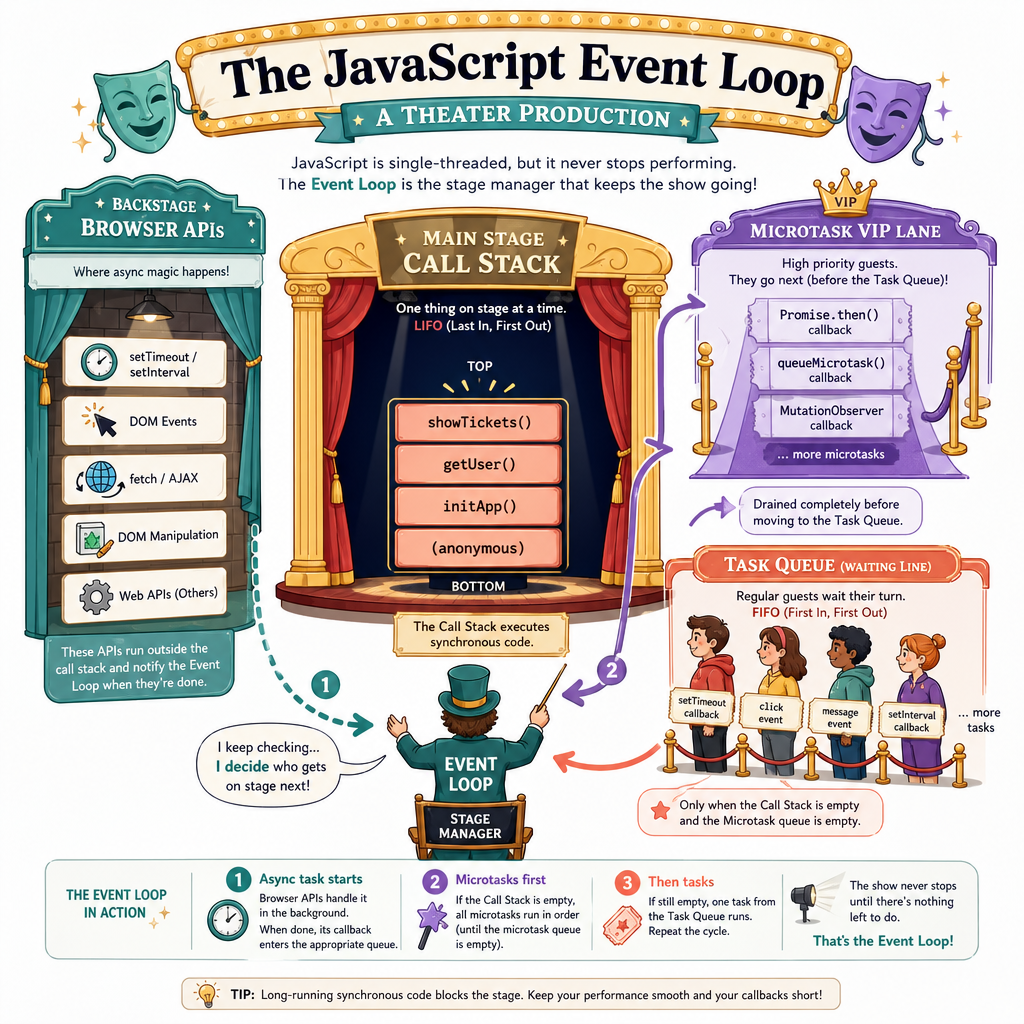
JavaScript has one main stage
JavaScript runs your code on a call stack. One thing executes at a time.
But the browser/runtime has helpers that handle waiting outside the stack: timers, network requests, events, file reads, and more.
A useful mental model:
Your JS code
   ↓
Call stack: runs current work
   ↓ when empty
Event loop checks queues
   ↓
Callbacks / promise continuations run later
Two important queues:
- Task queue: timers, DOM events, some browser callbacks
-
Microtask queue: Promise
.then,.catch,.finally, andawaitcontinuations
When the current stack finishes, JavaScript usually clears microtasks before moving to the next task. That detail explains many “why did this log first?” puzzles.
Callbacks Run Later
Scheduling is not executing
A callback is just a function handed to something else to run later.
setTimeout(fn, 0) does not mean “run immediately.” It means “schedule this callback as soon as the current stack is done and the runtime gets to it.”
That distinction is foundational for async UI work. If a game loads a sprite sheet or a reality-TV recap page fetches comments, your app can keep responding while the waiting happens.
```js
console.log("Scene opens");

setTimeout(() => {
  console.log("Explosion after the stunt team is ready");
}, 0);

console.log("Hero walks away in slow motion");
```
Order The Logs
A script does this in order:
- Logs
Start - Schedules a zero-millisecond timer that logs
Timer - Logs
End
Which output order should you expect?
Promises Model Results
A Promise is a placeholder for a future result
A Promise represents work that may complete later.
It has three states:
- pending: still waiting
- fulfilled: completed successfully
- rejected: failed
Promises are useful because they let us attach behavior to future outcomes without blocking the rest of the app.
In frontend terms: “When the clue arrives, update the UI. Until then, keep the room interactive.”
```js
function loadPuzzleClue(name, delay) {
  return new Promise((resolve) => {
    setTimeout(() => {
      resolve(`Clue for ${name}: look behind the bookshelf`);
    }, delay);
  });
}

console.log("Start mystery night");

const cluePromise = loadPuzzleClue("Ada", 100);

cluePromise.then((clue) => {
  console.log(clue);
  console.log("Update UI with clue");
});

console.log("Keep rendering the room");
```
Promise Timing
True or false?
Once a Promise is fulfilled, any .then callback attached to it runs synchronously, immediately inside the same call stack.
Async Await Clarity
async / await makes Promise code read top-to-bottom
An async function always returns a Promise.
Inside it, await pauses that async function, not the entire JavaScript runtime. Other work can still continue.
This is why async / await is so common in frontend code: it lets you write readable “do this, wait for that, then continue” flows without pretending the whole page stops.
```js
function fakeFetchEpisodeScore(show) {
  return new Promise((resolve) => {
    setTimeout(() => {
      resolve({ show, score: 87 });
    }, 80);
  });
}

async function renderScoreboard() {
  console.log("Requesting score...");

  const result = await fakeFetchEpisodeScore("Chaos Villa");

  console.log(`${result.show}: ${result.score}% drama`);
  console.log("Scoreboard rendered");
}

renderScoreboard();
console.log("Main thread keeps going");
```
Fill The Keyword
Inside an async function, the keyword that pauses that function until a Promise settles is ____.
Failures And Parallel Work
Real apps need both speed and failure paths
Async code is not only about success. APIs fail. Assets timeout. Users go offline mid-flow.
Two staff-level habits:
- Handle rejection near the user experience: show retry UI, fallback content, or a useful message.
- Run independent work in parallel: if three game assets do not depend on each other, do not load them one after another.
Promise.all starts multiple Promise-returning operations and waits for all of them. If any reject, the whole Promise.all rejects.
```js
function getAsset(name, ms, shouldFail = false) {
  return new Promise((resolve, reject) => {
    setTimeout(() => {
      if (shouldFail) {
        reject(new Error(`${name} failed`));
      } else {
        resolve(`${name} loaded`);
      }
    }, ms);
  });
}

async function bootGame() {
  try {
    const assets = await Promise.all([
      getAsset("map", 80),
      getAsset("sprites", 50),
      getAsset("music", 30)
    ]);

    console.log("Ready:", assets.join(", "));
  } catch (error) {
    console.log("Show retry UI:", error.message);
  } finally {
    console.log("Hide loading spinner");
  }
}

bootGame();
```
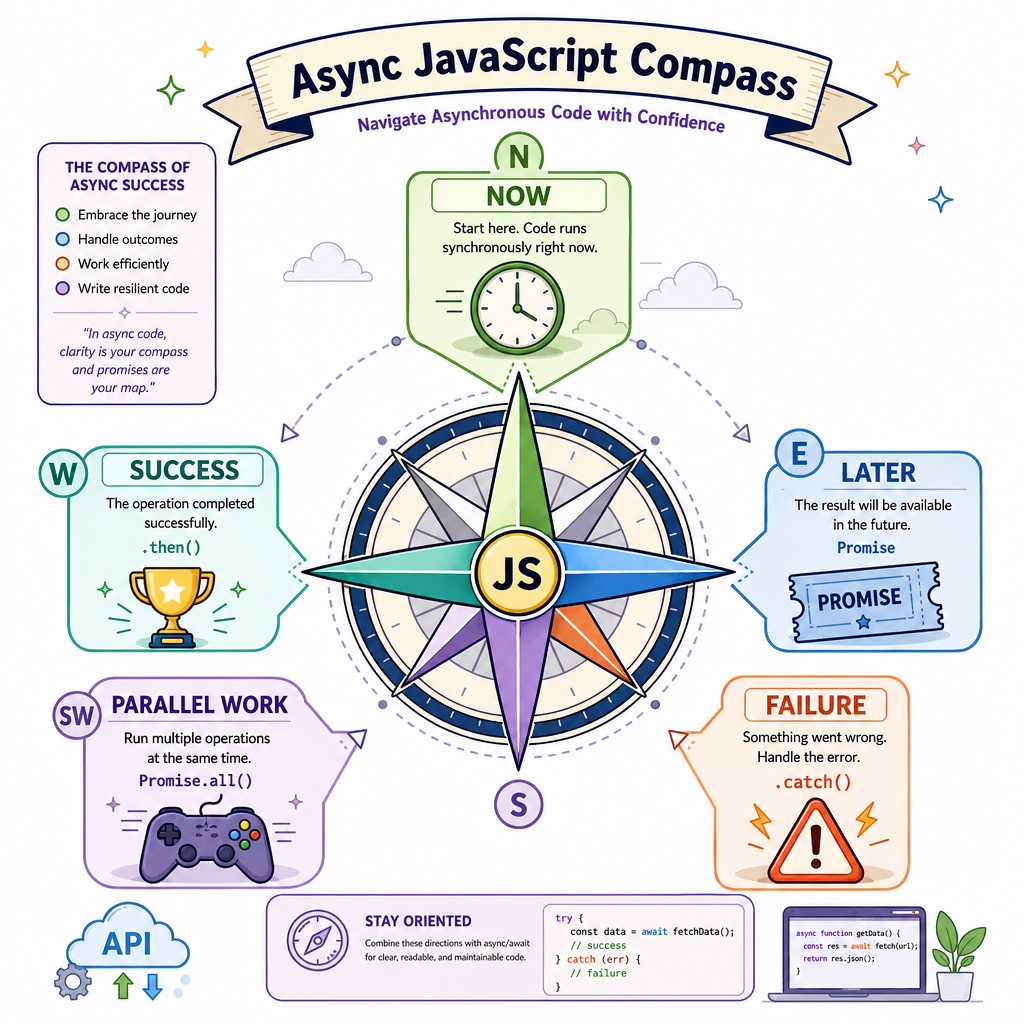
Your Async Compass
What to carry forward
Asynchronous JavaScript is the language of frontend waiting.
When you read async code, ask:
- What runs synchronously right now?
- What is scheduled for later?
- Is later work a task or a Promise microtask?
- What happens on success?
- What happens on failure?
- Can independent work happen in parallel?
That mental model will follow you into React Basics, where UI rendering and async data often meet. For now, the win is simpler: you can reason about time without losing the plot.