Bit Manipulation
Read at your own pace. Code execution, quizzes, progress tracking, and the AI tutor are available in the interactive view with JavaScript enabled.
Tiny Tools Matter
Why bit manipulation matters
Now that we've covered Dynamic Programming, you've seen how interview problems can become easier when you choose the right representation.
Bit manipulation is another representation trick: instead of thinking of a number only as a value like 13, we also think of it as a row of binary switches:
13  ->  1101
        on on off on
This matters in interviews because bits let you:
- Check even/odd quickly
- Track yes/no states compactly
- Use XOR to find a missing or unique value
- Build clean solutions for low-level or optimization-flavored questions
For finance-style interview prep, the bigger lesson is not “memorize bit hacks.” It is: learn to recognize when data can be represented as switches.
Binary Mental Model
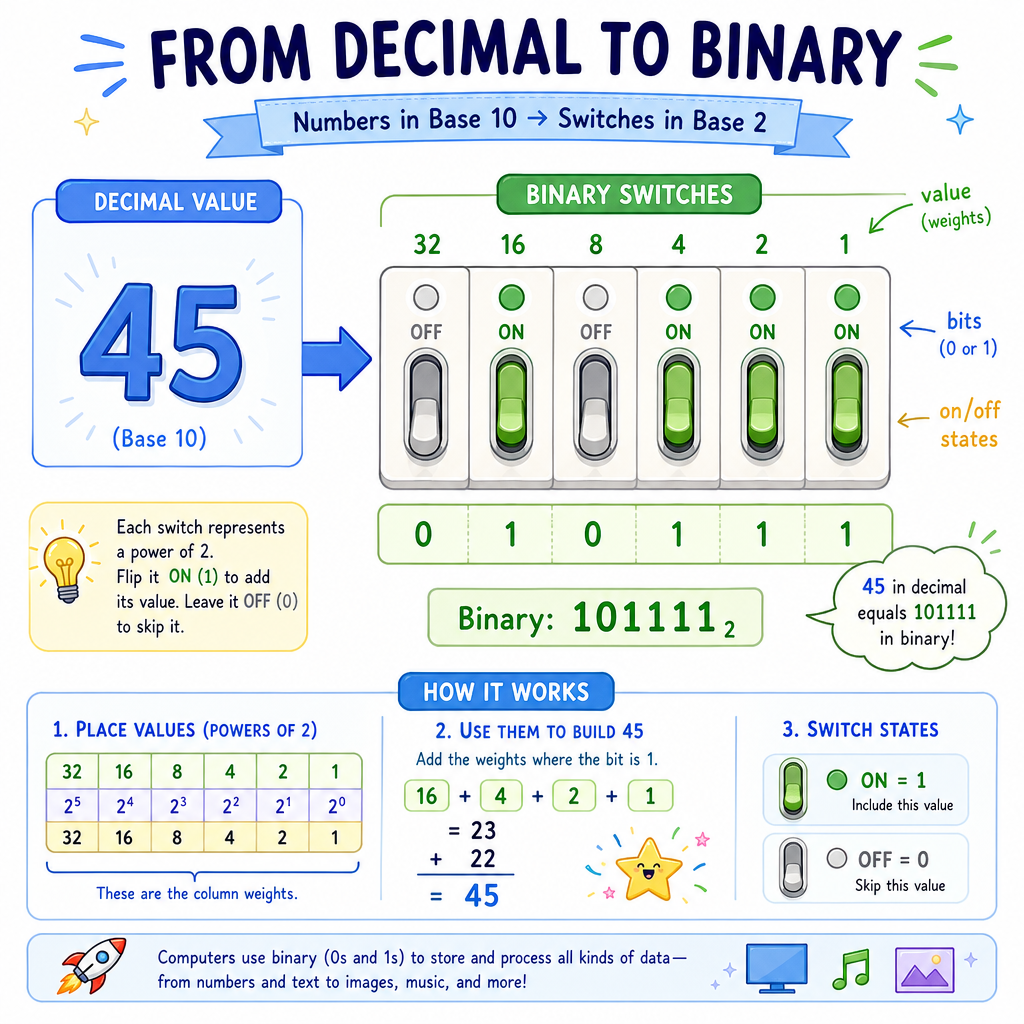
Bits are place values
Decimal uses powers of 10:
345 = 3*100 + 4*10 + 5*1
Binary uses powers of 2:
13 = 8 + 4 + 1
13 = 1101₂
Read 1101 like this:
bit:      1   1   0   1
place:    8   4   2   1
value:    8 + 4 + 0 + 1 = 13
A bit is either:
-
0= off -
1= on
In Python, bin(n) shows the binary representation of an integer.
```python
nums = [0, 1, 2, 5, 13, 42]

for n in nums:
    print(n, "->", bin(n))
```
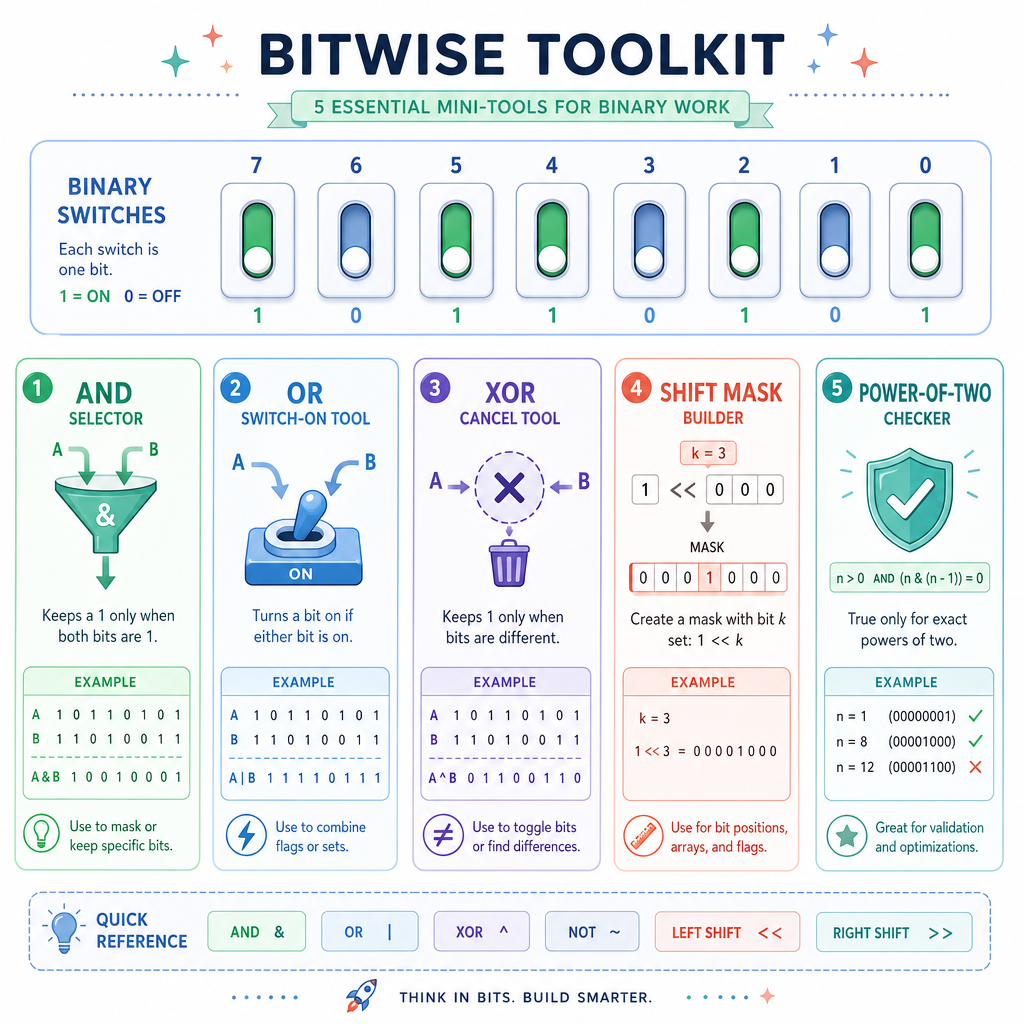
Core Bit Operators
The operators you actually need
Python gives us a few bit operators. For interviews, start with these:
Operator Name Meaning&
AND
1 only if both bits are 1
`
`
OR
^
XOR
1 if bits are different
~
NOT
flips bits, with Python signed-integer behavior
<<
left shift
move bits left, like multiplying by 2
>>
right shift
move bits right, like integer-dividing by 2
The most interview-useful ones are usually &, ^, <<, and >>.
Think of them as operations across columns:
```python
a = 6   # binary 110
b = 3   # binary 011

print("a:", bin(a))
print("b:", bin(b))
print("a & b:", a & b, bin(a & b))  # common 1 bits
print("a | b:", a | b, bin(a | b))  # any 1 bits
print("a ^ b:", a ^ b, bin(a ^ b))  # different bits
print("a << 1:", a << 1, bin(a << 1))
print("a >> 1:", a >> 1, bin(a >> 1))
```
Operator Check
Which operator returns 1 for a bit position only when the two compared bits are different?
Masks Select Bits
A mask is a selector
A bit mask is a number designed to select, set, clear, or toggle certain bits.
Example: to check whether the last bit is on, use mask 1:
n      = 13 = 1101
mask   =  1 = 0001
n & 1       = 0001  -> last bit is on
Why does this check odd/even?
- Odd numbers have last bit
1 - Even numbers have last bit
0
Common mask patterns:
Goal Expression Check biti
n & (1 << i)
Set bit i
`n
Toggle bit i
n ^ (1 << i)
Clear bit i
n & ~(1 << i)
This is like using a tiny spotlight to inspect or change one switch.
```python
n = 13  # 1101

print("n:", n, bin(n))
print("Is odd?", (n & 1) == 1)

# Work with bit index 1, counting from the right: 1101
# index:                                3210
mask = 1 << 1

print("mask:", bin(mask))
print("bit 1 is on?", (n & mask) != 0)
print("set bit 1:", bin(n | mask))
print("toggle bit 1:", bin(n ^ mask))
print("clear bit 2:", bin(n & ~(1 << 2)))
```
Odd Number Test
Complete the expression to check whether n is odd:
if (____) == 1:
    print("odd")
Use a bit operation.
XOR Cancels Pairs
XOR has a superpower
XOR is one of the most common bit manipulation interview patterns.
Key facts:
x ^ x = 0
x ^ 0 = x
So if every number appears twice except one number, XOR can find the unique number.
Example:
[4, 1, 2, 1, 2]

4 ^ 1 ^ 2 ^ 1 ^ 2
= 4 ^ (1 ^ 1) ^ (2 ^ 2)
= 4 ^ 0 ^ 0
= 4
This connects back to Time and Space Complexity Analysis: the brute-force approach might use extra storage, but XOR solves this in O(n) time and O(1) space.
```python
def single_number(nums):
    result = 0
    for x in nums:
        result ^= x
    return result

print(single_number([4, 1, 2, 1, 2]))
print(single_number([7, 3, 7]))
```
XOR True False
x ^ x always becomes 0 for an integer x.
Interview Patterns
When should you think “bits”?
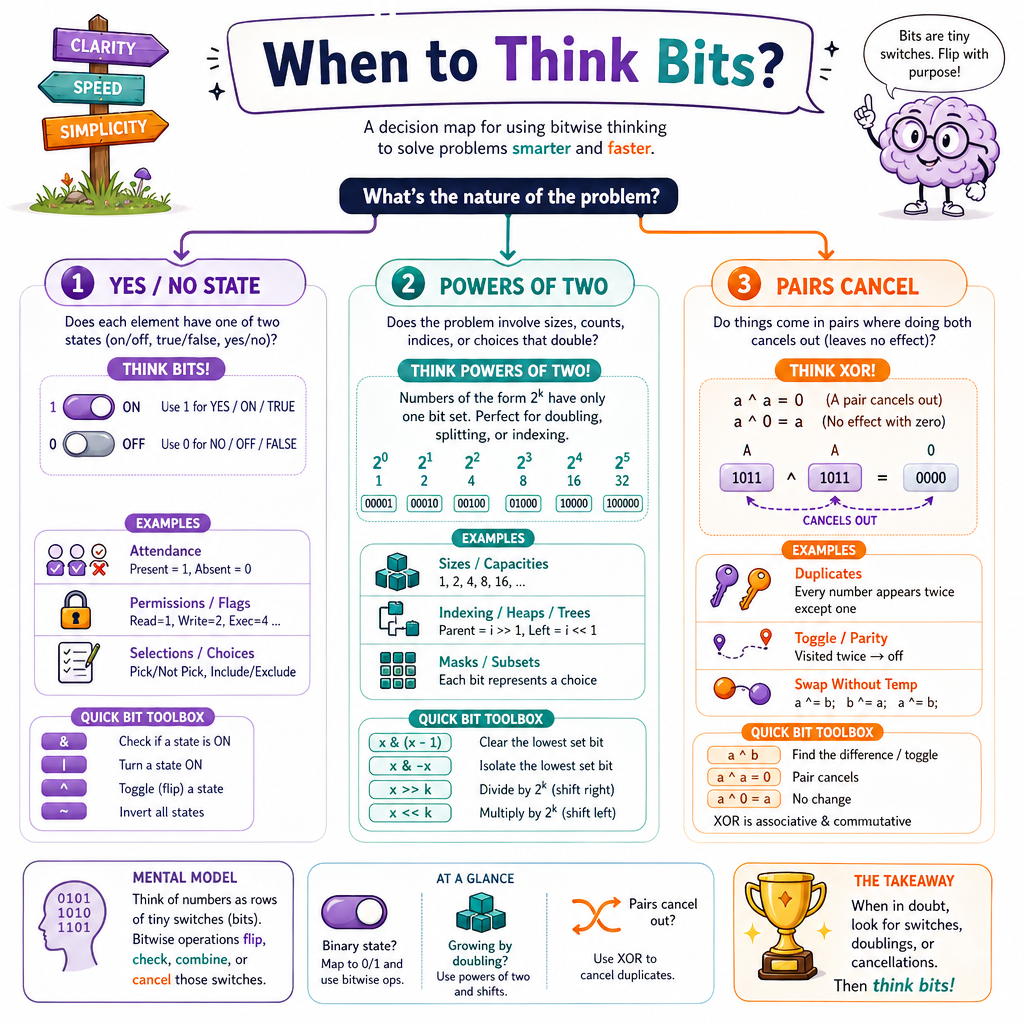
Bit manipulation is not the first tool for every problem. Use it when the problem has signals like these:
1. The data is yes/no
If something can be represented as on/off, a bit might work.
Examples:
- Feature flags
- Permissions
- Visited/unvisited states for a small fixed set
- Subsets of a small group
2. The problem mentions powers of two
Powers of two have clean binary shapes:
1  = 0001
2  = 0010
4  = 0100
8  = 1000
16 = 10000
A positive power of two has exactly one 1 bit.
3. Pairs cancel out
If the problem says “every item appears twice except one,” think XOR.
Interview answer template
When explaining your bit solution, say:
- “I’ll represent the relevant state as bits.”
- “This mask selects/changes the bit I care about.”
- “The loop touches each number once.”
- “So the time is O(n), and the extra space is O(1).”
Power Of Two
A classic bit check
A positive power of two has exactly one 1 bit.
8      = 1000
8 - 1  = 0111
8 & 7  = 0000
So this expression checks whether n is a power of two:
n > 0 and (n & (n - 1)) == 0
Why it works:
-
n - 1flips the rightmost1bit and everything after it - If
nhad only one1, thenn & (n - 1)becomes0 - If
nhad multiple1bits, at least one remains
This is a good example of interview-level bit manipulation: short code, but you must be able to explain the reasoning.
```python
def is_power_of_two(n):
    return n > 0 and (n & (n - 1)) == 0

for n in [0, 1, 2, 3, 4, 8, 12, 16, 18]:
    print(n, is_power_of_two(n))
```
Bit Checklist
What to remember
Bit manipulation can feel strange at first because it asks you to look below the normal number representation. Keep the mental model simple:
- A number is also a row of bits
-
&selects common1bits -
|turns bits on -
^detects differences and cancels pairs -
1 << icreates a mask for biti -
n & 1checks odd/even -
n & (n - 1)helps reason about powers of two
Practice focus
For interview prep, practice explaining each bit trick out loud. A short solution is only impressive if your reasoning is clear.
Next, we’ll move from bit-level tricks to Recursion and Backtracking, where the challenge becomes exploring choices step by step.