Bitwise Operators and Bit Manipulation for Interviews
Read at your own pace. Code execution, quizzes, progress tracking, and the AI tutor are available in the interactive view with JavaScript enabled.
Introduction
Decimal and binary
How do we usually represent numbers? We use decimal notation (a.k.a. Base 10) that provides ten unique digits: 0, 1, 2, 3, 4, 5, 6, 7, 8, and 9. To form numbers, we combine these digits in a certain sequence so that each decimal digit represents a value multiplied by a certain power of 10.
For example, in decimal, 152 = 100 + 50 + 2 = 1×10² + 5×101 + 2×100.
Decimal numbers are what humans like most. What computers like most are binary numbers (a.k.a. Base 2) where there are only 2 available digits: 0 and 1. As such, a binary number is a sequence of ones and zeros, e.g. 011101001, 1100110, or 110. In a binary number, each digit is referred to as bit, and each bit represents a power of decimal 2.
For humans, reading (and making sense of) binary numbers involves converting them to decimal form. Let's convert the binary number 110 to decimal notation. We know that the three digits in the number represent powers of decimal 2. In order to move from lower to higher powers of 2, we will read binary digits in our number right to left:
(Base 2) 110 = (Base 10) 0×20 + 1×21 + 1×22 = 0 + 2 + 4 = 6
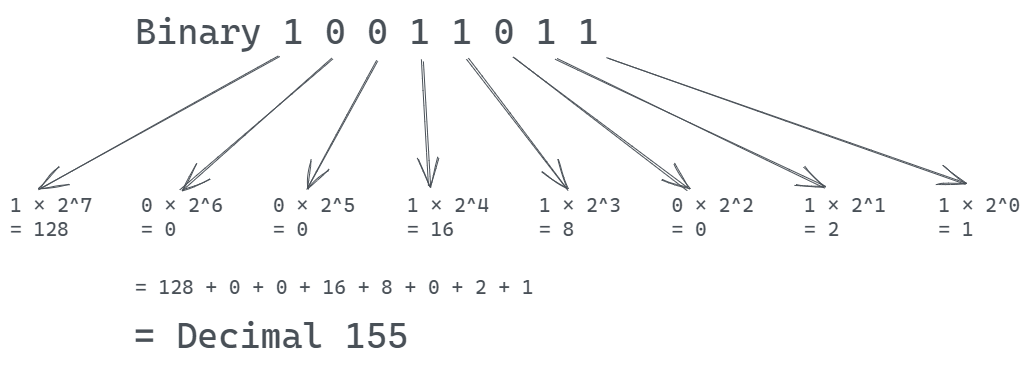
Let's try to convert a larger binary number: 10011000. Remember, we're reading binary digits right to left.
(Base 2) 10011011 = (Base 10) 1×20 + 1×21 + 0×22 + 1×23 + 1×24 + 0×25 + 0×26 + 1×27 = 1 + 2 + 0 + 8 + 16 + 0 + 0 + 128 = 155.
0So what's the big deal about binary numbers?
So what's the big deal about binary numbers?
The binary system is a natural fit for electronic circuits that use logic gates, and this is exactly why binary is used internally in all modern computer hardware. (Stock images of entire screens filled with zeros and ones that you see in articles about hackers are silly, yes, but they're not an overstatement.)
Modern high-level programming languages are designed in a way that enables humans to write and read program code, and the heavy lifting necessary to convert program code all the way to machine code is handled by compilers.
That said, most programming languages still provide ways to manipulate data as sequences of bits, as opposed to human-readable values of common types such as numbers and strings.
Although you probably won't see direct bit manipulation used every day (we'll talk about practical uses later), it's good to know how it's done, and it's done with something called bitwise operators.
Enter bitwise operators
Enter bitwise operators
A bitwise operator takes one or more values, treats them as sequences of bits, and performs operations on these bits rather than "human-readable" values.
Bitwise operators are available in most programming languages. For our purposes, let's explore how they're implemented in JavaScript.
Bitwise logical operators in JavaScript
JavaScript supports a total of 7 bitwise operators:
* 4 bitwise logical operators: & (Bitwise AND), | (Bitwise OR), ^ (Bitwise XOR), and ~ (Bitwise NOT).
* 3 bitwise shift operators: << (Left shift), >> (Sign-propagating right shift), and >>> (Zero-fill right shift).
JavaScript's bitwise operators treat their operands as binary numbers -- sequences of 32 bits -- but return decimal numbers.
Here's an algorithm that JavaScript's bitwise logical operators follow: * Operands are converted to 32-bit integers. * If there are two operands, individual bits from the operands are matched into pairs: first operand's first bit to second operand's first bit, second bit to second bit, and so on. * The operator is applied to each bit pair, which yields a binary result. * The binary result is converted back to decimal form.
Possible operands and return values of bitwise operators are often illustrated with something called truth tables. Here's a truth table for all 4 bitwise logical operators available in JavaScript:
a b a AND b a OR b a XOR b NOT a 0 0 0 0 0 1 0 1 0 1 1 - 1 0 0 1 1 0 1 1 1 1 0 -Before we discuss these operators in more detail, let's agree that we can present binary numbers in 3 different ways. Let's take the binary form of decimal 9 as an example:
-
0000000000000000000000000001001represents all 32 bits of the number. This form is too long for most cases, but we'll use it when talking about binary shifts. -
1001is the short form for the same number. Here, we include bits from the first bit that is set to 1 through the rightmost bit. We'll use this form in most examples. -
0b1001is the format for expressing binary numbers in JavaScript source code. Apart from the0bprefix, there's nothing fancy about it. We'll use this form in some code samples.
From Decimal To Bits
Before the operators get more detailed, anchor the mental model: bitwise work is not happening to the decimal number you read on screen.
The language first views the value as a row of bits, applies the operator column by column, then reports the result back as a regular number.

Bits As Tiny Switches
Before looking at each operator separately, keep this mental model: bitwise operators do not operate on the whole number at once. They line up the bits, compare each column, and build a new bit pattern.
In the visual, notice how the decimal values are only the input and output labels. The actual work happens column by column in binary.

Bitwise Logical Operators
& (Bitwise AND)
Bitwise AND takes bit representations of its two operands, combines bits in pairs by their order, and applies logical AND to each pair. It returns the resulting bit sequence converted back to its decimal form.
For each bit pair, Bitwise AND returns 1 only if both bits are 1. In all other cases, it returns 0.
Let's see what's going on here. Suppose we want to apply Bitwise AND to two numbers, 13 and 11:
```shell script
a & b ```
What happens when this line is executed?
First, the two values are converted from decimal to binary form:
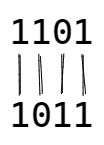
13represented in binary is1101, and11becomes1011.-
Then, each bit of the first number is paired with a corresponding bit of the second number:
-
Now, the familiar logical AND is applied to each of the bit pairs:
1101 & 1011 == 1001 -
After calculating the result,
1001, JavaScript converts it back to the decimal value9and returns: ```shell script13 & 11 9 ```
| (Bitwise OR)
If you understand Bitwise AND, the next two bitwise operators won't come as a surprise. Everything works the same way -- conversion to binary form, pairing bits from two operands, and subsequent conversion of a result to decimal form -- except that to each bit pair, a different operation is applied.
With Bitwise OR, a | b returns 1 if either a or b is 1. Again, think of it as of applying the good-old logical OR (||) to a set of bit pairs.
For example, if we apply Bitwise OR to the same two numbers -- 13 | 11 -- the numbers are first converted to binary form, which results in 1101 and 1011 respectively, and then for each pair, a resulting 1 is returned every time at least one bit in a pair contains a 1:
```
1101 |
1011 ==
1111 ```
The result, 1111, is converted to decimal form, and the decimal 15 is returned:
```shell script
13 | 11 15 ```
^ (Bitwise XOR)
For any given bit pair, Bitwise XOR (a.k.a. Bitwise exclusive OR) returns 1 only if two bits in the pair are different. In all other respects, it works exactly the same as Bitwise AND and Bitwise OR:
1101 |
1011 ==

0110
~ (Bitwise NOT)
Bitwise NOT is a little different, as it's applied to one operand, not two. What it does is trivial: after converting the operand to binary, it simply inverts its bits.
There's a quirk though. As we said before, before applying bitwise operators, JavaScript converts an operand to a 32-bit sequence. The leftmost bit in this sequence is used to store the sign of the number: 0 in the leftmost bit means positive, and 1 means negative.
Since Bitwise NOT inverts all 32 bits of its operand, it also inverts its sign: negative turns positive, and vice versa.
For example, here's the entire 32-bit sequence representing the decimal 9:
00000000000000000000000000001001
Invoking Bitwise NOT (~9) reverts all bits, which results in:
11111111111111111111111111110110
The leftmost bit now holds 1, which means the number is negative. The negative number is represented in something called 2's complement, and if you want to know how to use it, here's a quick but very solid summary of how it works.
For now, you want to know that the decimal representation of the resulting number is -10. In fact, applying Bitwise NOT to any number x returns -(x + 1). For example, ~9 returns -10, ~-8 returns 7, and so on.
0True or False
Consider a = 110, b = 001.
The results for a & b and a | b will be different, but a | b and a ^ b will be same.
Bitwise shift operators in JavaScript
Bitwise shift operators
All bitwise shift operators in JavaScript move individual bits left or right by a number of bit positions that you specify.
<< (Left shift)
Left shift (<<) shifts bits of the first operand to the left. The value of the second operand determines how many positions the bits are shifted. Bits shifted off to the left are discarded. Positions that free up to the right are populated with zero bits.
Let's look at an example: what exactly does 7 << 2 do in JavaScript?
The first (left) operand is converted to binary form:
7in binary is111. In fact, the entire binary number has 32 bits, but the remaining bits to the left are all zeros:0000000000000000000000000000111Because the second operand is 2, two leftmost bits are now stripped off, leaving us with 30 bits:
diff
-0000000000000000000000000000111
+00000000000000000000000000111
To fill the vacant 2 bits, zeros are inserted in the two rightmost positions:
diff
-00000000000000000000000000111
+0000000000000000000000000011100
The result,
11100, is now converted to decimal28and returned.
As a general rule, applying Left shift to x by y bits returns x multiplied by the yth power of 2:
x << y = x×2y
In our example above, this rule translates to:
7 << 2 = 7×22 = 7 × 4 = 28
>> (Sign-propagating right shift)
Sign-propagating right shift (>>) shifts bits of the first operand to the right by the number of positions defined by the second operand. Bits shifted off to the right are discarded. Bit positions that free up on the left are filled with copies of the bit that was previously leftmost.
Because the leftmost bit defines the sign of the number, the resulting sign never changes, which explains "sign-propagating" in the operator's name.
For example, 242 >> 3 returns 30:
diff
-0000000000000000000000011110010
+0000000000000000000000000011110
>>> (Zero-fill right shift)
Similar to the previous operator, Zero-fill right shift (>>>) shifts bits of the first operand to the right by the number of positions defined by the second operand. However, vacant bit positions on the left are filled with zeros. This has two implications:
- The result will always be positive, because a zero in the leftmost bit means a positive number.
- For positive numbers, both right shift operators,
>>and>>>, always return the same result.
For (a somewhat wild) example, -9 >>> 2 returns... 1073741821:
-11111111111111111111111111110111
+00111111111111111111111111111101
Enough with the theory though, let's discuss practice.
Is direct bit manipulation a common industry practice?
Is direct bit manipulation a common industry practice?
Today, you don't see bitwise operations used very often. This is because: * Memory and CPU resources available in today's hardware make micro-optimizations with bitwise operators redundant most of the time. * Bitwise operations aren't usually on top of an average developer's mind, which makes reading code written by others (or by yourself a month ago) harder.
That said, in some domains, bitwise operators are still in common use. These include image editing, motion graphics, data compression and encryption, device drivers, and embedded programming.
Bitwise operators can be used to create, manipulate, and read sequences of binary flags, helping save memory compared to collections of booleans. This means you sometimes see them used in error reporting and access control scenarios. For example, here's a case study describing how a combination of Bitwise OR and Bitwise AND helped check access privileges in a content management system.
Aside from these applications, you won't see bitwise operators used much. You should think twice before using them yourself unless you're sure they can bring added value in terms of improving performance or reducing complexity.
Shift And Use Cases
A useful way to remember shifts: left shift usually grows the magnitude by powers of two, while right shift shrinks it by powers of two.
But in real code, reach for bitwise operations when the data itself is naturally bit-shaped: flags, masks, pixels, compression, encryption, or low-level systems work.

When Bits Are Worth It
Bitwise tricks are powerful, but they trade readability for low-level control. In interviews, that tradeoff is often the point; in production, it needs a clear reason.
Use this visual as a quick decision filter: if the problem is about flags, masks, compression, encryption, hardware, or a known interview pattern, bit manipulation may be a good fit. Otherwise, prefer clearer code.

Fill In
___ shift operator may change the sign of the binary number.
Problem 1
Bitwise operators in interview questions
However scarce they are in production code, bitwise operators often surface in developer interview questions. Below is a quick selection of interview questions where the expected solution involves using bitwise operators.
Swap two numbers without using an intermediate variable
One common task that can be thrown upon you in an interview is, given two variables, swap their values without introducing a third variable.
This task can be solved quickly with 3 Bitwise OR operations, using the XOR swap algorithm. Here's the sequence of these operations:
x = x ^ y;
y = x ^ y;
x = x ^ y;
Let's try swap 2 and 5:
```javascript
let x = 2 // 0010
let y = 5 // 0101

x = x ^ y; // x is now 7 (0111), y is still 5 (0101)
y = x ^ y; // x is still 7 (0111), y is now 2 (0010),
x = x ^ y; // x becomes 5 (0101), y becomes 2 (0010)
```
```java
int x = 2; // 0010
int y = 5; // 0101

x = x ^ y; // x is now 7 (0111), y is still 5 (0101)
y = x ^ y; // x is still 7 (0111), y is now 2 (0010),
x = x ^ y; // x becomes 5 (0101), y becomes 2 (0010)
```
```python
x = 2 # 0010
y = 5 # 0101

x = x ^ y # x is now 7 (0111), y is still 5 (0101)
y = x ^ y # x is still 7 (0111), y is now 2 (0010),
x = x ^ y # x becomes 5 (0101), y becomes 2 (0010)
```
```cpp
int x = 2; // 0010
int y = 5; // 0101

x = x ^ y; // x is now 7 (0111), y is still 5 (0101)
y = x ^ y; // x is still 7 (0111), y is now 2 (0010)
x = x ^ y; // x becomes 5 (0101), y becomes 2 (0010)
```
```csharp
int x = 2; // 0010
int y = 5; // 0101

x = x ^ y; // x is now 7 (0111), y is still 5 (0101)
y = x ^ y; // x is still 7 (0111), y is now 2 (0010)
x = x ^ y; // x becomes 5 (0101), y becomes 2 (0010)
```
```go
x := 2 // 0010
y := 5 // 0101

x = x ^ y // x is now 7 (0111), y is still 5 (0101)
y = x ^ y // x is still 7 (0111), y is now 2 (0010)
x = x ^ y // x becomes 5 (0101), y becomes 2 (0010)
```
Problem 2
Check if an integer is even or odd without using division
This is Bitwise AND's territory: given integer x, the expression x & 1 will return 1 if the integer is odd, and 0 if it's even. This is because all odd numbers have their rightmost bit set to 1, and 1 & 1 = 1. Here's how you check 5 for oddity:
```shell script
0b0101 & 0b0001 // same as 5 & 1 1 ```
In various languages:
class Main {
  public static void main(String[] args) {
    int result = 0x5 & 0x1; // same as 5 & 1
    System.out.println(result);
  }
}
let result = 0x5 & 0x1; // same as 5 & 1
console.log(result);
result = 0x5 & 0x1 # same as 5 & 1
print(result)
#include <iostream>
int main() {
    int result = 0x5 & 0x1; // same as 5 & 1
    std::cout << result;
    return 0;
}
class Program {
    static void Main(string[] args) {
        int result = 0x5 & 0x1; // same as 5 & 1
        System.Console.WriteLine(result);
    }
}
package main
import "fmt"
func main() {
    result := 0x5 & 0x1 // same as 5 & 1
    fmt.Println(result)
}
For the sake or readability, you can even provide a nice wrapper around this simple operation:
```java
public class Main {
    public static void main(String[] args) {
        System.out.println(isNumberOdd(5));
    }

    public static boolean isNumberOdd(int number) {
        return (number & 1) != 0;
    }
}
```
```javascript
function isNumberOdd(number) {
    return Boolean(number & 1);
}
console.log(isNumberOdd(5));
```
```python
def is_number_odd(number):
    return bool(number & 1)

print(is_number_odd(5))
```
```cpp
#include <iostream>

bool isNumberOdd(int number) {
    return number & 1;
}

int main() {
    std::cout << std::boolalpha << isNumberOdd(5) << std::endl;
    return 0;
}
```
```csharp
class Program
{
    static void Main(string[] args)
    {
        System.Console.WriteLine(IsNumberOdd(5));
    }

    static bool IsNumberOdd(int number)
    {
        return (number & 1) != 0;
    }
}
```
```go
package main

import (
	"fmt"
)

func isNumberOdd(number int) bool {
	return number&1 != 0
}

func main() {
	fmt.Println(isNumberOdd(5))
}
```
Two Interview Moves
The first two interview examples are easy to mix up, so separate their purpose.
^ is useful when you need values to cancel or toggle. & 1 is useful when you only care about the last bit.

Two Interview Patterns
The first two problems use different bitwise ideas:
-
XOR swap uses
^to temporarily combine information, then recover each original value. -
Odd/even check uses
& 1as a mask that looks only at the rightmost bit.
The visual separates these patterns so they do not blur together.

Fill In
Shifting n digits to the ___ is equivalent to multiplying by 2 (where n is any positive integer).
Problem 3
Check if a positive integer is a power of 2 without branching
In binary representation of any power of (decimal) 2, one bit is set to 1, and all the following bits are set to 0:
Binary 10 = Decimal 2
Binary 100 = Decimal 4
Binary 1000 = Decimal 8
Binary 10000000000 = Decimal 1024
When we subtract 1 from any such number, we get a number where ones and zeros are inverted. For example, compare binary representations of decimal 8 and 7:
Binary 1000 = Decimal 8
Binary 0111 = Decimal 7
If we now apply Bitwise AND to these two numbers, the result will be zero. This resulting zero is what ensures we're dealing with a power of two.
(Note that you don't need to enclose number - 1 in parentheses because subtraction has a higher precedence than Bitwise AND.)
```javascript
const isPowerOfTwo = number => {
    return (number & number - 1) == 0;
}
```
```java
public class Main {
    public static void main(String[] args) {
        System.out.println(isPowerOfTwo(2));   // true
    }
    public static boolean isPowerOfTwo(int number) {
        return (number & (number - 1)) == 0;
    }
}
```
```python
def is_power_of_two(number):
    return (number & (number - 1)) == 0

print(is_power_of_two(2))  # True
```
```cpp
#include <iostream>

bool isPowerOfTwo(int number) {
    return (number & (number - 1)) == 0;
}

int main() {
    std::cout << std::boolalpha << isPowerOfTwo(2);  // true
    return 0;
}
```
```csharp
class Program
{
    static void Main(string[] args)
    {
        System.Console.WriteLine(IsPowerOfTwo(2));  // True
    }
    static bool IsPowerOfTwo(int number)
    {
        return (number & (number - 1)) == 0;
    }
}
```
```go
func isPowerOfTwo(number int) bool {
    return (number & (number - 1)) == 0
}

func main() {
    fmt.Println(isPowerOfTwo(2))  // true
}
```
Multiple Choice
To check if two integers have opposite signs using bitwise operators, we can use ___ operator.
Where to Learn More
Where to learn more
Here are a few resources to check out if you want to learn more about bitwise operators, their industry usage, as well as all the crazy ways they are used and abused by geeks:
One Pager Cheat Sheet
One Pager Cheat Sheet
- We usually represent numbers in decimal notation (Base 10), while computers prefer binary numbers (Base 2) represented by a sequence of ones and zeros, where each bit represents a power of decimal 2.
- Because of its convenience for logic circuits and its use for bitwise operations in programming, binary is the basis for all modern computer hardware and software.
- Javascript supports 7 bitwise operators; the four bitwise logical operators,
&,|,^, and~, and the three bitwise shift operators,<<,>>, and>>>, which allow binary values to be manipulated and converted to decimal numbers. - - Bitwise operators convert values into bit rows, operate per bit position, then return a numeric result.
- - Bitwise operators line up binary digits and compute the result one bit position at a time.
- Bitwise operators
&,|,^, and~manipulate the bits of their operands and the resulting bits are converted back to a decimal form. - Bitwise shift operators in JavaScript
shiftbits left or right by a predetermined number of bit positions, and the choice of operator determines whether the leftmost bit defines the sign of the number or it is filled with zeros. - Despite some common use cases in
image editing,motion graphics,data compression and encryption,device drivers, andembedded programming, direct bit manipulation is not a common industry practice, and should only be used if it brings added value. - - Shifts move bits across positions; use bit manipulation mainly when the problem is naturally represented as bits.
- - Use bitwise operations when the problem is naturally about bits, flags, masks, or low-level efficiency—not as a default style choice.
- The left shift operator (
<<)shiftsthe binary sequence of a number to the left, potentially changing its sign. - Answer this interview question with efficiency by using Bitwise Operators in the
XOR swap algorithm. - You can use Bitwise AND to quickly check if an integer
xis even or odd without using division:x & 1will return1if the integer is odd, and0if it's even. - - XOR helps with cancel/toggle patterns; AND with
1isolates the last bit for odd/even checks. - - XOR can combine-and-recover values; AND with
1can isolate the least significant bit. - Shifting
ndigits to the left is equivalent to multiplying by2, which is achieved by binary multiplication ofxmultiplied by2to the powern. - Check if a positive integer is a power of 2 without branching by subtracting 1 from it and performing a Bitwise AND operation.
- The
XORbitwise operatorcompareseach bit of two integers, returning1if they are different and0if they are the same, allowing for the detection of opposite signs and beingsymmetricregardless of the order of the two numbers being compared. - Learn more about
bitwise operatorsand their usage in real-world scenarios by exploring these resources.