Cloud-based Architecture
Read at your own pace. Code execution, quizzes, progress tracking, and the AI tutor are available in the interactive view with JavaScript enabled.
From Design To Cloud
Why this lesson matters
In High-Level System Design, you drew the blueprint. In Microservices Architecture, you split responsibilities into services. In Data Design and Database Management, you shaped durable data.
Now we ask: where does this system actually live, and how does it stay available when traffic, machines, and networks change?
Cloud-based architecture is the bridge between a clean design and a running production system.
A cloud platform gives you building blocks like:
- Compute: servers, containers, serverless functions
- Networking: load balancers, private networks, gateways
- Storage: relational databases, object storage, caches
- Operations: monitoring, logging, autoscaling, identity, backups
Think of cloud architecture as arranging these blocks so your Java/Spring Boot services can run safely at real-world scale.

Cloud Mental Model
The cloud is rented reliability
At a layman level, cloud architecture is like renting a professional kitchen instead of building your own restaurant infrastructure.
You still decide the recipe — your system design — but the cloud provider gives you ovens, electricity, refrigeration, fire alarms, security, and maintenance options.
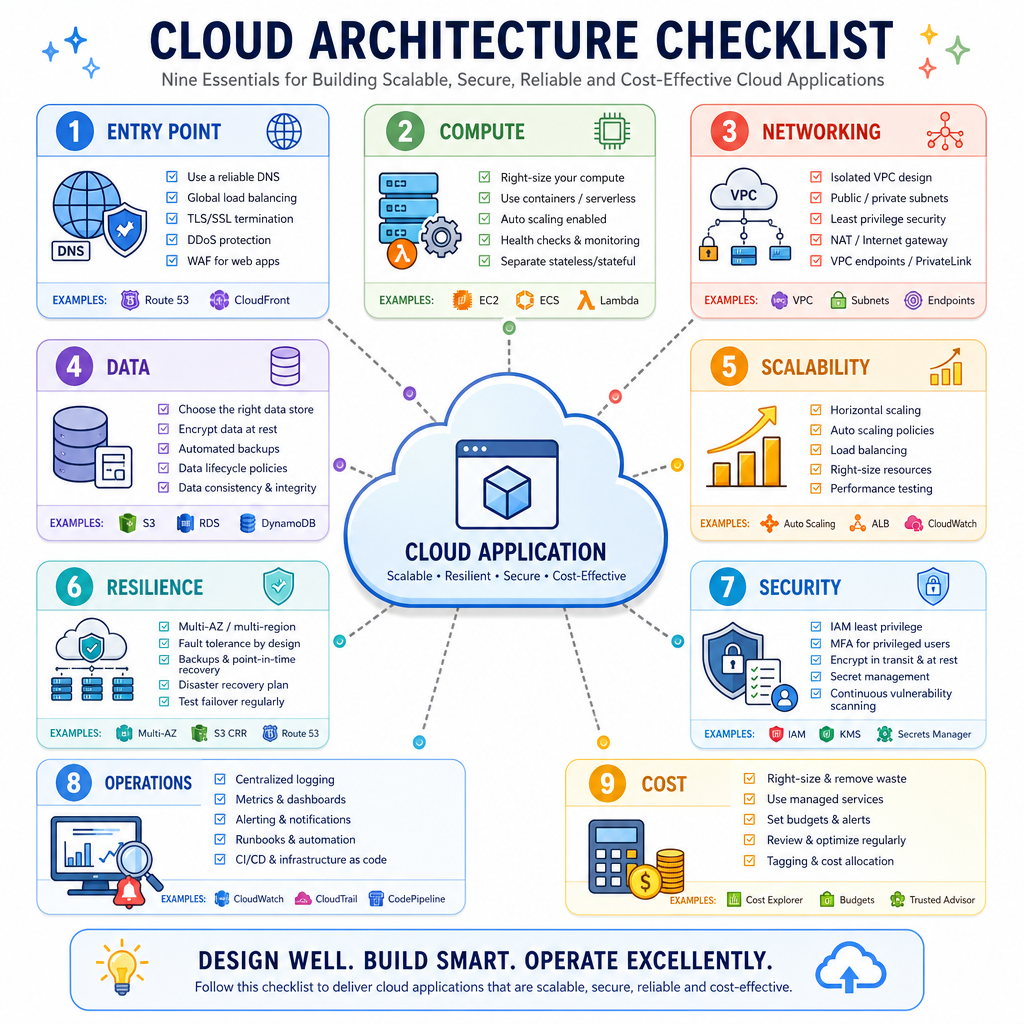
A typical cloud deployment has layers:
Users
  |
CDN / DNS
  |
Load Balancer
  |
App instances / Containers
  |
Database | Cache | Queue | Object Storage
  |
Monitoring / Logs / Alerts / Backups
The important shift is this: we design assuming infrastructure is replaceable. A single machine should not be special. If one app instance disappears, another should take its place.
Managed Database Choice
Your team is deploying an order service. The database must support backups, patching, failover, and monitoring, but your small team does not want to manage database servers manually.
Which cloud choice best matches this need?
Load Balanced Services
One service, many instances
In the microservices lesson, you saw that services communicate over network boundaries. In the cloud, each service often runs as multiple identical instances.
A load balancer receives traffic and spreads requests across healthy instances.
Why this matters:
- More instances can handle more traffic.
- Broken instances can be removed from rotation.
- Deployments can replace instances gradually.
- The service should avoid storing important user session state on one machine.
Below is a tiny Java simulation of a load balancer sending requests to three service instances.
```java
import java.util.*;

public class CloudLoadBalancerDemo {
    static class ServiceInstance {
        private final String id;

        ServiceInstance(String id) {
            this.id = id;
        }

        String handle(String request) {
            return id + " handled " + request;
        }
    }

    static class RoundRobinLoadBalancer {
        private final List<ServiceInstance> instances;
        private int next = 0;

        RoundRobinLoadBalancer(List<ServiceInstance> instances) {
            this.instances = instances;
        }

        String route(String request) {
            ServiceInstance chosen = instances.get(next);
            next = (next + 1) % instances.size();
            return chosen.handle(request);
        }
    }

    public static void main(String[] args) {
        List<ServiceInstance> instances = List.of(
            new ServiceInstance("orders-app-1"),
            new ServiceInstance("orders-app-2"),
            new ServiceInstance("orders-app-3")
        );

        RoundRobinLoadBalancer lb = new RoundRobinLoadBalancer(instances);

        for (int i = 1; i <= 8; i++) {
            System.out.println(lb.route("request-" + i));
        }
    }
}
```
Stateless Cloud Services
True or false: In cloud architecture, a service is generally easier to scale and replace when important user state is stored outside the individual app instance, such as in a database, cache, or external session store.
Configuration Per Environment
Same code, different environments
A common cloud rule is: build the application once, configure it per environment.
Your Java service might run in:
- Local development
- Test environment
- Staging
- Production
The code should not hardcode production database URLs, passwords, or feature flags. Cloud platforms usually inject configuration through environment variables, secret managers, or deployment settings.
This simple Java example reads configuration from environment variables and falls back to safe local defaults.
```java
public class CloudConfigDemo {
    public static void main(String[] args) {
        String appName = envOrDefault("APP_NAME", "orders-service");
        String profile = envOrDefault("APP_PROFILE", "local");
        String dbHost = envOrDefault("DB_HOST", "localhost");
        String dbPort = envOrDefault("DB_PORT", "5432");

        System.out.println("Starting " + appName);
        System.out.println("Profile: " + profile);
        System.out.println("Database endpoint: " + dbHost + ":" + dbPort);

        if ("local".equals(profile)) {
            System.out.println("Using developer-friendly local settings.");
        } else {
            System.out.println("Using cloud-provided environment configuration.");
        }
    }

    private static String envOrDefault(String key, String defaultValue) {
        String value = System.getenv(key);
        return value == null || value.isBlank() ? defaultValue : value;
    }
}
```
Resilience And Observability
Cloud systems fail in smaller pieces
In cloud architecture, failure is expected:
- A container restarts.
- A database connection drops.
- A network call times out.
- A region has partial issues.
So we design for resilience and observability.
Resilience means the system keeps working, perhaps in a reduced way. Observability means we can see what is happening through logs, metrics, traces, and alerts.
A practical cloud service usually has:
- Health checks: "Should this instance receive traffic?"
- Timeouts: "Do not wait forever."
- Retries: "Try again for temporary failures."
- Logs and metrics: "Tell humans what happened."
Here is a standalone Java demo of retrying an unstable dependency.
```java
import java.util.Random;

public class CloudRetryDemo {
    static class PaymentGatewayClient {
        private final Random random = new Random(7);

        String charge(int cents) {
            if (random.nextBoolean()) {
                throw new RuntimeException("temporary network failure");
            }
            return "charged " + cents + " cents";
        }
    }

    public static void main(String[] args) {
        PaymentGatewayClient client = new PaymentGatewayClient();
        int maxAttempts = 3;

        for (int attempt = 1; attempt <= maxAttempts; attempt++) {
            try {
                System.out.println("Attempt " + attempt + " to charge payment");
                String result = client.charge(2599);
                System.out.println("SUCCESS: " + result);
                return;
            } catch (RuntimeException ex) {
                System.out.println("WARN: " + ex.getMessage());
                if (attempt == maxAttempts) {
                    System.out.println("FAILED: send order to manual review queue");
                }
            }
        }
    }
}
```
Scaling Vocabulary
Adding more app instances behind a load balancer is called ________ scaling.
Type the single missing word.
Cost And Tradeoffs
The cloud is powerful, not magic
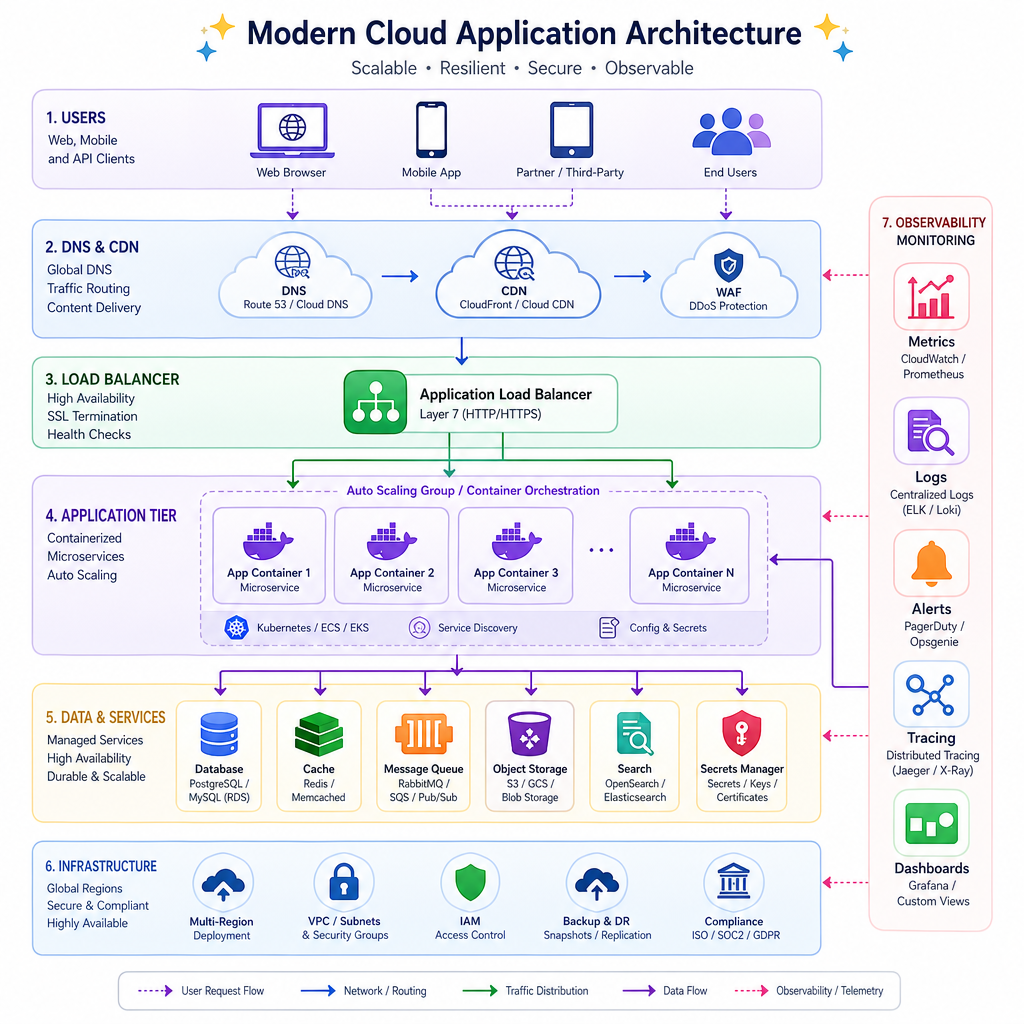
Cloud architecture makes many things easier, but every block has tradeoffs.
Choice Benefit Cost / Risk Managed database Backups, patching, failover Less low-level control, ongoing cost Autoscaling Handles traffic spikes Needs correct metrics and limits Multiple availability zones Better availability More networking and data cost Cache Faster reads Stale data and invalidation complexity Queue Smooths traffic bursts Eventual processing, more moving parts Object storage Cheap durable files Different access pattern than database rowsA good architect does not just ask, "Can we use cloud service X?"
A better question is: What reliability, scale, security, and cost target are we designing for?
Cloud Architecture Checklist
A practical checklist
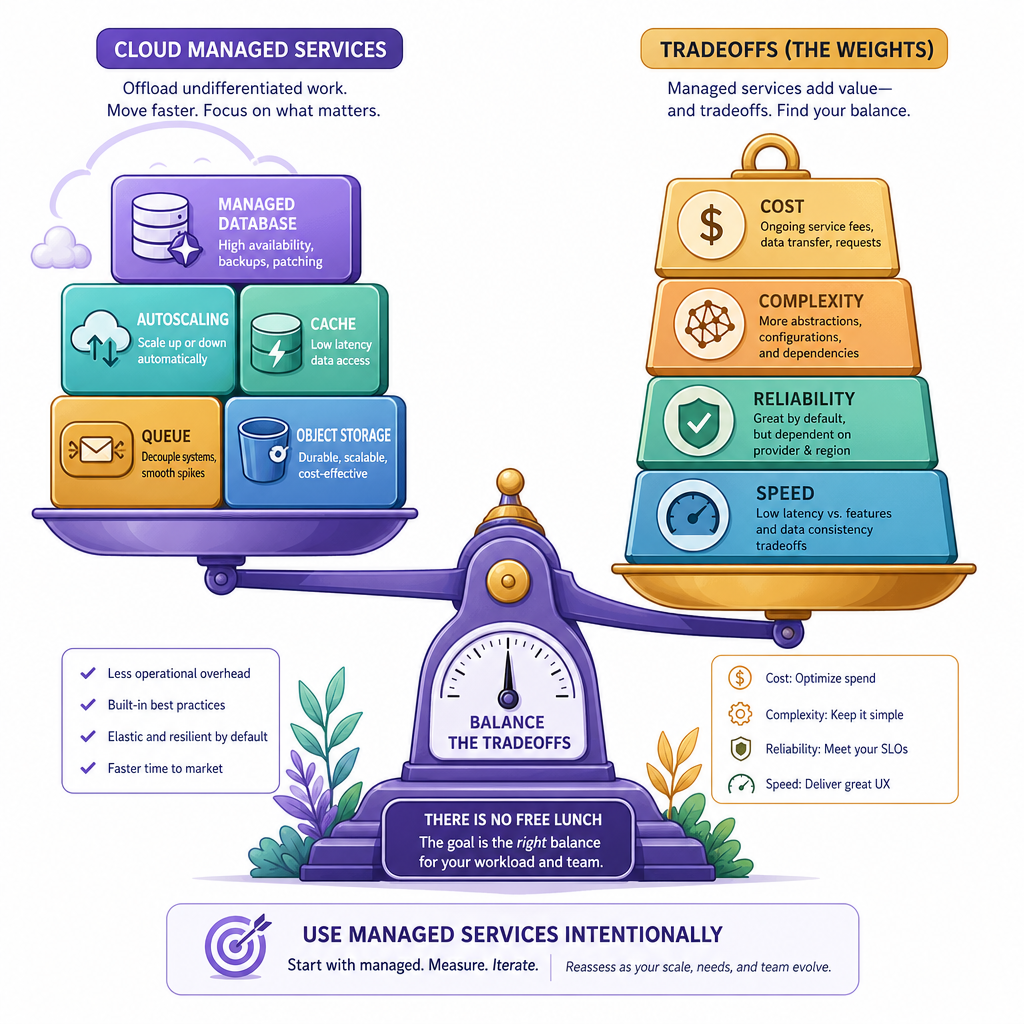
When you place a system into the cloud, walk through this checklist:
- Entry point: How do users reach the system? DNS, CDN, load balancer?
- Compute: Where do services run? Virtual machines, containers, or serverless?
- Networking: Which parts are public, and which stay private?
- Data: Which data goes to relational DB, cache, queue, or object storage?
- Scalability: Which components scale horizontally?
- Resilience: What happens when an instance, zone, or dependency fails?
- Security: How are identity, permissions, secrets, and network boundaries handled?
- Operations: Where are logs, metrics, traces, alerts, and backups?
- Cost: What resources run all the time, and what scales with usage?
This lesson gives you the deployment lens. Next, we will sharpen the code and structure lens with design patterns and best practices.