Common Regex Patterns
Read at your own pace. Code execution, quizzes, progress tracking, and the AI tutor are available in the interactive view with JavaScript enabled.
Patterns In Practice
From regex tools to regex judgment
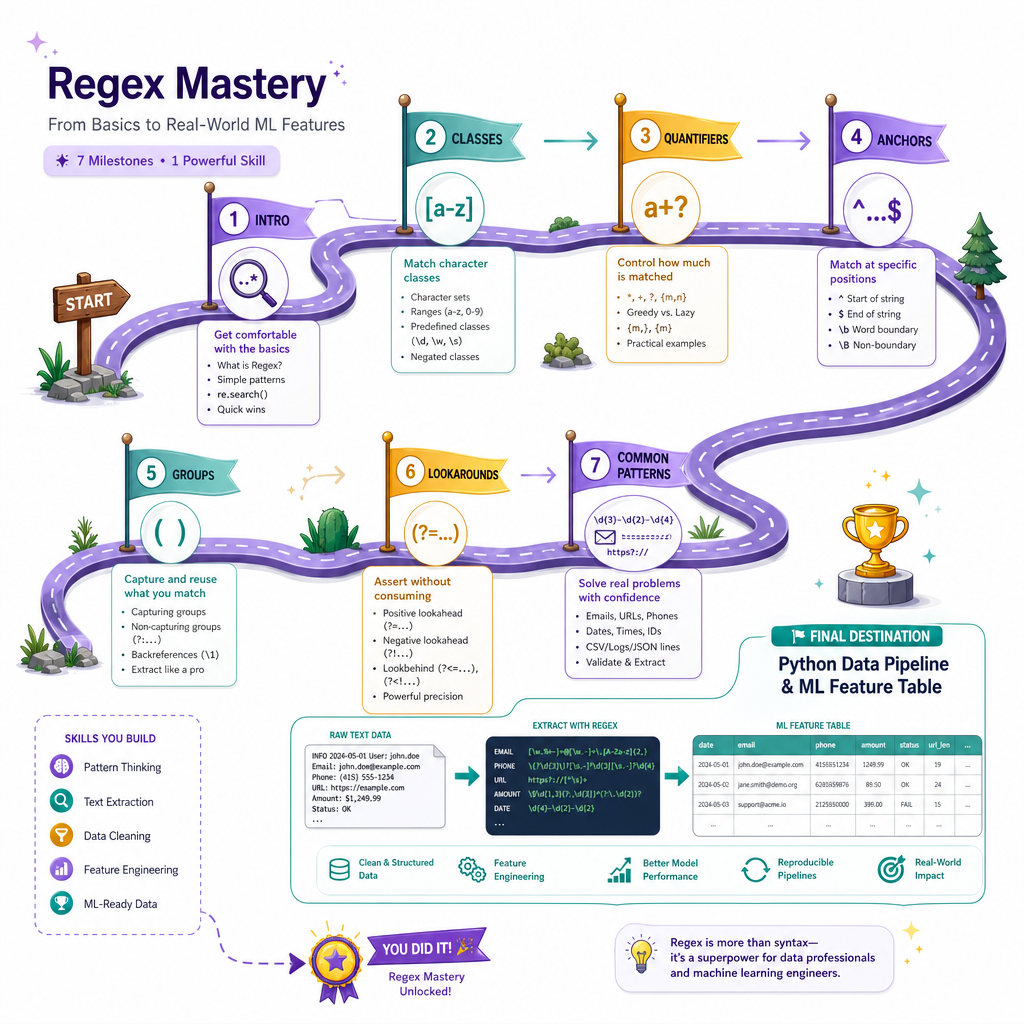
Now that you've finished Modifiers and Lookahead/Lookbehind, you have the full toolkit: character classes, quantifiers, anchors, groups, flags, and assertions.
This final lesson is about using those tools together in common patterns you'll see in production code, data cleaning, and machine learning preprocessing.
The goal is not to memorize one perfect regex for every situation. The goal is to learn how to adapt patterns safely:
- Validate only when the format is truly strict
- Extract when text is messy
- Normalize before feeding text into downstream systems
- Prefer readable, testable patterns over clever one-liners
Think of this lesson as your regex field guide.

Pattern Design Checklist
Before writing the regex
Common regex patterns become much easier when you ask four questions first:
-
Am I validating or extracting?
- Validation usually needs anchors like
^...$or\A...\Z. - Extraction usually avoids full-string anchors.
- Validation usually needs anchors like
-
What are the allowed alphabets?
- Use character classes from Metacharacters and Character Classes.
-
How much repetition is allowed?
- Use quantifiers from Quantifiers and Alternation.
-
Which parts matter later?
- Use named captures from Grouping and Capturing.
A useful mental model:
real text -> regex pattern -> matches / groups -> validated or transformed data
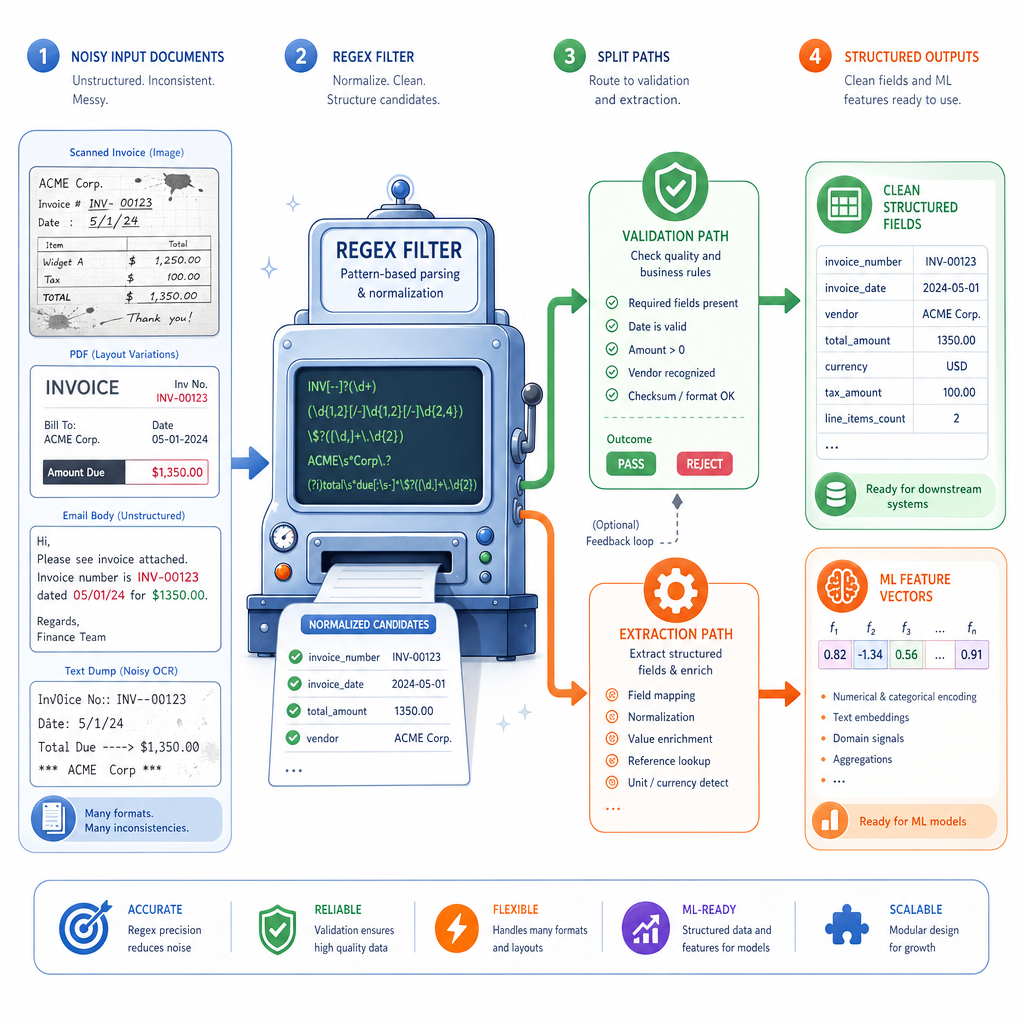
For ML workflows, this often means turning noisy text into cleaner features before tokenization or modeling.
Emails And Phones
Practical contact patterns
Email and phone patterns are classic examples where context matters.
A fully standards-compliant email regex is famously complex. In many data-cleaning workflows, a practical extractor is better than a giant validator.
Below, we extract likely emails and US-style phone numbers from messy text. Notice how the patterns are intentionally scoped: useful, readable, and testable.
```python
import re

text = """
Contact: ana@example.com, bob.smith@ml-lab.org
Backup phones: (415) 555-0134, 212-555-0199
Ignore: not-an-email@ and 555-ABCD
"""

email_pattern = re.compile(r"\b[\w.%+-]+@[A-Za-z0-9.-]+\.[A-Za-z]{2,}\b")
phone_pattern = re.compile(r"\b(?:\(\d{3}\)\s*|\d{3}[-.])\d{3}[-.]\d{4}\b")

emails = email_pattern.findall(text)
phones = phone_pattern.findall(text)

print("Emails:", emails)
print("Phones:", phones)
```
Validation Or Extraction
You are checking whether an entire input string is a 5-digit US ZIP code.
Which pattern is the best fit?
Logs To Features
Regex for structured extraction
Logs are a great bridge between regex and machine learning work.
You may not feed raw logs directly into a model. Instead, you often extract structured fields first:
- timestamp
- severity level
- service name
- message
This is where named groups shine. They make your extraction code easier to read and less fragile than relying on group numbers.
```python
import re

logs = [
    "2026-04-27 09:15:02 INFO api request_id=abc123 latency_ms=42",
    "2026-04-27 09:15:07 ERROR worker request_id=def456 latency_ms=900",
    "bad line that should not match"
]

pattern = re.compile(
    r"^(?P<date>\d{4}-\d{2}-\d{2})\s+"
    r"(?P<time>\d{2}:\d{2}:\d{2})\s+"
    r"(?P<level>INFO|WARN|ERROR)\s+"
    r"(?P<service>\w+)\s+"
    r"request_id=(?P<request_id>\w+)\s+"
    r"latency_ms=(?P<latency>\d+)$"
)

for line in logs:
    match = pattern.search(line)
    if match:
        record = match.groupdict()
        record["latency"] = int(record["latency"])
        print(record)
```
Bounded Patterns
True or false:
For validation tasks, anchoring a pattern to the start and end of the string usually makes the regex safer and more precise.
Dates With Names
Dates: common, but context-sensitive
Date patterns are everywhere: filenames, logs, exports, datasets, and reports.
A regex can check the shape of a date, such as YYYY-MM-DD. But it usually should not be your only tool for calendar correctness.
For example, regex can match 2026-99-99 if you only ask for digit ranges loosely. A good workflow is:
- Use regex to extract candidate date strings
- Use Python date parsing to validate calendar reality
That separation keeps your regex readable.
```python
import re
from datetime import datetime

text = "Files: train_2026-04-27.csv, test_2026-13-99.csv, notes.txt"

pattern = re.compile(r"(?P<year>\d{4})-(?P<month>\d{2})-(?P<day>\d{2})")

for match in pattern.finditer(text):
    date_text = match.group(0)
    try:
        parsed = datetime.strptime(date_text, "%Y-%m-%d")
        print("Valid date:", parsed.date())
    except ValueError:
        print("Invalid calendar date:", date_text)
```
Four Digit Year
Complete the missing regex inside this Python raw string so it validates an entire 4-digit year string.
pattern = r"____"
Fill in only the regex pattern.
Common Pitfalls
Patterns that look right but age badly
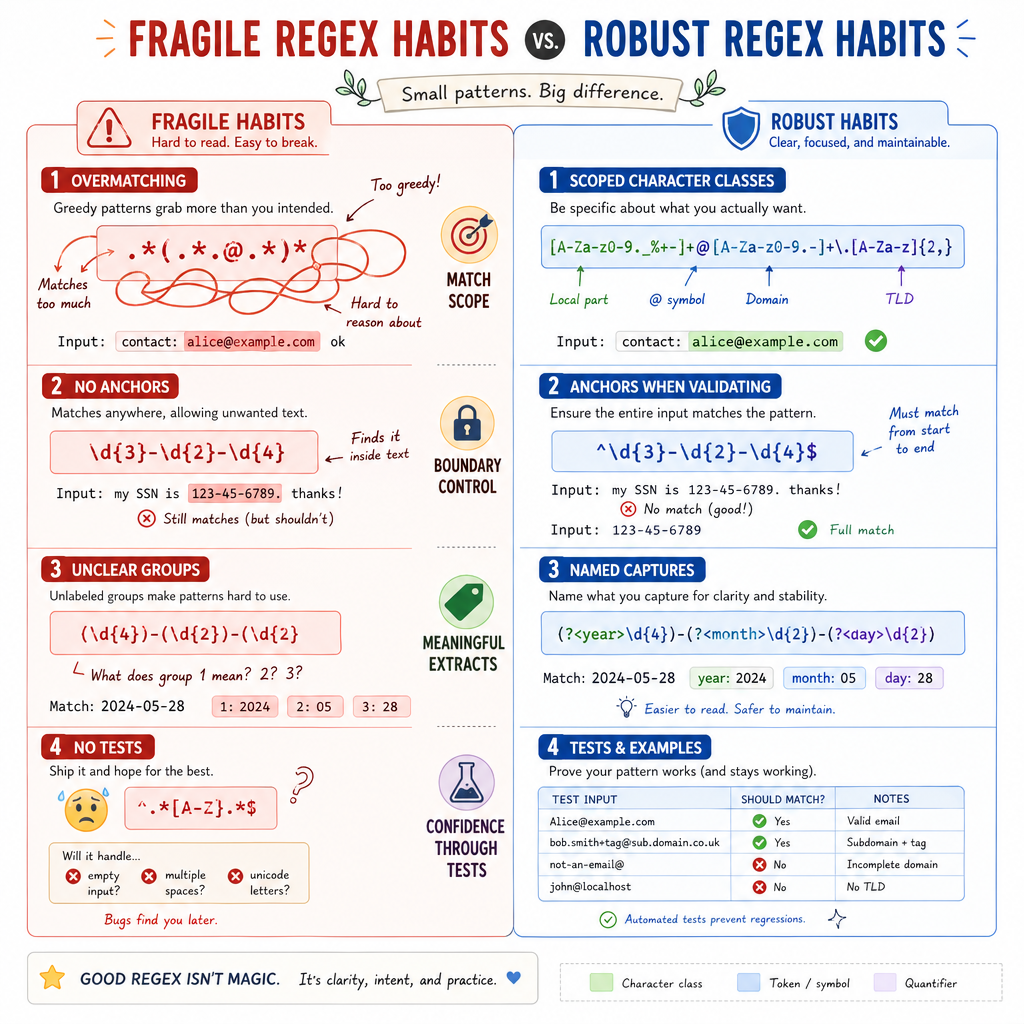
As regexes become more realistic, the biggest problems are usually not syntax errors. They are design errors.
Watch for these:
-
Overmatching with
.*- Prefer narrower character classes when possible.
-
Using validation patterns for extraction
- A pattern with
^...$may miss useful substrings inside larger text.
- A pattern with
-
Capturing everything
- Use noncapturing groups
(?:...)when grouping is only for structure.
- Use noncapturing groups
-
Ignoring flags
-
re.IGNORECASE,re.MULTILINE, andre.VERBOSEcan make patterns more intentional.
-
-
Regex-only thinking
- Use regex for shape and extraction; use Python libraries for deeper semantics like dates, URLs, JSON, or HTML.
A professional regex is not the longest one. It is the one whose assumptions are easiest to inspect and test.
Your Regex Cookbook
A compact reference
Here are practical starting points you can adapt:
Task Starter pattern Notes Integer^-?\d+$
Allows optional negative sign
Decimal
^-?\d+(?:\.\d+)?$
Simple decimal shape
Word token
\b\w+\b
Good baseline token extractor
Hashtag
(?<!\w)#\w+
Avoids matching inside words
Simple email
\b[\w.%+-]+@[A-Za-z0-9.-]+\.[A-Za-z]{2,}\b
Practical extractor, not full RFC validation
ISO date shape
\b\d{4}-\d{2}-\d{2}\b
Pair with date parsing
CSV-ish split point
,\s*
Fine only for simple CSV, not quoted CSV
Use these as templates, not universal truth. Real datasets always bring edge cases.
Course Wrap
You now have the regex toolkit
Across this course, you moved from first principles to practical pattern design:
- Introduction to Regular Expressions gave you the Python workflow and match object model.
- Metacharacters and Character Classes taught you how to define alphabets.
- Quantifiers and Alternation let you control amount and choice.
- Anchors and Boundaries helped you pin matches to the right locations.
- Grouping and Capturing turned matches into structured data.
- Modifiers and Lookahead/Lookbehind added context-sensitive precision.
- Common Regex Patterns showed how these pieces combine in real tasks.
For your next project, try this habit: whenever you write a regex, also write 3 examples that should match and 3 examples that should not. That small test set will improve your regex faster than memorizing another pattern.
Regex is not just a syntax skill. It is a way to describe text precisely — a powerful tool for cleaning data, extracting features, and building reliable Python workflows.