Control Flow
Read at your own pace. Code execution, quizzes, progress tracking, and the AI tutor are available in the interactive view with JavaScript enabled.
Choose the Path
Welcome to Control Flow
In Variables and Data Types, your program learned to remember values. In Input and Output, it learned to talk with the outside world.
Now we give it a sense of direction.
Control flow means deciding which lines run, which lines are skipped, and which lines repeat. Without it, a program is like a music track that can only play straight through from start to finish.
With control flow, your C++ programs can:
- Warn when an electronics battery is low
- Decide whether a basketball player made enough points
- Repeat renovation measurements until they are correct
- Count beats in a music practice loop
In this lesson, you will learn the core building blocks: if/else decisions, conditions, and loops.

If And Else
Making a Decision
An if statement asks a yes/no question.
If the condition is true, one block of code runs. If it is false, that block is skipped.
An optional else gives the program a backup path.
Think of it like a coach checking a stat:
- If the player scored at least 10 points, celebrate double digits.
- Else, encourage them to keep shooting.
The condition goes inside parentheses, and the code to run goes inside curly braces { }.
```cpp
#include <iostream>
using namespace std;

int main() {
    int points = 12;

    cout << "Player points: " << points << "\n";

    if (points >= 10) {
        cout << "Double digits! Keep feeding the hot hand.\n";
    } else {
        cout << "Keep shooting and look for good passes.\n";
    }

    cout << "Game check complete.\n";

    return 0;
}
```
Condition Check
Suppose a program has this value:
int batteryPercent = 15;
Which condition would be true?
Smarter Conditions
Comparisons and Logic
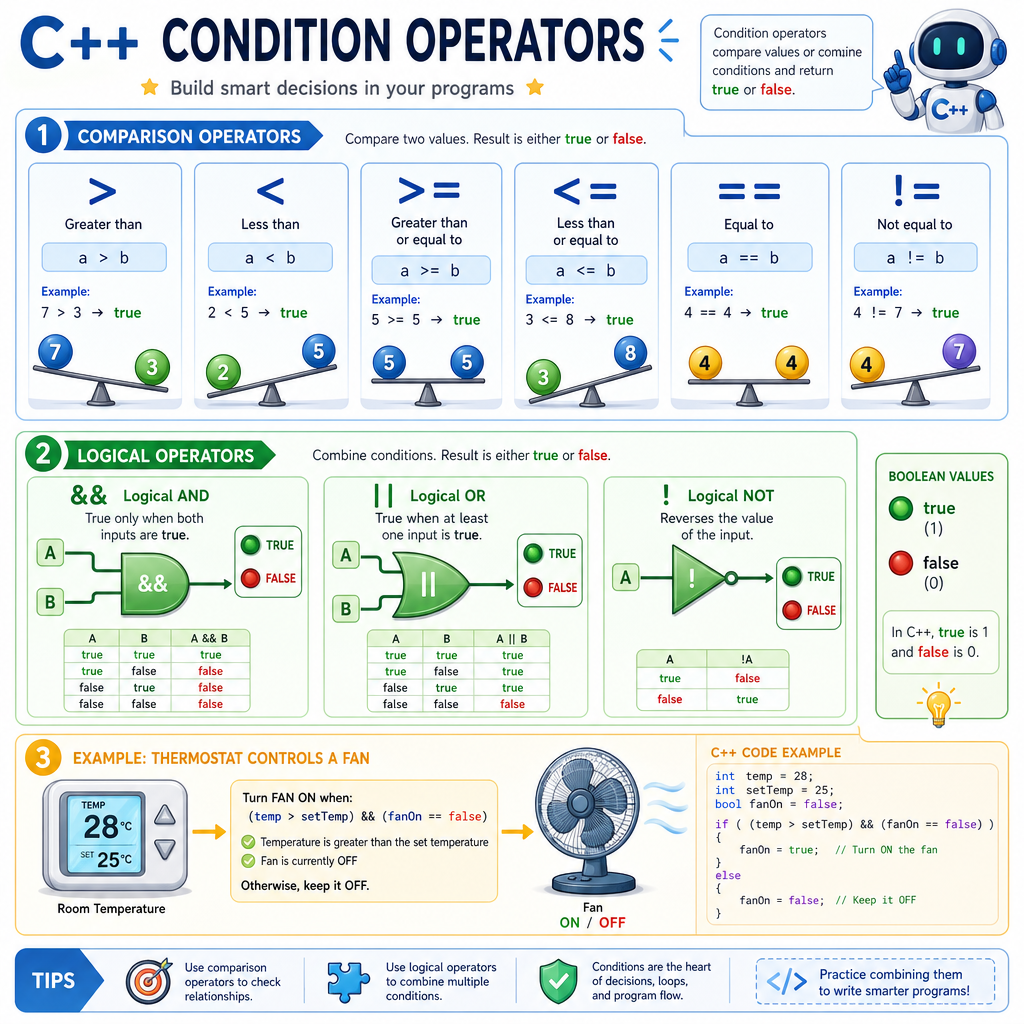
Conditions usually compare values.
Common comparison operators:
Operator Meaning>
greater than
<
less than
>=
greater than or equal to
<=
less than or equal to
==
equal to
!=
not equal to
You can also combine conditions:
Operator Meaning Example idea&&
AND
both things must be true
`
`
!
NOT
flips true to false, or false to true
Example in plain English:
temperature > 80 && fanIsOn == false
means: “The temperature is above 80 and the fan is not on.”
A condition ultimately becomes either true or false, and control flow uses that result to choose what happens next.
Equals Or Compares
True or false?
In C++, a single = is used to test whether two values are equal inside a condition.
Repeat With While
Loops Repeat Work
A loop runs code more than once.
A while loop keeps running while its condition is true.
This is useful when you do not mainly care about a fixed number of lines—you care about a condition staying true.
For example, while installing a shelf bracket, you might repeat: install one screw, check progress, install the next screw.
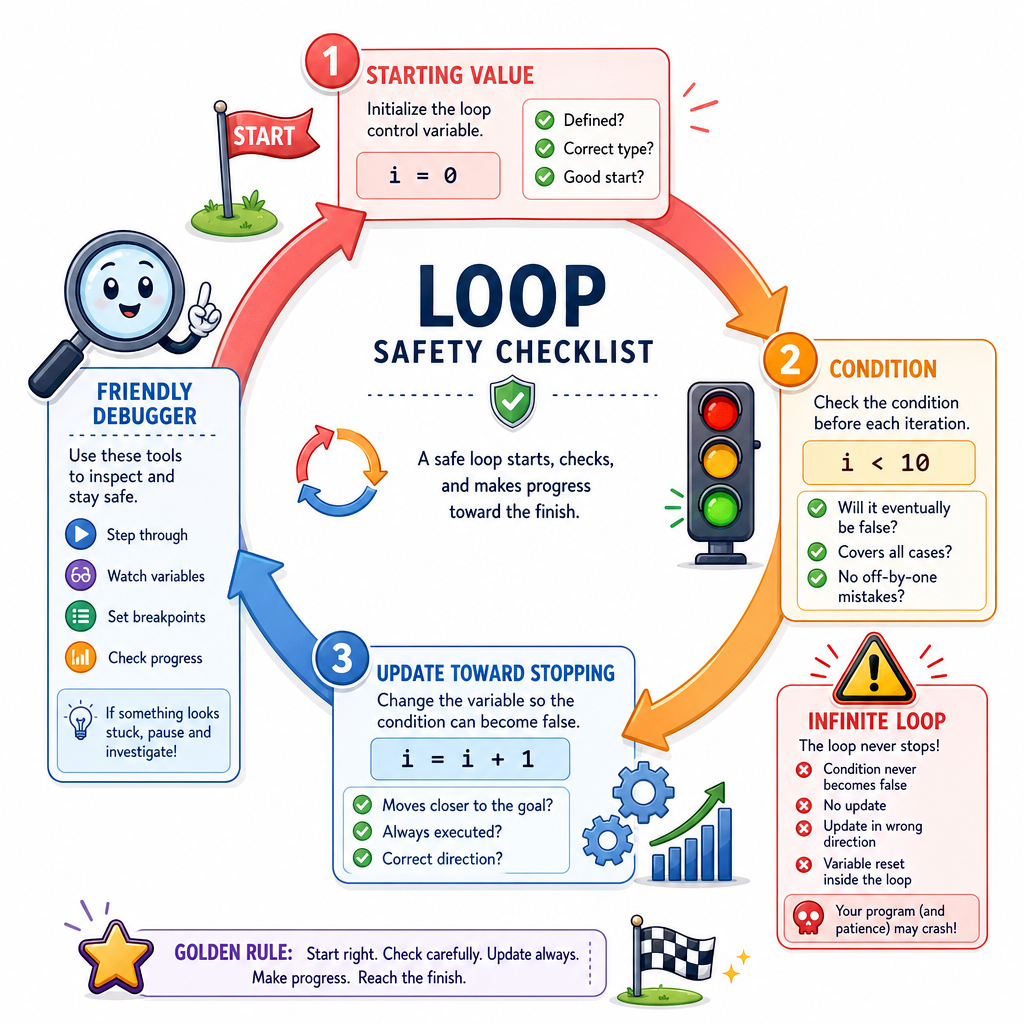
A safe while loop needs something inside it that eventually changes the condition. Otherwise, the loop may never stop.
```cpp
#include <iostream>
using namespace std;

int main() {
    int screwsInstalled = 0;

    while (screwsInstalled < 4) {
        screwsInstalled = screwsInstalled + 1;
        cout << "Installed screw #" << screwsInstalled << "\n";
    }

    cout << "Shelf bracket is secure.\n";

    return 0;
}
```
Loop Condition
Fill in the missing operator so the loop continues while attempts is less than 3.
while (attempts ___ 3)
Fill in the blank: _____________
Count With For
A Loop Built for Counting
A for loop is often used when you know the counting pattern ahead of time.
It has three parts inside the parentheses:
for (start; condition; update)
Read it like this:
- Start with a value.
- Keep going while the condition is true.
- Update after each loop round.
This is great for predictable repetition, like counting four beats in music practice.
```cpp
#include <iostream>
using namespace std;

int main() {
    for (int beat = 1; beat <= 4; beat = beat + 1) {
        cout << "Beat " << beat << ": clap\n";
    }

    cout << "Loop finished.\n";

    return 0;
}
```
Loop Safety
Avoid Infinite Loops
An infinite loop is a loop that never stops. Sometimes advanced programs use them on purpose, but as a beginner, an accidental infinite loop usually means the condition never became false.
A safe loop has this pattern:
set starting value
while condition is true:
    do useful work
    move closer to stopping
Before running a loop, ask:
- What value controls the loop?
- What condition keeps it running?
- What line changes the value so the loop can stop?
This habit will save you lots of debugging time as your programs grow.
Pick The Tool
You are writing a small electronics program.
It should print a warning one time if batteryPercent is below 10.
Which control flow tool fits best?