Converting Second-Level Data to Time Frame Averages
Read at your own pace. Code execution, quizzes, progress tracking, and the AI tutor are available in the interactive view with JavaScript enabled.
From Events To Features
Why this lesson matters
In Fetching OHLC Data from APIs, you normalized historical candles. In Real-time Data Handling with WebSockets in R, you normalized each live event and maintained state.
Now we connect those ideas: a stream of second-level rows must become time-frame features that your model can use on one line.
Your target mental model:
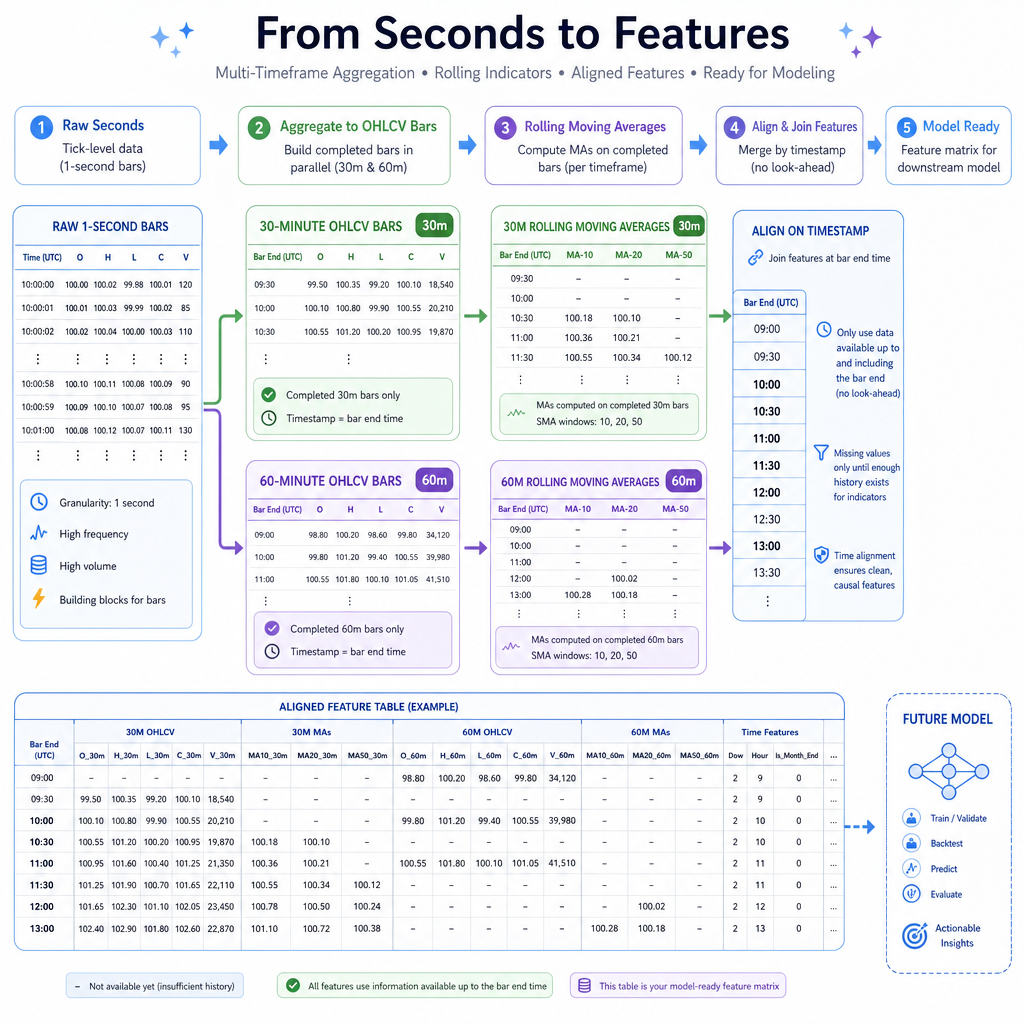
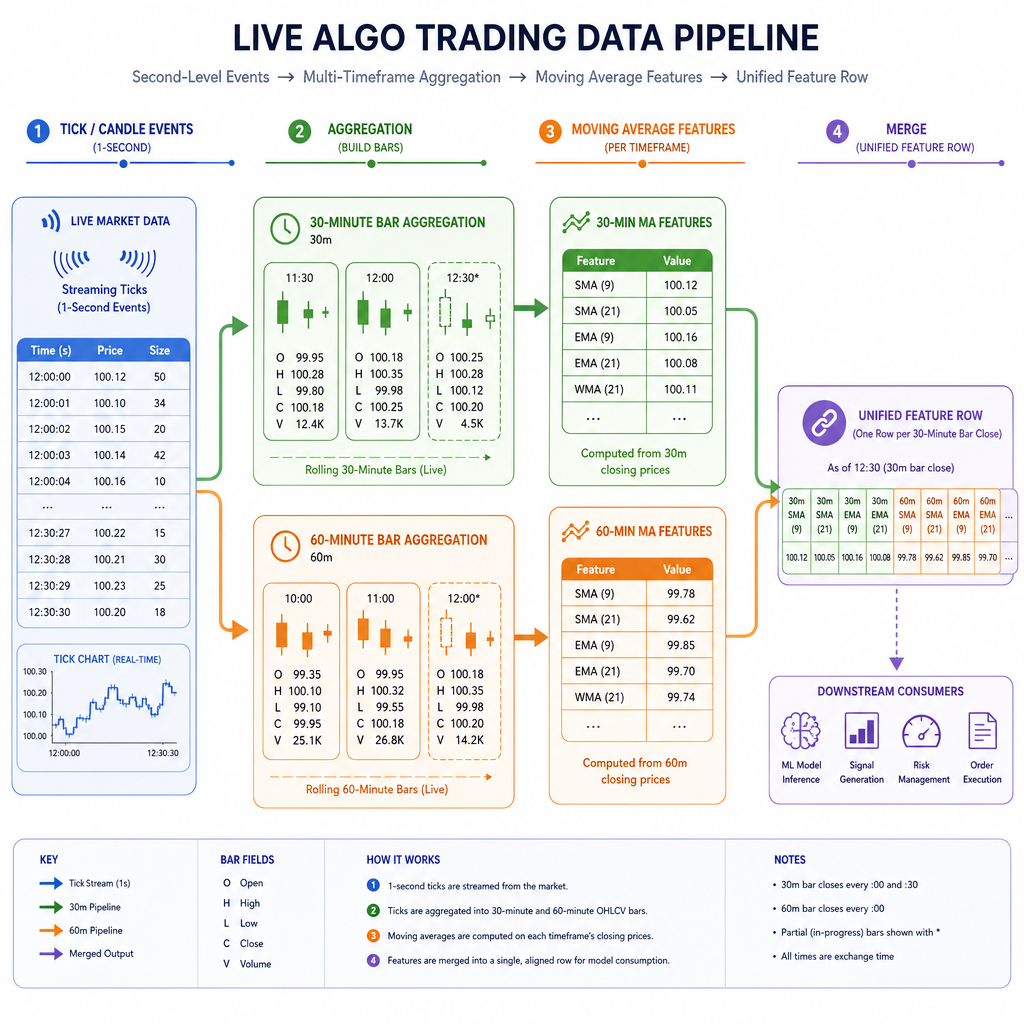
second events -> 30-min bars -> 30-min moving average
              -> 60-min bars -> 60-min moving average
              -> one feature row per decision time
We will stay focused on time-frame conversion and alignment. The next lesson uses these features inside dynamic linear regression.
The Clock Choice
Pick the row clock first
Before calculating averages, choose the timestamp grid that defines a row.
Common choices:
- Every second: maximum detail, many repeated higher-time-frame values
- Every 30 minutes: natural if you trade/evaluate on 30-minute closes
- Every 60 minutes: natural if the slower signal drives the decision
For your example — viewing 30-minute and 60-minute moving averages on the same line — a practical first design is:
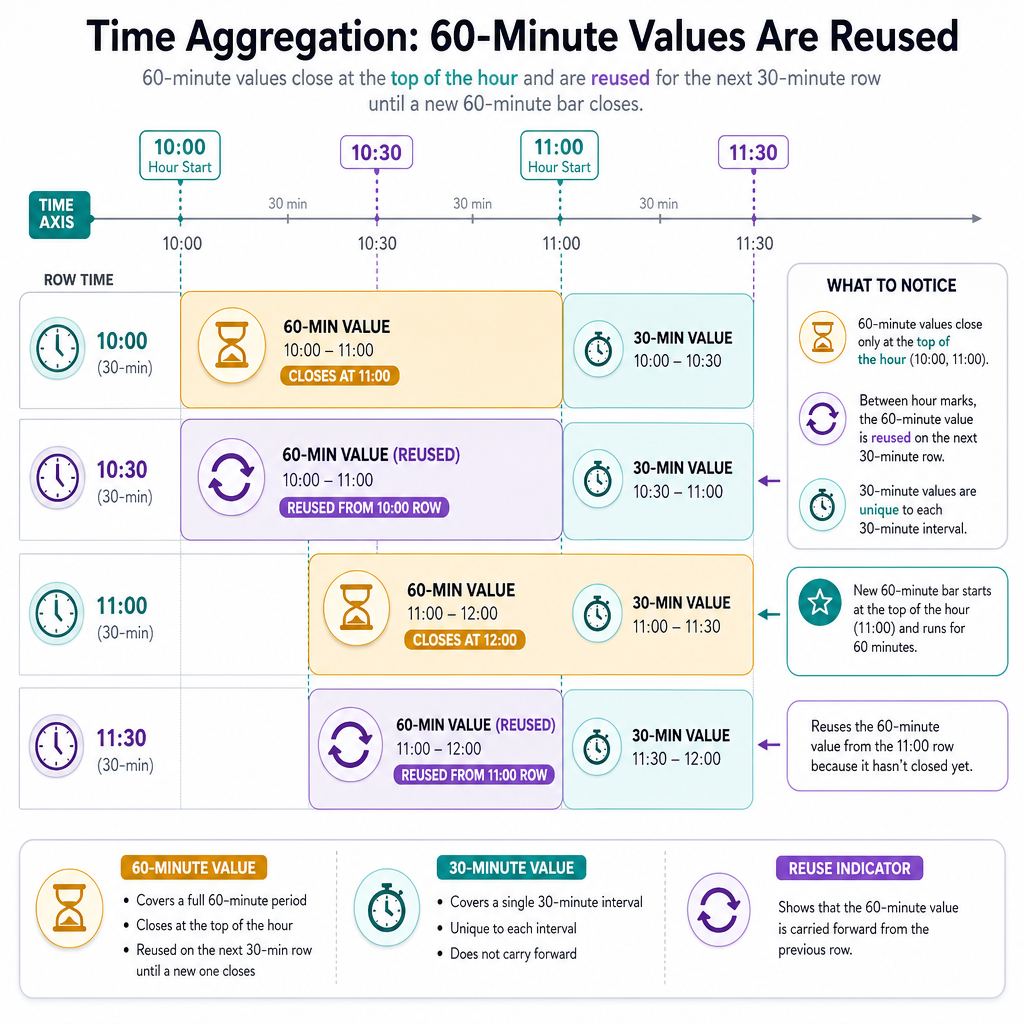
one row per completed 30-minute bar, with the latest completed 60-minute feature carried forward.
That gives rows like:
10:00 | 30m MA updated | 60m MA updated
10:30 | 30m MA updated | latest completed 60m MA still from 10:00
11:00 | 30m MA updated | 60m MA updated
This keeps the system causal: each row only knows what was complete at that time.
Aggregate Seconds
Seconds become candles by grouping time
A second-level OHLC row is not automatically a 30-minute or 60-minute signal. You must define how rows roll up:
-
open: first open in the bucket -
high: maximum high in the bucket -
low: minimum low in the bucket -
close: last close in the bucket -
volume: sum of volume
In pandas, resample() is the direct equivalent of the time-bucketing step you would do with xts, data.table, or tibbletime in R.
The key detail is labeling bars by their completion time, not their start time.
```python
import pandas as pd
import numpy as np

np.random.seed(7)

# Simulate 2 hours of second-level OHLCV data
idx = pd.date_range("2024-01-02 09:30:00", periods=2 * 60 * 60, freq="s")
price = 100 + np.cumsum(np.random.normal(0, 0.015, len(idx)))

seconds = pd.DataFrame({
    "open": price,
    "high": price + np.random.uniform(0, 0.02, len(idx)),
    "low": price - np.random.uniform(0, 0.02, len(idx)),
    "close": price + np.random.normal(0, 0.005, len(idx)),
    "volume": np.random.randint(1, 20, len(idx))
}, index=idx)

agg = {
    "open": "first",
    "high": "max",
    "low": "min",
    "close": "last",
    "volume": "sum"
}

bars_30 = seconds.resample("30min", label="right", closed="right").agg(agg).dropna()
bars_60 = seconds.resample("60min", label="right", closed="right").agg(agg).dropna()

print("30-minute bars:")
print(bars_30.tail(3).round(4))
print("\n60-minute bars:")
print(bars_60.tail(3).round(4))
```
Causal Alignment Check
You are building one feature row at 10:30 on a 30-minute clock. Which 60-minute moving average value is valid to use?
One Shared Row
Joining different time frames
Once you have separate 30-minute and 60-minute bars, you need a feature frame.
A feature frame is not just a table. It is a promise:
each row contains only the information available at that row's timestamp.
A clean 30-minute decision frame might look like this:
time close_30 ma_30_21 close_60 ma_60_21 10:00 updated updated updated updated 10:30 updated updated carried forward carried forward 11:00 updated updated updated updatedThe 60-minute columns are not recalculated at 10:30. They are simply the most recent completed 60-minute values known at that time.
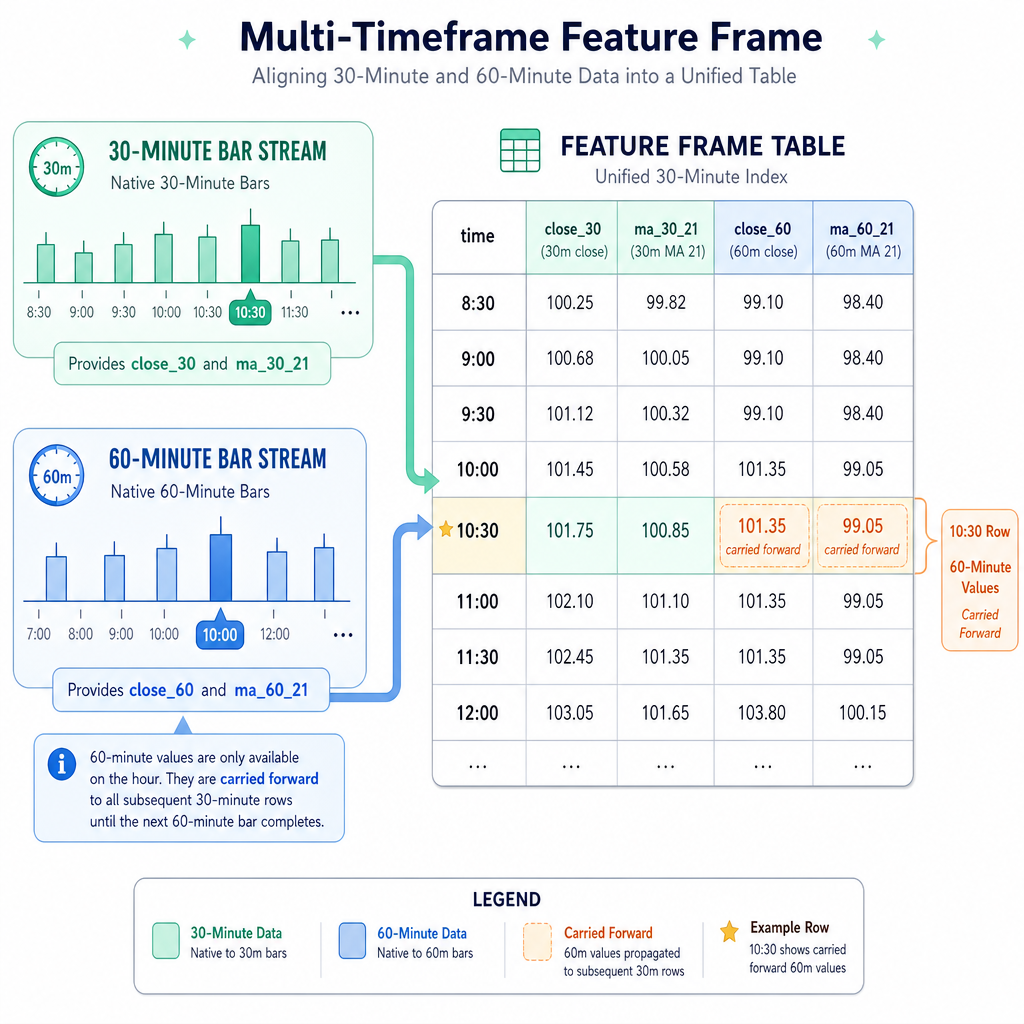
Forward Fill Blank
In pandas, after joining 60-minute features to a 30-minute clock, use _____ to carry the latest completed 60-minute value forward until a new 60-minute bar closes.
Compute Moving Averages
Translate the moving-average window
Be precise about what “21” means.
Two common interpretations:
-
21-period MA on 30-minute bars:
rolling(21)over 30-minute closes -
21 trading-day MA using 30-minute bars:
21 * bars_per_dayrolling window
For this lesson, we use the first meaning:
ma_30_21 = average of last 21 completed 30-minute closes
ma_60_21 = average of last 21 completed 60-minute closes
Then we align both onto the same 30-minute row clock.
```python
import pandas as pd
import numpy as np

np.random.seed(21)

# Simulate enough second-level data to produce many 30m and 60m bars
idx = pd.date_range("2024-01-01 00:00:00", periods=36 * 60 * 60, freq="s")
price = 100 + np.cumsum(np.random.normal(0, 0.01, len(idx)))

seconds = pd.DataFrame({
    "open": price,
    "high": price + np.random.uniform(0, 0.03, len(idx)),
    "low": price - np.random.uniform(0, 0.03, len(idx)),
    "close": price + np.random.normal(0, 0.004, len(idx)),
    "volume": np.random.randint(1, 10, len(idx))
}, index=idx)

agg = {"open": "first", "high": "max", "low": "min", "close": "last", "volume": "sum"}

bars_30 = seconds.resample("30min", label="right", closed="right").agg(agg).dropna()
bars_60 = seconds.resample("60min", label="right", closed="right").agg(agg).dropna()

feat_30 = pd.DataFrame(index=bars_30.index)
feat_30["close_30"] = bars_30["close"]
feat_30["ma_30_21"] = bars_30["close"].rolling(21).mean()

feat_60 = pd.DataFrame(index=bars_60.index)
feat_60["close_60"] = bars_60["close"]
feat_60["ma_60_21"] = bars_60["close"].rolling(21).mean()

# Align slower 60m features onto the 30m decision clock
features = feat_30.join(feat_60, how="left").ffill()
features = features.dropna()

print(features.tail(8).round(4))
```
Incomplete Bar Rule
True or false: In a completed-bar feature frame, a 10:30 row should not include the close of a 60-minute bar that ends at 11:00.
Mini Live Aggregator
The live version is the same idea
In production, you do not wait for a giant historical table every time. You maintain state and update it as events arrive.
A practical live loop does this:
- Receive one normalized second-level event
- Add it to the current time bucket
- When a bucket closes, emit a completed bar
- Recalculate indicators that depend on completed bars
- Update the shared feature row
The example below uses 5-second and 10-second bars so you can see output immediately. They are toy stand-ins for 30-minute and 60-minute bars.
```python
import pandas as pd
import numpy as np

np.random.seed(5)

def make_bar(rows):
    df = pd.DataFrame(rows)
    return {
        "open": df["price"].iloc[0],
        "high": df["price"].max(),
        "low": df["price"].min(),
        "close": df["price"].iloc[-1],
        "volume": df["volume"].sum()
    }

start = pd.Timestamp("2024-01-02 09:30:00")
price = 100.0
bars_5 = []
bars_10 = []
current_5 = []
current_10 = []
last_5_bucket = None
last_10_bucket = None

for i in range(35):
    ts = start + pd.Timedelta(seconds=i)
    price += np.random.normal(0, 0.03)
    event = {"ts": ts, "price": price, "volume": np.random.randint(1, 10)}

    bucket_5 = ts.floor("5s") + pd.Timedelta(seconds=5)
    bucket_10 = ts.floor("10s") + pd.Timedelta(seconds=10)

    if last_5_bucket is None:
        last_5_bucket = bucket_5
    if last_10_bucket is None:
        last_10_bucket = bucket_10

    if bucket_5 != last_5_bucket:
        bar = make_bar(current_5)
        bar["time"] = last_5_bucket
        bars_5.append(bar)
        current_5 = []
        last_5_bucket = bucket_5

    if bucket_10 != last_10_bucket:
        bar = make_bar(current_10)
        bar["time"] = last_10_bucket
        bars_10.append(bar)
        current_10 = []
        last_10_bucket = bucket_10

    current_5.append(event)
    current_10.append(event)

    if bars_5:
        f5 = pd.DataFrame(bars_5).set_index("time")
        f5["ma_5_3"] = f5["close"].rolling(3).mean()

        f10 = pd.DataFrame(bars_10).set_index("time") if bars_10 else pd.DataFrame()
        if not f10.empty:
            f10["ma_10_3"] = f10["close"].rolling(3).mean()
            feature_row = f5[["close", "ma_5_3"]].join(
                f10[["close", "ma_10_3"]].rename(columns={"close": "close_10"}),
                how="left"
            ).ffill().tail(1)
            print(feature_row.round(4))
```
Ready For Models
What you now have
You can now turn second-level data into a synchronized feature frame:
raw seconds
  -> completed 30m OHLCV
  -> completed 60m OHLCV
  -> rolling indicators
  -> one causal row per decision time
That one row is the bridge from market data engineering to machine learning.
In the next lesson, Implementing Dynamic Linear Regression Models, we will use this feature frame as the input to a simple predictive model. The important point for now: the model should receive a clean, aligned, no-future-leakage table.