Creating a Document-Oriented Database
Read at your own pace. Code execution, quizzes, progress tracking, and the AI tutor are available in the interactive view with JavaScript enabled.
Why Documents Now
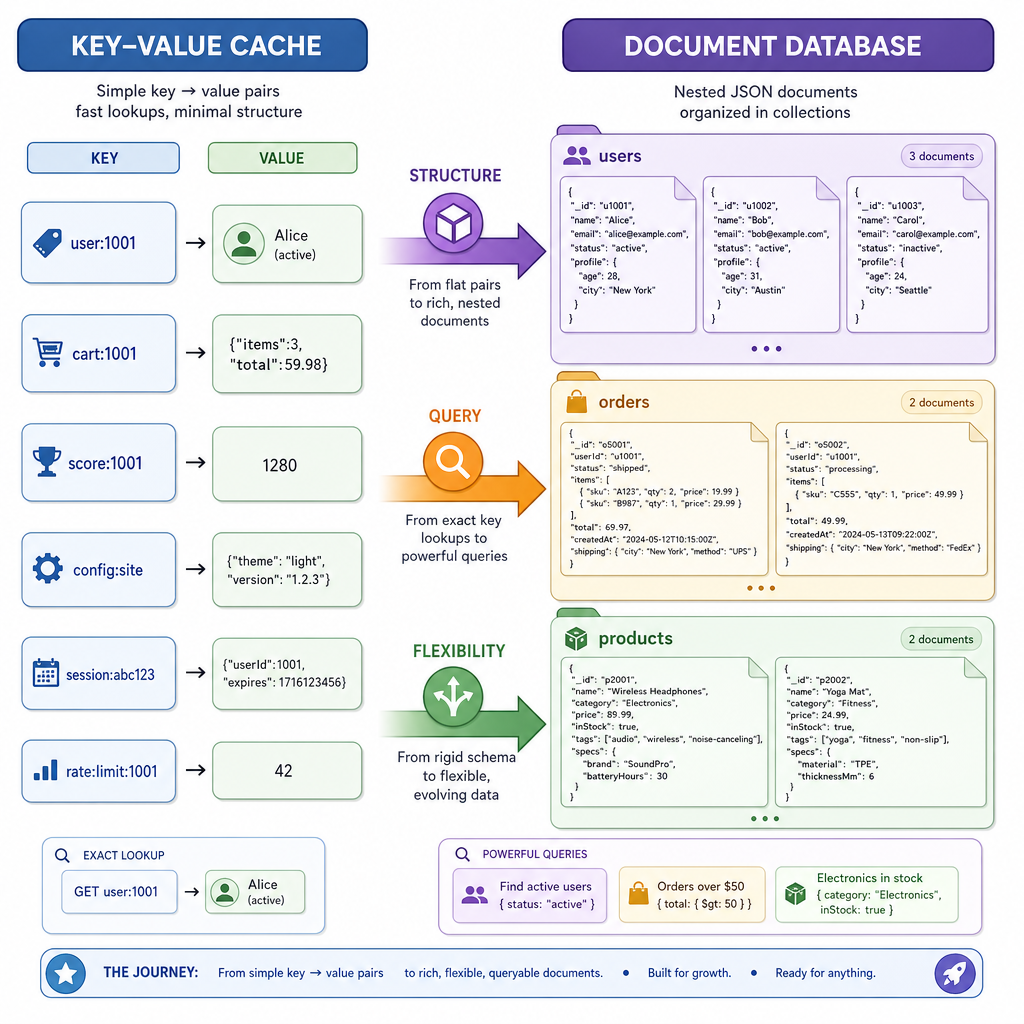
From keys to documents
In Designing a Simple Key-Value Store and Expanding Your Key-Value Store, we built around one core idea:
given a key, quickly retrieve a value.
That works beautifully for caches, sessions, counters, and simple lookup tables. But many real applications store objects with structure:
- users with nested settings
- trades with symbols, quantities, and timestamps
- AI experiment runs with flexible metadata
- invoices with line items
A document-oriented database keeps the developer-friendly feel of JSON while still giving us database-like operations: insert, retrieve, and query.
In this lesson, we'll build the first version of a MongoDB-like datastore in Python. We'll keep it intentionally small: in-memory collections, JSON-like dictionaries, generated IDs, and simple query matching. Next lesson, we'll make it more capable.
Document Mental Model
A document is a structured value
A document database stores records as JSON-like objects. In Python, our closest primitive is a dict:
- strings, numbers, booleans, and
None - nested dictionaries
- lists
- flexible fields from one document to another
A group of related documents is called a collection.
Database
└── collections
    ├── users
    │   ├── {'_id': 'u1', 'name': 'Ada', 'plan': 'pro'}
    │   └── {'_id': 'u2', 'name': 'Lin', 'risk': {'score': 72}}
    └── trades
        ├── {'_id': 't1', 'symbol': 'AAPL', 'qty': 10}
        └── {'_id': 't2', 'symbol': 'NVDA', 'qty': 3}
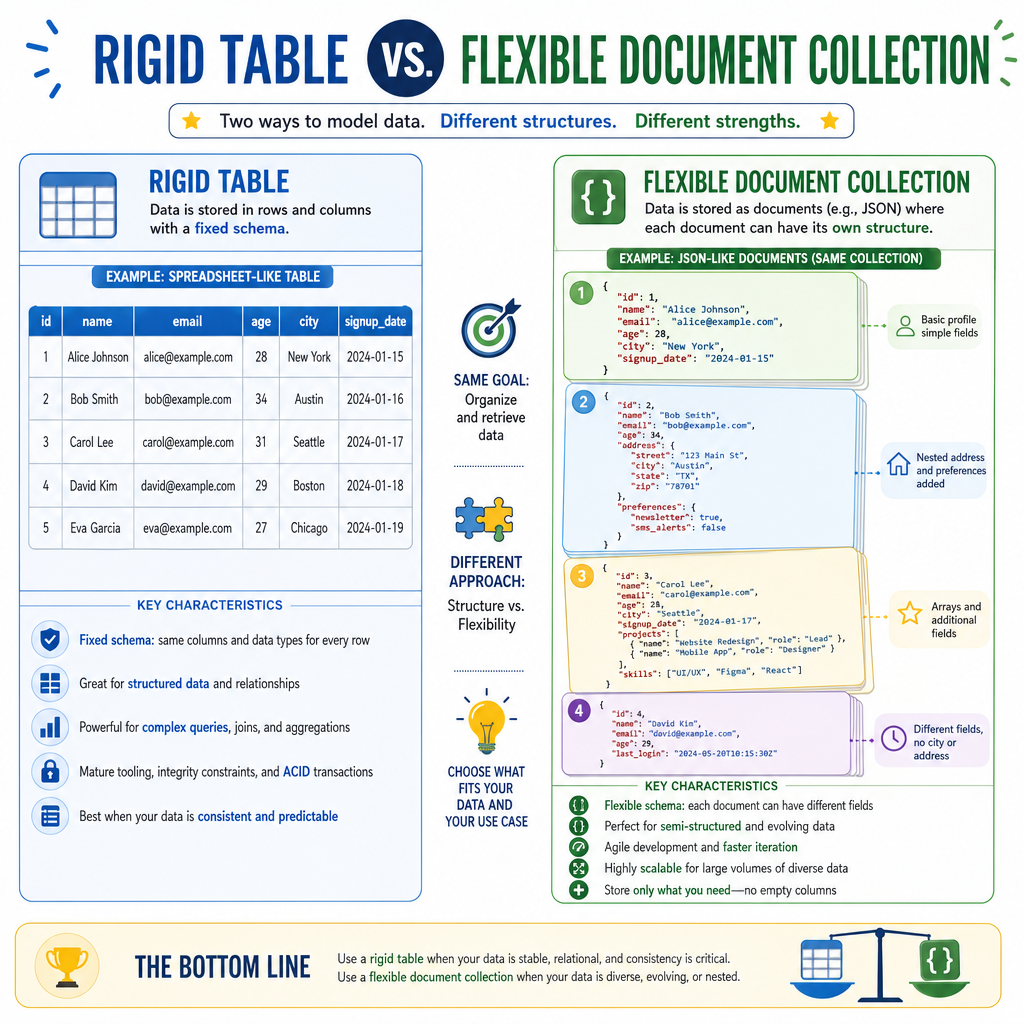
Unlike a relational table, documents in the same collection do not need identical fields. That flexibility is a major reason teams reach for MongoDB-style systems.
Our simple contract:
- Each document gets an
_id. - Documents live inside named collections.
- Queries match documents by field values.
Choose Documents
You are storing user profiles where each user may have different optional settings, nested preferences, and experiment metadata. Why might a document database be a better first fit than the simple key-value store we built earlier?
Insert And Retrieve
Start with collections
Just like our key-value store started with a Python dictionary, our document database can start with dictionaries and lists:
- database: maps collection name → collection
- collection: maps document
_id→ document - document: Python
dict
This gives us fast direct lookup by _id, similar to our earlier key-value store. The difference is that the value is now a structured document, not an opaque blob.
```python
from copy import deepcopy
from uuid import uuid4

class DocumentDB:
    def __init__(self):
        self.collections = {}

    def insert_one(self, collection, document):
        document = deepcopy(document)
        document.setdefault('_id', str(uuid4()))

        self.collections.setdefault(collection, {})
        self.collections[collection][document['_id']] = document
        return document['_id']

    def find_by_id(self, collection, doc_id):
        doc = self.collections.get(collection, {}).get(doc_id)
        return deepcopy(doc) if doc is not None else None


db = DocumentDB()
user_id = db.insert_one('users', {
    'name': 'Ada',
    'plan': 'pro',
    'prefs': {'theme': 'dark'}
})

print('created:', user_id)
print('loaded:', db.find_by_id('users', user_id))
```
Flexible Schemas
True or false: in a document-oriented database, every document in the same collection must have exactly the same fields.
Matching Documents
Querying means testing documents
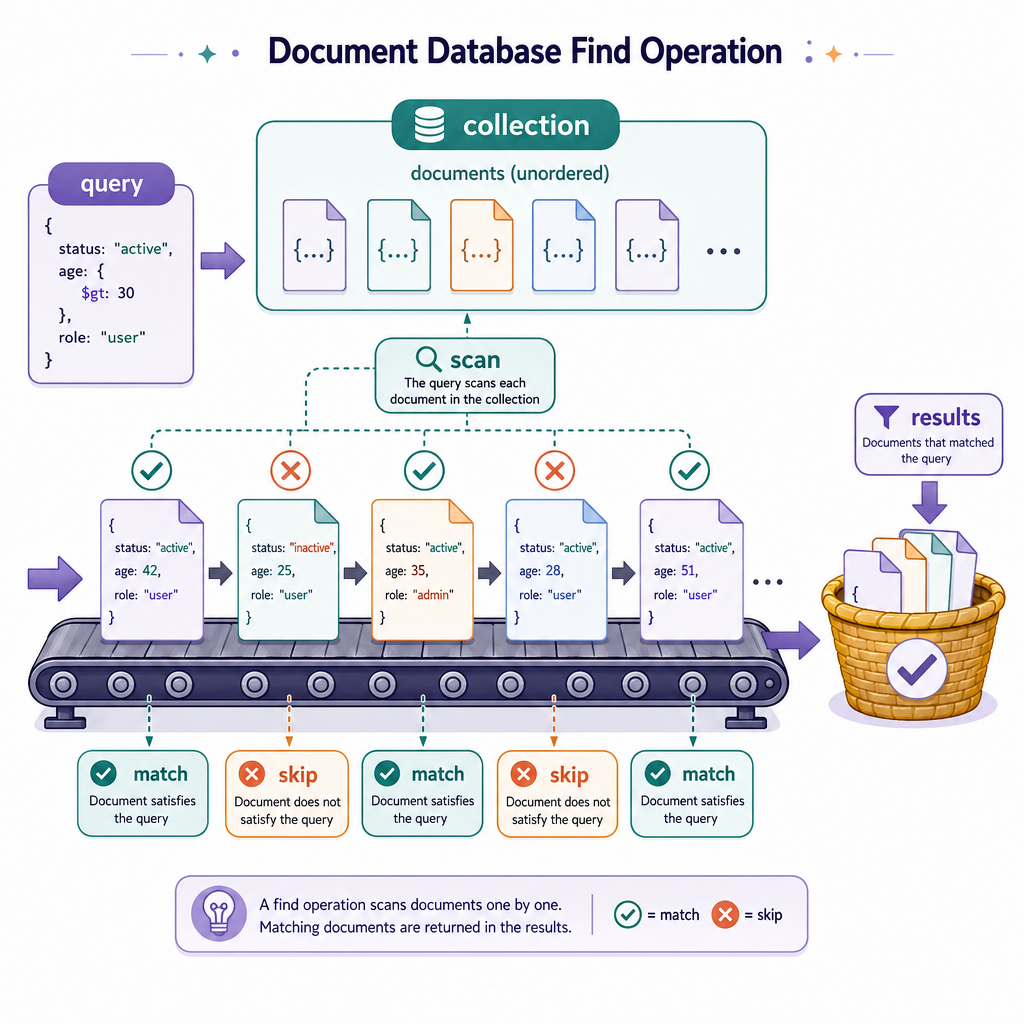
Without indexes yet, a simple query is a scan:
- Look at each document in the collection.
- Check whether it matches the query object.
- Return the matching documents.
We'll support equality matching and nested field access using dot paths like risk.score.
This is not MongoDB's full query language. It is the smallest useful version that teaches the core mechanism.
```python
def get_path(document, dotted_path):
    current = document
    for part in dotted_path.split('.'):
        if not isinstance(current, dict) or part not in current:
            return None
        current = current[part]
    return current


def matches(document, query):
    for field, expected in query.items():
        if get_path(document, field) != expected:
            return False
    return True


users = [
    {'name': 'Ada', 'plan': 'pro', 'risk': {'score': 82}},
    {'name': 'Lin', 'plan': 'free', 'risk': {'score': 72}},
    {'name': 'Grace', 'plan': 'pro', 'risk': {'score': 72}},
]

query = {'plan': 'pro', 'risk.score': 72}
results = [user for user in users if matches(user, query)]

print(results)
```
Identity Field
In our document database design, the field that uniquely identifies a document is called ____.
Scan Query Flow
What happens during find?
For this first version, find is intentionally direct:
query {'plan': 'pro'}
        │
        ▼
collection: users
        │
        ▼
scan each document
        │
        ├── match? yes → copy into results
        └── match? no  → skip
This has a cost: if there are n documents, a basic scan is O(n).
That is acceptable for a teaching implementation and even for small tools. Production document databases avoid scanning everything by using indexes, query planners, caching, and storage engines. We'll save those improvements for the next document-database lesson.
Query Cost
In the simple document database from this lesson, find checks each document in the target collection. If the collection contains n documents, what is the time complexity of this scan?
Tiny Document DB
Put the pieces together
Now we can wrap insertion, direct lookup, scanning queries, and deletion into one small class.
Notice the design continuity from the previous lessons:
- like the key-value store,
_idlookup is dictionary-based - unlike the key-value store, values are queryable documents
- unlike Redis-style cache behavior, we are focusing on document structure rather than TTL or eviction
This is a primitive but real document database surface.
```python
from copy import deepcopy
from uuid import uuid4

class TinyDocumentDB:
    def __init__(self):
        self.collections = {}

    def insert_one(self, collection, document):
        doc = deepcopy(document)
        doc.setdefault('_id', str(uuid4()))
        self.collections.setdefault(collection, {})[doc['_id']] = doc
        return doc['_id']

    def find_by_id(self, collection, doc_id):
        doc = self.collections.get(collection, {}).get(doc_id)
        return deepcopy(doc) if doc else None

    def find(self, collection, query=None):
        query = query or {}
        docs = self.collections.get(collection, {}).values()
        return [deepcopy(doc) for doc in docs if self._matches(doc, query)]

    def delete_one(self, collection, query):
        bucket = self.collections.get(collection, {})
        for doc_id, doc in list(bucket.items()):
            if self._matches(doc, query):
                del bucket[doc_id]
                return True
        return False

    def _matches(self, document, query):
        return all(self._get_path(document, field) == expected
                   for field, expected in query.items())

    def _get_path(self, document, dotted_path):
        current = document
        for part in dotted_path.split('.'):
            if not isinstance(current, dict) or part not in current:
                return None
            current = current[part]
        return current


db = TinyDocumentDB()
db.insert_one('trades', {'symbol': 'AAPL', 'side': 'buy', 'risk': {'desk': 'growth'}})
db.insert_one('trades', {'symbol': 'AAPL', 'side': 'sell', 'risk': {'desk': 'income'}})
db.insert_one('trades', {'symbol': 'NVDA', 'side': 'buy', 'risk': {'desk': 'growth'}})

print('growth trades:', db.find('trades', {'risk.desk': 'growth'}))
print('deleted one AAPL sell:', db.delete_one('trades', {'symbol': 'AAPL', 'side': 'sell'}))
print('remaining trades:', db.find('trades'))
```