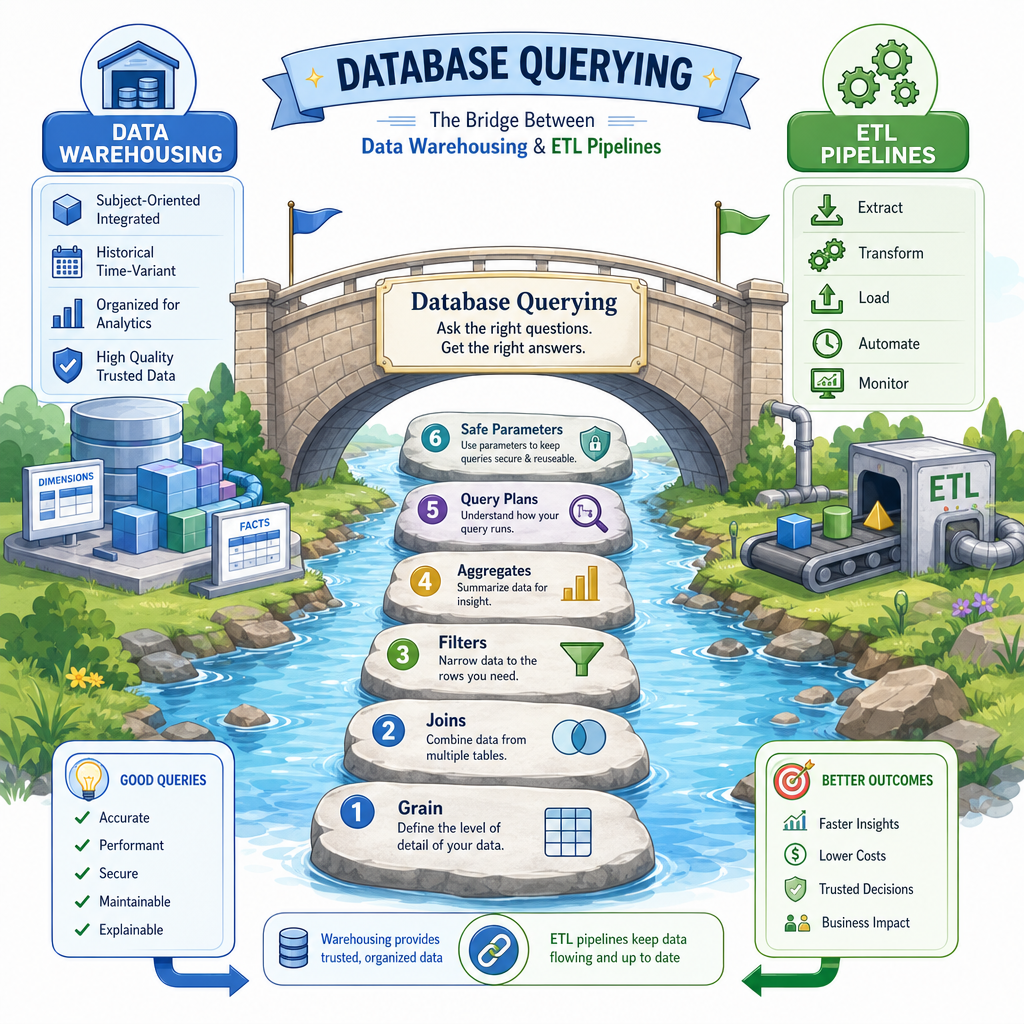
Database Querying
Read at your own pace. Code execution, quizzes, progress tracking, and the AI tutor are available in the interactive view with JavaScript enabled.
Querying The Warehouse
From modeled data to useful answers
In Data Warehousing, you learned how facts and dimensions give analytical data a dependable shape. Now we move one layer closer to day-to-day data engineering work: writing queries that are correct, readable, and efficient.
Database querying matters because many engineering tasks start with a question:
- Did yesterday's load produce the expected row counts?
- Which customers changed segments this month?
- Is a dashboard slow because the model is wrong, or because the query is expensive?
- Can we safely extract a subset of data for downstream use?
In this lesson, we will focus on practical SQL habits through Python-backed examples. We are not building full ETL pipelines yet; that comes next. For now, the goal is to query warehouse-style data with confidence.

Queries As Contracts
A query is more than text
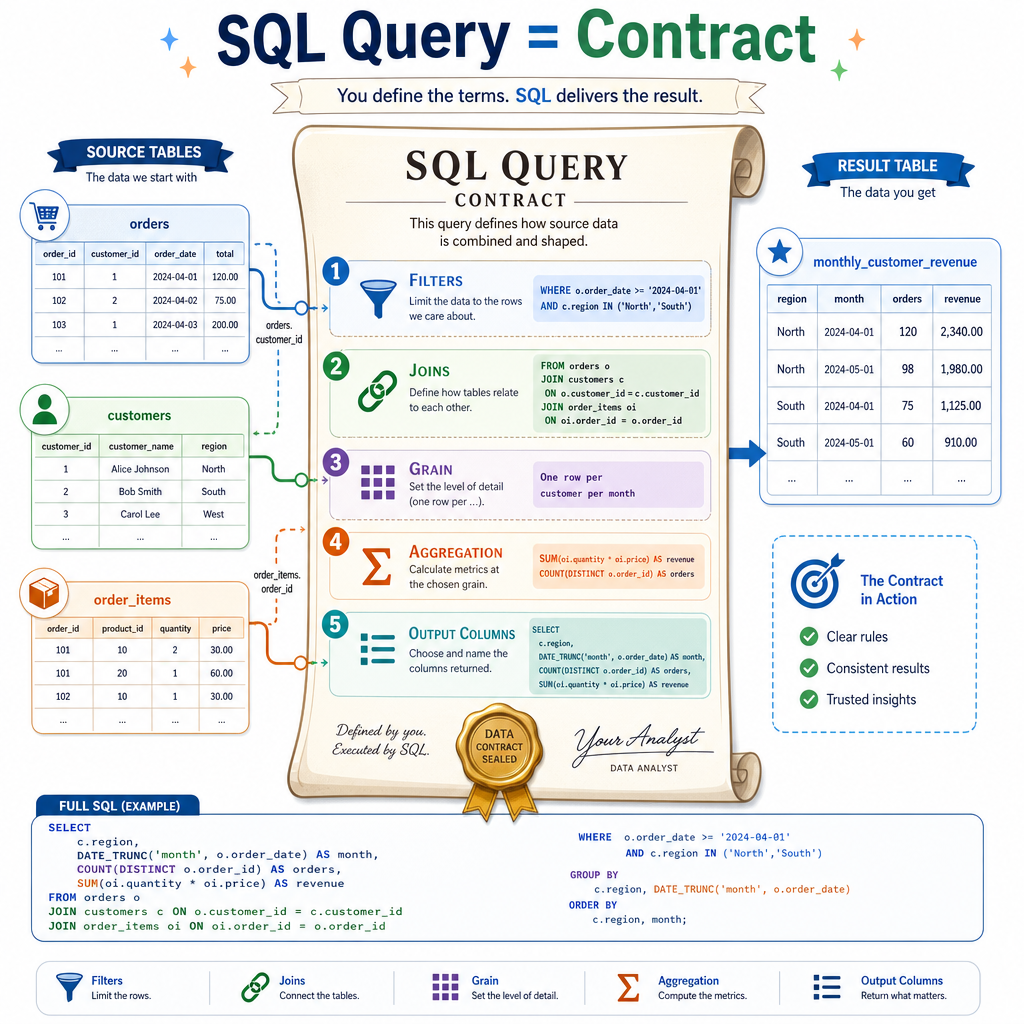
For a data engineer, a query is often a contract between stored data and an expected result.
A good query should be:
- Correct: returns the right rows and columns
- Stable: behaves predictably as data grows
- Readable: future engineers can audit and modify it
- Efficient enough: avoids unnecessary scans, joins, and shuffles
A useful mental model is:
source tables → filters → joins → grouping/windowing → result shape
When a query breaks, ask where the contract failed. Did the filter remove too much? Did the join multiply rows? Did aggregation happen at the wrong grain?
That word grain connects directly to the previous warehouse lesson: facts have a specific level of detail, and your query should respect it.
Join At Grain
Querying a mini star schema
Below is a tiny in-memory warehouse-style example. Notice the pattern:
- A fact table records events:
fact_orders - Dimension tables describe entities:
dim_customer,dim_product - The query joins dimensions to the fact table, then aggregates at a deliberate grain
The result answers: revenue by customer segment.
```python
import sqlite3

conn = sqlite3.connect(':memory:')
cur = conn.cursor()

cur.executescript('''
CREATE TABLE dim_customer (
    customer_id INTEGER PRIMARY KEY,
    customer_name TEXT,
    segment TEXT
);

CREATE TABLE dim_product (
    product_id INTEGER PRIMARY KEY,
    product_name TEXT,
    category TEXT
);

CREATE TABLE fact_orders (
    order_id INTEGER PRIMARY KEY,
    customer_id INTEGER,
    product_id INTEGER,
    quantity INTEGER,
    unit_price REAL,
    order_date TEXT
);
''')

cur.executemany(
    'INSERT INTO dim_customer VALUES (?, ?, ?)',
    [
        (1, 'Ada Co', 'Enterprise'),
        (2, 'Byte Shop', 'SMB'),
        (3, 'Core Labs', 'Enterprise')
    ]
)

cur.executemany(
    'INSERT INTO dim_product VALUES (?, ?, ?)',
    [
        (10, 'Notebook', 'Office'),
        (20, 'Monitor', 'Hardware')
    ]
)

cur.executemany(
    'INSERT INTO fact_orders VALUES (?, ?, ?, ?, ?, ?)',
    [
        (100, 1, 10, 3, 12.0, '2026-04-01'),
        (101, 1, 20, 1, 180.0, '2026-04-02'),
        (102, 2, 10, 10, 12.0, '2026-04-03'),
        (103, 3, 20, 2, 180.0, '2026-04-03')
    ]
)

query = '''
SELECT
    c.segment,
    ROUND(SUM(o.quantity * o.unit_price), 2) AS revenue
FROM fact_orders AS o
JOIN dim_customer AS c
    ON o.customer_id = c.customer_id
GROUP BY c.segment
ORDER BY revenue DESC;
'''

for row in cur.execute(query):
    print(row)
```
Choose The Grain
You need a query that returns one row per customer segment per month.
Which GROUP BY best matches that output grain?
Filtering Aggregates
WHERE vs HAVING
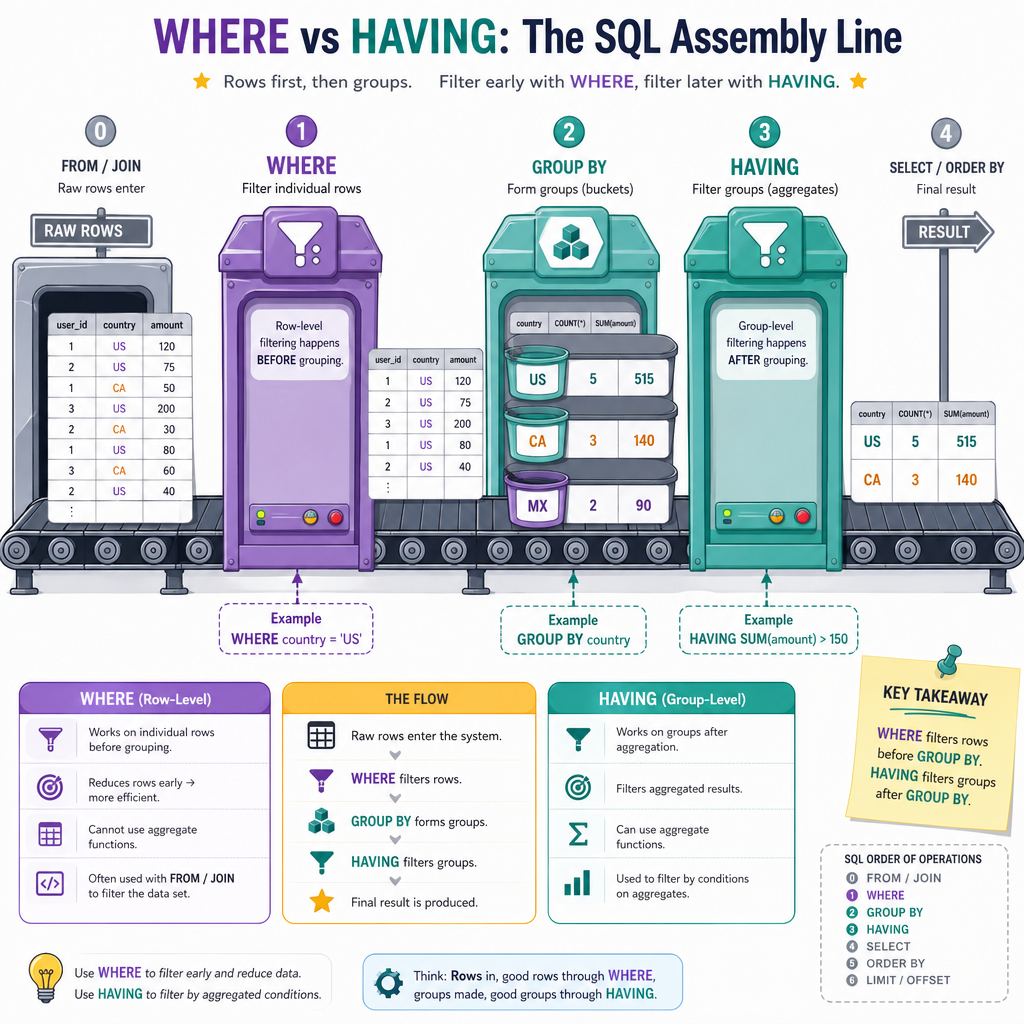
A common querying bug is filtering at the wrong phase.
Use WHERE to filter rows before aggregation.
Use HAVING to filter groups after aggregation.
-- Rows are filtered first
WHERE order_date >= '2026-04-01'

-- Groups are filtered after SUM is computed
HAVING SUM(quantity * unit_price) > 1000
This matters in warehouse queries because facts can be huge. A good WHERE clause can reduce the data early, while HAVING is for conditions that only make sense after grouping.
Think: WHERE limits input rows; HAVING limits output groups.
Aggregate Filter Keyword
Fill in the SQL keyword used to filter grouped results after aggregation:
SELECT segment, SUM(revenue)
FROM sales
GROUP BY segment
_____ SUM(revenue) > 1000;
Indexes And Plans
The database has a strategy
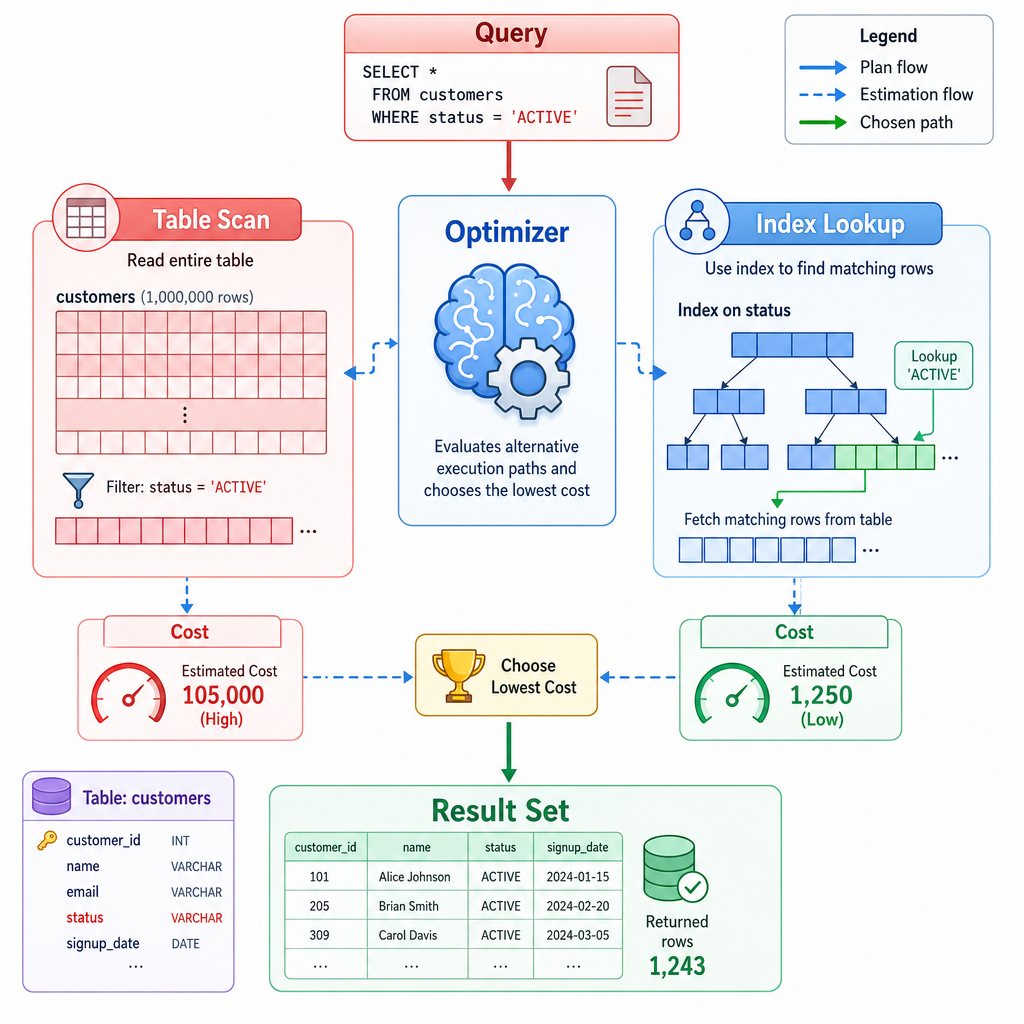
When you submit SQL, the database does not simply read it from top to bottom. It builds an execution plan: a strategy for accessing tables, applying filters, joining data, and returning results.
Two practical ideas:
- An index can help the database find matching rows without scanning every row.
- A query plan shows how the database expects to execute your query.
But indexes are not magic. They cost storage, must be maintained on writes, and may not help if your query returns a large portion of the table.
As a data engineer, you do not need to memorize every optimizer rule. You do need the habit of asking: is this query reading far more data than the result requires?
Index Reality Check
True or false:
Adding an index always makes every query faster.
Safe Query Parameters
Never build SQL with string concatenation
When Python code talks to a database, use query parameters instead of manually pasting values into SQL strings.
Parameters help with:
- Safety against SQL injection
- Correct quoting and escaping
- Cleaner separation between query structure and user/data values
The example below searches for customers in a segment using a parameterized query.
```python
import sqlite3

conn = sqlite3.connect(':memory:')
cur = conn.cursor()

cur.execute('CREATE TABLE customers (customer_id INTEGER, name TEXT, segment TEXT)')
cur.executemany(
    'INSERT INTO customers VALUES (?, ?, ?)',
    [
        (1, 'Ada Co', 'Enterprise'),
        (2, 'Byte Shop', 'SMB'),
        (3, 'Core Labs', 'Enterprise')
    ]
)

segment_to_find = 'Enterprise'

query = '''
SELECT customer_id, name
FROM customers
WHERE segment = ?
ORDER BY customer_id;
'''

rows = cur.execute(query, (segment_to_find,)).fetchall()
print('Enterprise customers:')
for row in rows:
    print(row)
```
Window Function Insight
Keep row detail while computing context
Aggregations collapse rows. Window functions let you keep row-level detail while adding calculated context.
For example, you might want every order row plus that customer's rank by order value. This is useful when debugging warehouse outputs because you can inspect individual facts and still see their relative position.
Window functions often use:
-
PARTITION BYto define groups -
ORDER BYto define ordering inside each group - A function like
RANK,ROW_NUMBER,SUM, orAVG
```python
import sqlite3

conn = sqlite3.connect(':memory:')
cur = conn.cursor()

cur.execute('''
CREATE TABLE orders (
    order_id INTEGER,
    customer_id INTEGER,
    amount REAL
)
''')

cur.executemany(
    'INSERT INTO orders VALUES (?, ?, ?)',
    [
        (1, 10, 120.0),
        (2, 10, 80.0),
        (3, 10, 220.0),
        (4, 20, 50.0),
        (5, 20, 140.0)
    ]
)

query = '''
SELECT
    order_id,
    customer_id,
    amount,
    RANK() OVER (
        PARTITION BY customer_id
        ORDER BY amount DESC
    ) AS customer_amount_rank
FROM orders
ORDER BY customer_id, customer_amount_rank;
'''

for row in cur.execute(query):
    print(row)
```
Querying In Practice
What to carry forward
Database querying is the bridge between warehouse design and reliable data movement.
Strong data engineers tend to ask these questions while writing SQL:
- What is the expected output grain?
- Are joins preserving or multiplying rows?
- Should this filter happen before or after aggregation?
- Is the query readable enough to debug later?
- Is the database doing unnecessary work?
- Are Python database calls parameterized safely?
In the next lesson, we will connect these querying skills to ETL Pipelines, where queries become repeatable steps in moving and transforming data.