ES6 Features
Read at your own pace. Code execution, quizzes, progress tracking, and the AI tutor are available in the interactive view with JavaScript enabled.
Why ES6 Matters
From working JavaScript to modern JavaScript
Now that you have covered Learning JavaScript Basics, wired interaction in DOM Manipulation, and pulled data with AJAX and Fetch API, you have the raw pieces of frontend work.
ES6 gives you the language tools that make those pieces easier to read, refactor, and review:
- clearer variable intent with
letandconst - less noisy functions with arrows
- cleaner data extraction with destructuring
- safer object and array copying with spread
- reusable files with modules
For a staff-level interview path, ES6 is not about trivia. It is about communicating intent quickly in code reviews, architecture discussions, and debugging sessions.

Bindings With Intent
let and const tighten scope
In Learning JavaScript Basics, we used the idea that bindings are not boxes. ES6 makes that idea more explicit.
Use:
-
constwhen the binding should not be reassigned -
letwhen the binding will be reassigned - avoid
varin modern frontend code unless maintaining legacy code
Important nuance: const protects the binding, not the contents of an object or array. A const object can still be mutated.
This distinction matters when rendering UI state: it is the difference between changing a property and pointing a name at a whole new object.
```javascript
const player = {
  name: 'Riley',
  score: 10
};

player.score += 5; // allowed: object contents changed
console.log('score after mutation:', player.score);

let round = 1;
round += 1; // allowed: binding reassigned
console.log('current round:', round);

if (true) {
  const clue = 'library key';
  console.log('inside block:', clue);
}

console.log('const keeps the binding stable, not the object frozen');
```
Const Check
You see this code in a review:
const episodes = [];
Which statement is accurate?
Arrow Function Fit
Arrows reduce ceremony and capture this
Arrow functions are excellent for short callbacks, especially when transforming arrays or continuing work inside another function.
Their most important behavioral difference: arrows do not create their own this. They close over this from the surrounding scope.
That is useful in methods that schedule work, such as timers, promises, or fetch follow-ups. It is not always what you want for DOM event handlers, where a regular function may intentionally receive this as the event target.
Staff-level habit: choose arrows for intent, not fashion.
```javascript
const scoreboard = {
  player: 'Nova',
  points: 40,
  awardBonus() {
    const add = () => {
      this.points += 10;
      console.log(`${this.player} now has ${this.points} points`);
    };

    add();
  }
};

scoreboard.awardBonus();
```
Arrow Listener Trap
True or false:
Arrow functions are always the best choice for DOM event listeners because they automatically bind this to the clicked element.
Destructure The Data
Pull out the pieces you mean
After AJAX and Fetch API, you have seen data arrive as objects and arrays. ES6 destructuring lets you name the pieces you need at the boundary.
Use destructuring when it makes code more direct:
- function parameters that expect object-shaped input
- extracting API response fields
- pulling the first few items from a list
Use rest and spread to separate or copy data without manual loops.
This is especially valuable in frontend code because UI layers often reshape data before rendering.
```javascript
const movieNight = {
  title: 'Neon Heist',
  year: 2026,
  cast: ['Ari', 'Mika', 'Sol'],
  ratings: { critics: 82, audience: 91 }
};

const {
  title,
  cast: [lead, ...supporting],
  ratings: { audience }
} = movieNight;

const upgradedCast = [lead, 'Guest Star', ...supporting];

console.log('title:', title);
console.log('lead:', lead);
console.log('audience score:', audience);
console.log('upgraded cast:', upgradedCast.join(', '));
```
Rest Parameter
Fill in the blank to collect all remaining arguments into an array named scores.
function total(label, ______) { return scores.reduce((sum, n) => sum + n, 0); }
Readable Construction
Templates, defaults, and shorthand
A lot of frontend code is construction work: labels, request payloads, view models, analytics events, and small configuration objects.
ES6 gives you concise tools for that:
- template literals for readable strings
- default parameters for predictable fallbacks
- object property shorthand when variable names match property names
- computed property names when keys are dynamic
These features look small, but they reduce noise in the exact places bugs like to hide.
```javascript
function createQuestCard(title, difficulty = 'normal') {
  const status = 'available';
  const key = `quest:${title.toLowerCase().replaceAll(' ', '-')}`;

  return {
    title,
    difficulty,
    status,
    [key]: true,
    label: `${title} (${difficulty})`
  };
}

const card = createQuestCard('Library Puzzle', 'hard');

console.log(card.label);
console.log(card['quest:library-puzzle']);
```
Modules And Classes
ES6 also changed code organization
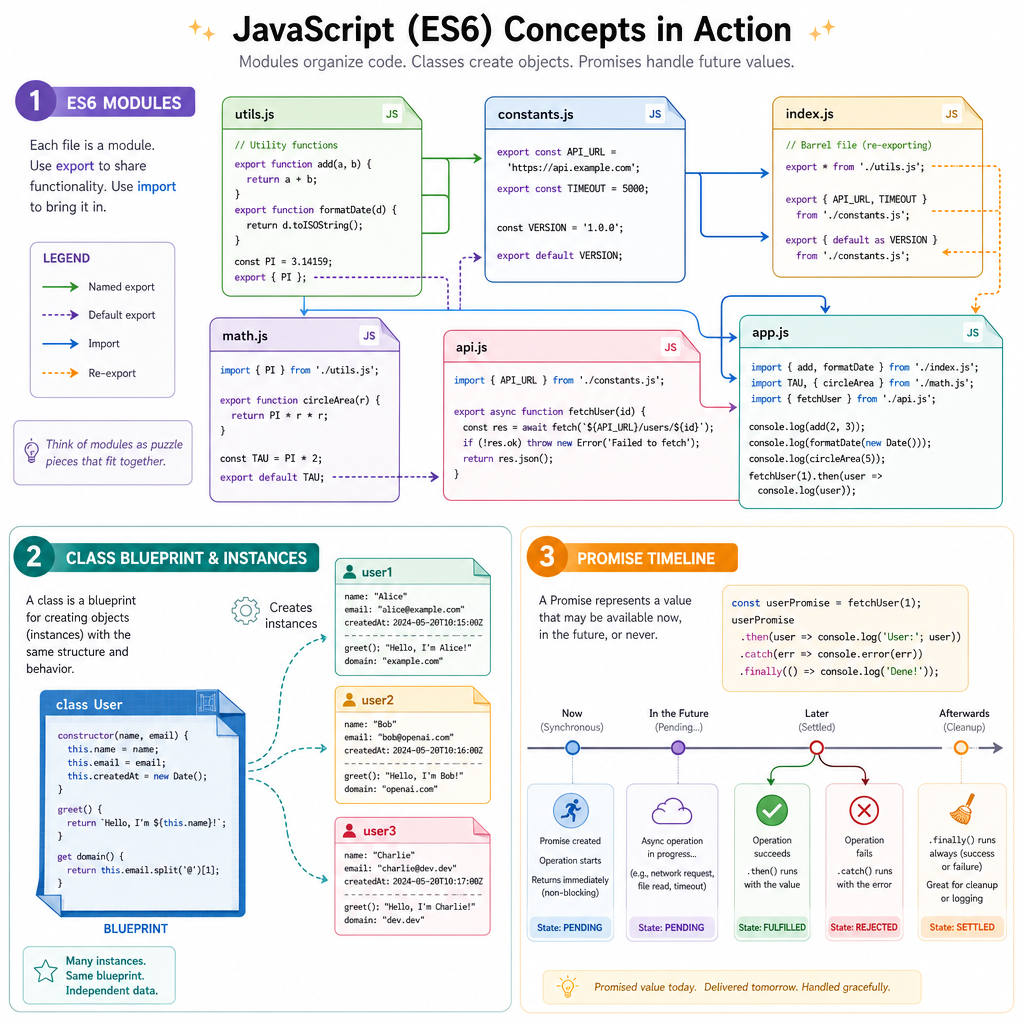
ES6 was not only syntax polish. It gave JavaScript a standard way to organize larger applications.
Modules
Modules let files explicitly share values:
-
exportsomething from one file -
importit in another file
This supports maintainable frontend architecture because dependencies become visible instead of hidden globals.
Classes
Classes provide cleaner syntax for constructor/prototype patterns. They are common in framework internals, libraries, custom elements, and interview discussions.
Promises
Promises became the native model for future values. You already touched this through fetch; ES6 is the reason that style is standardized.
We will keep the focus here on recognition and intent. Later course work will move back into page structure, styling, and deployment.
Import Match
Which export matches this import?
import { formatScore } from './score.js';
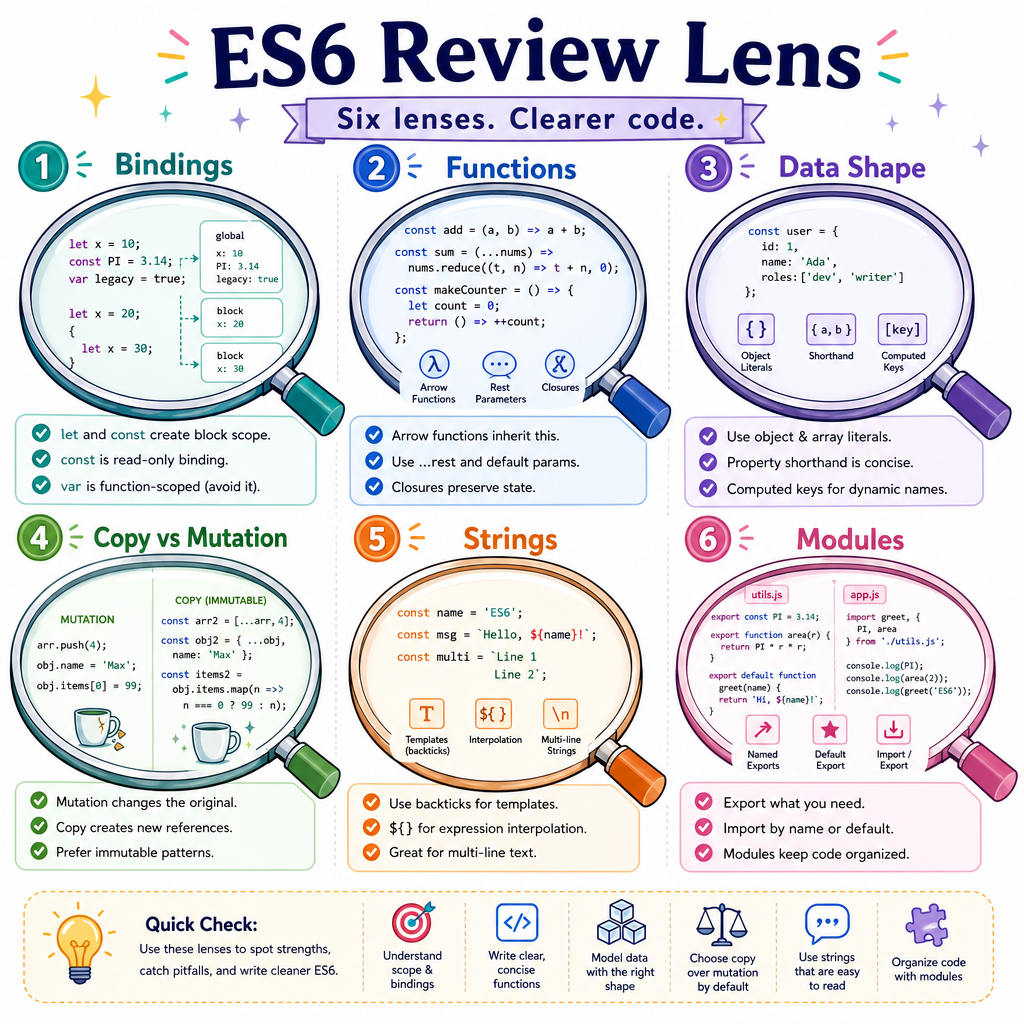
ES6 Review Lens
How to use ES6 like a senior engineer
When reviewing or writing modern JavaScript, ask:
-
Binding intent: should this be
const, or is reassignment part of the design? -
Function intent: is an arrow function clearer, or do we need a regular function's
this? - Data shape: would destructuring make the expected object structure obvious?
- Copy vs mutation: are spread/rest being used to avoid accidental shared changes?
- String construction: would a template literal make this easier to scan?
- File boundary: should this helper be exported instead of recreated?
ES6 is your readability upgrade. It makes the codebase feel less like a pile of clever snippets and more like a well-edited puzzle where every piece announces its role.
Next, we will shift from JavaScript language fluency into the visual layer with CSS Fundamentals.