File Handling and I/O operations
Read at your own pace. Code execution, quizzes, progress tracking, and the AI tutor are available in the interactive view with JavaScript enabled.
Why I/O Matters
Programs need conversations
So far, you've built up C++ from syntax to functions and object-oriented design. In OOP Advanced: Inheritance and Polymorphism, objects became flexible pieces of a larger system.
Now we give those systems a way to talk to the outside world:
-
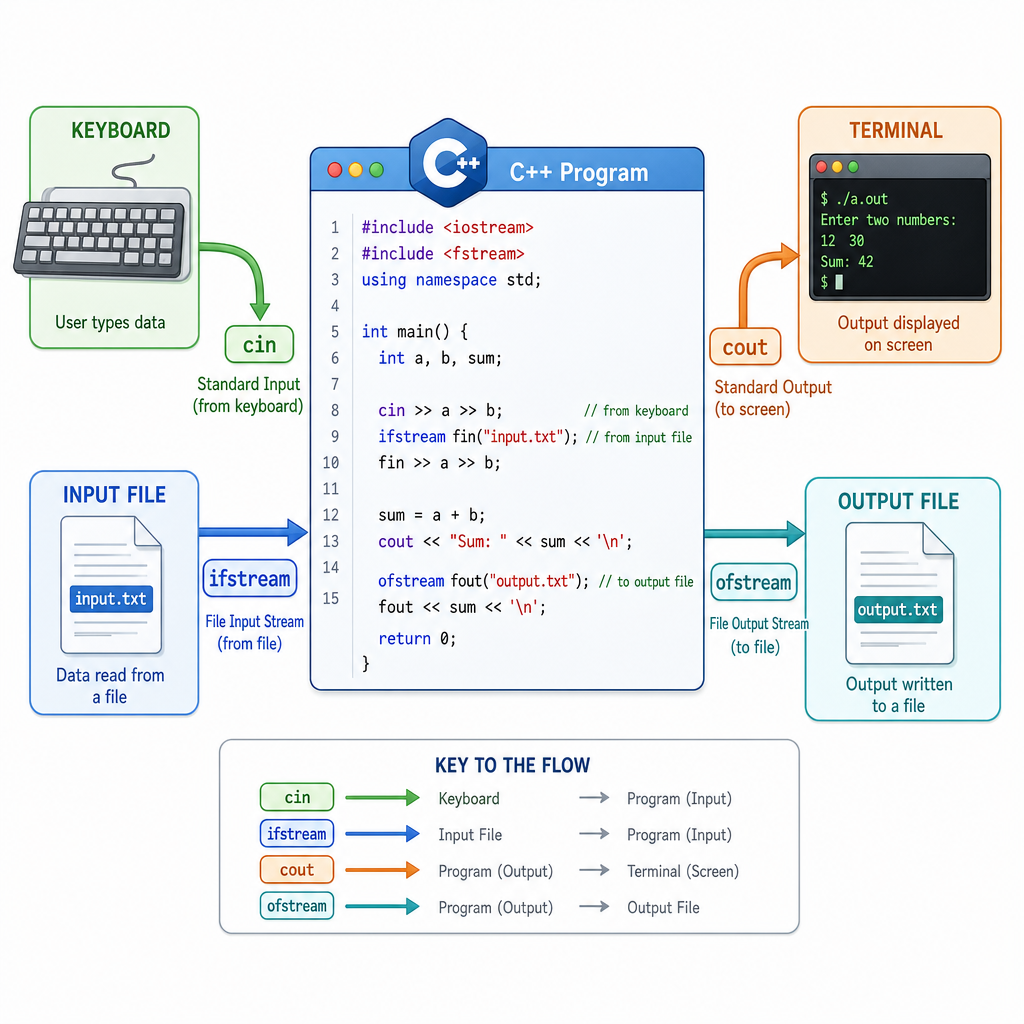
cinreceives input from the keyboard -
coutprints output to the terminal - file streams read and write persistent data
For web developers, this is like moving between request/response data and stored files. For finance or AI workflows, it is how a program might read transactions, logs, model inputs, or configuration files.
Console Streams
cin and cout
C++ uses streams for input and output. A stream is a flow of data moving from one place to another.
-
std::coutsends data to the console -
std::cinreceives data from the console -
<<inserts data into an output stream -
>>extracts data from an input stream
The operators may look unusual at first, but read them as arrows showing data movement.
```cpp
#include <iostream>
#include <string>

int main() {
    std::string traderName;
    int shares;
    double price;

    std::cout << "Enter trader name: ";
    std::getline(std::cin, traderName);

    std::cout << "Enter shares and price: ";
    std::cin >> shares >> price;

    double orderValue = shares * price;

    std::cout << "Trader: " << traderName << "\n";
    std::cout << "Order value: $" << orderValue << "\n";

    return 0;
}
```
Choose The Stream
You want to print the value of a variable to the terminal.
Which stream should you use?
Files Are Streams
Same idea, different destination
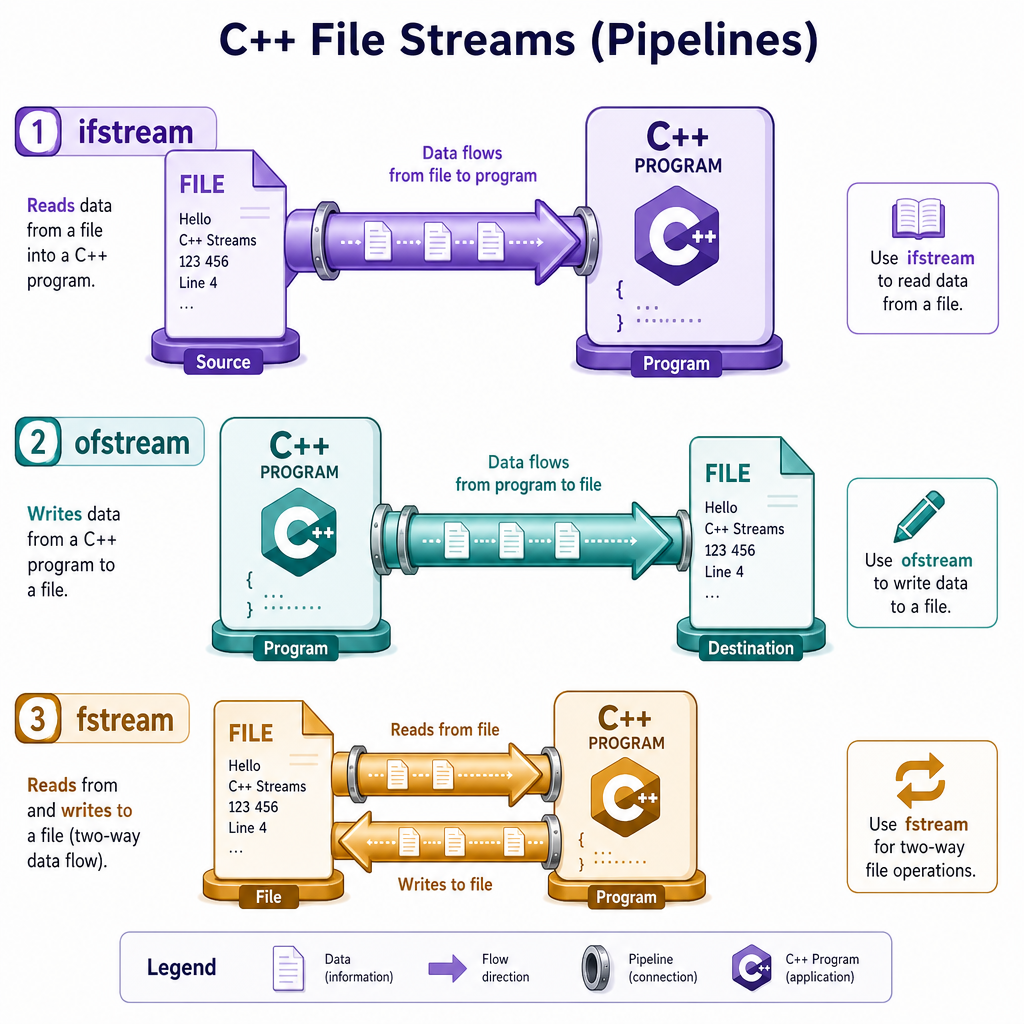
File I/O uses the same stream mental model as console I/O.
Instead of flowing between your program and the terminal, data flows between your program and a file.
Common file stream types:
-
std::ifstream— input file stream, used for reading -
std::ofstream— output file stream, used for writing -
std::fstream— can support both reading and writing
To use them, include the <fstream> header.
Writing A File
Create or overwrite output
An std::ofstream opens a file for writing. If the file does not exist, C++ will usually create it. If it already exists, the default behavior is to overwrite it.
This is useful for exporting reports, logs, generated data, or configuration files.
```cpp
#include <fstream>
#include <iostream>

int main() {
    std::ofstream outFile("portfolio.txt");

    outFile << "AAPL 10\n";
    outFile << "MSFT 5\n";
    outFile << "NVDA 2\n";

    if (outFile) {
        std::cout << "Wrote portfolio.txt successfully.\n";
    } else {
        std::cout << "Could not write to portfolio.txt.\n";
    }

    return 0;
}
```
Read Or Write
std::ifstream is primarily used to write data into a file.
Reading A File
Pull data back in
Reading from a file often looks like reading from cin: you extract values with >>.
A common pattern is:
- Open the file
- Check that it opened
- Read values in a loop
- Process each record
Here we create a small file first so the example is fully runnable.
```cpp
#include <fstream>
#include <iostream>
#include <string>

int main() {
    {
        std::ofstream seedFile("trades.txt");
        seedFile << "AAPL 10 175.25\n";
        seedFile << "MSFT 5 410.50\n";
        seedFile << "NVDA 2 900.00\n";
    }

    std::ifstream inFile("trades.txt");

    if (!inFile) {
        std::cout << "Could not open trades.txt.\n";
        return 1;
    }

    std::string symbol;
    int shares;
    double price;

    while (inFile >> symbol >> shares >> price) {
        std::cout << symbol << " position value: $"
                  << shares * price << "\n";
    }

    return 0;
}
```
Include The Header
Fill in the missing line needed to use std::ifstream and std::ofstream:
_____
Modes And Checks
Files can fail
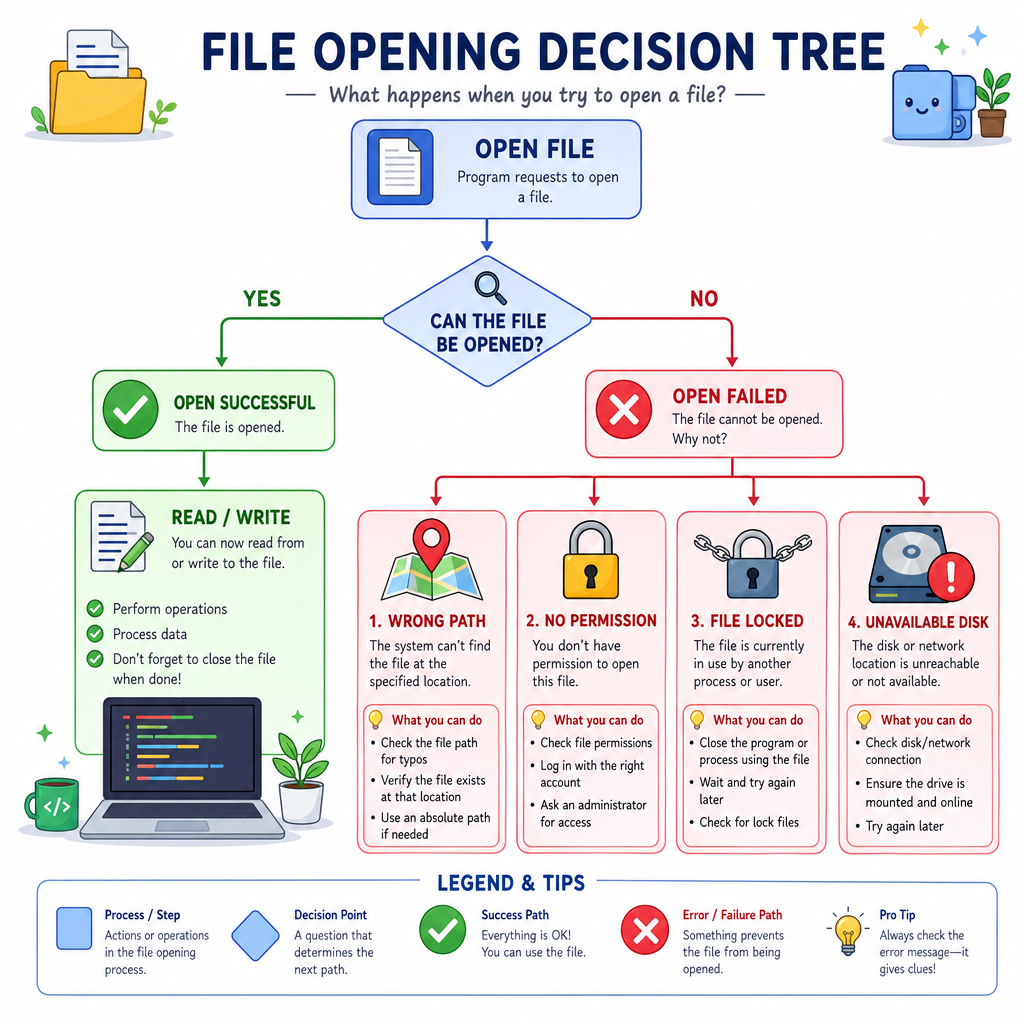
Unlike printing to the terminal, file operations depend on the operating system and filesystem.
A file might fail to open because:
- the path is wrong
- permissions are missing
- the disk is unavailable
- another process has locked the file
So check your stream before trusting it:
-
if (!inFile)means opening or reading failed -
if (outFile)means the stream is currently usable
You can also choose file modes:
-
std::ios::appappends instead of overwriting -
std::ios::truncclears existing contents -
std::ios::inopens for reading -
std::ios::outopens for writing
Next lesson, Exception Handling, will show another way to organize failure paths, but for now stream checks are the core habit.
I/O Foundation
What you can do now
You now have the basic tools for C++ programs that interact beyond their own memory.
You can:
- prompt users with
cout - collect typed input with
cin - write persistent output with
ofstream - read stored input with
ifstream - check whether file operations succeeded
This is a major step toward real applications: command-line tools, data processors, trading logs, AI dataset utilities, and system programs all rely on reliable I/O.
A useful practice project: write a small expense tracker that asks for category and amount, appends each entry to a file, then reads the file back to compute a total.