Front End Basics
Read at your own pace. Code execution, quizzes, progress tracking, and the AI tutor are available in the interactive view with JavaScript enabled.
Your Front-End Map
Welcome to the course
You already have 2 years of software engineering experience, so this lesson will not treat you like a total beginner. Instead, we will build a front-end mental model that helps you transition from support work into product engineering.
Front-end engineers turn product requirements into interfaces that are:
- Usable: people can complete tasks easily
- Reliable: the UI behaves correctly across states
- Performant: pages load and respond quickly
- Accessible: more people can use the product
- Maintainable: the codebase can evolve with the team
In this first lesson, we will focus on the browser, HTML, CSS, JavaScript’s role, and the core workflow. Later, we will go deeper into JavaScript and then connect DSA thinking to front-end problem solving.

Browser As Runtime
The browser is your front-end runtime
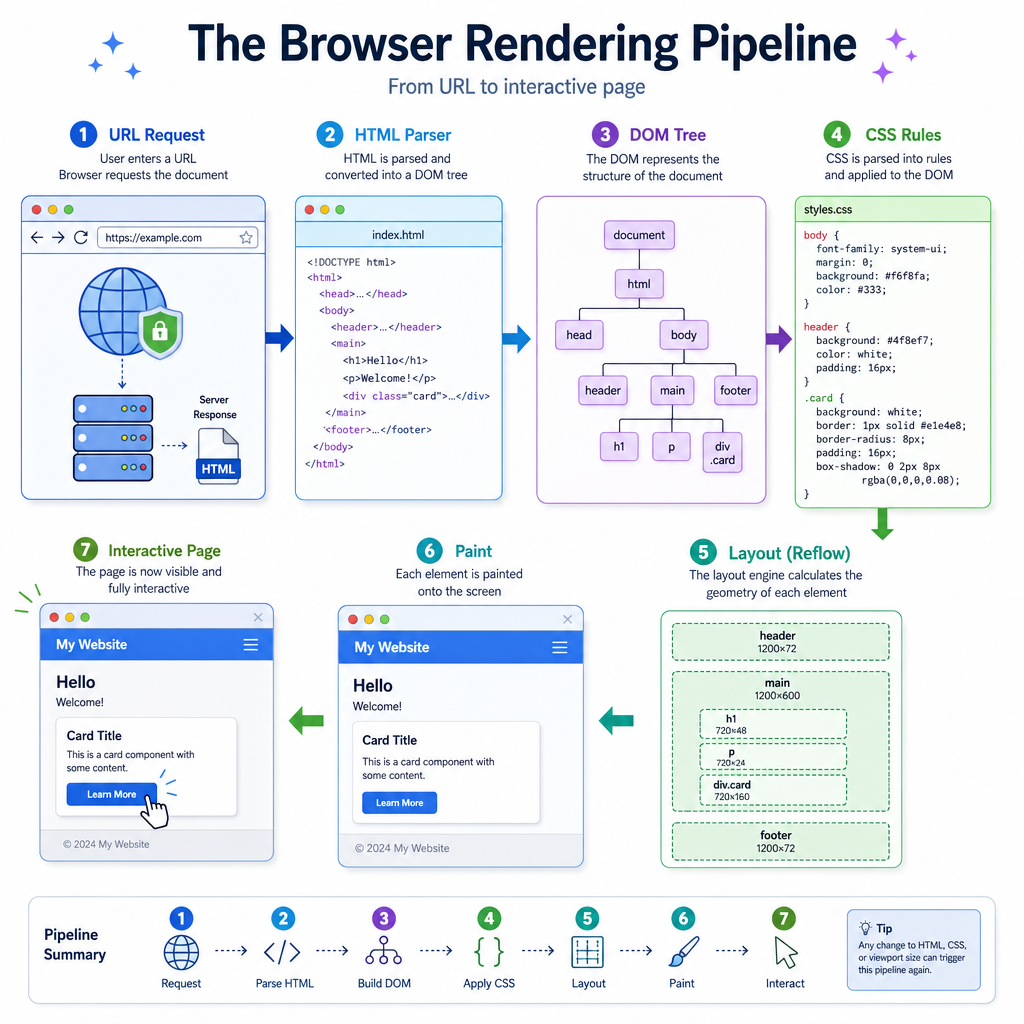
A front-end app does not run in isolation. It runs inside a browser, which provides the environment for loading, parsing, rendering, and interacting with web pages.
A simplified flow:
User enters URL
      ↓
Browser requests files
      ↓
HTML is parsed into DOM
      ↓
CSS is parsed into style rules
      ↓
Layout + paint happen
      ↓
JavaScript can react to events
The three foundational technologies work together:
Technology Main responsibility HTML Structure and meaning CSS Presentation and layout JavaScript Behavior and interactivityA strong front-end engineer understands not just how to write these files, but how the browser interprets them.
Client Server Loop
Front end talks to back end
Most product front ends are clients. They request data from servers, receive responses, and display useful UI.
At a high level:
Browser / Client  →  Request  →  Server
Browser / Client  ←  Response ←  Server
In real web development, this happens through HTTP APIs, often returning JSON. Since your course language is C++, here is a small simulation of the idea without going into networking details.
```cpp
#include <iostream>
#include <string>
using namespace std;

struct Request {
    string method;
    string path;
};

struct Response {
    int statusCode;
    string body;
};

Response handleRequest(const Request& req) {
    if (req.method == "GET" && req.path == "/profile") {
        return {200, "{ name: 'Aarav', role: 'Frontend Engineer' }"};
    }
    return {404, "{ error: 'Not Found' }"};
}

int main() {
    Request browserRequest{"GET", "/profile"};
    Response serverResponse = handleRequest(browserRequest);

    cout << "Client requested: " << browserRequest.path << endl;
    cout << "Server status: " << serverResponse.statusCode << endl;
    cout << "Response body: " << serverResponse.body << endl;

    return 0;
}
```
Structure Check
Which front-end technology is primarily responsible for describing the structure and meaning of a web page?
HTML Gives Meaning
HTML is not just tags
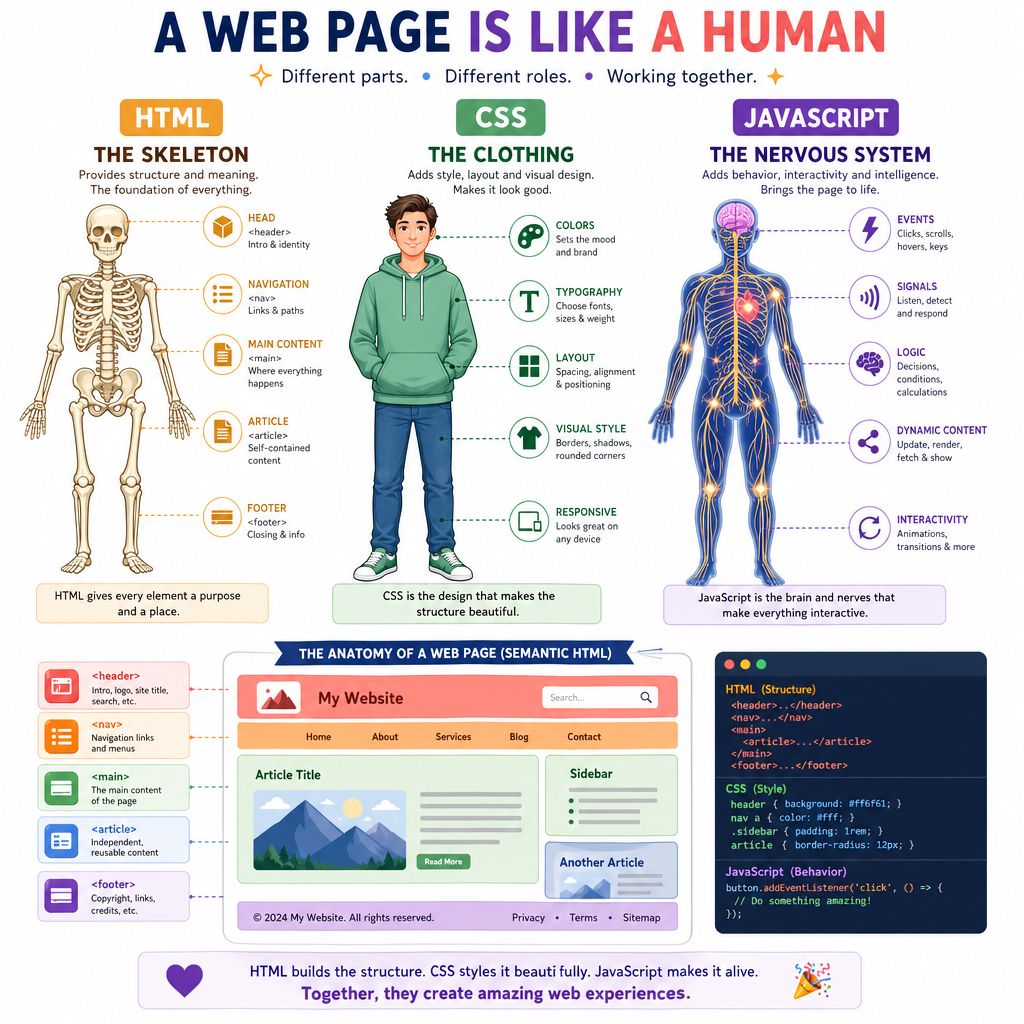
HTML defines the document structure that browsers, search engines, screen readers, and JavaScript can understand.
Good HTML answers questions like:
- What is the main heading?
- Which area is navigation?
- What content belongs inside an article?
- Which input is connected to which label?
This matters in product companies because semantic HTML improves:
- Accessibility for assistive technologies
- SEO and content discoverability
- Testing because meaningful elements are easier to target
- Maintainability because structure is clear
Think of HTML as the skeleton of the interface. If the skeleton is weak, styling and scripting become harder.
CSS Controls Presentation
CSS turns structure into layout
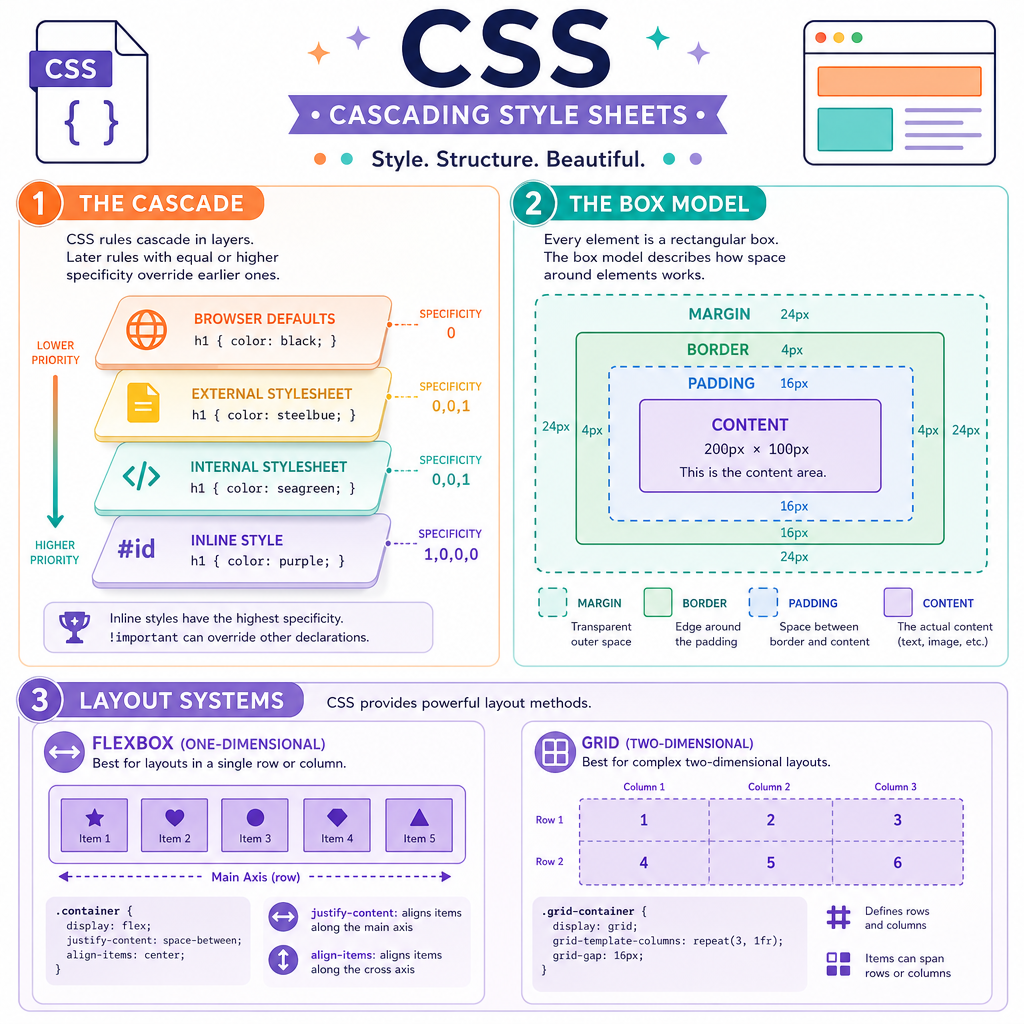
CSS controls how elements look and how they are arranged.
Important mental models:
1. Cascade
Multiple rules can target the same element. The browser decides which rule wins based on origin, importance, specificity, and order.
2. Box model
Most elements can be understood as boxes:
margin
  border
    padding
      content
3. Layout systems
Modern front-end work heavily uses:
- Flexbox for one-dimensional layout
- Grid for two-dimensional layout
- Responsive design for different screen sizes
For interviews and real projects, you do not need to memorize every CSS property first. You need a strong model of how layout decisions are made.
Looks Enough?
True or false: A front-end feature is complete once it looks correct on the developer’s laptop.
JavaScript Adds Behavior
JavaScript makes pages interactive
HTML gives structure. CSS gives presentation. JavaScript responds to change.
Common JavaScript responsibilities include:
- Reacting to user events like clicks, typing, and scrolling
- Reading and updating page state
- Requesting data from APIs
- Validating forms
- Updating the visible UI
We will go much deeper in JavaScript in Depth, but for now, understand this: front-end behavior is often about responding to events and updating state.
Here is a tiny C++ analogy for event handling.
```cpp
#include <iostream>
#include <functional>
using namespace std;

void simulateButtonClick(function<void()> onClick) {
    cout << "User clicks the button..." << endl;
    onClick();
}

int main() {
    int cartCount = 0;

    auto addToCart = [&]() {
        cartCount++;
        cout << "Item added. Cart count: " << cartCount << endl;
    };

    simulateButtonClick(addToCart);
    simulateButtonClick(addToCart);

    return 0;
}
```
DOM Blank
The browser’s object representation of an HTML document is called the _____.
Product Quality Mindset
Think like a product front-end engineer
In a product-based company, front-end work is not only about writing UI code. You are expected to reason about quality.
Before calling a feature done, ask:
- Does it handle loading, success, empty, and error states?
- Is it usable from a keyboard?
- Is the text readable and responsive?
- Does it avoid unnecessary delay?
- Is the code understandable for the next engineer?
This mindset will carry into the next lessons. JavaScript will give you deeper control over behavior, and DSA will strengthen your ability to reason about state, data transformations, and efficient UI logic.
Here is a simple C++ checklist model for thinking about front-end readiness.
```cpp
#include <iostream>
#include <vector>
#include <string>
using namespace std;

int main() {
    vector<pair<string, bool>> checklist = {
        {"Responsive layout", true},
        {"Keyboard accessible", true},
        {"Loading state handled", false},
        {"Error state handled", true},
        {"Readable code", true}
    };

    int passed = 0;
    for (const auto& item : checklist) {
        cout << item.first << ": " << (item.second ? "OK" : "Needs work") << endl;
        if (item.second) passed++;
    }

    cout << "Quality score: " << passed << "/" << checklist.size() << endl;

    return 0;
}
```