Git and Version Control
Read at your own pace. Code execution, quizzes, progress tracking, and the AI tutor are available in the interactive view with JavaScript enabled.
Why Git Now
From building pages to protecting work
In the last few lessons, you built up the core frontend surface area: JavaScript behavior, DOM updates, fetch-driven data, ES6 structure, and responsive CSS layouts.
Now we need the tool that lets real teams change all of that without chaos: Git.
Git is not just “saving files.” It is a history system for code decisions. For a staff-level frontend engineer, Git fluency matters because you will often need to:
- review risky UI changes before they ship
- explain why a change happened months later
- untangle regressions across JavaScript, CSS, and markup
- coordinate multiple engineers working on the same product
- keep experiments isolated until they are ready
Think of Git like the edit history behind a long-running game patch: every balance tweak, bug fix, and rollback needs a traceable story.

Commits Are Snapshots
Git records meaningful states
A Git commit is a saved snapshot of your project at a specific moment, plus metadata like:
- who made the change
- when it happened
- a message explaining why
- a pointer to the previous commit
The powerful idea is the pointer chain. Git can reconstruct history because each commit knows what came before it.
A simple history looks like this:
A --- B --- C
Where C is the current version, B is the previous version, and A is older still.
Here is a tiny JavaScript model of that idea.
```javascript
const commits = [
  { id: "a1", message: "Create responsive card layout", parent: null },
  { id: "b2", message: "Fetch book data from API", parent: "a1" },
  { id: "c3", message: "Fix mobile spacing regression", parent: "b2" }
];

const current = commits.at(-1);

console.log(`Current commit: ${current.id}`);
console.log(`Why it changed: ${current.message}`);
console.log(`Previous commit: ${current.parent}`);
```
Git Stores What
Which description best matches how Git thinks about project history?
Three Work Areas
Working tree → staging area → repository
Git has three important zones:
- Working tree: files you are currently editing
- Staging area: changes selected for the next commit
- Repository: committed history
This separation is subtle but important. You do not have to commit every edit you made. You can stage only the coherent part.
That is a staff-level habit: commits should tell a clean story, not just say “stuff I changed before lunch.”
For example, if you change a responsive layout and also start a fetch refactor, those may deserve separate commits because they answer different questions in code review.
```javascript
const workingTree = ["card.css", "api.js", "README.md"];
const staged = [];
const repository = [];

function stage(file) {
  staged.push(file);
}

function commit(message) {
  repository.push({ message, files: [...staged] });
  staged.length = 0;
}

stage("card.css");
commit("Improve card spacing on narrow screens");

console.log("Still edited but not committed:", workingTree.filter(file => file !== "card.css"));
console.log("History:", repository);
```
Saved Snapshot Name
Fill in the blank:
A saved Git snapshot with a message and a link to previous history is called a ______.
Branches Enable Experiments
Branches are movable labels
A branch is a named pointer to a commit. It lets you develop a change without immediately disturbing the main line of work.
Conceptually:
A --- B --- C   main
       \
        D --- E feature/search-ui
This is perfect for frontend work:
- try a new CSS Grid layout without breaking the existing page
- build a fetch-powered autocomplete flow separately
- spike an interaction idea, then abandon it if it gets messy
Branches are cheap, so teams use them constantly. The discipline is not “make branches”; it is “keep each branch focused.”
```javascript
const main = ["A: initial layout", "B: responsive cards", "C: fetch book list"];
const featureSearch = [...main, "D: add search input", "E: filter visible cards"];

console.log("main latest:", main.at(-1));
console.log("feature latest:", featureSearch.at(-1));
console.log("main stayed stable:", main.length === 3);
```
Branch Copies Files
True or false?
A Git branch is a complete duplicate folder of your project that Git copies every time you create a branch.
Remote Collaboration
Local history meets team history
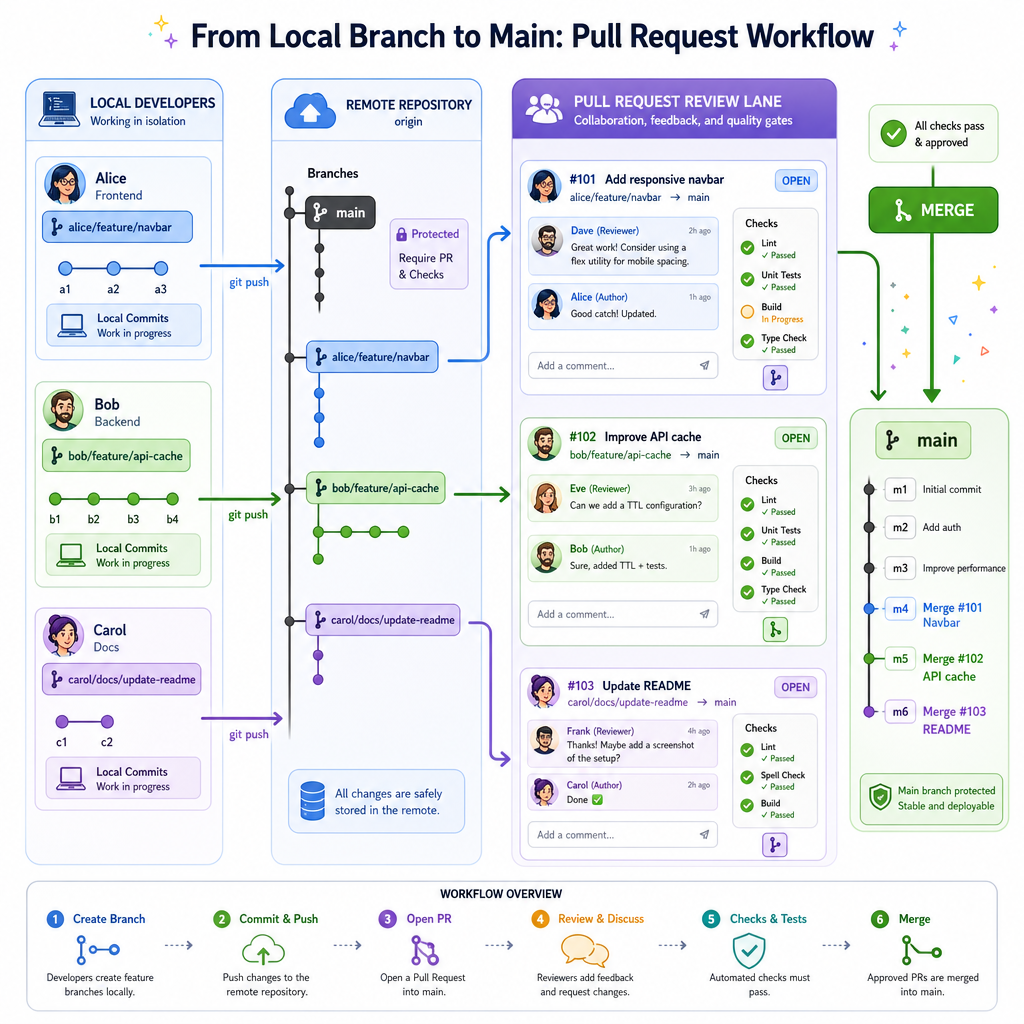
Git can run locally, but teams usually share history through a remote repository hosted on a platform like GitHub, GitLab, or Bitbucket.
Common collaboration flow:
- Create a focused branch
- Make small commits with clear messages
- Share the branch to the remote
- Open a pull request / merge request
- Discuss, review, test, and merge
The pull request is not just a gate. It is a conversation around intent, risk, tradeoffs, and maintainability.
For frontend work, reviewers may ask:
- Does this UI change preserve responsive behavior?
- Does the DOM update safely handle missing data?
- Does the fetch flow handle failures clearly?
- Does the CSS naming communicate component intent?
Notice how this connects back to earlier lessons: Git becomes the record of the engineering decisions behind those implementation choices.
Conflicts Are Signals
Merge conflicts are not moral failures
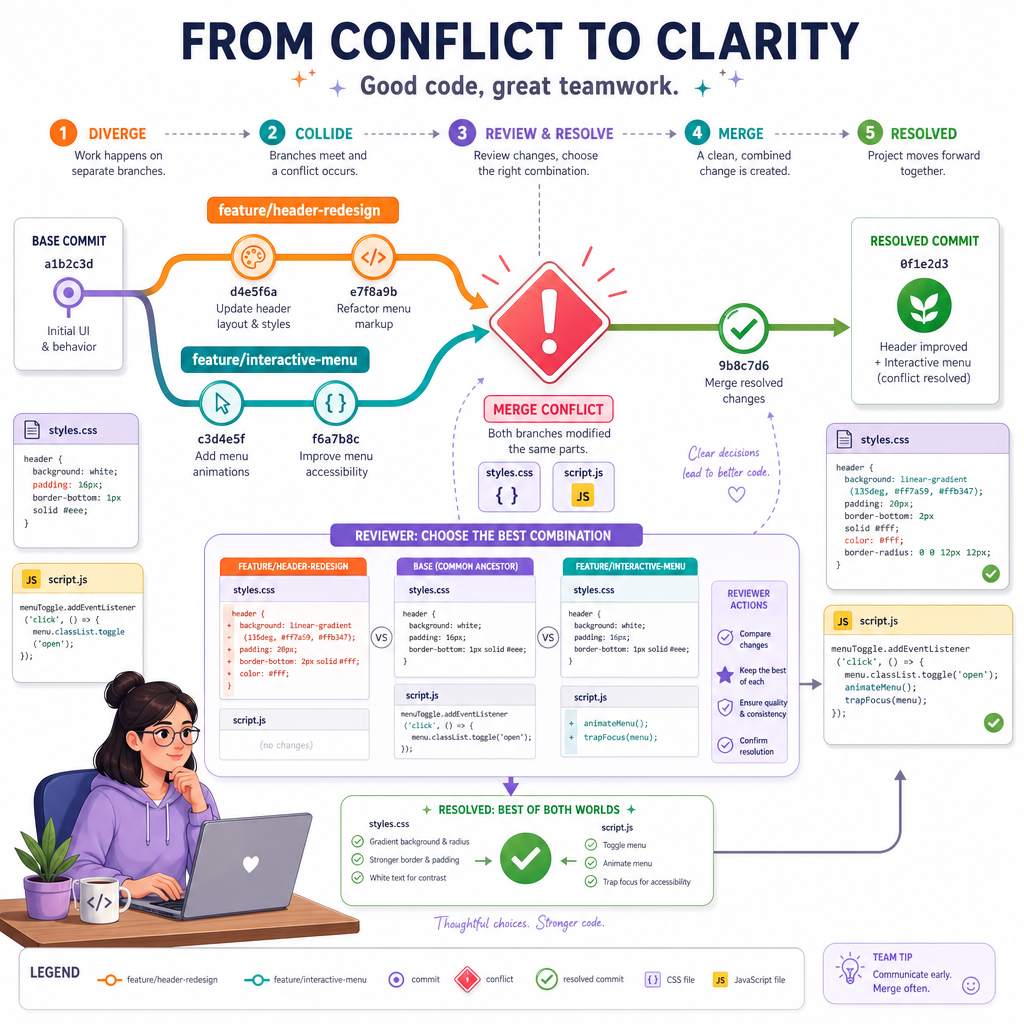
A merge conflict happens when Git cannot safely combine two changes by itself.
For example, two people may edit the same CSS rule or the same DOM-rendering function. Git pauses and asks a human to decide what the final version should be.
At senior and staff levels, the important skill is not just resolving the text conflict. It is asking:
- Did both changes intend to solve the same problem?
- Should one implementation replace the other?
- Do we need a small follow-up refactor?
- Should the team coordinate differently next time?
A conflict is like two reality TV contestants giving incompatible versions of the same event. Git does not pick a side. It hands you the footage and asks you to produce the final cut.
Commit Discipline
You fixed a mobile layout bug and also started rewriting an unrelated data-fetching helper. What is usually the best Git habit?