Google Dorks Cheat Sheet
Read at your own pace. Code execution, quizzes, progress tracking, and the AI tutor are available in the interactive view with JavaScript enabled.
Introduction
Google Dorks Cheat Sheet
A "Google dork" is a search string that uses advanced operators to find sensitive information that is not readily available on the open web. Learning Google dorks can help with penetration testing, security research, and more. This cheat sheet provides some handy Google dorks to get started.

Basic Search Operators
Basic Search Operators
These are some basic Google search operators that can be combined with keywords to refine results:
Operator Description Example" "
Search for an exact phrase
"password compromised"
*
Wildcard symbol
password *
OR
Either term A or B
password OR compromised
-
Exclude a term
password -compromised
..
Number range
login attempts ..100
Operator Stacking
Operator Stacking
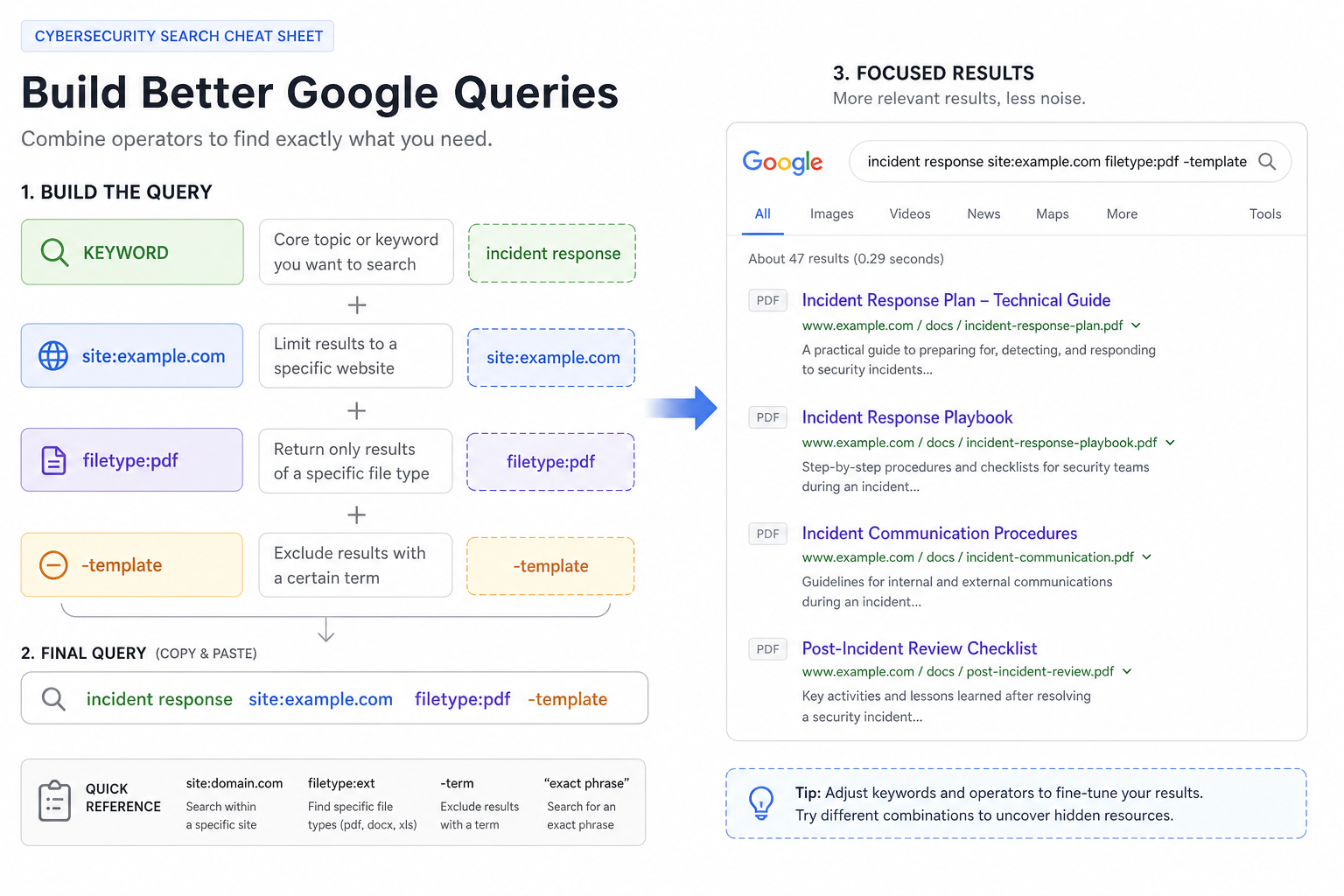
Google dorks become useful when you combine small operators into a focused query.
A safe pattern is:
Piece Purpose Example Keyword What you are looking forlogin
Scope
Where you are allowed to search
site:example.com
Type
What kind of result you want
filetype:pdf
Exclusion
What to leave out
-template
For example, during an authorized review of your own site, you might search:
site:example.com filetype:pdf "internal" -template
The key habit is to start with a clear, authorized scope before adding more specific operators.
Filetype Search
Filetype Search
Searching by filetype allows finding specific kinds of documents:
filetype:pdffiletype:docfiletype:xlsfiletype:ppt-
filetype:txt
Can be combined with other search terms, e.g. api key filetype:txt
Scope Check
Which query best limits the search to PDF files on an authorized domain?
Operator Match
Which operator searches for text inside the URL of a page?
Fill in the blank: _____________
Site Search
Site Search
Use site: to restrict results to a particular site:
site:example.comsite:example.com password-
site:*.example.com- search all subdomains
Intitle and Inurl
Intitle and Inurl
-
intitle:- search page titles -
inurl:- search page URLs
For example:
-
intitle:"index of" inurl:"wp-config.php"
Link and Cache Searches
Link and Cache Searches
-
link:example.com- find pages linking to the site -
cache:example.com- find Google's cached pages for the site
Login Page Search
Login Page Search
Many login pages follow similar naming conventions and can be found with:
inurl:signininurl:logininurl:adminintitle:"login page"
Database Searches
Database Searches
Find exposed databases:
-
intitle:"index of" db filetype:config dbpasswdfiletype:env DB_PASSWORD
Document Searches
Document Searches
Find sensitive documents:
filetype:pdf secret -site:gov -site:.edu-
filetype:doc confidential -site:gov -site:.edu
Security Searches
Security Searches
Find misconfigured servers and software:
intext:"sql syntax near" -gitlab -githubintitle:"index of" intext:id_rsaintitle:"index of" intext:id_dsafiletype:pem intext:private
Custom Date Ranges
Custom Date Ranges
Use custom date ranges to find recent data:
-
password leak after:2018/01/01 breach since:last week
Google Dorks Give You Power
Google Dorks Give You Power
With the right search techniques, you can leverage Google to uncover all kinds of useful information. Use these Google dorks carefully and ethically! Let me know if you need any clarification or have additional questions.
One Pager Cheat Sheet
One Pager Cheat Sheet
- A Google dorks cheat sheet is a guide for using search strings that utilize
advanced operatorsto locate sensitive information not readily available, useful for tasks likepenetration testingandsecurity research. - Basic Google search operators include " " for
exact phrase,*forwildcard substitution,ORforeither/or,-toexclude a term, and..to indicate anumber range. - Stack operators by combining keyword, scope, filetype, and exclusions.
- Searching by
filetypeallows users to find specific kinds of documents, which can be combined with other search terms. - Use
site:first when you need to keep a dork inside an approved target. -
inurl:searches URLs;intitle:searches page titles. - Use the
site:operator in a search to restrict results to a specific site or subdomain. - The
intitle:andinurl:search operators are used to search page titles and URLs, respectively, with examples beingintitle:"index of"andinurl:"wp-config.php". - The
link:example.comcommand helps to find pages linking to the site, whilecache:example.comis used to find Google's cached pages for the site. - Many login pages can be found using similar naming conventions such as
inurl:signin,inurl:login,inurl:admin, andintitle:"login page". - Search for exposed databases by using
technical search termslikeintitle:"index of" db,filetype:config dbpasswd, andfiletype:env DB_PASSWORD. - Use the
filetype:pdf secret -site:gov -site:.eduandfiletype:doc confidential -site:gov -site:.educommands to find sensitive documents. - The document offers various search parameters to locate misconfigured servers and software using
technical termslikeintext:"sql syntax near",intitle:"index of" intext:id_rsa,intitle:"index of" intext:id_dsa, andfiletype:pem intext:private. - You can use custom date ranges to find recent data, using
technical termslikepassword leak after:2018/01/01orbreach since:last week. - Using Google dorks, one can uncover useful information with the right search techniques, but must use these tools carefully and ethically.