Grouping and Capturing
Read at your own pace. Code execution, quizzes, progress tracking, and the AI tutor are available in the interactive view with JavaScript enabled.
Why Groups Matter
From matching to extracting
In Anchors and Boundaries, you learned how to pin a match to the right location. Before that, Quantifiers and Alternation gave you control over how much and which alternatives can match.
Now we add a key regex skill: grouping and capturing.
Groups let you:
- Treat several tokens as one unit
- Extract only the part of a match you care about
- Reuse matched text later in the same pattern
- Build cleaner feature-extraction pipelines in Python
For an intermediate Python learner, this is where regex becomes less like search and more like structured parsing.
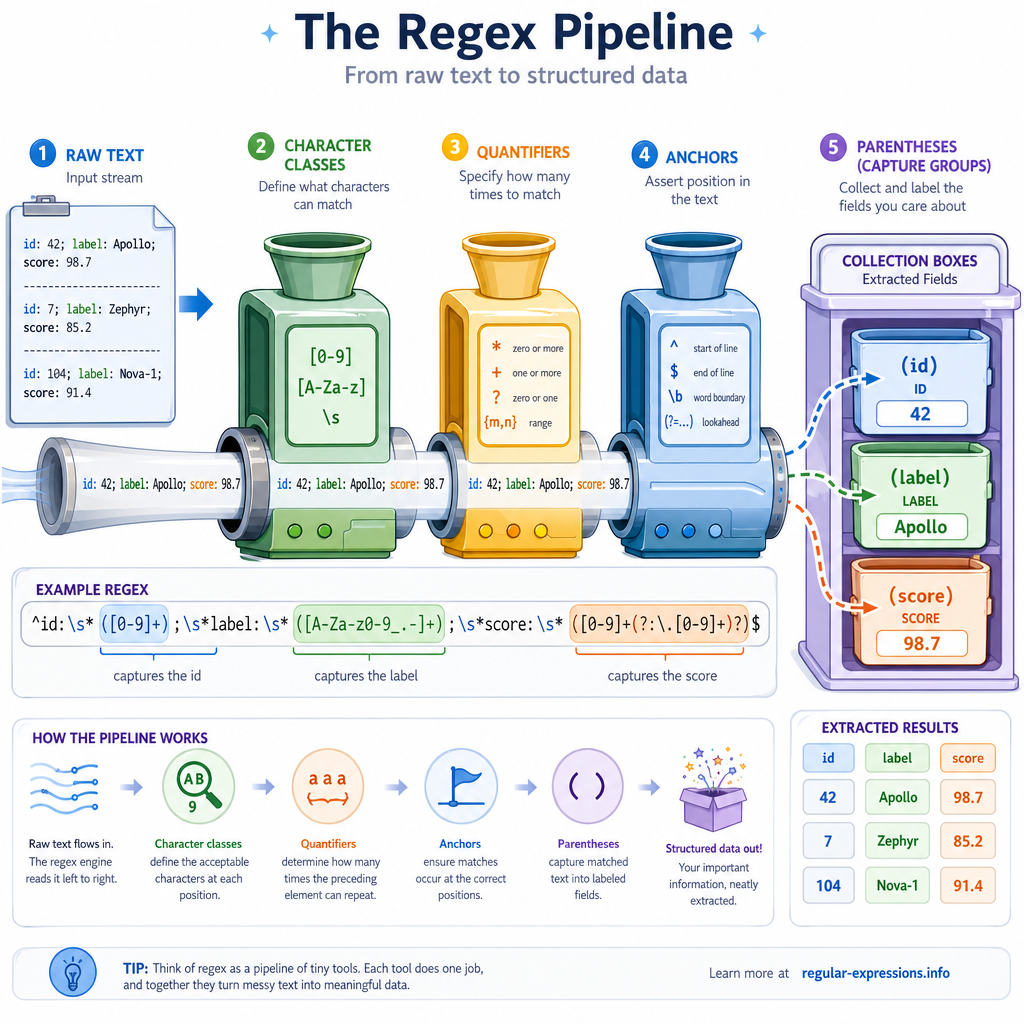
Capturing With Parentheses
Parentheses create memory
A pair of parentheses (...) does two jobs:
- Groups a subpattern so regex treats it as one unit
- Captures the text matched by that subpattern
Python exposes captured text through the match object you met in Introduction to Regular Expressions.
In this example, the full match is the whole metric string, while each group extracts a useful field.
```python
import re

line = 'epoch=12 loss=0.084 accuracy=0.973'
pattern = r'epoch=(\d+) loss=([\d.]+)'

match = re.search(pattern, line)

print('Full match:', match.group(0))
print('Epoch:', match.group(1))
print('Loss:', match.group(2))
print('All captured groups:', match.groups())
```
Choose The Capture
You want to extract the numeric value from this text:
loss=0.084
Which pattern captures only 0.084 as group 1?
Group Numbering Rules
Groups count from left to right
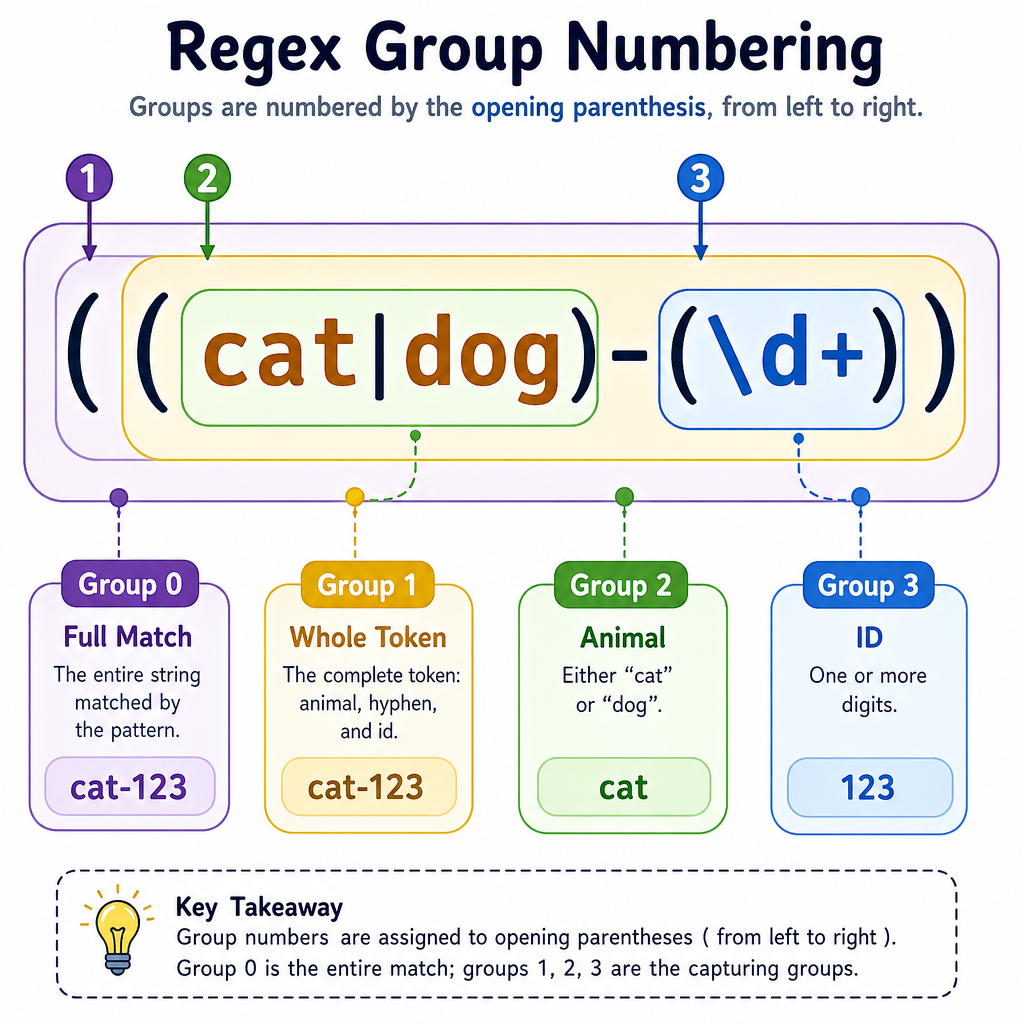
Python numbers capturing groups by the order of their opening parentheses.
Important rules:
-
group(0)is always the entire match -
group(1)is the first captured group -
group(2)is the second captured group - Nested groups still count by opening parenthesis order
Example pattern:
((cat|dog)-(\d+))
Numbering:
((cat|dog)-(\d+))
12         3
So if the text is dog-42:
- Group 0:
dog-42 - Group 1:
dog-42 - Group 2:
dog - Group 3:
42
This matters when your pattern grows. A small extra pair of capturing parentheses can shift every later group number.
Group Index Check
In Python regex, after a successful match, match.group(__) returns the second captured group.
Fill in the blank: _____________
Named Captures
Prefer names when meaning matters
Numbered groups are compact, but they can become fragile as patterns evolve.
Python supports named capturing groups:
(?P<name>...)
This is especially useful in data-cleaning and machine-learning workflows, where extracted fields often become structured records or model features.
Instead of remembering whether confidence is group 2 or 3, you can ask for confidence directly.
```python
import re

line = 'prediction: label=cat confidence=0.97'
pattern = r'label=(?P<label>\w+) confidence=(?P<confidence>[\d.]+)'

match = re.search(pattern, line)

print('Label:', match.group('label'))
print('Confidence:', match.group('confidence'))
print('As dictionary:', match.groupdict())
```
Parentheses Always Change?
True or false: Adding parentheses around a subpattern always changes which text the regex matches.
Noncapturing Groups
Group without storing
Sometimes you need parentheses for structure, but you do not want a captured group.
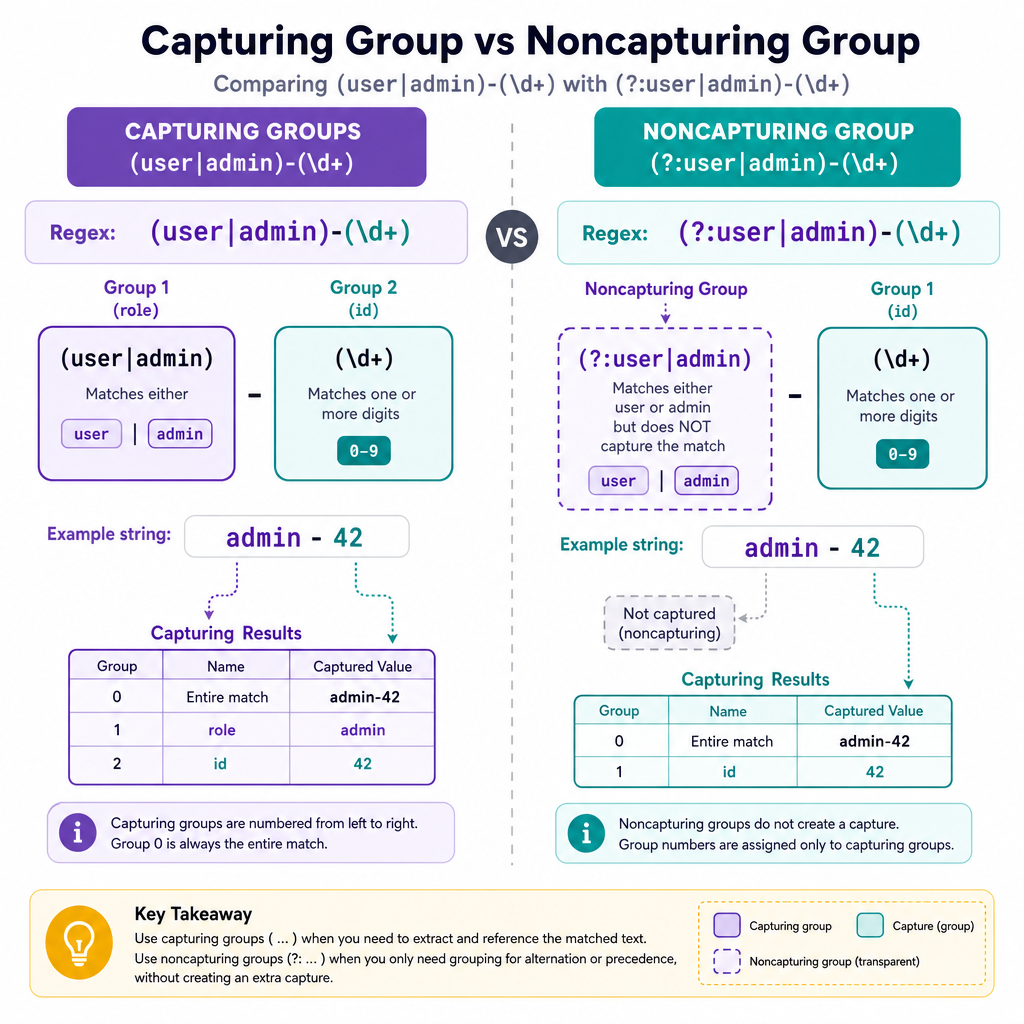
Use a noncapturing group:
(?:...)
This is useful when combining tools from earlier lessons:
- Group alternatives from Quantifiers and Alternation
- Apply a quantifier to multiple tokens
- Avoid shifting numbered capture groups
Compare:
(user|admin)-(\d+)      # captures role and id
(?:user|admin)-(\d+)    # captures only id
Both can match admin-42, but the second pattern keeps group numbering simpler.
Capture The Version
You have text like:
model-v2.7
You want group 1 to be exactly v2.7. Which pattern is best?
Extraction Workflow
Groups turn text into records
A strong practical pattern is:
- Write a regex that matches one complete record
- Capture the fields you need
- Convert each match into a Python dictionary
That gives you structured data that can feed validation scripts, analytics jobs, or ML preprocessing steps.
Next, we will add modifiers and lookaround tools that make these patterns more flexible without always consuming extra text.
```python
import re

text = '''
id=101 label=spam confidence=0.98
id=102 label=ham confidence=0.87
id=103 label=spam confidence=0.91
'''

pattern = re.compile(
    r'id=(?P<id>\d+)\s+label=(?P<label>\w+)\s+confidence=(?P<confidence>[\d.]+)'
)

records = []
for match in pattern.finditer(text):
    record = match.groupdict()
    record['id'] = int(record['id'])
    record['confidence'] = float(record['confidence'])
    records.append(record)

for record in records:
    print(record)
```