Hash Tables
Read at your own pace. Code execution, quizzes, progress tracking, and the AI tutor are available in the interactive view with JavaScript enabled.
Why Hash Tables
From connections to instant lookup
In Graphs, you used adjacency lists to quickly find a node's neighbors. That idea depended on a bigger pattern: storing data so the next question is cheap.
A hash table is the data structure behind that kind of speed. It stores values by key, so instead of scanning an array item by item, you can often jump directly to what you need.
You'll use hash tables for:
- counting frequencies
- checking if something was seen before
- grouping records by an ID
- fast lookup in easy and medium interview problems
JavaScript gives you hash-table-like tools through Map, Set, and objects. Today we'll focus on how they behave and when to reach for them.

Key Value Thinking
The mental model
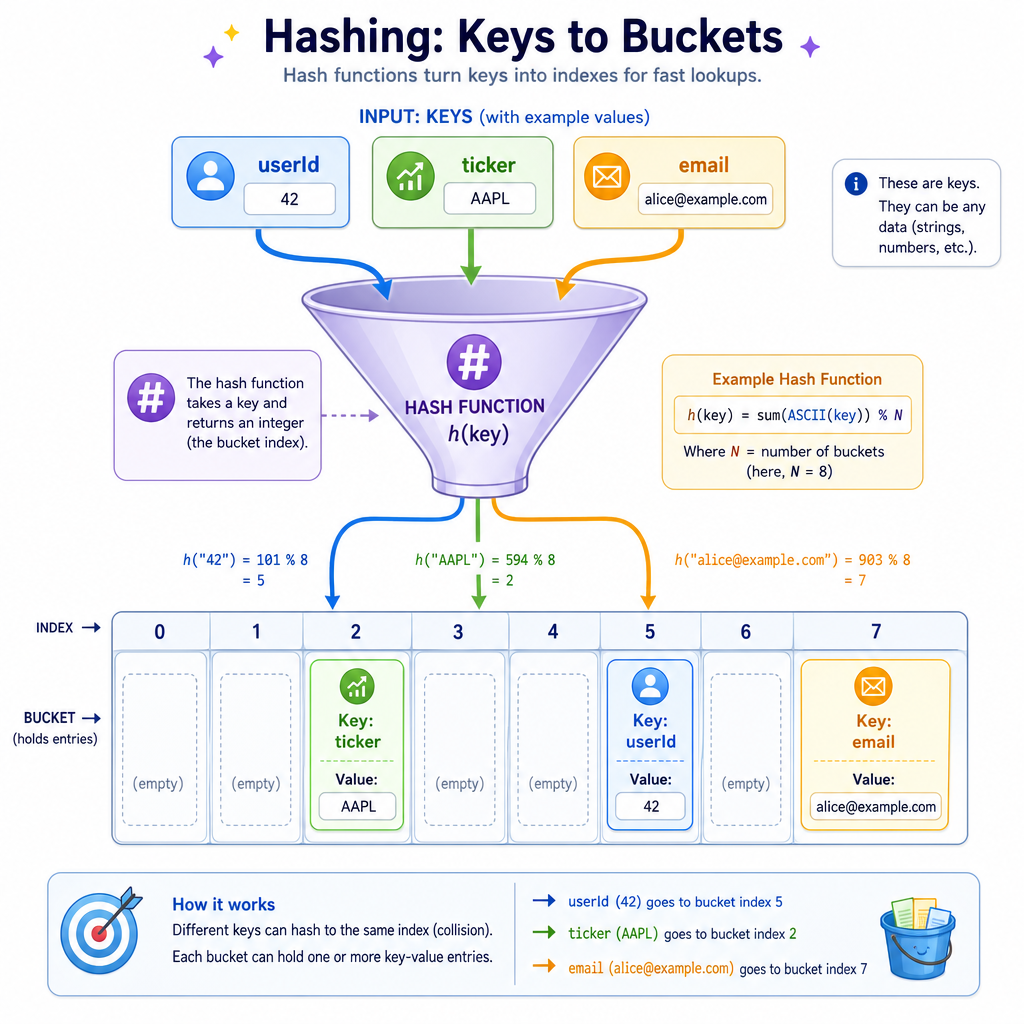
A hash table stores data as key → value pairs.
"AAPL"  →  193.25
"MSFT"  →  420.10
"GOOG"  →  171.90
The key is passed through a hash function, which converts it into an array index behind the scenes.
key        hash function       bucket index
"AAPL"  ---------------->     4
So instead of asking, "Where in this list is AAPL?" we ask, "What bucket does AAPL belong in?"
That is why hash tables are often described as having average O(1) insert, lookup, and delete operations.
Map And Set
JavaScript's practical tools
For most algorithm problems in JavaScript, prefer:
-
Mapwhen you need key → value storage -
Setwhen you only need to know whether a value exists
Map is usually clearer than using a plain object for algorithmic lookup because it supports any key type and has helpful methods like .has(), .get(), and .set().
Here is a small example using both.
```javascript
const prices = new Map();

prices.set("AAPL", 193.25);
prices.set("MSFT", 420.10);
prices.set("GOOG", 171.90);

console.log("AAPL price:", prices.get("AAPL"));
console.log("Has TSLA?", prices.has("TSLA"));

const visited = new Set();
visited.add("AAPL");
visited.add("MSFT");
visited.add("AAPL"); // duplicate ignored

console.log("Visited count:", visited.size);
console.log("Visited symbols:", [...visited]);
```
Lookup Speed Check
You need to repeatedly check whether a customer ID has already appeared in a stream of records.
Which structure is usually the best fit?
Collisions Happen
Same bucket, different keys
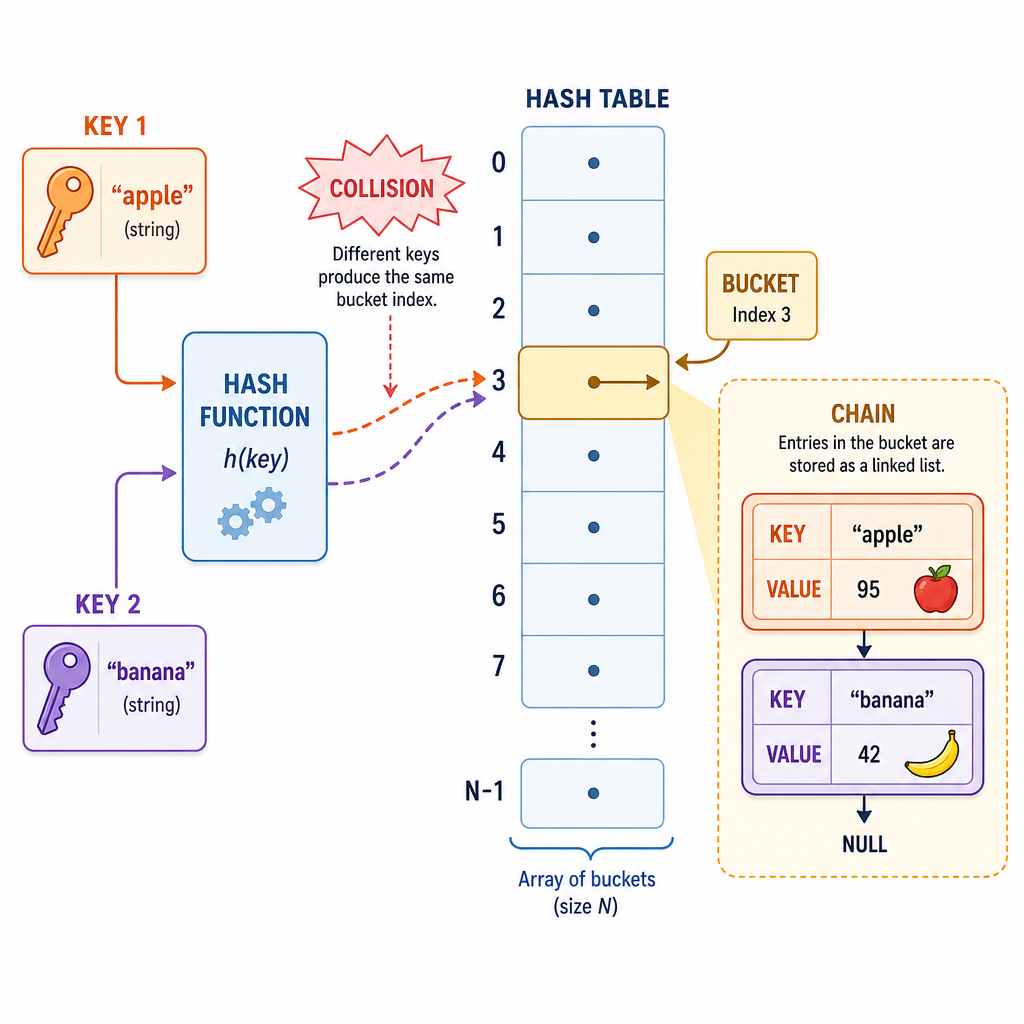
A hash function maps many possible keys into a limited number of buckets. Because there are more possible keys than buckets, two different keys can land in the same place.
That is called a collision.
"AAPL" ─┐
        ├──> bucket 4
"IBM"  ─┘
Hash tables handle collisions internally. Common strategies include storing multiple entries at the same bucket or probing for another open bucket.
The important algorithmic takeaway:
- average case: lookup, insert, delete are usually O(1)
- worst case: if many keys collide badly, operations can degrade toward O(n)
In normal JavaScript algorithm work, you usually rely on Map and Set to manage this for you.
Build A Tiny Table
A simplified implementation
You do not need to build hash tables from scratch in most interviews, but implementing a tiny one makes the moving parts concrete.
This version:
- uses a basic string hash
- stores buckets in an array
- handles collisions with small arrays inside each bucket
It is intentionally simple, not production-grade.
```javascript
class TinyHashTable {
  constructor(size = 5) {
    this.buckets = Array.from({ length: size }, () => []);
  }

  hash(key) {
    let total = 0;
    for (const char of key) {
      total += char.charCodeAt(0);
    }
    return total % this.buckets.length;
  }

  set(key, value) {
    const index = this.hash(key);
    const bucket = this.buckets[index];

    for (const pair of bucket) {
      if (pair[0] === key) {
        pair[1] = value;
        return;
      }
    }

    bucket.push([key, value]);
  }

  get(key) {
    const index = this.hash(key);
    const bucket = this.buckets[index];

    for (const [storedKey, storedValue] of bucket) {
      if (storedKey === key) return storedValue;
    }

    return undefined;
  }
}

const table = new TinyHashTable();
table.set("AAPL", 193.25);
table.set("MSFT", 420.10);
table.set("IBM", 184.50);

console.log("AAPL:", table.get("AAPL"));
console.log("IBM:", table.get("IBM"));
console.log("Buckets:", JSON.stringify(table.buckets));
```
Collision Truth
True or false?
If a hash table has a collision, it becomes useless because two keys can no longer be stored correctly.
Common Problem Patterns
When hash tables shine
Hash tables often turn a nested-loop solution into a single pass.
Look for phrases like:
- "Have we seen this before?"
- "How many times does this appear?"
- "Find the first duplicate"
- "Group items by some property"
- "Check whether a complement exists"
Example: finding the first repeated value can be done by scanning once and storing what you've seen.
```javascript
function firstRepeatedValue(values) {
  const seen = new Set();

  for (const value of values) {
    if (seen.has(value)) {
      return value;
    }
    seen.add(value);
  }

  return null;
}

console.log(firstRepeatedValue([8, 3, 5, 3, 2, 8])); // 3
console.log(firstRepeatedValue([1, 2, 3, 4]));       // null
```
Average Complexity
Fill in the blank:
A well-distributed hash table usually provides average-case lookup time of ____.
Hash Table Takeaways
What to remember
Hash tables are one of the most useful structures for easy and medium data structure problems.
Core ideas:
- Store data as key → value pairs.
- Use
Mapfor associations and counts. - Use
Setfor fast existence checks. - Expect average O(1) insert, lookup, and delete.
- Remember collisions exist, even when JavaScript hides the details.
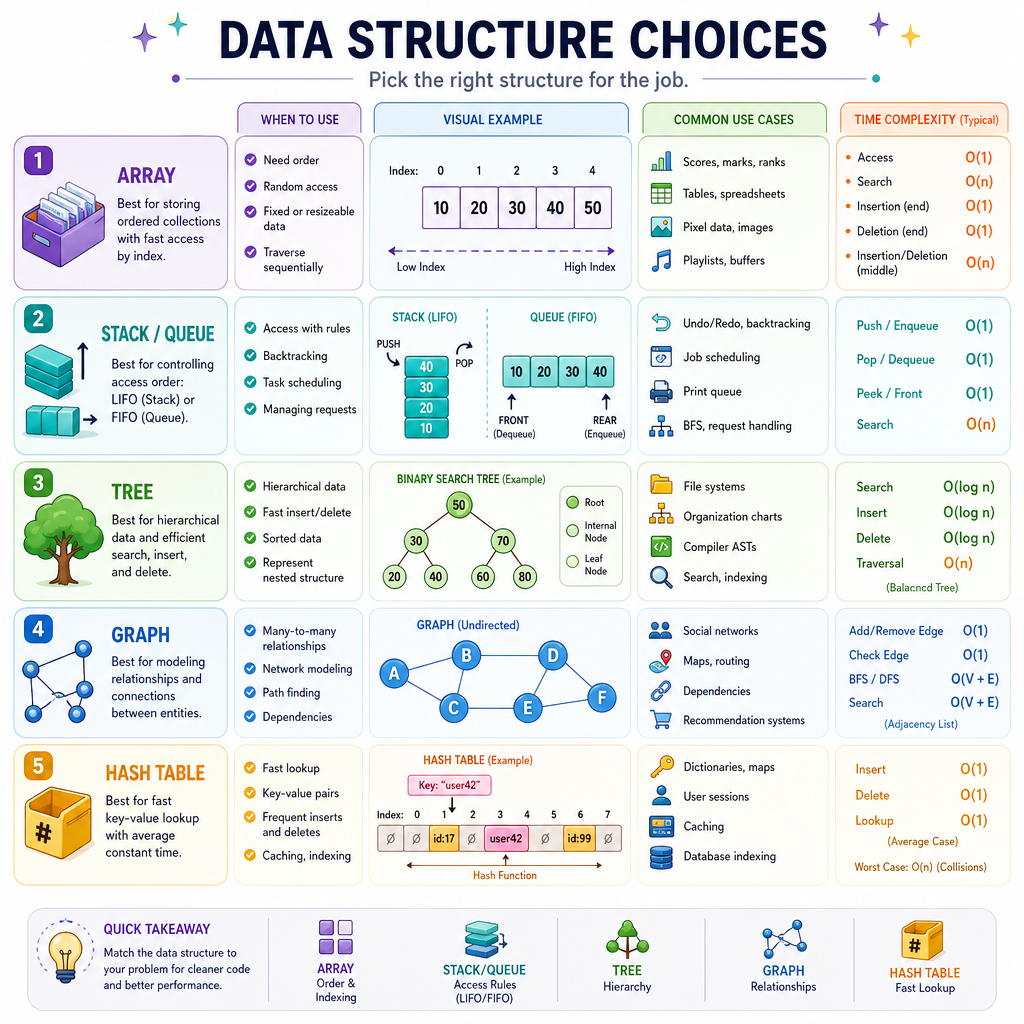
A useful decision rule:
Need position/order?      Array or linked structure
Need last/first access?   Stack or queue
Need hierarchy?           Tree
Need relationships?       Graph
Need fast lookup?         Hash table
Next, we'll shift from data storage choices into the algorithms that arrange and locate data efficiently.