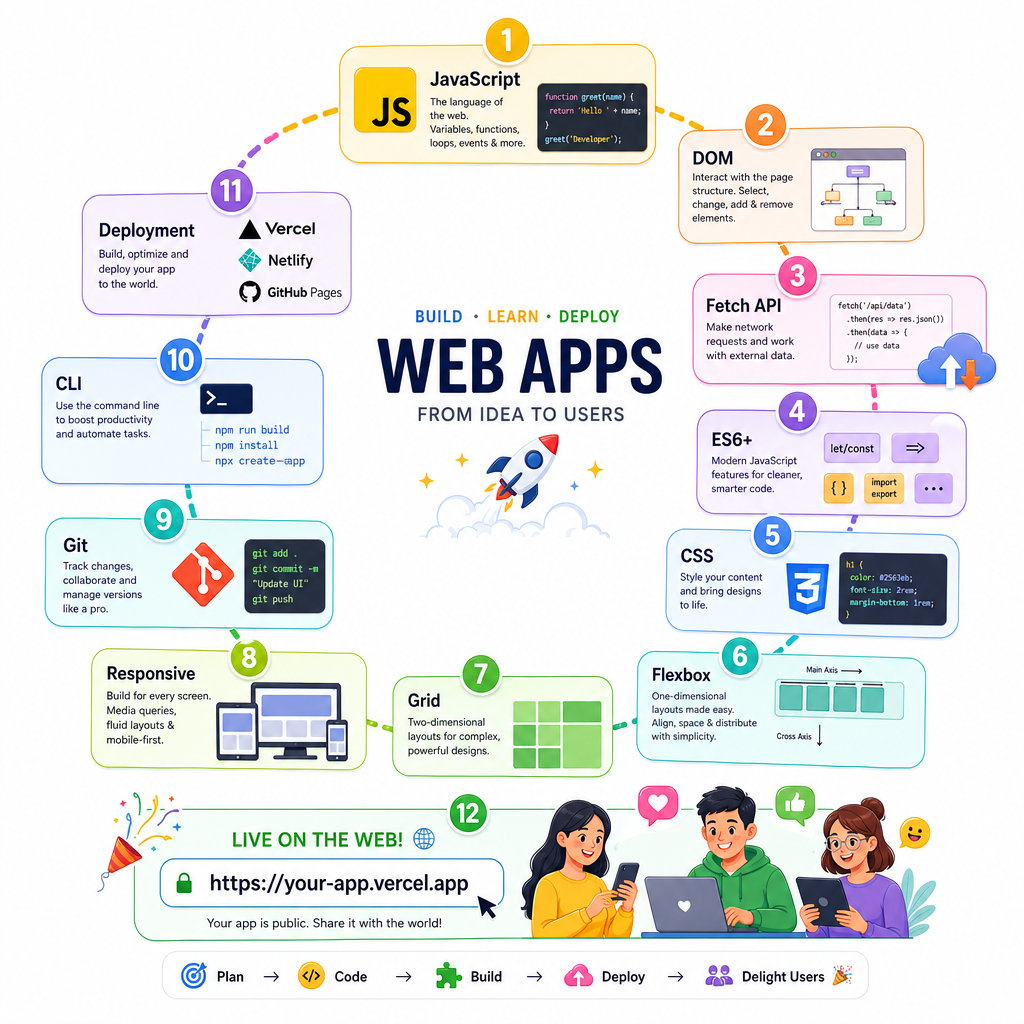
Hosting and Deployment
Read at your own pace. Code execution, quizzes, progress tracking, and the AI tutor are available in the interactive view with JavaScript enabled.
Ship The Interface
From local skill to production skill
You have built the pieces: JavaScript values and functions, DOM updates, fetch, ES6 modules, CSS layout, responsive decisions, Git history, and command-line workflow.
Now we turn that work into something users can actually open.
Deployment is not just “upload files.” For a staff-level frontend engineer, hosting and deployment are about making releases repeatable, observable, reversible, and boring.
Think of it like releasing a game patch: the code may be clever, but the launch process decides whether players get a smooth update or a chaotic bug montage.

Deployment Pipeline
The production path
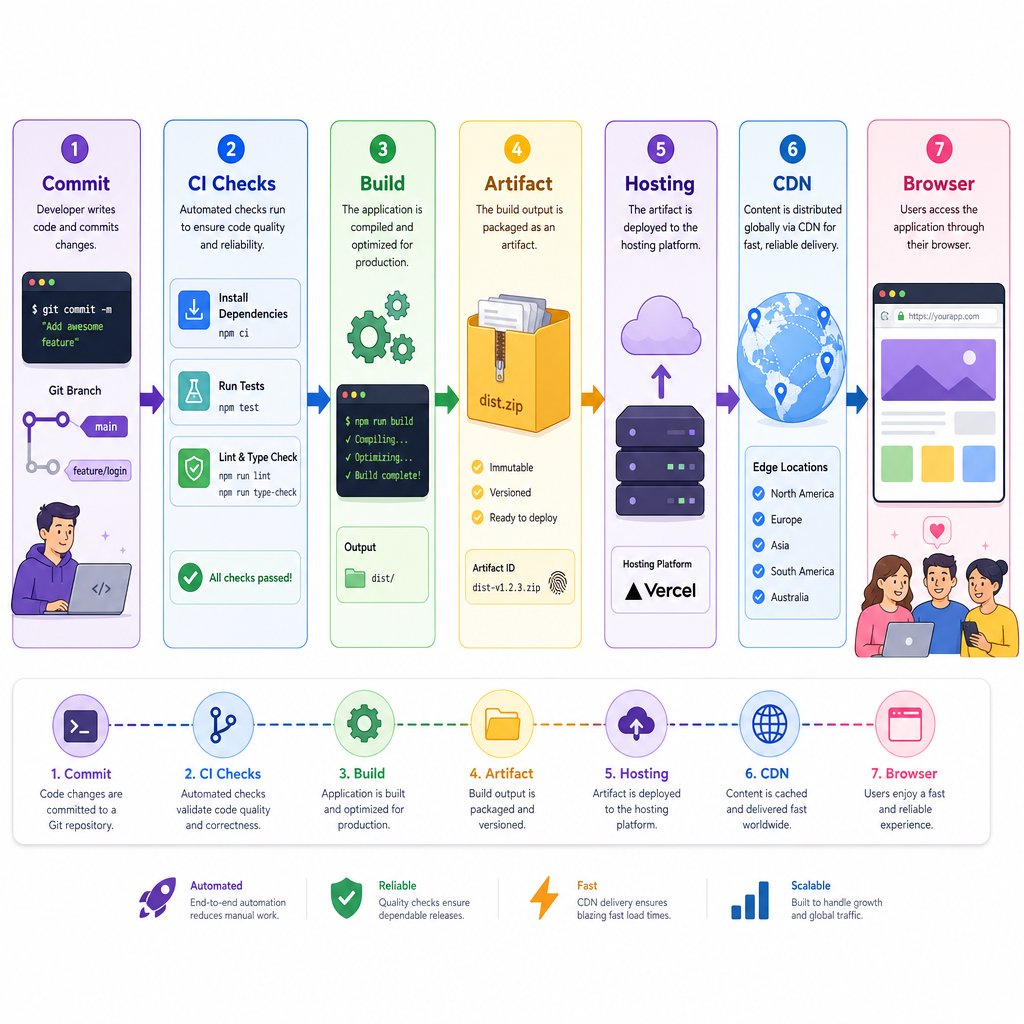
A modern frontend deployment usually follows this shape:
source code
   ↓
version control
   ↓
install dependencies
   ↓
run checks
   ↓
build static assets
   ↓
upload artifacts
   ↓
serve through hosting/CDN
   ↓
users load the app
Earlier, Git and Version Control gave you the shared history. Command Line Basics gave you the ability to run scripts intentionally. Hosting connects those skills to a public URL.
The key mental shift: production should come from a known commit and a known build process, not from “whatever was on my laptop at 11:48 PM.”
Best Deploy Source
A team wants consistent frontend deployments. Which source should production deploys ideally be based on?
Build Artifacts
Source is not always what you host
In beginner projects, you might open index.html directly. In professional apps, a build step often transforms source files into optimized production files.
A build may:
- Bundle JavaScript modules
- Minify CSS and JS
- Generate hashed filenames for caching
- Copy images and fonts
- Produce a deployable folder like
dist/orbuild/
That output is the artifact: the thing hosting actually serves.
Below is a tiny simulation of hashed production assets.
```javascript
const sourceFiles = [
  "src/main.js",
  "src/components/GameCard.js",
  "src/styles/layout.css"
];

function tinyHash(name) {
  return [...name].reduce((sum, char) => sum + char.charCodeAt(0), 0).toString(16);
}

const artifacts = sourceFiles.map((file) => {
  const baseName = file.split("/").pop();
  const [name, extension] = baseName.split(".");
  return `dist/${name}.${tinyHash(file)}.${extension}`;
});

console.log("Deploy these build artifacts:");
console.log(artifacts.join("\n"));
```
Name The Output
In a frontend deployment, the generated production output sent to hosting is commonly called a build ______.
Static Hosting Contract
What static hosting promises
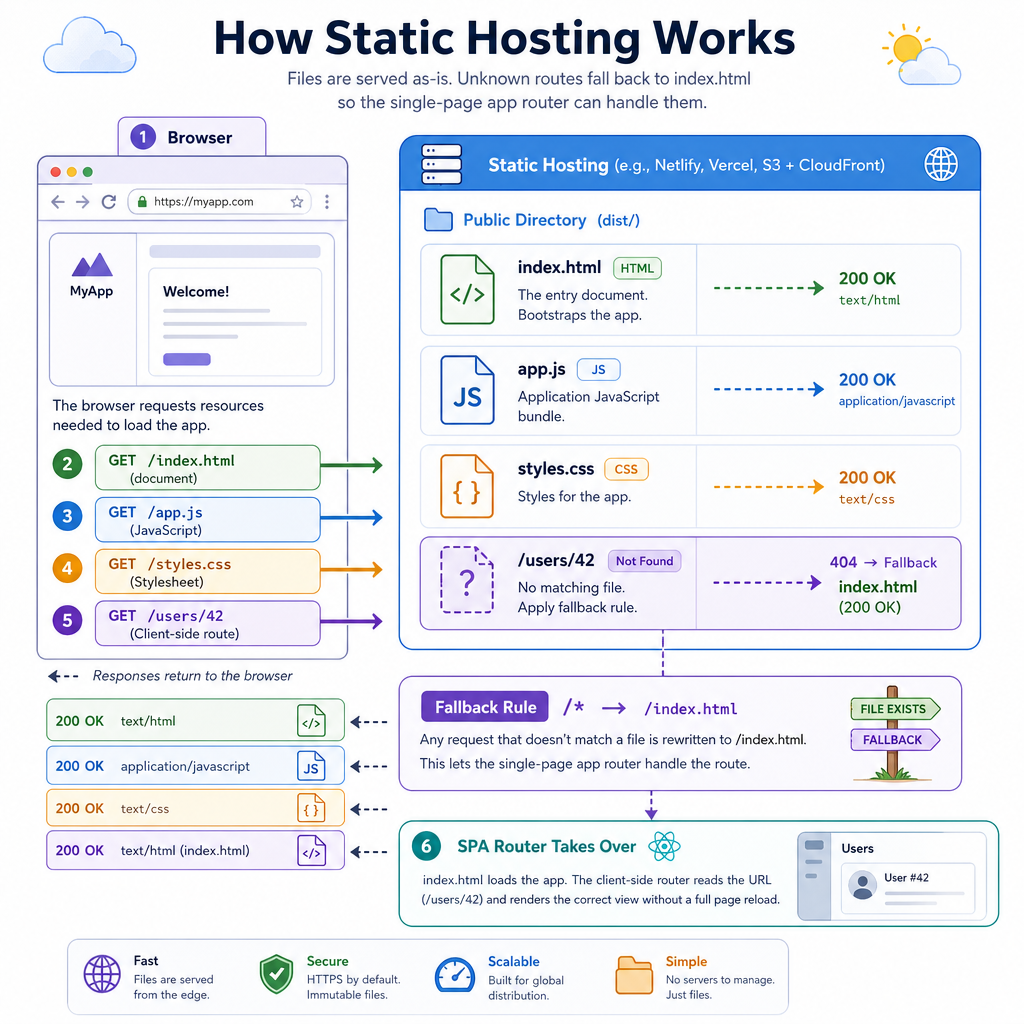
Most frontend apps are hosted as static assets: HTML, CSS, JavaScript, images, and fonts.
The hosting platform’s basic job is:
request URL → find matching file → return bytes with headers
Examples include Vercel, Netlify, GitHub Pages, Firebase Hosting, and S3 + CloudFront.
For a single-page app, there is one extra rule: unknown routes often need to return index.html so client-side routing can take over.
/users/42  → no physical file
          → serve index.html
          → JavaScript router renders the page
This connects directly to DOM Manipulation, AJAX and Fetch API, and Responsive Web Design: once the browser receives your assets, all those earlier skills become the live product experience.
Environment Settings
Same code, different destinations
Frontend apps often run in multiple environments:
- Local: your machine
- Preview: branch or pull request deploy
- Staging: production-like testing
- Production: real users
The code should not hard-code every URL. Instead, the build or hosting platform injects environment-specific values.
This matters for fetch: the same app may call a staging API during review and a production API after release.
```javascript
const environment = process.env.APP_ENV || "preview";

const apiByEnvironment = {
  local: "http://localhost:3000/api",
  preview: "https://preview-api.example.com",
  staging: "https://staging-api.example.com",
  production: "https://api.example.com"
};

const apiBaseUrl = apiByEnvironment[environment] || apiByEnvironment.preview;

console.log(`Environment: ${environment}`);
console.log(`Frontend will fetch from: ${apiBaseUrl}`);
```
Local Deploys
True or false: Deploying production directly from one engineer’s local machine is usually the best long-term strategy for a frontend team.
CDN And Caching
Fast globally, correct locally
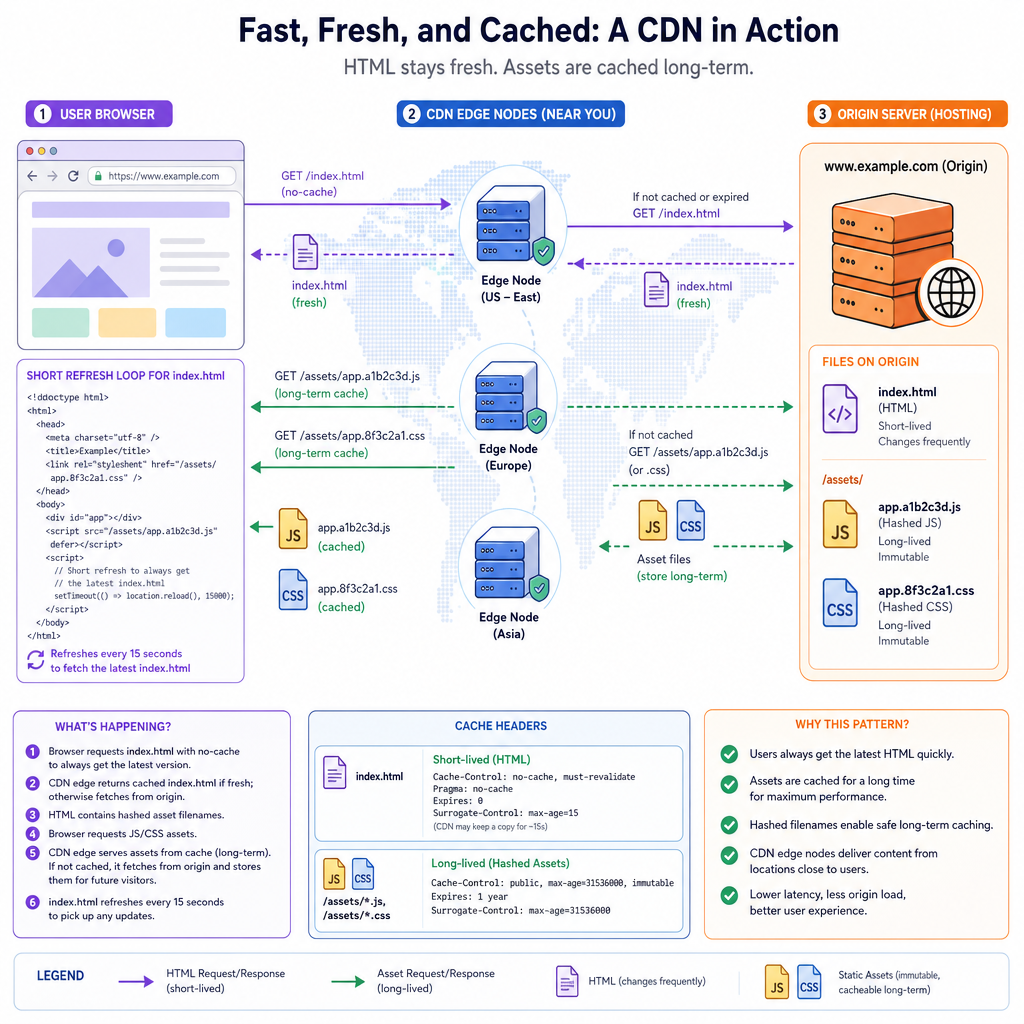
A CDN stores copies of static assets near users. That makes your app feel faster, especially for people far from your origin server.
Caching creates a tradeoff:
-
index.htmlusually changes often and should be checked frequently - Hashed assets like
app.a8f31.jscan be cached for a long time
Why? If the content changes, the filename changes. The browser can safely keep the old file until a new HTML file points to a new hashed file.
This is one of those staff-level details that separates “it works on my machine” from “it rolls out safely to millions.”
```javascript
const files = [
  "index.html",
  "assets/app.a8f31.js",
  "assets/styles.91c2.css",
  "assets/logo.svg"
];

function cacheHeaderFor(file) {
  const hasContentHash = /\.[a-f0-9]{4,}\./.test(file);

  if (file === "index.html") {
    return "Cache-Control: no-cache";
  }

  if (hasContentHash) {
    return "Cache-Control: public, max-age=31536000, immutable";
  }

  return "Cache-Control: public, max-age=3600";
}

for (const file of files) {
  console.log(`${file} -> ${cacheHeaderFor(file)}`);
}
```
Course Wrap
Your frontend foundation is now shippable
This course started with JavaScript basics and ended with production delivery. That arc matters.
You can now describe a frontend feature across its lifecycle:
- Model data with JavaScript values and functions
- Render and update DOM state safely
- Load remote data with
fetch - Organize code with modern ES6 patterns
- Style layout with CSS, Flexbox, Grid, and responsive rules
- Track changes with Git
- Use the command line to run repeatable workflows
- Build and deploy assets to real users
For staff frontend interviews, keep practicing the connective tissue: tradeoffs, failure modes, team workflows, observability, accessibility, performance, and maintainability.
A polished deployment is like the final act of an action movie: all the setup only pays off if the landing is clean.