Introduction to CI/CD in Azure
Read at your own pace. Code execution, quizzes, progress tracking, and the AI tutor are available in the interactive view with JavaScript enabled.
Why CI/CD Matters
Welcome to the interview cheat sheet course
As a senior C# backend developer, you are often expected to discuss not only code, but also how code safely reaches production.
This first lesson sets the stage: CI/CD in Azure is the bridge between your C# application, automated quality checks, and reliable deployment.
By the end, you should be able to answer interview questions like:
- What is CI/CD?
- How does Azure DevOps or GitHub Actions support it?
- What happens between
git pushand production? - How do teams reduce deployment risk?
Later lessons will zoom into Azure services, advanced C#, microservices, and OOP. For now, focus on the delivery pipeline.

CI/CD Mental Model
The simplest definition
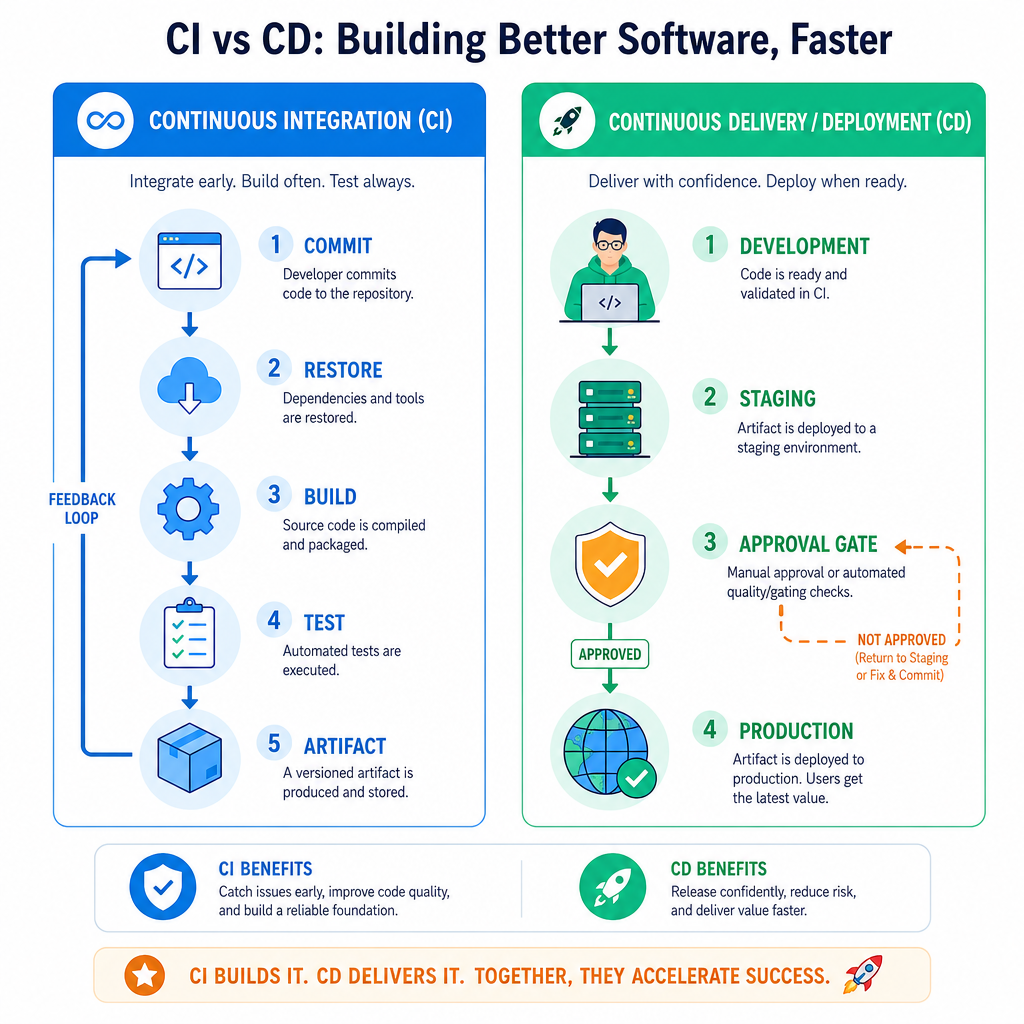
CI/CD is automation around software delivery.
CI: Continuous Integration
Every code change is integrated frequently and checked automatically.
Typical CI steps:
- Restore dependencies
- Build the solution
- Run unit tests
- Run static analysis
- Produce a deployable artifact
CD: Continuous Delivery or Deployment
The artifact is moved toward an environment such as Dev, Test, Staging, or Production.
Two common meanings:
- Continuous Delivery: production deployment is ready, but may require approval
- Continuous Deployment: production deployment happens automatically after checks pass
A strong interview answer usually separates these two clearly.
CI Or CD?
A pipeline restores NuGet packages, builds a C# solution, runs unit tests, and publishes a build artifact.
Which part of CI/CD is this primarily describing?
Azure Pipeline Anatomy
What Azure adds
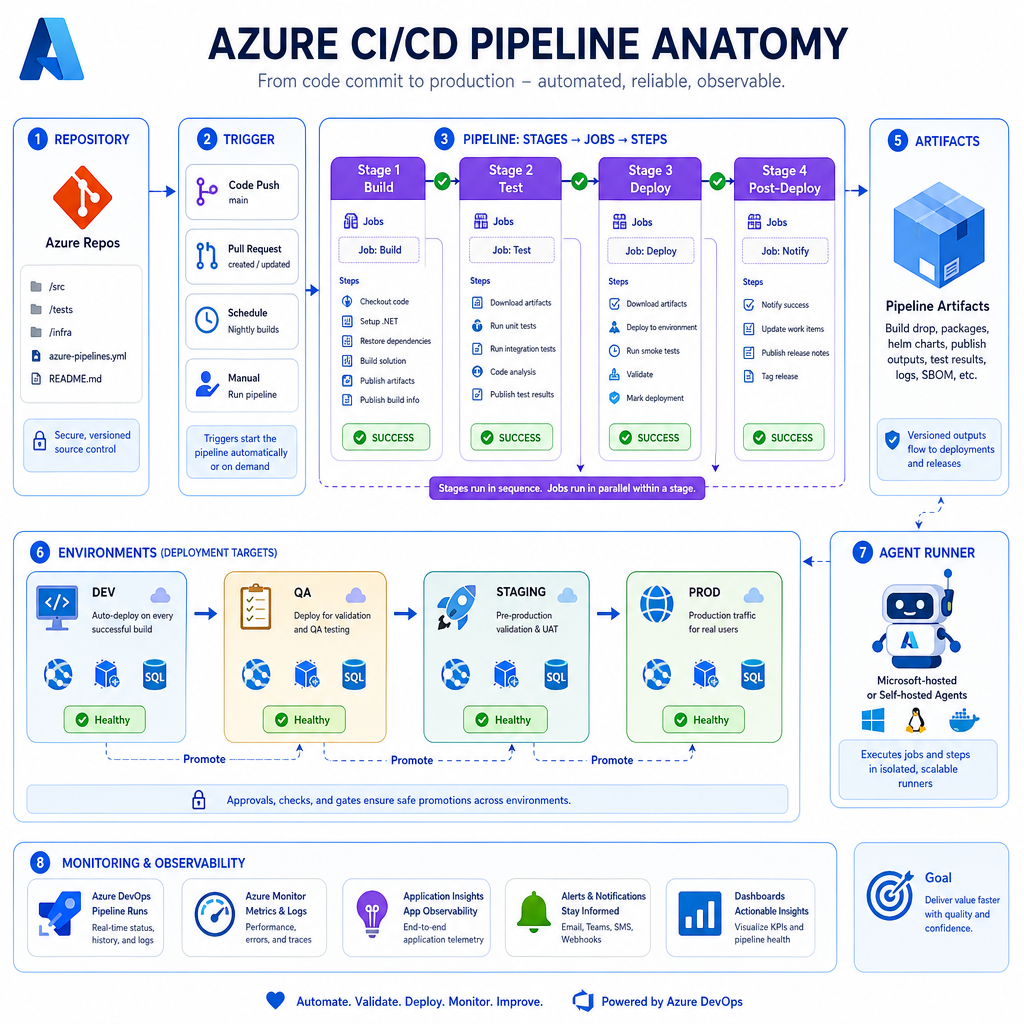
In Azure, CI/CD is commonly implemented with either:
- Azure DevOps Pipelines
- GitHub Actions
Both can build and deploy C# applications into Azure targets such as App Service, Functions, containers, or Kubernetes.
Common pipeline structure
Repository
   |
   v
Trigger: push / pull request / tag
   |
   v
Build stage
   |
   v
Test stage
   |
   v
Package artifact
   |
   v
Deploy to environment
   |
   v
Health checks + monitoring
Key interview vocabulary
- Pipeline: automated workflow
- Stage: major phase, such as Build or Deploy
- Job: group of steps run on an agent
- Step: individual command or task
- Agent/Runner: machine that executes the pipeline
- Artifact: packaged output that can be deployed
- Environment: target such as Dev, QA, Staging, or Prod
Quality Gates In C#
Pipelines should fail fast
A production-grade CI pipeline is not just a script that compiles code. It is a set of quality gates.
For a C# backend service, common gates include:
- Build must succeed
- Unit tests must pass
- Code coverage must meet a threshold
- Security scan must not find critical issues
- Package version must be valid
Here is a tiny standalone C# example that models a pipeline gate decision. In real Azure DevOps or GitHub Actions, these checks would come from build tasks, test runners, and scanners.
```csharp
using System;
using System.Collections.Generic;

var gates = new List<(string Name, bool Passed)>
{
    ("Restore NuGet packages", true),
    ("Build solution", true),
    ("Run unit tests", true),
    ("Coverage >= 80%", false),
    ("Critical vulnerabilities = 0", true)
};

Console.WriteLine("CI quality gate report:");

bool pipelinePassed = true;
foreach (var gate in gates)
{
    Console.WriteLine($"- {gate.Name}: {(gate.Passed ? "PASS" : "FAIL")}");
    pipelinePassed &= gate.Passed;
}

Console.WriteLine();
Console.WriteLine(pipelinePassed
    ? "Artifact can be promoted."
    : "Pipeline stopped before deployment.");
```
Name The Artifact
In CI/CD terminology, the packaged output produced by a build and later deployed to an environment is called an ________.
Versioning The Release
Traceability is interview gold
A strong CI/CD process lets you answer:
What code is running in production right now?
That usually means every release should be traceable to:
- A Git commit SHA
- A build number
- A branch or tag
- A deployment environment
- The artifact version
This matters during incidents. If production breaks after a deployment, you need to know exactly what changed and whether rollback is possible.
The example below creates a simple release label from typical pipeline metadata.
```csharp
using System;

string appName = "orders-api";
string environment = "staging";
string branch = "main";
string shortCommitSha = "a13f9c2";
int buildNumber = 428;

string releaseLabel = $"{appName}:{environment}:build-{buildNumber}:{branch}:{shortCommitSha}";

Console.WriteLine("Release metadata");
Console.WriteLine($"Application : {appName}");
Console.WriteLine($"Environment : {environment}");
Console.WriteLine($"Build       : {buildNumber}");
Console.WriteLine($"Branch      : {branch}");
Console.WriteLine($"Commit      : {shortCommitSha}");
Console.WriteLine($"Label       : {releaseLabel}");
```
Deployment Safety Patterns
CI/CD is not only speed
Interviewers often listen for whether you understand safe release practices, not just automation.
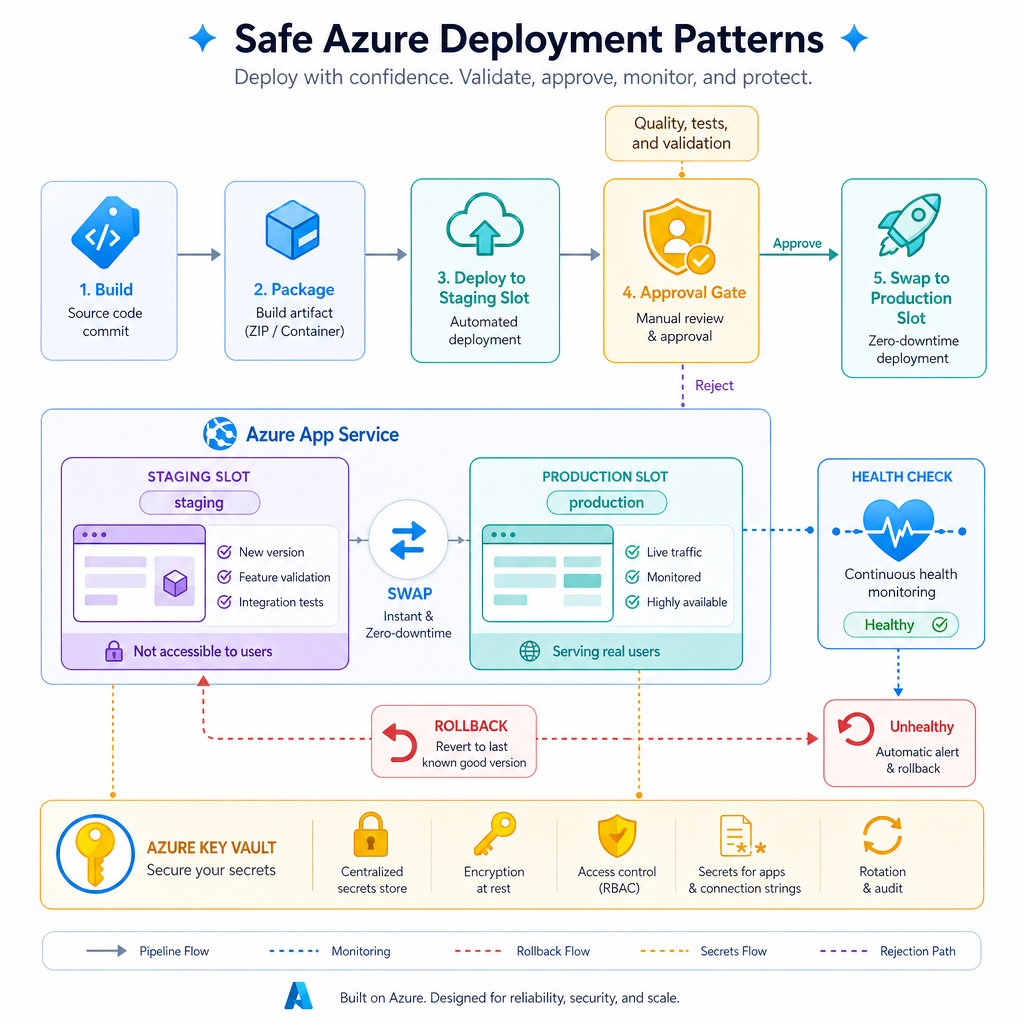
Common Azure-friendly deployment safety patterns:
Deployment slots
Azure App Service supports slots such as staging and production. You deploy to staging first, warm it up, validate health, then swap.
Approvals
Production deployment may require a human approval, especially in regulated environments.
Rollback
A good release process has a clear rollback path, such as redeploying a previous artifact or swapping slots back.
Health checks
After deployment, the pipeline or platform should verify that the application is alive and behaving correctly.
Secrets management
Pipelines should not store passwords directly in source code or YAML. Use secure variables, Azure Key Vault, or managed identity where appropriate.
Automatic Production Always?
True or false: Continuous Delivery always means every successful build is automatically deployed to production without human approval.
Interview Cheat Sheet
A strong senior-level answer
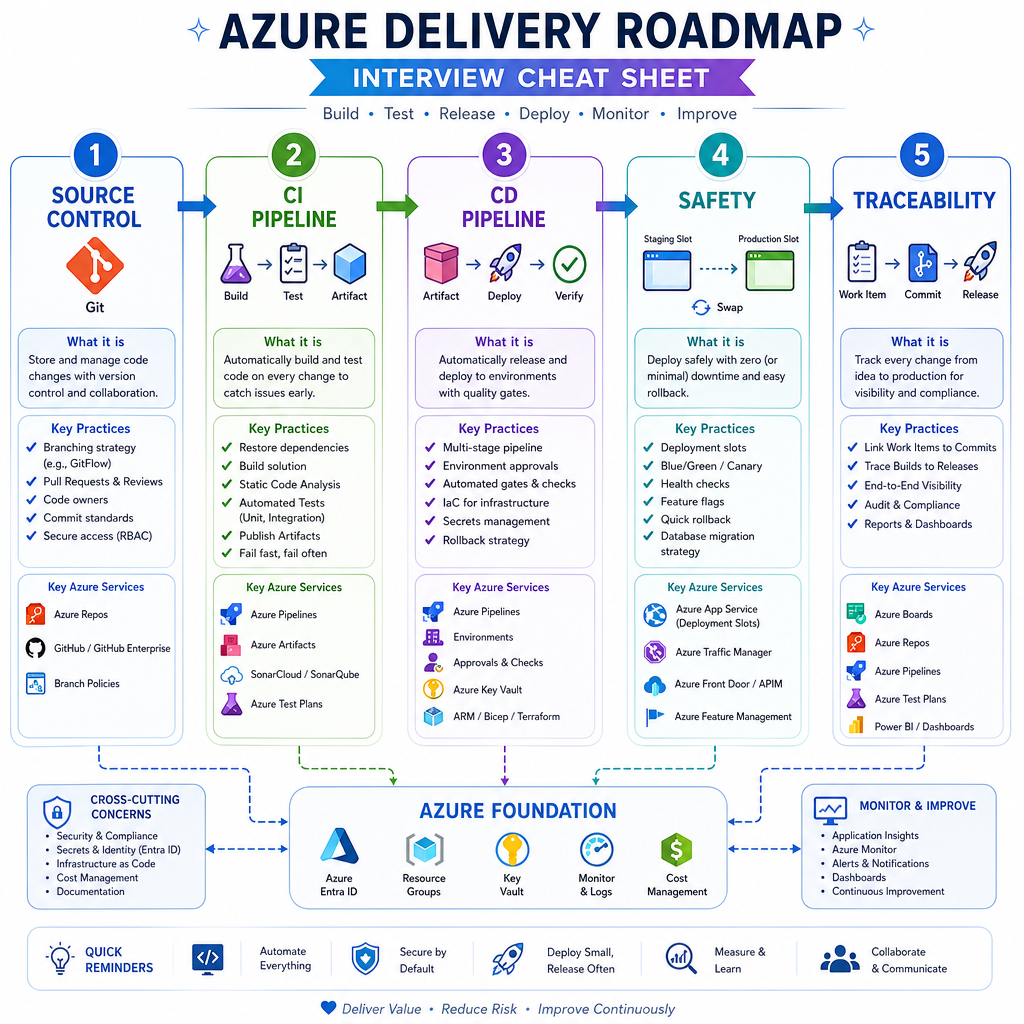
If asked, "How would you set up CI/CD for a C# service in Azure?", structure your response like this:
-
Source control
- Code is in Git, with pull requests and branch policies.
-
CI pipeline
- Restore NuGet packages.
- Build the solution.
- Run tests.
- Run quality and security checks.
- Publish a versioned artifact.
-
CD pipeline
- Deploy the same artifact through Dev, Test, Staging, and Production.
- Use approvals where needed.
- Keep environment-specific configuration outside the artifact.
-
Safety
- Use deployment slots, health checks, monitoring, and rollback.
-
Traceability
- Every deployment maps back to commit, build number, artifact, and environment.
One-liner to remember
CI proves the code is safe to package; CD proves the package is safe to release.
Next, we will broaden the view with an Azure Cloud overview so the deployment targets and platform services become clearer.
Best Senior Answer
In an interview, which answer best demonstrates senior-level understanding of CI/CD in Azure?