Introduction to Databases
Read at your own pace. Code execution, quizzes, progress tracking, and the AI tutor are available in the interactive view with JavaScript enabled.
Why Databases Matter
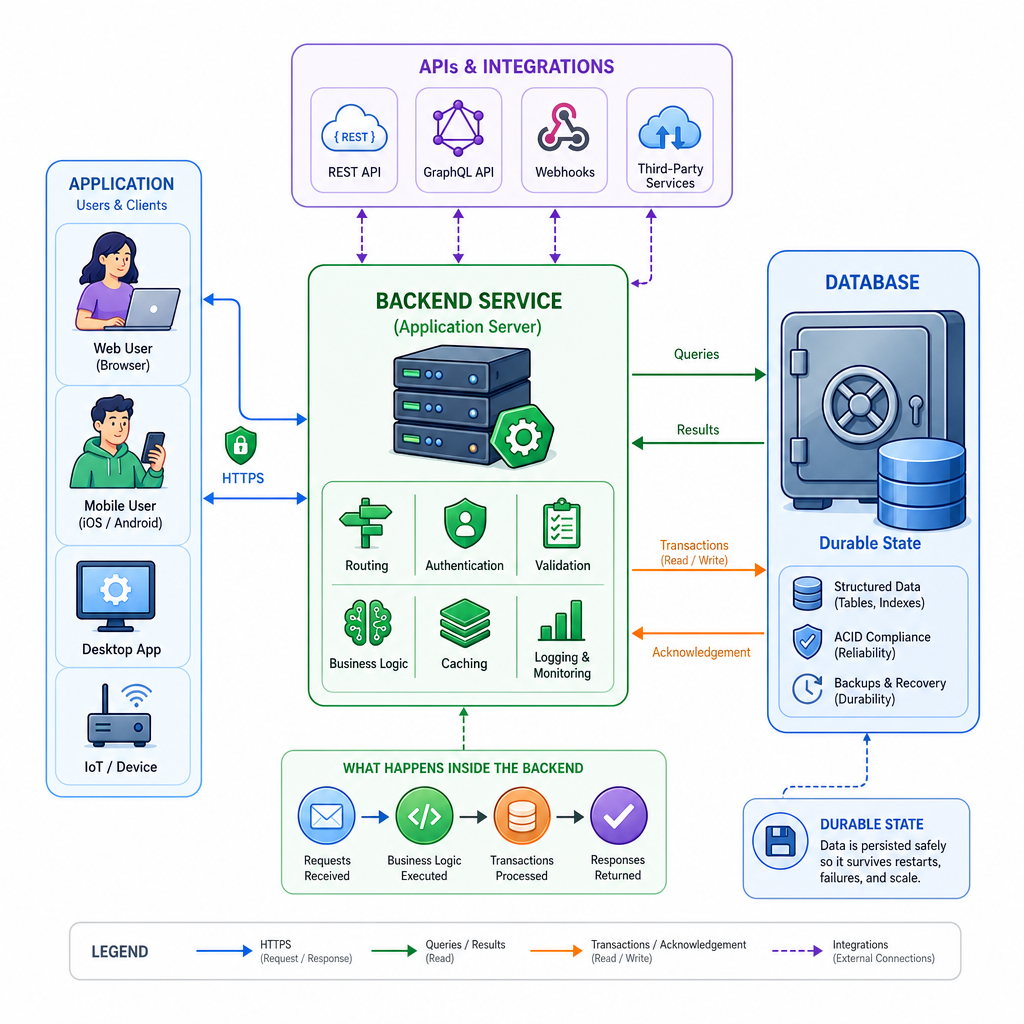
Welcome to the backend foundation
As a backend engineer, most business logic eventually becomes a question about data:
- Where is it stored?
- How is it found quickly?
- Who is allowed to change it?
- What happens if two requests change it at the same time?
- Can we trust it after a crash?
A database is not just a place to put bytes. It is a system for storing, organizing, querying, and protecting application state.
This first lesson sets the vocabulary for the rest of the course. Later, we will connect these ideas to system design, architecture patterns, frameworks, and testing.
Data Needs Structure
Files and lists are not enough
As an experienced coder, you can store data in memory, JSON files, CSVs, or logs. That works for small scripts.
But production backend systems usually need more:
- Persistence: data survives process restarts
- Efficient lookup: find specific records without scanning everything
- Concurrency control: many users can read/write safely
- Integrity: invalid states are prevented or detected
- Querying: ask flexible questions without rewriting application code
The pain point is not storing one record. It is managing millions of records correctly over time.
```python
users = [
    {'id': 1, 'email': 'ana@example.com', 'active': True},
    {'id': 2, 'email': 'ben@example.com', 'active': False},
    {'id': 3, 'email': 'cy@example.com', 'active': True},
]

active_emails = [user['email'] for user in users if user['active']]

print('Active users:', active_emails)
print('This works in memory, but every query requires custom Python logic.')
print('A database gives us persistence, indexing, constraints, and a query language.')
```
Core Database Role
Which option best describes the core role of a database in a backend system?
DBMS Mental Model
Database vs DBMS
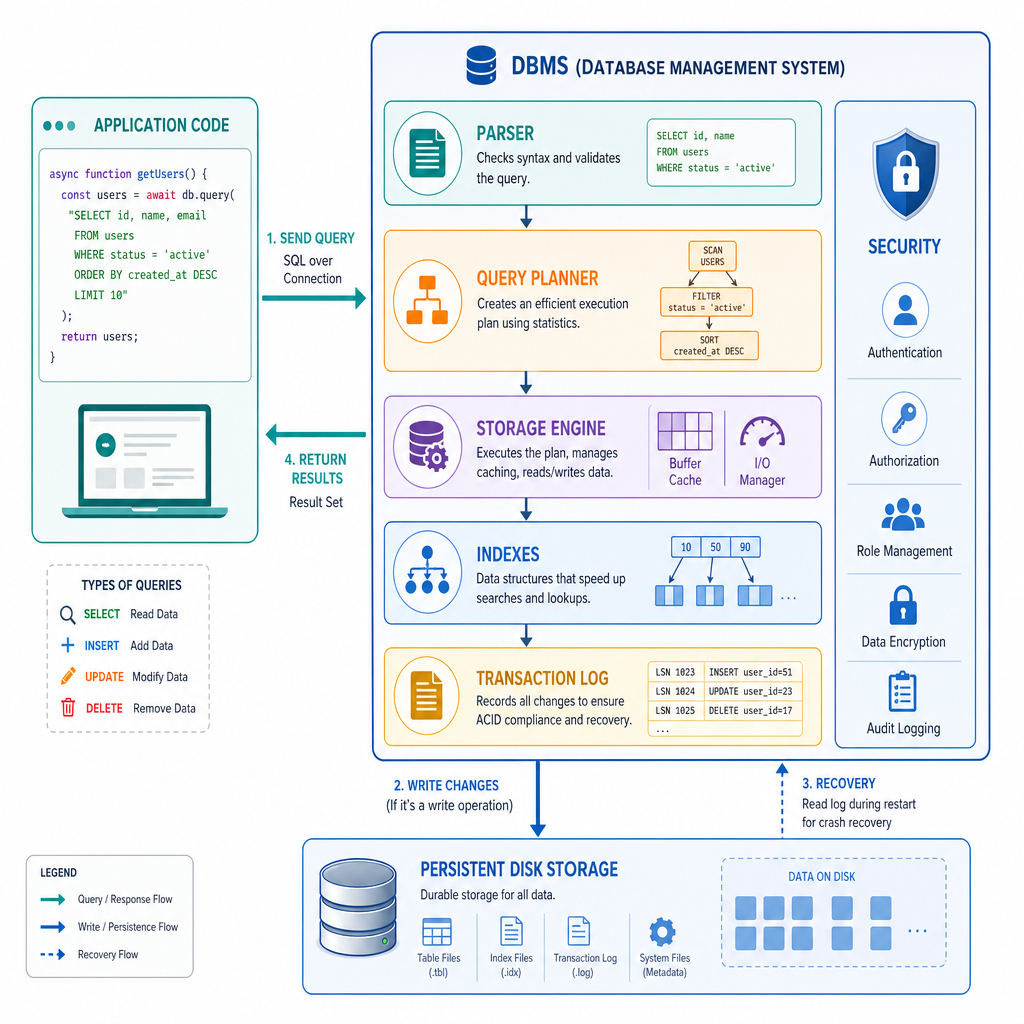
People often say database when they mean two related things:
- Database: the organized collection of data
- DBMS: the Database Management System that stores, retrieves, secures, and updates that data
Examples of DBMSs include PostgreSQL, MySQL, SQLite, MongoDB, Redis, and Cassandra.
A useful mental model:
Application code
      |
      | query / command
      v
+-------------------+
|       DBMS        |
| parser, planner,  |
| storage, locks,   |
| indexes, logs     |
+-------------------+
      |
      v
Persistent data on disk / memory
Your backend code asks for outcomes. The DBMS handles many hard details behind the scenes.
Tables and Documents
Two common data models
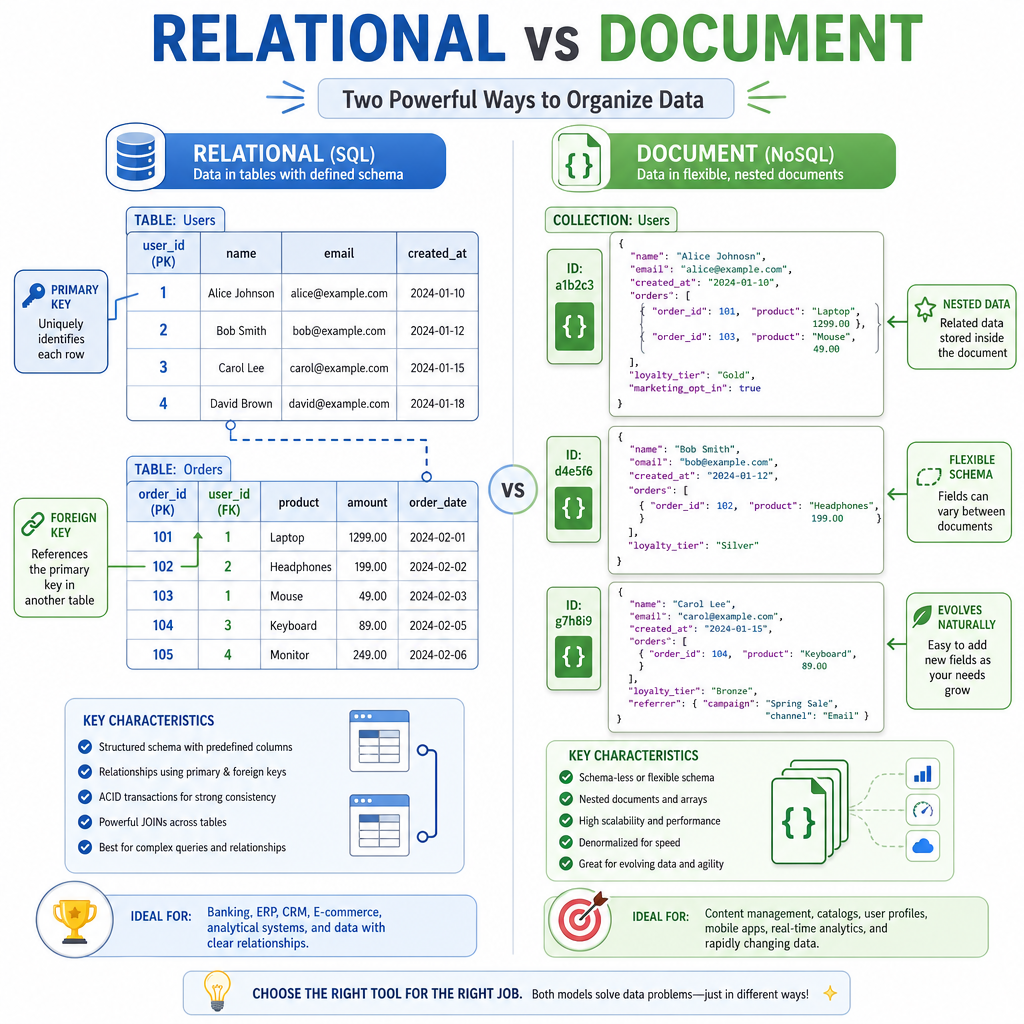
A data model is the shape a database uses to represent information.
Relational model
Data is represented as tables with rows and columns.
users
+----+-----------------+
| id | email           |
+----+-----------------+
| 1  | ana@example.com |
| 2  | ben@example.com |
+----+-----------------+
Relational databases are strong when data has clear relationships and integrity rules.
Document model
Data is represented as flexible documents, often similar to JSON.
{
  id: 1,
  email: ana@example.com,
  preferences: { theme: dark }
}
Document databases are useful when records naturally vary in shape.
Senior backend judgment is not about memorizing a favorite database. It is about matching data shape and access patterns to the right storage model.
Schemas Add Guarantees
True or false: A database schema is only documentation; it cannot prevent invalid data from being written.
Queries Express Intent
Query languages ask questions
A backend service often needs answers like:
- Which users placed orders this month?
- What is the total revenue per customer?
- Does this email already exist?
Instead of loading all data into Python and filtering manually, a database query lets you express what you want. The DBMS decides how to retrieve it.
Below is a tiny in-memory SQLite example. SQLite is a real relational DBMS available from Python's standard library.
```python
import sqlite3

conn = sqlite3.connect(':memory:')
cur = conn.cursor()

cur.execute('CREATE TABLE users (id INTEGER PRIMARY KEY, email TEXT UNIQUE)')
cur.execute('CREATE TABLE orders (id INTEGER PRIMARY KEY, user_id INTEGER, amount INTEGER)')

cur.executemany('INSERT INTO users VALUES (?, ?)', [
    (1, 'ana@example.com'),
    (2, 'ben@example.com'),
])
cur.executemany('INSERT INTO orders VALUES (?, ?, ?)', [
    (1, 1, 40),
    (2, 1, 25),
    (3, 2, 15),
])

query = '''
SELECT users.email, SUM(orders.amount) AS total_spent
FROM users
JOIN orders ON users.id = orders.user_id
GROUP BY users.email
ORDER BY total_spent DESC
'''

for email, total in cur.execute(query):
    print(f'{email}: ${total}')
```
Transactions Protect Meaning
Some changes must move together
A transaction is a unit of work that should either fully happen or not happen at all.
Classic example: transferring money.
If Alice is debited but Bob is not credited, the database now represents a broken business fact. Transactions protect against that kind of partial update.
At an introductory level, remember this:
- Start a transaction
- Perform related changes
- Commit if all changes succeed
- Roll back if something fails
```python
import sqlite3

conn = sqlite3.connect(':memory:')
cur = conn.cursor()

cur.execute('CREATE TABLE accounts (name TEXT PRIMARY KEY, balance INTEGER)')
cur.executemany('INSERT INTO accounts VALUES (?, ?)', [
    ('Alice', 100),
    ('Bob', 50),
])
conn.commit()

def print_balances(label):
    rows = cur.execute('SELECT name, balance FROM accounts ORDER BY name').fetchall()
    print(label, rows)

print_balances('Before failed transfer:')

try:
    cur.execute('BEGIN')
    cur.execute('UPDATE accounts SET balance = balance - 70 WHERE name = ?', ('Alice',))
    raise RuntimeError('network timeout before Bob is credited')
    cur.execute('UPDATE accounts SET balance = balance + 70 WHERE name = ?', ('Bob',))
    conn.commit()
except RuntimeError as error:
    print('Error:', error)
    conn.rollback()

print_balances('After rollback:')

cur.execute('BEGIN')
cur.execute('UPDATE accounts SET balance = balance - 70 WHERE name = ?', ('Alice',))
cur.execute('UPDATE accounts SET balance = balance + 70 WHERE name = ?', ('Bob',))
conn.commit()

print_balances('After successful transfer:')
```
Consistency Keyword
Fill in the blank: The all-or-nothing unit of work used to group related database changes is called a ____.
Indexes Trade Space
Fast lookup has a cost
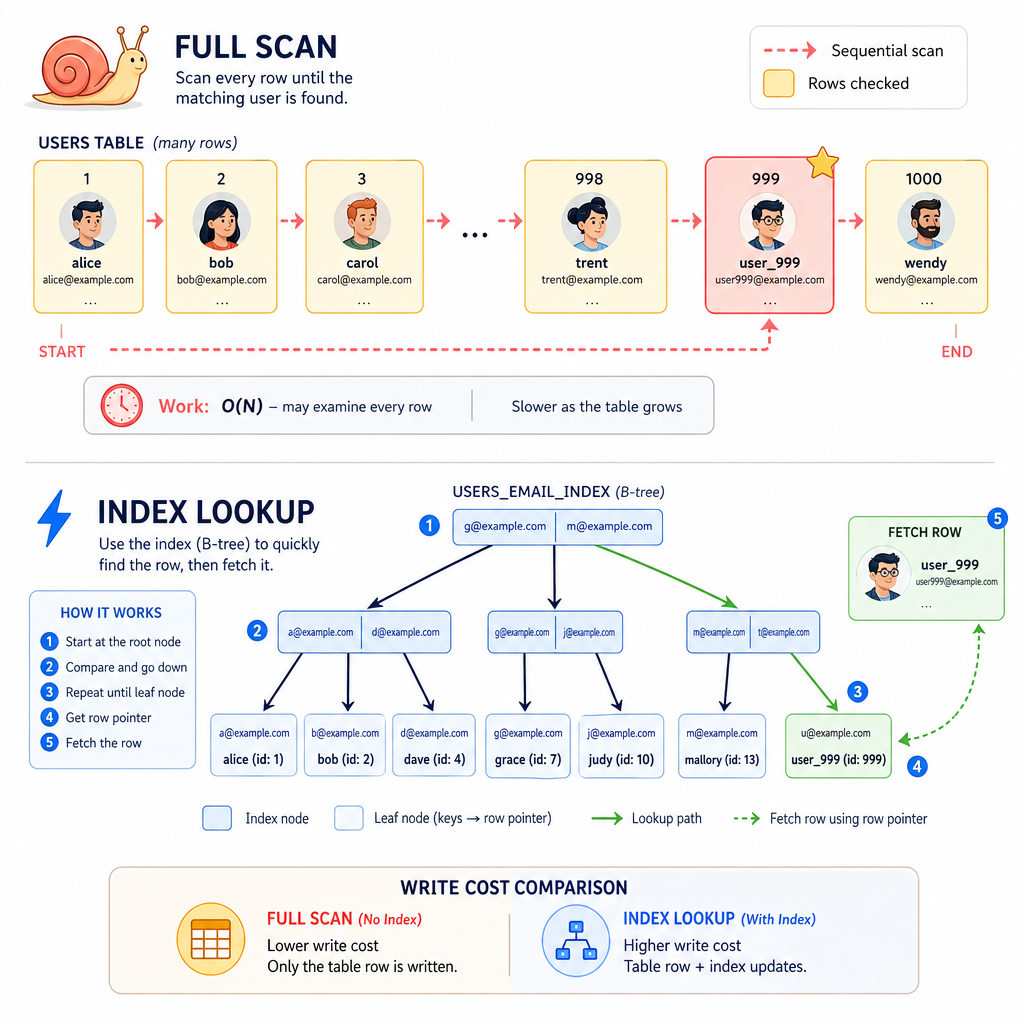
An index is an auxiliary data structure that helps the DBMS find records faster.
Think of a book index:
- Without it, you scan pages one by one
- With it, you jump near the answer quickly
Database indexes are similar. They can speed up reads, filters, joins, and ordering.
But indexes are not free:
- They use storage
- They must be updated on writes
- Too many indexes can slow inserts and updates
The senior backend mindset is to ask: Which queries must be fast, and what write cost am I willing to pay?
Database Engineering Lens
A product feature requires looking up users by email very frequently, while new users are created less often. Which database idea is most directly relevant?