Introduction to UX Design
Read at your own pace. Code execution, quizzes, progress tracking, and the AI tutor are available in the interactive view with JavaScript enabled.
Why UX Now
The last layer: usefulness
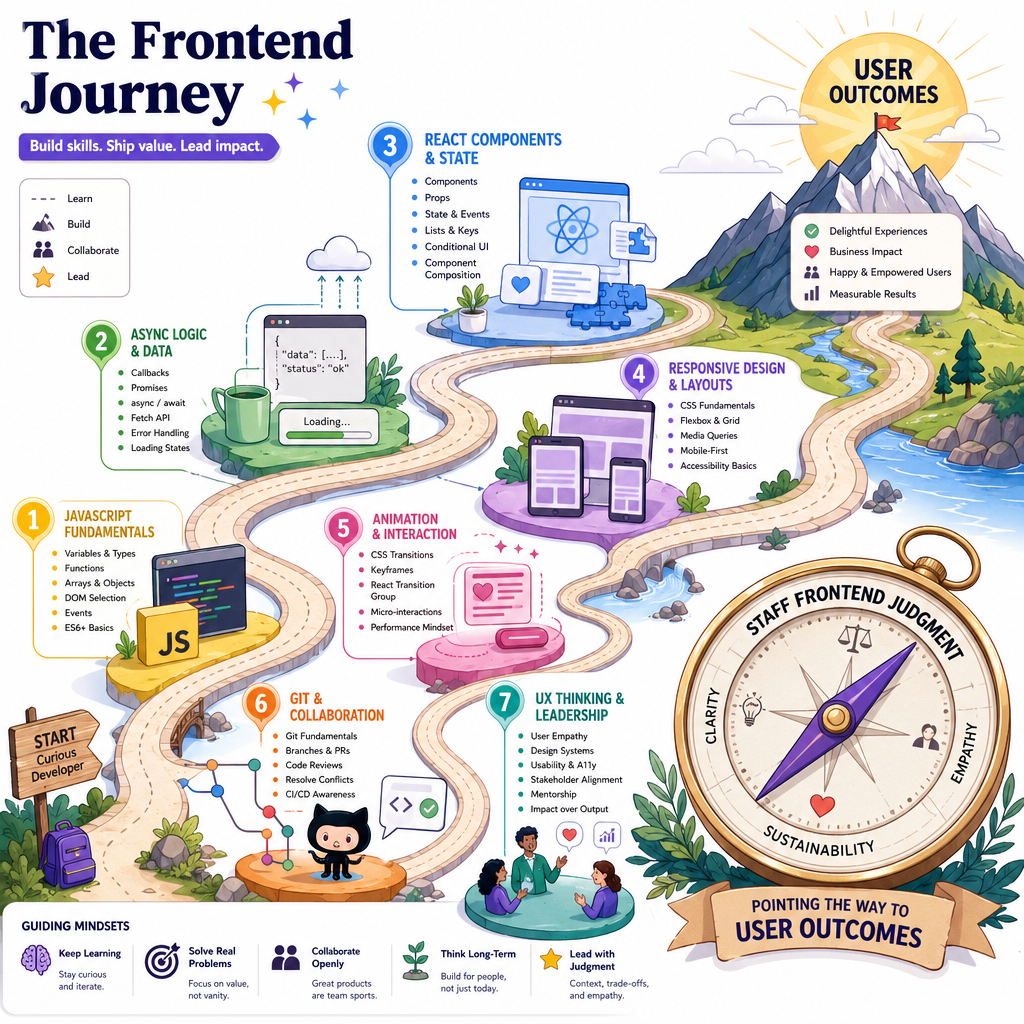
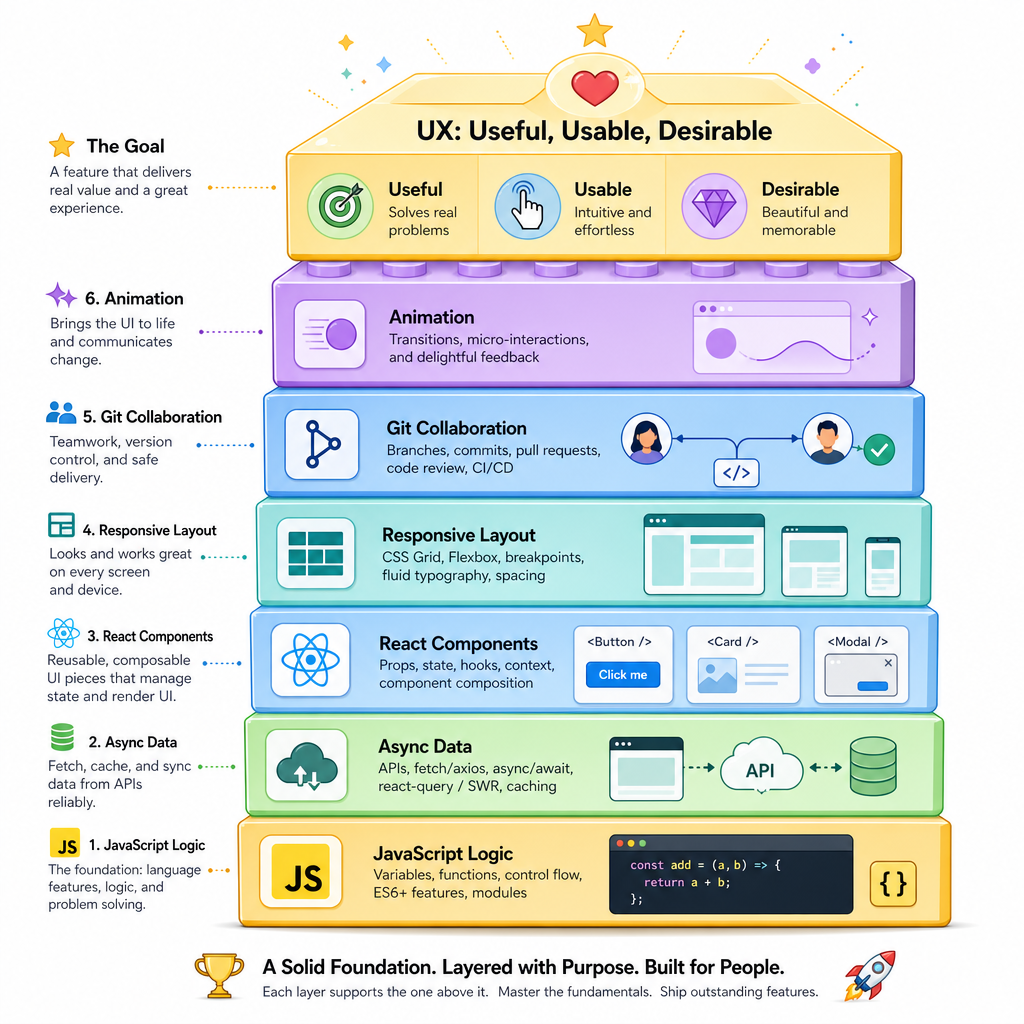
You have already built the technical stack of a frontend feature:
- Introduction to JavaScript gave you values, functions, objects, and decisions.
- Asynchronous JavaScript helped you reason about waiting, failures, and parallel work.
- React Basics turned behavior into components and state.
- Responsive Web Design made interfaces adapt.
- CSS Animation added purposeful motion.
- Version Control with Git made change collaborative.
Now we ask the staff-level question: should this experience exist in this shape at all?
UX design is not “making it pretty.” It is the practice of reducing the gap between what a person is trying to do and what your product actually makes possible.
Think of it like a puzzle game: the best level design does not remove all challenge. It removes confusion that is not part of the intended challenge.
UX Is Not UI
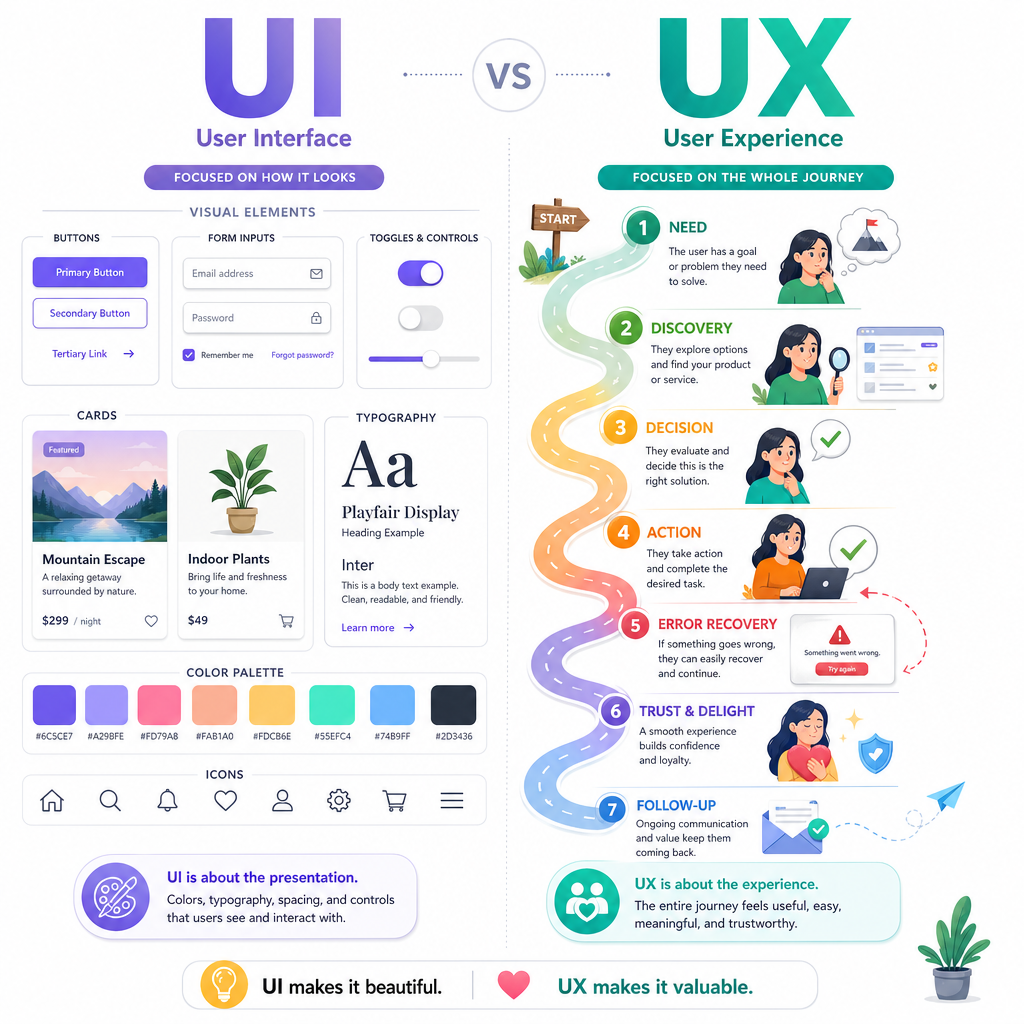
UX is the whole journey
UI is what the person sees and touches: buttons, forms, typography, spacing, animation.
UX includes UI, but also covers:
- Whether the product solves a real problem
- Whether the path through the product makes sense
- Whether people trust the result
- Whether errors are recoverable
- Whether the experience works across devices, abilities, and contexts
- Whether the team can learn from real behavior
A staff frontend engineer does not need to become a full-time product designer. But you do need to spot when a technically correct implementation creates a poor experience.
Example: a checkout button can be perfectly coded, responsive, animated, and version-controlled — while still failing users if shipping cost appears too late.
Design From Intent
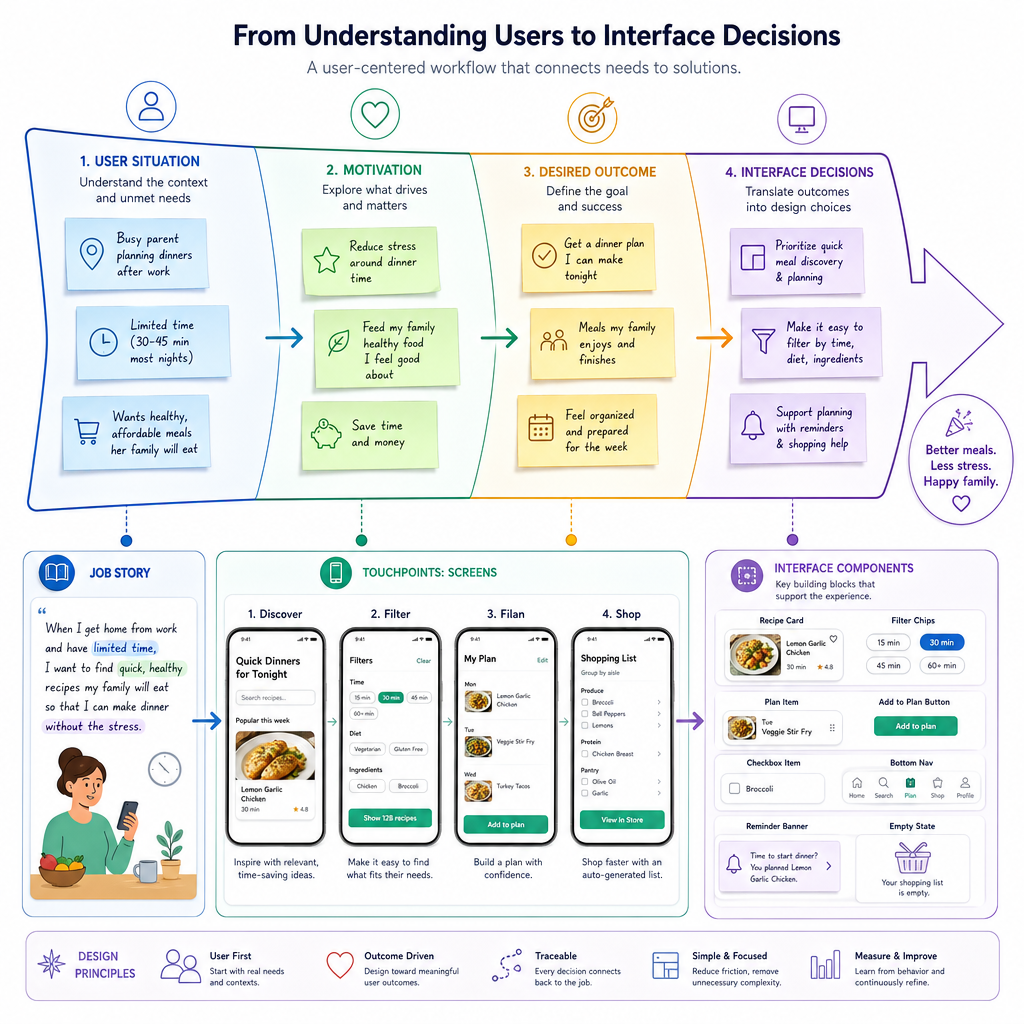
Start with the user's job
Before reaching for components, ask:
What is the person trying to accomplish, and what is getting in their way?
A useful framing tool is a job story:
When [situation], I want to [motivation/action], so I can [outcome].
Examples:
- When I am choosing a movie on a Friday night, I want quick filters by mood and runtime, so I can avoid endless scrolling.
- When I am submitting an expense report, I want clear validation before I upload, so I can avoid rework.
- When I am comparing two game builds, I want change history and impact notes, so I can decide what to test first.
This connects directly to your React work: components are implementation units, but user intent should define the experience boundaries.
Find Friction Signals
Behavior tells a story
UX research can include interviews, usability tests, surveys, analytics, support tickets, and session review. As a frontend engineer, you often help make behavior observable.
The goal is not to spy on users. The goal is to detect friction:
- Repeated clicks on the same disabled control
- Form fields edited many times before submission
- Long pauses after an error message
- Users abandoning a flow at the same step
- People opening help text repeatedly
Here is a tiny standalone example that turns event logs into UX clues.
```javascript
const events = [
  { user: "A", type: "click", target: "checkout", time: 1000 },
  { user: "A", type: "click", target: "checkout", time: 1200 },
  { user: "A", type: "click", target: "checkout", time: 1350 },
  { user: "A", type: "error", target: "shipping-form", time: 2000 },
  { user: "B", type: "click", target: "checkout", time: 5000 },
  { user: "B", type: "success", target: "order", time: 9000 }
];

function findRepeatedClicks(events, windowMs = 500) {
  const clicks = events.filter(event => event.type === "click");

  return clicks.filter((event, index) => {
    const previous = clicks[index - 1];
    return previous &&
      previous.user === event.user &&
      previous.target === event.target &&
      event.time - previous.time <= windowMs;
  });
}

const friction = findRepeatedClicks(events);

console.log("Repeated-click signals:", friction.length);
console.log(friction.map(event => `${event.user} clicked ${event.target} again`).join("\n"));
```
UX Scope Check
A product manager says: “The button is blue, the animation is smooth, and the layout works on mobile, so the UX is done.”
What is the best staff-level response?
Research Before Certainty
True or false:
If your team has eight years of frontend experience, you can usually skip user research because experienced engineers can predict what users need.
Heuristics Help
A practical review lens
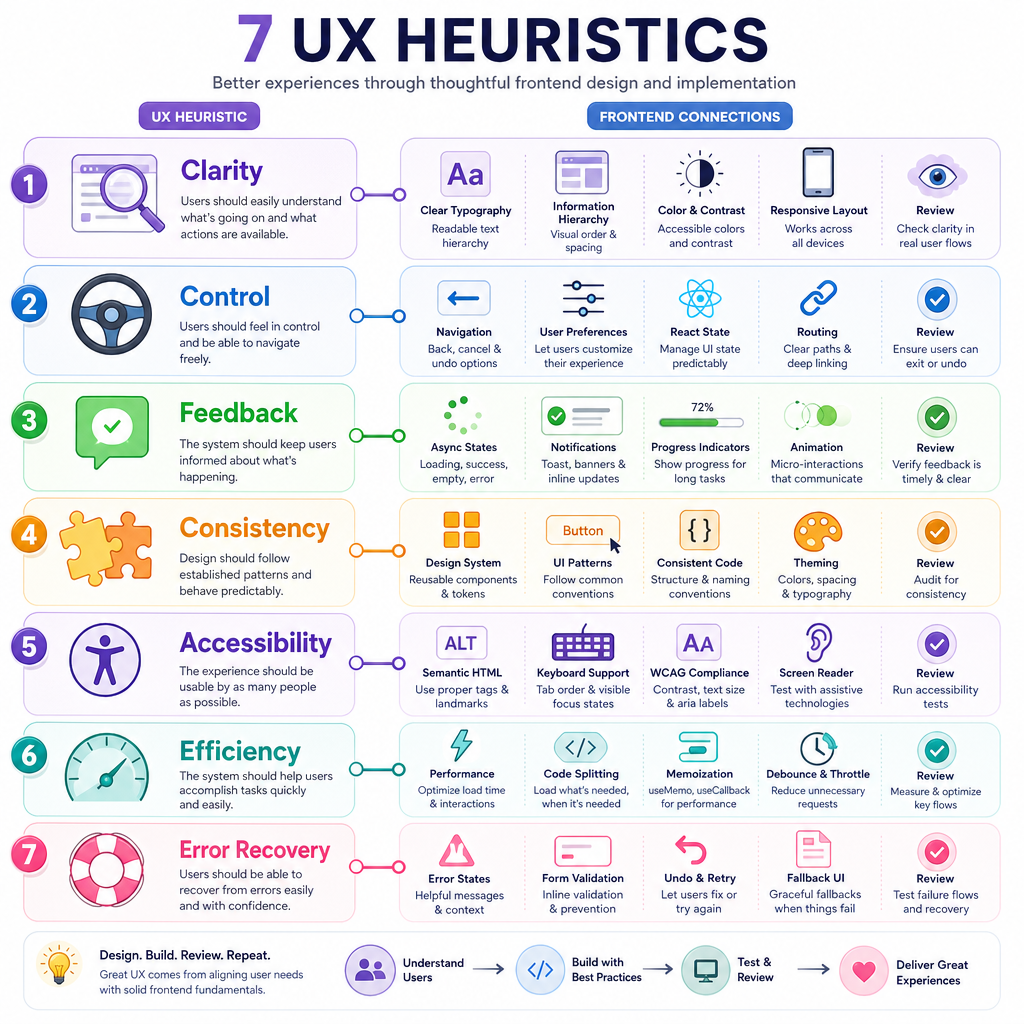
When you review a feature, use heuristics: repeatable principles that expose likely UX problems.
A compact frontend-friendly checklist:
- Clarity — Can users tell what is happening?
- Control — Can they undo, cancel, or change direction?
- Feedback — Does the UI respond to actions and async states?
- Consistency — Do patterns match the rest of the product?
- Accessibility — Can people use it with different inputs, devices, and abilities?
- Efficiency — Are common tasks fast without making rare tasks impossible?
- Error recovery — Are failures understandable and fixable?
Notice how this ties back to earlier lessons: async loading states, React state, responsive layouts, motion, and Git review habits all become UX tools when aimed at these principles.
Prioritize UX Issues
Not every issue is equal
In staff-level work, the hard part is often prioritization. A tiny visual bug and a confusing payment error should not receive the same urgency.
One simple way to reason is:
- Impact: How much does this hurt the user or business?
- Reach: How many users hit it?
- Confidence: How sure are we?
- Effort: How expensive is it to fix?
This is not a magic formula. It is a conversation starter that makes tradeoffs explicit.
```javascript
const issues = [
  { name: "Unclear payment error", impact: 9, reach: 8, confidence: 0.8, effort: 3 },
  { name: "Card spacing off on tablet", impact: 3, reach: 4, confidence: 0.9, effort: 1 },
  { name: "Search has no empty state", impact: 6, reach: 7, confidence: 0.7, effort: 2 },
  { name: "Settings animation feels slow", impact: 2, reach: 5, confidence: 0.6, effort: 2 }
];

function priorityScore(issue) {
  return (issue.impact * issue.reach * issue.confidence) / issue.effort;
}

const ranked = issues
  .map(issue => ({ ...issue, score: priorityScore(issue) }))
  .sort((a, b) => b.score - a.score);

console.log("UX issue priority:");
for (const issue of ranked) {
  console.log(`${issue.name}: ${issue.score.toFixed(1)}`);
}
```
Name The Center
Fill in the blank:
Good UX design starts with the ______ trying to accomplish something, not with the component you want to build.
Prototype Then Learn
Reduce risk before production
A prototype is a learning tool. It can be a sketch, clickable mock, throwaway React screen, feature flag, or narrow experiment.
Use prototypes when the team is uncertain about:
- The order of steps in a flow
- Whether labels are understandable
- Whether users notice an important action
- Whether a new interaction feels natural
- Whether performance or loading states change trust
For a frontend engineer, prototyping is where craft and humility meet. You can quickly create something realistic enough to test, while staying unattached enough to delete it.
Git branches from Version Control with Git are perfect for this: isolate the experiment, gather feedback, then merge, revise, or discard.
```javascript
const prototypeFeedback = [
  { participant: 1, completed: true, confusionPoints: 1 },
  { participant: 2, completed: false, confusionPoints: 3 },
  { participant: 3, completed: true, confusionPoints: 0 },
  { participant: 4, completed: true, confusionPoints: 2 }
];

const completed = prototypeFeedback.filter(item => item.completed).length;
const averageConfusion = prototypeFeedback.reduce(
  (sum, item) => sum + item.confusionPoints,
  0
) / prototypeFeedback.length;

console.log(`Completion: ${completed}/${prototypeFeedback.length}`);
console.log(`Average confusion points: ${averageConfusion.toFixed(1)}`);

if (averageConfusion > 1) {
  console.log("Next step: revise the flow before building it deeply.");
} else {
  console.log("Next step: validate with a broader audience.");
}
```
Your Frontend Compass
Course wrap-up
You have moved from syntax to judgment.
A staff frontend engineer is not just someone who writes more JavaScript. They connect layers:
User goal
  ↓
UX flow
  ↓
Accessible, responsive UI
  ↓
React state and components
  ↓
Async data and failure handling
  ↓
Maintainable JavaScript
  ↓
Collaborative Git history
As you prepare for staff frontend interviews, practice explaining decisions in this full chain:
- What user problem were you solving?
- What tradeoffs did you consider?
- How did you validate the direction?
- How did the frontend architecture support the experience?
- How did you make the work safe for the team to change later?
That is the bridge from building screens to leading product-quality frontend work.