JavaScript Array Methods
Read at your own pace. Code execution, quizzes, progress tracking, and the AI tutor are available in the interactive view with JavaScript enabled.
Why Array Methods?
Why Array Methods?
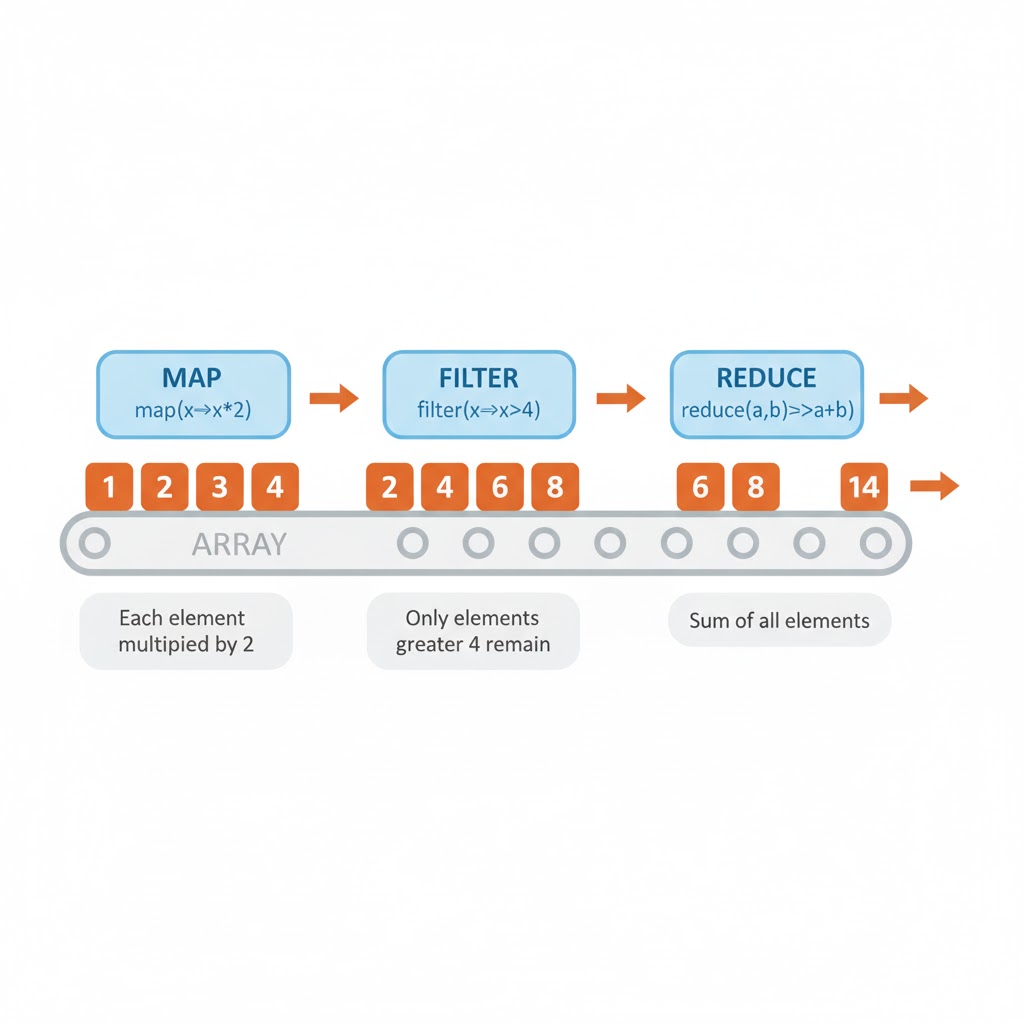
Array methods are built-in functions on JavaScript’s Array type that help you transform, search, aggregate, and mutate lists of values with clear, expressive code. Think of them as tiny superpowers that turn loops into readable one-liners.
Two Families: Mutating vs Non-Mutating
Two Families: Mutating vs Non-Mutating
-
Mutating methods: change the original array in place (push,pop,shift,unshift,splice,sort,reverse,fill,copyWithin). -
Non-mutating methods: return a new array or value and leave the original unchanged (map,filter,slice,concat,flat,flatMap,toSorted,toReversed,toSpliced(new),reduce,some,every,find,findIndex,findLast,findLastIndex,includes,indexOf,lastIndexOf,join).
A pure function is one that has no side effects; many non-mutating methods help you write more functional code.
Multiple Choice
Which method mutates the original array?
Core Trio: `map`, `filter`, `reduce`
Core Trio: map, filter, reduce
-
map(fn): transform each element, returning a new array of equal length. -
filter(fn): keep elements where the predicate is true. -
reduce(fn, init): fold the array into a single value (sum, object, map).
```javascript
// trio_demo.js
const nums = [1, 2, 3, 4, 5];

// Double then keep evens then sum
const doubled = nums.map(x => x * 2);                 // [2,4,6,8,10]
const evens = doubled.filter(x => x % 4 === 0);       // [4,8]
const total = evens.reduce((acc, x) => acc + x, 0);   // 12

console.log({ doubled, evens, total });
```
True or False?
map can change the length of the resulting array.
`reduce` Deep Dive (with Comments)
reduce Deep Dive (with Comments)
Build two results with a single pass using reduce: 1) sum of prices, 2) group items by category.
Accumulator is the carry-over value you return each iteration; its shape is up to you.
```javascript
const items = [
  { name: 'apple',  price: 1,   category: 'fruit' },
  { name: 'banana', price: 2,   category: 'fruit' },
  { name: 'carrot', price: 3,   category: 'veg'   },
  { name: 'kale',   price: 2.5, category: 'veg'   },
];

const init = { sum: 0, groups: {} };

const result = items.reduce((acc, item) => {
  // accumulate sum
  acc.sum += item.price;

  // accumulate groups
  const key = item.category;
  if (!acc.groups[key]) acc.groups[key] = [];
  acc.groups[key].push(item);

  return acc; // always return the accumulator!
}, init);

console.log(result);
// { sum: 8.5, groups: { fruit: [...], veg: [...] } }
```
Order the Steps
Put these steps of reduce in order:
Searching: `find`, `some`, `every`, `includes`
Searching: find, some, every, includes
-
find(fn): first element that matches (orundefined). -
some(fn): is there any match? returns boolean. -
every(fn): do all match? returns boolean. -
includes(value, fromIndex=0): direct value presence check (uses===).
```javascript
// searchers.js
const users = [
  { id: 1, name: 'Ana', active: true },
  { id: 2, name: 'Bo',  active: false },
  { id: 3, name: 'Cy',  active: true }
];

console.log(users.find(u => !u.active));     // {id:2,...}
console.log(users.some(u => u.name.length > 2)); // true
console.log(users.every(u => typeof u.id === 'number')); // true

const letters = ['a','b','c'];
console.log(letters.includes('b')); // true
```
Method Families Snapshot
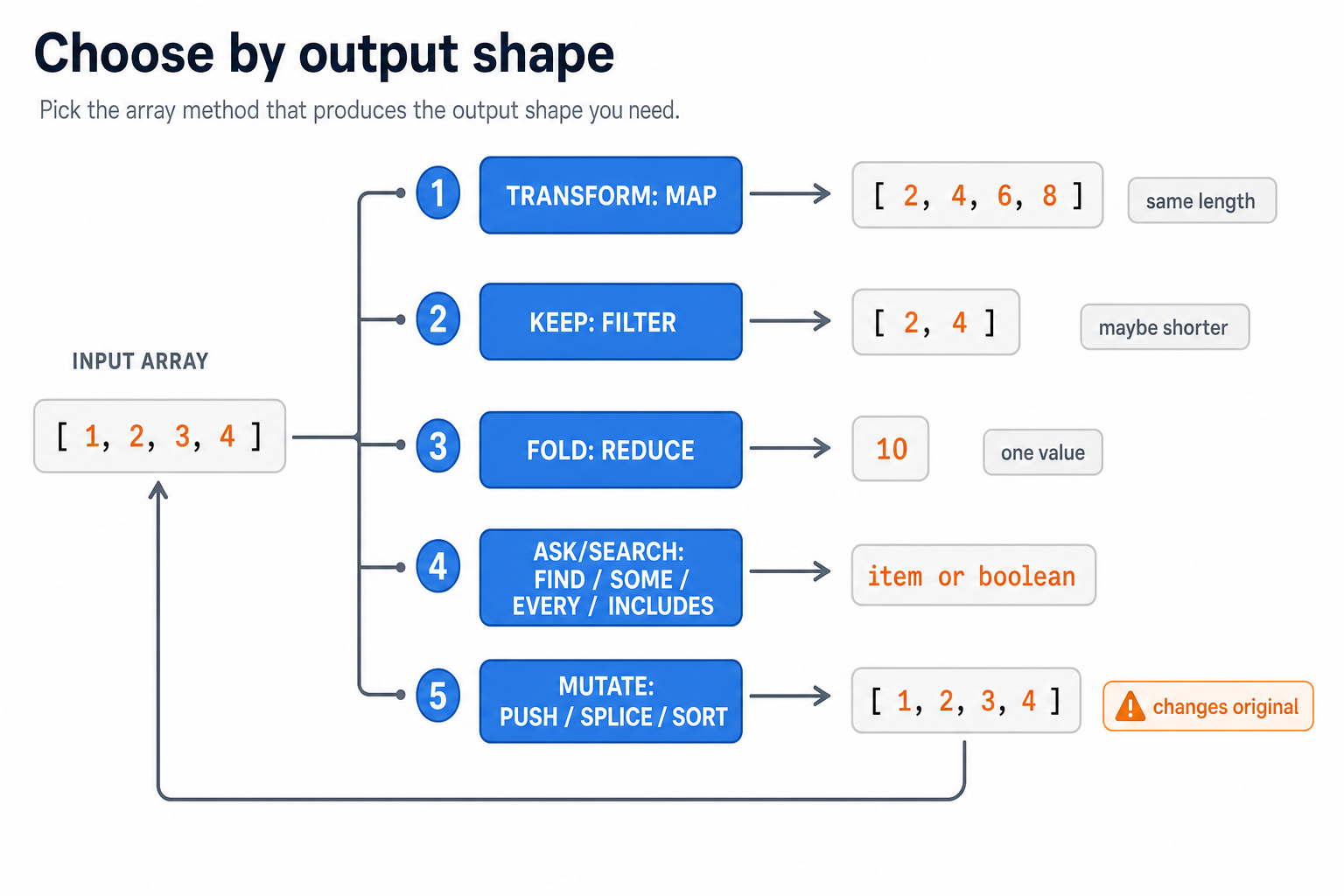
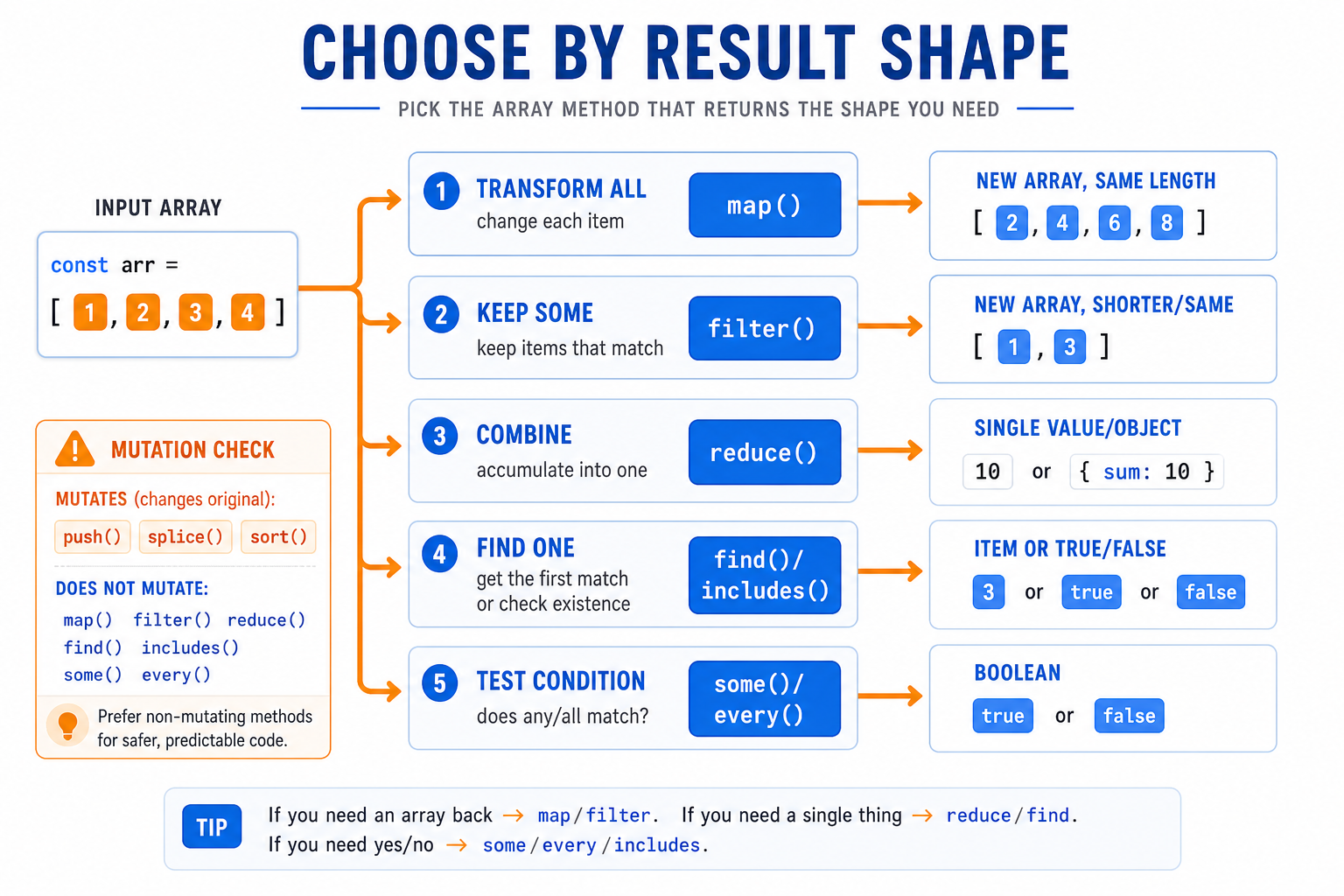
Before the decision map, anchor the big picture: array methods are usually about shape.
Notice which methods keep an array, shrink/search it, collapse it into a value, or mutate the original. In interviews, saying this out loud often explains your choice before you write code.
Array Method Decision Map
Before adding more methods, lock in the mental model: array methods are easiest to choose by the shape of the result you need.
Notice the visual split: some methods return another array, some return one value, and search methods often stop as soon as the answer is known.
Fill In the Blank
__________ returns the index of the first matching element, while find returns the element itself.
Slicing vs Splicing
Slicing vs Splicing
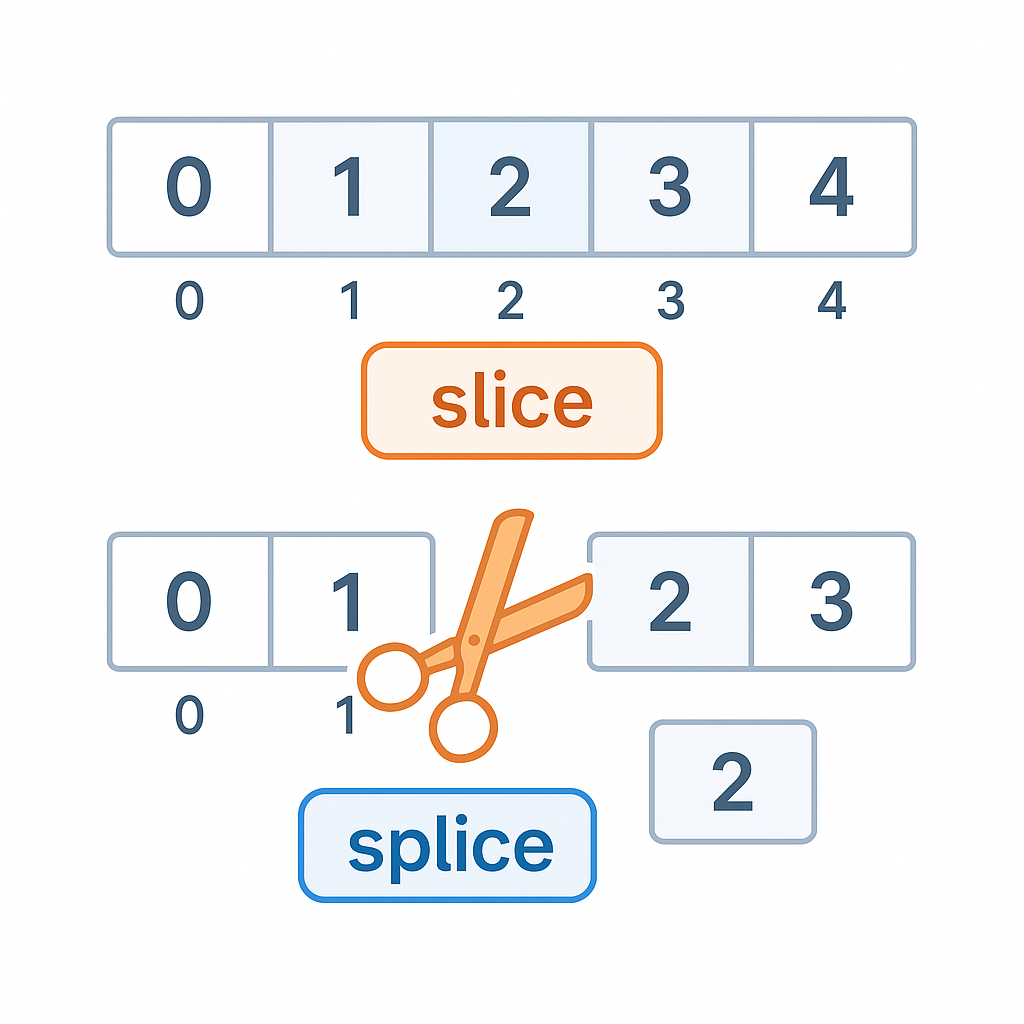
-
slice(begin, end?): non-mutating copy of a subarray. -
splice(start, deleteCount, ...items): mutating insertion/removal.
```javascript
// slice_vs_splice.js
const a = [10,20,30,40,50];
const b = a.slice(1, 4);        // [20,30,40], a unchanged
const removed = a.splice(2, 2); // removes 30,40 → a becomes [10,20,50]
console.log({ b, a, removed });
```
Immutable Newcomers
Immutable Newcomers
Modern JS adds non-mutating versions of classic mutators:
-
toSorted(compareFn?)— likesortbut returns a new array. -
toReversed()— likereversebut non-mutating. -
toSpliced(start, deleteCount, ...items)— likesplice, but returns a new array.
```javascript
// immutable_methods.js
const a = [3,1,2];
const sorted = a.toSorted((x,y) => x - y); // [1,2,3], a still [3,1,2]
const rev = a.toReversed();                 // [2,1,3], a still [3,1,2]
const sp2 = a.toSpliced(1,1,'X');          // [3,'X',2], a unchanged
console.log({ a, sorted, rev, sp2 });
```
Sorting Gotchas
Sorting Gotchas
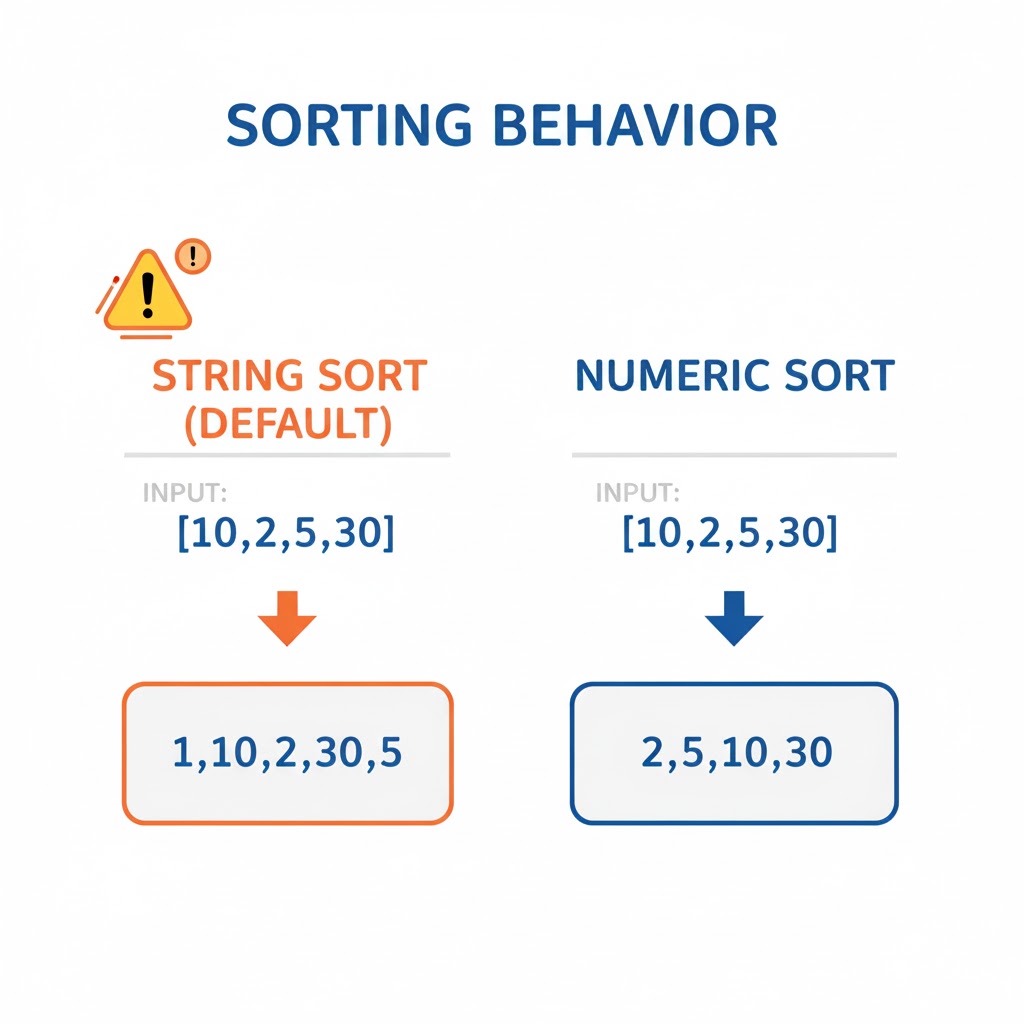
sort by default sorts lexicographically (as strings). Use a compare function for numeric sort.
```javascript
// sort_numbers.js
const nums = [10, 2, 5, 30];
console.log(nums.sort());                 // [10,2,30,5] (string sort!)
console.log(nums.sort((a,b)=>a-b));       // [2,5,10,30] (numeric)
```
Multiple Choice
Which method both flattens and maps in one pass?
`flat` and `flatMap`
flat and flatMap
-
flat(depth=1): flattens nested arrays up todepth. -
flatMap(fn): appliesmap, then flattens one level.
```javascript
// flat_flatMap.js
const nested = [1, [2, [3, [4]]]];
console.log(nested.flat(1));      // [1,2,[3,[4]]]
console.log(nested.flat(2));      // [1,2,3,[4]]
console.log(nested.flat(99));     // [1,2,3,4]

const words = ["hi", "yo"];
console.log(words.map(w => w.split("")));      // [['h','i'], ['y','o']]
console.log(words.flatMap(w => w.split("")));  // ['h','i','y','o']
```
Joining and Splitting
Joining and Splitting
-
join(sep=','): concatenate elements into a string. -
split(sep, limit?): (on strings) break into an array.
```javascript
// join_split.js
const cols = ['id','name','age'];
const header = cols.join(',');  // 'id,name,age'
const row = "1,Ana,34".split(','); // ['1','Ana','34']
console.log({ header, row });
```
Aggregations You’ll Use Daily
Aggregations You’ll Use Daily
These are every day aggregations you'll encounter daily, with examples.
```javascript
// Sum/avg with reduce
const amounts = [4, 10, 7];
const sum = amounts.reduce((a,b)=>a+b, 0);
const avg = sum / amounts.length;

// Max/min w/o Math.max(...spread) on huge arrays (safer for size)
const max = amounts.reduce((m,x)=> x>m?x:m, -Infinity);
const min = amounts.reduce((m,x)=> x<m?x:m, Infinity);

// Unique values (dedupe) preserving first occurrence
const arr = [3,5,3,2,5,9];
const uniq = arr.filter((v,i,src) => src.indexOf(v) === i);

// Frequency map
const freq = arr.reduce((m,x)=> (m[x]=(m[x]||0)+1, m), {});
console.log({ sum, avg, max, min, uniq, freq });
```
True or False?
indexOf works for objects by structural equality.
Insertion & Removal Patterns (Immutable)
Insertion & Removal Patterns (Immutable)
```javascript
// immutable_crud.js
const a = ['A','B','C','D'];

// Insert 'X' at index 2 (no mutation)
const insert2 = [...a.slice(0,2), 'X', ...a.slice(2)];

// Remove at index 1
const remove1 = [...a.slice(0,1), ...a.slice(2)];

// Replace index 3 with 'Z'
const replace3 = a.map((v,i)=> i===3 ? 'Z' : v);

console.log({ a, insert2, remove1, replace3 });
```
Performance & Pitfalls
Performance & Pitfalls
-
O(n)nature: many array ops traverse the entire list; avoid repeatedconcatin loops—prefer onepushper item or build thenjoin. - Copy vs reference: methods like
slicecopy references for objects; nested structures still share inner objects. -
sortis in-place; prefertoSortedif immutability matters.
Project: CSV to Summary with Array Methods
Project: CSV to Summary with Array Methods
Here, we parse a tiny CSV (no quotes/escapes) and summarize sales by product.
```javascript
const csv = `
product,price,qty
pen,1.50,4
pen,1.50,2
notebook,3.00,5
stapler,5.00,1
`.trim();

// 1) split lines, 2) split fields, 3) map to records, 4) reduce to summary
const [header, ...lines] = csv.split('\n');
const cols = header.split(',');

const records = lines
  .map(line => line.split(','))
  .map(parts => Object.fromEntries(parts.map((v,i)=>[cols[i], v])))
  .map(r => ({ product: r.product, price: +r.price, qty: +r.qty })); // cast

const summary = records.reduce((acc, {product, price, qty}) => {
  const t = (acc[product] ||= { units: 0, revenue: 0 });
  t.units += qty;
  t.revenue += price * qty;
  return acc;
}, {});

console.log(records);
console.table(summary);
```
Pipeline Shape Trace
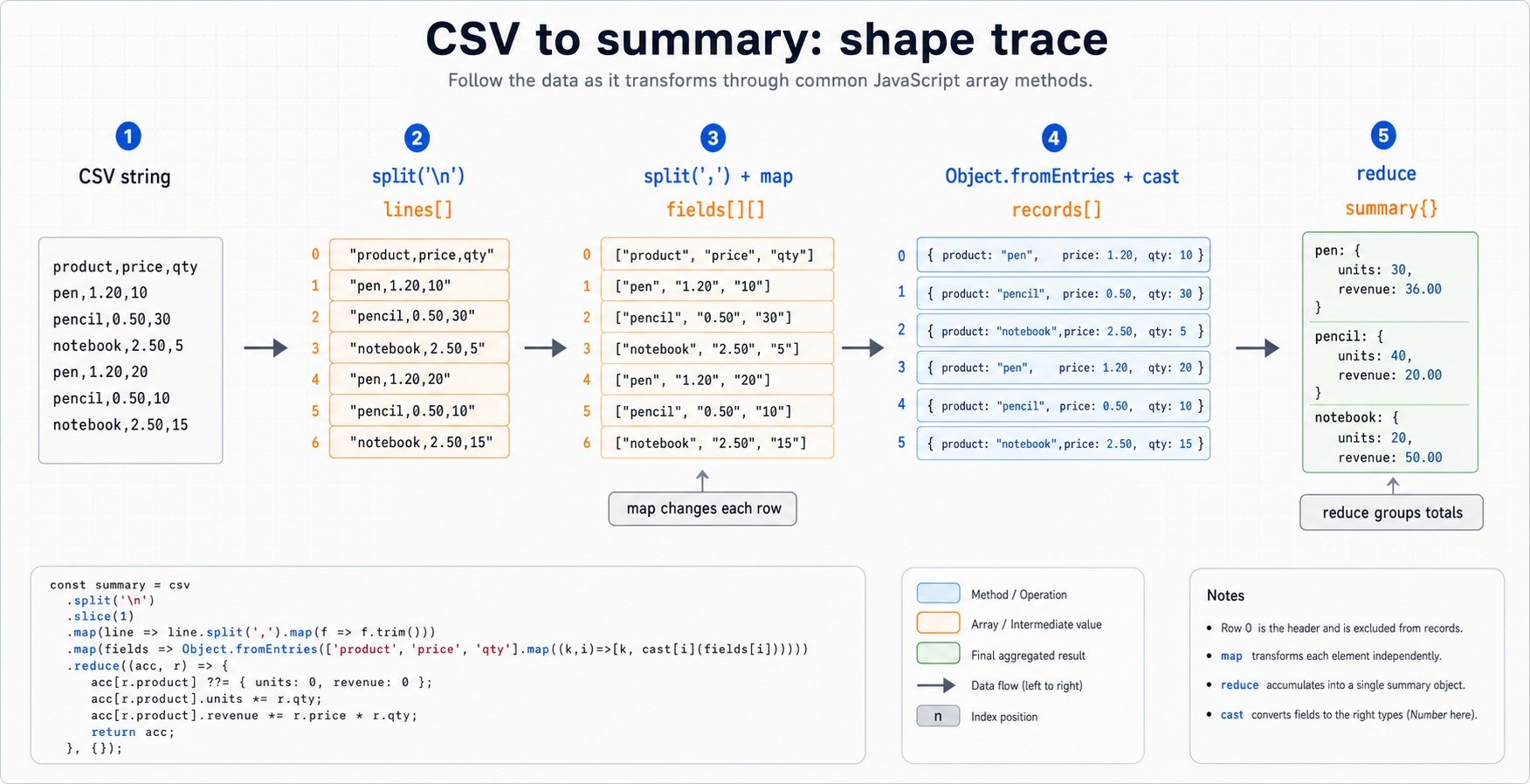
The CSV project is a full array-method pipeline: each step changes the data shape.
Track the shape first, then the method. Strings become rows, rows become records, records become a summary object. That mental trace prevents most map/reduce confusion.
Data Pipeline View
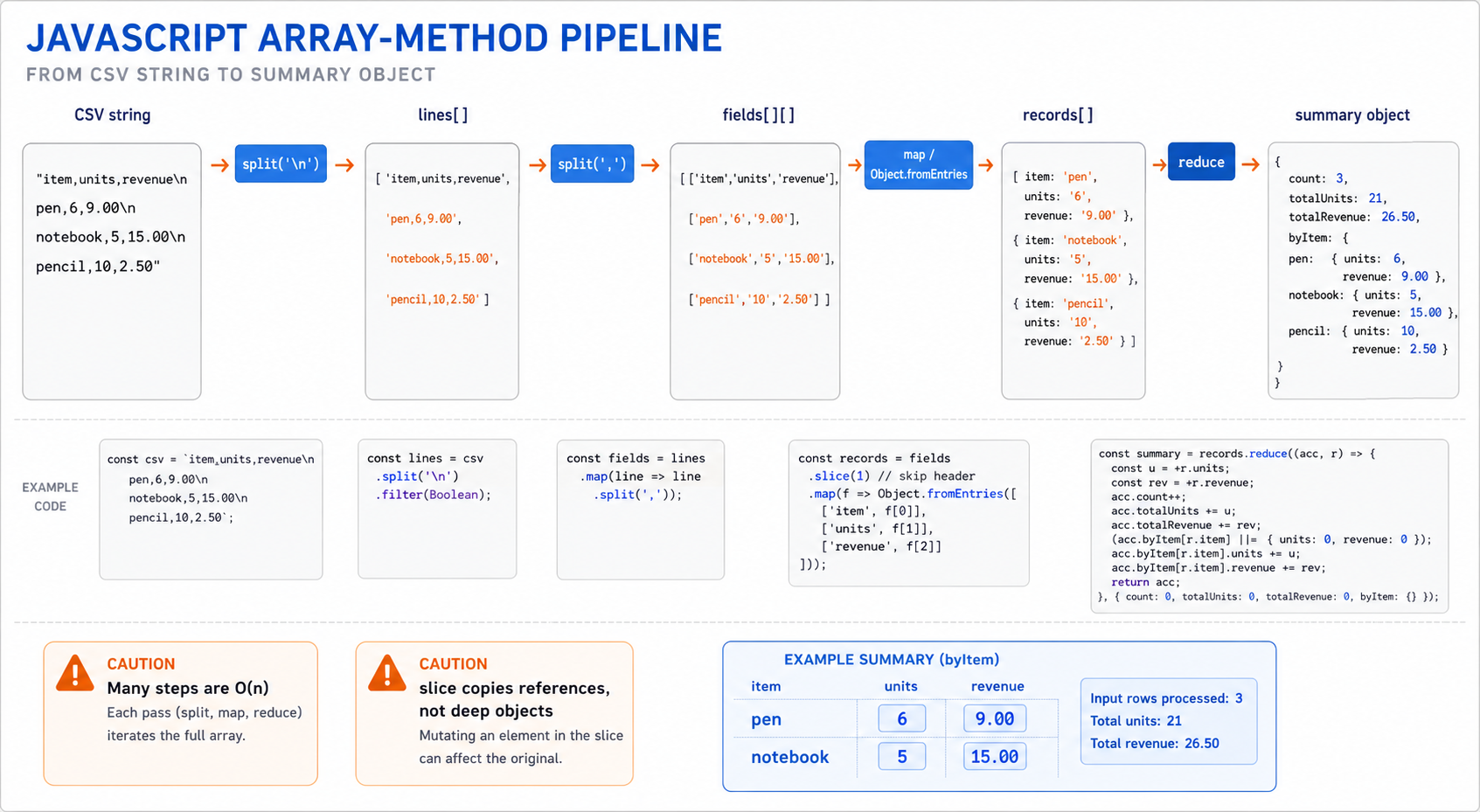
The CSV project is a miniature frontend data pipeline: convert text into rows, rows into objects, then objects into a summary.
Read the visual left to right. Each step changes the data shape, and that is the key to knowing whether you need split, map, flatMap, reduce, or an immutable update pattern.
Multiple Choice
Which sequence keeps the original array unchanged while returning a sorted copy?
Defensive Patterns
Defensive Patterns
- Use
Array.isArray(x)to check arrayness;typeof [] === 'object'. - Destructure with defaults to avoid
undefinedissues in callbacks. - Prefer
Number.isFinitewhen parsing numeric arrays.
```javascript
// defensive.js
function sumIfNumbers(maybes) {
  return maybes
    .filter(x => Number.isFinite(x))
    .reduce((a,b)=>a+b, 0);
}

console.log(sumIfNumbers([1, 2, NaN, Infinity, '3'])); // 3
```
Fill In the Blank
The map callback receives three parameters: currentValue, index, and __________.
Practice: Implement `map` & `filter` from Scratch
Practice: Implement map & filter from Scratch
DO NOT use built-ins inside implementations; use simple loops.
Sparse array has “holes” (missing indices). Native methods skip them; we mirrored that.
```javascript
// reimplement_map_filter.js
function myMap(arr, fn, thisArg) {
  const out = new Array(arr.length);
  for (let i = 0; i < arr.length; i++) {
    // skip holes in sparse arrays to emulate native semantics
    if (!(i in arr)) continue;
    out[i] = fn.call(thisArg, arr[i], i, arr);
  }
  return out;
}

function myFilter(arr, fn, thisArg) {
  const out = [];
  for (let i = 0; i < arr.length; i++) {
    if (!(i in arr)) continue;
    if (fn.call(thisArg, arr[i], i, arr)) out.push(arr[i]);
  }
  return out;
}

const nums = [1, , 3, 4]; // note the hole at index 1
console.log(myMap(nums, x => x*2));        // [2, , 6, 8]
console.log(myFilter(nums, x => x > 2));   // [3,4]
```
One Pager Cheat Sheet
One Pager Cheat Sheet
-
Array methodsare built-in functions on JavaScript’sArraytype that let you transform, search, aggregate, and mutate lists of values using clear, expressive code, effectively turning loops into readable one-liners. - JavaScript arrays fall into two families—mutating methods like
push,pop,splice,sort,reversethat change the original array in place, and non-mutating methods likemap,filter,slice,concat,reducethat return new values and leave the original unchanged, which helps you write pure functions and more functional code. - The
splicemethod mutates the original array by removing and/or inserting elements (and updating indices/length) and returns the removed elements, so it produces a side effect and is not a pure function, unlike non-mutating alternatives such asslice,map,concat, or the newertoSpliced(or you can build a new array withlet b = [...a.slice(0,i), ...newItems, ...a.slice(i+deleteCount)]). -
maptransforms each element producing a new array of the same length,filterkeeps elements that satisfy a predicate, andreducefolds the array into a single value (e.g., sum, object, map). -
mapalways preserves the original array length and index positions: it transforms each element by calling thecallback(returningundefinedstill yields an element) and — for sparse arrays — it does not call thecallbackfor holes so they remain, so to change the number of elements usefilterorflatMap. - Use
reduceto build two results in a single pass — a sum of prices and group items by category — by returning anAccumulator(the carry-over value) whose shape is up to you each iteration. - 1. Initialize
accumulator
-
Run
reduceron current item
-
Return the
accumulator
- Move to next item
You must first initialize the accumulator (via an explicit initialValue or the first element) so the reducer can process each currentValue, return the updated accumulator to serve as the carry-over, and only then move to the next item, allowing reduce to perform single-pass computations by carrying a combined state.
- Use find(fn) to return the first matching element (or undefined), some(fn) to test if any element matches (boolean), every(fn) to check if all elements match (boolean), and includes(value, fromIndex=0) to check for direct value presence using strict equality (===).
- - Choose array methods by output shape: same-length array, smaller array, single value, boolean/item lookup, or in-place mutation.
- - Choose array methods by output shape: same-length array, filtered array, single value, boolean, or found item.
- find returns the element (or undefined) while findIndex returns the index (or -1); both take a predicate callback and short-circuit, so use find for the element value and findIndex for the position (e.g., to splice/update), and note that includes differs by checking a value with === and returning a boolean—both find and findIndex run in O(n).
- slice(begin, end?) creates a non-mutating copy of a subarray, whereas splice(start, deleteCount, ...items) performs mutating insertion and/or removal of elements.
- Modern JavaScript introduces non-mutating versions of classic mutators — toSorted(compareFn?), toReversed(), and toSpliced(start, deleteCount, ...items) — which return new arrays instead of modifying the original.
- By default, sort sorts lexicographically (as strings), so use a compare function for numeric sort.
- flatMap combines mapping and one-level flattening in a single pass by calling a callback for each element and immediately concatenating its (possibly array) result, which avoids creating an intermediate array that map(...).flat(1) would produce.
- flat(depth=1) flattens nested arrays up to the given depth, whereas flatMap(fn) applies map then flattens the result by one level.
- Use join(sep=',') to concatenate elements into a string and split(sep, limit?) (on strings) to break a string into an array.
- A concise guide to aggregations you'll use daily, presenting common aggregations with practical examples.
- indexOf in JavaScript does not perform structural (deep) equality for objects; it relies on reference (identity) equality.
- This section addresses insertion and removal patterns for immutable data structures.
- Performance & Pitfalls include the O(n) nature of many array operations, the distinction between copying vs referencing objects, and the importance of considering immutability when using the sort method.
- Project is focused on converting a small CSV file with no quotes or escapes into a summary of sales by product using Array Methods.
- - For data pipelines, trace shape changes: string → lines → fields → records → grouped summary.
- - Real array workflows are pipelines: string → rows → records → grouped summary, with each method chosen by the next data shape.
- Both B and C create a new (shallow) array copy of the original array using slice() and the spread syntax, then use sort to return the sorted copy while leaving the original array unchanged.
- When working with arrays, use Array.isArray(x) for array checking, use destructuring with defaults to avoid undefined issues, and prefer Number.isFinite when working with numeric arrays.
- The array parameter in a map callback provides access to the original array being iterated over, allowing for contextual operations within the callback function.
- map and filter functions were implemented from scratch without using built-in methods, with the consideration of handling sparse arrays by skipping "holes" in the indices, similar to the behavior of native methods.