JavaScript in Depth
Read at your own pace. Code execution, quizzes, progress tracking, and the AI tutor are available in the interactive view with JavaScript enabled.
Why JavaScript Deeply
From page behavior to engineering confidence
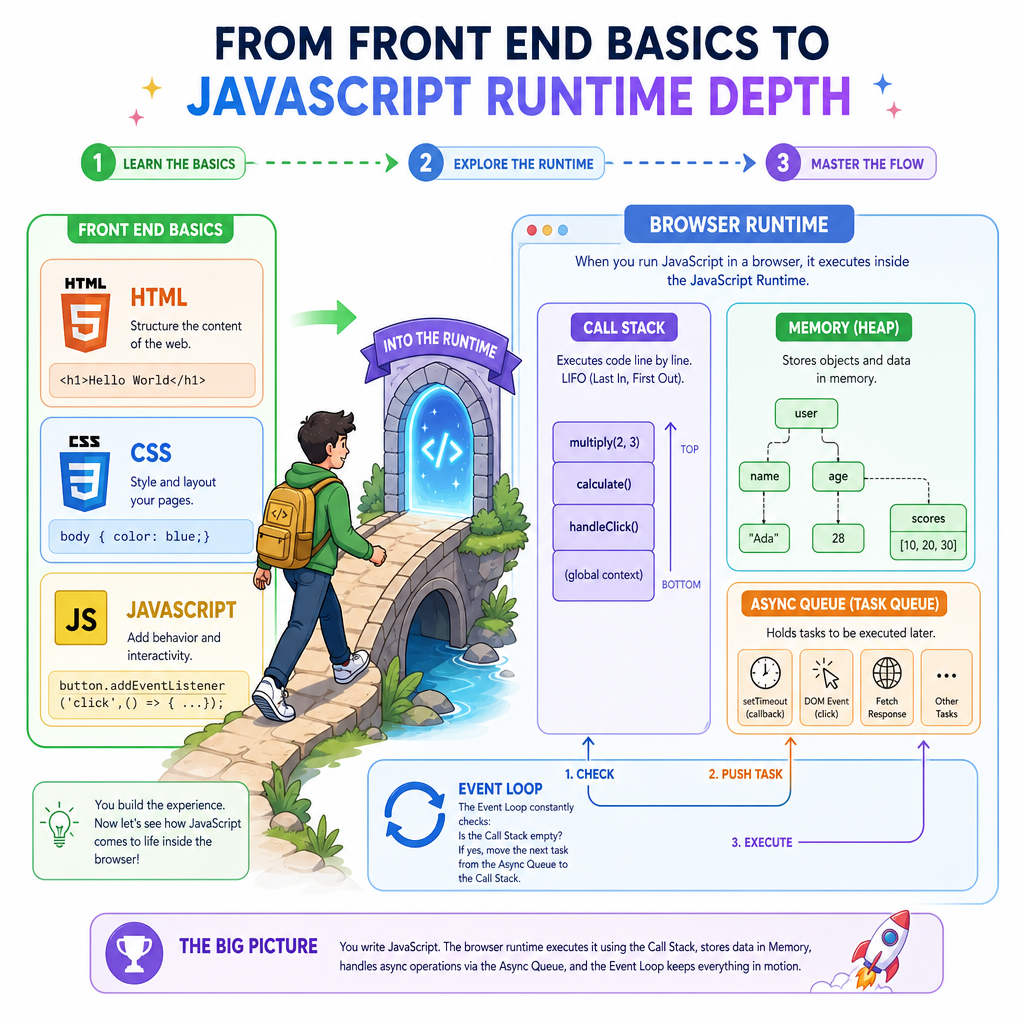
In Front End Basics, you mapped the browser as a runtime: HTML gives meaning, CSS controls presentation, and JavaScript adds behavior.
Now we go one layer deeper: how JavaScript actually behaves when a real product UI runs.
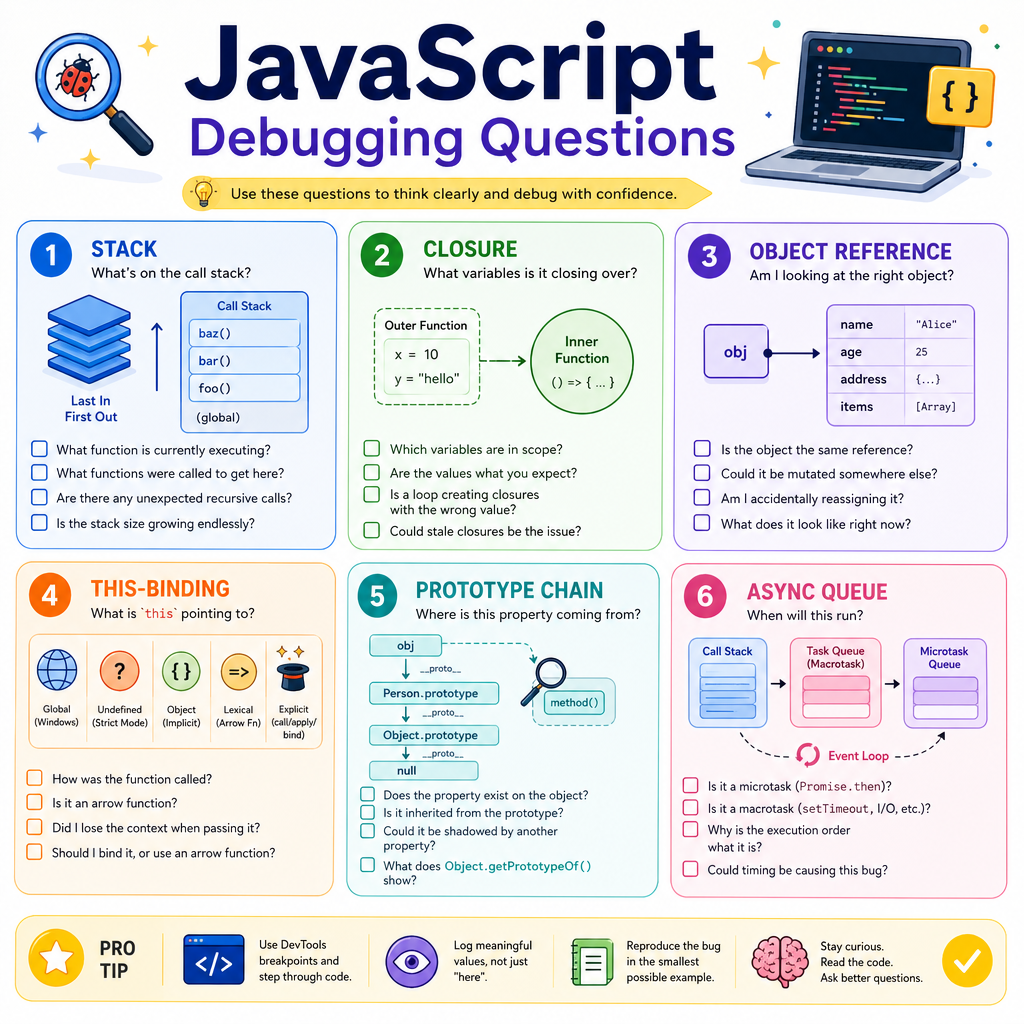
For a support-to-front-end transition, this is a key interview and on-the-job skill. Product companies expect you to debug issues like:
- Why did this value become
undefined? - Why did this async API response update the UI later than expected?
- Why does
thispoint somewhere surprising? - Why does a function still remember an old variable?
We will use your C++ background as a mental bridge, but keep the focus on JavaScript as the browser’s behavior language. Next lesson, we’ll use JavaScript for DSA practice — today is about mastering the language model itself.
Runtime Mental Model
JavaScript is single-threaded, but not simple
JavaScript usually executes your code on one main thread in the browser. That thread is responsible for a lot:
- Running JS functions
- Responding to user events
- Updating DOM-related state
- Coordinating rendering work with the browser
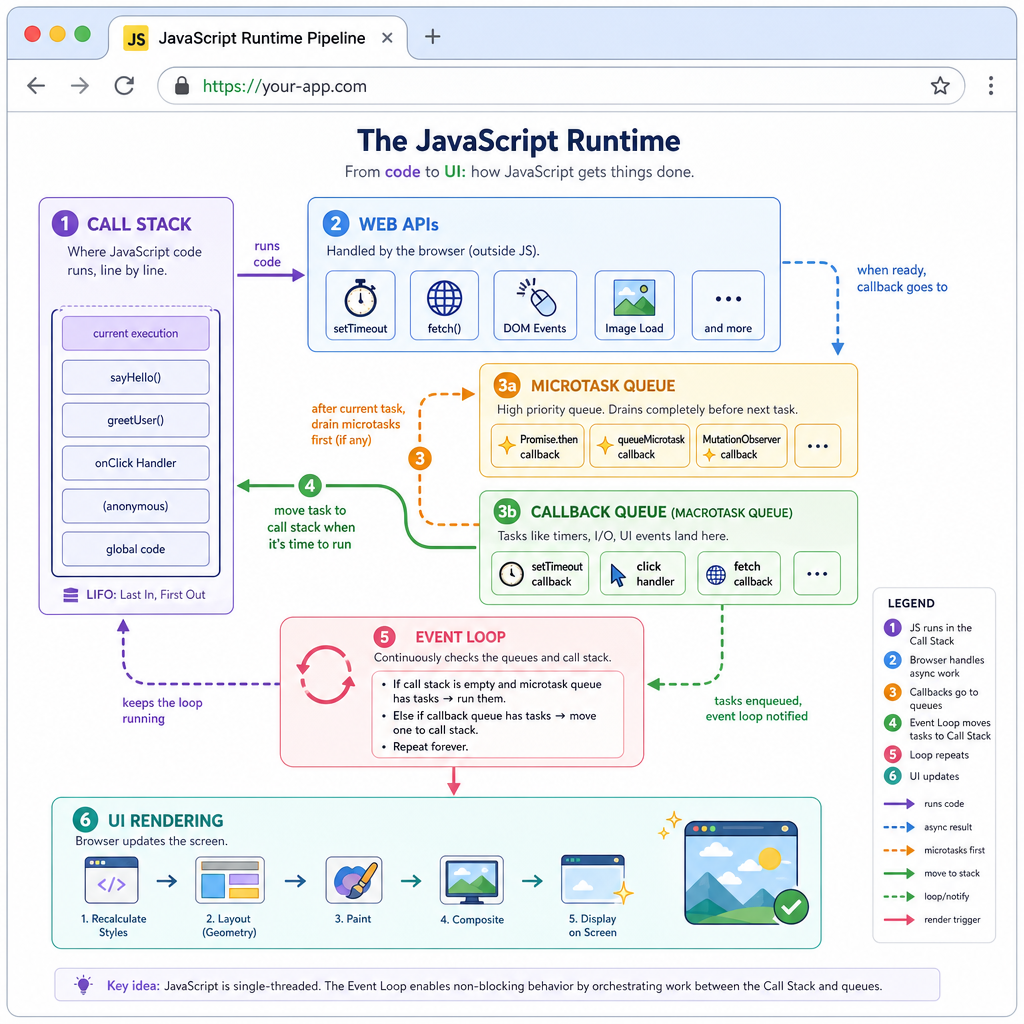
A useful mental model:
Your JS Code
   |
   v
Call Stack  <--- currently running function
   |
   v
Web APIs    <--- timers, fetch, DOM events handled by browser
   |
   v
Queues      <--- callbacks waiting to run
   |
   v
Event Loop  <--- moves ready callbacks back to stack
The key idea: JavaScript does not pause the whole program for every async operation. Instead, the browser handles work like timers and network requests outside the call stack, then schedules callbacks later.
This is why front-end bugs often feel timing-related: a value may not exist yet, not because the code is syntactically wrong.
Stack Check
A click handler starts running in JavaScript. While it is executing, where is the currently active function represented?
Scope And Closures
Functions remember their birthplace
JavaScript uses lexical scope: where a function is written determines what variables it can access.
A closure happens when a function keeps access to variables from its outer scope even after that outer function has finished.
This matters constantly in front-end work:
- Event handlers remember component state
- Debounced search functions remember timer IDs
- API callbacks remember request parameters
- React hooks rely heavily on closure behavior
A C++ lambda with captured variables is a helpful analogy. The syntax differs, but the idea of “function + remembered environment” maps well.
```cpp
#include <iostream>
#include <functional>
using namespace std;

function<int()> makeCounter() {
    int count = 0;

    // Captures count by value, but mutable allows the stored copy to change.
    return [count]() mutable {
        count++;
        return count;
    };
}

int main() {
    auto counterA = makeCounter();
    auto counterB = makeCounter();

    cout << "counterA: " << counterA() << endl;
    cout << "counterA: " << counterA() << endl;
    cout << "counterB: " << counterB() << endl;

    return 0;
}
```
Closure Blank
In JavaScript, when a function remembers variables from the lexical environment where it was created, that remembered function-environment combination is called a ____.
Values And Identity
Primitive values vs object references
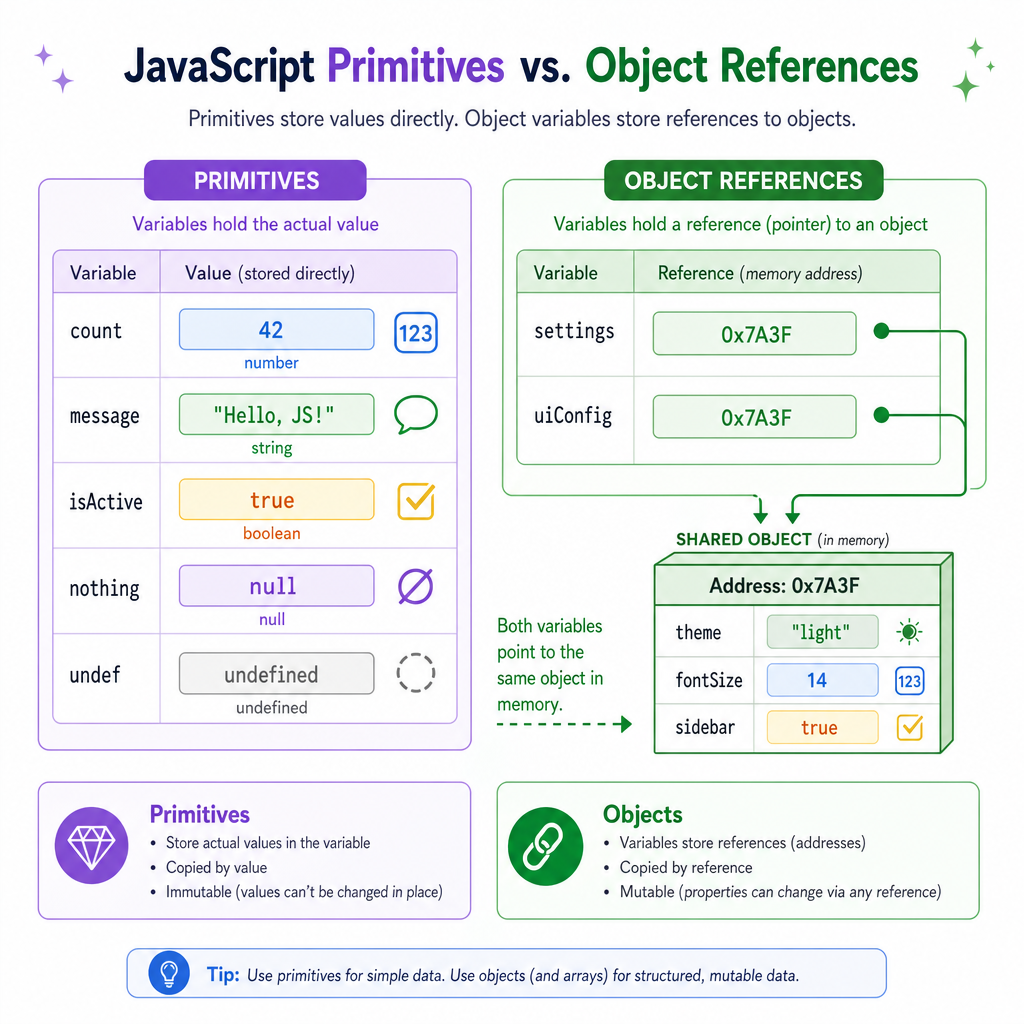
JavaScript has primitive values like:
numberstringbooleanundefinednullsymbolbigint
Objects, arrays, and functions are reference-like values.
That distinction explains many UI bugs:
let a = { theme: "dark" };
let b = a;
b.theme = "light";

// a.theme is also "light"
a and b point to the same object. You did not clone the object; you copied the reference.
In product front-end work, this is especially important because UI frameworks often depend on detecting whether state identity changed. Mutating an existing object can be very different from creating a new one.
Equality Trap
True or false: In JavaScript, two separate object literals with the same properties are equal with ===.
This And Prototypes
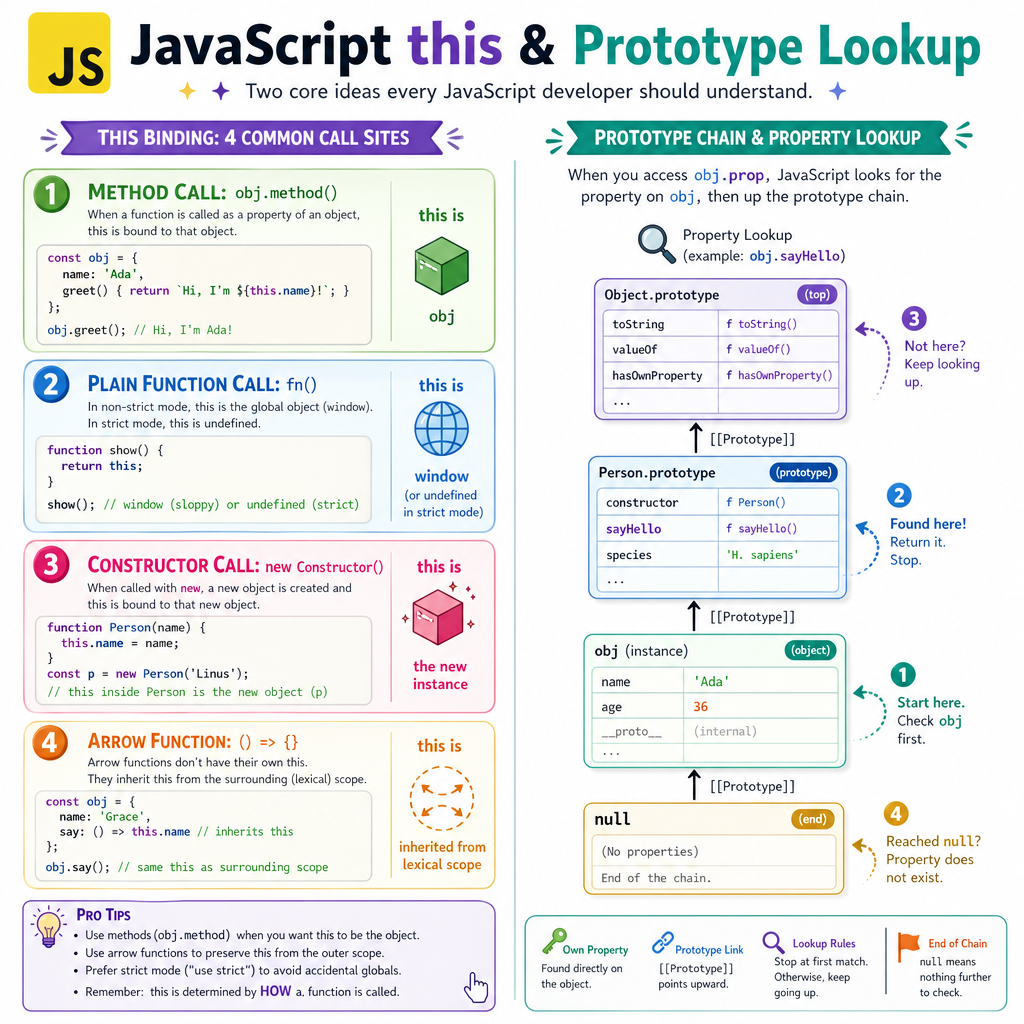
this depends on the call site
In JavaScript, this is not mainly about where a function is written. It is usually about how the function is called.
Common cases:
obj.method()        -> this is obj
functionCall()      -> this depends on strict mode / environment
new Constructor()   -> this is the new object
arrow function      -> this is inherited lexically
This is why passing methods as callbacks can break behavior:
button.addEventListener("click", user.sayName)
The method may lose its original object context.
JavaScript also uses prototype-based inheritance. Classes exist, but they are mostly cleaner syntax over prototypes. When you access obj.name, JavaScript first checks the object itself, then walks up its prototype chain.
Async Scheduling
Async is scheduling, not magic
When JavaScript sees async behavior, it does not simply “run everything later” randomly.
A simplified ordering:
- Run current synchronous code on the call stack
- Run ready microtasks like promise callbacks
- Run queued macrotasks like timers and many events
- Let the browser continue rendering work when appropriate
This explains a classic interview output-order question:
console.log("A")
setTimeout(() => console.log("B"), 0)
Promise.resolve().then(() => console.log("C"))
console.log("D")
Output:
A
D
C
B
The C++ program below simulates the ordering. It is not a browser, but it makes the scheduling rule visible.
```cpp
#include <iostream>
#include <queue>
#include <functional>
using namespace std;

int main() {
    queue<function<void()>> microtasks;
    queue<function<void()>> macrotasks;

    cout << "A" << endl;

    macrotasks.push([]() {
        cout << "B" << endl;
    });

    microtasks.push([]() {
        cout << "C" << endl;
    });

    cout << "D" << endl;

    while (!microtasks.empty()) {
        auto task = microtasks.front();
        microtasks.pop();
        task();
    }

    while (!macrotasks.empty()) {
        auto task = macrotasks.front();
        macrotasks.pop();
        task();
    }

    return 0;
}
```
Promise Priority
After synchronous JavaScript finishes, which callback type generally runs first in the event loop model?
Interview Ready JS
What to carry forward
You now have the deeper JavaScript model needed for product front-end interviews and real debugging:
- The call stack shows what is running now
- The event loop schedules what runs later
- Closures let functions remember outer variables
- Objects compare by identity, not deep structure
-
thisdepends heavily on call style - Prototypes explain property lookup and class behavior
- Promises use microtasks, which usually run before timer callbacks
As you practice, do not only ask “what does this code output?” Ask:
What is on the stack?
What variables are captured?
Is this a primitive or object reference?
How is this function called?
Is this callback a microtask or macrotask?
Next, we will apply JavaScript more directly to problem solving in Data Structures and Algorithms with JavaScript.