Learning JavaScript Basics
Read at your own pace. Code execution, quizzes, progress tracking, and the AI tutor are available in the interactive view with JavaScript enabled.
Course Starting Point
Welcome to Frontend Mastery
This first lesson sets the foundation the rest of the course will lean on: DOM work, fetching data, modern syntax, CSS systems, tooling, and deployment all depend on clear JavaScript thinking.
With 8 years of frontend experience, you have probably written plenty of JavaScript already. The goal here is not “what is a variable?” in isolation. It is to tighten the mental models that show up in senior and staff-level interviews:
- What is a value versus a reference?
- Why does
typeof nullfeel like a trap? - When does JavaScript coerce a value?
- What exactly can a function “see” from its scope?
Think of this as checking your inventory before a big puzzle-room run: the tools are familiar, but we want no hidden rusty edges.

Values And Types
JavaScript starts with values
A value is a piece of data your program can work with.
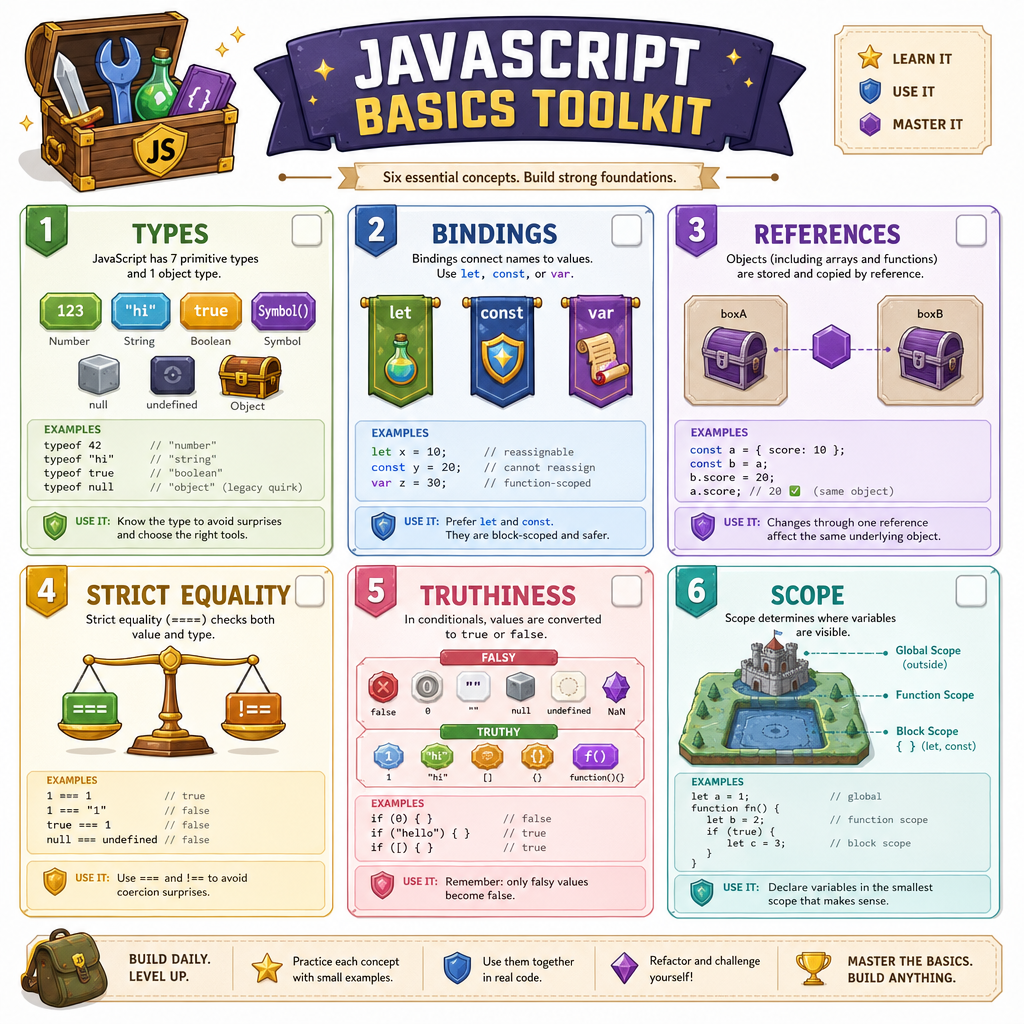
JavaScript values fall into two broad groups:
Primitive values
These are atomic values:
stringnumberbooleanundefinednullbigintsymbol
Object values
These are compound values:
- plain objects:
{ name: "Ripley" } - arrays:
["book", "game", "movie"] - functions:
function play() {} - dates, maps, sets, and many more
The important interview-level distinction: primitives are compared by their value, while objects are compared by identity/reference.
```javascript
console.log(typeof "frontend"); // string
console.log(typeof 42); // number
console.log(typeof true); // boolean
console.log(typeof undefined); // undefined

console.log(typeof null); // object - historical JavaScript quirk
console.log(typeof ["puzzle", "game"]); // object
console.log(typeof function solve() {}); // function

console.log("same primitive?", "movie" === "movie");
console.log("same array?", [1, 2] === [1, 2]);
```
Type Check Trap
What does this expression evaluate to?
typeof null
Bindings Not Boxes
Variables are bindings
A variable is not the value itself. It is a binding: a name that points at a value.
That distinction matters when assignment enters the story.
let score = 10
    │
    └── points to the number value 10
When you assign a new primitive, the binding points at a different value. When you assign an object, the binding points at an object reference.
This is where many “wait, why did that change?” bugs begin.
```javascript
let hero = "Maverick";
let callSign = hero;

hero = "Iceman";

console.log("hero:", hero);
console.log("callSign:", callSign);

const player = { name: "Ava", score: 10 };
const leaderboardEntry = player;

leaderboardEntry.score = 99;

console.log("player score:", player.score);
console.log("same object?", player === leaderboardEntry);
```
Reference Reality
True or false?
If two variables refer to the same object, mutating that object through one variable can be observed through the other variable.
Equality And Coercion
Prefer predictable comparisons
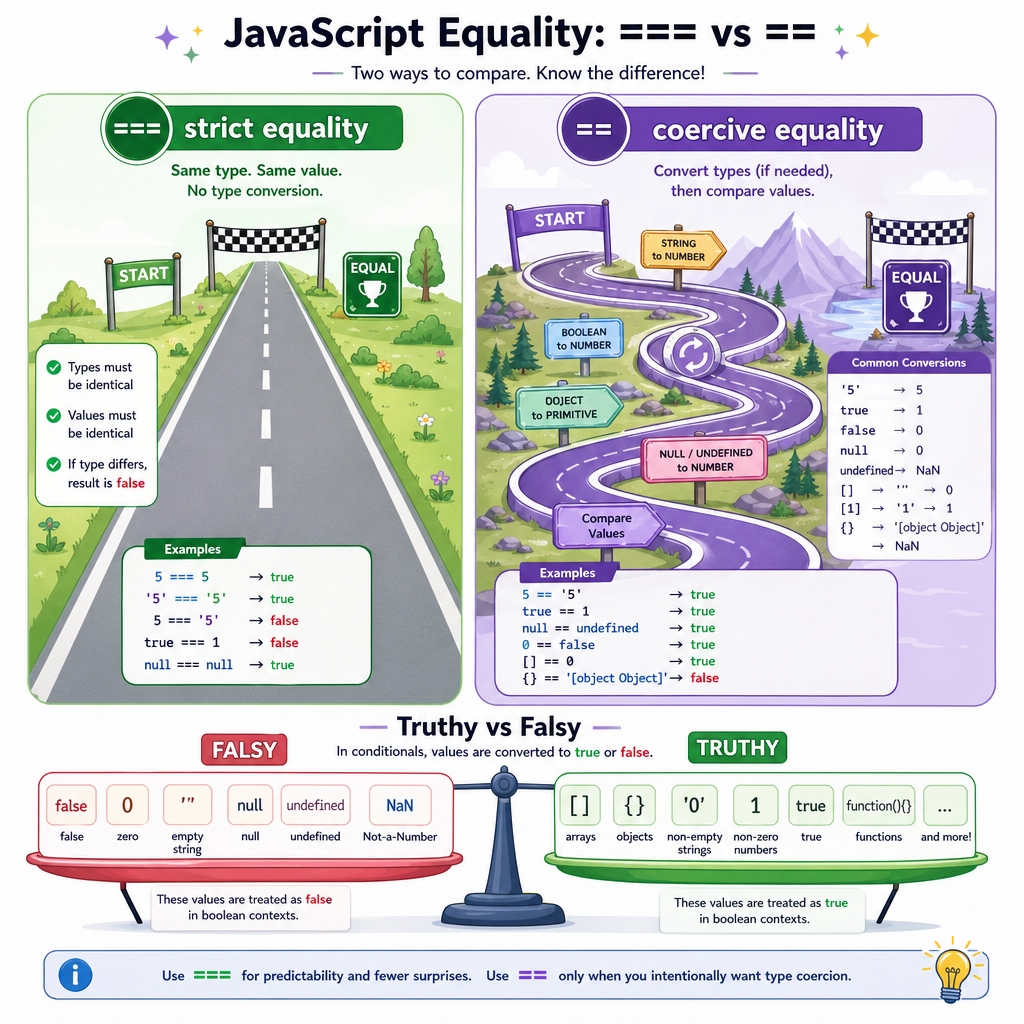
JavaScript has two common equality operators:
-
===checks equality without broad type coercion -
==allows type coercion before comparing
At staff level, the answer is not simply “never learn ==.” You should understand it well enough to avoid being surprised by it.
In production frontend code, === is usually the default because it keeps intent visible. If the types differ, you decide how to convert them instead of letting JavaScript improvise.
Truthiness is related, but different
Conditionals do not require a boolean. They evaluate whether a value is truthy or falsy.
Common falsy values:
false0""nullundefinedNaN
Everything else is truthy, including [] and {}.
Strict Equality
Fill in the operator that compares two values without broad type coercion:
value ____ expected
Functions And Scope
Functions create reusable behavior
A function packages a sequence of work behind a name.
For interviews, the key idea is not just syntax. It is scope: where names are visible.
A function can access:
- its parameters
- variables declared inside it
- variables from outer scopes
But outer code cannot access variables declared only inside the function.
This visibility rule is one reason frontend code can stay organized instead of turning into a reality-TV reunion episode where everyone is yelling in the same room.
```javascript
const bonus = 5;

function calculateScore(baseScore, comboMultiplier) {
  const comboScore = baseScore * comboMultiplier;
  return comboScore + bonus;
}

console.log(calculateScore(10, 3)); // 35

// comboScore only exists inside calculateScore.
console.log(typeof comboScore); // undefined
```
Scope Boundary
A variable is declared inside a function body with a local declaration. Which statement is most accurate?
Basics Checklist
Your baseline mental model
Before we touch the DOM in the next lesson, keep this checklist handy:
- Values have types. Primitives and objects behave differently.
- Variables are bindings. They point at values; they are not the values themselves.
- Objects are reference-based. Two bindings can point to the same object.
- Use strict equality by default. Convert explicitly when needed.
- Conditionals use truthiness. Falsy is a small, specific list.
- Functions define scope. Inner names are not automatically visible outside.
These basics are the grammar of every frontend feature coming next. DOM manipulation will feel much cleaner when you can reason confidently about values, references, comparisons, and scope.