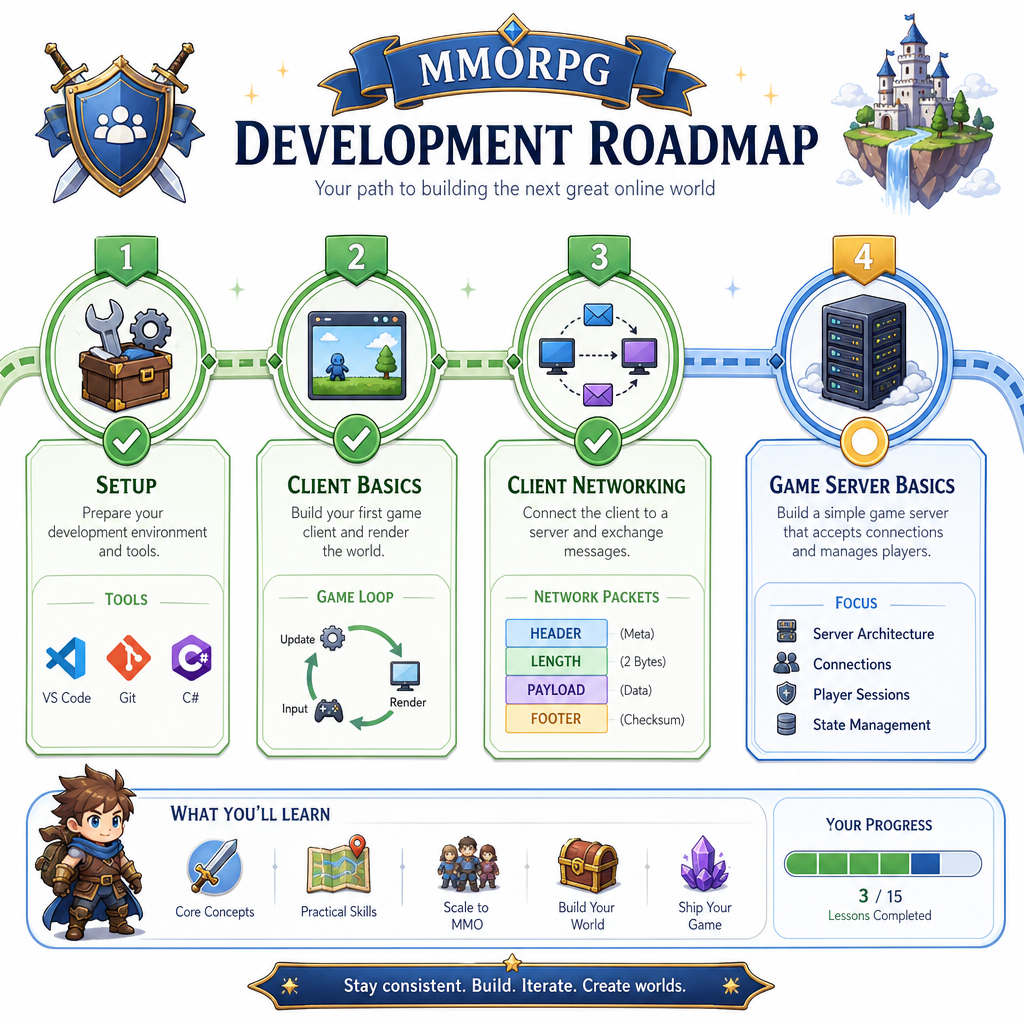
Lesson 3: Game Client - Networking
Read at your own pace. Code execution, quizzes, progress tracking, and the AI tutor are available in the interactive view with JavaScript enabled.
Client Goes Online
Why networking matters now
In Lesson 2: Game Client - Basics, we separated the client into subsystems, treated input as intent, and introduced client states. That gives us a clean place to plug in networking without turning rendering, input, and world simulation into one tangled loop.
Today we’ll add the client-side networking layer for our MMORPG prototype:
- connect/disconnect lifecycle
- packet/message boundaries
- outgoing player intents
- incoming world updates
- a thread-safe handoff between networking and the main loop
We will not build the real authoritative server yet — that begins in Lesson 4: Game Server - Basics. For now, we’re shaping the client so it can talk to one cleanly.

Networking Boundary
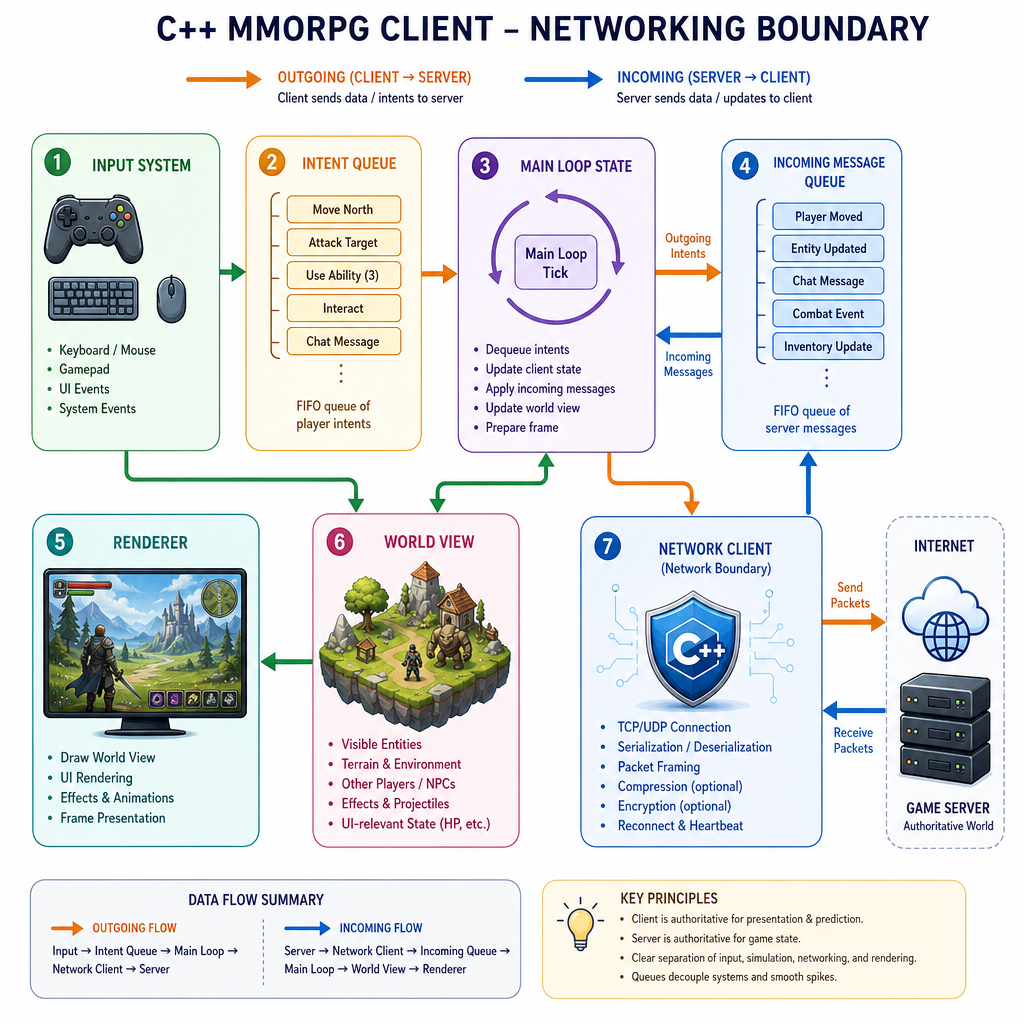
Keep networking behind a boundary
Coming from Netty/Spring, you already know the value of isolating protocol code from application logic. We want the same discipline in C++.
A useful first client shape is:
Input System       World View / Renderer
     |                    ^
     v                    |
Intent Queue ---> Game Loop State <--- Incoming Message Queue
                          ^
                          |
                  Network Client
The main loop should not directly call low-level socket reads everywhere. Instead:
- input creates intent messages: move, interact, cast spell
- network receives server messages: snapshot, entity spawned, entity removed
- the main loop drains incoming messages at a safe point each frame
- rendering reads the client’s local view of the world
This preserves the subsystem boundaries from Lesson 2 while making the client online-capable.
Connection Lifecycle
Treat connection as client state
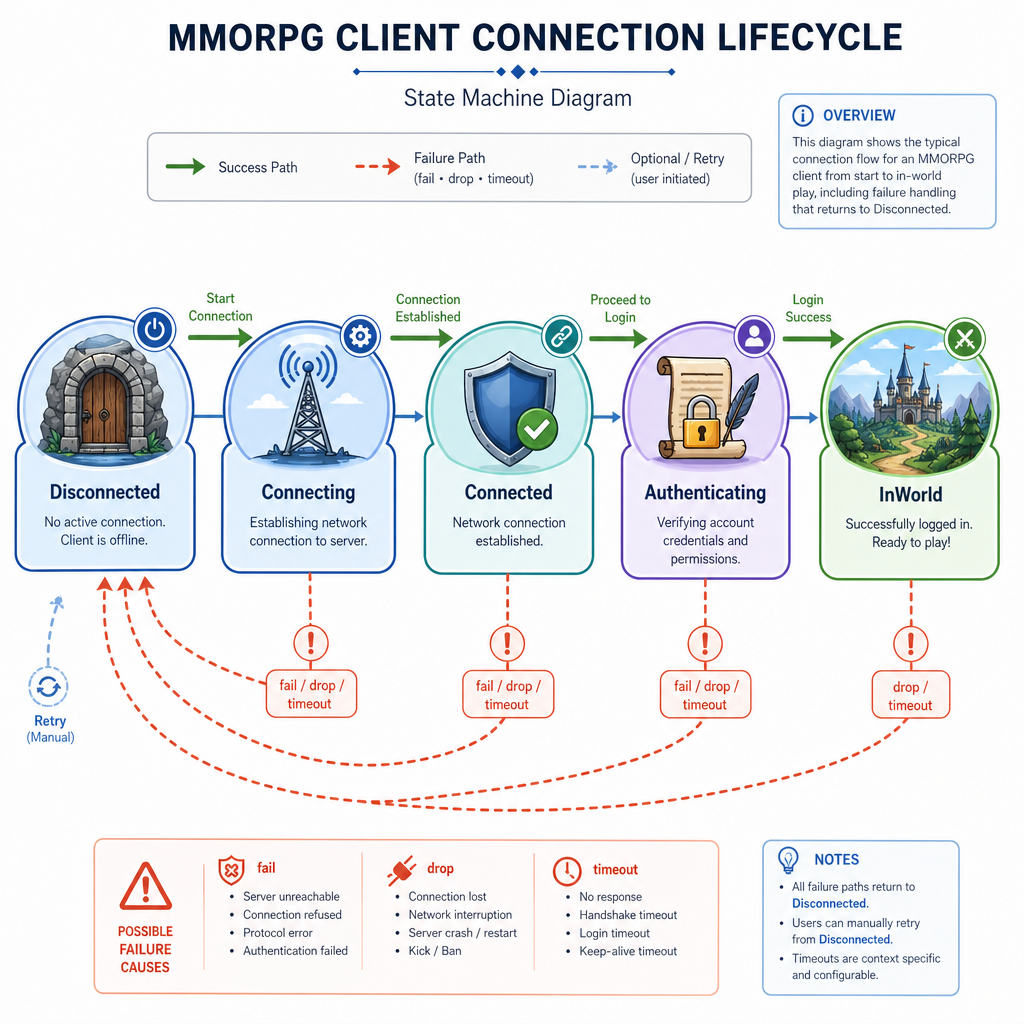
Networking is not just connect() and then happy gameplay forever. The client needs a small lifecycle that integrates with the client states from Lesson 2.
A minimal lifecycle:
Disconnected
    |
    v
Connecting
    |
    v
Connected
    |
    v
Authenticating
    |
    v
InWorld
And failure can happen almost anywhere:
Connecting ----fail----> Disconnected
Connected -----drop----> Disconnected
InWorld -------timeout-> Disconnected
For this lesson, focus on client behavior:
- show connection progress
- prevent gameplay input before
InWorld - cleanly clear network-owned state on disconnect
- keep retry/backoff logic separate from rendering
Authentication details and account persistence belong later; here we only need the state slots that will support them.
Packet Framing
TCP is a byte stream, not a message stream
If we start with TCP, we get reliable ordered bytes. But we do not get automatic game-message boundaries.
That means one socket read might contain:
- half a message
- exactly one message
- multiple messages
- the end of one message plus the start of another
So the client protocol needs framing. A simple first format is:
[4-byte length][payload bytes]
[4-byte length][payload bytes]
Below is a standalone parser demo. It simulates receiving chunks from the network and reconstructs complete messages.
```cpp
#include <cstdint>
#include <iostream>
#include <string>
#include <vector>

class FrameParser {
public:
    void feed(const std::vector<uint8_t>& bytes) {
        buffer.insert(buffer.end(), bytes.begin(), bytes.end());
        parseAvailable();
    }

private:
    std::vector<uint8_t> buffer;

    static uint32_t readU32BE(const std::vector<uint8_t>& b, size_t offset) {
        return (static_cast<uint32_t>(b[offset]) << 24) |
               (static_cast<uint32_t>(b[offset + 1]) << 16) |
               (static_cast<uint32_t>(b[offset + 2]) << 8) |
               static_cast<uint32_t>(b[offset + 3]);
    }

    void parseAvailable() {
        while (true) {
            if (buffer.size() < 4) return;

            uint32_t length = readU32BE(buffer, 0);
            if (buffer.size() < 4 + length) return;

            std::string payload(buffer.begin() + 4, buffer.begin() + 4 + length);
            std::cout << "Parsed message: " << payload << "\n";

            buffer.erase(buffer.begin(), buffer.begin() + 4 + length);
        }
    }
};

std::vector<uint8_t> frame(const std::string& payload) {
    uint32_t len = static_cast<uint32_t>(payload.size());
    std::vector<uint8_t> out;
    out.push_back((len >> 24) & 0xFF);
    out.push_back((len >> 16) & 0xFF);
    out.push_back((len >> 8) & 0xFF);
    out.push_back(len & 0xFF);
    out.insert(out.end(), payload.begin(), payload.end());
    return out;
}

int main() {
    std::vector<uint8_t> stream;
    std::vector<uint8_t> a = frame("WELCOME");
    std::vector<uint8_t> b = frame("SNAPSHOT x=10 y=20");
    stream.insert(stream.end(), a.begin(), a.end());
    stream.insert(stream.end(), b.begin(), b.end());

    FrameParser parser;

    parser.feed(std::vector<uint8_t>(stream.begin(), stream.begin() + 3));
    std::cout << "Fed first 3 bytes: no full message yet\n";

    parser.feed(std::vector<uint8_t>(stream.begin() + 3, stream.begin() + 12));
    parser.feed(std::vector<uint8_t>(stream.begin() + 12, stream.end()));

    return 0;
}
```
TCP Message Myth
True or false?
With TCP, if the server sends one complete game message, the client’s next socket read is guaranteed to return exactly that one message.
Tick Handoff
Network updates meet the game loop
Your client loop from Lesson 2 remains the coordinator. Networking should feed it, not control it.
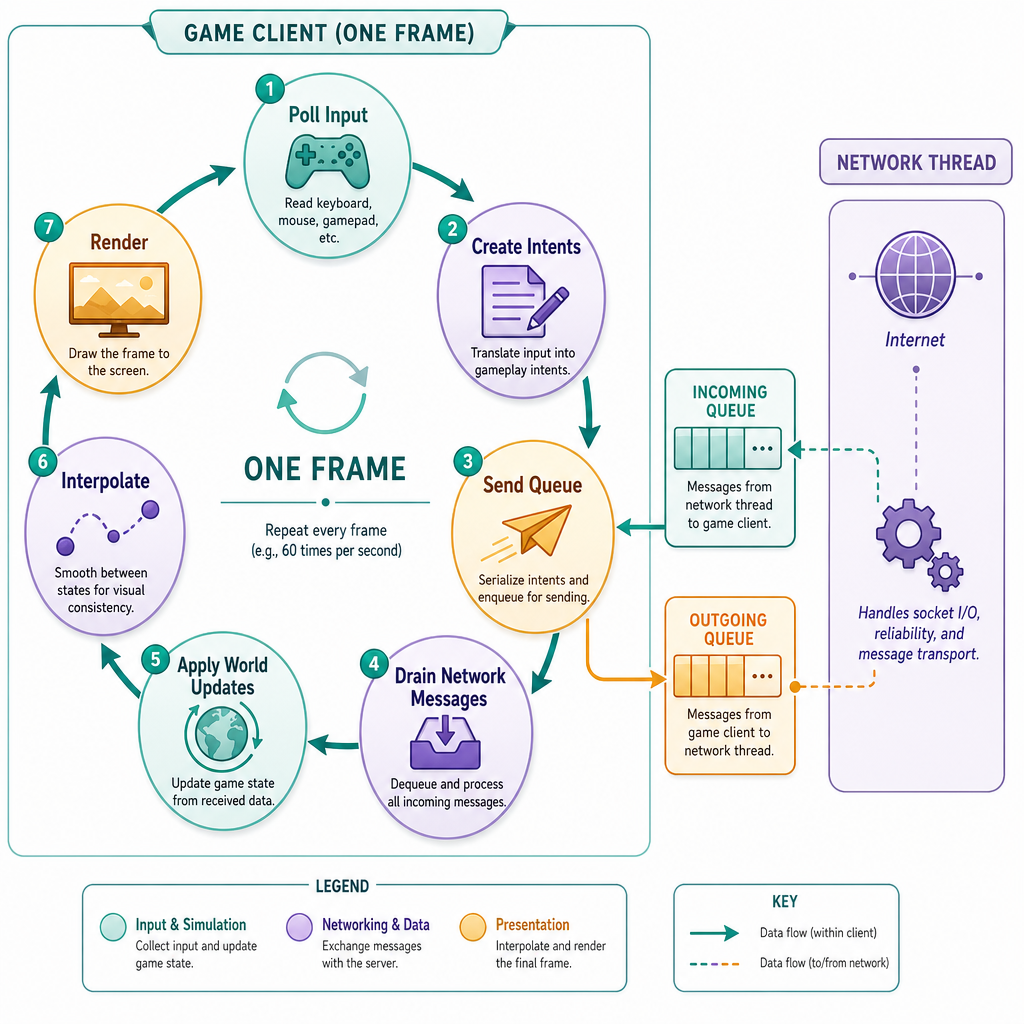
A practical frame looks like:
while running:
    poll window/input
    convert input -> intents
    enqueue outgoing intents
    drain incoming network messages
    apply messages to client world view
    update local interpolation/prediction
    render
Two important rules:
- Do not mutate render/world state from a socket callback directly. Queue messages and apply them on the game thread.
- Do not block the frame waiting for the network. A stalled connection should not freeze the window.
This is similar to event-loop thinking from web and Netty systems, but in games the render frame budget makes blocking especially painful.
Name The Boundary
Fill in the blank
Because TCP is a byte stream, the protocol layer must add message boundaries. This technique is called ________.
Queues Between Threads
A safe client-side handoff
Many C++ clients use one thread for the game loop and another for blocking network I/O. Even if you later switch to non-blocking sockets or an async library, the same idea holds: network code produces messages; the game loop consumes them at a controlled point.
This standalone example simulates a network thread receiving messages and the main thread draining them. It uses standard C++ only, so it runs without platform socket setup.
```cpp
#include <chrono>
#include <iostream>
#include <mutex>
#include <queue>
#include <string>
#include <thread>

class MessageQueue {
public:
    void push(const std::string& msg) {
        std::lock_guard<std::mutex> lock(mutex);
        messages.push(msg);
    }

    bool tryPop(std::string& out) {
        std::lock_guard<std::mutex> lock(mutex);
        if (messages.empty()) return false;
        out = messages.front();
        messages.pop();
        return true;
    }

private:
    std::mutex mutex;
    std::queue<std::string> messages;
};

int main() {
    MessageQueue incoming;
    bool networkDone = false;

    std::thread networkThread([&]() {
        const char* simulatedMessages[] = {
            "WELCOME playerId=42",
            "ENTITY_SPAWN id=100 type=slime",
            "SNAPSHOT player=42 x=11 y=20"
        };

        for (const char* msg : simulatedMessages) {
            std::this_thread::sleep_for(std::chrono::milliseconds(120));
            std::cout << "[network] received: " << msg << "\n";
            incoming.push(msg);
        }

        networkDone = true;
    });

    int frame = 0;
    while (!networkDone || frame < 8) {
        std::cout << "[game] frame " << frame << "\n";

        std::string msg;
        while (incoming.tryPop(msg)) {
            std::cout << "[game] applying: " << msg << "\n";
        }

        std::this_thread::sleep_for(std::chrono::milliseconds(60));
        ++frame;
    }

    networkThread.join();
    std::cout << "Client shutdown cleanly\n";
    return 0;
}
```
Ready For Server
What we have now
Our client now has a networking shape that fits the architecture from the first two lessons:
- a clear network subsystem boundary
- a connection lifecycle that maps into client states
- length-prefixed framing for byte streams
- outgoing intent messages instead of authoritative claims
- incoming message queues applied safely during the game loop
Before moving on, your client should be able to log a simulated connection flow like:
Disconnected -> Connecting -> Connected -> InWorld
send: MoveIntent(dx=1, dy=0)
recv: Snapshot(entity=42, x=10, y=20)
apply snapshot during frame
In Lesson 4: Game Server - Basics, we’ll build the other side of this conversation and make these messages come from an actual server process.