Lesson 4: Working with REST APIs in C++
Read at your own pace. Code execution, quizzes, progress tracking, and the AI tutor are available in the interactive view with JavaScript enabled.
REST Bridge
Why this lesson matters
In Lesson 1: Introduction to API in C++, you learned to treat an API like a contract. In Lesson 2, you used that contract to read Gmail messages. In Lesson 3, you turned email text into structured buy/sell intent.
Now we zoom out and strengthen the layer underneath all of that: REST APIs over HTTP.
For an algorithmic trading workflow, REST is often used for:
- reading account state
- checking current positions
- placing simple orders
- fetching historical data
- calling services like Gmail, broker APIs, or market-data APIs
A useful mental model:
signal parser  ->  REST client  ->  external service
BUY AAPL 10       HTTP request      broker / Gmail / data API
Today’s goal is not to memorize every HTTP detail. It is to build a clean C++ mindset for making REST calls safely and predictably.

REST Shape
REST is resource-oriented HTTP
A REST API usually exposes resources through URLs.
Examples:
GET    /messages
GET    /messages/abc123
POST   /orders
GET    /positions
DELETE /orders/old-order-id
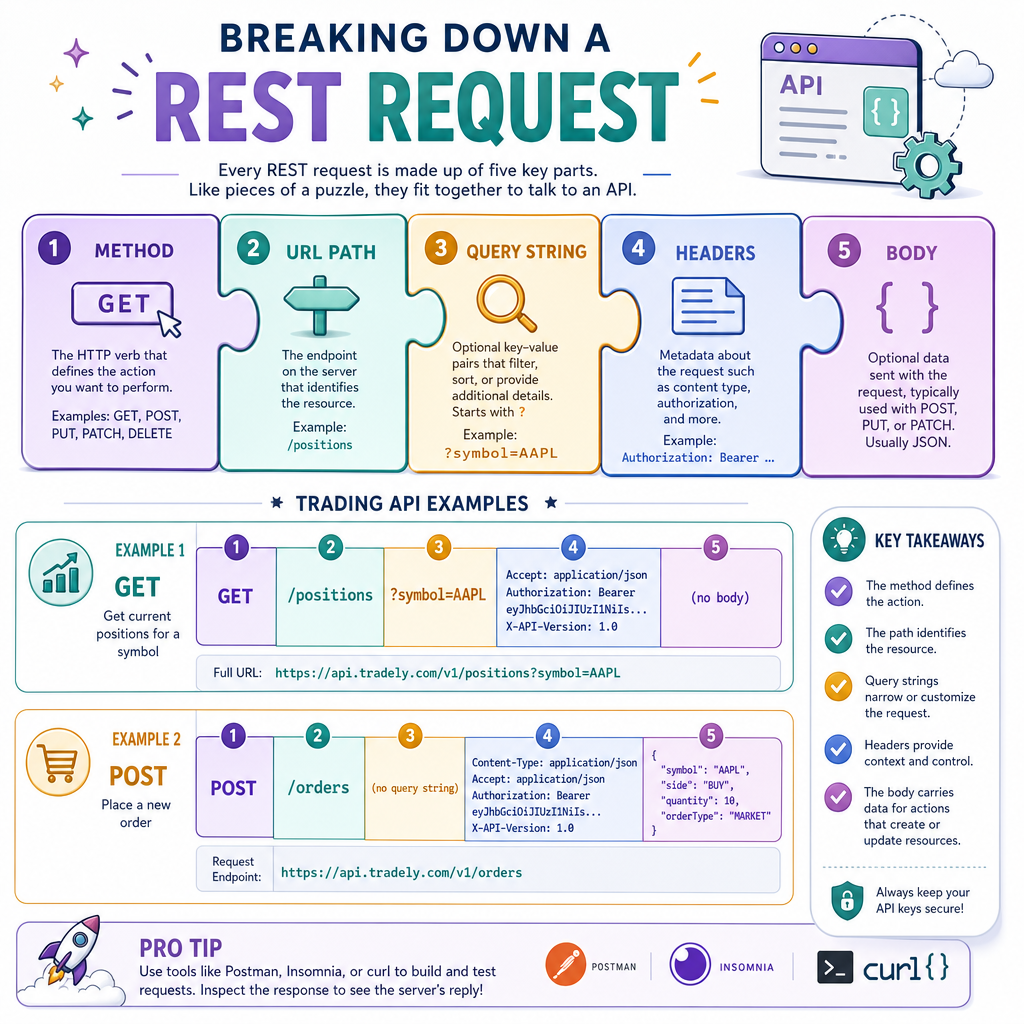
The key pieces of a REST request are:
Piece Example Trading meaning MethodGET
read data
URL/path
/positions
resource to access
Query string
?symbol=AAPL
filters/options
Headers
Authorization: Bearer ...
credentials/metadata
Body
JSON order payload
data you send
In Lesson 2, Gmail used this shape. Here we make that shape reusable so your C++ code does not become a pile of one-off HTTP strings.
Build Requests
Separate request construction from sending
A common beginner mistake is mixing everything together:
build URL + add token + send + parse + trade decision
That becomes hard to test.
Instead, start with a tiny request model. Even before using a real HTTP library, your code can clearly represent:
- method
- path
- query parameters
- headers
- optional body
This example does not contact the internet. It builds and prints the exact request shape your transport layer would send.
```cpp
#include <iostream>
#include <map>
#include <sstream>
#include <string>

struct RestRequest {
    std::string method;
    std::string baseUrl;
    std::string path;
    std::map<std::string, std::string> query;
    std::map<std::string, std::string> headers;
    std::string body;
};

std::string buildUrl(const RestRequest& req) {
    std::ostringstream out;
    out << req.baseUrl << req.path;

    if (!req.query.empty()) {
        out << "?";
        bool first = true;
        for (const auto& [key, value] : req.query) {
            if (!first) out << "&";
            out << key << "=" << value;
            first = false;
        }
    }
    return out.str();
}

void printRequest(const RestRequest& req) {
    std::cout << req.method << " " << buildUrl(req) << "\n";
    for (const auto& [key, value] : req.headers) {
        std::cout << key << ": " << value << "\n";
    }
    if (!req.body.empty()) {
        std::cout << "\n" << req.body << "\n";
    }
}

int main() {
    RestRequest req;
    req.method = "GET";
    req.baseUrl = "https://api.example-broker.com";
    req.path = "/positions";
    req.query = {{"symbol", "AAPL"}};
    req.headers = {
        {"Authorization", "Bearer ACCESS_TOKEN"},
        {"Accept", "application/json"}
    };

    printRequest(req);
    return 0;
}
```
Choose The Method
You are calling a broker-style REST API and want to read current open positions without changing anything on the server.
Which HTTP method is the best default choice?
Status Codes
REST responses are not just bodies
A REST response has at least two important parts:
status code + response body
Examples:
Status Meaning C++ client behavior200
OK
parse body
201
Created
order/resource created
400
bad request
fix payload/validation
401
unauthorized
refresh token / re-auth
404
not found
check ID/path
429
rate limited
back off before retrying
500
server error
retry carefully or alert
For trading-related code, never parse the body as if every response succeeded. Check the status first, then decide what the next safe action is.
```cpp
#include <iostream>
#include <string>

struct RestResponse {
    int statusCode;
    std::string body;
};

std::string classifyResponse(const RestResponse& res) {
    if (res.statusCode >= 200 && res.statusCode < 300) {
        return "success: parse response body";
    }
    if (res.statusCode == 401) {
        return "auth error: refresh token or stop";
    }
    if (res.statusCode == 429) {
        return "rate limited: wait before retry";
    }
    if (res.statusCode >= 500) {
        return "server error: retry carefully";
    }
    return "client error: inspect request before retry";
}

int main() {
    RestResponse examples[] = {
        {200, "{\"positions\":[]}"},
        {401, "{\"error\":\"expired token\"}"},
        {429, "{\"error\":\"too many requests\"}"},
        {500, "{\"error\":\"temporary failure\"}"}
    };

    for (const auto& res : examples) {
        std::cout << res.statusCode << " -> "
                  << classifyResponse(res) << "\n";
    }
    return 0;
}
```
Safe Retries
Retrying is powerful and dangerous
REST calls fail for normal reasons:
- network timeout
- rate limit
- expired token
- temporary server issue
- malformed request
But in trading software, retries need discipline.
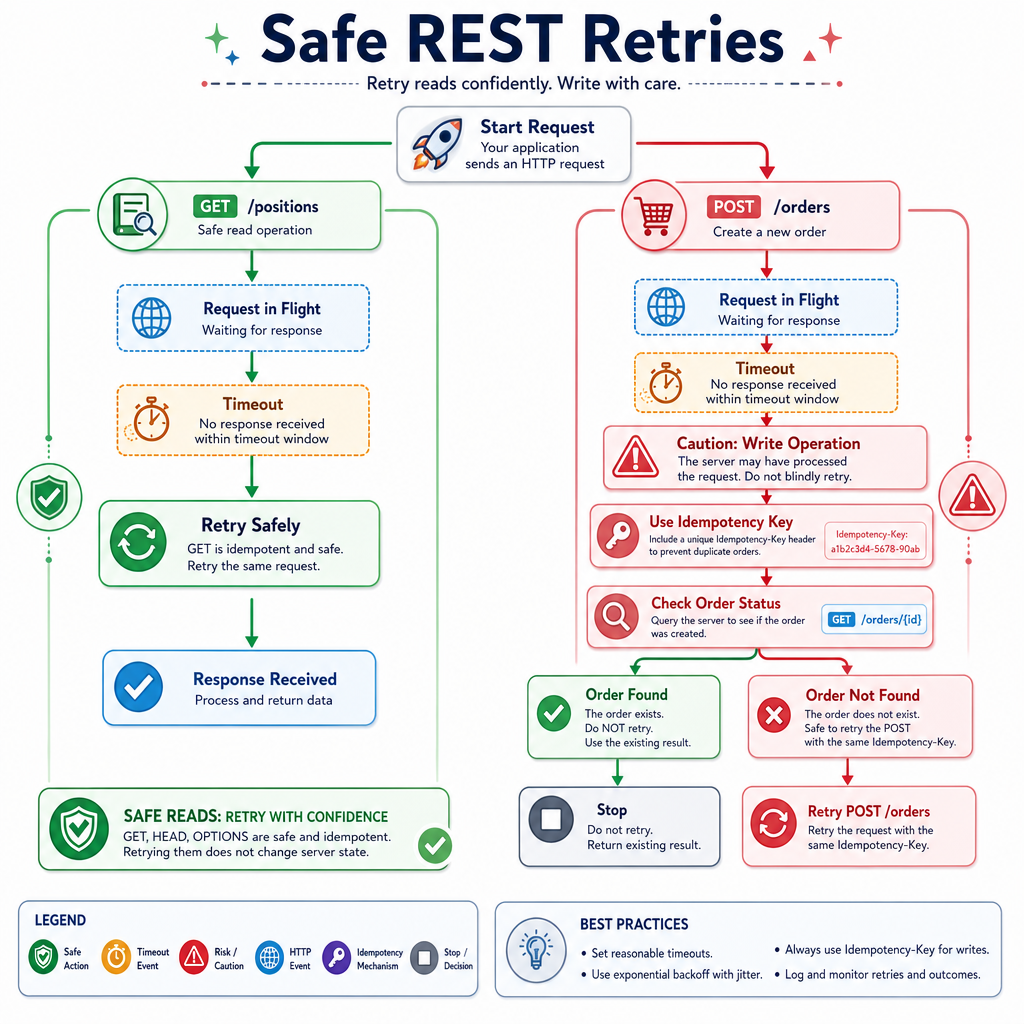
A failed GET /positions can usually be retried safely. A failed POST /orders is more sensitive because the first request might have succeeded even if your client did not receive the response.
A practical rule:
Retry reads more freely.
Retry writes only with safeguards.
Safeguards may include request IDs, idempotency keys, order status checks, and clear logging. We will stay REST-focused here; the next lesson will contrast this with FIX-style workflows.
GET Is Harmless
True or false?
A GET request is normally intended for reading data, so a well-designed REST API should not use it to place trades or create orders.
Tiny REST Client
Use an interface around transport
In real C++ projects, you might use libcurl, Boost.Beast, CPR, Poco, or another HTTP library.
But your trading logic should not care which transport library is underneath. It should depend on a small interface like:
RestRequest -> RestResponse
That makes it easier to:
- test without hitting real APIs
- swap HTTP libraries later
- log all requests in one place
- keep Gmail, broker, and market-data calls consistent
The example below uses a fake transport so it is runnable and testable without external dependencies.
```cpp
#include <iostream>
#include <map>
#include <string>

struct RestRequest {
    std::string method;
    std::string path;
    std::map<std::string, std::string> headers;
    std::string body;
};

struct RestResponse {
    int statusCode;
    std::string body;
};

class IRestTransport {
public:
    virtual ~IRestTransport() = default;
    virtual RestResponse send(const RestRequest& request) = 0;
};

class FakeBrokerTransport : public IRestTransport {
public:
    RestResponse send(const RestRequest& request) override {
        std::cout << "Sending " << request.method
                  << " " << request.path << "\n";

        if (request.method == "GET" && request.path == "/positions") {
            return {200, "{\"positions\":[{\"symbol\":\"AAPL\",\"qty\":10}]}"};
        }
        return {404, "{\"error\":\"not found\"}"};
    }
};

int main() {
    FakeBrokerTransport transport;

    RestRequest req;
    req.method = "GET";
    req.path = "/positions";
    req.headers = {{"Authorization", "Bearer DEMO_TOKEN"}};

    RestResponse res = transport.send(req);

    std::cout << "Status: " << res.statusCode << "\n";
    std::cout << "Body: " << res.body << "\n";

    return 0;
}
```
Auth Header
Fill in the missing HTTP header name commonly used to send a bearer access token:
__________: Bearer ACCESS_TOKEN
REST Checklist
A practical C++ REST checklist
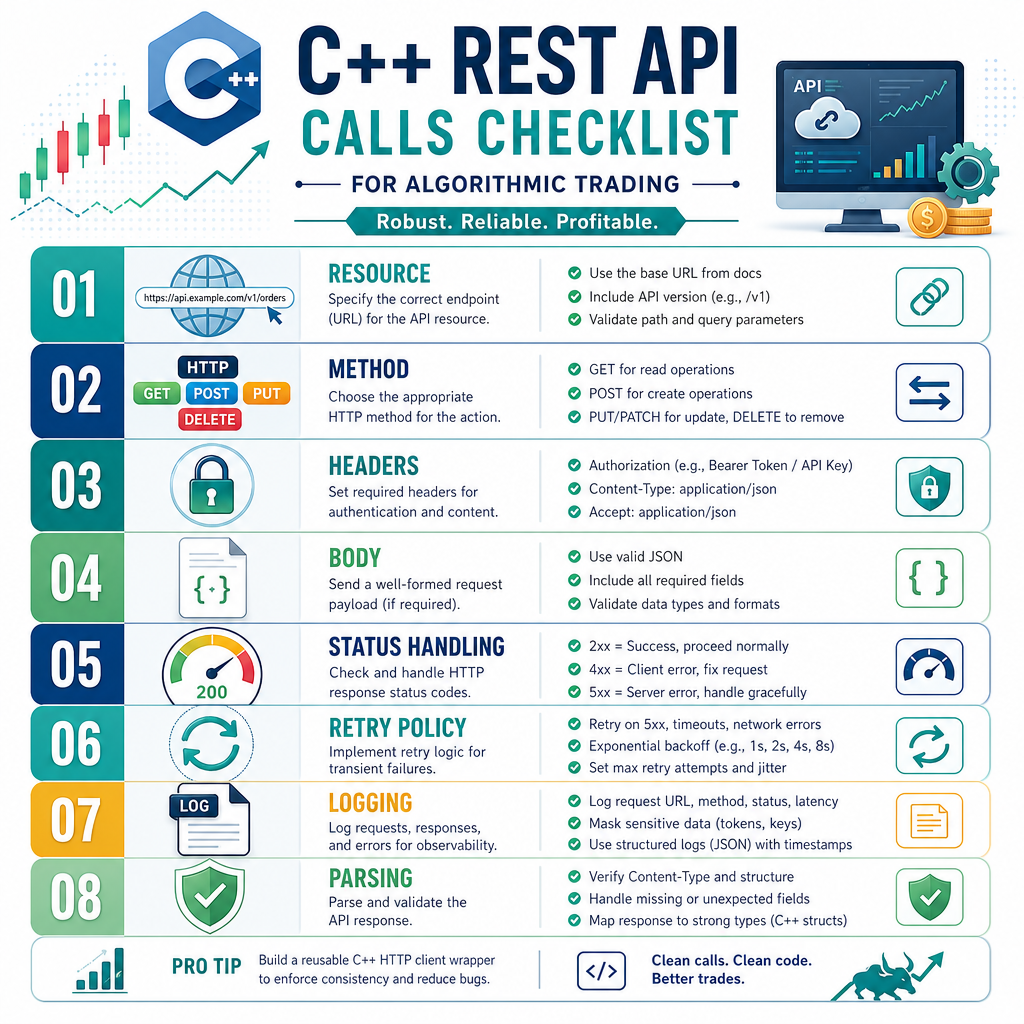
Before connecting a parsed trading signal to a real REST endpoint, walk through this checklist:
- Resource: What URL/path are you calling?
- Method: Is this a read or a write?
- Headers: Do you need auth, JSON content type, or request IDs?
- Body: Is the JSON payload valid and minimal?
-
Status handling: What happens on
200,401,429, and500? - Retry policy: Is the request safe to retry?
- Logging: Can you debug without leaking secrets?
- Parsing: Do you validate the response before using it?
This lesson gives you the REST layer that sits between the signal parser from Lesson 3 and any external service you call next.
Method Match
A parsed signal says:
BUY MSFT 5
You are preparing a REST request to create a new order resource on a broker-like API.
Which request shape is the most appropriate default?