Lesson 6: Advanced Features and Optimizations
Read at your own pace. Code execution, quizzes, progress tracking, and the AI tutor are available in the interactive view with JavaScript enabled.
Final Upgrade Pass
From working datastore to usable datastore
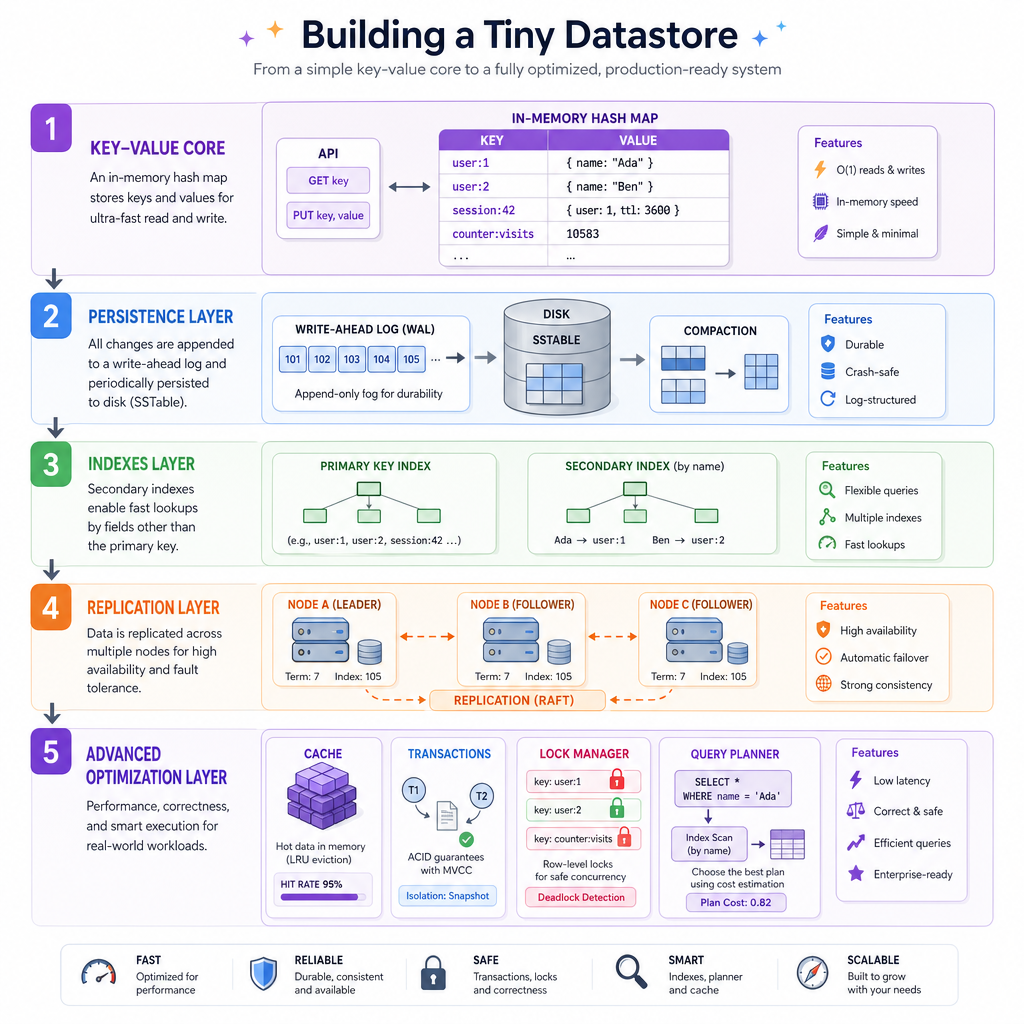
In Lesson 2, you built the key-value core. In Lesson 3, you made it survive restarts. In Lesson 4, you added indexes and searching. In Lesson 5, you stretched the system across nodes with routing, replication, quorums, and failover.
Now we do what real datastore teams spend years doing: improve the behavior under pressure.
This lesson focuses on four advanced themes:
- Caching: make hot reads fast without lying too much
- Transactions: group changes into reliable units
- Concurrency control: let many clients safely act at once
- Query optimization: choose a better path before doing work
The goal is not to clone PostgreSQL, Redis, MongoDB, or ElasticSearch. It is to see the machinery clearly enough that those systems feel less magical.
Caching Hot Reads
The fastest query is the one you avoid
A cache stores recently or frequently used results closer to the application path.
For our tiny datastore, a cache can sit in front of get(key):
client -> cache -> underlying store
          hit       miss -> load from store -> remember
A cache introduces a classic datastore tradeoff:
- Speed: repeated reads avoid slower layers
- Memory cost: cached values consume RAM
- Freshness risk: cached values can become stale
A common policy is LRU, or least recently used. When the cache is full, evict the item that has gone unused the longest.
This is useful in finance-style workloads too: a small set of symbols, accounts, or risk models may receive most reads during a trading window.
```python
from collections import OrderedDict

class LRUCache:
    def __init__(self, capacity):
        self.capacity = capacity
        self.items = OrderedDict()

    def get(self, key):
        if key not in self.items:
            return None
        self.items.move_to_end(key)
        return self.items[key]

    def put(self, key, value):
        if key in self.items:
            self.items.move_to_end(key)
        self.items[key] = value
        if len(self.items) > self.capacity:
            evicted_key, evicted_value = self.items.popitem(last=False)
            print('evicted:', evicted_key, evicted_value)

cache = LRUCache(capacity=2)
cache.put('AAPL', 192)
cache.put('MSFT', 417)
print('read AAPL:', cache.get('AAPL'))
cache.put('GOOG', 171)
print('read MSFT:', cache.get('MSFT'))
print('read GOOG:', cache.get('GOOG'))
```
Cache Tradeoff Check
A datastore adds an in-memory cache in front of its persistent key-value store. Which problem must the implementation now handle carefully?
Transactions As Units
Group changes so partial work does not leak
A transaction treats several operations as one logical unit.
For a primitive datastore, the most important property is often atomicity:
Either all changes commit, or none of them become visible.
This matters whenever one update depends on another. For example:
- debit one account and credit another
- update a document and its secondary index
- write data and append to a replication log
In production databases, transactions connect to WALs, isolation levels, locks, MVCC, deadlock handling, and recovery. Here, we will model the core idea with a staged write buffer.
```python
class TinyStore:
    def __init__(self):
        self.data = {}

    def begin(self):
        return Transaction(self)

class Transaction:
    def __init__(self, store):
        self.store = store
        self.pending = {}
        self.active = True

    def set(self, key, value):
        if not self.active:
            raise RuntimeError('transaction is closed')
        self.pending[key] = value

    def commit(self):
        self.store.data.update(self.pending)
        self.active = False
        print('committed:', self.pending)

    def rollback(self):
        print('rolled back:', self.pending)
        self.pending.clear()
        self.active = False

store = TinyStore()
store.data['checking'] = 100

tx = store.begin()
tx.set('checking', 70)
tx.set('savings', 30)
tx.rollback()
print('after rollback:', store.data)

tx = store.begin()
tx.set('checking', 70)
tx.set('savings', 30)
tx.commit()
print('after commit:', store.data)
```
Atomicity Swipe
True or false: if a transaction fails halfway through, atomicity means the datastore should expose only the successful operations from the first half.
Concurrency Control
Multiple clients, one shared truth
Once many clients call your datastore at the same time, correct single-threaded logic may break.
A common bug is the lost update:
client A reads balance = 100
client B reads balance = 100
client A writes 90
client B writes 80
If both operations should have applied, the final balance should be 70, not 80 or 90.
Datastores prevent this with concurrency-control strategies such as:
- Locks: make conflicting operations wait
- Optimistic version checks: allow work, then reject stale writes
- MVCC: let readers see stable snapshots while writers create new versions
For a small Python datastore, a lock is the most direct starting point.
```python
import threading

class AccountStore:
    def __init__(self):
        self.data = {'balance': 100}
        self.lock = threading.Lock()

    def withdraw(self, amount):
        with self.lock:
            current = self.data['balance']
            next_balance = current - amount
            self.data['balance'] = next_balance
            print('withdrew', amount, 'balance is now', next_balance)

store = AccountStore()
threads = [
    threading.Thread(target=store.withdraw, args=(10,)),
    threading.Thread(target=store.withdraw, args=(20,))
]

for thread in threads:
    thread.start()
for thread in threads:
    thread.join()

print('final balance:', store.data['balance'])
```
Isolation Blank
Fill in the blank:
A transaction property that controls how much one transaction can observe another transaction's in-progress work is called ________.
Query Optimizer
Do less work on purpose
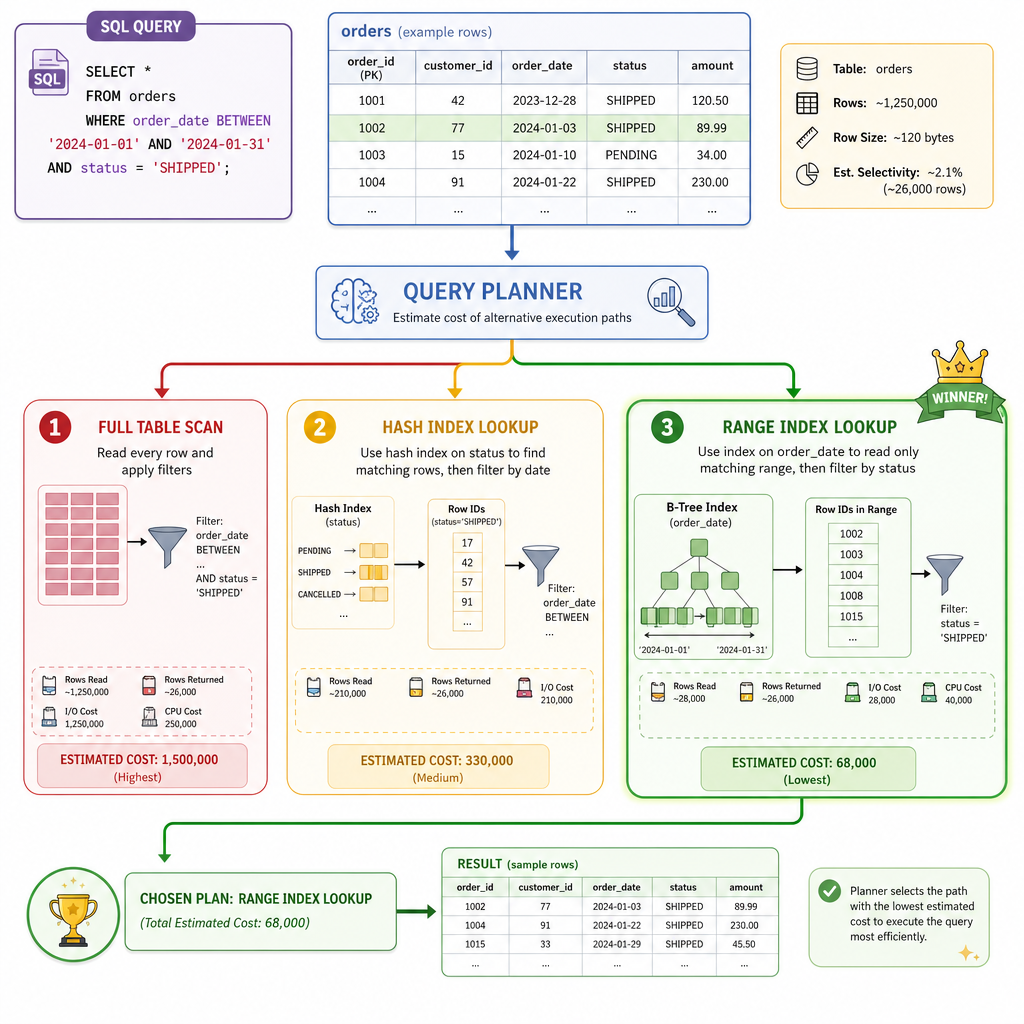
In Lesson 4: Implementing Indexing and Searching, you added indexes. A query optimizer asks: which available path is cheapest?
For a simple query like:
where symbol = 'AAPL' and price between 100 and 200
possible plans include:
- scan every record
- use a hash index on
symbol, then filter by price - use a range index on
price, then filter by symbol
The optimizer does not need to be perfect. Even a rough cost model is powerful:
- prefer smaller candidate sets
- use indexes with high selectivity
- avoid full scans when an index is likely narrow
- measure real timings and update estimates over time
```python
records = [
    {'id': 1, 'symbol': 'AAPL', 'price': 192},
    {'id': 2, 'symbol': 'MSFT', 'price': 417},
    {'id': 3, 'symbol': 'AAPL', 'price': 181},
    {'id': 4, 'symbol': 'TSLA', 'price': 175},
    {'id': 5, 'symbol': 'AAPL', 'price': 205}
]

symbol_index = {}
for row in records:
    symbol_index.setdefault(row['symbol'], []).append(row)

def query(symbol, max_price):
    full_scan_cost = len(records)
    index_cost = len(symbol_index.get(symbol, []))

    if index_cost < full_scan_cost:
        plan = 'symbol_index'
        candidates = symbol_index.get(symbol, [])
    else:
        plan = 'full_scan'
        candidates = records

    result = [row for row in candidates if row['symbol'] == symbol and row['price'] <= max_price]
    print('chosen plan:', plan, 'estimated cost:', min(full_scan_cost, index_cost))
    return result

print('query result:', query('AAPL', 200))
```
Optimization Reality
Why can a query optimizer make a bad plan choice even when indexes exist?
System Lifecycle
Advanced features interact
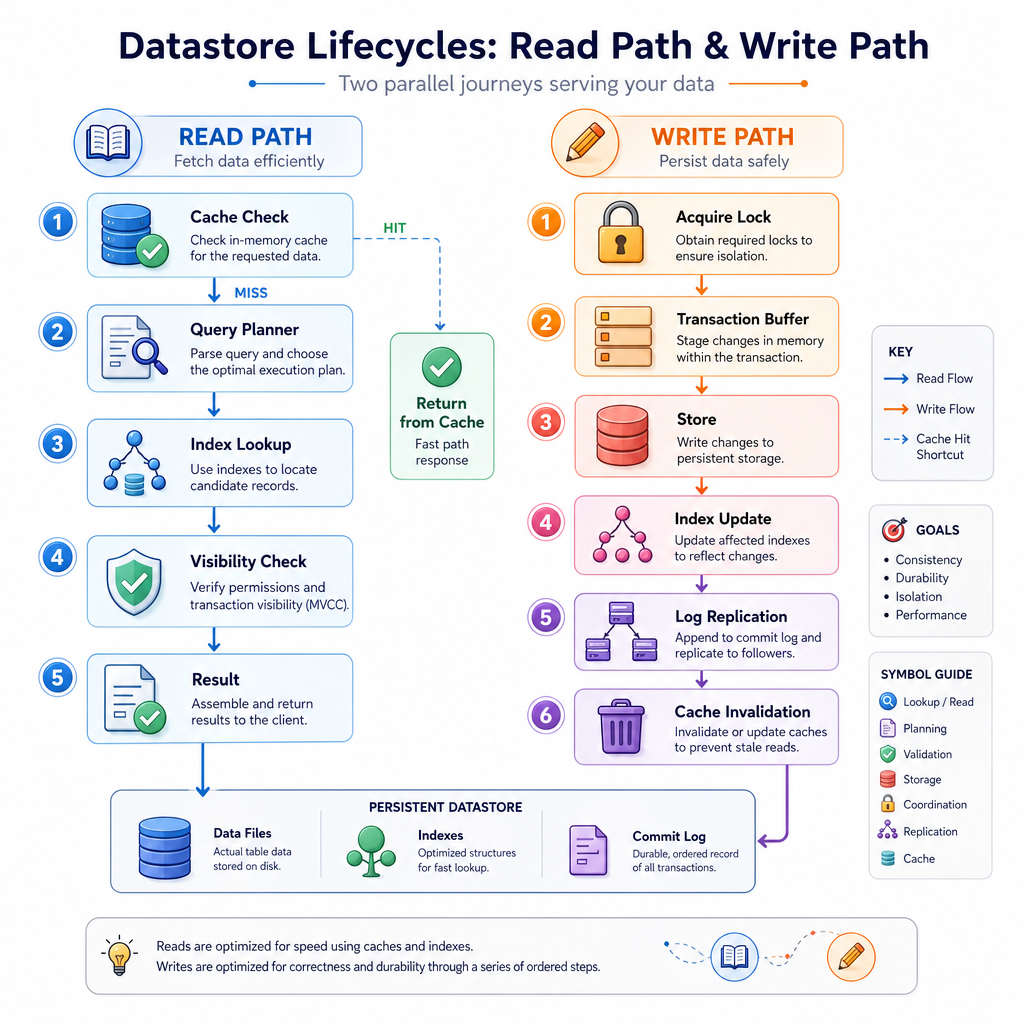
These features are not isolated knobs. They form a system.
A write might need to:
- acquire a lock or validate a version
- stage transaction changes
- update the primary store
- update secondary indexes
- append to a persistence or replication log
- invalidate or refresh cache entries
- release concurrency controls
A read might need to:
- check cache
- choose a query plan
- use an index or scan
- respect transaction visibility
- return a stable result
This is why datastore bugs can be subtle: performance, correctness, durability, and availability all meet in the same code path.
Course Wrap Up
You now have the datastore map
Across this course, you built the conceptual layers of a datastore from scratch:
- Lesson 1: chose designs based on access patterns
- Lesson 2: built a basic key-value API
- Lesson 3: added persistence and safer writes
- Lesson 4: made lookups smarter with indexes
- Lesson 5: explored scaling, replication, quorums, and failover
- Lesson 6: added caching, transactions, concurrency control, and optimization
The big lesson: every datastore is a bundle of tradeoffs.
Fast reads may need cache invalidation. Strong transactions may reduce concurrency. Replication improves availability but complicates consistency. Indexes speed queries but increase write cost. Query planning helps only when its estimates are good.
When you use PostgreSQL, Redis, MongoDB, ElasticSearch, or a specialized AI/vector/finance datastore, you can now ask sharper questions:
- What is the access pattern?
- Where is the source of truth?
- What happens on crash?
- Which indexes exist, and what do they cost?
- What consistency does replication provide?
- Which operations are atomic?
That is the mindset of someone who does not just use datastores, but understands them.