Lesson 7: Client Editor - Map Editor
Read at your own pace. Code execution, quizzes, progress tracking, and the AI tutor are available in the interactive view with JavaScript enabled.
Editor Mode Begins
From server discipline to creator tools
In Lesson 6: Game Server - Performance Optimization, we protected the authoritative tick from slow work, world scans, and allocation spikes. Now we switch viewpoints: instead of only running the world, we need tools to build it.
This lesson adds a map editor mode inside the game client — your first "god-mode" tool.
The key idea:
Game Client
├── Play Mode: player input becomes movement/combat intent
└── Editor Mode: developer input becomes map-edit commands
We are not building a Unity-like engine. We are adding a practical in-client editor that uses the same renderer, camera, asset loading, and world representation your game already needs.
By the end, you should have a clear model for:
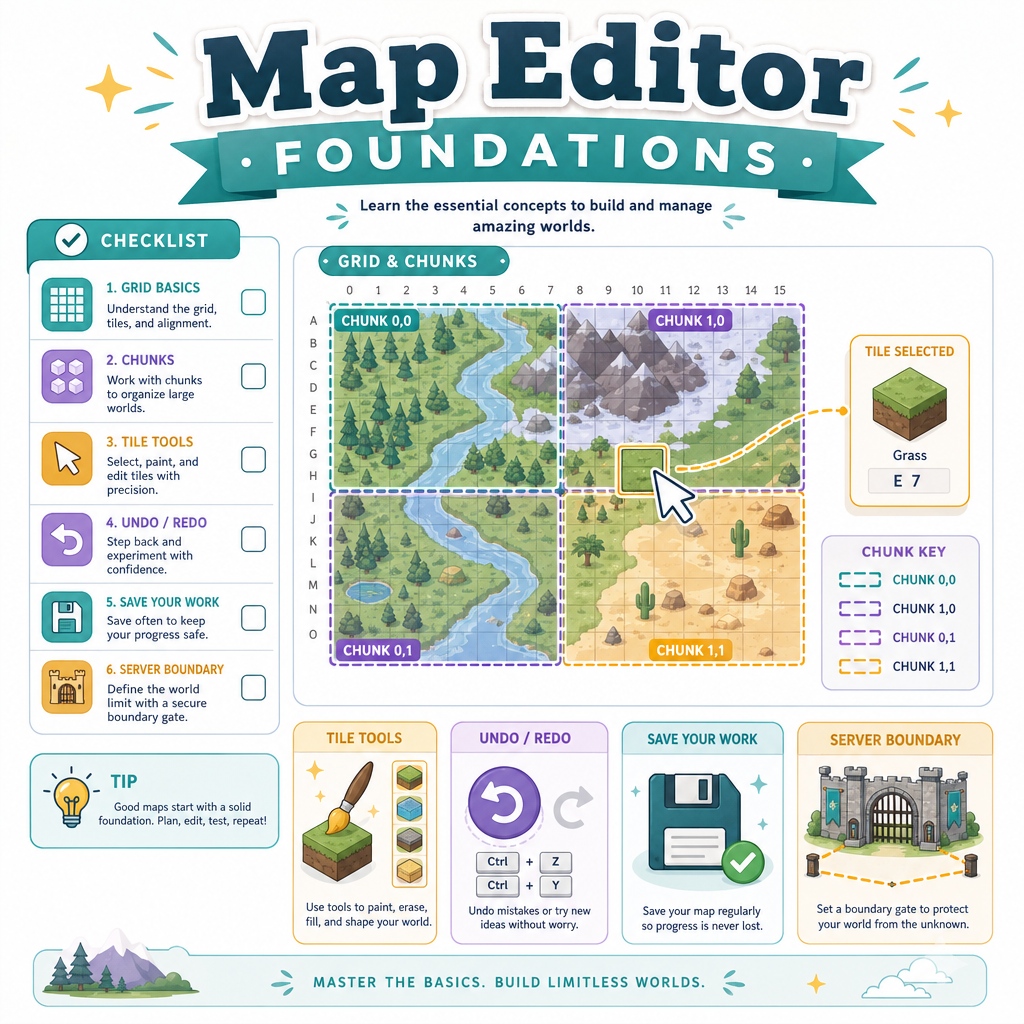
- representing map tiles and layers
- converting mouse clicks into world edits
- tracking dirty chunks
- saving map files safely
- keeping editor power separate from server authority
Next lesson will extend the editor idea to monsters, but today we stay focused on terrain/map editing.

Editor Architecture
Treat the editor as a client state
Back in Lesson 2: Game Client - Basics, we separated the main loop into subsystems and client states. The map editor fits naturally into that structure.
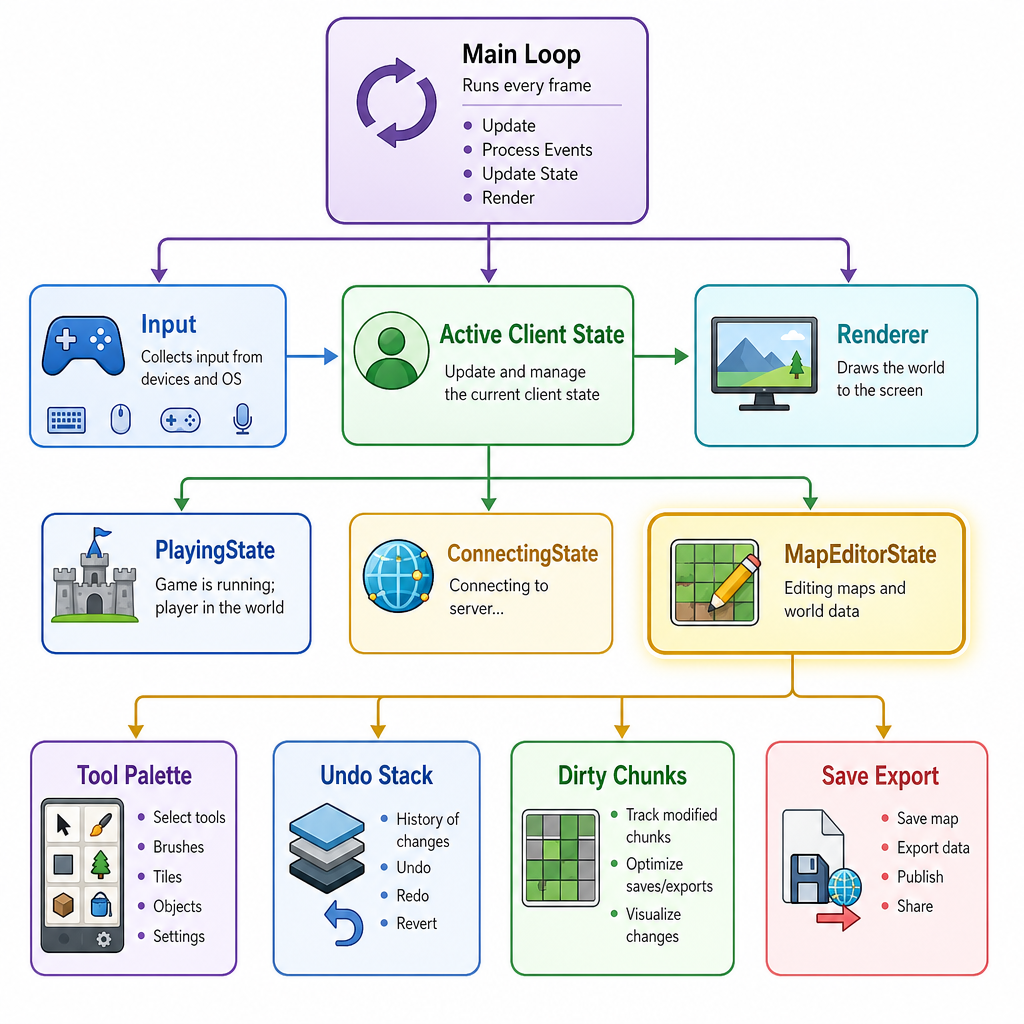
A clean architecture looks like this:
Main Loop
├── poll input
├── update active client state
│   ├── PlayingState
│   ├── ConnectingState
│   └── MapEditorState
└── render
MapEditorState should not be a pile of global hotkeys. Give it explicit ownership over editor-only concerns:
- selected brush/tool
- current tile palette item
- camera panning/zooming behavior
- selected layer
- undo/redo stack
- dirty chunk list
- save/export command
But it should reuse shared client systems:
- renderer
- texture atlas
- asset database
- map/world data structure
- input abstraction
- filesystem utilities
This keeps the editor powerful without making your normal game client depend on editor-only logic.
Map Data Model
Start with boring data
A good editor begins with a boring, explicit map format. For a first MMORPG map editor, avoid clever procedural structures until you can reliably load, edit, save, and validate simple maps.
A practical 2D tile map can be modeled as:
Map
├── width, height
├── tileSize
├── layers
│   ├── ground
│   ├── collision
│   └── decoration
└── metadata
Each layer is a grid of tile IDs. A tile ID of 0 can mean "empty".
Why layers?
- ground: grass, dirt, stone
- collision: blocked/unblocked movement
- decoration: trees, rocks, signs
This is also server-friendly. The server probably does not care about decorative pixels, but it absolutely cares about collision and navigation-relevant map data.
Here is a tiny standalone C++ example that builds a map, edits two tiles, and prints a simple text serialization.
```cpp
#include <iostream>
#include <vector>
#include <string>

struct TileLayer {
    std::string name;
    int width = 0;
    int height = 0;
    std::vector<int> tiles;

    TileLayer(std::string layerName, int w, int h)
        : name(std::move(layerName)), width(w), height(h), tiles(w * h, 0) {}

    int& at(int x, int y) {
        return tiles[y * width + x];
    }
};

struct Map {
    int width = 0;
    int height = 0;
    int tileSize = 32;
    std::vector<TileLayer> layers;
};

void printLayer(const TileLayer& layer) {
    std::cout << "layer " << layer.name << "\n";
    for (int y = 0; y < layer.height; ++y) {
        for (int x = 0; x < layer.width; ++x) {
            std::cout << layer.tiles[y * layer.width + x] << ' ';
        }
        std::cout << "\n";
    }
}

int main() {
    Map map;
    map.width = 5;
    map.height = 4;
    map.tileSize = 32;

    map.layers.emplace_back("ground", map.width, map.height);
    map.layers.emplace_back("collision", map.width, map.height);

    map.layers[0].at(2, 1) = 7;  // grass variant
    map.layers[1].at(2, 1) = 1;  // blocked

    std::cout << "map " << map.width << "x" << map.height
              << " tileSize=" << map.tileSize << "\n";

    for (const auto& layer : map.layers) {
        printLayer(layer);
    }

    return 0;
}
```Picking Tiles
Convert input into map intent
In Lesson 2, we treated input as intent. The editor follows the same rule.
A mouse click should not directly mean "write index 1234." It should become an editor intent:
screen position -> world position -> tile coordinate -> edit command
For an orthographic 2D map editor, the basic conversion is:
worldX = screenX + cameraX
worldY = screenY + cameraY

tileX = floor(worldX / tileSize)
tileY = floor(worldY / tileSize)
Later, if you move to an isometric map or a 3D terrain editor, this step becomes ray casting. But the principle stays the same: input becomes a well-defined edit request.
```cpp
#include <cmath>
#include <iostream>

struct Vec2 {
    float x = 0.0f;
    float y = 0.0f;
};

struct TileCoord {
    int x = 0;
    int y = 0;
};

TileCoord screenToTile(Vec2 screen, Vec2 camera, int tileSize) {
    float worldX = screen.x + camera.x;
    float worldY = screen.y + camera.y;

    return {
        static_cast<int>(std::floor(worldX / tileSize)),
        static_cast<int>(std::floor(worldY / tileSize))
    };
}

int main() {
    Vec2 mouseScreen{150.0f, 90.0f};
    Vec2 camera{64.0f, 32.0f};
    int tileSize = 32;

    TileCoord tile = screenToTile(mouseScreen, camera, tileSize);

    std::cout << "Mouse screen: (" << mouseScreen.x << ", " << mouseScreen.y << ")\n";
    std::cout << "Camera offset: (" << camera.x << ", " << camera.y << ")\n";
    std::cout << "Selected tile: (" << tile.x << ", " << tile.y << ")\n";

    return 0;
}
```
Safe Editor Power
True or false: because the editor is a god-mode client feature, it is acceptable for it to bypass validation and directly overwrite live server world memory.
Undoable Edits
Use commands for edits
A map editor becomes frustrating quickly if every mistake is permanent. The simplest useful pattern is an edit command that knows how to apply and undo itself.
For a tile brush, store:
- target layer
- target coordinate
- old tile ID
- new tile ID
Then your editor can support:
- undo/redo
- dirty chunk tracking
- edit logging
- eventually networked/admin review workflows
This should feel familiar if you have used command-style handling in backend systems: represent a change as data, validate it, then apply it intentionally.
```cpp
#include <iostream>
#include <vector>

struct TileMap {
    int width;
    int height;
    std::vector<int> tiles;

    TileMap(int w, int h) : width(w), height(h), tiles(w * h, 0) {}

    int& at(int x, int y) {
        return tiles[y * width + x];
    }
};

struct PaintTileCommand {
    int x;
    int y;
    int oldTile;
    int newTile;

    void apply(TileMap& map) const {
        map.at(x, y) = newTile;
    }

    void undo(TileMap& map) const {
        map.at(x, y) = oldTile;
    }
};

int main() {
    TileMap map(4, 3);
    map.at(1, 1) = 2;

    PaintTileCommand cmd{1, 1, map.at(1, 1), 9};

    std::cout << "Before edit: tile(1,1)=" << map.at(1, 1) << "\n";
    cmd.apply(map);
    std::cout << "After apply: tile(1,1)=" << map.at(1, 1) << "\n";
    cmd.undo(map);
    std::cout << "After undo: tile(1,1)=" << map.at(1, 1) << "\n";

    return 0;
}
```
Changed Chunk Term
Fill in the blank: A chunk or map region that has been edited and needs to be saved, rebuilt, or re-exported is commonly called a ______ chunk.
Save Pipeline
Saving is a pipeline, not a button
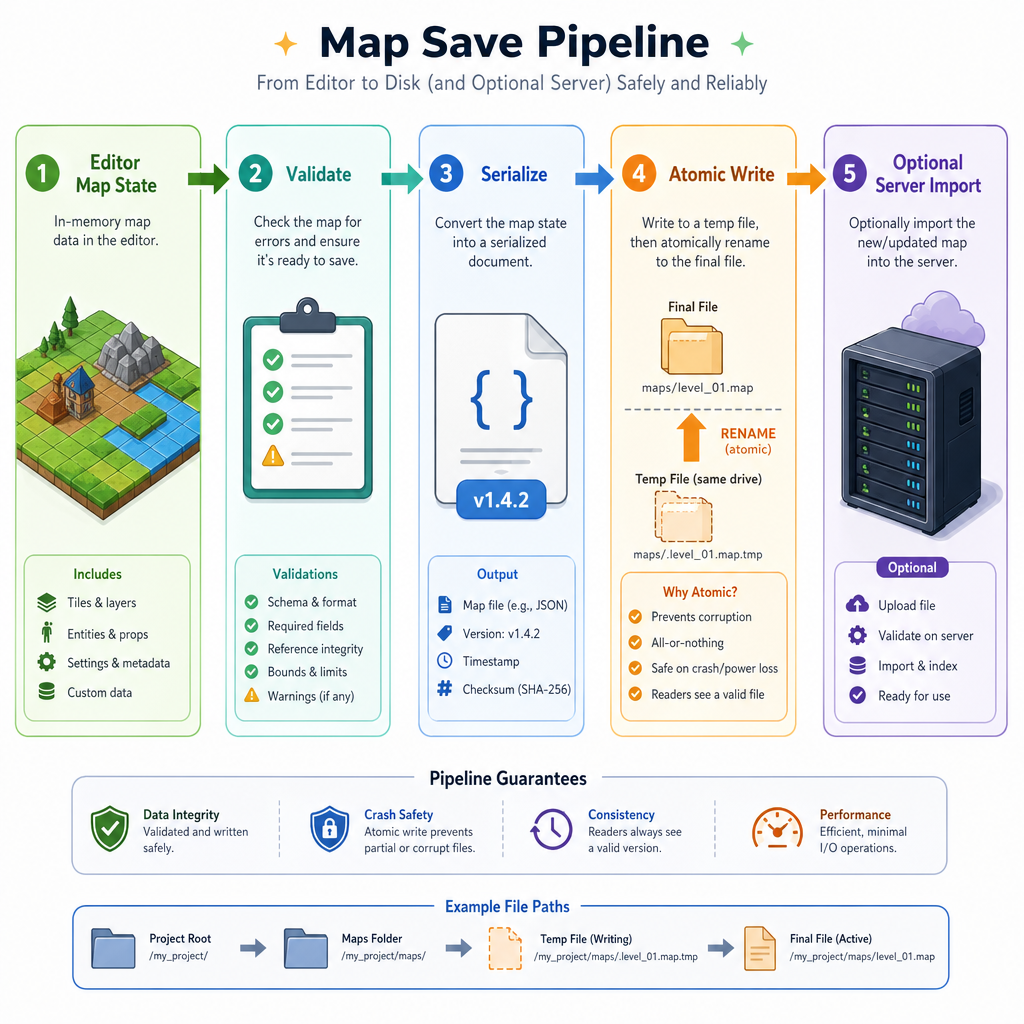
Clicking Save should trigger a controlled workflow. This matters because maps are shared assets: the client renders them, the server may validate movement against them, and future tools will attach more data to them.
A practical save/export pipeline:
Editor Map State
   │
   ▼
Validate
- bounds are valid
- required layers exist
- tile IDs exist in asset database
- collision layer uses legal values
   │
   ▼
Serialize
- stable version number
- dimensions and tile size
- layers
- metadata
   │
   ▼
Atomic Write
- write temp file
- flush/close
- rename over target
   │
   ▼
Optional Server Import
- offline load
- admin-only live reload
- deployment package
This is the same mindset from Lesson 5: Game Server - Persistence: do not casually corrupt important state. Prefer stable formats, explicit versions, and crash-safe writes.
For early development, a readable JSON-like format is excellent. Later, you can add a compact binary format if loading time or file size becomes a real measured problem.
Map Editor Checklist
What you now have
You have moved from runtime infrastructure into creator tooling — a major step for an MMORPG from scratch.
A solid first map editor should include:
-
MapEditorStateas a distinct client state - a tile/layer map representation
- screen-to-world-to-tile picking
- brush tools that create edit commands
- undo support for common edits
- dirty chunk tracking
- validation before saving
- versioned serialization
- crash-safe writes
- a clear boundary before server import
The important design choice is that the editor is not a separate toy. It uses the same client foundations you already built: input, rendering, world data, assets, and state transitions.
In Lesson 8: Client Editor - Monster Editor, we will extend this tool mindset from terrain to spawn and monster placement data.