Lesson 9: Cross-Platform Support
Read at your own pace. Code execution, quizzes, progress tracking, and the AI tutor are available in the interactive view with JavaScript enabled.
Final Portability Pass
Why this lesson matters
You now have the major MMORPG building blocks in place:
- Lesson 2 gave the client a loop, state, and subsystem boundaries.
- Lesson 3 connected the client to the network.
- Lessons 4-6 made the server authoritative, persistent, and performance-aware.
- Lessons 7-8 turned the client into a small god-mode editor for maps and monster spawns.
Now we finish the course with a portability pass: making sure the project can survive outside your current machine.
For this course, Windows can be the main target, but cross-platform thinking still pays off. It makes your code cleaner, easier to test, and less likely to hide assumptions in rendering, networking, files, threads, and build scripts.

Define Platform Seams
Portability is mostly boundary design
Do not scatter #ifdef _WIN32 through gameplay, world simulation, editor tools, packet handlers, and persistence code.
Instead, create platform seams: small places where OS-specific details are allowed to exist.
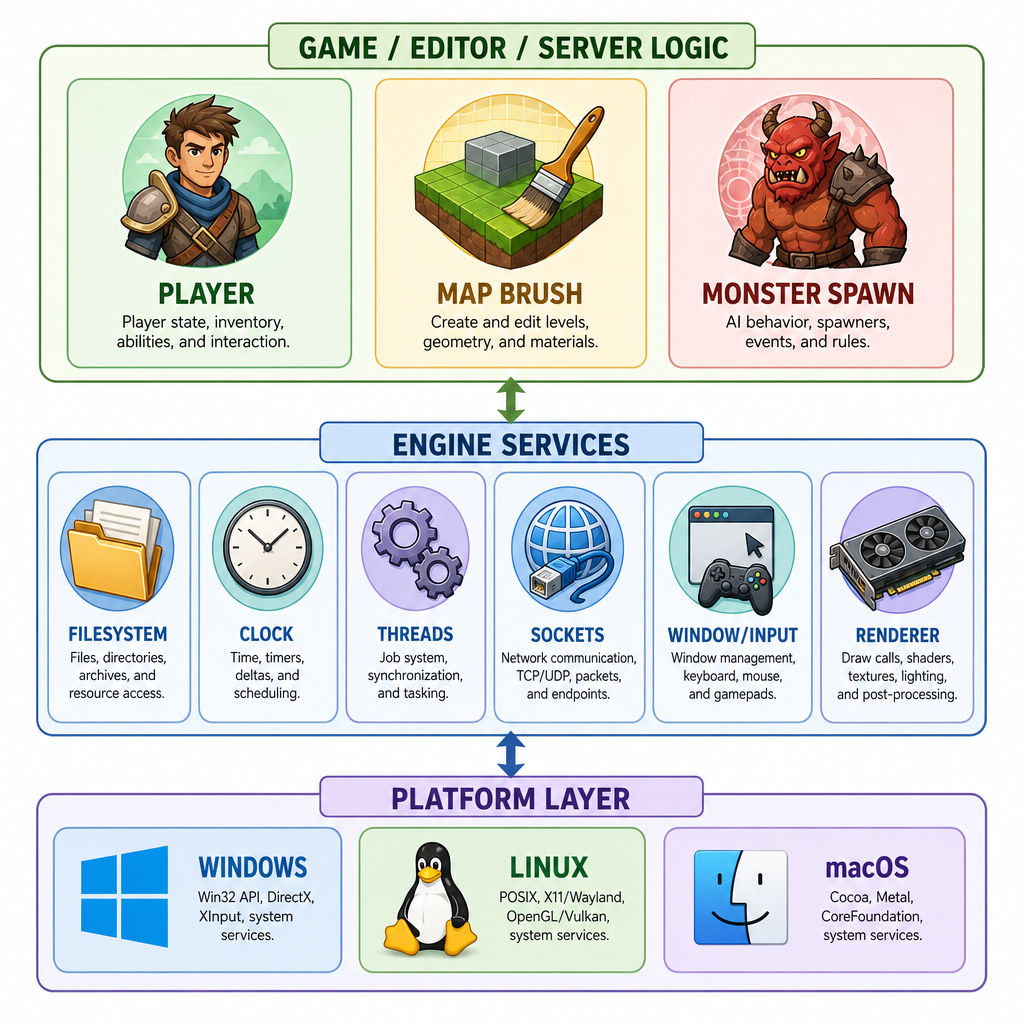
A practical MMORPG layout might look like this:
Game / Editor / Server Logic
        |
        v
Engine Services
- FileSystem
- Clock
- Threads
- Sockets
- Window/Input
- Renderer backend
        |
        v
Platform Layer
- Windows implementation
- Linux implementation
- macOS implementation
This should feel familiar from your Java/Spring and Netty background: application logic depends on stable interfaces, while adapters handle the environment.
The goal is not abstraction for its own sake. The goal is to make platform-specific code small, named, and easy to audit.
Where To Abstract
Which part of the MMORPG should usually depend directly on OS-specific APIs?
Detect The Host
Compile-time platform detection
A tiny amount of preprocessor logic is normal. The trick is to keep it close to your platform layer.
Use compile-time checks for things that truly differ by target platform: OS APIs, compiler attributes, dynamic library loading, or low-level socket setup.
Avoid using platform detection to change game rules. If movement, damage, spawn validation, or save formats differ by OS, debugging becomes miserable.
```cpp
#include <iostream>

int main() {
#if defined(_WIN32)
    const char* os = "Windows";
#elif defined(__APPLE__) && defined(__MACH__)
    const char* os = "macOS";
#elif defined(__linux__)
    const char* os = "Linux";
#else
    const char* os = "Unknown OS";
#endif

#if defined(__x86_64__) || defined(_M_X64)
    const char* arch = "x64";
#elif defined(__aarch64__) || defined(_M_ARM64)
    const char* arch = "arm64";
#else
    const char* arch = "unknown architecture";
#endif

    std::cout << "MMORPG platform probe\n";
    std::cout << "OS: " << os << "\n";
    std::cout << "Architecture: " << arch << "\n";
    return 0;
}
```
Portable Paths
File paths are not just strings
Your map editor from Lesson 7 and monster editor from Lesson 8 save content. That makes file handling part of your toolchain, not an afterthought.
Common path traps:
- Hardcoding
/or\\separators everywhere - Assuming the working directory is the project root
- Writing user data beside the executable
- Treating case sensitivity the same on every filesystem
- Building paths with string concatenation
In modern C++, prefer std::filesystem::path for path composition. It will not solve every platform packaging question, but it removes a lot of accidental separator bugs.
```cpp
#include <filesystem>
#include <fstream>
#include <iostream>

int main() {
    namespace fs = std::filesystem;

    fs::path root = fs::temp_directory_path() / "mmorpg_from_scratch";
    fs::path mapFile = root / "data" / "maps" / "starter_zone.map";

    fs::create_directories(mapFile.parent_path());

    {
        std::ofstream out(mapFile);
        out << "version=1\n";
        out << "name=starter_zone\n";
    }

    std::cout << "Wrote map file:\n  " << mapFile << "\n";
    std::cout << "Parent directory:\n  " << mapFile.parent_path() << "\n";
    std::cout << "File exists: " << std::boolalpha << fs::exists(mapFile) << "\n";

    fs::remove_all(root);
    std::cout << "Cleaned up temp directory.\n";
    return 0;
}
```
Paths As Strings
True or false: If the editor currently runs on Windows, building save paths with string concatenation is good enough because cross-platform path issues can be fixed later.
Packets Need Certainty
Network formats must be explicit
In Lesson 3 and Lesson 4, the client and server started exchanging packets. Cross-platform support adds an important rule:
Never send raw C++ structs as your network protocol.
Why?
- Struct padding can differ by compiler and build settings.
- Integer sizes can surprise you if you use vague types.
- Endianness can differ by CPU architecture.
- Floating-point behavior needs care if used in authoritative simulation.
Prefer explicit serialization: fixed-width integer types, known byte order, and versioned packet definitions.
```cpp
#include <cstdint>
#include <iomanip>
#include <iostream>
#include <vector>

void write_u16_be(std::vector<std::uint8_t>& out, std::uint16_t value) {
    out.push_back(static_cast<std::uint8_t>((value >> 8) & 0xFF));
    out.push_back(static_cast<std::uint8_t>(value & 0xFF));
}

void write_u32_be(std::vector<std::uint8_t>& out, std::uint32_t value) {
    out.push_back(static_cast<std::uint8_t>((value >> 24) & 0xFF));
    out.push_back(static_cast<std::uint8_t>((value >> 16) & 0xFF));
    out.push_back(static_cast<std::uint8_t>((value >> 8) & 0xFF));
    out.push_back(static_cast<std::uint8_t>(value & 0xFF));
}

int main() {
    std::vector<std::uint8_t> packet;

    packet.push_back(0x01);          // message type: MoveIntent
    write_u16_be(packet, 513);       // player id
    write_u32_be(packet, 100000);    // client tick

    std::cout << "Packet bytes:";
    for (std::uint8_t byte : packet) {
        std::cout << " " << std::hex << std::uppercase
                  << std::setw(2) << std::setfill('0')
                  << static_cast<int>(byte);
    }
    std::cout << "\n";
    return 0;
}
```
Canonical Bytes
The traditional socket API name for the canonical big-endian ordering is _____ byte order.
Rendering Without Lock-In
Cross-platform graphics is a choice tree
Your course goal allows libraries like OpenGL, Vulkan, or SFML. The portability decision is not simply "which API is fastest?" It is also about how much platform work you want to own.
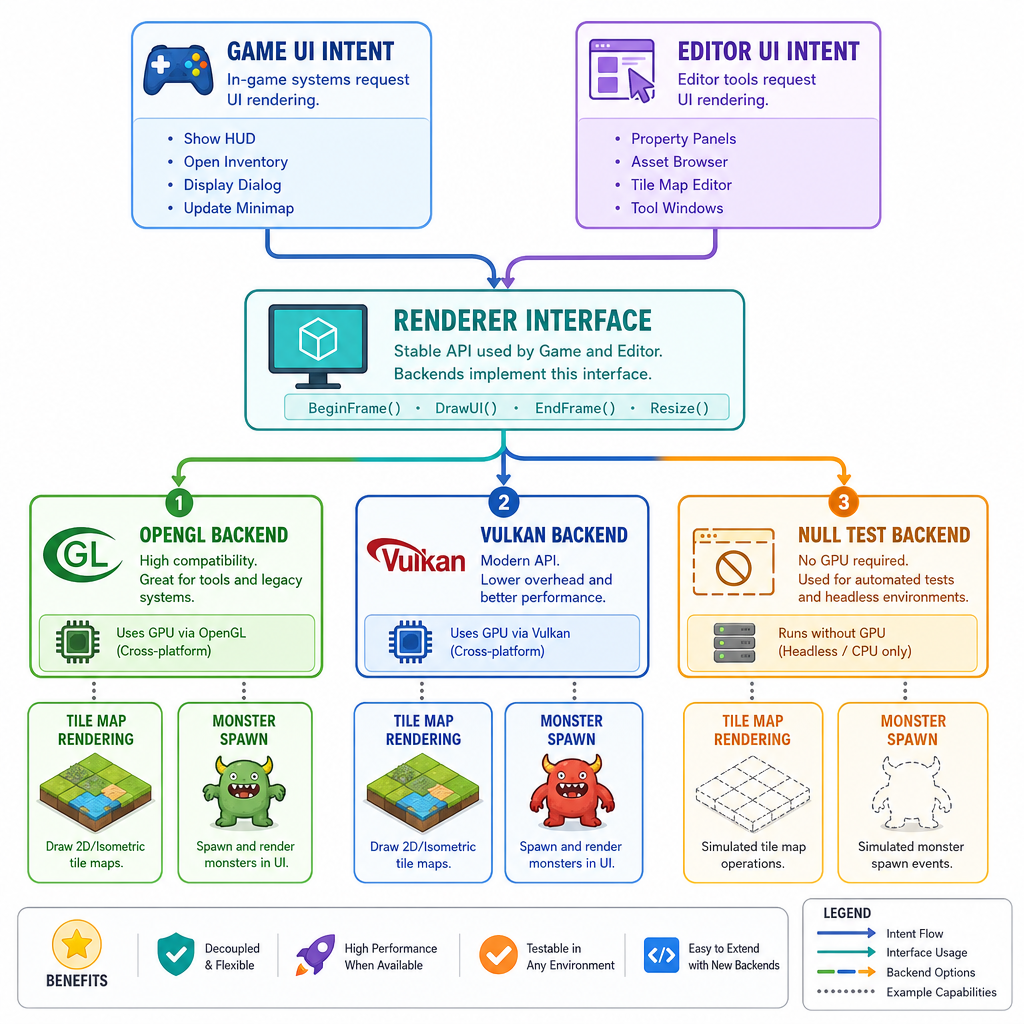
A useful split:
Game/editor UI intent
        |
        v
Renderer interface
        |
        +--> OpenGL backend
        +--> Vulkan backend
        +--> Null/test backend
For this course-sized MMORPG, a single backend is fine. But still avoid letting the entire client know the backend's details.
Examples:
- The map editor should request "draw tile selection," not call raw platform window APIs.
- The monster editor should work with editor commands, not GPU resource lifetimes.
- The main loop from Lesson 2 should own frame rhythm, while rendering is a subsystem.
A null/test renderer is especially useful for server-side tools, content validation, or CI environments without a GPU.
Build Matrix Check
True or false: A build matrix should compile every platform and configuration you claim to support, even before you have full automated gameplay tests.
Ship The Foundation
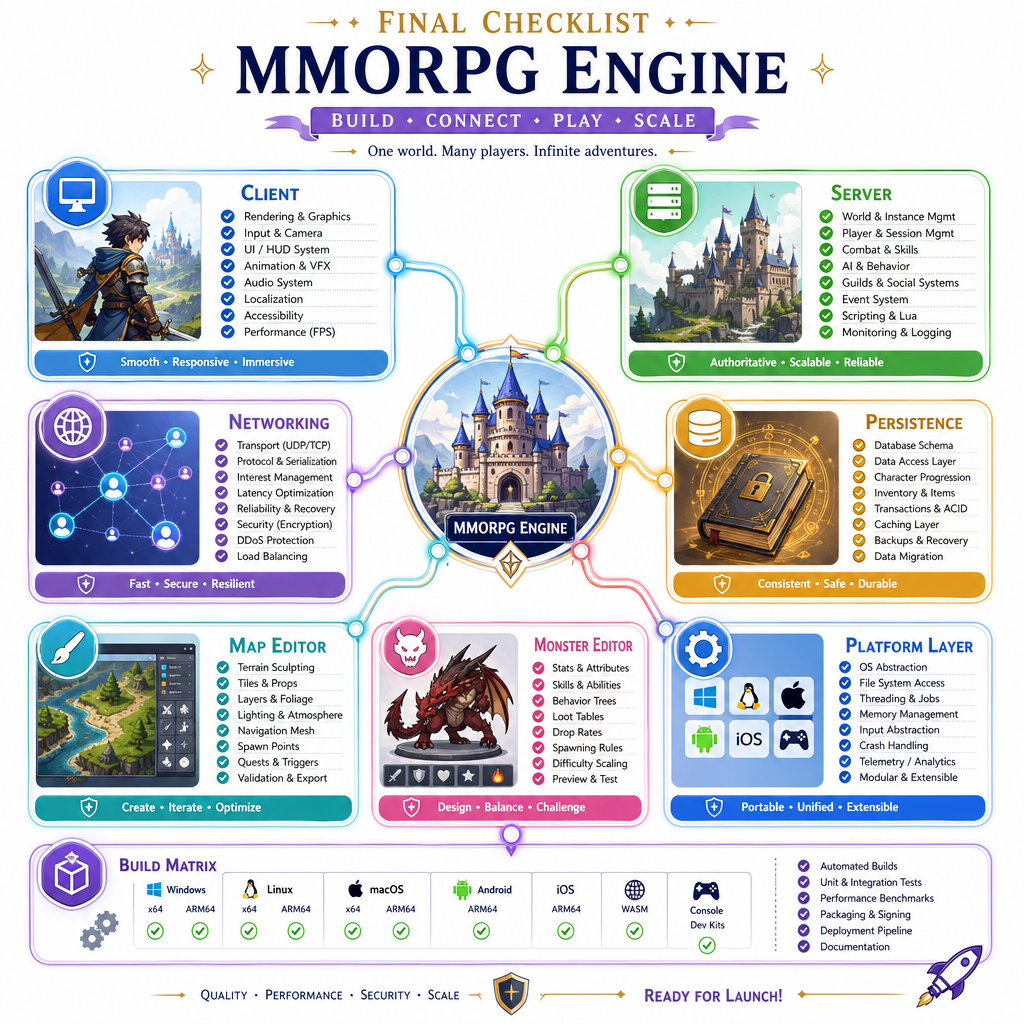
Final course checklist
You now have a coherent foundation for an MMORPG from scratch:
- A client loop and subsystem boundaries from Lesson 2
- Client networking and packet handoff from Lesson 3
- An authoritative server model from Lesson 4
- Persistence patterns from Lesson 5
- Tick-budget awareness from Lesson 6
- Map and monster editing workflows from Lessons 7-8
- A portability strategy from this lesson
Before calling a platform "supported," check these areas:
[ ] Builds cleanly on target compiler
[ ] Uses fixed-width packet fields
[ ] Avoids raw struct serialization
[ ] Saves editor data through stable formats
[ ] Uses portable path composition
[ ] Keeps OS APIs inside platform seams
[ ] Has a repeatable build command
[ ] Documents supported OS/compiler/library versions
The big lesson: cross-platform support is not one final heroic rewrite. It is the result of disciplined boundaries applied throughout the client, server, editor, networking, and persistence layers.
That discipline is what lets your MMORPG grow from a local prototype into a real project.