React Basics
Read at your own pace. Code execution, quizzes, progress tracking, and the AI tutor are available in the interactive view with JavaScript enabled.
Why React Now
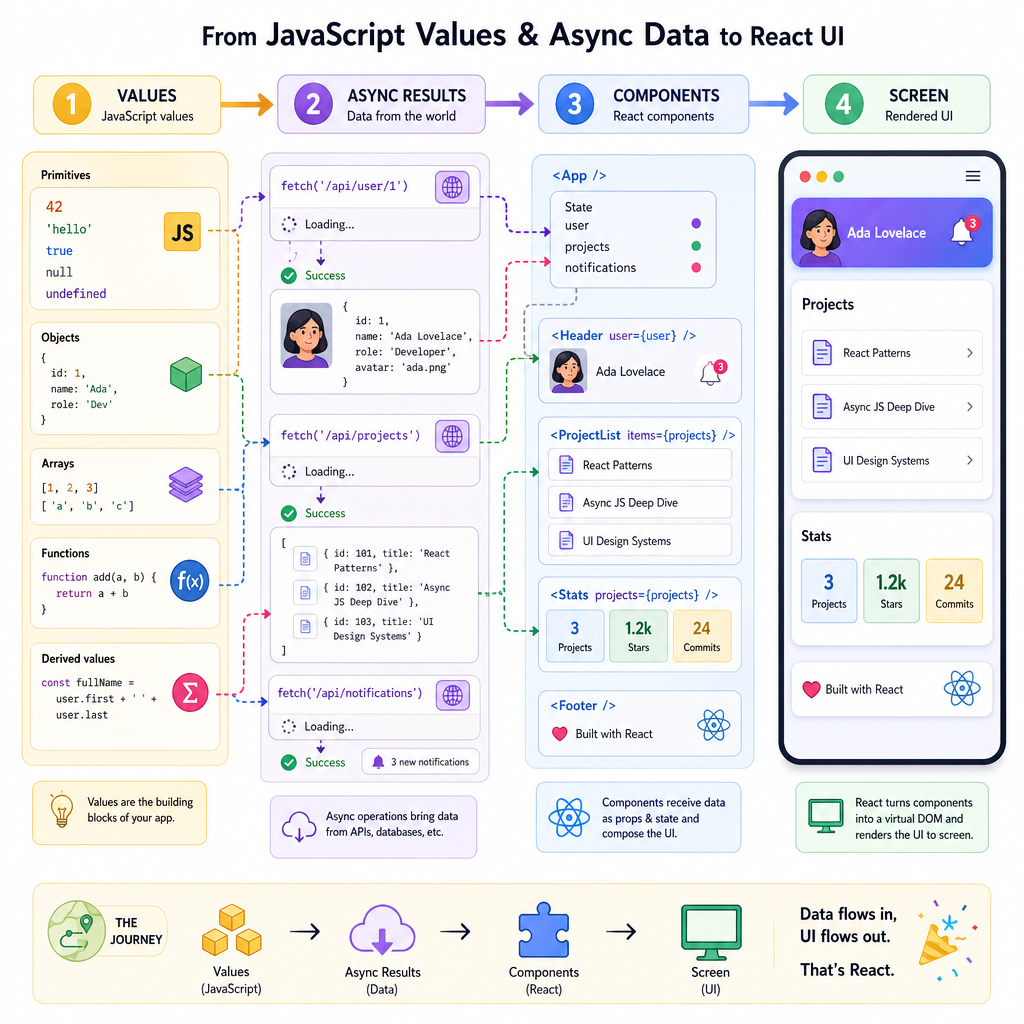
From JavaScript to interfaces
Now that we've covered Introduction to JavaScript and Asynchronous JavaScript, you're ready for the next layer: turning values, functions, objects, arrays, and async results into interactive UI.
React matters because it gives frontend teams a shared way to answer:
- What should the screen look like for this data?
- How does the UI change after a click, fetch, or form edit?
- How do we split a growing interface into understandable pieces?
For a staff-level frontend path, React basics are not just syntax trivia. They are the vocabulary you'll use to discuss architecture, component boundaries, state ownership, rendering cost, and product behavior.
React Mental Model
UI as a function of state
React's core idea is simple but powerful:
Given the current data, describe what the UI should be.
You do not manually edit every DOM node like moving puzzle pieces one by one. Instead, you describe the next picture, and React coordinates the update.
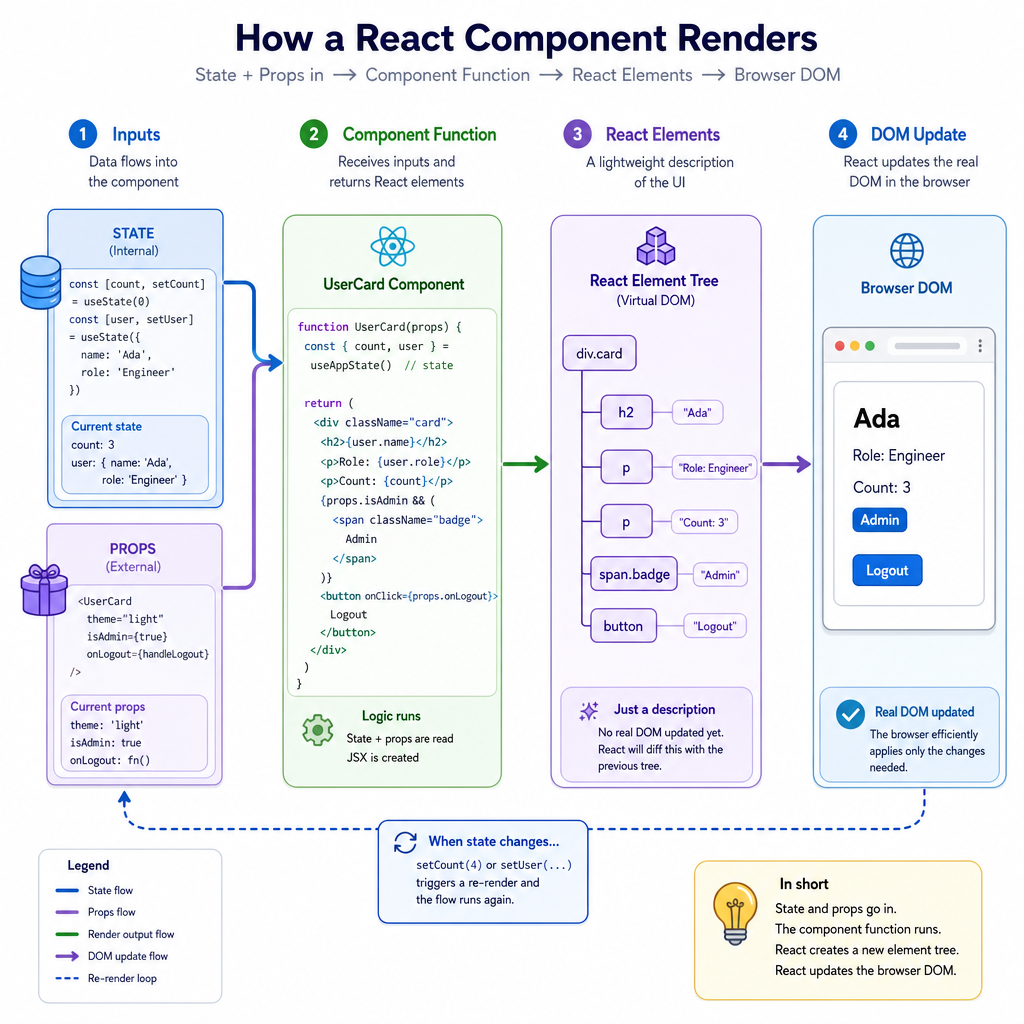
A useful mental model:
state + props
     ↓
component function
     ↓
React elements
     ↓
DOM on screen
That does not mean React is magic. It means your job shifts from imperative DOM choreography to declarative UI description.
Components Are Functions
Components package UI decisions
In the first lesson, functions helped us package decisions. React components build on that idea: a component is a function that packages a piece of interface behavior.
In real React, components return JSX. JSX looks like HTML, but it represents JavaScript objects that React can render.
This small standalone example mimics the idea without needing a browser or build tool:
```js
function createElement(type, props, ...children) {
  return { type, props: props || {}, children };
}

function MovieCard(movie) {
  return createElement(
    "article",
    { className: "movie-card" },
    createElement("h2", null, movie.title),
    createElement("p", null, `Rating: ${movie.rating}/10`)
  );
}

const element = MovieCard({ title: "Mad Max: Fury Road", rating: 9 });
console.log(JSON.stringify(element, null, 2));
```
Component Output
A React component is best described as:
Props Flow Down
Props are component inputs
Props are how a parent component passes information to a child component.
Think of props like a book recommendation card: the card component should not need to know your entire reading history. It just needs the title, author, and maybe a status like "finished" or "want to read".
Key idea:
- Parents choose props.
- Children receive props.
- Children should not mutate props.
This keeps components predictable and easier to reason about in code review.
```js
function BookBadge(props) {
  return `${props.title} by ${props.author} — ${props.status}`;
}

function Shelf() {
  const book = {
    title: "The Hobbit",
    author: "J.R.R. Tolkien",
    status: "reread-worthy"
  };

  return BookBadge(book);
}

console.log(Shelf());
```
Mutating Props
True or false: A child component should directly modify the props object it receives from its parent.
State Changes UI
State is remembered UI data
Props come from outside a component. State belongs to a component and represents data that can change over time.
Examples:
- Is a menu open?
- What did the user type into a search box?
- Which reality-show contestant is currently filtered as "most chaotic"?
- Has async data finished loading?
In React, a state update asks React to render again with new data. The important staff-level framing: state is not just storage. State is a design decision about ownership and change over time.
```js
function createCounter() {
  let count = 0;

  function render() {
    console.log(`Button label: Count is ${count}`);
  }

  function click() {
    count += 1;
    render();
  }

  render();
  click();
  click();
}

createCounter();
```
State Owner
A search input and a results list both need the current search term. Where should that state usually live?
Lists Need Keys
Arrays become repeated UI
You already worked with arrays in Introduction to JavaScript. In React, arrays often become lists of elements.
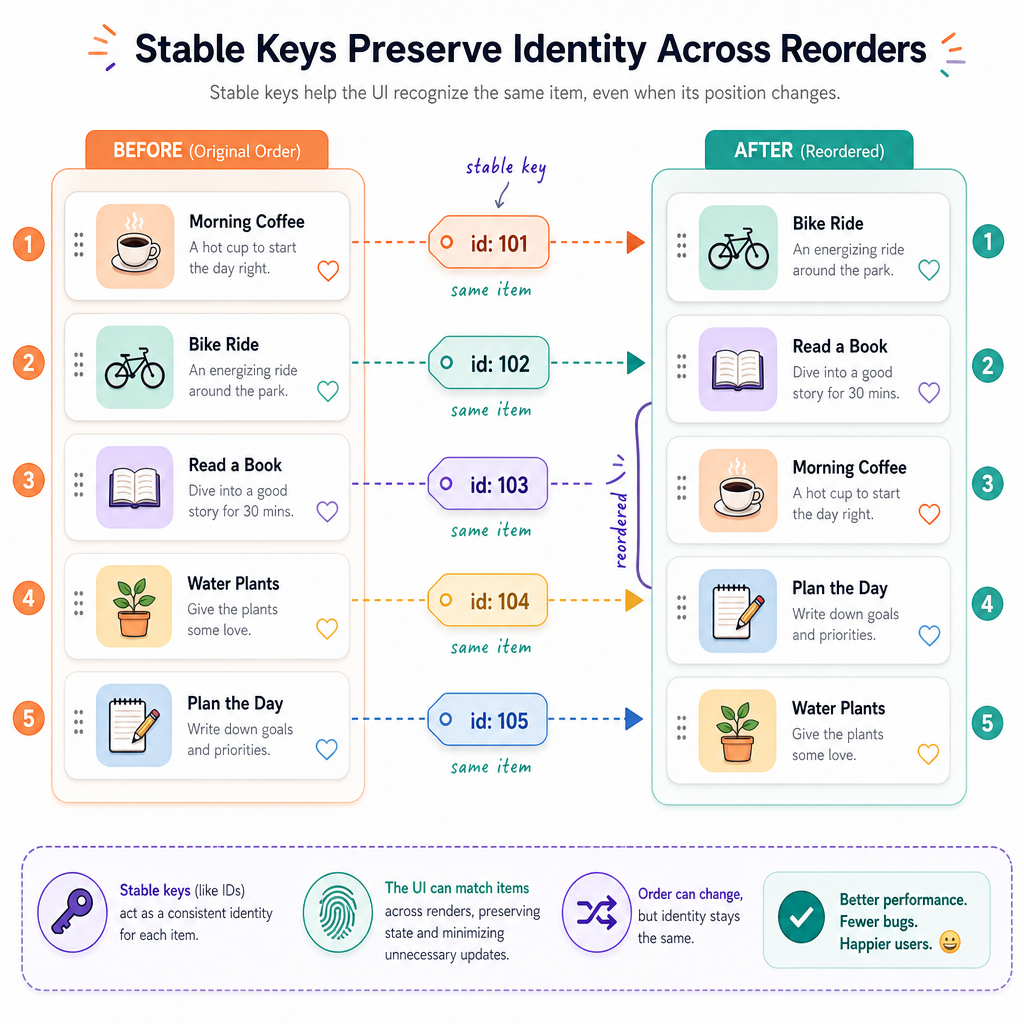
When rendering a list, React needs a stable key for each item so it can match old items to new items across renders.
Good keys usually come from stable IDs:
puzzle-17   ✅ stable
book-42     ✅ stable
index 0     ⚠️ risky if items reorder
random()    ❌ changes every render
Keys are not for users. They are for React's reconciliation process: matching identity as the list changes.
Effect Boundaries
Effects connect React to the outside world
From Asynchronous JavaScript, you already know that network requests, timers, and later-running callbacks introduce time.
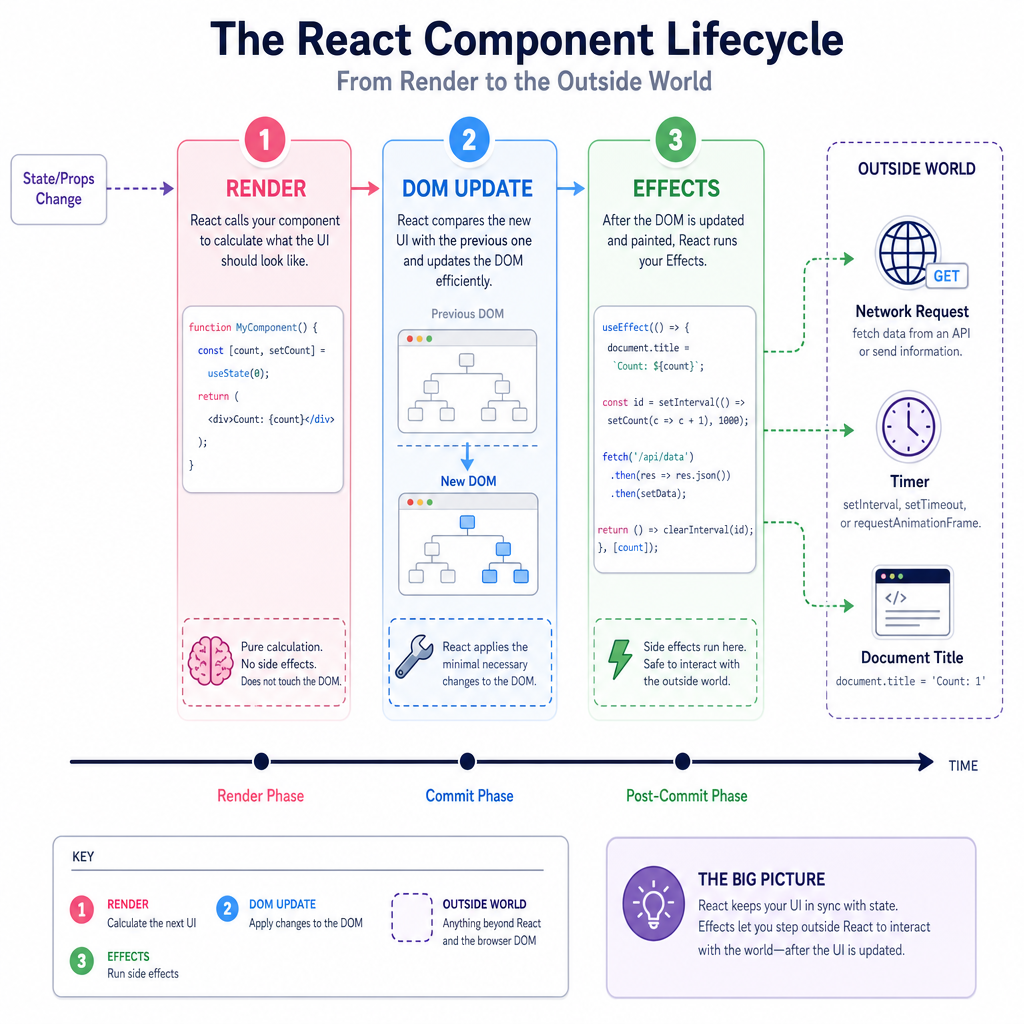
React components should keep rendering logic as pure as possible. When a component must synchronize with something outside React, such as fetching data or setting document.title, React uses effects.
At a basic level:
render UI description
then React updates the DOM
then effects may run
Do not treat effects as a place for all logic. Many bugs come from putting derived values or ordinary calculations into effects when they could have been computed during render.
Complete The Phrase
Fill in the blank:
In React, data passed from a parent component to a child component is called ______.
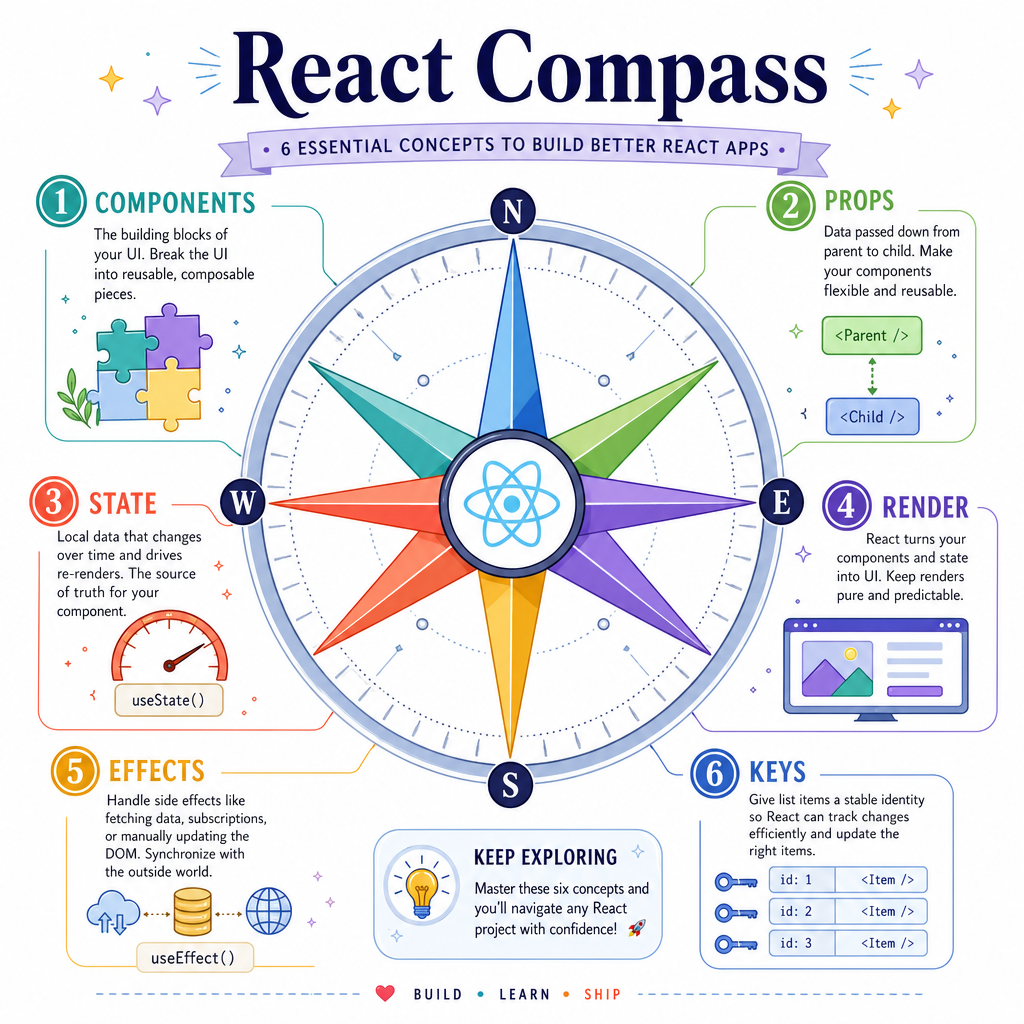
Your React Compass
What to carry forward
React basics are less about memorizing every API and more about building a reliable model:
- Components describe UI.
- Props pass data down.
- State represents owned data that changes over time.
- Rendering should be predictable.
- Effects are for synchronizing with the outside world.
- Keys preserve identity in lists.
As you continue toward staff-level frontend readiness, keep asking: Who owns this state, what changes it, and what UI should result?
Next, we'll shift from component structure to how interfaces adapt across screens in Responsive Web Design.