Risk Management and Security
Read at your own pace. Code execution, quizzes, progress tracking, and the AI tutor are available in the interactive view with JavaScript enabled.
Risk Before Live
Why this lesson matters
In Backtesting and Strategy Analysis, you learned that a strategy can look good historically and still fail when costs, slippage, or unseen market conditions appear.
Now we add the layer that protects the trading application itself: risk management and security.
A fast C++ algo trading system is powerful because it can react in milliseconds. But the same speed can amplify mistakes:
- A bad signal can fire many orders quickly.
- A reconnect bug can duplicate orders.
- A leaked API key can expose real capital.
- A missing loss limit can turn a small bug into a large loss.
Today’s goal: build a mindset and basic C++ components so your system can say “no” before damage happens.

Risk Gate Model
Add gates around the strategy
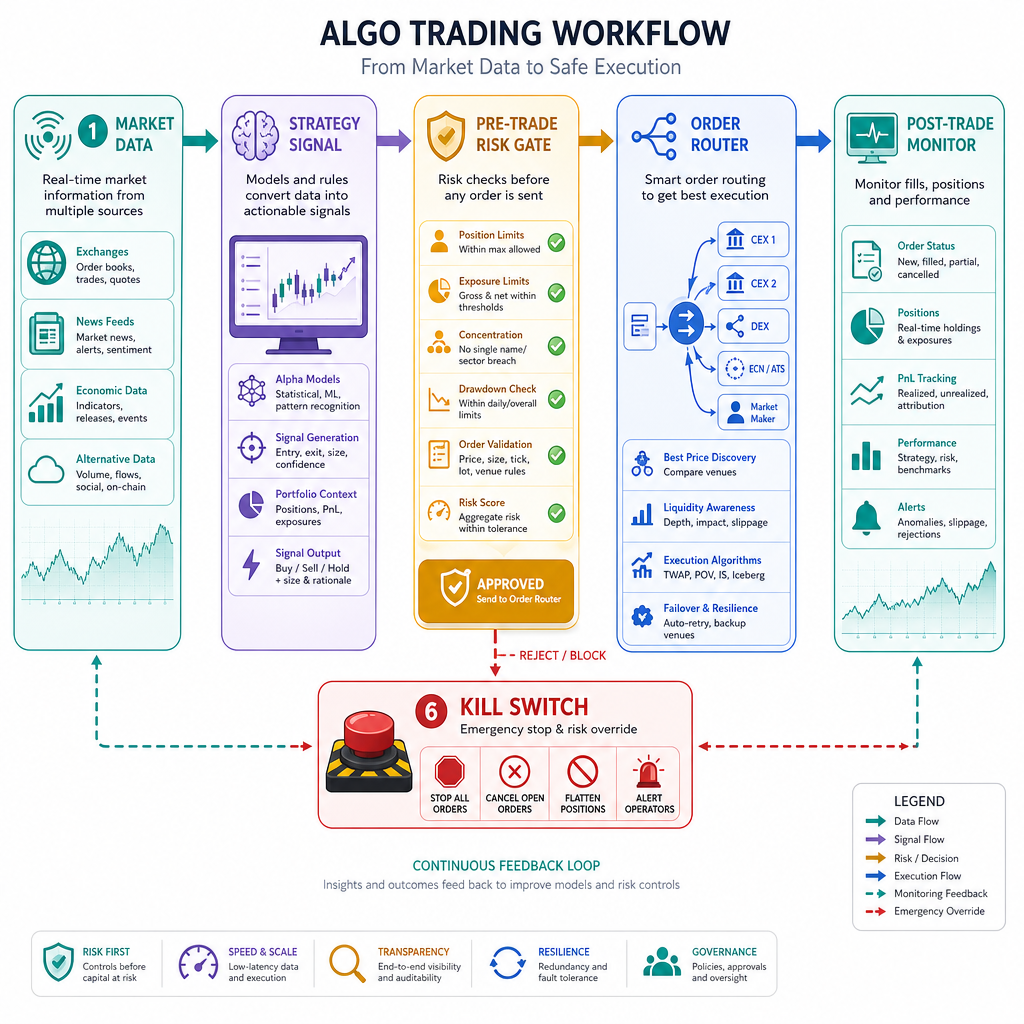
From Implementing Trading Algorithms, your strategy layer produces intent: buy, sell, hold, or adjust.
Risk management should not be hidden inside the strategy only. A safer architecture separates decision-making from permission-making.
Market Data
   ↓
Strategy Signal
   ↓
Pre-Trade Risk Gate  ← max size, max position, valid symbol
   ↓
Order Router / API
   ↓
Post-Trade Monitor   ← fills, P&L, exposure, daily loss
   ↓
Kill Switch          ← stop new orders, cancel open orders
Think of risk gates as circuit breakers. They should be simple, deterministic, and fast.
Good risk rules answer questions like:
- Is this order too large?
- Would this exceed max position?
- Are we trading after a daily loss limit?
- Is the market/API connection healthy?
- Are credentials and permissions safe?
Pre Trade Guard
A minimal C++ risk check
Below is a standalone pre-trade guard. It does not place orders. It only decides whether an order is allowed.
Notice the design:
- The strategy proposes an
OrderIntent. - The
RiskLimitsobject stores boundaries. - The
RiskEnginereturns an approval result with a reason.
This keeps your system explainable under pressure.
```cpp
#include <iostream>
#include <string>
#include <cmath>

struct OrderIntent {
    std::string symbol;
    int quantity;       // positive for buy, negative for sell
    double price;
};

struct RiskLimits {
    int maxOrderQty = 100;
    int maxLongPosition = 500;
    int maxShortPosition = -300;
    double maxNotionalPerOrder = 25000.0;
};

struct RiskResult {
    bool approved;
    std::string reason;
};

class RiskEngine {
public:
    explicit RiskEngine(RiskLimits limits) : limits_(limits) {}

    RiskResult check(const OrderIntent& order, int currentPosition) const {
        if (order.symbol.empty()) {
            return {false, "Rejected: missing symbol"};
        }

        if (order.quantity == 0) {
            return {false, "Rejected: zero quantity"};
        }

        if (std::abs(order.quantity) > limits_.maxOrderQty) {
            return {false, "Rejected: order quantity too large"};
        }

        double notional = std::abs(order.quantity) * order.price;
        if (notional > limits_.maxNotionalPerOrder) {
            return {false, "Rejected: order notional too large"};
        }

        int projectedPosition = currentPosition + order.quantity;
        if (projectedPosition > limits_.maxLongPosition) {
            return {false, "Rejected: max long position exceeded"};
        }

        if (projectedPosition < limits_.maxShortPosition) {
            return {false, "Rejected: max short position exceeded"};
        }

        return {true, "Approved"};
    }

private:
    RiskLimits limits_;
};

int main() {
    RiskEngine risk({100, 500, -300, 25000.0});
    int currentPosition = 450;

    OrderIntent safeOrder{"AAPL", 25, 180.0};
    OrderIntent riskyOrder{"AAPL", 100, 180.0};

    for (const auto& order : {safeOrder, riskyOrder}) {
        RiskResult result = risk.check(order, currentPosition);
        std::cout << order.symbol << " qty=" << order.quantity
                  << " -> " << result.reason << "\n";
    }

    return 0;
}
```
Risk Layer Check
Your strategy generates a BUY order for 1,000 shares, but your pre-trade risk limit allows a maximum order size of 100 shares.
What should the risk layer do?
Loss Limits
Protect the trading day
Position limits protect exposure. Loss limits protect survival.
A common pattern is:
- Track realized and unrealized P&L.
- Compare daily P&L against a maximum allowed loss.
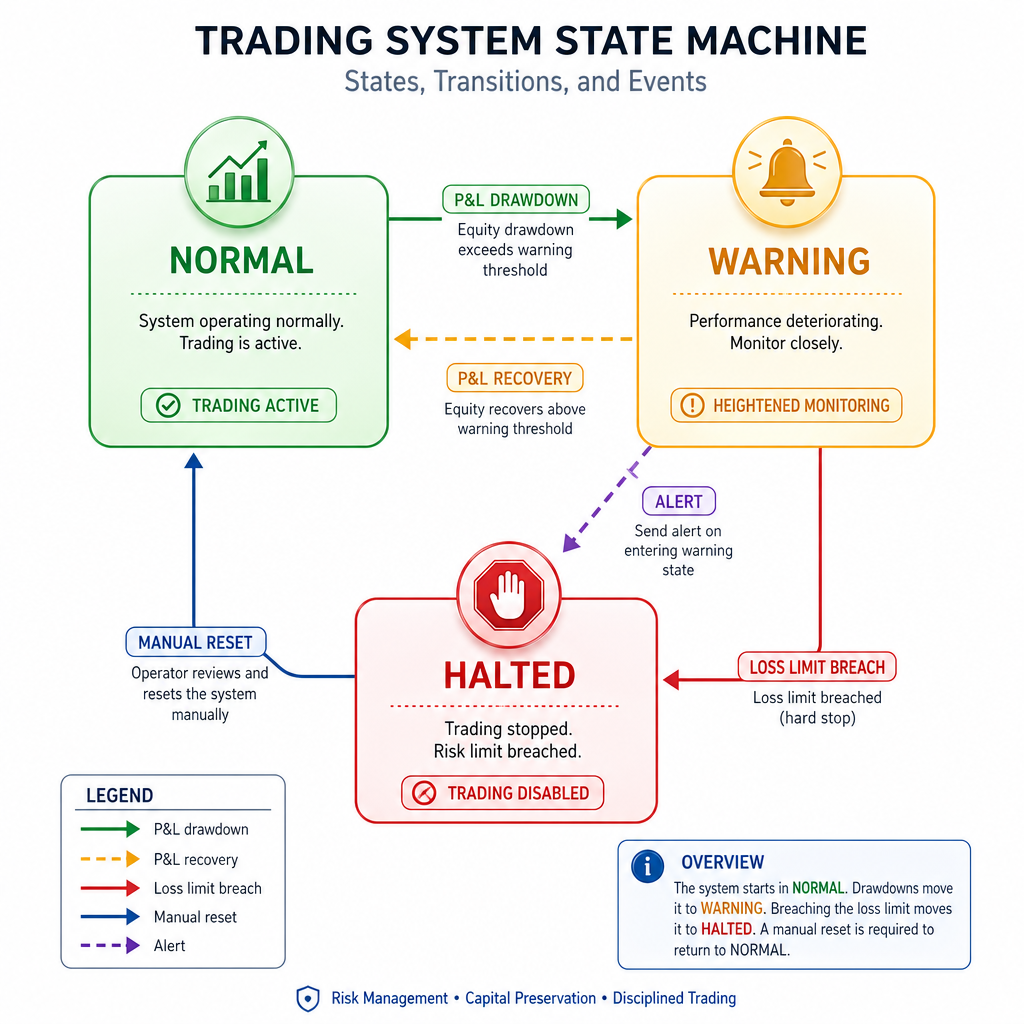
- If the limit is breached, enter a restricted state.
- Stop new orders and optionally cancel open orders.
For a learner building an intermediate C++ application, keep the first version simple:
NORMAL → WARNING → HALTED
Example rules:
-
NORMAL: trading allowed. -
WARNING: trading allowed, but size reduced or alerts triggered. -
HALTED: no new orders allowed.
The important design choice: once halted, do not let the strategy immediately restart itself. Recovery should be explicit and logged.
Kill Switch Truth
True or false:
A high-performance C++ trading system should allow optimized hot-path code to bypass the kill switch if latency is critical.
Circuit Breaker Code
Code a trading halt state
This example models a small risk circuit breaker.
It tracks daily P&L and rejects new orders after a maximum loss is reached. In a real system, this would connect to your order router and cancel logic, but the core idea is intentionally small and testable.
```cpp
#include <iostream>
#include <string>

class CircuitBreaker {
public:
    explicit CircuitBreaker(double maxDailyLoss)
        : maxDailyLoss_(maxDailyLoss), halted_(false), dailyPnl_(0.0) {}

    void updatePnl(double pnlChange) {
        dailyPnl_ += pnlChange;
        if (dailyPnl_ <= -maxDailyLoss_) {
            halted_ = true;
        }
    }

    bool canSendOrder() const {
        return !halted_;
    }

    std::string status() const {
        if (halted_) return "HALTED";
        if (dailyPnl_ <= -0.75 * maxDailyLoss_) return "WARNING";
        return "NORMAL";
    }

    double dailyPnl() const {
        return dailyPnl_;
    }

private:
    double maxDailyLoss_;
    bool halted_;
    double dailyPnl_;
};

int main() {
    CircuitBreaker breaker(1000.0);

    double pnlEvents[] = {-150.0, -250.0, -400.0, -300.0};

    for (double pnl : pnlEvents) {
        breaker.updatePnl(pnl);
        std::cout << "P&L change: " << pnl
                  << ", daily P&L: " << breaker.dailyPnl()
                  << ", status: " << breaker.status()
                  << ", can send order: " << std::boolalpha << breaker.canSendOrder()
                  << "\n";
    }

    return 0;
}
```
Secure Credentials
Security is also risk management
In Connectivity with Financial Market APIs, you saw that API access usually involves authentication, signed requests, and rate limits.
Security rules for an algo trading app:
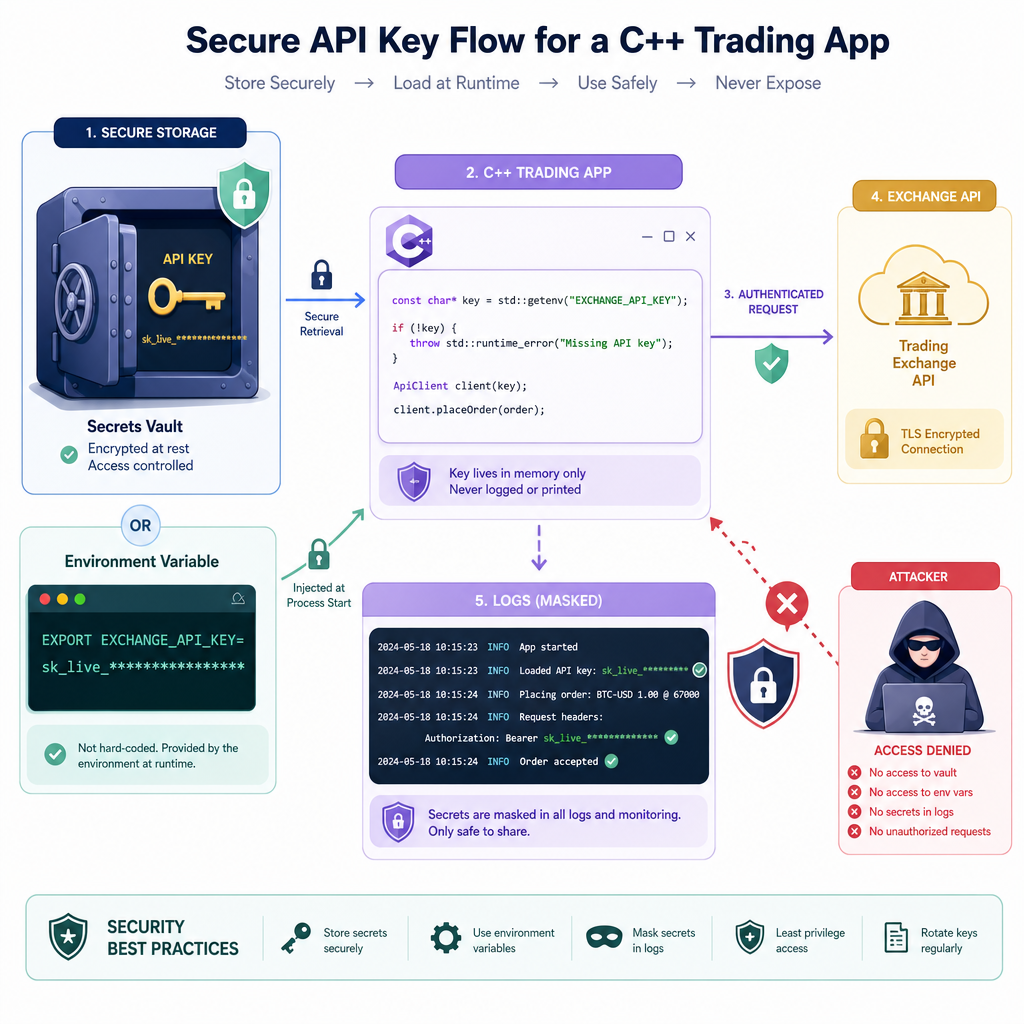
- Never hard-code live API keys in source code.
- Use environment variables, secret managers, or encrypted config files.
- Give API keys the minimum permissions needed.
- Separate paper-trading keys from live-trading keys.
- Rotate keys after exposure or team changes.
- Log request IDs and decisions, but do not log raw secrets.
For early development, environment variables are a practical first step. They are not a full enterprise secret-management solution, but they are far safer than committing credentials into Git.
Mask Secrets
Read secrets without printing them
This standalone example reads an API key from an environment variable and masks it for logging.
Run it like this on macOS/Linux:
export TRADING_API_KEY=abc123SECRET789
./app
On Windows PowerShell:
$env:TRADING_API_KEY="abc123SECRET789"
.\app.exe
The key lesson: your logs should confirm configuration without exposing credentials.
```cpp
#include <cstdlib>
#include <iostream>
#include <string>

std::string maskSecret(const std::string& secret) {
    if (secret.size() <= 4) return "****";
    return secret.substr(0, 2) + std::string(secret.size() - 4, '*') + secret.substr(secret.size() - 2);
}

int main() {
    const char* rawKey = std::getenv("TRADING_API_KEY");

    if (rawKey == nullptr) {
        std::cout << "TRADING_API_KEY is not set. Refusing to start live trading mode.\n";
        return 0;
    }

    std::string apiKey(rawKey);
    std::cout << "API key loaded: " << maskSecret(apiKey) << "\n";
    std::cout << "Live trading startup checks can continue.\n";

    return 0;
}
```
Blank Check
Fill in the blank:
A system-wide control that stops new orders when risk limits are breached is commonly called a ______ switch.
Ready To Assemble
What you now have
You have the core safety ideas needed before assembling the full application:
- Pre-trade checks reject dangerous orders before routing.
- Position and notional limits control exposure.
- Daily loss limits protect the trading session.
- Kill switches halt activity when safety is compromised.
- Credentials must be protected and masked in logs.
This lesson fits directly after backtesting: a strategy that looks promising still needs guardrails before it can approach live execution.
In the final project, you’ll connect the pieces from the course into one C++ algo trading application structure.