Sorting and Searching Algorithms
Read at your own pace. Code execution, quizzes, progress tracking, and the AI tutor are available in the interactive view with JavaScript enabled.
From Structure To Order
Why this lesson matters
In Introduction to OODSA, you modeled software with objects. In Algorithmic Thinking, you practiced decomposing tasks and checking invariants. In Data Structures, you saw that arrays, lists, stacks, queues, dictionaries, and sets shape what operations are easy.
Now we ask a practical programming question:
Once data is stored, how do we arrange it and find things efficiently?
Sorting and searching are the everyday workhorses behind autocomplete, leaderboards, inventory systems, file explorers, database indexes, and interview problems.
By the end, you should be able to:
- Recognize when sorting is useful before searching
- Compare linear search, binary search, and hash-based lookup
- Explain the basic tradeoffs of common sorting approaches
- Use C# library tools without treating them like magic

Sorting Is A Contract
Sorting means choosing an order
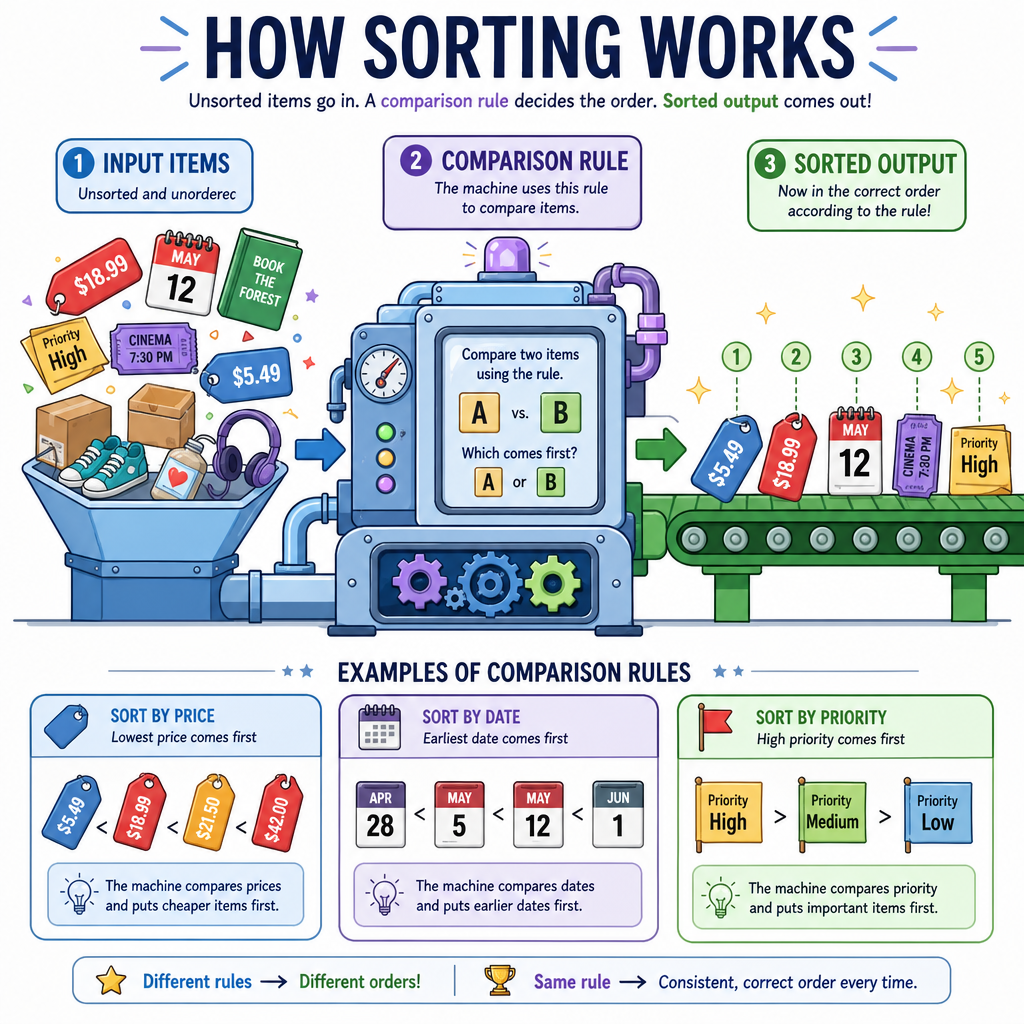
A sort is not just "make it neat." It is a contract:
- Input: a collection of comparable items
- Rule: how to compare two items
- Output: the same items arranged according to that rule
For numbers, the rule is obvious: smaller before larger.
For objects, the rule is a design decision:
- Products by price
- Users by signup date
- Tasks by priority, then due date
- Files by extension, then name
This connects directly to OODSA: objects carry data, but algorithms need a clear comparison rule to organize them.
Unsorted: [42, 7, 19, 7]
Rule: ascending numeric order
Sorted:   [7, 7, 19, 42]
A good question to ask before sorting is: what does "comes before" mean for this domain?
Selection Sort Trace
A simple sorting mental model
Selection sort is not the fastest general-purpose sort, but it is excellent for learning because its invariant is easy to see:
After each pass, the left side contains the smallest items in final sorted position.
At pass i, we scan the remaining unsorted region, find the smallest value, and swap it into position i.
This mirrors the tracing habit from Algorithmic Thinking: do not just trust the loop; watch what becomes guaranteed after every pass.
```csharp
using System;

public class Program
{
    static void SelectionSort(int[] nums)
    {
        for (int i = 0; i < nums.Length - 1; i++)
        {
            int minIndex = i;

            for (int j = i + 1; j < nums.Length; j++)
            {
                if (nums[j] < nums[minIndex])
                {
                    minIndex = j;
                }
            }

            int temp = nums[i];
            nums[i] = nums[minIndex];
            nums[minIndex] = temp;

            Console.WriteLine($"After pass {i + 1}: {string.Join(", ", nums)}");
        }
    }

    public static void Main()
    {
        int[] scores = { 64, 25, 12, 22, 11 };
        Console.WriteLine("Before: " + string.Join(", ", scores));
        SelectionSort(scores);
        Console.WriteLine("After:  " + string.Join(", ", scores));
    }
}
```
Sorting Cost Check
Selection sort repeatedly scans the unsorted part of the array to find the next smallest item.
For an array of n items, which time complexity best describes its number of comparisons?
Searching Needs Shape
The collection determines the search
Searching means finding whether an item exists, or where it lives.
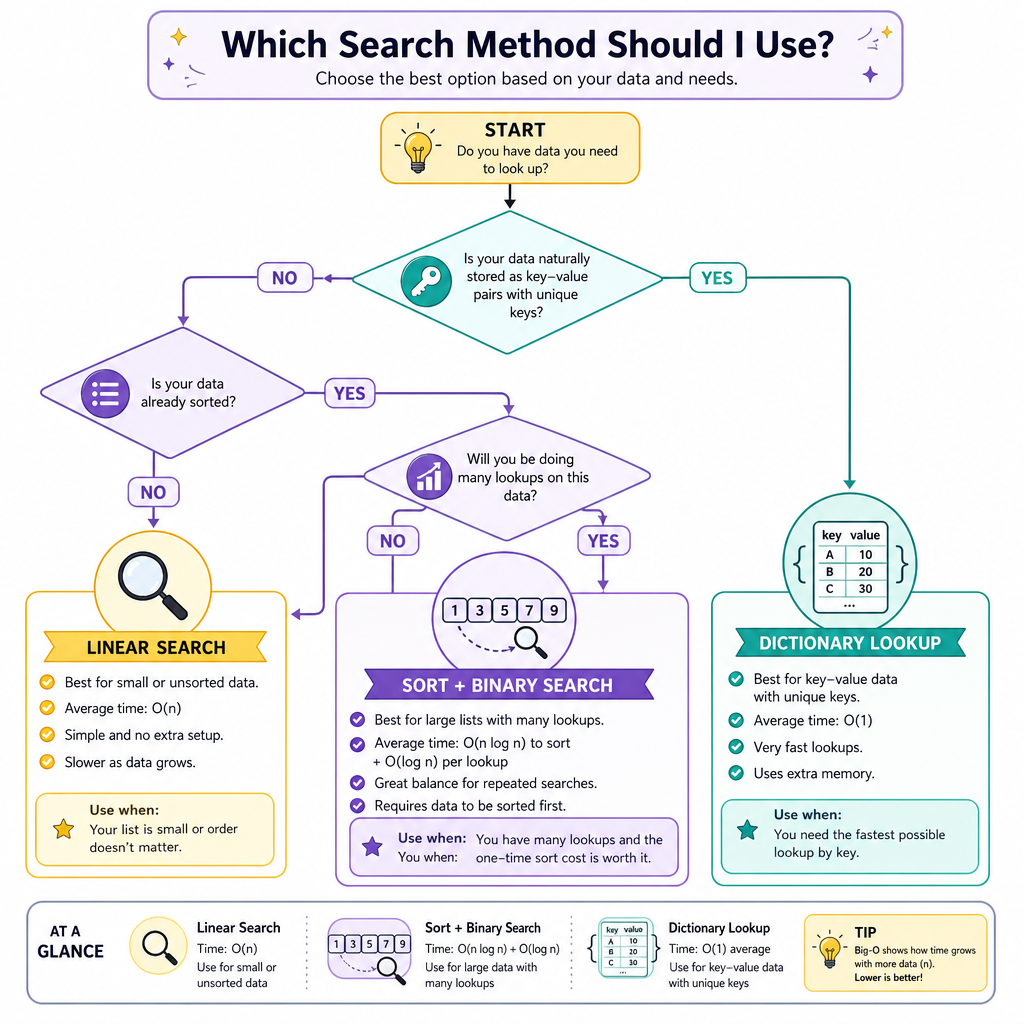
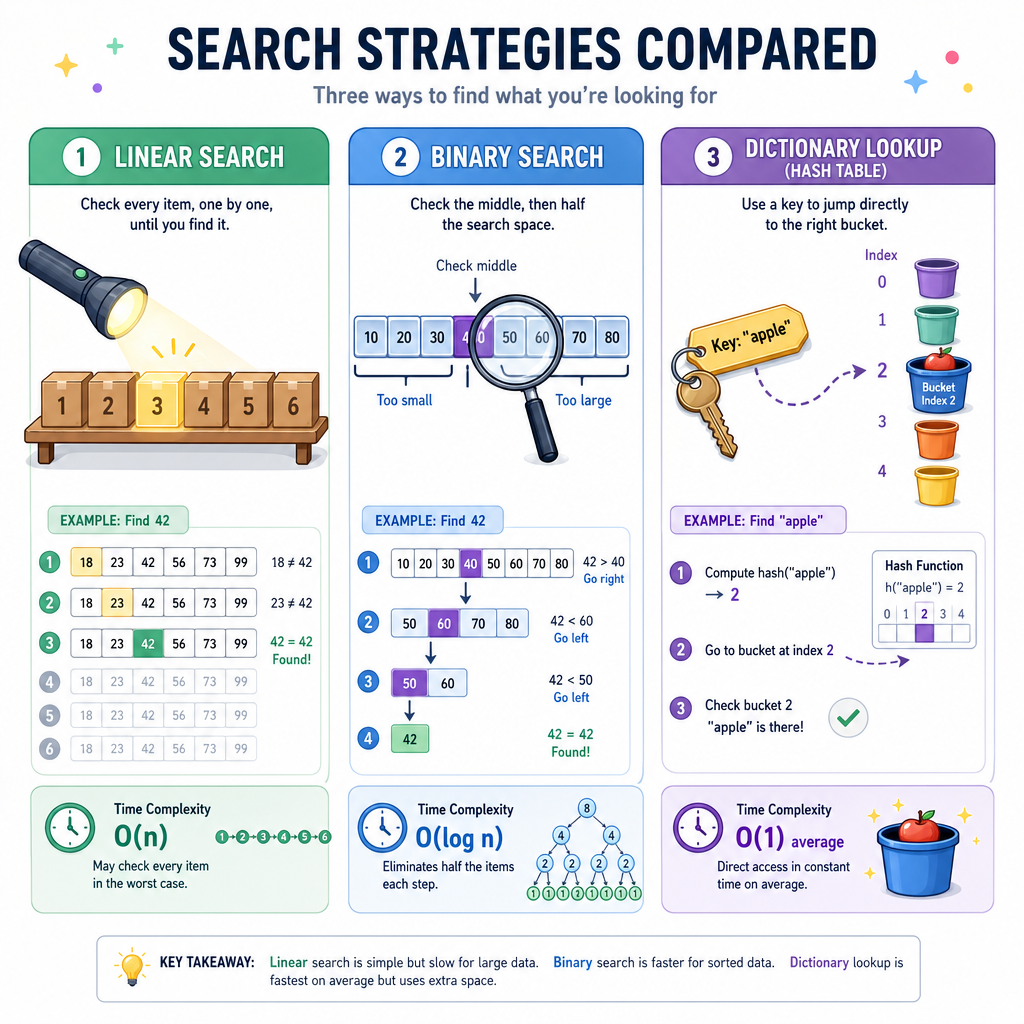
The best strategy depends on the structure you have:
Data shape Typical search approach Big idea Unsorted array/list Linear search Check one by one Sorted array/list Binary search Cut the search space in half Dictionary/set Hash lookup Jump near the answerThis is the payoff from Data Structures: the same question, "is this value here?", can have very different costs depending on how the data is organized.
Binary Search Invariant
Sorted data unlocks binary search
Binary search works only when the data is sorted by the same rule you are searching with.
Its invariant is:
If the target exists, it must be inside the current
left..rightrange.
Each comparison removes half of the remaining candidates:
[2, 5, 8, 12, 16, 23, 38]
 target = 16

middle = 12 → target is larger
Discard left half, keep [16, 23, 38]
That repeated halving is why binary search is dramatically faster than linear search on large sorted collections.
```csharp
using System;

public class Program
{
    static int BinarySearch(int[] nums, int target)
    {
        int left = 0;
        int right = nums.Length - 1;

        while (left <= right)
        {
            int mid = left + (right - left) / 2;
            Console.WriteLine($"Checking index {mid}, value {nums[mid]}");

            if (nums[mid] == target)
            {
                return mid;
            }
            else if (nums[mid] < target)
            {
                left = mid + 1;
            }
            else
            {
                right = mid - 1;
            }
        }

        return -1;
    }

    public static void Main()
    {
        int[] sorted = { 2, 5, 8, 12, 16, 23, 38 };
        int target = 16;
        int index = BinarySearch(sorted, target);
        Console.WriteLine($"Target {target} found at index: {index}");
    }
}
```
Log Time Blank
Binary search cuts the remaining search space roughly in half after each comparison.
Fill in the time complexity:
Binary search is ____.
Sorted Requirement
True or false:
Binary search can be correctly used on any array, even if the values are not sorted.
Use Library Tools
Do not rebuild everything
In real C# programming, you often use well-tested library operations:
-
Array.Sortfor arrays -
List<T>.Sortfor lists -
Array.BinarySearchfor sorted arrays -
Dictionary<TKey, TValue>for direct key-based lookup
The goal of learning the algorithms is not to hand-code them forever. The goal is to understand their assumptions, costs, and failure modes.
If you sort first, then binary search, remember the tradeoff:
- Sorting costs time up front
- Searching becomes faster afterward
- This is worthwhile when you search the same data many times
```csharp
using System;
using System.Collections.Generic;

public class Program
{
    public static void Main()
    {
        int[] ids = { 42, 7, 19, 100, 3 };
        Array.Sort(ids);
        Console.WriteLine("Sorted IDs: " + string.Join(", ", ids));

        int index = Array.BinarySearch(ids, 19);
        Console.WriteLine($"ID 19 found at index: {index}");

        var usernamesById = new Dictionary<int, string>
        {
            [7] = "maya",
            [19] = "lin",
            [42] = "niko"
        };

        Console.WriteLine("User with ID 42: " + usernamesById[42]);
    }
}
```
Choosing An Approach
A practical decision checklist
Use this when solving programming problems:
-
Is the data already sorted?
- Yes: binary search may be available.
- No: linear search or sort first.
-
How many searches will happen?
- One search: sorting first may be overkill.
- Many searches: sorting or a dictionary may pay off.
-
Do you need the data in order afterward?
- Yes: sorting gives reusable structure.
- No: a dictionary or set may be simpler.
-
Are you comparing objects?
- Define the ordering clearly: by name, score, date, priority, or a combination.
Sorting and searching are not isolated tricks. They are design choices that connect your object model, data structure, and algorithmic cost.
Next, you will move into Dynamic Programming, where the central question changes from "how do I find or order data?" to "how do I reuse answers to overlapping subproblems?"