Sorting and Searching Algorithms
Read at your own pace. Code execution, quizzes, progress tracking, and the AI tutor are available in the interactive view with JavaScript enabled.
Why Sort Search
From storing data to finding patterns
In the last lessons, you built a toolbox of structures: arrays and linked lists for storage, stacks and queues for order of processing, trees and graphs for relationships, and hash tables for fast key lookup.
Now we focus on two core algorithm families that show up constantly in easy and medium problems:
- Sorting: rearrange data into a useful order.
- Searching: locate a value, boundary, or condition efficiently.
Sorting often turns a messy problem into a structured one. Once data is ordered, you can use faster searches, detect duplicates, merge ranges, use two pointers, and reason about boundaries.

Sorting Mental Model
Sorting is controlled rearrangement
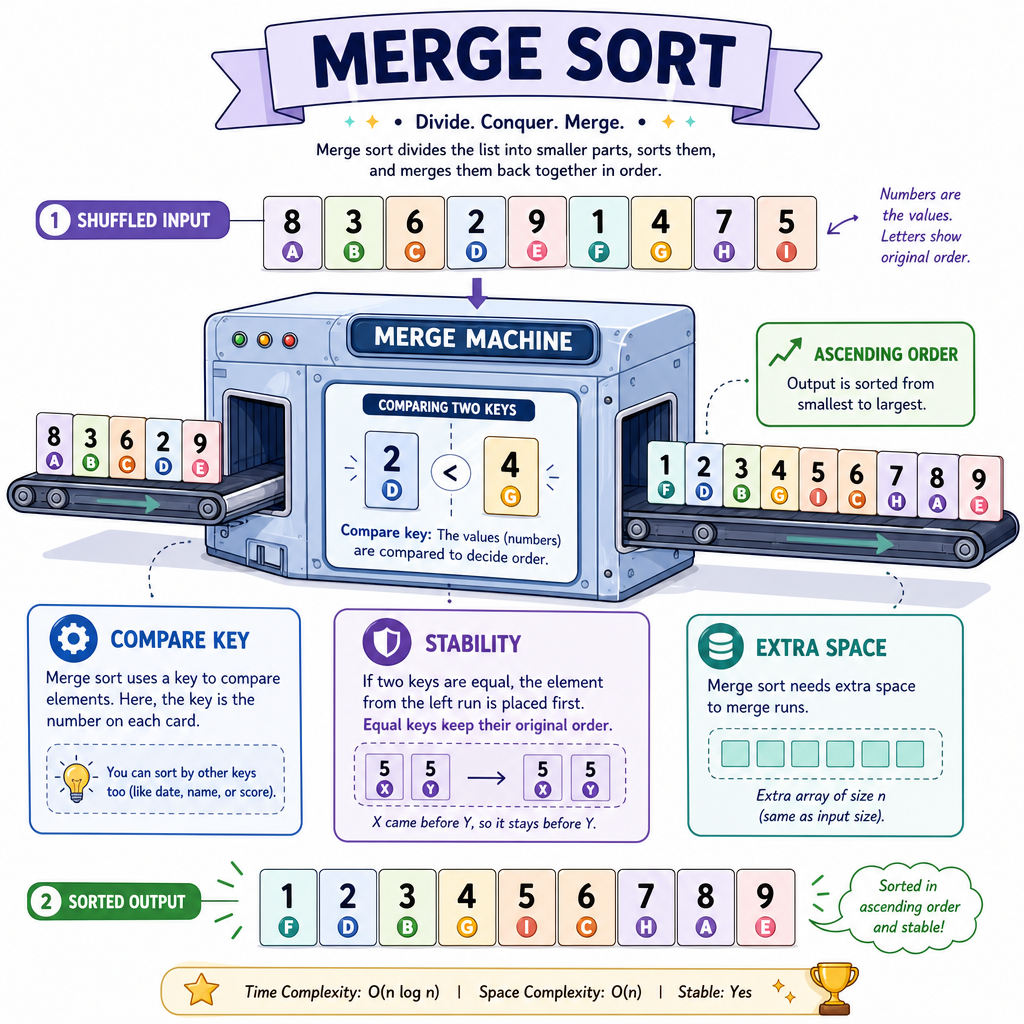
A sorting algorithm takes a collection and places its items in a defined order:
[7, 2, 9, 1, 5] -> [1, 2, 5, 7, 9]
The important questions are:
- What are we comparing? Numbers, strings, dates, object fields?
- Ascending or descending? Smallest first or largest first?
- Do equal items keep their relative order? This is called stability.
- How much extra space is used? Some sorts rearrange in place; others copy data.
For interviews and day-to-day engineering, you usually do not need to memorize every sorting algorithm. You need to know what sorting buys you and how to choose a practical approach.
Insertion Sort
A simple sort worth understanding
Insertion sort builds a sorted prefix one item at a time.
Mental model: sorting a hand of playing cards. You take the next card and slide it left until it is in the correct spot.
Why learn it?
- It is easy to reason about.
- It works in place.
- It is fast enough for small or nearly sorted arrays.
- It makes the cost of repeated shifting very visible.
Its worst-case time is O(n²), so it is not the default for large random inputs.
```javascript
function insertionSort(nums) {
  const arr = [...nums]; // copy so the original input is unchanged

  for (let i = 1; i < arr.length; i++) {
    const current = arr[i];
    let j = i - 1;

    while (j >= 0 && arr[j] > current) {
      arr[j + 1] = arr[j];
      j--;
    }

    arr[j + 1] = current;
  }

  return arr;
}

const scores = [42, 17, 23, 99, 8];
console.log(insertionSort(scores));
console.log("original:", scores);
```
Sort Cost Check
An array is already almost sorted, with only a few elements slightly out of place. Which statement is most accurate?
Binary Search
Searching by cutting the problem in half
Linear search checks items one by one:
O(n): maybe inspect every element
Binary search is faster, but it has a requirement: the search space must be ordered.
At each step:
- Look at the middle item.
- If it is the target, stop.
- If the target is smaller, discard the right half.
- If the target is larger, discard the left half.
That repeated halving gives binary search its famous O(log n) time.
```javascript
function binarySearch(sortedNums, target) {
  let left = 0;
  let right = sortedNums.length - 1;

  while (left <= right) {
    const mid = Math.floor((left + right) / 2);

    if (sortedNums[mid] === target) {
      return mid;
    }

    if (sortedNums[mid] < target) {
      left = mid + 1;
    } else {
      right = mid - 1;
    }
  }

  return -1;
}

const nums = [3, 6, 10, 14, 18, 25, 31];
console.log(binarySearch(nums, 18)); // 4
console.log(binarySearch(nums, 7));  // -1
```
Search Requirement
True or false: binary search works correctly on any array, even if the values are not sorted.
Boundary Searches
Search is not only for exact matches
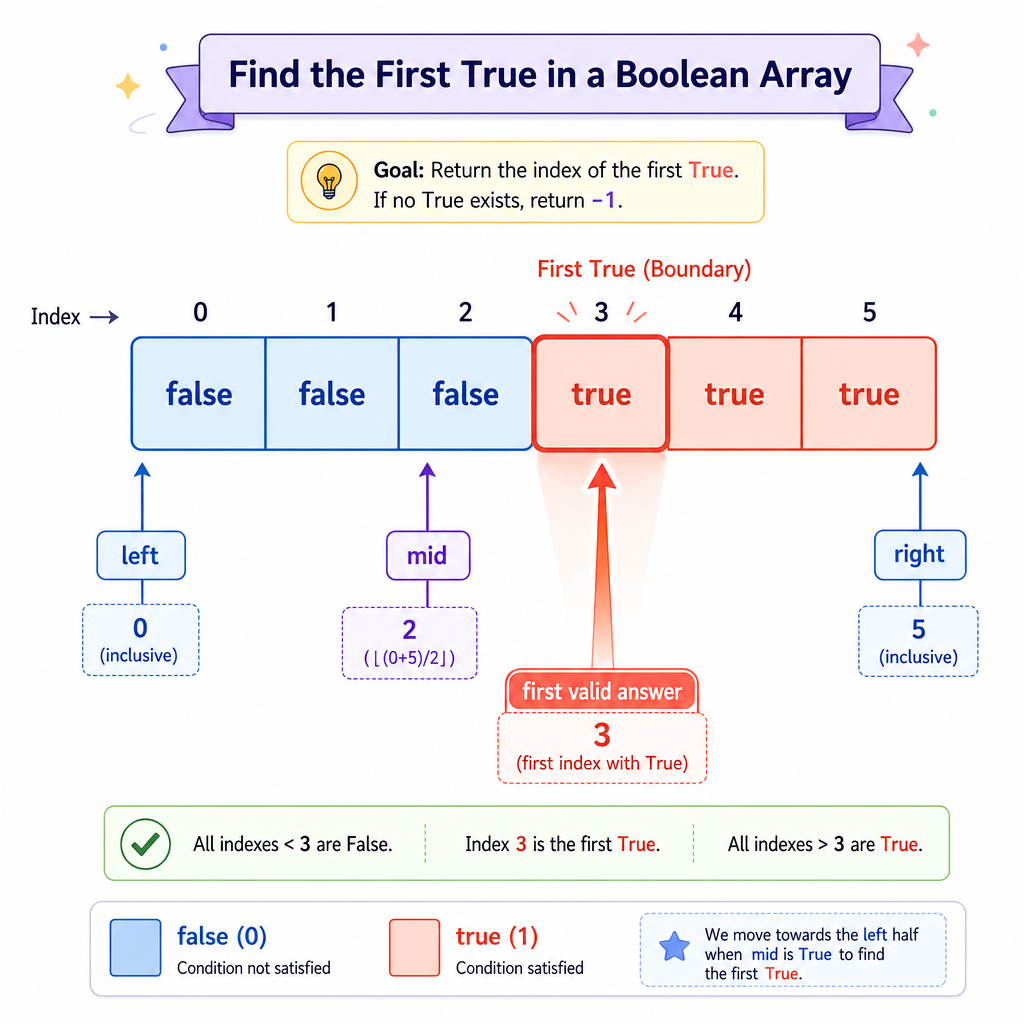
In medium-level problems, binary search often finds a boundary, not just a value.
Examples:
- First index where
nums[i] >= target - Last index where
nums[i] <= target - Smallest valid answer in a range
- Insert position for a new value
A useful pattern is to ask:
Is the condition false on one side and true on the other?
index:      0  1  2  3  4  5
condition: F  F  F  T  T  T
                    ^ first true
This idea will also connect later to more advanced problem-solving patterns, but for now keep the focus on ordered search spaces.
Log Time Blank
Fill in the blank: binary search runs in O(____) time because it repeatedly halves the search space.
JavaScript Sorting
Use the built-in sort carefully
JavaScript arrays have a built-in .sort() method, but there is one common trap:
By default, JavaScript sorts values as strings.
So for numbers, always pass a comparator:
-
a - bfor ascending -
b - afor descending
For objects, compare the field that matters to the problem.
```javascript
const nums = [10, 2, 30, 4];

console.log("default:", [...nums].sort());
console.log("numeric:", [...nums].sort((a, b) => a - b));

const trades = [
  { symbol: "ABC", price: 42 },
  { symbol: "XYZ", price: 17 },
  { symbol: "MNO", price: 25 }
];

const byPrice = [...trades].sort((a, b) => a.price - b.price);
console.log(byPrice.map(t => `${t.symbol}:${t.price}`));
```
Pick The Tool
You need to check many times whether a customer ID exists. You do not need the IDs in sorted order. Based on earlier lessons and this one, which approach is usually best?
Choosing Algorithms
Practical decision guide
Sorting and searching are not isolated tricks. They connect directly to the structures you have already learned.
Use this checklist:
- Need one lookup in an unsorted array? Linear search may be fine.
- Need many membership checks? Consider
SetorMapfrom Hash Tables. - Need ordered results or boundaries? Sort first, then scan or binary search.
- Need range-like ordered operations? A tree-like structure may be a better fit conceptually.
- Need to process relationships? That is still graph territory, using BFS or DFS from the Graphs lesson.
The key habit: do not ask only, “What algorithm do I know?” Ask, “What structure makes the next operation cheap?”
Next, you will revisit recursion and dynamic programming, where problem structure becomes even more important.