What are Strings and String Operations?
Read at your own pace. Code execution, quizzes, progress tracking, and the AI tutor are available in the interactive view with JavaScript enabled.
Introduction
This is a general purpose tutorial for multiple languages. For the Javascript-specific version of this lesson that focuses on fundamentals frontend engineers need to know, please click here.
In the previous lessons, we learnt about variables and their usage. In programming languages, these variables can be assigned values of different types. These include integers, decimal numbers, sequence of alphabetical letters, booleans (true or false) among several others. Programming languages not only offer these data types, but also allow programmers to perform various operations on them. In this lesson, we will focus on the data type called string, and the operations that are defined on strings.
Strings
Strings: A Wonderful Sequence of Characters
Strings are one of the most fundamental and commonly used data types in programming. A string represents a sequence of characters and can be as simple as a single letter or as complex as an entire book.
Definition and Declaration
- What is a String?: A string consists of a sequence of characters, such as numbers, letters, spaces, or special symbols. Think of it as a chain of characters linked together.
-
Quotation Marks: Strings are usually enclosed within single (
'') or double quotation marks (""). This tells the compiler or interpreter that the text inside the quotes should be treated as a single unit. - Unicode Characters: Strings are made up of Unicode characters, allowing them to represent virtually any character in any writing system.
Strings as Arrays of Characters
- Accessing Characters: Since strings are essentially arrays of characters, individual characters can be accessed and manipulated in many programming languages.
- Indexing: Characters within a string can be accessed by their position (or index) in the sequence, typically starting from 0.
Manipulating Strings
- Concatenation: Strings can be combined or concatenated to form new strings.
- Methods and Functions: Most languages provide various built-in methods and functions to work with strings, such as finding the length, transforming case, replacing characters, etc.
Strings in Different Programming Languages
Now, let's look at how strings are used and manipulated in various programming languages:
String greeting = "Hello World!";
int length = greeting.length(); // Getting the length
char firstChar = greeting.charAt(0); // Accessing the first character
let greeting = "Hello World!";
let length = greeting.length; // Getting the length
let firstChar = greeting[0]; // Accessing the first character
greeting = "Hello World!"
length = len(greeting) # Getting the length
firstChar = greeting[0] # Accessing the first character
#include <string>
std::string greeting = "Hello World!";
int length = greeting.length(); // Getting the length
char firstChar = greeting[0]; // Accessing the first character
string greeting = "Hello World!";
int length = greeting.Length; // Getting the length
char firstChar = greeting[0]; // Accessing the first character
import "fmt"
greeting := "Hello World!"
length := len(greeting) // Getting the length
firstChar := greeting[0] // Accessing the first character (in byte)
String Shape Check
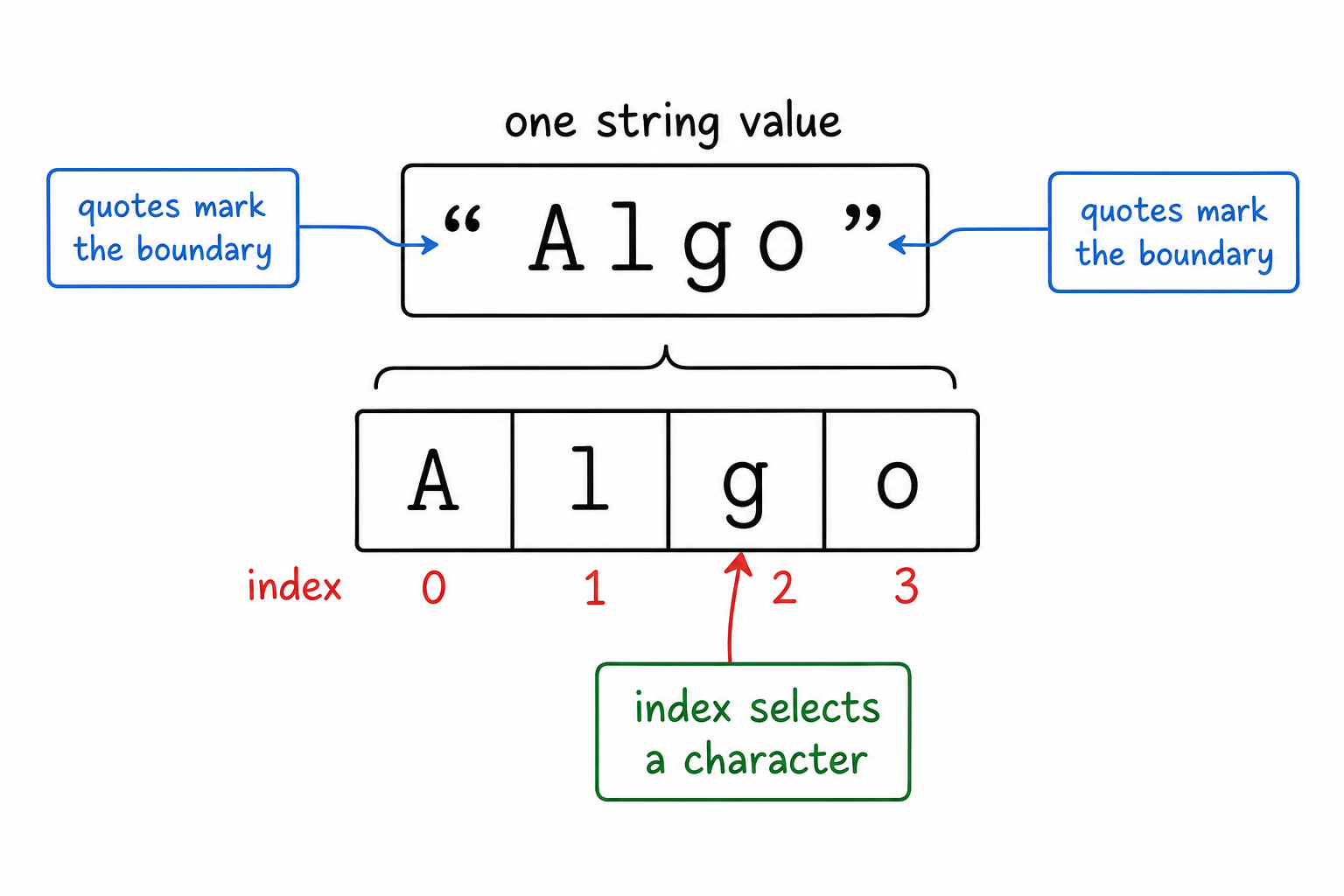
Before moving into syntax, lock in the shape of a string: it is ordered text stored as one value, but made from individual characters.
Notice two ideas in the visual: quotes create the string boundary, and indexes let you point to specific characters inside that boundary.
String Anatomy Map
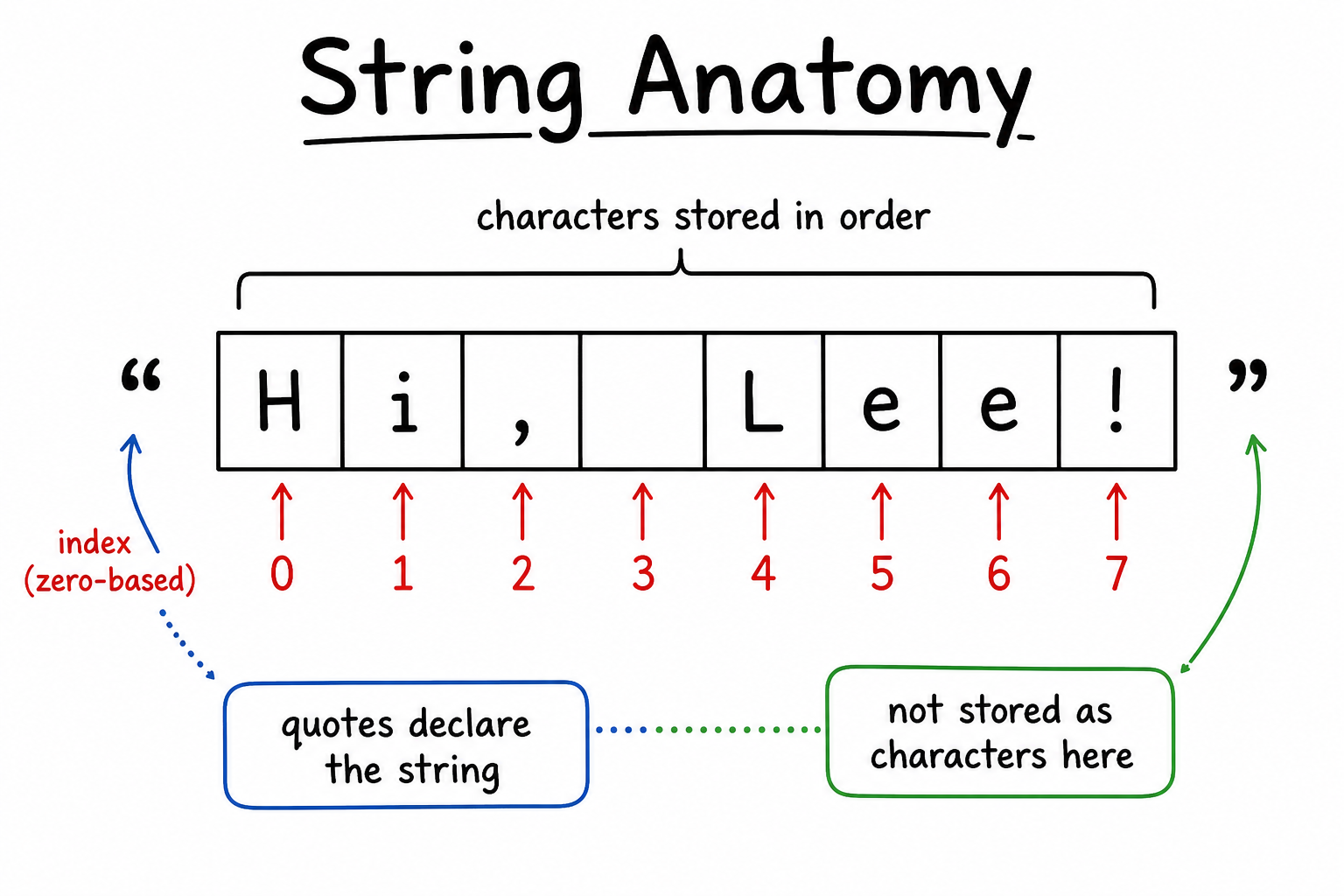
Before we start operating on strings, lock in the shape: a string is an ordered sequence of characters.
In the visual, notice that each character has an index, including spaces and punctuation. The quotation marks declare the string, but they are not usually part of the stored text unless you include them deliberately.
String Mental Model
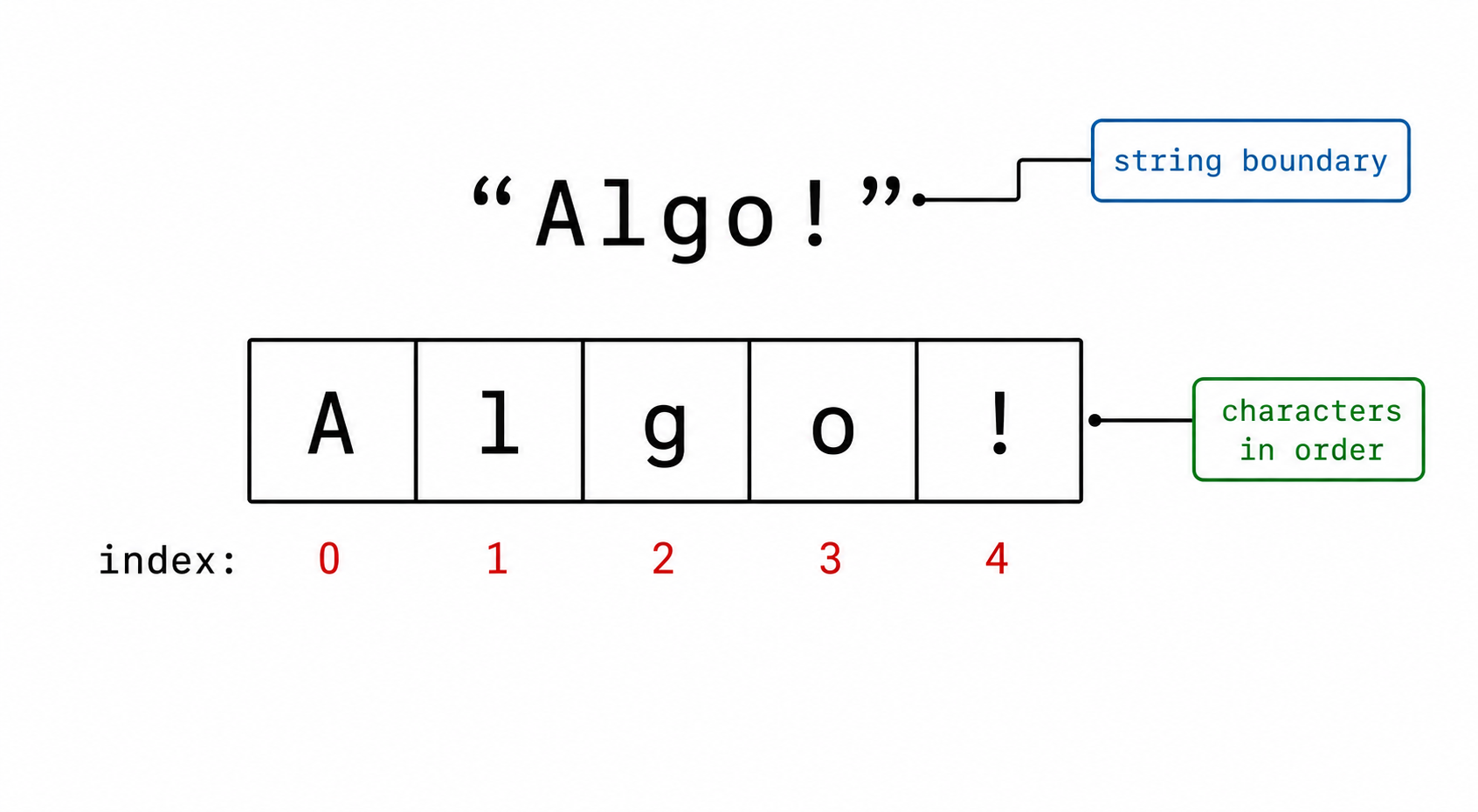
Before moving into code, keep one picture in mind: a string is a sequence of characters stored in order.
The quotes mark the boundaries of the string, and each character sits at a position called an index. Most languages start counting those positions at 0.
Strings in Code
Strings in Code
As mentioned above, strings in most programming languages can be declared by single or double quotation marks, and so is the case with Python. Following code block shows some examples of string declaration in Python.
name = "Chris"
email = "chris123@gmail.com"
var book = "The Great Gatsby";
var author = "F. Scott Fitzgerald";
String name = "Chris";
String email = "chris123@gmail.com";
String book = "The Great Gatsby";
String author = "F. Scott Fitzgerald";
std::string name = "Chris";
std::string email = "chris123@gmail.com";
std::string book = "The Great Gatsby";
std::string author = "F. Scott Fitzgerald";
string name = "Chris";
string email = "chris123@gmail.com";
string book = "The Great Gatsby";
string author = "F. Scott Fitzgerald";
var name string = "Chris"
var email string = "chris123@gmail.com"
var book string = "The Great Gatsby"
var author string = "F. Scott Fitzgerald"
In Python, characters in a string can be accessed by providing an index, which is the position of the character that need to be accessed inside a pair of square brackets ([]). Suppose we wanted to access the character r in the name string above. The position of r in the string is 2. This is because the indices, or the positions in a string start from 0, and not 1, as illustrated below.

The subsequent code will be:
name = "Chris"
print(name[2]) #prints 'r'
const name = "Chris";
console.log(name[2]); // logs r
String name = "Chris";
System.out.println(name.charAt(2)); // prints 'r'
#include <iostream>
std::string name = "Chris";
std::cout << name[2]; // prints 'r'
string name = "Chris";
Console.WriteLine(name[2]); // prints 'r'
name := "Chris"
fmt.Println(string(name[2])) // prints 'r'
Python also has some specified string methods which allow to manipulate strings more easily. These will be discussed in the string operations section below.
True or False
Does the following code block declare a valid string in Python?
country = "India"
var country = "India";
String country = "India";
std::string country = "India";
string country = "India";
var country = "India"
True or False
Strings cannot have capital letters.
Operations on Strings
Operations on Strings
In programming languages, operations are defined on different data types, including strings. These operations could be regarding comparison of strings, combination, removal, or addition of characters/strings. Let's work with them in detail in the following sections.
Operations on Strings in Python
String Operations in Python
First string operation to discuss is concatenation. This operation allows us to combine multiple strings together.
first_name = "John"
second_name = "Weather"
full_name = first_name + " " + second_name

print(full_name) #prints "John Weather"
var book = "The Great Gatsby";
var author = "F. Scott Fitzgerald";

var sentence = book + "was written by " + author;

console.log(sentence); //prints "The Great Gatsby was written by F. Scott Fitzgerald"
std::string firstName = "John";
std::string secondName = "Weather";
std::string fullName = firstName + " " + secondName;

std::cout << fullName; //prints "John Weather"

std::string book = "The Great Gatsby";
std::string author = "F. Scott Fitzgerald";

std::string sentence = book + " was written by " + author;

std::cout << sentence; //prints "The Great Gatsby was written by F. Scott Fitzgerald"
String firstName = "John";
String secondName = "Weather";
String fullName = firstName + " " + secondName;

System.out.println(fullName); //prints "John Weather"

String book = "The Great Gatsby";
String author = "F. Scott Fitzgerald";

String sentence = book + " was written by " + author;

System.out.println(sentence); //prints "The Great Gatsby was written by F. Scott Fitzgerald";
firstname := "John"
secondname := "Weather"
fullname := firstname + " " + secondname

fmt.Println(fullname) //prints "John Weather"

book := "The Great Gatsby"
author := "F. Scott Fitzgerald"

sentence := book + " was written by " + author

fmt.Println(sentence) //prints "The Great Gatsby was written by F. Scott Fitzgerald"
string firstName = "John";
string secondName = "Weather";
string fullName = firstName + " " + secondName;

Console.WriteLine(fullName); //prints "John Weather"

string book = "The Great Gatsby";
string author = "F. Scott Fitzgerald";

string sentence = book + " was written by " + author;

Console.WriteLine(sentence); //prints "The Great Gatsby was written by F. Scott Fitzgerald";
Multiplication operator *, allows to create a string which repeats itself multiple times. For example,
name = "Chris"

print(name*3) #prints "ChrisChrisChris"
Other string operations in Python are all implemented through string methods. Let's see some of the examples below.
-
len()method tells us the length of string. -
count()method tells about the number of times a specified value occurs in string. -
upper()method converts all the characters in the string to uppercase.
Example usage of these operations can be found in the code block below.
name = "Chris"
email = "chris123@gmail.com"

print(len(name)) #prints 5
print(count(email, 'i')) #prints 2
print(name.upper()) #prints "CHRIS"
var book = "The Great Gatsby";
var author = "F. Scott Fitzgerald";

console.log(book.length); // prints 16
console.log(author.indexOf("z")); // prints 12
console.log(author.indexOf("Scott")); // prints 3
console.log(author.toLowerCase()); // prints "f. scott fitzgerald"
String book = "The Great Gatsby";
String author = "F. Scott Fitzgerald";

System.out.println(book.length()); // prints 16
System.out.println(author.indexOf("z")); // prints 12
System.out.println(author.indexOf("Scott")); // prints 3
System.out.println(author.toLowerCase()); // prints "f. scott fitzgerald"
#include <iostream>
#include <string>
#include <algorithm>

std::string book = "The Great Gatsby";
std::string author = "F. Scott Fitzgerald";

std::cout << book.length() << std::endl; // prints 16
std::cout << author.find("z") << std::endl; // prints 12
std::cout << author.find("Scott") << std::endl; // prints 3

std::transform(author.begin(), author.end(), author.begin(), ::tolower);
std::cout << author << std::endl; // prints "f. scott fitzgerald"
string book = "The Great Gatsby";
string author = "F. Scott Fitzgerald";

Console.WriteLine(book.Length); // prints 16
Console.WriteLine(author.IndexOf("z")); // prints 12
Console.WriteLine(author.IndexOf("Scott")); // prints 3
Console.WriteLine(author.ToLower()); // prints "f. scott fitzgerald"
package main

import (
    "fmt"
    "strings"
)

func main() {
    book := "The Great Gatsby"
    author := "F. Scott Fitzgerald"

    fmt.Println(len(book)) // prints 16
    fmt.Println(strings.Index(author, "z")) // prints 12
    fmt.Println(strings.Index(author, "Scott")) // prints 3
    fmt.Println(strings.ToLower(author)) // prints "f. scott fitzgerald"
}
A comprehensive list of string methods is provided here.
Operation Result Map
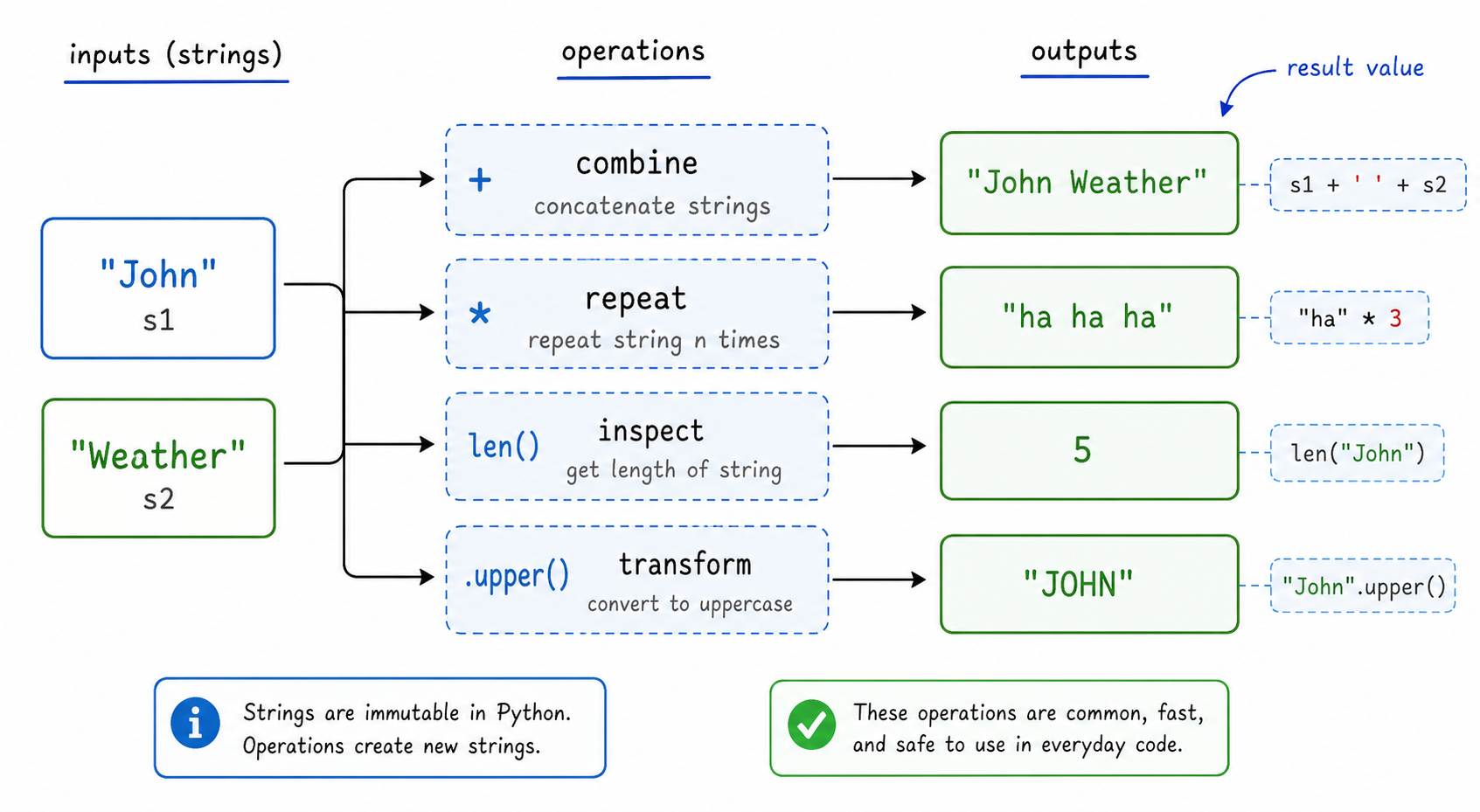
String operations usually follow the same pattern: start with one or more strings, apply an operator or method, then receive a result.
The key interview habit is to ask: does this operation combine text, repeat text, inspect text, or transform text?
Operation Result Flow
String operations are easiest to reason about as input → operation → result.
The important habit: ask whether the operation creates a new string, returns a measurement, or checks a condition. In Python, many string methods return a new value rather than changing the original string in place.
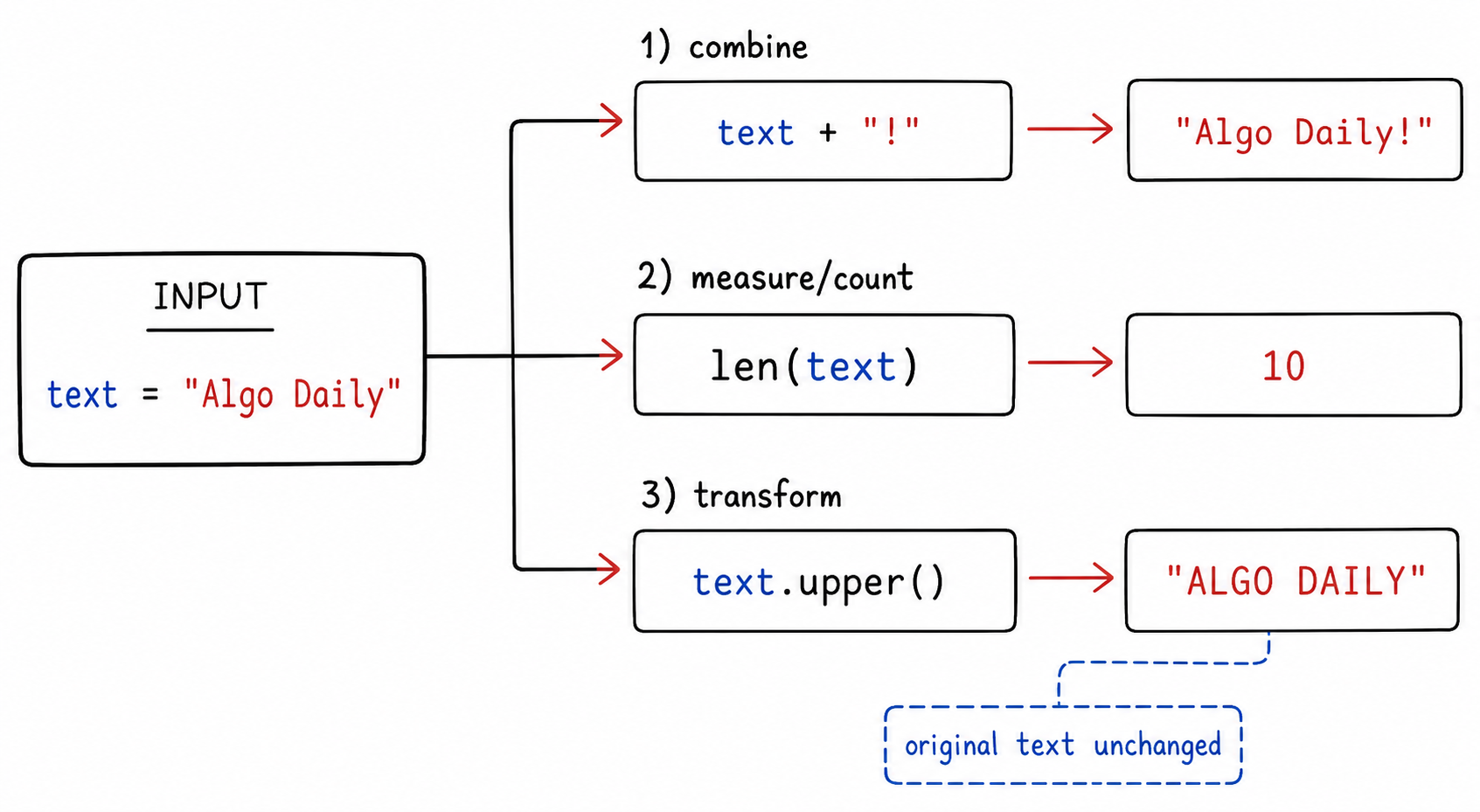
Operation Flow
String operations are easiest to read as a small flow: start with a string, apply an operation, then get either a new string or a computed value.
For example, concatenation creates a longer string, while counting or finding length returns a number. This distinction helps you predict outputs in interview-style questions.
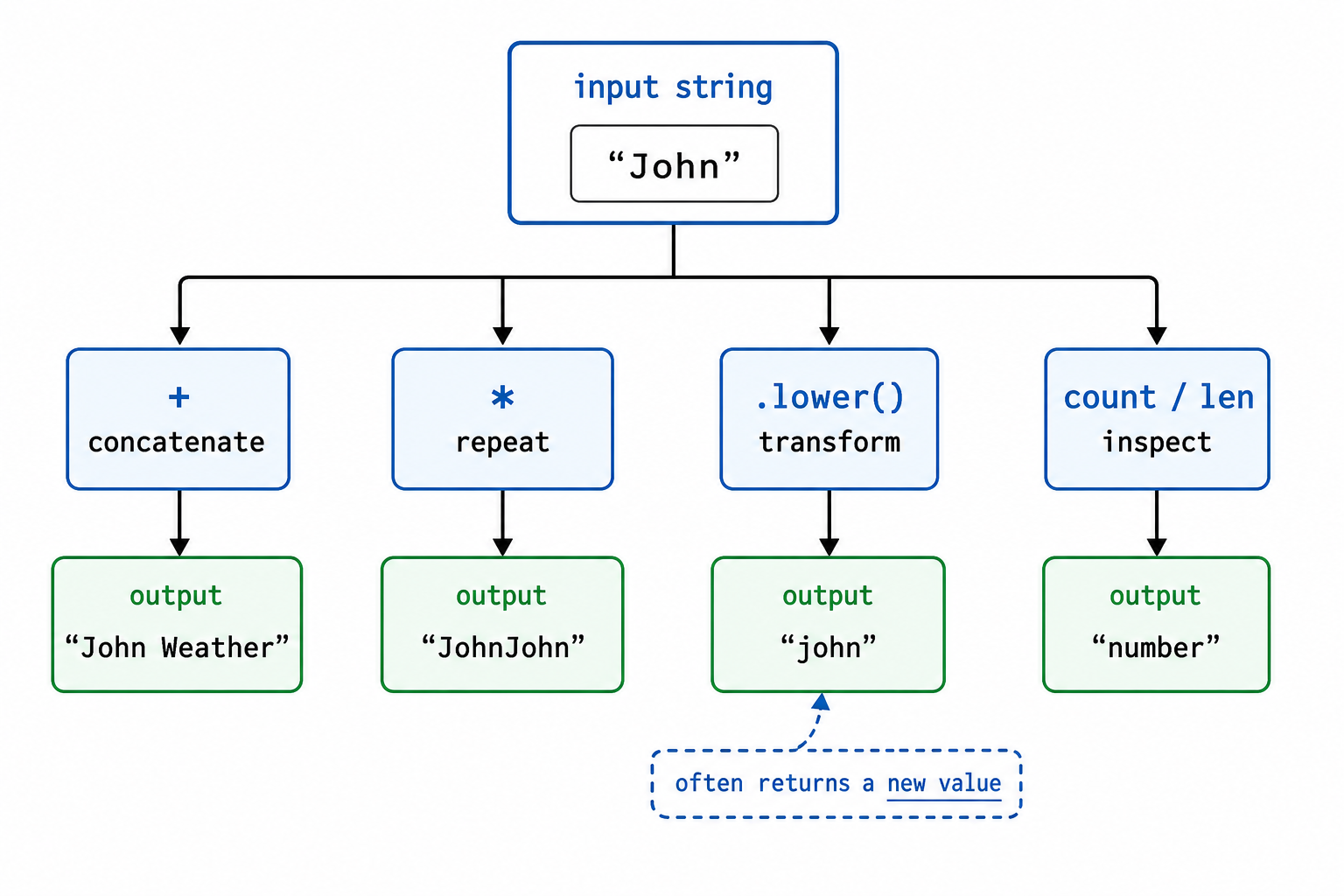
Multiple Choice
The output to the following code block in Python will be,
name = "Sara"
age = "12"
print(name+age)
String name = "Sara";
String age = "12";
System.out.println(name+age);
let name = "Sara";
let age = "12";
console.log(name + age);
#include <iostream>
using namespace std;
string name = "Sara";
string age = "12";
cout << name+age << endl;
string name = "Sara";
string age = "12";
Console.WriteLine(name + age);
package main
import "fmt"
func main() {
    name := "Sara"
    age := "12"
    fmt.Println(name + age)
}
Fill In
The output to the following code in JavaScript will be ___.
text = "Giraffes like to eat leaves."
print(text.count(" "))
String text = "Giraffes like to eat leaves.";
System.out.println(text.split(" ").length - 1);
let text = "Giraffes like to eat leaves.";
console.log(text.split(" ").length - 1);
string text = "Giraffes like to eat leaves.";
Console.WriteLine(text.Split(' ').Length - 1);
#include <iostream>
#include <string>
#include <algorithm>

int main()
{
    std::string text = "Giraffes like to eat leaves.";
    long spaces = std::count(text.begin(), text.end(), ' ');
    std::cout << spaces << std::endl;
    return 0;
}
package main

import (
    "fmt"
    "strings"
)
func main() {
    text := "Giraffes like to eat leaves."
    fmt.Println(strings.Count(text, " "))
}
Properties of Strings
While working with strings, there are some important properties that need to be taken care of,
- Strings are immutable. This means that they cannot be reassigned characters. For example, in the example below, we will get an error of item assignment as reassignment of characters is not allowed.
name = "Lee"
name[0] = "T"
var name = "Lee";
name[0] = "T";
console.log(name); // 'Lee'
String name = "Lee";
name = 'T' + name.substring(1);
System.out.println(name); // "Tee"
std::string name = "Lee";
name[0] = 'T';
std::cout << name; // "Tee"
string name = "Lee";
name = 'T' + name.Substring(1);
Console.WriteLine(name); // "Tee"
name := "Lee"
name = "T" + name[1:]
fmt.Println(name) // "Tee"
- To include single quotation inside a string, we need to use double quotation marks to declare them. We cannot use single quotation marks to declare the string if we want to use single quotation marks inside the string.
Summary
Summary
In this lesson, we discussed about strings and various string operations that can be performed on them. String operations, as we've seen, are helpful in modifying strings at any time during the program rather than creating the entire string again and again. It also tells us about important properties of the already declared string variables.
String Safety Snapshot
The final thing to remember is that strings are convenient, but they still have rules.
Use this snapshot as a quick debugging checklist when a string problem behaves strangely: check indexing, quote boundaries, immutability, and whether + is doing concatenation instead of numeric addition.
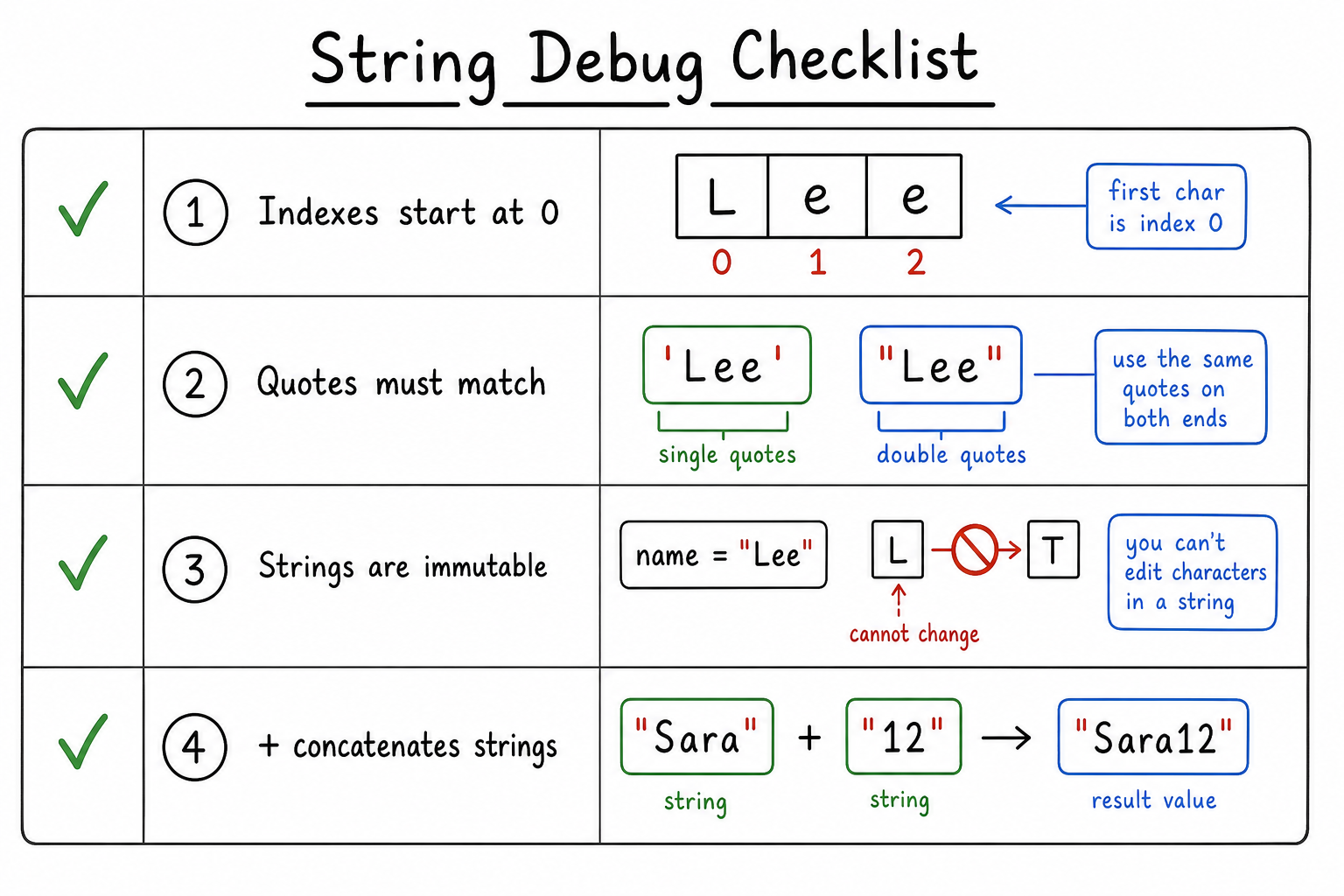
String Safety Checklist
As a final check, separate what you can do directly from what requires a new string.
You can read characters by index, combine strings, and count patterns. But when changing text, treat the result as a new value and assign it back if you want to keep it.
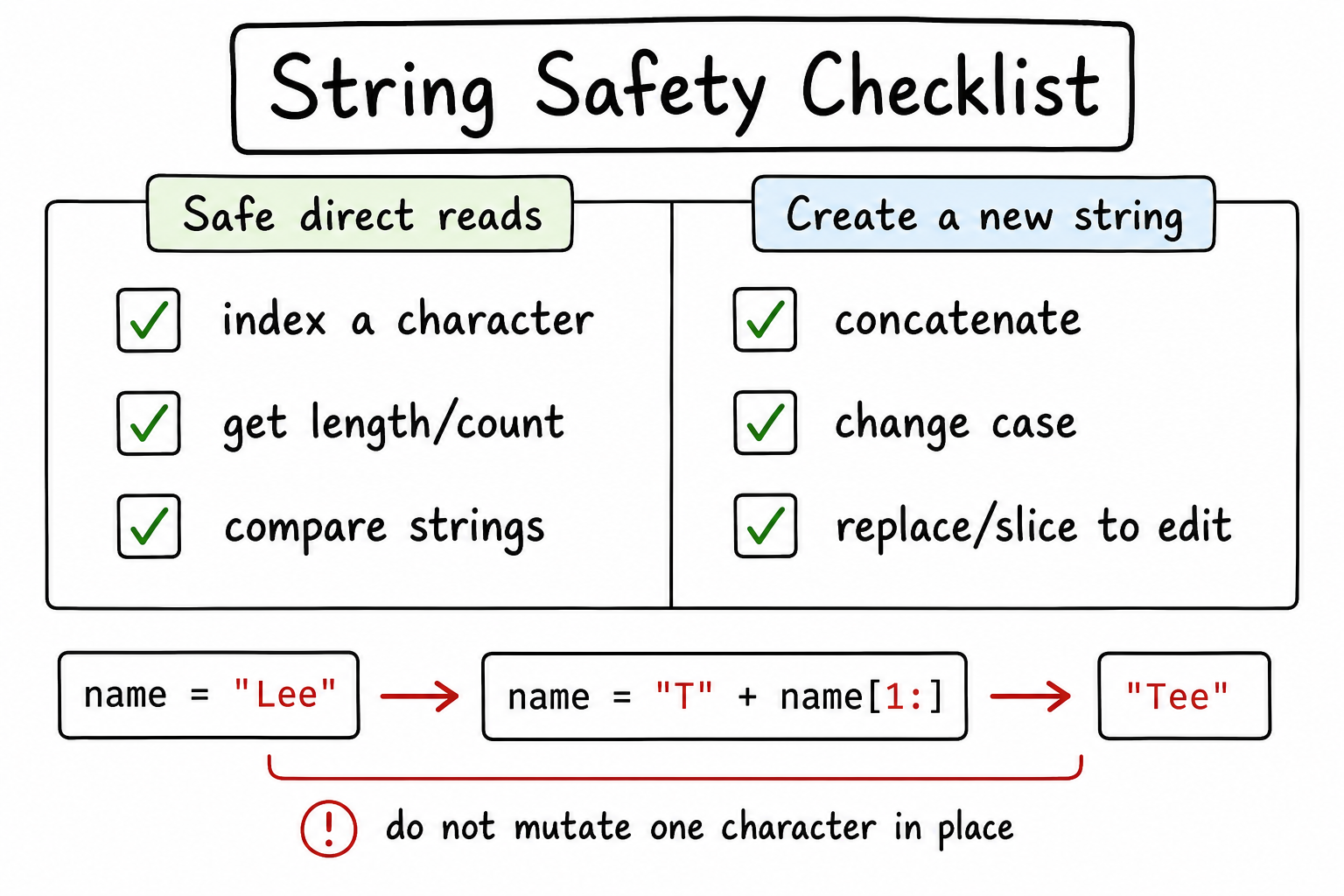
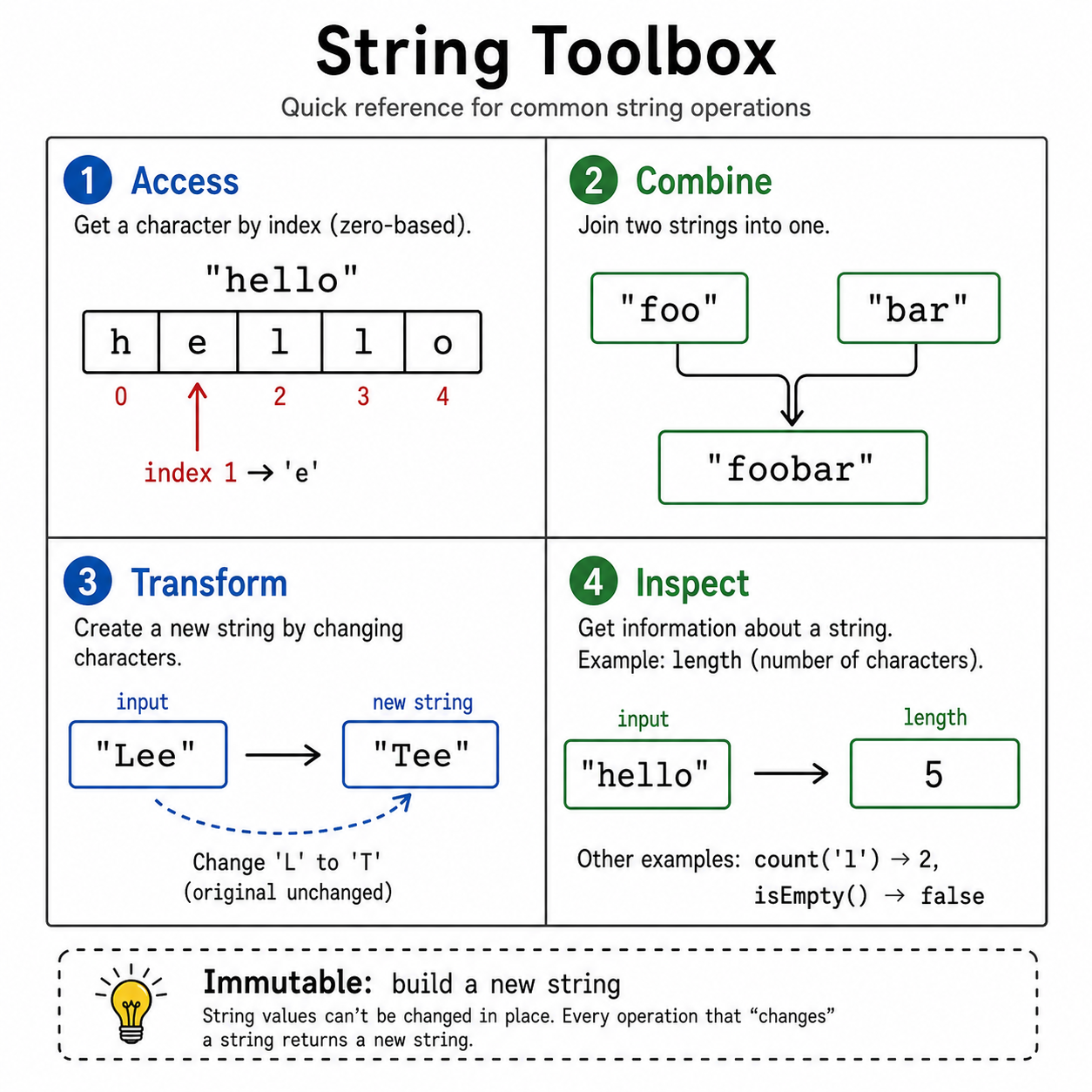
String Toolbox Recap
Here is the practical checklist to carry forward: when you see a string problem, first identify whether you need to access, combine, transform, or inspect the text.
Also remember the key property: in many languages, strings behave as immutable values, so changing text usually means building a new string rather than editing one character in place.
One Pager Cheat Sheet
One Pager Cheat Sheet
- In this lesson, we will explore the
stringtype and common related operations in introductory programming languages. - Strings are a data type in most programming languages which are declared by enclosing characters with
single ('')ordouble quotation marks ("")and contain asequence of charactersorarray of characterswhich can be accessed and manipulated with properties and methods. - - A string is one quoted value made from an ordered sequence of characters.
- - A string is an indexed sequence of characters; spaces and symbols count too.
- - A string is an ordered character sequence: quotes define it, indexes let you access it.
- Python and JavaScript strings can be declared with single or double quotations, and their characters can be accessed with indices starting from 0, as illustrated by
name[2]printingr. - Yes, both Python and JavaScript support declaring a
string literalusing single or double-quotation marks, as evidenced by the code blocks above. - Strings in programming languages such as Python and JavaScript are collections of characters, including both upper and lower case letters,
numbers,symbols, and other characters, and are therefore not case-sensitive. - Strings can be manipulated through comparison, combination, removal, and addition of characters or
stringsin programming languages. -
PythonandJavaScriptsupport string concatenation, multiplication, and multiple built-in methods to manipulate strings. - - String operations take string inputs and produce a new combined, repeated, inspected, or transformed result.
- - String operations usually produce a result: a new string, a count/length, or a true/false answer.
- - String operations usually transform text into a new string or inspect text to return a value.
- The
+operator in Python is used to concatenate strings, such as"Sara"and"12"stored in variablesnameandage, respectively, resulting in the output string"Sara12". - The
print()function in JavaScript prints the number of spaces in the argumenttext, which in this example is 4. - Strings are
immutableand cannot be reassigned characters, sodouble quotation marksmust be used when includingsingle quotation marksin a string. - We
discussedvarious string operations that can be used tomodifyand understand thepropertiesof already declared string variables. - - When debugging strings, check indexes, quotes, immutability, and concatenation behavior first.
- - Read and inspect strings directly; create a new string when you need modified text.
- - For string problems, decide whether you are accessing, combining, transforming, or inspecting characters.