Testing and Debugging Java Projects
Read at your own pace. Code execution, quizzes, progress tracking, and the AI tutor are available in the interactive view with JavaScript enabled.
Why Testing Now
From working project to trustworthy project
In the last lesson, Project: Real-time Chat Application, you assembled a realistic Java system: domain objects, message flow, persistence boundaries, and broadcasting.
Now the question changes from Can it run? to Can we trust it after changes?
Testing and debugging are how professional Java projects stay editable. Every feature you add to the chat app, REST service, Hibernate repository, or upcoming larger project should come with a way to verify behavior and diagnose failures.
In this lesson, we will focus on:
- Testing business rules without needing the whole app
- Using fakes to isolate dependencies
- Debugging with a repeatable workflow
- Adding logs that explain runtime behavior
- Turning bugs into regression tests
We will not automate deployment yet. That belongs to the next lesson, Continuous Integration and Deployment.
Testing Layers
Match the test to the risk
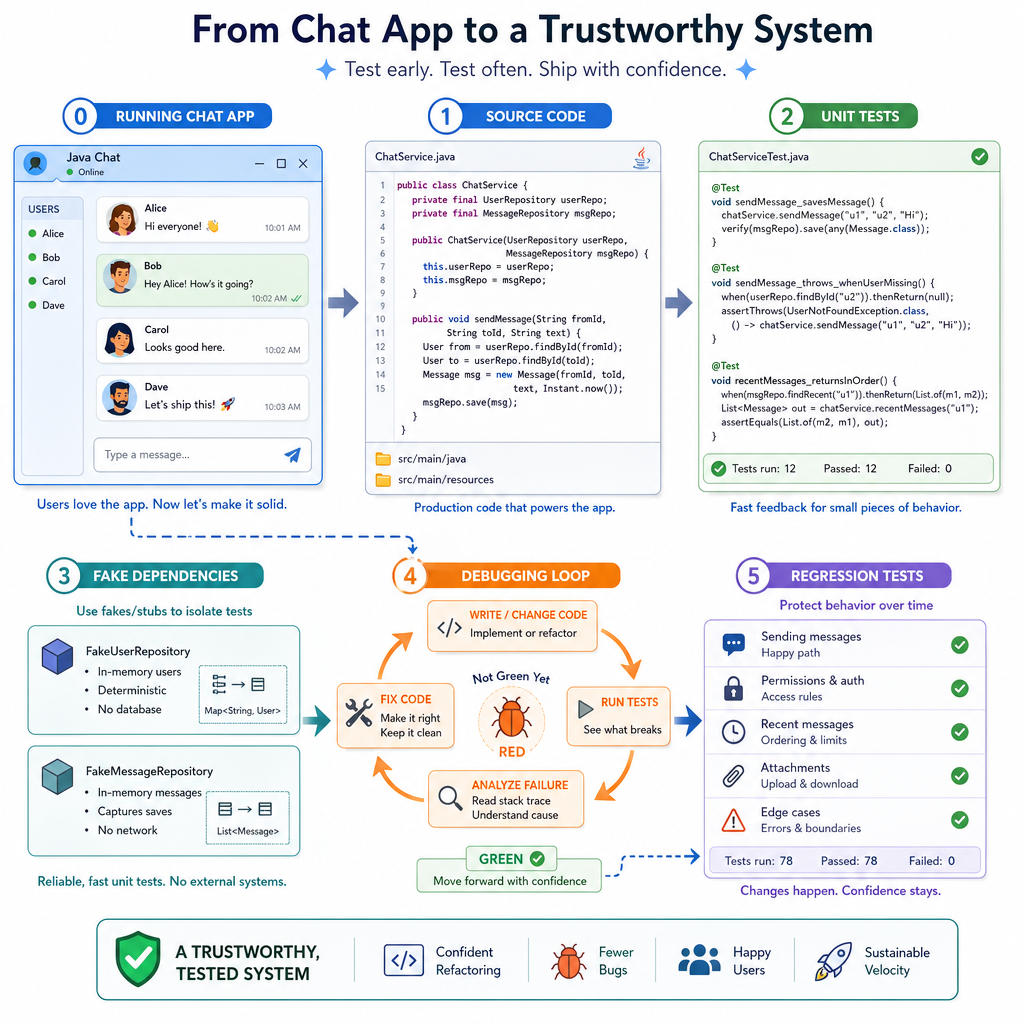
A real Java project should not rely on only one kind of test. Different bugs appear at different boundaries.
          Few, slower, broad confidence
        ┌──────────────────────────────┐
        │ End-to-end / system tests     │
        │ Example: send chat message    │
        │ through API and observe event │
        └──────────────────────────────┘
        ┌──────────────────────────────┐
        │ Integration tests             │
        │ Example: repository + DB      │
        └──────────────────────────────┘
        ┌──────────────────────────────┐
        │ Unit tests                    │
        │ Example: validate message     │
        │ text, room, sender rules      │
        └──────────────────────────────┘
          Many, fast, precise feedback
For the projects you have built so far:
- Design Patterns in Java helps you create testable seams with Strategy, Factory, and Observer-style boundaries.
- Building a RESTful Web Service introduced controller, service, and error layers.
- Database Integration with Hibernate gave you repository and transaction boundaries.
- Project: Real-time Chat Application gave us a concrete system to test.
The practical rule: test the smallest layer that can prove the behavior. If a message validation rule can be tested without a server or database, keep it as a fast unit test.
Executable Test Harness
Start with a tiny, runnable test
In production, you will commonly use JUnit. But the core idea is simpler: arrange inputs, act on the code, and assert the result.
Below is a standalone Java example that tests a chat message validator. It prints a small test report so you can run it directly.
Notice the shape:
- Valid input should pass
- Empty text should fail
- Overly long text should fail
This is the same kind of business rule that belongs near the domain/service layer of the chat project, not hidden inside a controller or database class.
```java
public class Main {
    static class MessageValidator {
        void validate(String sender, String text) {
            if (sender == null || sender.trim().isEmpty()) {
                throw new IllegalArgumentException("sender is required");
            }
            if (text == null || text.trim().isEmpty()) {
                throw new IllegalArgumentException("message text is required");
            }
            if (text.length() > 200) {
                throw new IllegalArgumentException("message text is too long");
            }
        }
    }

    static void assertDoesNotThrow(Runnable action, String testName) {
        try {
            action.run();
            System.out.println("PASS: " + testName);
        } catch (Throwable error) {
            System.out.println("FAIL: " + testName + " -> " + error.getMessage());
        }
    }

    static void assertThrows(Class<? extends Throwable> expected, Runnable action, String testName) {
        try {
            action.run();
            System.out.println("FAIL: " + testName + " -> expected " + expected.getSimpleName());
        } catch (Throwable actual) {
            if (expected.isInstance(actual)) {
                System.out.println("PASS: " + testName);
            } else {
                System.out.println("FAIL: " + testName + " -> got " + actual.getClass().getSimpleName());
            }
        }
    }

    public static void main(String[] args) {
        MessageValidator validator = new MessageValidator();

        assertDoesNotThrow(
            () -> validator.validate("alice", "Hello team!"),
            "valid message is accepted"
        );

        assertThrows(
            IllegalArgumentException.class,
            () -> validator.validate("alice", "   "),
            "blank message is rejected"
        );

        assertThrows(
            IllegalArgumentException.class,
            () -> validator.validate("alice", "x".repeat(201)),
            "message over 200 chars is rejected"
        );
    }
}
```
Choose Test Level
You need to verify this rule: A chat message with blank text must be rejected before it is saved.
Which test should you usually write first?
Fake The Boundary
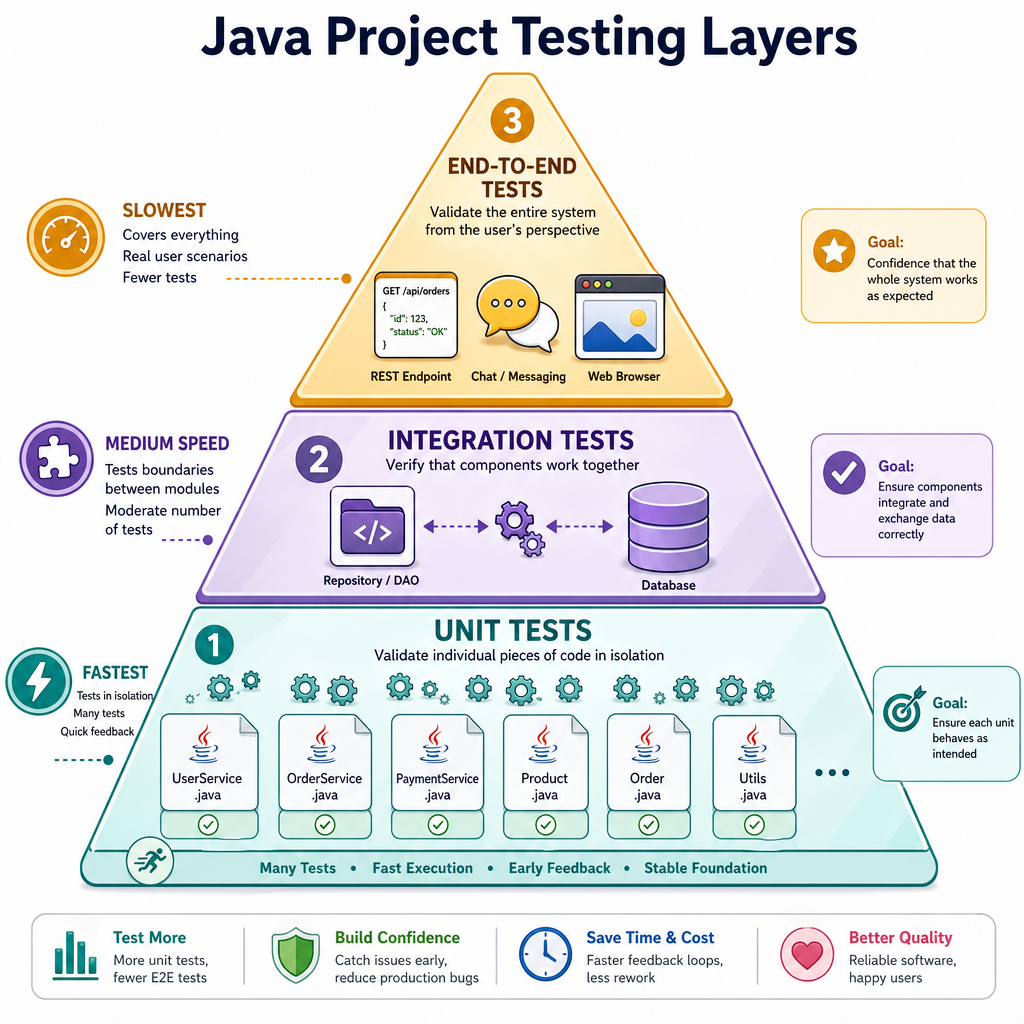
Test behavior without the real database
From Database Integration with Hibernate, you already know that repositories form a boundary around persistence.
That boundary is also a testing seam.
If the service logic says, "validate the message, timestamp it, then save it," you can test that behavior with an in-memory fake repository. This keeps the test fast and focused.
The fake is not pretending to test Hibernate. It is testing whether your service uses its repository dependency correctly.
```java
import java.time.Instant;
import java.util.ArrayList;
import java.util.List;

public class Main {
    record ChatMessage(String room, String sender, String text, Instant createdAt) {}

    interface MessageRepository {
        void save(ChatMessage message);
        List<ChatMessage> findAll();
    }

    static class InMemoryMessageRepository implements MessageRepository {
        private final List<ChatMessage> messages = new ArrayList<>();

        public void save(ChatMessage message) {
            messages.add(message);
        }

        public List<ChatMessage> findAll() {
            return messages;
        }
    }

    static class ChatService {
        private final MessageRepository repository;

        ChatService(MessageRepository repository) {
            this.repository = repository;
        }

        ChatMessage send(String room, String sender, String text) {
            if (room == null || room.isBlank()) throw new IllegalArgumentException("room required");
            if (sender == null || sender.isBlank()) throw new IllegalArgumentException("sender required");
            if (text == null || text.isBlank()) throw new IllegalArgumentException("text required");

            ChatMessage message = new ChatMessage(room, sender, text.trim(), Instant.now());
            repository.save(message);
            return message;
        }
    }

    public static void main(String[] args) {
        InMemoryMessageRepository fakeRepo = new InMemoryMessageRepository();
        ChatService service = new ChatService(fakeRepo);

        ChatMessage sent = service.send("java", "nina", "  Testing seams  ");

        System.out.println("Saved count: " + fakeRepo.findAll().size());
        System.out.println("Sender: " + sent.sender());
        System.out.println("Text: " + sent.text());
    }
}
```
Fake Or Real
True or false:
If a service test uses an in-memory fake repository, it can prove the service behavior, but it does not prove that the real Hibernate mapping works.
Debugging Loop
Debugging is a controlled investigation
A common mistake is to randomly edit code until the symptom disappears. That creates fragile fixes.
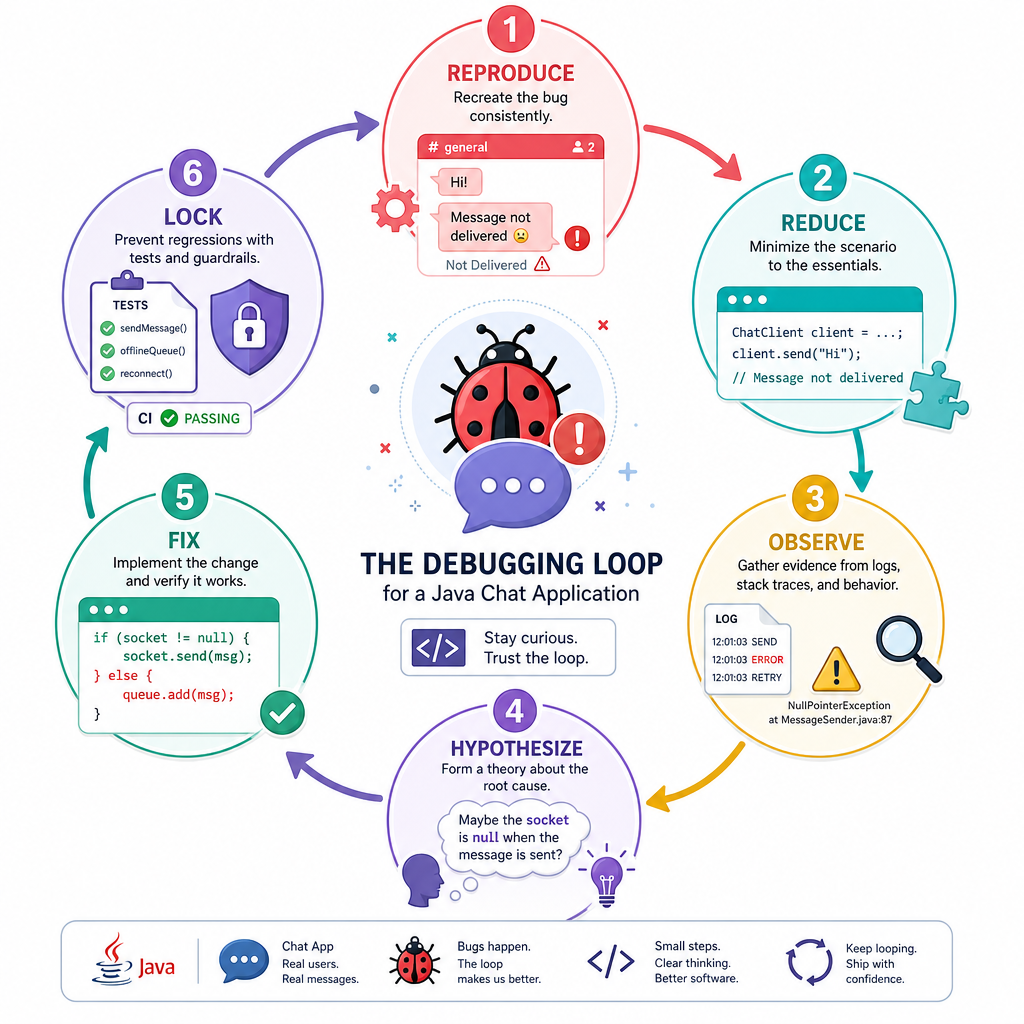
Use a repeatable loop instead:
1. Reproduce
   Can you make the bug happen on demand?

2. Reduce
   What is the smallest input or flow that still fails?

3. Observe
   What values, branches, logs, or exceptions explain the failure?

4. Hypothesize
   What specific rule or assumption is broken?

5. Fix
   Make the smallest change that addresses the cause.

6. Lock
   Add or update a test so the bug cannot silently return.
For example, if the chat app broadcasts duplicate messages, do not start by rewriting the broadcaster. First reproduce one duplicate, reduce it to one room and one sender, inspect where the second publish occurs, then fix that path.
Trace With Logs
Logs should explain the path
Breakpoints are great during local development. Logs are essential when the application is already running or when a bug appears only under a realistic flow.
Good diagnostic logs usually include:
- A correlation or trace id
- The major step being executed
- Important state, not secrets
- Rejection reasons for invalid input
The example below simulates a message pipeline and prints traceable log lines. In a full project, you would typically use a logging framework, but the design idea is the same.
```java
import java.util.UUID;

public class Main {
    static class DebugLog {
        static void info(String traceId, String step, String message) {
            System.out.printf("[%s] %-12s %s%n", traceId, step, message);
        }
    }

    static class MessagePipeline {
        String process(String room, String rawText) {
            String traceId = UUID.randomUUID().toString().substring(0, 8);

            DebugLog.info(traceId, "RECEIVED", "room=" + room + ", rawLength=" + rawText.length());

            String text = rawText.trim();
            DebugLog.info(traceId, "NORMALIZED", "textLength=" + text.length());

            if (text.isEmpty()) {
                DebugLog.info(traceId, "REJECTED", "reason=blank message");
                return "REJECTED";
            }

            String payload = room + ": " + text;
            DebugLog.info(traceId, "BROADCAST", payload);
            return payload;
        }
    }

    public static void main(String[] args) {
        MessagePipeline pipeline = new MessagePipeline();

        String result1 = pipeline.process("java", "  Hello with logs  ");
        System.out.println("Result 1: " + result1);

        String result2 = pipeline.process("java", "   ");
        System.out.println("Result 2: " + result2);
    }
}
```
Bug Lock-In
A test added after fixing a bug, specifically to prevent that same bug from returning, is called a ____ test.
Project Debug Checklist
A practical checklist for your Java projects
Before calling a feature complete, ask:
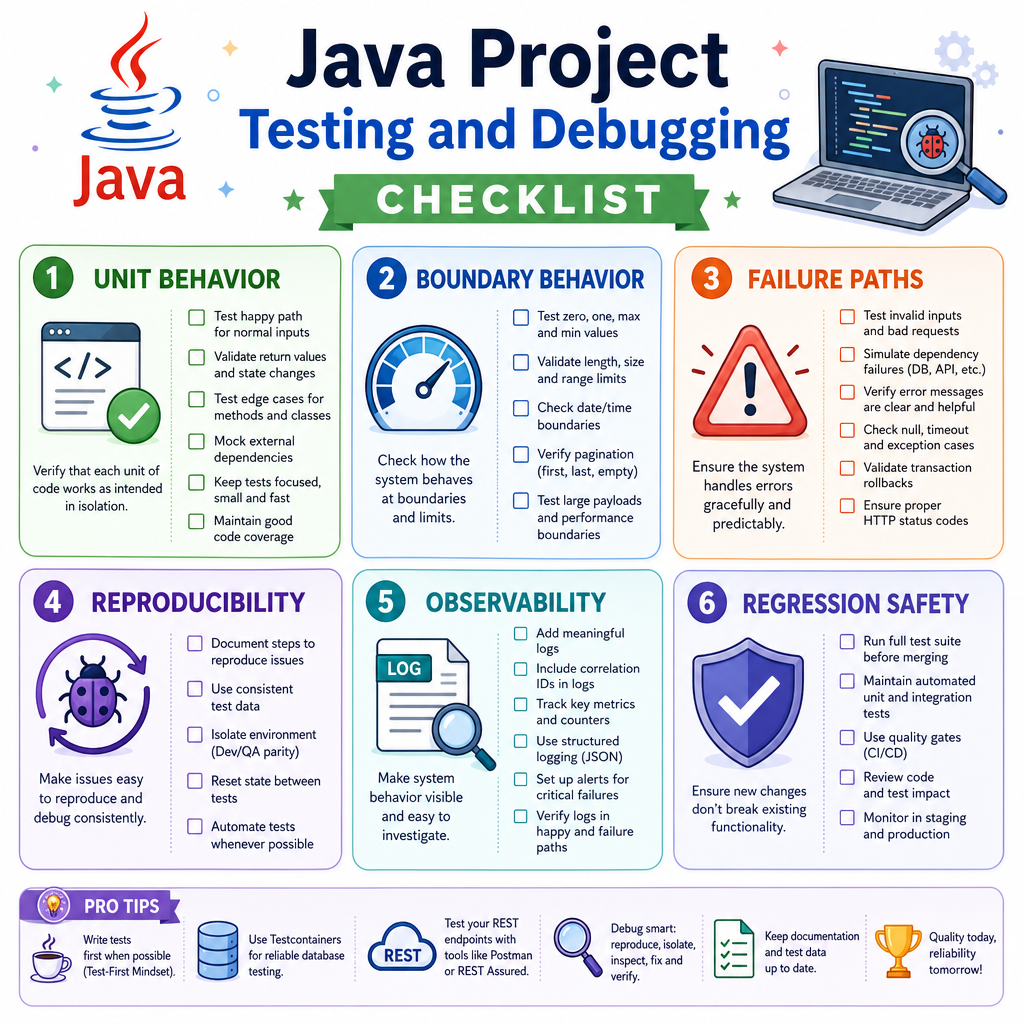
- Unit behavior: Are important rules tested close to the class or service that owns them?
- Boundary behavior: Are repository, API, or broadcast boundaries tested at the right level?
- Failure paths: Do tests cover invalid input and expected exceptions, not only happy paths?
- Reproducibility: If a bug was found, can you reproduce it with a test or small scenario?
- Observability: Would logs help explain what happened in a running project?
- Regression safety: Did every important bug fix leave behind a regression test?
This is where your earlier project design decisions pay off. Clean layers from the REST service, repository boundaries from Hibernate, and message flow from the chat project all make testing and debugging easier.
Next, you will take these checks and make them run automatically in Continuous Integration and Deployment.