Trees
Read at your own pace. Code execution, quizzes, progress tracking, and the AI tutor are available in the interactive view with JavaScript enabled.
Branching From Lines
Why trees matter
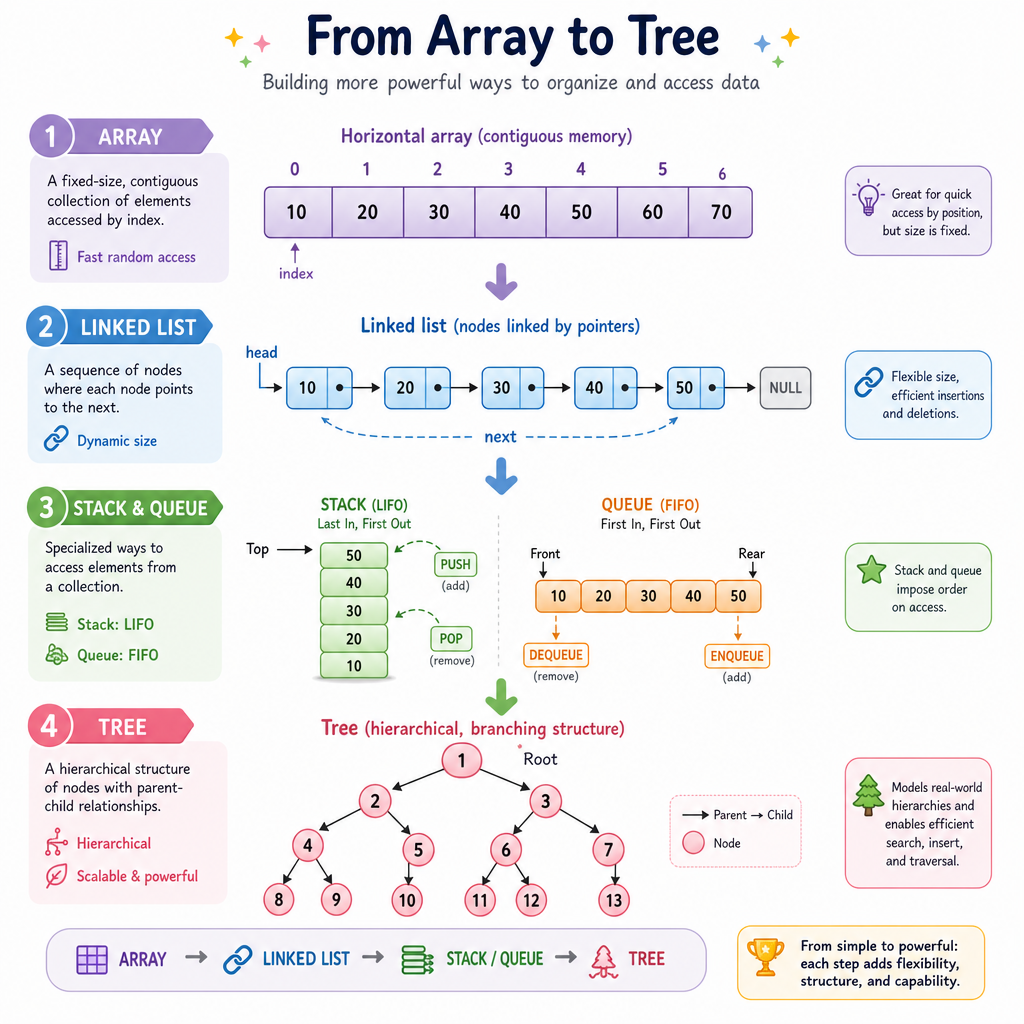
In Arrays and Linked Lists, data lived in a line. In Stacks and Queues, we controlled which end of the line we used.
Now we move to hierarchical data: values connected as parent and child nodes.
Trees show up in:
- File systems: folders contain files and folders
- DOM structures: HTML elements contain nested elements
- Decision paths: each choice branches to more choices
- Search structures: values can be organized for faster lookup
The key shift: instead of asking “what comes next?”, we ask “what is below this node?”
Tree Vocabulary
The basic mental model
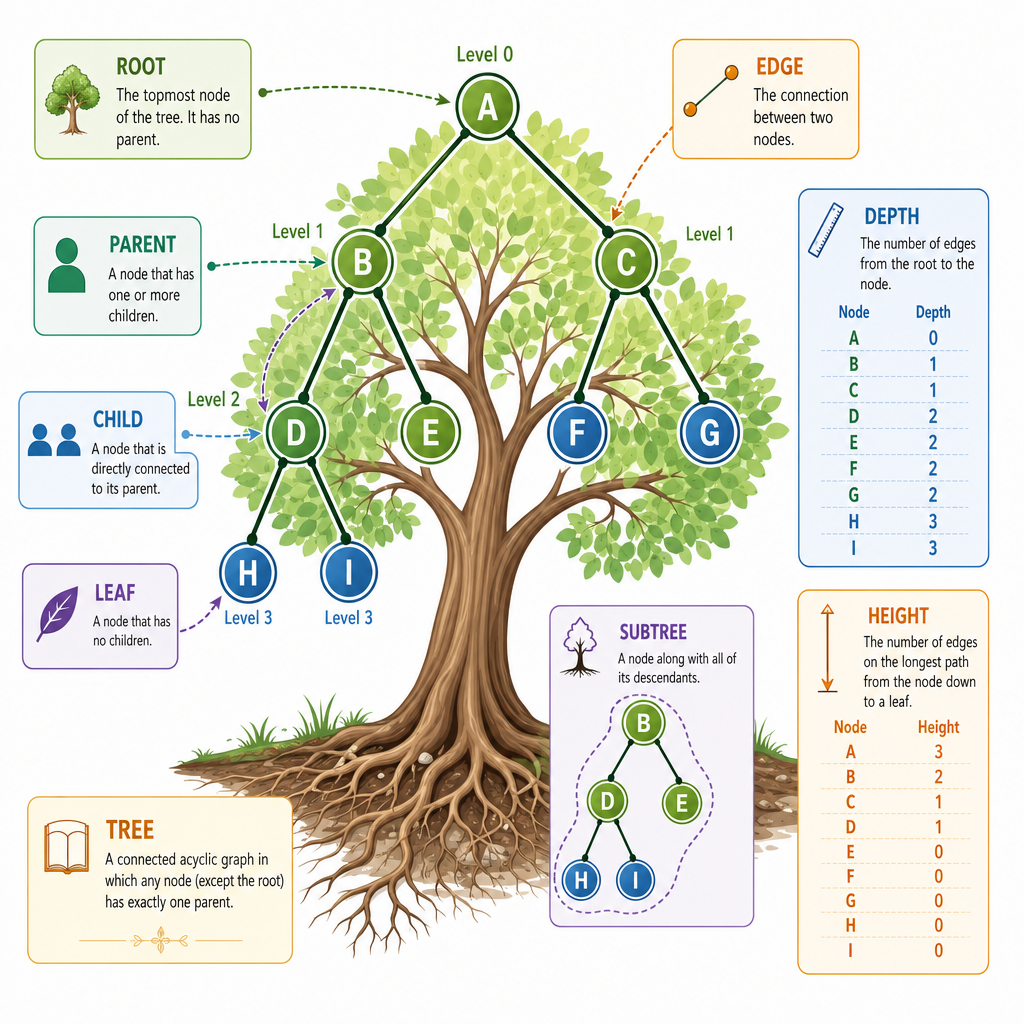
A tree is a collection of nodes connected by edges with one starting point called the root.
        A        <- root
      /   \
     B     C     <- children of A
    / \     \
   D   E     F   <- leaves: D, E, F
Important terms:
- Root: the top node
- Parent: a node directly above another node
- Child: a node directly below another node
- Leaf: a node with no children
- Subtree: any node plus everything beneath it
- Height: longest path from a node down to a leaf
- Depth: distance from the root down to a node
A tree has no cycles: if you follow child links downward, you never loop back.
Spot The Leaf
Given this tree:
        10
       /  \
      5    20
     / \
    3   7
Which nodes are leaves?
Binary Trees
A common constraint
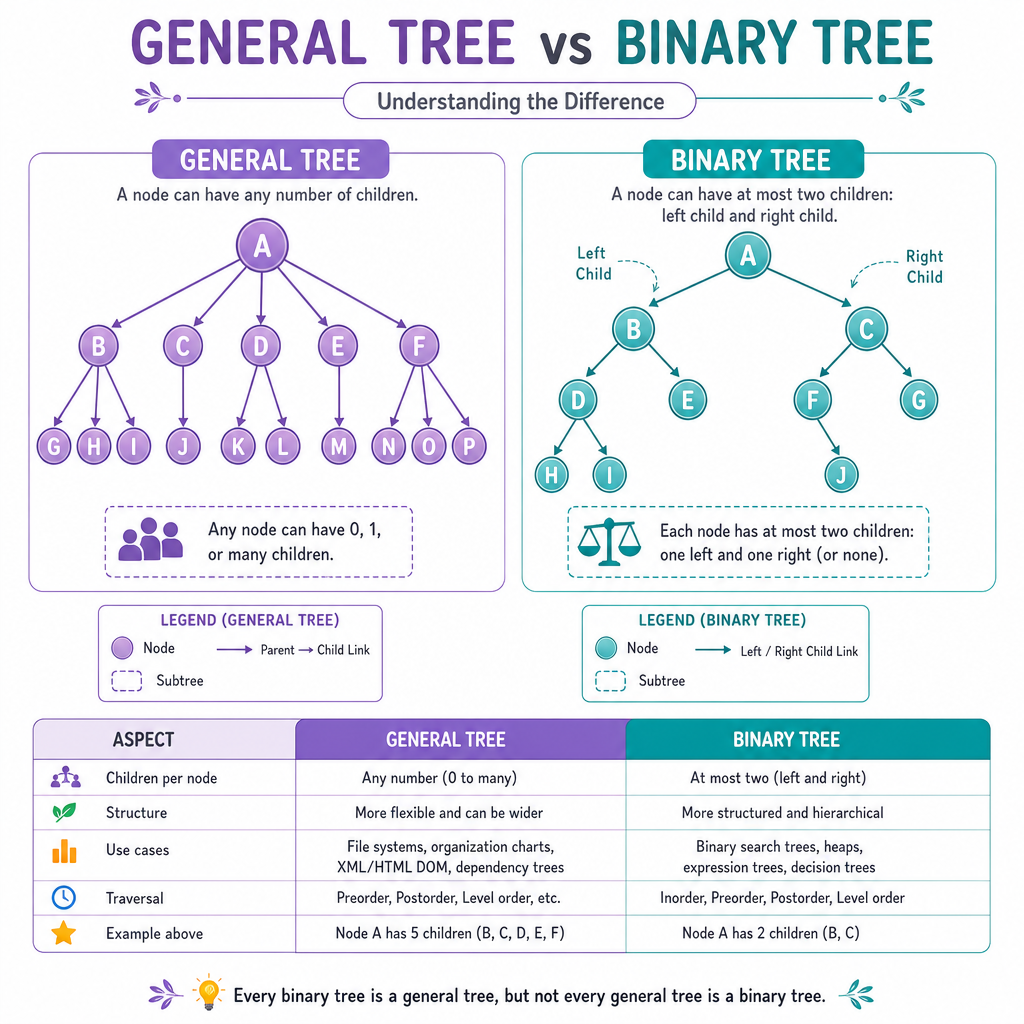
A binary tree is a tree where each node has at most two children.
Those children are usually called:
leftright
      root
      /  \
   left  right
This “at most two” rule is simple, but powerful. It lets us represent branching choices, expression trees, and searchable structures.
Not every binary tree is sorted. A binary tree only says how many children a node can have — not how values are ordered.
Build And Traverse
A tree in JavaScript
In JavaScript, a tree node is usually an object with a value and references to child nodes.
Below we build a small binary tree, then visit it in two ways:
- Depth-first preorder: visit node, then left subtree, then right subtree
- Breadth-first: visit level by level using the queue idea from Stacks and Queues
```javascript
class TreeNode {
  constructor(value) {
    this.value = value;
    this.left = null;
    this.right = null;
  }
}

// Build this tree:
//       A
//      / \
//     B   C
//    / \
//   D   E
const root = new TreeNode("A");
root.left = new TreeNode("B");
root.right = new TreeNode("C");
root.left.left = new TreeNode("D");
root.left.right = new TreeNode("E");

function preorder(node, result = []) {
  if (node === null) return result;

  result.push(node.value);
  preorder(node.left, result);
  preorder(node.right, result);

  return result;
}

function breadthFirst(root) {
  if (root === null) return [];

  const result = [];
  const queue = [root];
  let front = 0;

  while (front < queue.length) {
    const node = queue[front];
    front++;

    result.push(node.value);
    if (node.left) queue.push(node.left);
    if (node.right) queue.push(node.right);
  }

  return result;
}

console.log("Preorder:", preorder(root));
console.log("Breadth-first:", breadthFirst(root));
```
Traversal Order
In a breadth-first traversal, we visit a tree one ______ at a time.
Search Trees
Binary Search Tree rule
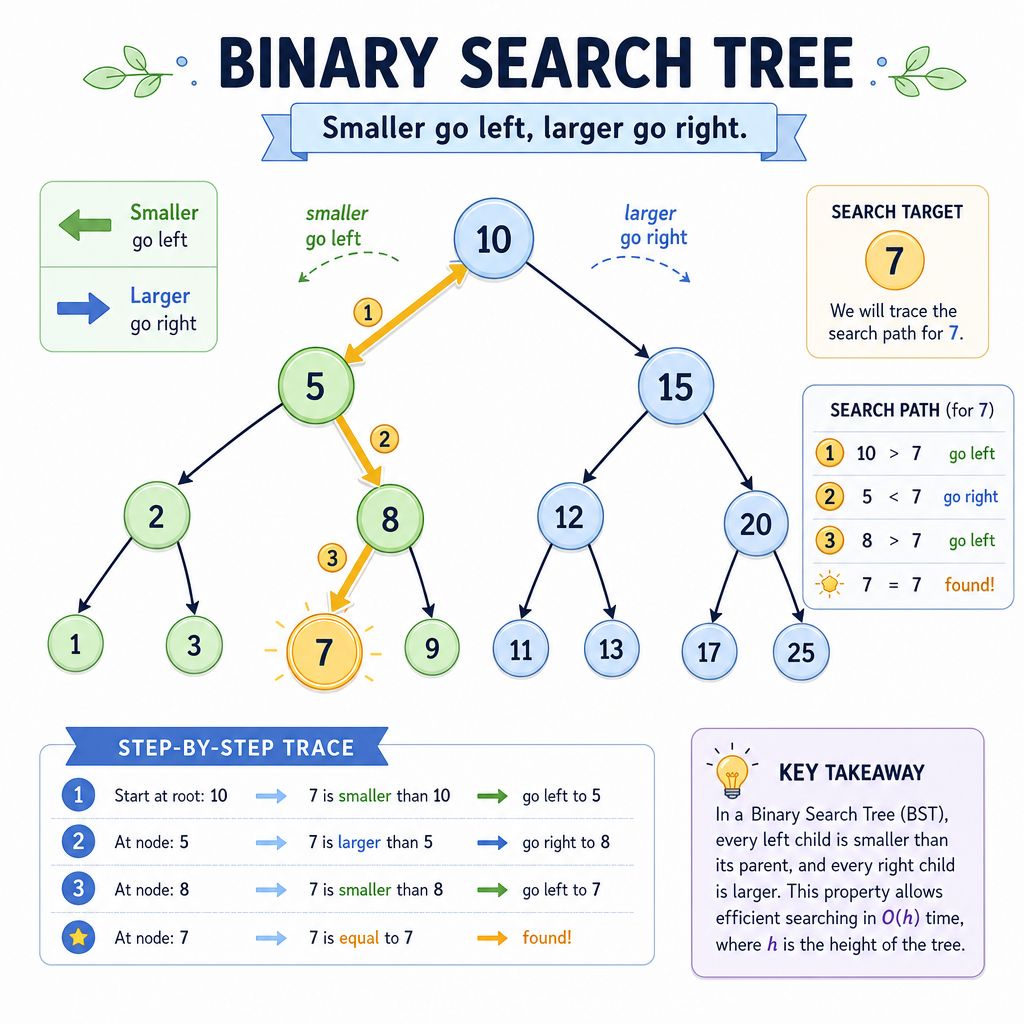
A Binary Search Tree, or BST, is a binary tree with an ordering rule:
For every node:
- Values in the left subtree are smaller
- Values in the right subtree are larger
        10
       /  \
      5    15
     / \     \
    2   7     20
This structure helps us avoid checking every value when searching — if the target is less than the current node, go left; if greater, go right.
The idea is similar to choosing the right data structure from the first lesson: structure gives the algorithm leverage.
BST In Code
Insert and search
Here is a compact BST implementation.
Notice how each comparison eliminates an entire side of the tree from consideration. That is the main reason BSTs are useful when they stay reasonably balanced.
```javascript
class BSTNode {
  constructor(value) {
    this.value = value;
    this.left = null;
    this.right = null;
  }
}

class BinarySearchTree {
  constructor() {
    this.root = null;
  }

  insert(value) {
    const newNode = new BSTNode(value);

    if (this.root === null) {
      this.root = newNode;
      return;
    }

    let current = this.root;

    while (true) {
      if (value < current.value) {
        if (current.left === null) {
          current.left = newNode;
          return;
        }
        current = current.left;
      } else {
        if (current.right === null) {
          current.right = newNode;
          return;
        }
        current = current.right;
      }
    }
  }

  contains(value) {
    let current = this.root;

    while (current !== null) {
      if (value === current.value) return true;
      current = value < current.value ? current.left : current.right;
    }

    return false;
  }
}

const bst = new BinarySearchTree();
[10, 5, 15, 2, 7, 20].forEach(num => bst.insert(num));

console.log("Contains 7?", bst.contains(7));
console.log("Contains 99?", bst.contains(99));
```
Balanced Or Skewed
True or false: A Binary Search Tree always guarantees fast search because it is sorted.
Tree Costs
What to remember about performance
For a tree with n nodes and height h:
- Visiting every node is O(n)
- Searching a balanced BST is about O(log n)
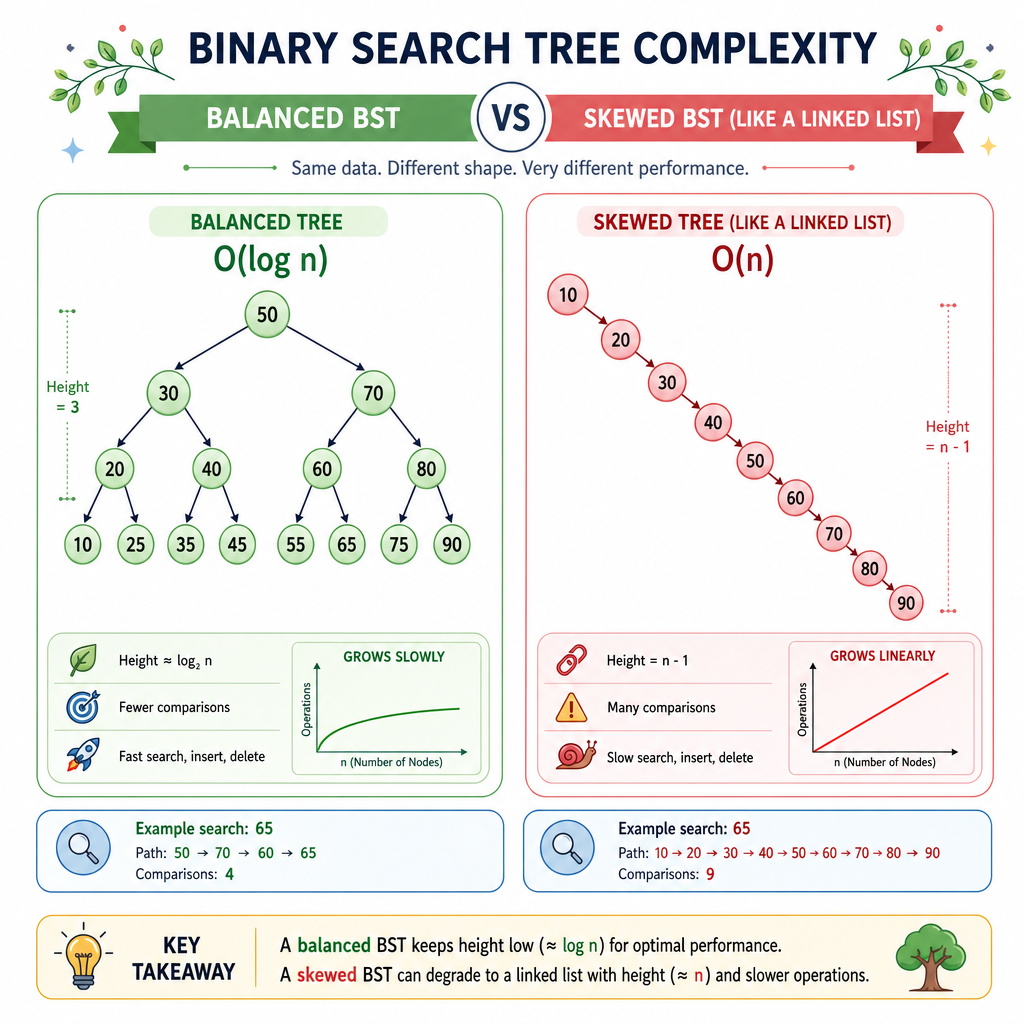
- Searching a badly skewed BST can become O(n)
- Space usage depends on stored nodes plus traversal overhead
The big idea: tree shape matters.
A balanced tree keeps paths short. A skewed tree loses much of the advantage and starts behaving like the linear structures from earlier lessons.
Next, we will move from trees to Graphs, where relationships become more flexible than strict parent-child links.