Useful SQL Commands with Examples
Read at your own pace. Code execution, quizzes, progress tracking, and the AI tutor are available in the interactive view with JavaScript enabled.
Introduction
Useful SQL Commands with Examples
So you’re harnessing the power of using SQL. Although it’s one of the easier programming languages to understand, it still holds some complexities.
Below we will go through some useful SQL commands that you can use as a reference guide, like the bread and butter for your SQL projects. We will be using a dataset which contains information on New York Cities Airbnb listings available on Kaggle.
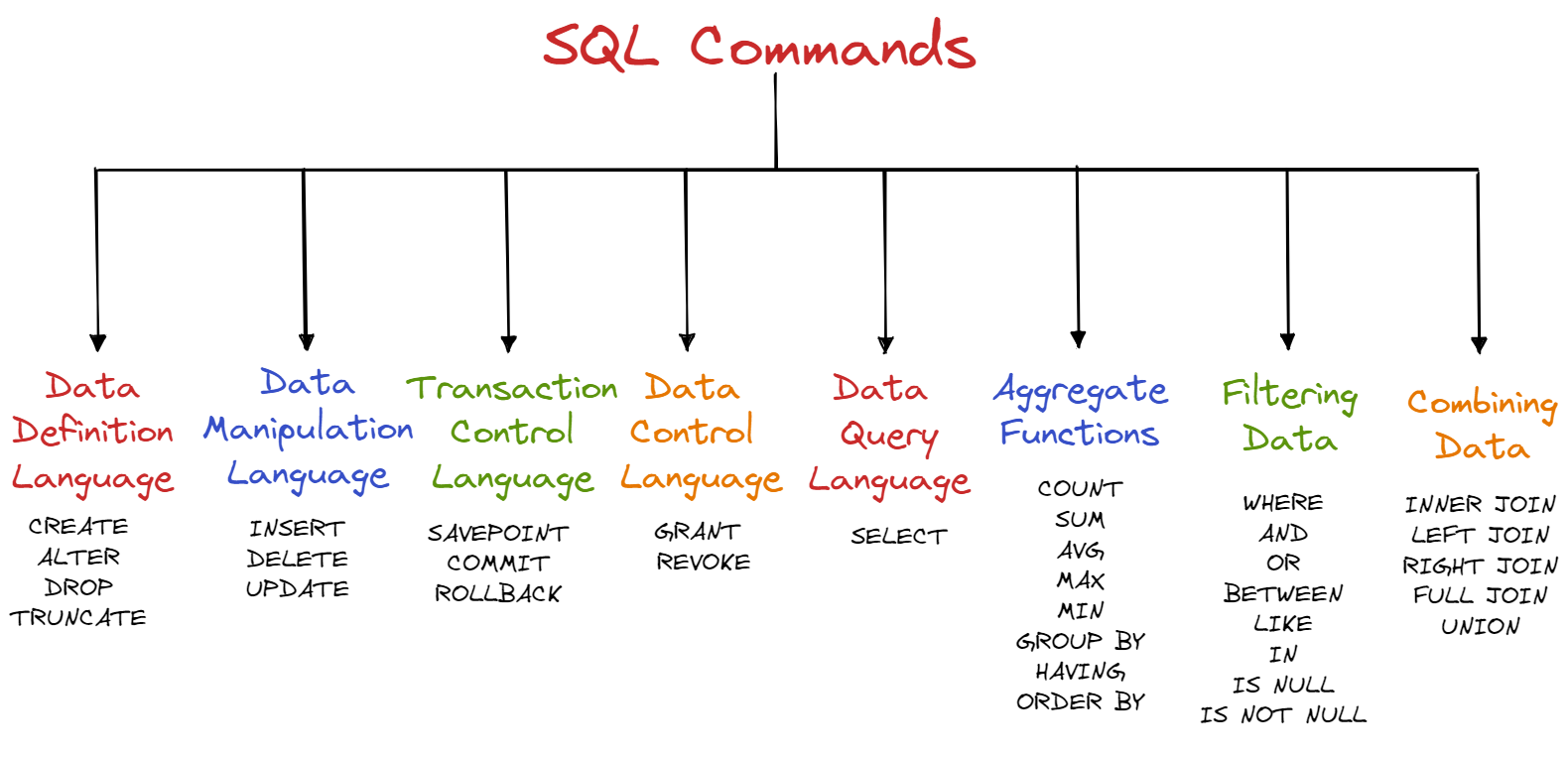
Command Categories
SQL Command Categories
Before we dive into each command, it helps to group them by what they change in the database.
Category What it is used for Examples DDL Changing the structure of tablesCREATE, ALTER, DROP
DML
Changing the data inside tables
INSERT, UPDATE, DELETE
TCL
Managing transactions
SAVEPOINT, COMMIT, ROLLBACK
DCL
Managing user permissions
GRANT, REVOKE
DQL
Fetching data from tables
SELECT
For the Airbnb listings dataset, this means some commands change the table itself, some change the listing rows, and others simply return information from the table.

Data Definition Language
A. Data Definition Language (DDL)
By using DDL we can change the structure of our tables. Since all the command of DDL are auto committed it permanently saves all the changes in the database.
1. CREATE
Let's suppose you want to create a table with information about the type of rooms in the listings. The command below allows you to create a new database or table.
CREATE TABLE room_details(
  room_type TEXT,
  room_size INTEGER
);
2. ALTER
Now let’s say you want to add a column to the airbnb_listings table which states if the property is reserved or not. The next command is used to modify (add, drop, rename, etc) the structure of the data in your database, it should be noted the data will remain unchanged.
ALTER TABLE airbnb_listings
ADD listings_reserved BOOLEAN;
3. DROP
So you’ve decided that the table you created no longer serves a purpose and you want to delete it. The DROP command deletes a database or table. Before running this command you should be aware that it will delete your whole table, including all data, indexes, and more, so make sure you are certain before you run.
DROP TABLE room_details;
To delete a specific column we can combine the ALTER TABLE command with the DROP command.
ALTER TABLE airbnb_listings
DROP COLUMN listings_reserved;
4. TRUNCATE
This command is used to remove all data entries from a table in a database while keeping the table and structure in place.
TRUNCATE TABLE airbnb_listings;
Multiple Choice
You want to add a new column size_square_metres to your dataset. What SQL command do you use?
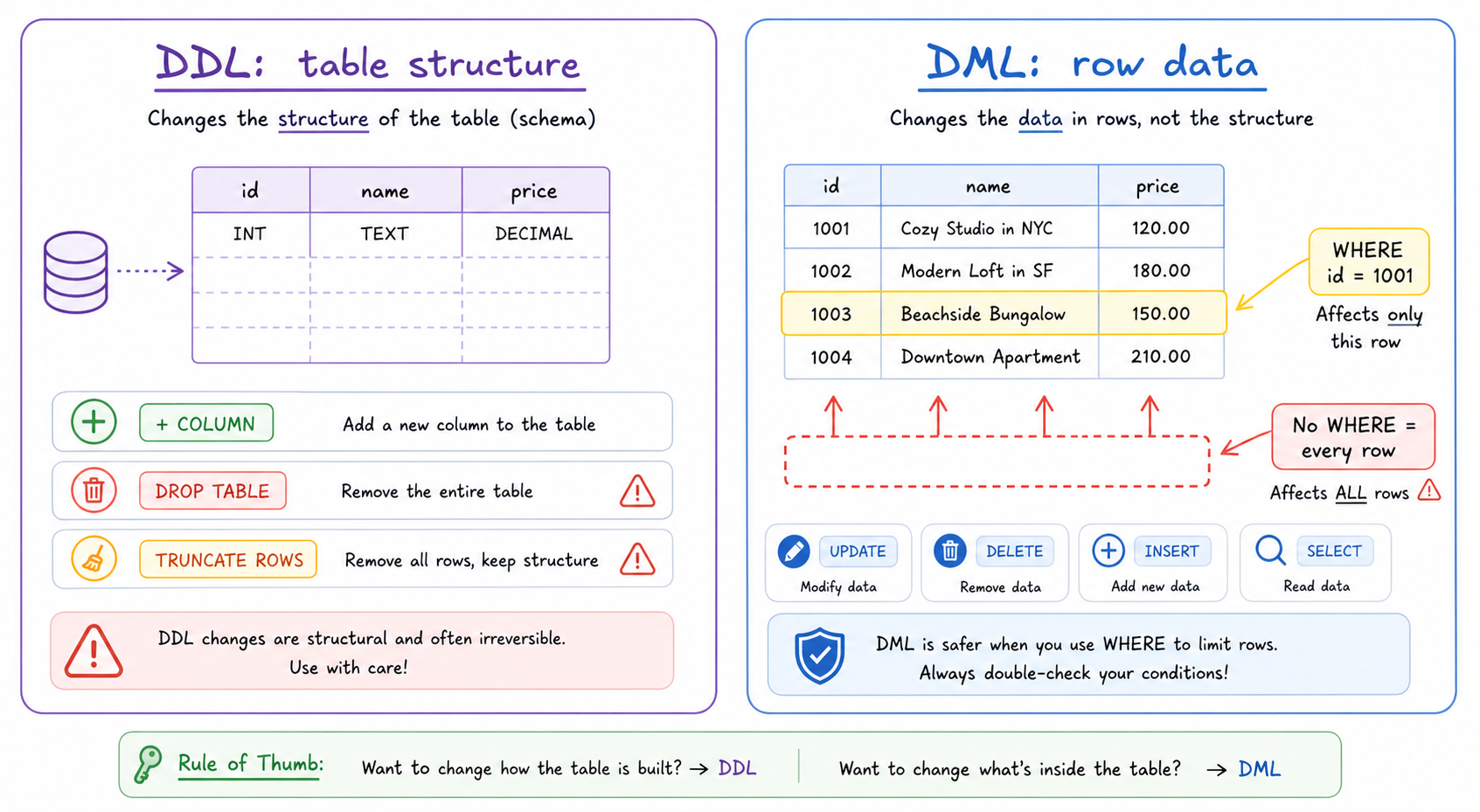
DML Safety: WHERE
DML Safety: WHERE
The UPDATE and DELETE examples above both use a WHERE condition. This is one of the most important habits to build when working with real data.
If you forget the WHERE clause, SQL does not know that you only meant to change one Airbnb listing. It will apply the change to every row in the table.
A good habit is to first run a SELECT query with the same condition to make sure you are targeting the correct row.
```sql
-- First, check the row you plan to update
SELECT id, name, price
FROM airbnb_listings
WHERE id = 1001;

-- Safer: updates one listing
UPDATE airbnb_listings
SET price = 250
WHERE id = 1001;

-- Dangerous: updates every listing in the table
UPDATE airbnb_listings
SET price = 250;
```
Structure vs Row Changes
Before we keep adding commands, separate the two kinds of change you just saw:
- DDL changes the table itself: columns, tables, and structure.
-
DML changes the rows inside the table, so
WHEREbecomes your safety guard.
Use the visual as a quick mental checkpoint: am I changing the container, or the data inside it?
Multiple Choice
Which part of the command makes sure only the listing with id = 1001 is updated?
Data Manipulation Language
B. Data Manipulation Language (DML)
By using DML we can modify, retrieve, delete and update the data in our database.
1. INSERT
Suppose we have a new listing we would like to add to our database, to add this new record we use the INSERT INTO command. This command allows you to add one or more rows.
INSERT INTO airbnb_listings(id, name, host_id, neighbourhood_group, price)
VALUES (1001, 'Luxury Villa', 2345, 'Brooklyn', 225);
2. DELETE
The new listings pulls out last minute so we need to remove the data from our table. To remove data we can simply use the DELETE command based on conditions specified with the WHERE command.
DELETE FROM airbnb_listings
WHERE id = 1001;
3. UPDATE
Imagine you need to update data in your table because one listing increased their price. The UPDATE command allows you to do this based on conditions specified after the WHERE command.
UPDATE airbnb_listings
set price = 200
WHERE id = 2539;
Multiple Choice
You want to change the name of a listings in your dataset from 'Clean & quiet apt home by the park' to 'Luxurious Apt. facing Kensington's Most Famous Park'. What SQL command do you use?
Transaction Control Language
C. Transaction Control Language (TCL)
TCL commands are used to maintain consistency of our databases and for management of transaction made by DML commands. We can only use TCL commands with DML commands like INSERT, DELETE and UPDATE.
1. SAVEPOINT
The SAVEPOINT command allows us to pick a point in a transaction and save it so that we can roll back to it. This is similar to how you can backup your pictures to the cloud or you save a backup of an important project.
SAVEPOINT SAVEPOINT_NAME;
2. COMMIT
By using the COMMIT statement we end the current transaction removing any existing savepoints that may be in use and make permanent all changes preformed in the transaction. Once the statement is run, we cannot roll back the transaction.
DELETE FROM airbnb_listings
WHERE id = 1001;
COMMIT
3. ROLLBACK
To undo a transaction that are not saved to the database we use the ROLLBACK command. This can only be used to undo transactions that has came after the last COMMIT or ROLLBACK command that was ran. You can also rollback to a SAVEPOINT that has been created before.
ROLLBACK TO SAVEPOINT_NAME;
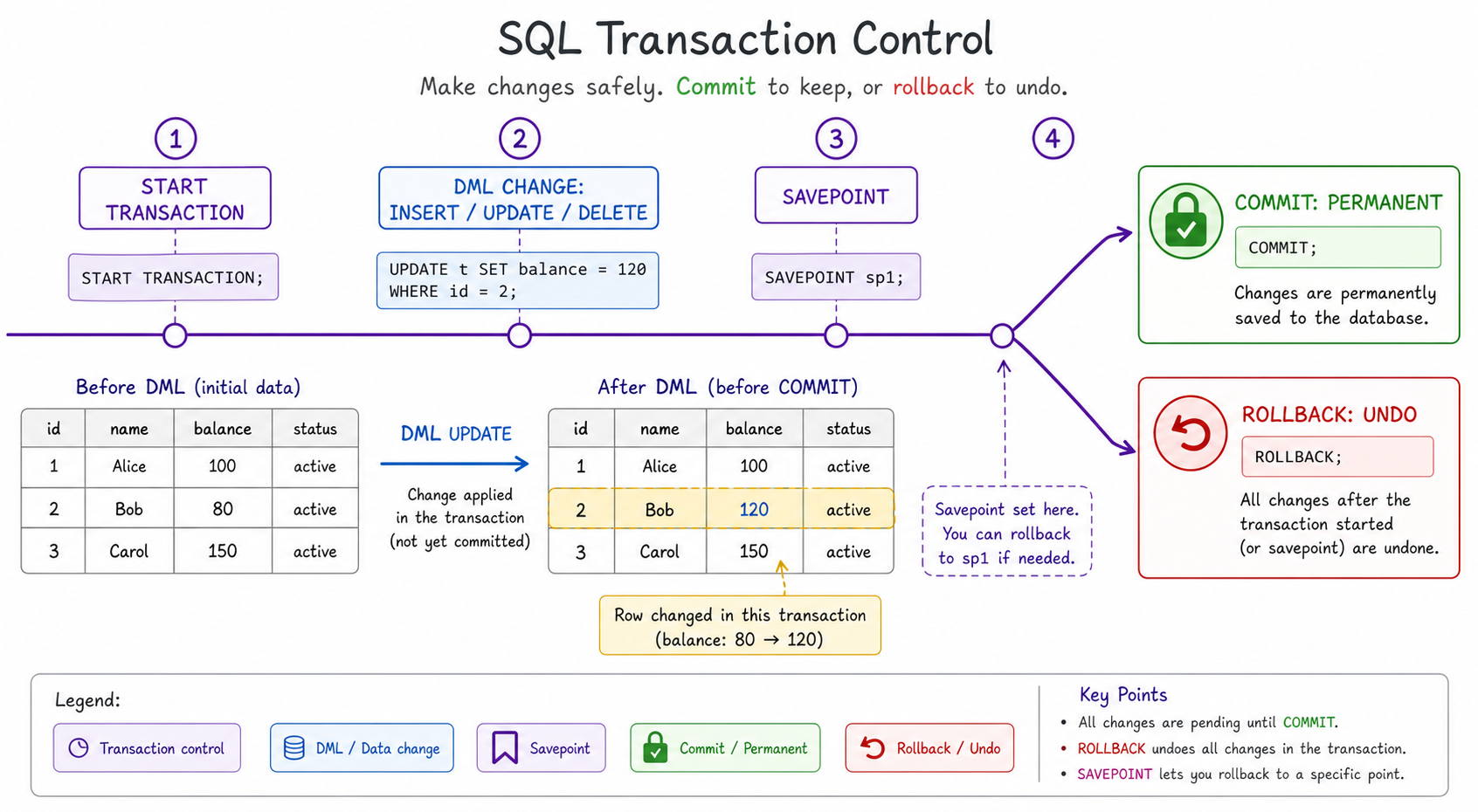
Transaction Safety Flow
DML commands make changes; TCL commands decide whether those changes become permanent.
Think of a transaction as a controlled work zone: make a change, set a savepoint if needed, then either COMMIT to keep it or ROLLBACK to undo it.
Multiple Choice
You want to return to a previously created SAVEPOINT. What SQL command do you use?
Data Control Language
D. Data Control Language (DCL)
By using DCL we can permit a user to access, modify or work on the different privileges in order to control the database.
1. GRANT
Suppose you hire a freelancer to update your airbnb_listings database with new information. By using the GRANT command you can give the user access to database objects such as tables, views or the database itself. The below example gives the user named ‘usr_maria’ SELECT and UPDATE access on the airbnb_listings table.
GRANT SELECT, UPDATE ON airbnb_listings TO usr_maria;
2. REVOKE
After the freelancer has completed her work you now want to remove the users permission. You can do so by using the REVOKE command.
REVOKE SELECT, UPDATE ON airbnb_listings FROM usr_maria;
True or False?
We use the command REVOKE to remove the access of a previous employee from our database.
Data Query Language
E. Data Query Language (DQL)
By using DQL we can fetch data from the database.
1. SELECT
You use the SELECT command almost every time you query data with SQL. It allows you to define what data you want your query to return. By using the SELECT command with an asterisk () all of the columns in the table *airbnb_listings are returned.
SELECT * FROM airbnb_listings;
Using the following command we can find out all the neighborhoods we have listings in.
SELECT neighbourhood_group
FROM airbnb_listings;
However you will notice there are duplicate results. To overcome this we use the SELECT DISTINCT command which will eliminate duplicates and only return distinct data.
SELECT DISTINCT neighbourhood_group
FROM airbnb_listings;
True or False?
The command SELECT(*) removes duplicates from the query results.
Aggregate Functions
F. Aggregate Functions
An aggregate function is used to combine a set of values and return a single result.
1. COUNT
We want to find out the number of Airbnb listings we have. To do so we use the COUNT() function which will add up the number of rows where the specified column is not NULL.
SELECT COUNT()
FROM airbnb_listings;
2. SUM
Let’s say we want to find the total number_of_reviews left on our listings. Using the SUM function we can return the total sum of a numeric column.
SELECT SUM(number_of_reviews)
FROM airbnb_listings;
3. AVERAGE
Let’s say you want to see what the average price is across your listings is. By using the AVG function the average value of the numeric column will be returned.
SELECT AVG(price)
FROM airbnb_listings;
4. MAXIMUM & MINIMUM
To find what is the maximum and minimum price of our listings we use the MIN and MAX functions.
 --  Max
SELECT MAX(price)
FROM airbnb_listings;

 --  Min
SELECT MIN(price)
FROM airbnb_listings;
5. GROUP BY
Let’s say we want to find the average price for each neighborhood. We can do this using the GROUP BY statement. It groups rows with the same values into summary rows and is commonly used with aggregate functions like AVG.
SELECT neighbourhood, AVG(price)
FROM airbnb_listings
GROUP BY neighbourhood;
6. HAVING
HAVING acts in the same way as the WHERE clause with the difference being that HAVING is used for aggregate functions. Let’s suppose want to return the names of the clients who have more than 2 listings on Airbnb.
SELECT COUNT(host_id), name
FROM airbnb_listings
GROUP BY host_name
HAVING COUNT(host_id) > 2;
7. ORDER BY
To order the results obtained from a query we use the ORDER BY command. By default the order will be ascending (A -> Z / 1 -> 100) however we can change this using DESC. Let’s say for example we want to order our listings by price.
SELECT name, price
FROM airbnb_listings
ORDER BY price;

 -- In descending order
SELECT name, price
FROM airbnb_listings
ORDER BY price DESC;
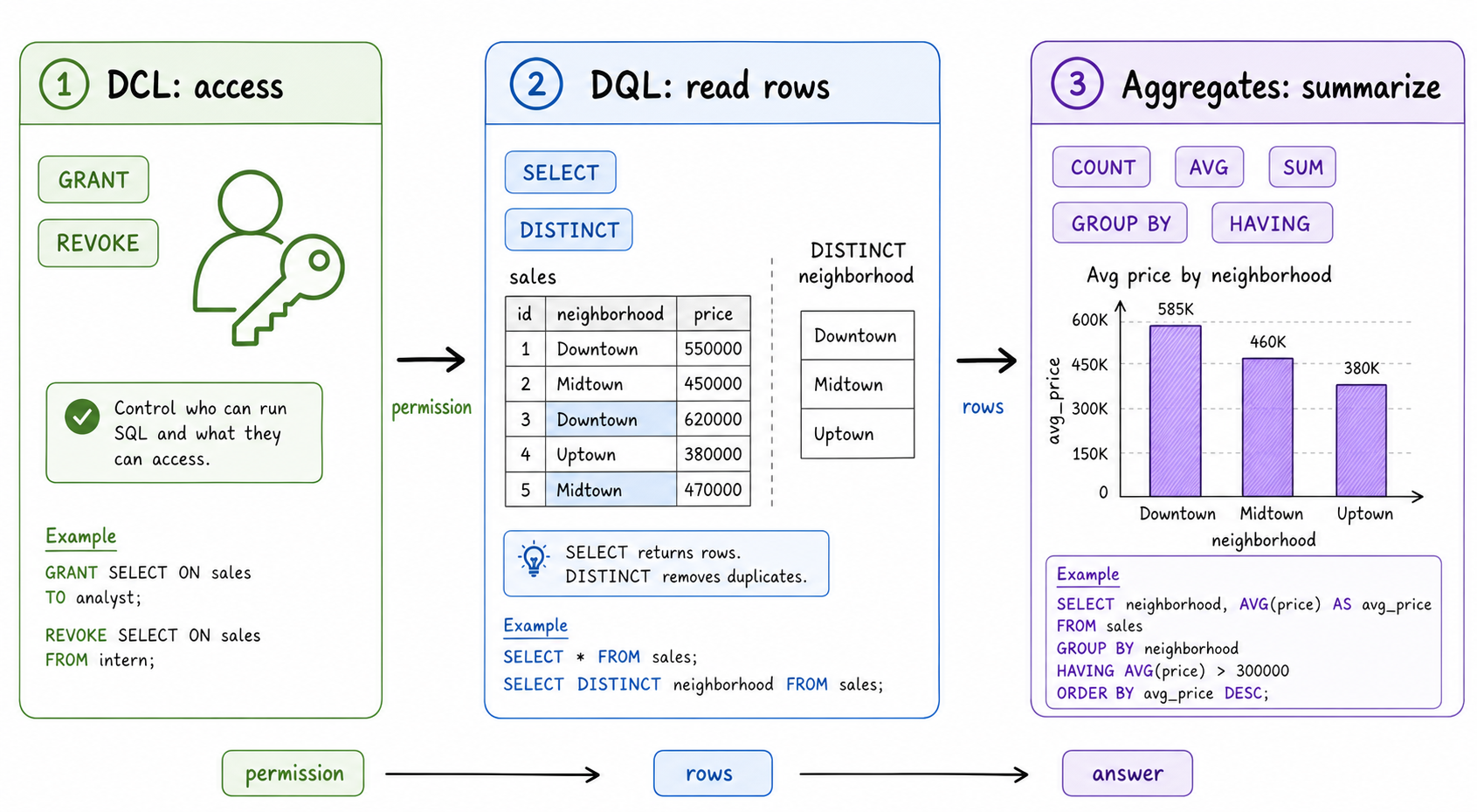
From Access to Answers
You just moved from permissions to querying to summarizing data.
A useful interview mental model is: Can the user access it? What rows should we read? What answer should we calculate? That maps to DCL, DQL, and aggregate functions.
Multiple Choice
You want to find the total number of records in your database. What SQL command do you use?
Filtering Data
G. Filtering Data
One of the most powerful feature of using SQL is the ability to rapidly filter data to match a certain criteria you are searching for.
1. WHERE
By using the WHERE filters with a query it allows us to only return results that match a set condition. We can use this together with conditional operators like =, >, <, >=, <=, etc.
SELECT *
FROM airbnb_listings
WHERE price < 300;
2. AND
We can combine two or more conditions into a single query by using the AND command. All of the conditions must be met for the result to be returned. Let’s say we want results for listings over $300 in Brooklyn.
SELECT name
FROM airbnb_listings
WHERE price < 300 AND neighbourhood_group = 'Brooklyn';
3. OR
We can combine two or more conditions into a single query by using the OR command. It differs from AND in the sense that only one of the conditions must be met for a result to be returned. Therefore from our example all listings priced over $300 will be returned as well as all listings located in Brooklyn.
SELECT name
FROM airbnb_listings
WHERE price < 300 OR neighbourhood_group = 'Brooklyn';
4. BETWEEN
We can specify a range using the BETWEEN filter. For example creating a price range for listings as follows.
SELECT name, price
FROM airbnb_listings
WHERE price BETWEEN 200 AND 400;
5. LIKE
We can search for patterns within our data using the LIKE command. Suppose you want to find listings with the word 'country' in the title, the code below will achieve this.
SELECT name
FROM airbnb_listings
WHERE name LIKE ‘%country%’;
Other operators for LIKE:
- %x — will select all values that begin with x
- %x% — will select all values that include x
- x% — will select all values that end with x
- x%y — will select all values that begin with x and end with y
- _x% — will select all values have x as the second character
- x_% — will select all values that begin with x and are at least two characters long. You can add additional _ characters to extend the length requirement, i.e. x___%
6. IN
By using the IN command we can specify multiple values we want to select from with the WHERE command.
SELECT name, neighbourhood_group, price
FROM airbnb_listings
WHERE neighbourhood_group IN ('Brooklyn', 'Manhattan');
7. IS NULL & IS NOT NULL
IS NULL will return only rows with a NULL value, while IS NOT NULL does the opposite returning only rows without a NULL value. Let’s say we want to find listings which have received no reviews in the past month.
-- IS NULL
SELECT name
FROM airbnb_listings
WHERE reviews_per_month IS NULL;

-- IS NOT NULL
SELECT name
FROM airbnb_listings
WHERE reviews_per_month IS NOT NULL;
Multiple Choice
You want to find listings for short term holidays between 7 to 14 days for 'minimum_nights'. What SQL command do you use?
Combining Data
H. Combining Data
So you want to combine your table with another. Let's first take a look at joins to accomplish this goal. A JOIN clause is used to combine rows from two or more tables allowing you to fetch combined results.
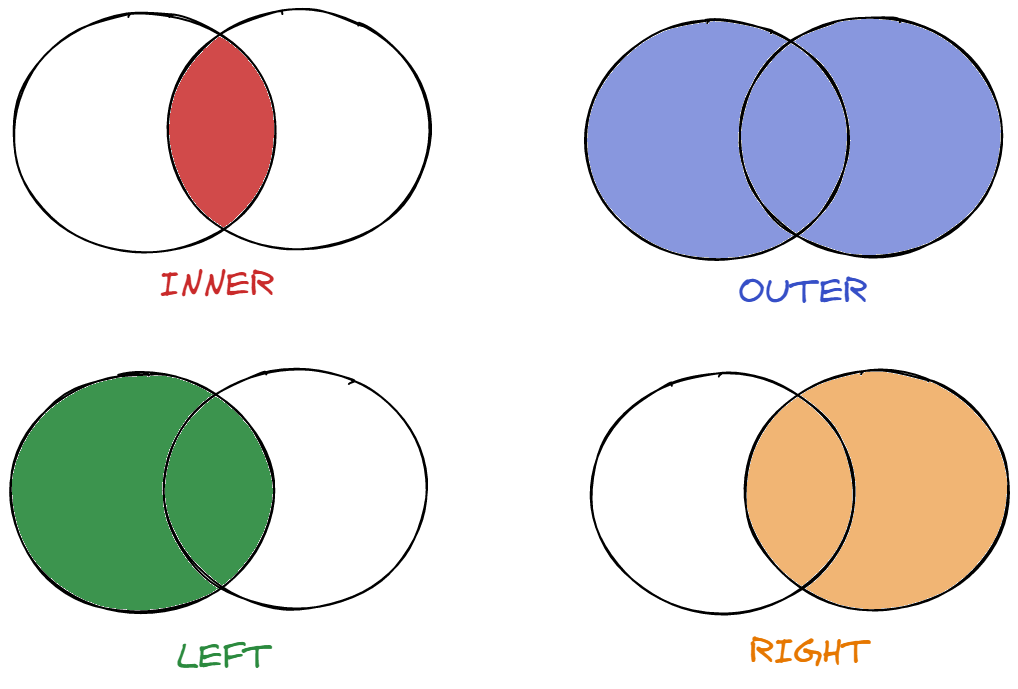
For this example let's imagine we're joining with another table called 'booking_listings' which contains listings from the website Booking.com.
1. INNER JOIN
INNER JOIN selects records that have matching values in both tables.
SELECT name
FROM airbnb_listings
INNER JOIN booking_listings
ON airbnb_listings.host_id = booking_listings.host_id;
2. LEFT JOIN
LEFT JOIN selects records from the left table that match records in the right table. In the below example the left table is airbnb_listings.
SELECT name
FROM airbnb_listings
LEFT JOIN booking_listings
ON airbnb_listings.host_id = booking_listings.host_id;
3. RIGHT JOIN
RIGHT JOIN selects records from the right table that match records in the left table. In the below example the right table is booking_listings.
SELECT name
FROM airbnb_listings
RIGHT JOIN booking_listings
ON airbnb_listings.host_id = booking_listings.host_id;
4. FULL JOIN
FULL JOIN selects records that have a match in the left or right table. Think of it as the “OR” JOIN compared with the “AND” JOIN (INNER JOIN).
SELECT name
FROM airbnb_listings
FULL OUTER JOIN booking_listings
ON airbnb_listings.host_id = booking_listings.host_id;
5. UNION
Union on the other hand allows you to append rows to each other. Unlike joins which append matching columns, union can append unrelated rows provided they have the same number and name of columns.
SELECT price, name FROM  airbnb_listings
UNION
SELECT price, name FROM booking_listings;
You can think of union as a way of combining the results of two queries. You can use the UNION ALL syntax to return all the data, regardless of duplicates.
SELECT price, name FROM  airbnb_listings
UNION ALL
SELECT price, name FROM booking_listings;
Multiple Choice
You want to return only the matching records from two tables. What SQL command do you use?
Conclusion
Conclusion
To master the SQL language having knowledge of SQL commands is necessary. With the previously discussed commands you should be well on your way to becoming an SQL expert!
One Pager Cheat Sheet
One Pager Cheat Sheet
-
Learn the essentialSQLcommands including SELECT, FROM, WHERE, and more to effectively work withNew York City Airbnbdata. - - SQL commands are easier to remember when grouped by purpose: structure, data, transactions, permissions, and queries.
- A Data Definition Language (DDL) can be used to create, alter, drop, and truncate tables in the database, permanently changing their structure.
- The
ALTERcommand can be used to add new columns, such as size_square_metres, to a database table. - - Always use a
WHEREclause withUPDATEorDELETEwhen you only want to affect specific rows. - - DDL changes schema; DML changes rows, so protect DML with
WHERE. - -
WHEREcontrols which rows are affected by anUPDATEorDELETEcommand. - Through the use of Data Manipulation Language (DML), we can
modify,retrieve,deleteorupdatethe data in our database. - The
UPDATEcommand can be used to modify data in a database by specifyingWHEREconditions, such as changing the name of a listing from 'Clean & quiet apt home by the park' to 'Luxurious Apt. facing Kensington's Most Famous Park'. - TCL commands are used to manage DML operations and ensure consistency of the database using
SAVEPOINT,COMMIT, andROLLBACKstatements. - - TCL wraps DML changes with save, keep, and undo controls.
- The ROLLBACK command is used to undo a transaction that has not been saved to the database and to return to a previously created
SAVEPOINT. - Using Data Control Language (DCL) commands like
GRANTandREVOKE, we can control a user's access and privileges to our database objects. - The
REVOKE commandis used to remove access previously given to a user from database objects, like tables and views. - By using
SELECTandSELECT DISTINCT, the DQL (Data Query Language) allows us to query data from the database and get distinct data as required. - No, the command
SELECT (*)does not remove duplicates, rather it returns all columns in the query; to remove duplicates,SELECT DISTINCTshould be used. - Aggregate functions such as
COUNT,SUM,AVG,MAX,MIN,GROUP BYandHAVINGare used to process data and generate results based on a given criteria, and can be ordered usingORDER BY. - - DCL controls access, DQL reads rows, and aggregates turn rows into summaries.
- The
COUNT()function is used to determine the total number of records in a given table, and is an important aggregate function for quickly gauging the size of a dataset. - SQL provides powerful querying capabilities to filter data using
WHERE,AND,OR,BETWEEN,LIKE,IN,IS NULLandIS NOT NULLfilters. - We can use the
BETWEENcommand to return data from our query that is within a certain range, in this case listings with a 'minimum_nights' requirement of between 7 and 14 days. - With INNER JOIN, LEFT JOIN, RIGHT JOIN, FULL JOIN and UNION, you can combine rows from two or more tables, either appending matching columns or appending all rows with the same number and name of columns.
- The
SQL commandINNER JOINselects recordswithmatching valuesin two or more tables tocombine rowsand returnmatching records. - With knowledge of the essential SQL commands, you can
masterthe SQL language and become anSQL expert.