What Is DDL? Data Definition Language Explained
Read at your own pace. Code execution, quizzes, progress tracking, and the AI tutor are available in the interactive view with JavaScript enabled.
Introduction
What is Data Definition Language (DDL)?
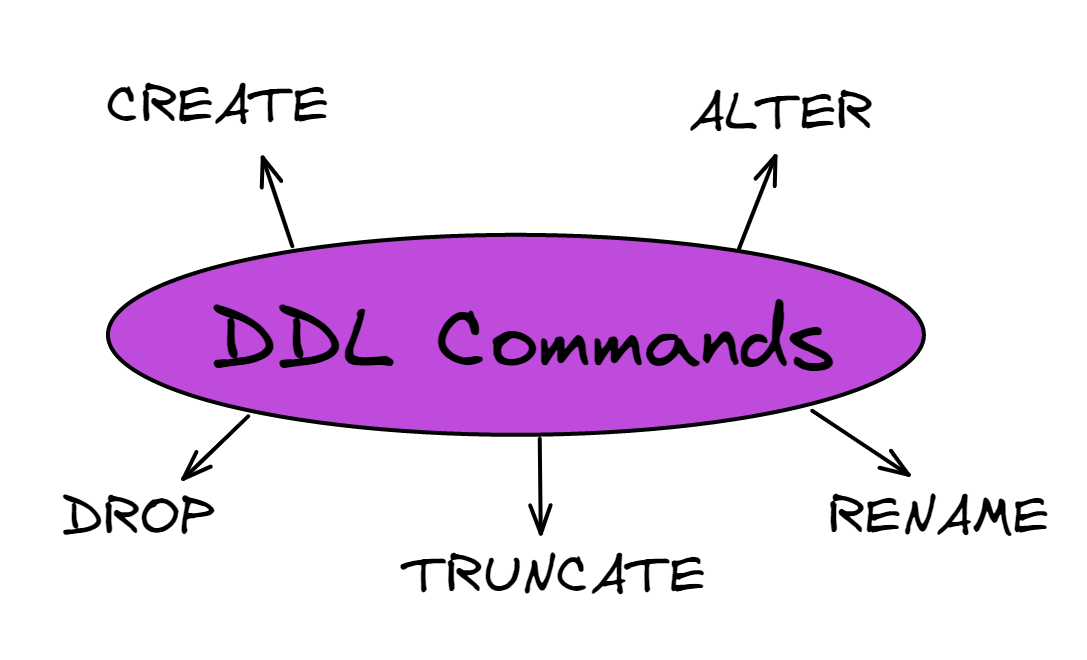
Simply put, DDL is a subset of SQL commands that we use to create and modify the structure of objects in a database. We can change the database structure by adding new tables or objects with all of their attributes such as data type, table name, and so on.
To gain a better understanding, let's delve deeper into each DDL command shown in the diagram. To demonstrate these commands, let's pretend we're working on a database for a fictitious music store Sequel Records.
DDL vs DML
DDL vs DML
Before we start writing more DDL commands, it is useful to understand what DDL does not do. DDL changes the structure of a database object, while DML changes the data inside those objects.
Command Type What It Changes Common Commands DDL Tables, columns, schemas, and other database objectsCREATE, ALTER, DROP, TRUNCATE, RENAME
DML
Rows stored inside existing tables
INSERT, UPDATE, DELETE, SELECT
For example, adding a new column to our albums table is DDL:
ALTER TABLE albums
ADD record_label VARCHAR(80);
But changing the price of one album is DML:
UPDATE albums
SET price = 12.99
WHERE album_id = 1;
This difference is a common interview point: DDL defines the container, while DML works with the records inside the container.

CREATE
CREATE
The DDL command CREATE is used to create the database or any objects such as a table, index, function, view, and store procedures.
1. CREATE DATABASE
Firstly we must create the database for our store. The CREATE query below allows you to create a new database.
CREATE DATABASE musicstore;
2. CREATE TABLE
We firstly want to create a table containing all of the information on the albums we sell. Within the CREATE statement, we must first define the structure of our table, including column names, data types, and the size of the data to be added to each column.
CREATE TABLE albums (
    album_id INT,
    title VARCHAR(150),
    artist VARCHAR (80),
    year_published SMALLINT,
    price DECIMAL (6,2) NOT NULL,
    genre VARCHAR(20) NOT NULL,
    PRIMARY KEY (album_id));

From there we can use Data Manipulation Language (DML) specifically the command INSERT to populate the table with the data from our albums.
3. CREATE VIEW
Suppose we run a query and want to save the results-set as a table, in this situation we can create a view using the CREATE command. Because a view displays current data, the database engine recreates it each time a user queries it.
CREATE VIEW DE_view AS
SELECT album_id, title, artist, price
FROM albums
WHERE genre = ‘Dance/Electronic’;
We can then run queries on our view as if it was a separate table.
SELECT title, artist
FROM DE_view;

4. CREATE INDEX
Using the CREATE command we can create indexes for our table. Indexes are used to retrieve data from a database more quickly than would otherwise be possible. The indexes are not visible to users; they are only used to speed up searches and queries.
As an example, our database becomes increasingly populated with albums over time, to the point where searching becomes extremely slow. Using the following command, we create an index on a single column title or more than one column title and artist.
-- One column index
CREATE INDEX index_album
ON albums (title);

-- Multiple column index
CREATE INDEX index_album_m
ON albums (title, artist);
In addition, we can make indexes unique in order to maintain data integrity by ensuring that no two rows of data in a table have the same key value.
CREATE UNIQUE INDEX index_album_u
ON albums (title);
5. CREATE PROCEDURE
The CREATE command can also be used to create a stored procedure which is basically a prepared SQL code that can be saved and reused over and over again.
DELIMITER //
CREATE PROCEDURE SelectAllAlbums()
BEGIN
    SELECT * FROM albums;
END //
DELIMITER ;
To execute our stored procedure we simply run the command below. Handy right?
CALL SelectAllAlbums();

Multiple Choice
You want to create a table called artists. Fill in the blank
sql
______________ artists(
    artist_id CHAR(3),
    artist_name VARCHAR (80),
    PRIMARY KEY (artist_id ));
ALTER
ALTER
1. ALTER TABLE
The DDL command ALTER is used to change the structure of the databases we create. For example, you might want to be able to keep track of inventory with your new database. You decide to add a column called qty_on hand.
ALTER TABLE albums
ADD qty_on_hand SMALLINT NOT NULL;
Or you notice that the data type you entered for album_id is an integer, when you actually wanted it to be a VARCHAR of length 3.
ALTER TABLE albums
MODIFY COLUMN album_id VARCHAR(3);
Multiple Choice
You want to add a column called nationality to the table artists. Fill in the blank
sql
ALTER TABLE artists
______ nationality VARCHAR(30);
DROP
DROP
Using the DROP command we can delete the database or any objects associated with it.
1. DROP DATABASE
Using the following command we can delete our entire database. Before running this command, you should be aware that it will delete your entire database including all tables, data, indexes, and other elements, so make sure you're certain before proceeding.
DROP DATABASE musicstore;
2. DROP TABLE
Similar to dropping a database, when we drop a table everything will be deleted.
DROP TABLE albums;
3. DROP VIEW
And to drop a view.
DROP VIEW DE_view;
3. DROP COLUMN
Let's say we want to delete a specific column. In this case we use the ALTER TABLE command in conjunction with the DROP command. As the owner of the music store, you determine that the column year_published is no longer necessary in this table and decide to remove it.
ALTER TABLE albums
DROP COLUMN year_published;
4. DROP CONSTRAINT
Another useful feature of this command is the ability to remove constraints. Below we will go through the syntax for removing all constraints with the command DROP.
-- Drop the Primary Key
ALTER TABLE albums
DROP PRIMARY KEY;

-- Drop the Foreign Key
ALTER TABLE albums
DROP FOREIGN KEY FK_AlbumOrder;

-- Drop a Unique constraint
ALTER TABLE albums
DROP INDEX UC_Album;

-- Drop the Check constraint
ALTER TABLE albums
DROP CONTRAINT CHK_AlbumPrice;

-- Drop the Default constraint
ALTER TABLE abums
ALTER genre DROP DEFAULT;
5. DROP INDEX
Imagine we no longer have as much albums in our table therefore there is no real need for the index we created in the first part of this tutorial. We can remove the index using the DROP command.
ALTER TABLE album
DROP INDEX index_album;
DDL Change Map
Before moving on, separate these DDL commands by the kind of schema change they make:
-
ALTERreshapes an existing object: add, modify, or remove part of a table. -
DROPremoves an object or schema feature entirely: database, table, view, column, constraint, or index.
In interviews, the key signal is scope: are you changing the structure, or deleting the structure?

Multiple Choice
You want to delete the table artists you just made. Fill in the blank
sql
_______________ artists;
Multiple Choice
You want to remove every row from the albums table before importing a fresh inventory list, but you want to keep the table structure. Which command should you use?
TRUNCATE
TRUNCATE
The TRUNCATE TABLE command deletes the data within a table. Unlike DROP, it keeps the table's structure, indexes, and dependencies. If we wanted to remove all data entries from a table in a database while keeping the table albums structure but not the entries, we would use the SQL command below.
TRUNCATE TABLE albums;

-- Check table with a query
SELECT * FROM albums;

True or False?
Truncating a table deletes the tables structure.
RENAME
RENAME
The DDL command RENAME, as expected is used to change names in our database.
1. RENAME TABLE
Perhaps we should choose a more appropriate name for our table in our music store. We can do so with the following.
ALTER TABLE albums
RENAME TO our_albums;
2. RENAME COLUMN
Or maybe we want to rename a column, we can do the following.
ALTER TABLE albums
RENAME COLUMN title TO album_name;
Multiple Choice
You want to rename the column year_published to release_year. Fill in the blank
sql
ALTER TABLE albums
____________________ year_published TO release_year;
One Pager Cheat Sheet
One Pager Cheat Sheet
- Data Definition Language (DDL) is a subset of SQL commands that we use to create, modify and manipulate the structure of database objects.
- - DDL changes database structure; DML changes the rows stored in that structure.
- The
CREATEcommand is used to create objects such as a database, table, index, view, and stored procedure in a database. - The
CREATE TABLEcommand is used to create a new table called artists in the database, defining its columns, data types, size, andPRIMARY KEY. - The DDL command
ALTERis used to modify existing databases by adding or modifying columns in atable. - We can use the
ALTERcommand with theADDkeyword to add a new column called nationality to the table artists. - Using the
DROPcommand we can delete a database, table, column, constraint, or index. - -
ALTERchanges existing structure;DROPremoves database objects or constraints. - The
DROP TABLEcommand is used to deletetables, such as artists, followed by asemicolon. - - Use
TRUNCATE TABLEwhen you want to clear table data but keep the table structure. - The
TRUNCATE TABLEcommand is used to delete data entries from a table while keeping its structure, indexes, and dependencies. - The
TRUNCATE TABLEcommand deletes the data within a table but does not affect its structure, indexes or dependencies. - The DDL command
RENAMEcan be used to change the name of tables and columns in our database. - We
RENAMEthecolumnyear_published to release_year in the albums table using theRENAME COLUMNclause of theALTER TABLEDLLcommand.