An Executable Data Structures Cheat Sheet for Interviews
This cheat sheet uses Big O notation to express time complexity.
- For a reminder on Big O, see Understanding Big O Notation and Algorithmic Complexity.
- For a quick summary of complexity for common data structure operations, see the Big-O Algorithm Complexity Cheat Sheet.
Array
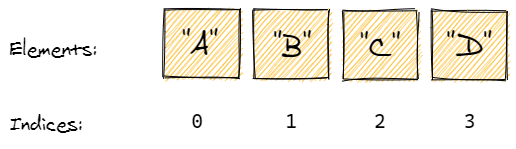
- Quick summary: a collection that stores elements in order and looks them up by index.
- Also known as: fixed array, static array.
- Important facts:
- Stores elements sequentially, one after another.
- Each array element has an index. Zero-based indexing is used most often: the first index is 0, the second is 1, and so on.
- Is created with a fixed size. Increasing or decreasing the size of an array is impossible.
- Can be one-dimensional (linear) or multi-dimensional.
- Allocates contiguous memory space for all its elements.
- Pros:
- Ensures constant time access by index.
- Constant time append (insertion at the end of an array).
- Cons:
- Fixed size that can't be changed.
- Search, insertion and deletion are
O(n). After insertion or deletion, all subsequent elements are moved one index further. - Can be memory intensive when capacity is underused.
- Notable uses:
- The String data type that represents text is implemented in programming languages as an array that consists of a sequence of characters plus a terminating character.
- Time complexity (worst case):
- Access:
O(1) - Search:
O(n) - Insertion:
O(n)(append:O(1)) - Deletion:
O(n)
- Access:
- See also:
Arrays are a primitive building block in most languages, here's how to initialize them:
1arr := []int{1, 2, 3}xxxxxxxxxx38
}package mainimport ( "fmt" "sort")func main() { // instantiation var empty []string teams := []string{"Knicks", "Mets", "Giants"} // literal notation otherTeams := []string{"Nets", "Patriots", "Jets"} // size fmt.Println("Size:", len(otherTeams)) // access fmt.Println("Access:", teams[0]) // sort sort.Strings(teams) fmt.Println("Sorted:", teams) // search found := falseOUTPUT
Results will appear here.