Authentication and Production
Read at your own pace. Code execution, quizzes, progress tracking, and the AI tutor are available in the interactive view with JavaScript enabled.
User Management
User Management
In this section, we shall set up user login, logout, and registration.
Let's begin with registration, we'll start with the registration form, we'll be using the user creation form from django.contrib.auth.forms
# ./crud_app/forms.py
...
from django import forms
from django.contrib.auth.models import User
from django.contrib.auth.forms import UserCreationForm

class UserRegisterForm(UserCreationForm):
    email = forms.EmailField()
    class Meta:
        model = User
        fields = ['username', 'email', 'password1', 'password2']
...
Next, we create a view for registering new users ```python
./crud_app/views.py
...
def register(request):
if request.method == 'POST':
form = UserRegisterForm(request.POST)
if form.is_valid():
form.save()
return redirect('home')
else:
form = UserRegisterForm()
return render(request, 'crud_app/register.html', {'form': form})
```
Then we create a template for it
<!-- ./crud_app/templates/crud_app/home.html -->
{% extends 'base.html' %}
{% load static %}

{% block title %}Register{% endblock title %}
{% block content %}

<div class="col-lg-12 blog-post">
<form action="" method="post">
    {{form.as_p}}
    {% csrf_token %}
    <button type="submit" class="btn btn-secondary">Register</button>
</form>
</div>

{% endblock  %}
And finally, we add the view function to a path in urls.py
# ./crud_app/urls.py
...
urlpatterns = [
    ...
    path('user/register', views.register, name='register'),
    ...
]
Now we update the register button on base.html to add the register URL, clicking on the button will bring us here where we can create a new user.
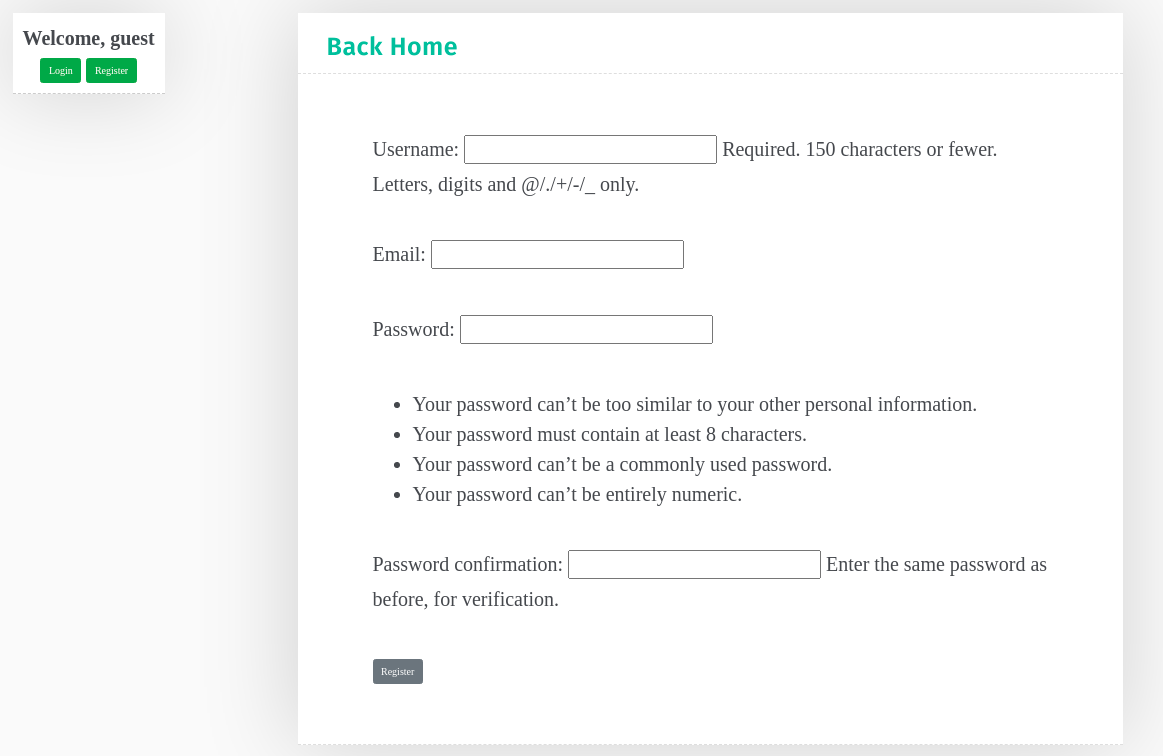
For the user login and logout, Django provides views and URLs, all we need to do is create a template in the registration directory and call it login.html.
<!-- ./crud_app/templates/registeration/login.html -->
{% extends 'base.html' %}
{% load static %}

{% block title %}Login{% endblock title %}
{% block content %}

<div class="col-lg-12 blog-post">
<form action="" method="post">
    {{form.as_p}}
    {% csrf_token %}
    <button type="submit" class="btn btn-secondary">Login</button>
</form>
</div>
{% endblock  %}
Next, we add the URL in our urls.py file
# ./crud_app/urls.py
...
urlpatterns = [
    ...
    path('user/', include('django.contrib.auth.urls')),
]
This path will give us access to login and logout routes, so let's update our base template and add these routes to their respective buttons.
And that is it for login and log out.
Or is it, well no it is not because after a successful login or logout we get the following error.
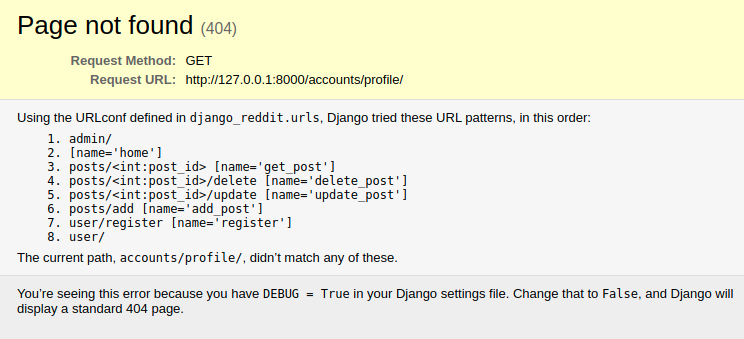
We are getting this error because Django redirects to a profile route by default, to change this behavior, we need to add an entry in our settings file that will tell Django which path to redirect to after login and logout.
open the settings.py file and add the following at the end.
# ./django_crud/settings.py
...
LOGIN_REDIRECT_URL = 'home'
LOGOUT_REDIRECT_URL = 'home'
And with that, we have ourselves a fully working CRUD app with Django.
CONTINUE WITH ALGODAILY PREMIUM
Keep going with the complete tutorial.
Unlock the remaining explanations and exercises, alongside the full learning library.
Explore Premium →