Background Crawls and Status Updates
Read at your own pace. Code execution, quizzes, progress tracking, and the AI tutor are available in the interactive view with JavaScript enabled.
Why Background Crawls
Now that we've covered Crawl Result Models and Import Pipeline, our Django app can store Scrapy output as product data.
But the workflow is still developer-driven:
run spider in terminal
   ↓
export JSONL
   ↓
run Django import command
   ↓
open admin
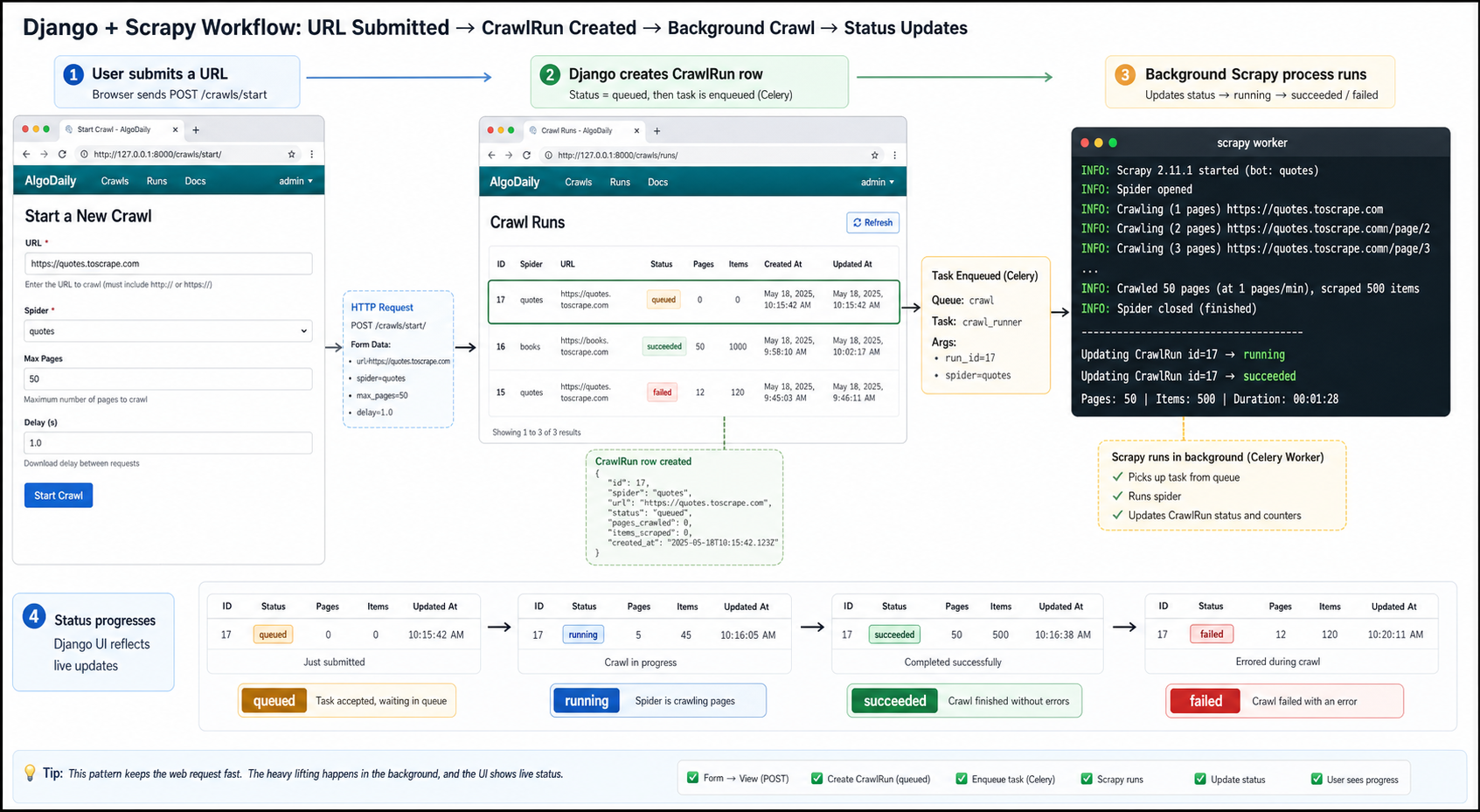
A user-facing website analysis tool needs a better experience:
user submits URL
   ↓
Django creates a crawl job
   ↓
background process runs Scrapy
   ↓
Django stores results
   ↓
status page updates: queued → running → succeeded / failed
The important product rule: do not make the browser wait while a crawl runs. Crawling external pages can take seconds or minutes. A Django request should create the job quickly, then let another process do the slow work.
CONTINUE WITH ALGODAILY PREMIUM
Keep going with the complete tutorial.
Unlock the remaining explanations and exercises, alongside the full learning library.
Explore Premium →