Course Overview & Environment Setup
Read at your own pace. Code execution, quizzes, progress tracking, and the AI tutor are available in the interactive view with JavaScript enabled.
Welcome To HFT
Why this lesson matters
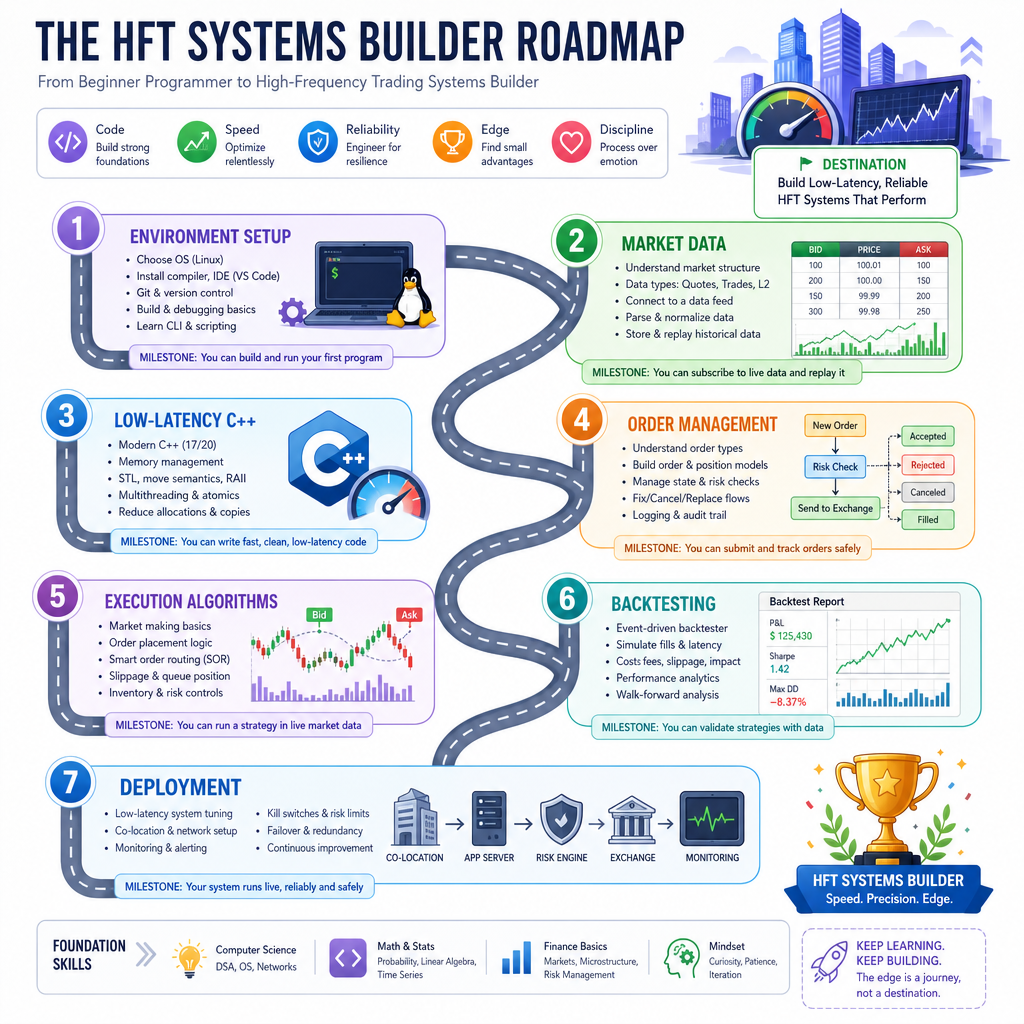
This is the first lesson, so our goal is not to build a trading strategy yet. Our goal is to set up a reliable workspace and a mental model for the course.
High-frequency trading systems are unusual software systems because they care about:
- Correctness: never send the wrong order.
- Latency: every unnecessary delay matters.
- Throughput: market data can arrive extremely fast.
- Observability: if something goes wrong, we need logs, metrics, and reproducible tests.
In this course, C++ will be our main systems language. Python will appear later as a useful research, analysis, and tooling companion.
You do not need to be an expert C++ developer yet. But you do need a clean environment, repeatable builds, and a habit of measuring what your code actually does.
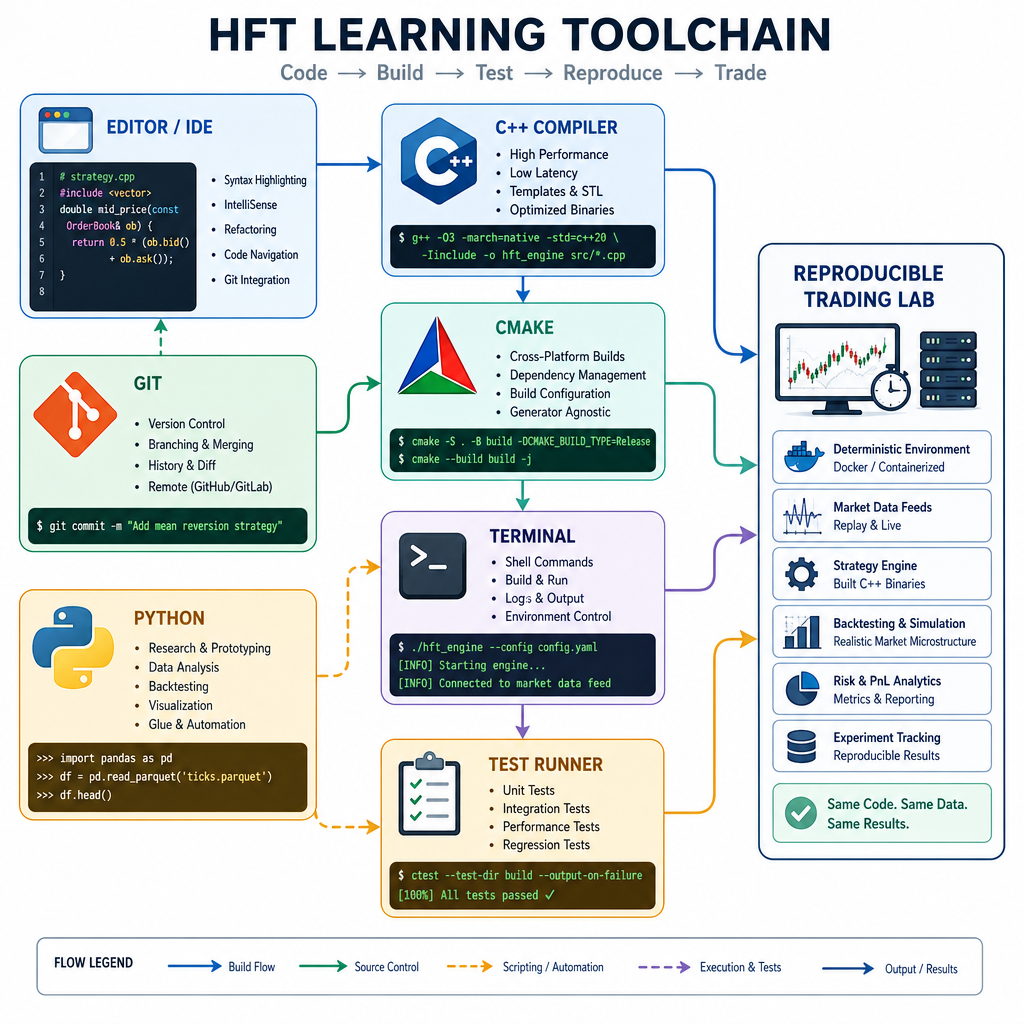
Course Toolchain
The tools we will rely on
Think of the course toolchain as a small trading engineering lab:
C++ compiler  -> builds fast trading components
CMake         -> makes builds repeatable
Git           -> tracks experiments and versions
Python        -> supports analysis, scripts, notebooks
Terminal      -> runs builds, tests, and benchmarks
Editor/IDE    -> helps you read, write, and debug code
For this lesson, focus on getting the C++ path working first:
- Write a small C++ program.
- Compile it.
- Run it.
- Confirm it prints expected output.
- Repeat without guessing.
That repeatability is important. In trading systems, “it works on my machine” is not a strong enough engineering standard.
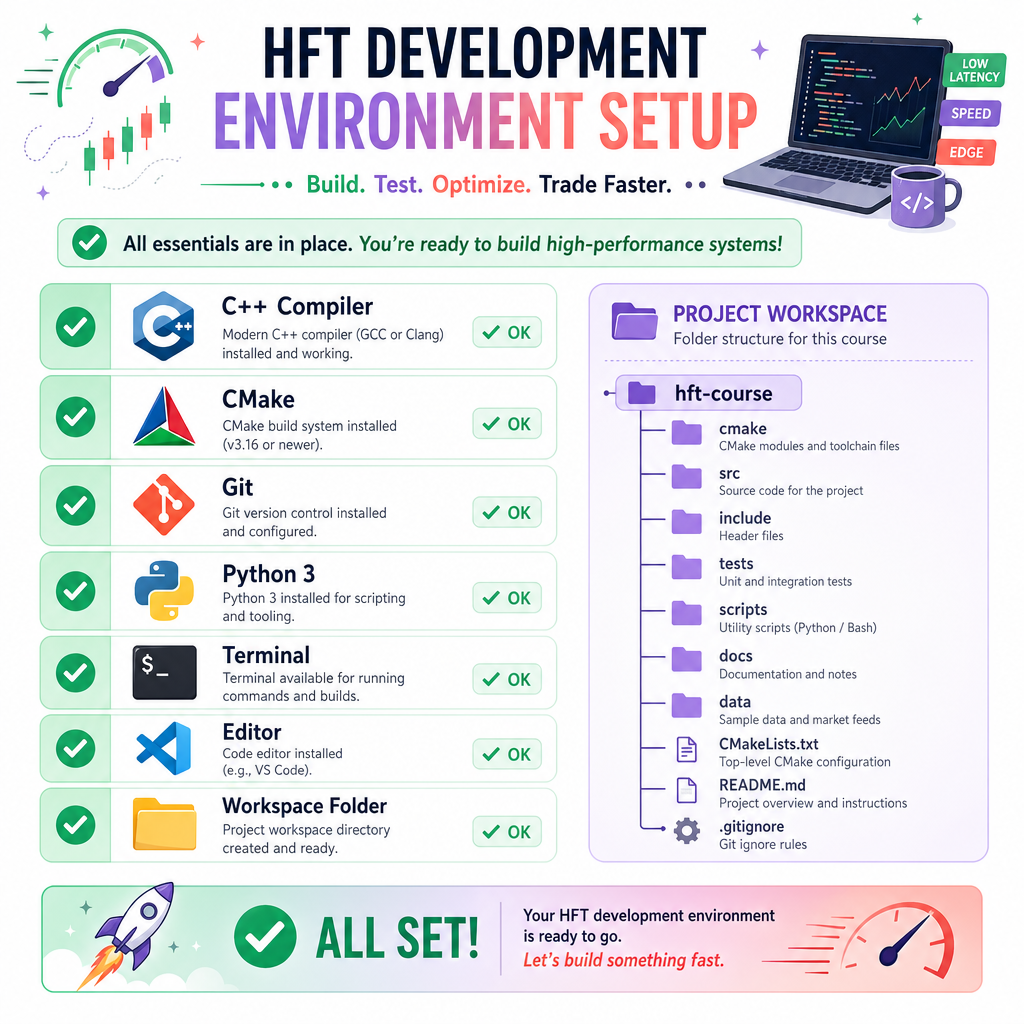
Install Checklist
Recommended environment
Use any modern operating system, but a Linux-like terminal is ideal. On Windows, WSL2 is a strong option.
You should have:
- A modern C++ compiler:
- Linux:
g++orclang++ - macOS: Apple Clang via Xcode command line tools
- Windows: MSVC or WSL2 with
g++/clang++
- Linux:
cmakegit- Python 3.10+
- A code editor such as VS Code, CLion, Vim, or another editor you like
Suggested folder
Create one course workspace:
hft-course/
  lesson01-environment/
  experiments/
  notes/
Keep experiments separate from finished lesson code. HFT work often involves measurement, comparison, and iteration, so clean organization pays off quickly.
Compiler Smoke Test
First executable check
Before we discuss markets, latency, or execution algorithms, verify that your compiler can build and run a standalone C++ program.
This program prints:
- The C++ standard level used by the compiler
- The detected compiler family
- A timestamp from the standard library clock
Compile example:
g++ -std=c++20 -O2 environment_check.cpp -o environment_check
./environment_check
If your compiler does not support C++20, C++17 is acceptable for early lessons, but C++20 is preferred.
```cpp
#include <chrono>
#include <iostream>

int main() {
    std::cout << "HFT course environment check\n";
    std::cout << "C++ standard macro: " << __cplusplus << "\n";

#if defined(__clang__)
    std::cout << "Compiler: Clang\n";
#elif defined(__GNUC__)
    std::cout << "Compiler: GCC\n";
#elif defined(_MSC_VER)
    std::cout << "Compiler: MSVC\n";
#else
    std::cout << "Compiler: Unknown\n";
#endif

    const auto now = std::chrono::system_clock::now();
    const auto ms = std::chrono::duration_cast<std::chrono::milliseconds>(
        now.time_since_epoch()
    ).count();

    std::cout << "Current epoch time, ms: " << ms << "\n";
    std::cout << "Environment looks ready.\n";
    return 0;
}
```
Setup Priority
You are preparing your machine for this course. Which setup goal matters most for the first lesson?
Project Shape
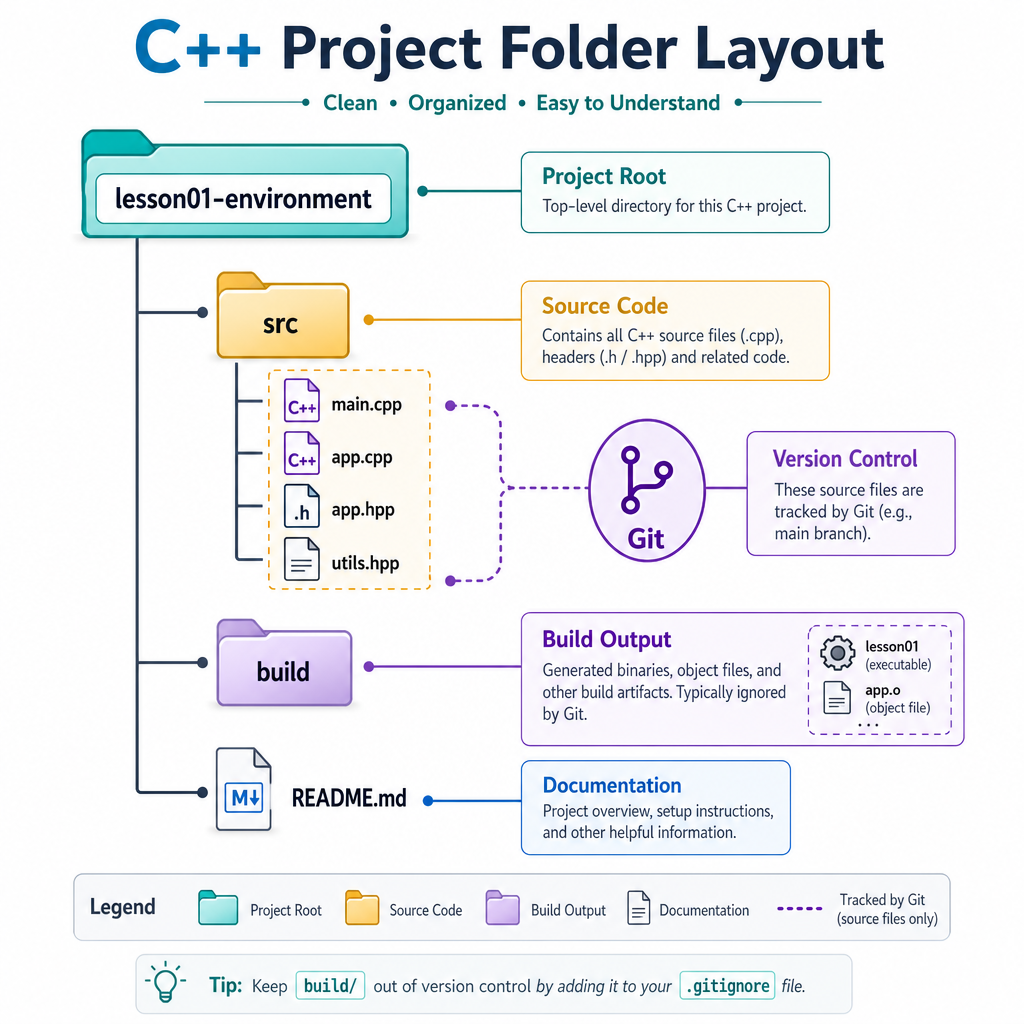
A simple project structure
Even small experiments should have a predictable shape. Later, when you compare strategies, replay market data, and tune performance, structure will help you avoid confusion.
A useful beginner layout is:
lesson01-environment/
  src/
    environment_check.cpp
  build/
  README.md
The src/ folder contains source code. The build/ folder contains generated files and compiled binaries. Usually, you do not commit build output to Git.
Why this matters in trading systems
Trading code often evolves through many tiny experiments. If you cannot reproduce yesterday’s binary, benchmark, or configuration, you cannot trust today’s comparison.
CMake Smoke Test
Make the build repeatable
Compiling one file directly with g++ is useful for a first smoke test. But as soon as a project has multiple files, tests, and build modes, we want a repeatable build description.
Inside lesson01-environment/, create this shape:
lesson01-environment/
  CMakeLists.txt
  src/
    environment_check.cpp
  build/
A minimal CMakeLists.txt can describe the executable:
cmake_minimum_required(VERSION 3.20)
project(hft_environment LANGUAGES CXX)

set(CMAKE_CXX_STANDARD 20)
set(CMAKE_CXX_STANDARD_REQUIRED ON)

add_executable(environment_check src/environment_check.cpp)
Build from the project root:
cmake -S . -B build
cmake --build build
./build/environment_check
The important habit is the out-of-source build: generated files go into build/, while your source files stay clean.
Measure Something
A tiny timing exercise
HFT engineering is measurement-driven. This does not mean this tiny example is a serious benchmark. It is just a smoke test that confirms your environment can compile code using std::chrono and print timing information.
The program performs a simple loop and reports elapsed time in microseconds.
Compile example:
g++ -std=c++20 -O2 timing_smoke_test.cpp -o timing_smoke_test
./timing_smoke_test
Important: real benchmarking requires more care. We will build that discipline gradually later in the course.
```cpp
#include <chrono>
#include <cstdint>
#include <iostream>

int main() {
    constexpr std::int64_t iterations = 10'000'000;
    volatile std::int64_t accumulator = 0;

    const auto start = std::chrono::steady_clock::now();

    for (std::int64_t i = 0; i < iterations; ++i) {
        accumulator += i % 7;
    }

    const auto end = std::chrono::steady_clock::now();
    const auto micros = std::chrono::duration_cast<std::chrono::microseconds>(
        end - start
    ).count();

    std::cout << "Iterations: " << iterations << "\n";
    std::cout << "Accumulator: " << accumulator << "\n";
    std::cout << "Elapsed time, microseconds: " << micros << "\n";

    return 0;
}
```
Environment Myth
True or false: Environment setup for HFT-style development is only about choosing a comfortable editor.
Runtime Configuration
Programs need configuration
Trading systems rarely run with hardcoded values only. They receive configuration such as symbol names, modes, limits, ports, or file paths.
For now, we will keep this simple with command-line arguments. This is not a complete configuration system, but it introduces a useful habit: make program behavior explicit when launching it.
Compile and run:
g++ -std=c++20 -O2 run_config.cpp -o run_config
./run_config AAPL simulation
This prepares us for later lessons where components will need clear inputs and repeatable settings.
```cpp
#include <iostream>
#include <string>

int main(int argc, char* argv[]) {
    const std::string symbol = argc > 1 ? argv[1] : "DEMO";
    const std::string mode = argc > 2 ? argv[2] : "dry-run";

    std::cout << "Starting course component\n";
    std::cout << "Symbol: " << symbol << "\n";
    std::cout << "Mode: " << mode << "\n";

    if (mode == "live") {
        std::cout << "Live mode requested: in this course, use safeguards before real trading.\n";
    } else {
        std::cout << "Safe mode: no real orders will be sent.\n";
    }

    return 0;
}
```
Build Directory Check
When using CMake for this course, why do we usually place generated build files inside a separate build/ directory?
Build Tool Blank
Fill in the blank: The cross-platform tool commonly used to generate and manage C++ builds in this course is ____.
One Pager Cheat Sheet
One Pager Cheat Sheet
- - Use CMake to describe repeatable C++ builds, and keep generated files inside
build/. - -
build/is for generated output; source files should remain clean and easy to track.