CSS Fundamentals
Read at your own pace. Code execution, quizzes, progress tracking, and the AI tutor are available in the interactive view with JavaScript enabled.
From DOM To Style
Why CSS now
You have already moved from values to views in DOM Manipulation, pulled data into the page in AJAX and Fetch API, and cleaned up JavaScript syntax in ES6 Features.
Now we make those views feel intentional.
CSS fundamentals are not about memorizing every property. They are about predicting why the browser chose a visual result:
- Which rule wins?
- Which values are inherited?
- How big is this thing really?
- What should be a class versus a one-off patch?
For a staff-level frontend path, CSS is part craft, part debugging discipline. The best engineers do not just make pixels move; they make UI systems understandable.

Rule Anatomy
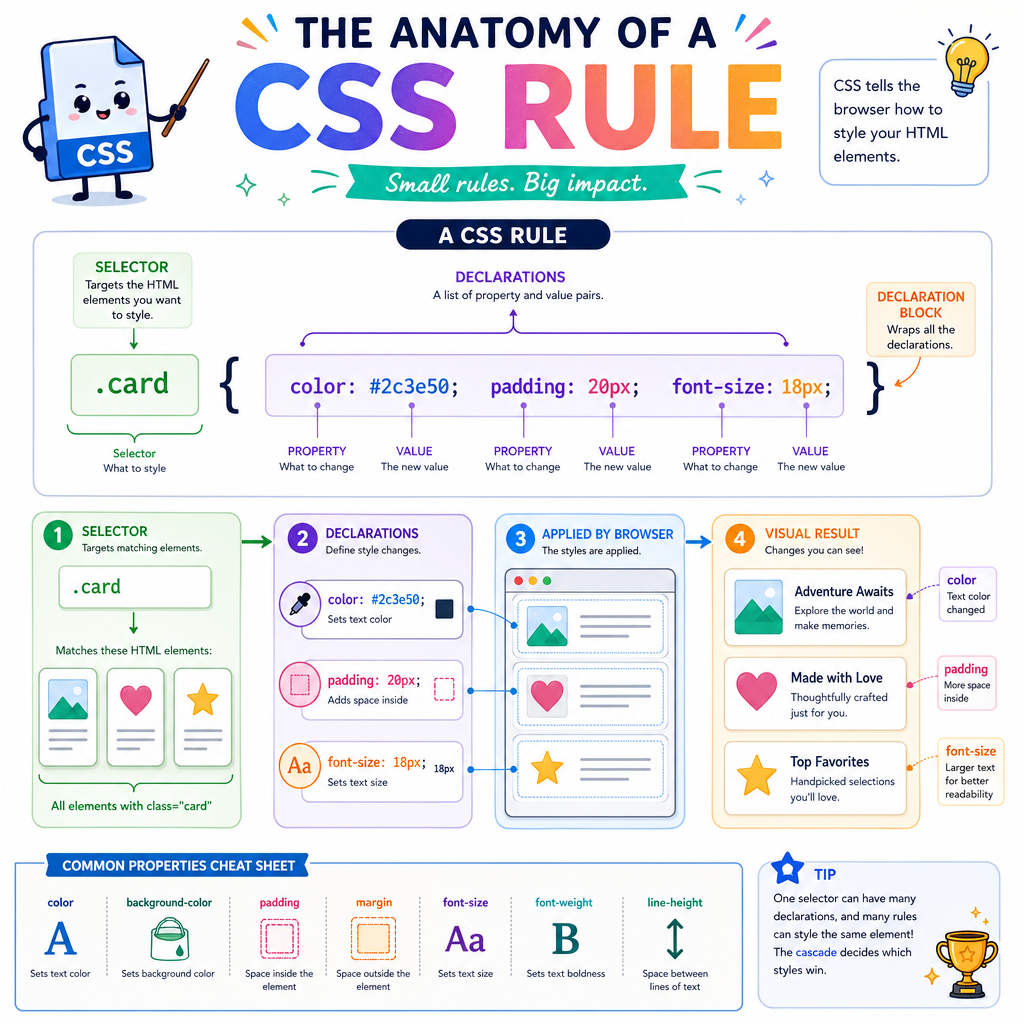
A CSS rule is a targeting statement
A basic rule has two parts:
- Selector: which elements should receive styles
- Declarations: what visual properties should change
Example shape: .movie-card { color: white; padding: 16px; }
Read it as: Find elements with class movie-card, then apply these declarations.
A declaration has:
-
Property:
color,padding,background,font-size -
Value:
white,16px,#111,1rem
The browser does not care that a card represents a game item, book recommendation, or reality TV contestant. It only sees elements, attributes, classes, and rules. Your job is to create names and structure that make the styling intent obvious to humans.
Cascade Wins
CSS is a decision system
When multiple rules target the same property on the same element, the browser resolves conflict with the cascade.
A practical mental model:
-
Importance and origin: user agent, user, author styles, and
!important - Specificity: how targeted the selector is
- Source order: later rules win when the previous factors tie
For daily work, most surprises come from specificity and source order.
Specificity is commonly compared as:
IDs - classes/attributes/pseudo-classes - elements
So #hero .card beats .card, and .card.featured beats .card.
Avoid turning specificity into an action-movie arms race. If every fix adds a bigger selector, the stylesheet becomes harder to reason about.
```js
const selectors = ['.card', '#hero .card', 'article.card.featured', 'button.primary:hover'];

function specificity(selector) {
  const ids = (selector.match(/#[A-Za-z0-9_-]+/g) || []).length;
  const classes = (selector.match(/[.:][A-Za-z0-9_-]+/g) || []).length;
  const withoutIdsClasses = selector.replace(/#[A-Za-z0-9_-]+|[.:][A-Za-z0-9_-]+/g, ' ');
  const elements = withoutIdsClasses.split(/\s+/).filter(Boolean).length;
  return [ids, classes, elements];
}

for (const selector of selectors) {
  console.log(`${selector} -> ${specificity(selector).join('-')}`);
}
```
Specificity Check
Which selector has the highest specificity?
The Box Model
Every element is a box
CSS layout begins with the box model. Even text, buttons, images, and cards participate in it.
From inside to outside:
content -> padding -> border -> margin
- Content: the actual text, image, or child elements
- Padding: space inside the element, around content
- Border: the visible or invisible edge
- Margin: space outside the element, pushing other boxes away
The common footgun: by default, width usually means content width only. Padding and border can make the visible box larger than expected.
That is why many teams set box-sizing: border-box globally in app styles.
```js
const contentWidth = 320;
const padding = 16;
const border = 2;
const margin = 24;

const visibleDefaultWidth = contentWidth + padding * 2 + border * 2;
const spaceTakenInRow = visibleDefaultWidth + margin * 2;

console.log(`Content width: ${contentWidth}px`);
console.log(`Visible box width: ${visibleDefaultWidth}px`);
console.log(`Horizontal space including margins: ${spaceTakenInRow}px`);
console.log('With border-box, a declared width can include content + padding + border.');
```
Box Sizing Blank
Fill in the blank:
Many teams prefer box-sizing: ________ so an element's declared width includes its content, padding, and border.
Inheritance Trap
True or false:
Every CSS property inherits from its parent element by default.
Units Carry Meaning
Units are design decisions
CSS values are not just numbers. The unit communicates how a value should respond to context.
Common fundamentals:
-
px: fixed CSS pixels; useful for borders, shadows, and precise details -
%: relative to another size, often the parent or containing block -
em: relative to the current element's font size -
rem: relative to the root font size - keywords:
auto,inherit,initial,currentColor
A healthy stylesheet uses units intentionally. Typography and spacing often benefit from relative units because they scale more predictably across the app. Tiny visual details often work well in px.
```js
const rootFontSize = 16;
const parentFontSize = 20;

const remValue = 1.5 * rootFontSize;
const emValue = 1.5 * parentFontSize;

console.log(`1.5rem at a ${rootFontSize}px root = ${remValue}px`);
console.log(`1.5em inside a ${parentFontSize}px parent = ${emValue}px`);
console.log('Same number, different reference point.');
```
Name For Intent
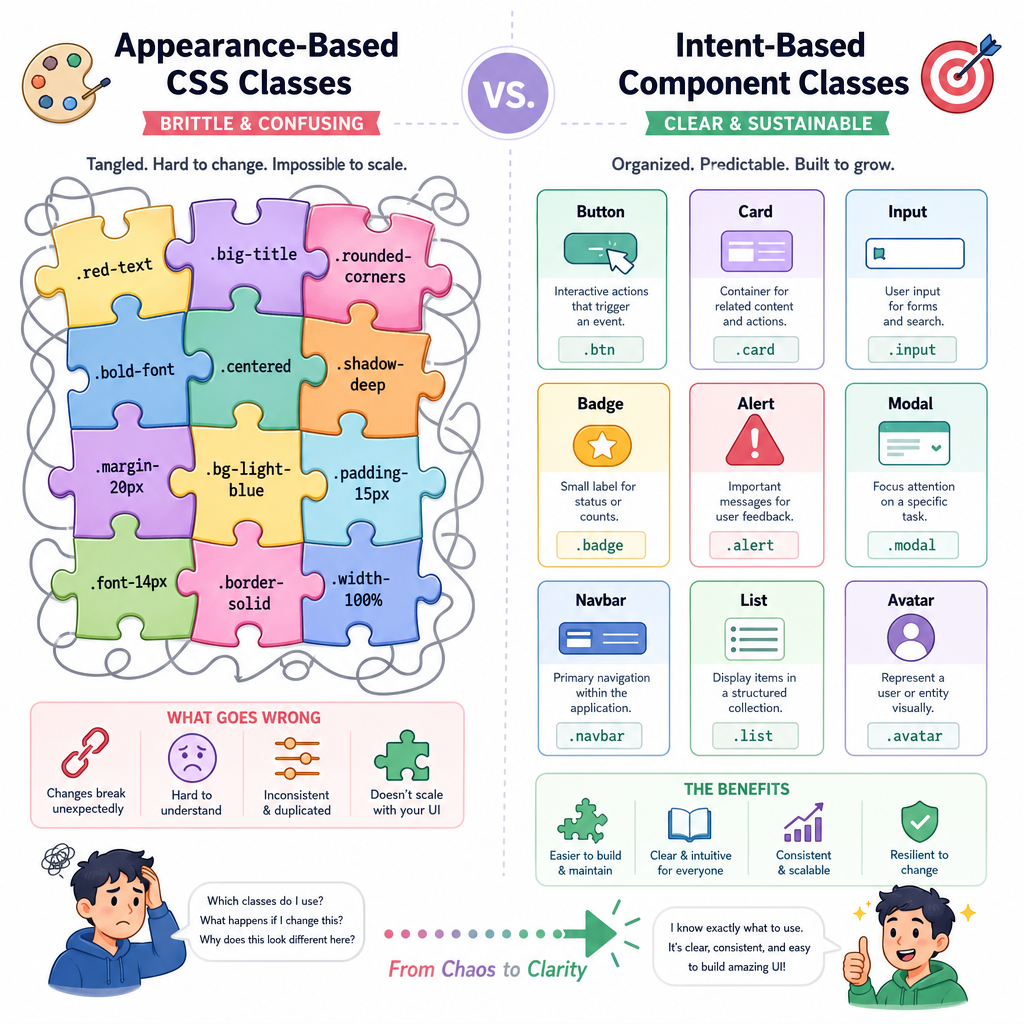
Classes should describe roles, not accidents
A maintainable CSS class names the role an element plays in the interface.
Prefer:
.profile-card.nav-link.button-primary.form-error
Be cautious with names like:
.red-text.big-box.left-thing
Those names describe current appearance, not purpose. The moment the design changes, the name lies.
This matters more as codebases grow. Staff-level frontend work often involves creating systems where many engineers can safely add UI without triggering cascade puzzles.
Debug Like Detective
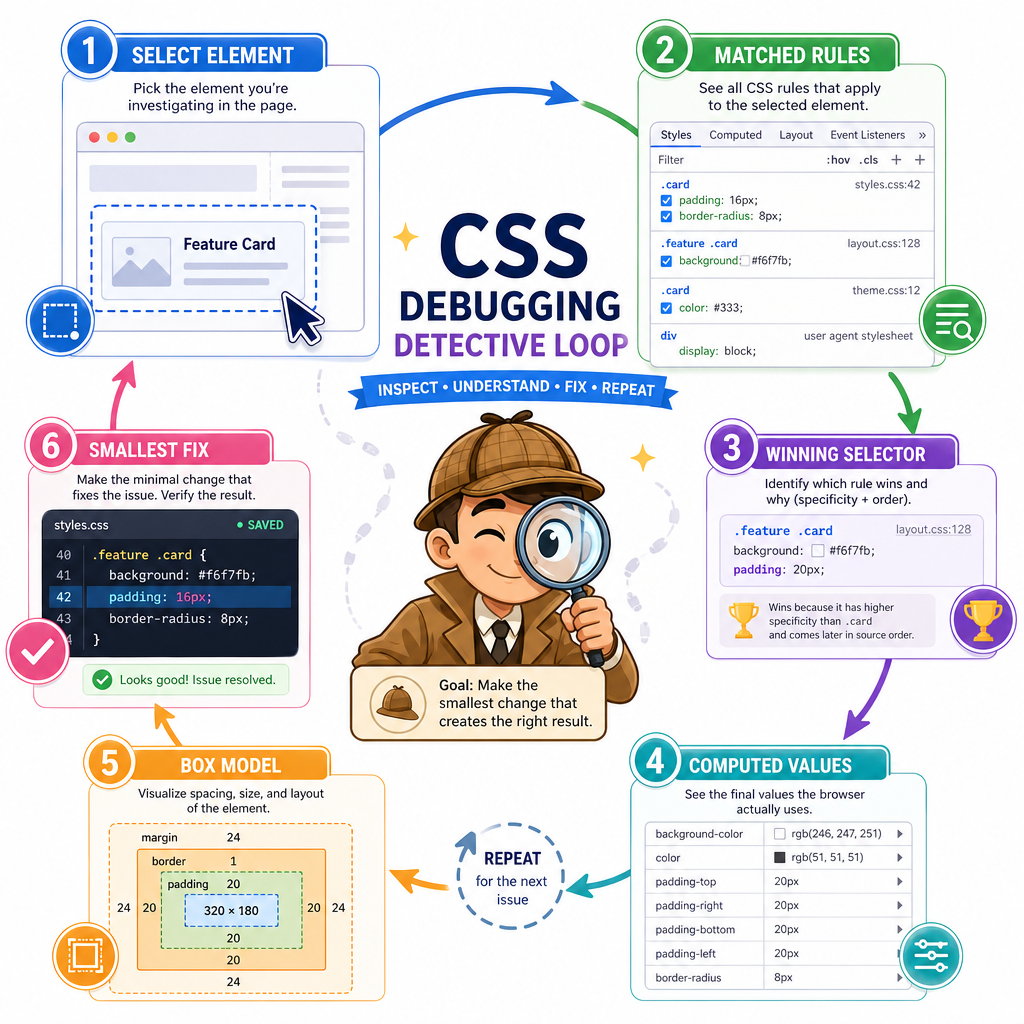
A CSS debugging loop
When a style does not look right, avoid random property tweaking. Use a repeatable loop:
- Select the element in DevTools
- Check matched rules and crossed-out declarations
- Identify the winning selector for the property
- Inspect computed values for final browser-resolved output
- Confirm the box model: content, padding, border, margin
- Make the smallest rule change that expresses the intent
This is the CSS version of the data-to-markup discipline from AJAX and Fetch API: observe the actual system state, then change the correct layer.
Next, we will use these fundamentals to reason about one-dimensional layout with CSS Flexbox.