Getting to Know Promises, Async, and Await in JS
Read at your own pace. Code execution, quizzes, progress tracking, and the AI tutor are available in the interactive view with JavaScript enabled.
Introduction
If you have dabbled in web development before, there is a high chance that you have worked with what's known as asynchronous operations. These are programmatic operations that don’t block the flow of execution, and allow users to continue using a website while the response is being fetched.
According to the Node.js docs, blocking "is when the execution of additional JavaScript in the Node.js process must wait until a non-JavaScript operation completes. This happens because the event loop is unable to continue running JavaScript while a blocking operation is occurring."
People have started hating on JavaScript because they don’t have a good understanding of these three concepts! But with our visual guide, you will be able to master these and start working with them today.
Synchronous vs Asynchronous
Synchronous vs Asynchronous
Synchronous execution is plain and straightforward. Let’s say you have three lines of code, Lines 1, 2, and 3. Line 2 gets executed only after Line 1 has finished execution. Line 3 after Line 2, and so on.
console.log("Hi"); // line 1
console.log("I am"); // line 2
console.log("John"); // line 3
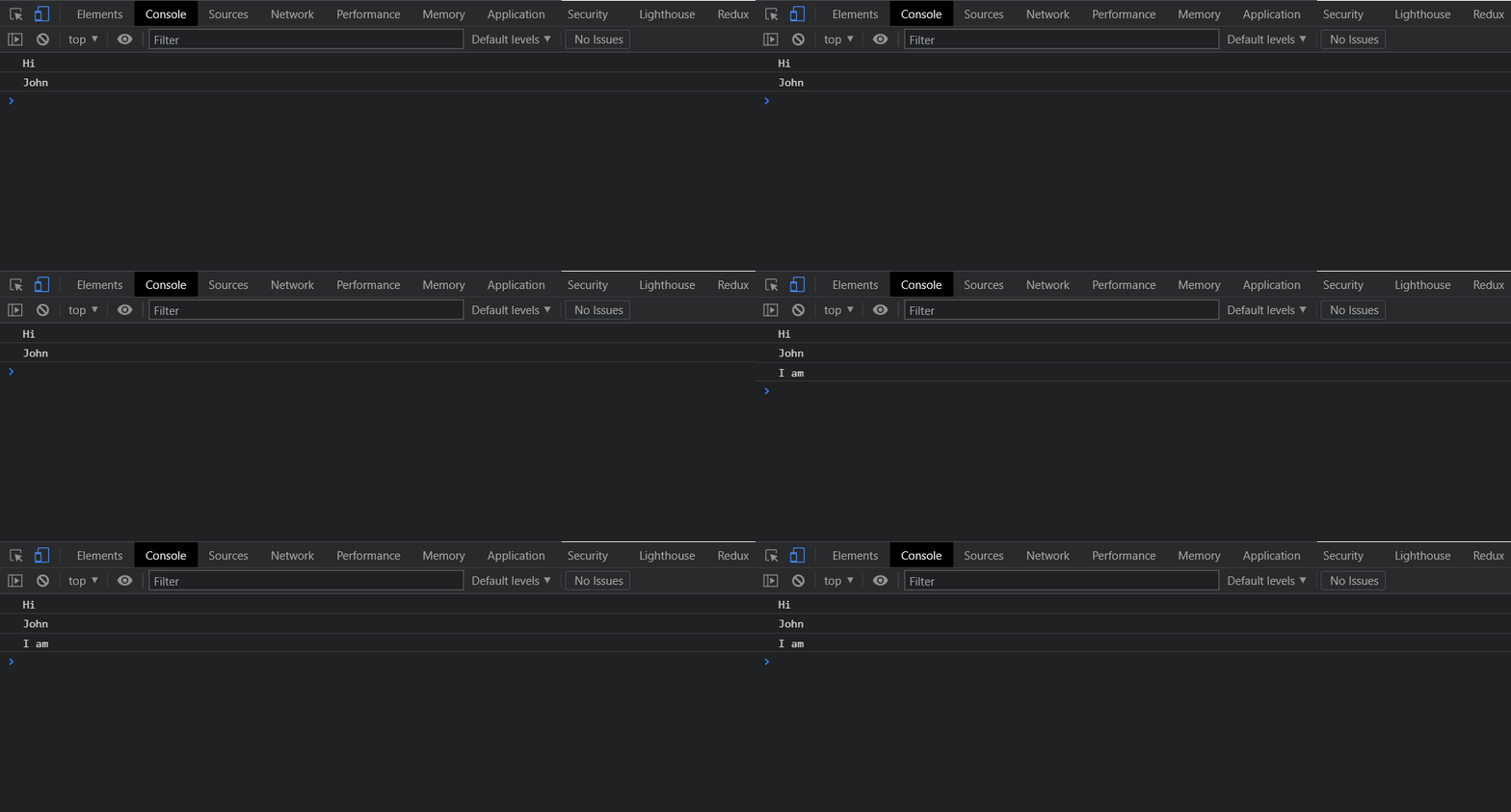
Async (which literally means "out of sync") happens differently. Let us take the same example of having three lines of code, but Line 2 takes more time to execute. In the asynchronous case, do Lines 1 and 3 wait for it to complete? No, they don’t. Lines 1 and 3 finish execution and the result of Line 2 is returned later, when available.
This can be easily exhibited using the setTimeout() method in JavaScript. This is often used to demonstrate synchronous and asynchronous code execution. Don’t worry if you don’t understand the syntax, we will explain it step by step.
Lines 1 and 3 have a simple console.log() statement. The setTimeout() function takes a callback as an argument and the next parameter that you see is the delay in milliseconds. Once the delay is completed, the callback (which is a function) is executed.
```javascript
console.log("Hi");
setTimeout(() => {
    console.log("I am");
}, 2000)
console.log("John");
```
Callback Hell
Callback Hell
"Callback hell" is state that code gets in. It's a problem created due to multiple nested callbacks. It is a very common anti-pattern in JavaScript, so let us take a closer look.
Imagine you are starting to build an application. The logic seems simple enough and you implement it using a few callbacks.
As you can see, with just three callbacks, the pyramid of doom (or the callback hell) is starting to take shape.
What if your application grows and the logic gets more and more complex? There is a high chance that the nesting from above can grow even further. In that case, it is safe to say that you're in callback hell.
getSomething(function(x){
    getSomethingElse(x, function(y){
        getMoreOfSomethingElse(y, function(z){
        });
    });
});
Fill In 1
Promises solve the problem of _______________
Promises
Promises
You now know what callback hell is and what it looks like. But how do you solve it? For that, we have promises in JavaScript. They were introduced in ES6 and can be a confusing topic for many. Let’s try and understand the syntax for Promises, how its internals work, and how we can use them to solve callback hell.
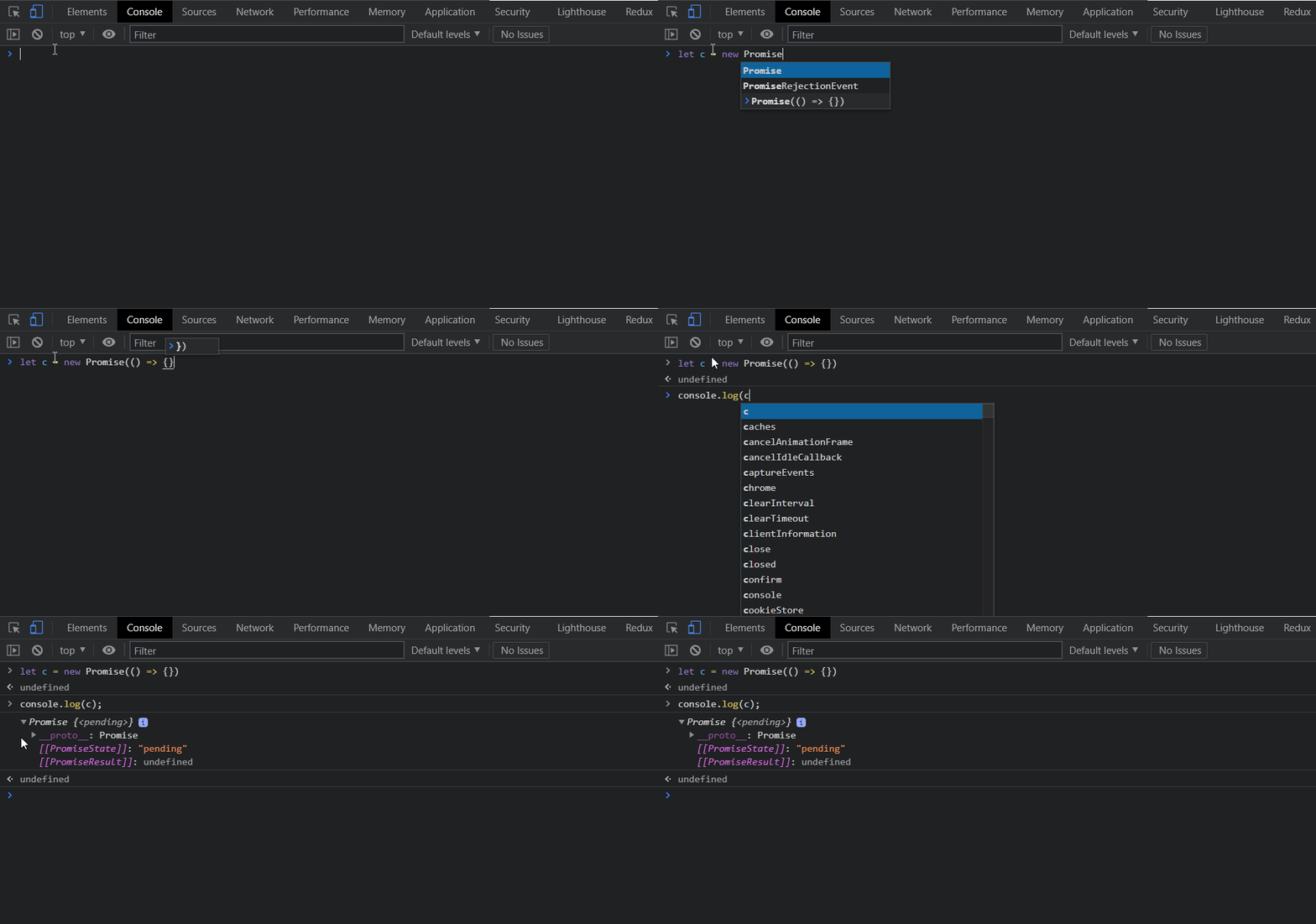
A promise object has two attributes, a status, and a value. As you can see above, when we create a new Promise, the status is pending and the value is undefined.
The status can take one of three values; fulfilled, rejected, and pending. As their names suggest:
- fulfilled is when the promise has been resolved
- rejected is when it gets rejected, and..
- pending is when it has been neither resolved nor rejected.
In an actual scenario, we pass in two callbacks to the Promise constructor, known as resolve (or res) and reject (or rej). These two methods are used when the promise needs to be resolved or rejected. The argument passed to the resolve method is the value associated with it and the argument for the rejected method is the value associated with it.
```js
function hello(){
    return new Promise((resolve, reject) => {
        // resolve() or reject()
    });
}
```
Promises Continued
The output of this next bit of code will be Promise { ‘Hello’ }. Even though we are returning a string it is wrapped in a promise. How do we access this data from the promise?
There are three methods that are attached to a promise, they are .then(), .catch() and .finally(). They are used to access the data from the promise. The first method is called after a promise is resolved, the second one is called if a promise is rejected and the last one always gets called (used for closing connections, clean-up, etc). Let’s wrap all of this into a nice little example.
javascript
hello().then(value => console.log(value));
This will give the output as Hello. In the same way, if we encounter an error, the output can be retrieved by using the .catch() method.
```javascript
function hello(){
    return new Promise((resolve, reject) => {
        try{
            resolve("Hello")
        }
        catch(error){
            reject("Boo! You have a " + error)
        }
    });
}
console.log(hello());
```
Fill In 2
The two methods associated with a promise to retrieve its data are ____ and _____ ?
Async/Await
Async/Await
For management of asynchronous operations, we have Promises-- so everything should be good, right?
There must be a better way to write Promises from what we saw above. The syntax still requires reasoning about multiple states of resolution, and requires effort to understand if there are many Promises being generated. Is there something better?
That is where async/await comes in. This is a special syntax (really just a nicer interface to Promises) that allows us to handle them in a much easier manner. To use async, you simply need to prefix the keyword before any function and it will return a promise. Even the other values within that function will be wrapped inside the promise. This allows us to refrain from using the Promise keyword by ourselves, since it's done automatically behind the scenes.
async function hello(){
    try{
        return("Hello")
    }
    catch(error){
        return("Boo! You have a " + error)
    }
}
hello().then(value => console.log(value));
Remember the hello() method we wrote earlier? Look how easy to read it has become just by using the async keyword.
Await is another keyword that is used in conjunction with async. Like the literal meaning of await, this keyword allows us to suspend an asynchronous function. It works only inside an async function because, at the end of the day, it is suspending an async function.
```javascript
async function hello() {
    return greeting = await new Promise((resolve, reject) => {
        setTimeout(() => resolve("Hello"), 1000)
    });
};
console.log("Before execution");
hello().then((value) => console.log(value));
console.log("After execution");
```
Async/Await Continued
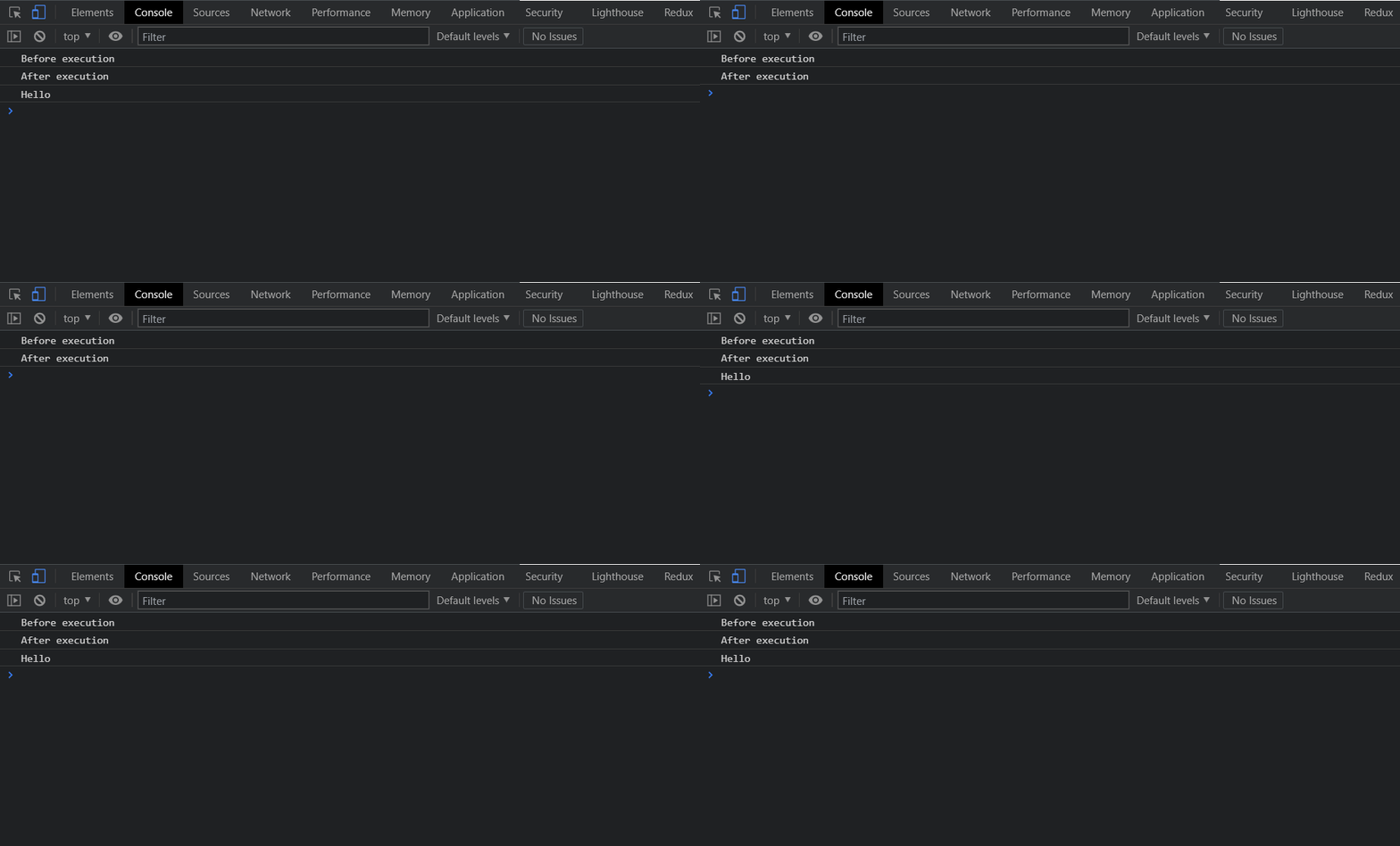
As you can see below, the first console log statement gets printed. After that, the async function gets suspended, as the variable greeting is waiting to be resolved.
But during this time, the other statements ("in the global context", or to put in layman terms, outside the function) get executed. Thus, we see the next console log statement printed.
Finally, once the promise is resolved we see the Hello also printed.
That’s it for this one! We hope you've enjoyed learning about a critical advanced topic in JavaScript.
Before you leave, try answering the following questions to see if you have understood everything correctly.
Multiple Choice 1
What does the await keyword do to an async function?
Multiple Choice 2
What is the output of the following code?
async function hello(){
    try{
        abc
        return("Hello")
    }
    catch(error){
        return("Boo! You have a " + error)
    }
}
hello().then(value => console.log(value)).catch(error => console.log(error));
One Pager Cheat Sheet
One Pager Cheat Sheet
- If you understand the differences between
blockingandnon-blockingoperations and how they relate toasynchronousoperations in web development, you can easily master working with these concepts. - In asynchronous execution, lines of code don't have to wait for each other to complete before being executed, as demonstrated using the
setTimeout()method. - Despite being a common anti-pattern in JavaScript,
Callback Hellcan be avoided by taking a closer look at our code to prevent the pyramid of doom from growing. - Promises
solve the problem of callback hellby providing a simpler syntax to chain asynchronous operations and better error handling. - You can create and use a
Promiseduring asynchronous programming to represent a state that can be eitherfulfilled,rejected, orpending. - The output of a
Promisecan be accessed using three methods:.then(),.catch()and.finally(),.then()being used to access a successful response and.catch()used to access an error response. - The two key methods for retrieving the value from a
Promiseare.then()and.catch(), which are used to get a value or an error respectively. - With async/await, we have a simpler approach to writing
Promises, allowing us to suspend the resolution of an asynchronous function explicitly, without needing to reason about multiple states. - The
async/awaitconcept allowspromisesto be suspended while the code outside the function continues to execute, finally providing the expected output once the promise is resolved. - By using the
awaitkeyword, execution of anasync functionis suspended until itsPromiseresults in aresolved value. - Asynchronous function
hello()does not contain anawaitkeyword, and the code willthrow a ReferenceErrorthat will be caught within thetry...catchblock, returning the value"Boo! You have a ReferenceError: abc is not defined", and logged out to the console through the.catch()method.