Advanced Javascript Interview Questions
Read at your own pace. Code execution, quizzes, progress tracking, and the AI tutor are available in the interactive view with JavaScript enabled.
Introduction
Setting the Stage for Advanced JavaScript Mastery
JavaScript isn't just another language; it's the lifeblood of modern web development. With the rise of web development stacks like MERN (MongoDB, Express, React, Node.js), MEAN (MongoDB, Express, Angular, Node.js), and MEVN (MongoDB, Express, Vue.js, Node.js), mastering JavaScript becomes indispensable for any aspiring or seasoned web developer.
Why JavaScript Matters
If you're aiming for a senior web developer position, expect to face questions that dig deep into the intricacies of JavaScript. The language isn't just for basic client-side scripts; it's a versatile tool capable of powering front-end frameworks, back-end servers, and even databases.
What You'll Gain from This Guide
In the following sections, imagine yourself traversing the vast landscape of JavaScript's advanced features. This guide is your roadmap, pinpointing areas you should focus on to deepen your understanding and skill set.

Variable Hoisting Task1
#1 - Variable Hoisting
What will be the output of this code?
console.log('name is ', name);

var name;

console.log('name is ', name);

name = "Susan";

console.log('name is ', name);
Variable Hoisting Introduction
Decoding the Enigma of Hoisting
The Concept of Hoisting
Hoisting is a feature in JavaScript that often perplexes newcomers. Simply put, hoisting allows variables and function declarations to be moved to the top of their containing scope during the compilation phase. This makes these variables and functions accessible even before the code executes.
The Inner Workings of the JavaScript Engine
The JavaScript engine performs a "pre-scan" of the code and hoists—or moves up—the declarations. This is why you can access variables even before they appear to be initialized.
console.log(myVar); // Output: undefined
var myVar = 10;
Understanding undefined
When a variable is hoisted, JavaScript automatically assigns it an initial value of undefined. It remains undefined until it's explicitly initialized.
var name;
console.log(name); // Output: undefined
name = "Alice";
console.log(name); // Output: Alice
The Catch
While hoisting allows you to use variables before their declarations, it doesn't mean they'll have the values you expect. As seen in the example above, hoisted variables start off as undefined.
```js
console.log('name is ', name); // Undefined

var name = "Susan";

console.log('name is ', name); // Susan

```
Closures
#2 - Closures

Closures - Task1
What will be the output of this code?
var a = 10;

function outerFunc(a) {
  function inner() {
    var b = 20;
    console.log(a + b);
  }

  return inner;
}

var func = outerFunc(a);

a = 30;

func();
Closure Introduction
Demystifying Closures: The Power of Scope Chaining
What is a Closure?
A closure in JavaScript is like a function with a backpack. Inside that backpack are all the variables from the outer function that the inner function may need. In layman's terms, a closure is a function (inner function) bundled with its surrounding state (outer function), allowing the inner function to access variables from an external scope.
How Does It Work?
The crux of closures lies in JavaScript's scope chaining. When a function is defined inside another function, it forms a lexical scope. This lexical scope allows the inner function to access variables from its surrounding or outer scopes.
function outerFunction(outerVariable) {
  return function innerFunction(innerVariable) {
    console.log(`Outer Variable: ${outerVariable}`);
    console.log(`Inner Variable: ${innerVariable}`);
  }
}

const closureInstance = outerFunction('outer'); // outerFunction has returned
closureInstance('inner'); // Still can access 'outerVariable'
The Magic: Persisting State
What's magical about closures is that they remember the environment in which they were created. Even if the outer function has finished executing and its variables are out of scope, the inner function still retains access to them.
Scope Chaining in Action
The ability for closures to access variables from outer scopes even after those scopes have exited is possible due to JavaScript's scope chaining mechanism.
function countdown(start) {
  let counter = start;
  return function () {
    console.log(counter);
    counter--;
  };
}

const countFromFive = countdown(5);
countFromFive(); // Output: 5
countFromFive(); // Output: 4
```js
// Outer function
function adder(a) {
  // Inner function/Closure
  function add(b) {
    console.log(a + b);
  }

  return add;
}

var add5 = adder(5);
var add10 = adder(10);

add5(10); //15
add10(10); //20

```
Promises Task1
Javascript promise is defined as
Promise Introduction
#3 - Promises

Javascript promise is an object that acts as a proxy for an asynchronous function that is supposed to complete at some point. Promise supports the non-blocking asynchronous operations in javascript. So, with promises, the code doesn’t block, and the promise eventually returns a value.
A promise may exist in any of the three states. - Pending: Initial state; neither fulfilled nor rejected - Fulfilled: When the operation completes successfully - Rejected: When the operation fails
Source
https://developer.mozilla.org/en-US/docs/Web/JavaScript/Reference/Global_Objects/Promise\
```js
const IPromise = new Promise((resolve,reject)=>{
    setTimeout(()=>{
        resolve("Hello");
    },300);
});

//Output : Hello World
IPromise
.then(value=>{return value + " World"})
.then(value=>{console.log(value)})
.catch(err => {console.log(err)});
```
Destructuring Task1
Destructuring in javascript extracts array’s values and object’s properties into variables.
const myObj  =
{
    name: "Harvey",
    age: 50
}

//Destructuring
const {name,age} = myObj;

console.log(name); //Harvey
console.log(age);  //50
Destructuring Introduction
#4 - Destructuring
The destructuring syntax allows you to extract an array’s elements or an object’s properties into distinct variables. This syntax is commonly used in real world applications where only a subset of values or properties is needed. One important keyword related to destructuring is the rest keyword. Check out the example below to understand the rest keyword in restructuring.
```js

const arr = [1,2,3,4,5,6,7,8,9,10];

const [a,b,c,...rest] = arr;

console.log(a); //1
console.log(b); //2
console.log(c); //3
console.log(rest); //[4,5,6,7,8,9,10]

```
Array methods: map, filter, and reduce Introduction
#5 Array methods: map, filter, and reduce
Arrays have a diverse set of methods. The three most useful one-liner functions are map, filter, and reduce. They are powerful because they get a callback function as an argument and apply it to all the array’s values. These functions transform the array in the most convenient method, without using any explicit loops. Thus, these functions help you write short and clean code.
Map Task1
What will be the output of this code?
const arr = [1,2,3,4,5,6,7,8,9,10];

const mapped_arr = arr.map((e)=>e+10);

console.log(mapped_arr);
Map Introduction
Mastering the JavaScript Map Function
What is the map Function?
The map function in JavaScript is like a factory line for arrays. Imagine an assembly line where each item (array element) goes through a transformation (callback function) and comes out as a new, refined product (new array element). The map function processes each element in the original array and returns a brand new array containing these transformed elements.
The Basic Syntax
The map function takes a callback function as an argument, and this callback function is applied to each element of the array.
const numbers = [1, 2, 3, 4];
const squaredNumbers = numbers.map(function(element) {
  return element * element;
});
console.log(squaredNumbers); // Output: [1, 4, 9, 16]
How It Works
-
Looping Through Elements:
mapgoes through each element in the original array. - Applying the Callback: The provided callback function is called with the current element as its argument.
- Collecting Results: A new array is created with the results of the callback function.
Why Use map?
-
Immutability:
mapdoes not modify the original array; it creates a new one, adhering to the principles of immutability. -
Chainable: You can chain other array methods like
filterorreducewithmapfor more complex operations. -
Readability: Using
mapmakes the code more declarative, making it easier to understand at a glance.
Example: Capitalizing Strings
Let's say you have an array of names in lowercase, and you want to capitalize the first letter of each name.
const names = ['alice', 'bob', 'charlie'];
const capitalizedNames = names.map(name => name.charAt(0).toUpperCase() + name.slice(1));
console.log(capitalizedNames); // Output: ['Alice', 'Bob', 'Charlie']
Mastering the map function will not only make your code more efficient but also make you a more versatile JavaScript developer.
Map Keeps Shape
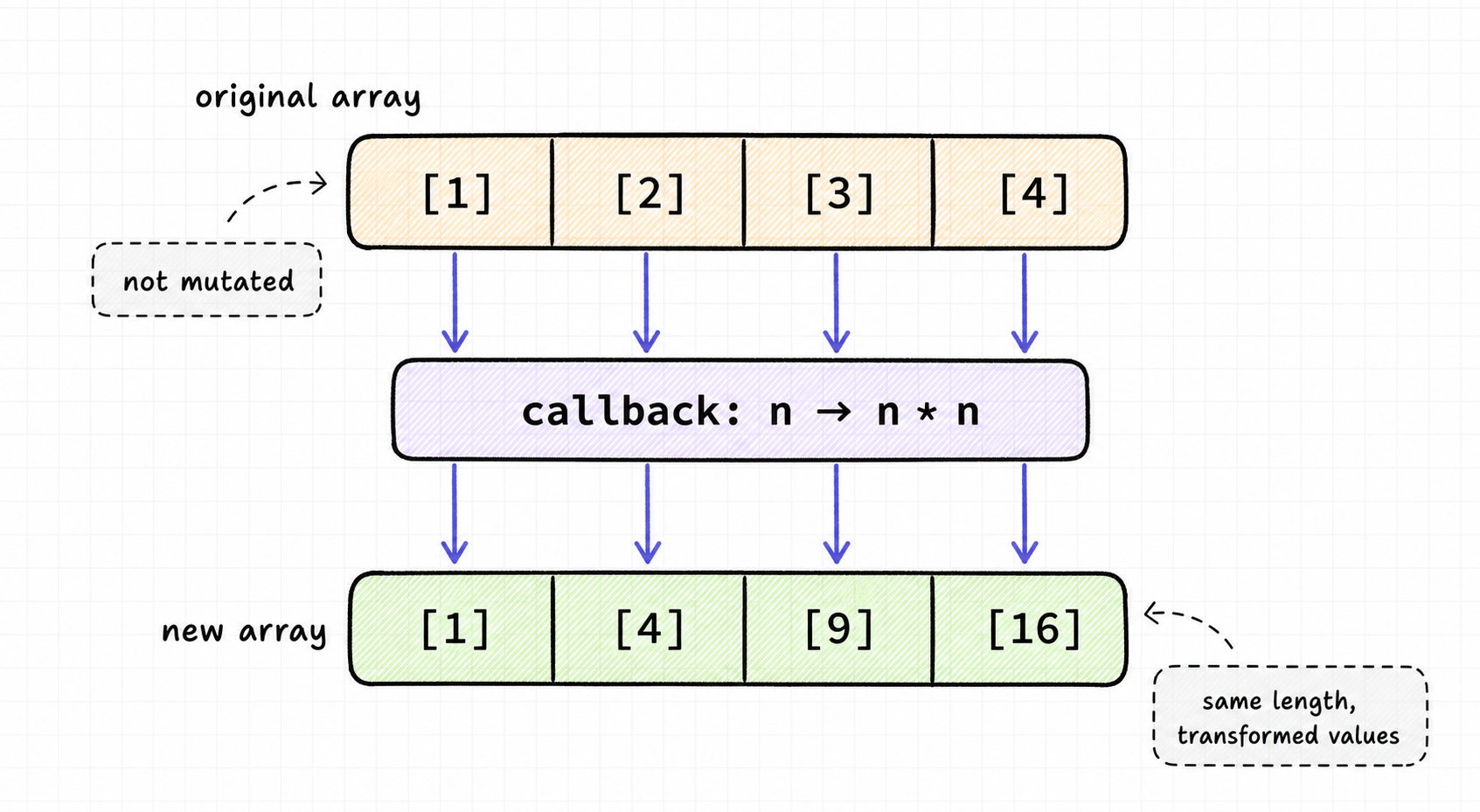
Before moving on, lock in the key mental model: map() transforms each element, but keeps the array shape the same.
Notice in the visual that every input slot has one matching output slot. The original array stays unchanged; the callback decides what value appears in the new array.
Array Shape Mental Model
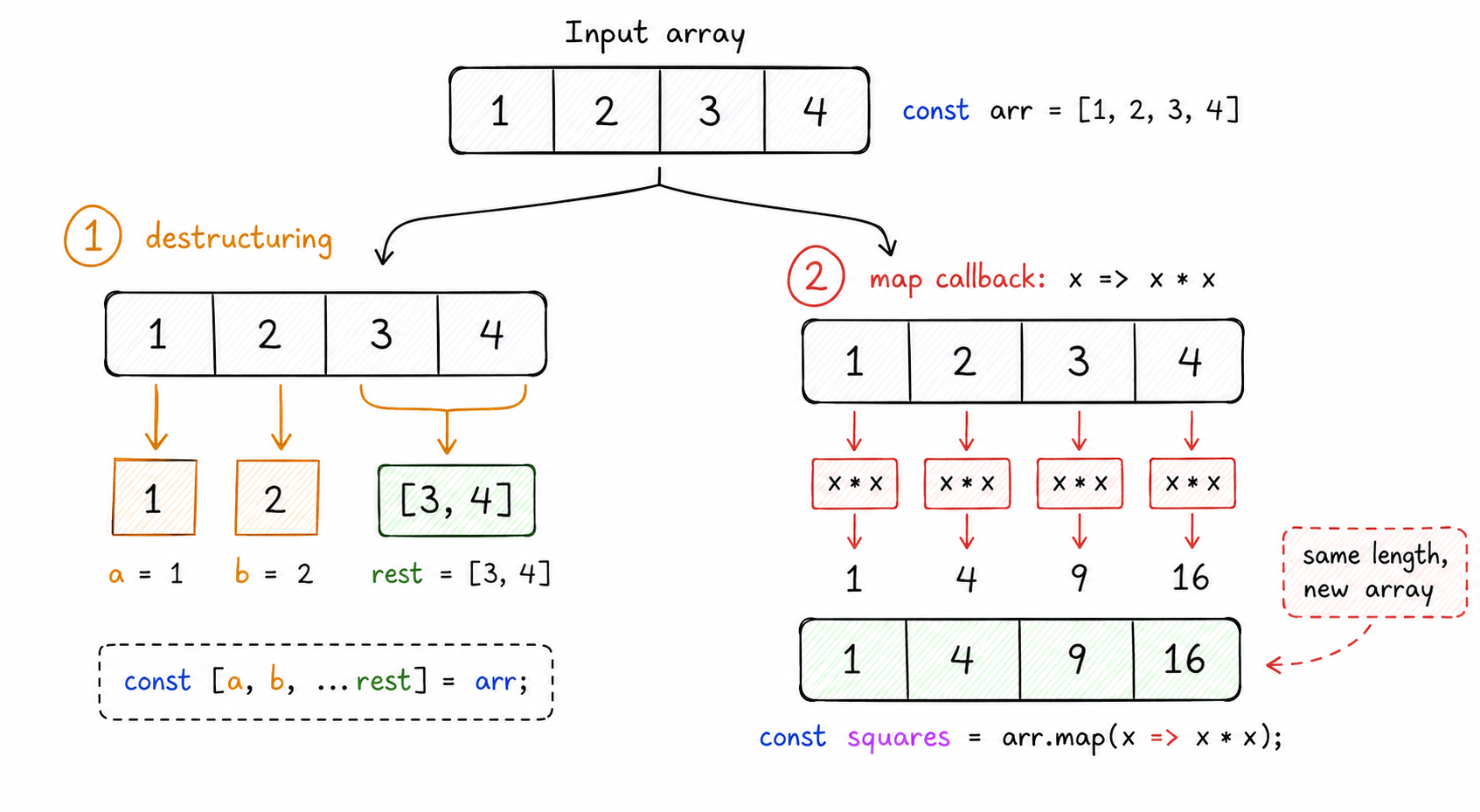
Before moving on, anchor the data-shape changes:
- Destructuring pulls values out into variables.
- map transforms every element and returns a new array of the same length.
- The original array stays unchanged unless you explicitly mutate it elsewhere.
In interviews, say both parts: what the callback does and what shape comes back.
Filter Task1
As the name suggests, Array filter filters array elements into a new array based on the condition specified in the callback function. Check out the code and try to understand what does the filter function does.
const arr = [1,2,3,4,5,6,7,8,9,10];

const filtered_arr = arr.filter((e)=>e%2 == 0);

console.log(filtered_arr);
Filter Introduction
Understanding the filter Function: Curating Arrays with Precision
What is the filter Function?
Think of JavaScript's filter function as a meticulous curator for your arrays. Imagine you have a collection of artworks, and you only want to display those that meet certain criteria—say, paintings from the Renaissance period. The filter function works similarly; it sifts through an array and returns a new array containing only the elements that meet a specific condition.
The Basic Syntax
The filter function takes a callback function as its argument. This callback function must return either true or false, determining whether the element should be included in the new array or not.
const numbers = [1, 2, 3, 4, 5];
const evenNumbers = numbers.filter(function(element) {
  return element % 2 === 0;
});
console.log(evenNumbers); // Output: [2, 4]
How It Operates
-
Iterating Over Elements:
filterloops through each element in the array. - Evaluating the Callback: For each element, the callback function is invoked.
-
Making the Cut: If the callback function returns
true, the element is included in the new array.
Why Choose filter?
-
Non-Destructive: Like
map,filterdoes not alter the original array; it returns a new one. -
Composable: You can chain
filterwith other array methods likemapandreduce. -
Clarity: Using
filtermakes your intentions clear, simplifying code readability.
Example: Filtering Out Negative Numbers
Suppose you have an array of numbers, and you want to create a new array containing only the positive numbers.
const numbers = [0, -1, 2, -3, 4, 5];
const positiveNumbers = numbers.filter(num => num > 0);
console.log(positiveNumbers); // Output: [2, 4, 5]
Reduce Task1
The reduce function applies the callback function on every element passing in the return value of preceding calculations. Check out the code and guess the output.
const arr = [1,2,3,4,5,6,7,8,9,10];

const reduced_arr = arr.reduce((prev,next)=> prev+next);

console.log(reduced_arr);
Reduce Accumulator Trace
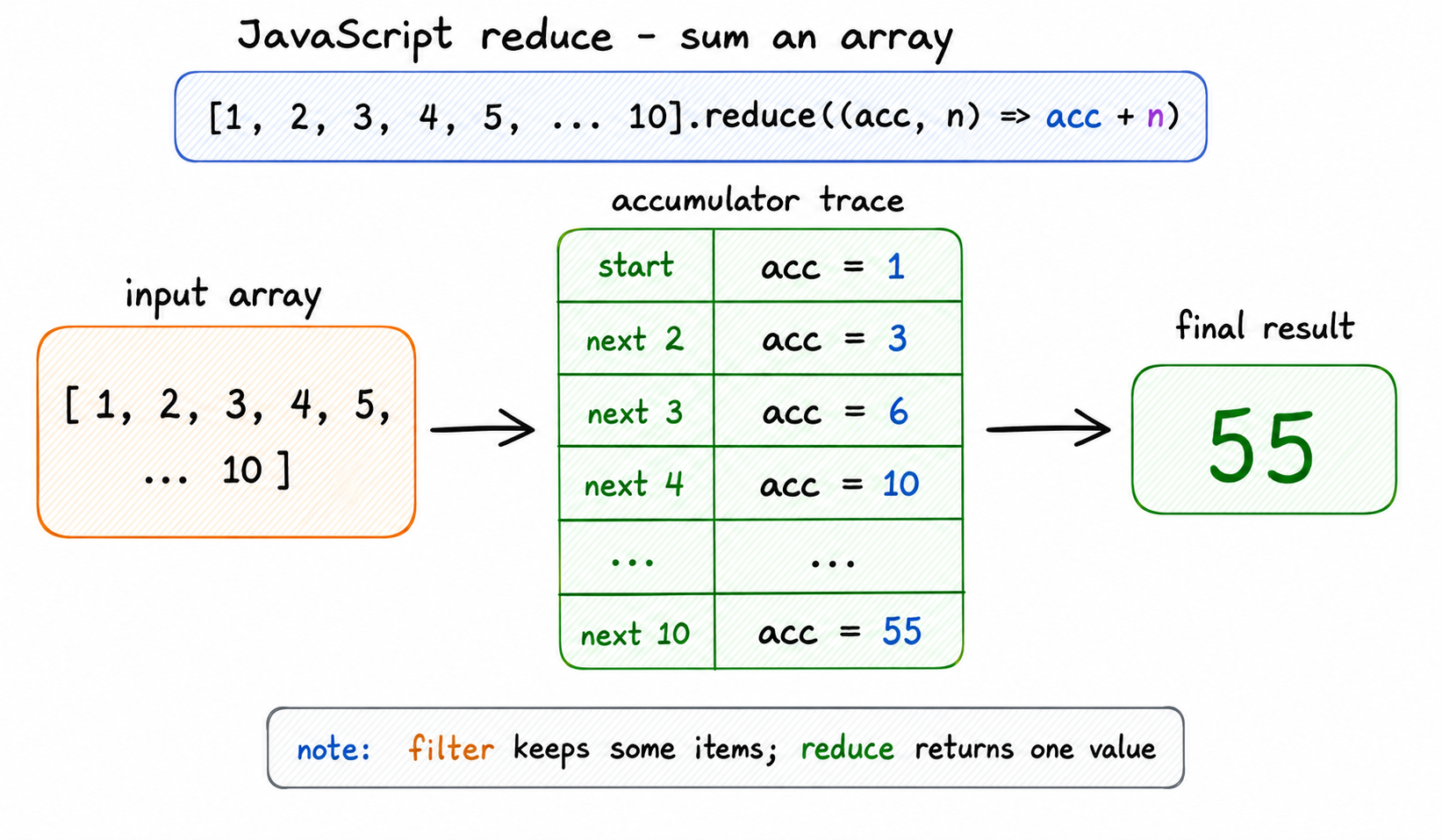
reduce() is easiest to understand as a running calculation.
For the sum example, the accumulator starts with the first value when no explicit initial value is provided. Each next element updates that accumulator until one final result remains.
Filter Versus Reduce
filter and reduce both visit each element, but they answer different questions:
- filter: “Should this item stay?” → returns a smaller or equal-sized array.
- reduce: “How does this item update the running result?” → returns one accumulated value.
For reduce questions, trace the accumulator step by step instead of trying to guess the final result.

Reduce Introduction
Reduce
The reducer function applies a callback or a reducer function as defined by the user. The callback function accepts two arguments. The first argument is for storing the return value of a preceding operation, while the second argument refers to the current value that the function refers to in the array.
IIFE
#6 IIFE

IIFE Task1
IIFE stands for “Immediately Invoked Function Expression.”
IIFE Introduction
Immediately Invoked Function Expression or IIFE is a self-executing javascript anonymous function. This function runs as soon as it is declared rather than waiting for being invoked after declaration. AN IIFE has two parts: - 1. An anonymous function declaration is enclosed in a grouping operator () - 2. A () immediately after the declaration to call the function.
//An IIFE
(function greet()
{
    console.log("Hello World");
})();

//OUTPUT: Hello World
One Pager Cheat Sheet
One Pager Cheat Sheet
- Making JavaScript your friend is essential for any aspiring web developers, and the guide provided will help you assess your advanced knowledge in order to land the senior developer position.
- The output of this code will be Undefined Undefined Susan because of variable hoisting which causes
function declarationsandvariable declarationsto be moved to the top of the current scope, sonameis declared but not initialized when the code first executes. - Javascript
hoistingcan make variables and functions appeardeclaredbefore they are actually initialized, leading to confusion for beginners. - A
closureis a function that has access to the variables in its parent's scope, even after the parent has returned. - A
closureis used to keep a reference to the outer scope ofouterFunc(), preserving the value ofa(10) and allowingfunc()to log the result ofa+b(30). - A
closureallows an inner function to access variables in its outer function, even after the outer function has returned and its local variable have gone out of scope. - A Javascript Promise is an object serving as a
proxythat allows asynchronous operations to be handled in a synchronous manner, while representing the eventual result of the operation. -
Javascript promiseis an object that acts as a proxy for asynchronous functions and can exist in Pending, Fulfilled, or Rejected states. - Destructuring in JavaScript allows for easy extraction of values from an
objector anarrayand assignment of those values tovariables. - Using destructuring syntax with the
restkeyword allows you toextractan array's elements or object's properties into distinct variables in a real-world application. -
Themap,filter, andreducefunctions` enable developers to conveniently and quickly transform an array in a compact manner, without requiring explicit loops. - The
map()method calls a callback function to add 10 to each element of the arrayarr, resulting in a new array,mapped_arr, with values of [11 12 13 14 15 16 17 18 19 20]. - The
map()function in Javascriptloopsover an array and calls a callback on each element, returning a new array. - -
map()returns a new array with the same length, where each item is the callback result. - -
maptransforms each item and returns a new array with the same number of elements. - The
filter()method of the Array object returns a new array containing the elements for which the providedcallbackexpression returns atruthyresult. - Updated array is created with elements which satisfy the condition provided by
callbackfunction. - The
reducefunction applies a callback function (in this case,prev+next) to each item in the array, starting from an initial value (1), and returns a single value (55) which is the sum of every item in the array. - -
reduce()collapses many array values into one accumulated result. - -
filterkeeps matching items;reducefolds many items into one result. - The
reducerfunction uses a user-definedcallbackorreducerfunction to apply areturn valuefrom a previous operation to thecurrent valueof anarray. - An Immediately Invoked Function Expression (IIFE) is a
self-executinganonymous function wrapped in parentheses(). - An IIFE is used to
executean anonymous function immediately in order to keep variables and function declarations out of the global scope and avoid accidental interactions with other functions and variables. - A Immediately Invoked Function Expression (IIFE) is a self-executing anonymous function that is declared and called
instantlywith a grouping operator and()to indicate its invocation.