Java Interview Questions Cheat Sheet
Read at your own pace. Code execution, quizzes, progress tracking, and the AI tutor are available in the interactive view with JavaScript enabled.
Introduction
What is Java?
Java is an object-oriented programming language developed by James Gosling and his colleagues at Suns Microsystems in the early 1990s. Java was designed to be a programming language for highly efficient applications that emphasize reliability and reusability. The language itself borrows most of its syntax from C and C++ but has a simpler object model and fewer low-level facilities.
Since it is a well-structured, object-oriented language, Java code is relatively easy to maintain and modify. The only requirement is having JRE or Java Runtime Environment installed on the system. It runs on multiple platforms such as Windows, Mac, and Linux(irrespective of the operating system or architecture of the device).
According to The Java Language Environment, There were five main goals in mind in the creation of Java:
- It should allow the same program to be executed on multiple operating systems.
- It should be easy to use by selecting what was considered the good parts of other object-oriented languages
- It should follow the object-oriented programming methodology 4) It should be designed to run code from remote sources securely 5) It should contain built-in support for using computer networks
With that being said, Java is one of the most useful programming languages for any new developer to learn. Not only it is highly in-demand among employers and larger organizations but it is one of two primary programming languages used for Android development.
In contrast to languages such as Python or R, Java is one of the harder programming languages to pick up, especially if you're learning it for the first time. Java does a few things that make it tricky for example object-oriented structure is often unintuitive and syntax requirements can be rigid. However, learning Java is a masterclass in programming.
Data Types
Primitive Data Types
Let's start by diving into the primitive data types that Java offers.
The primitive data types include byte, short, int, long, float, double, boolean, and char. The primitive data type specifies the size and type of variable values.
byte
A Byte data type is used to save space in larger arrays in the place of integers. A byte is four times smaller than an integer. The default value of a byte is 0.
byte b = 90 ;
short
A short data type can be used to save memory similar to a byte data type. A short is two times smaller than an integer. The default value of a short is 0.
short s = 1200;
int
An integer is the conventionally used default data type for values unless there is a concern about memory. The default value of an integer is 0.
int var = 5;
long
A long is a type used when a wider range than an int is needed. The default value of a long is 0L.
long l = 1000l;
float
A float is mainly used to save memory in large data structures of floating point numbers or to represent a collection of floating point numbers. The default value of a float is 0.0f.
float f = 3.14f
boolean
A boolean data type is used for flags that examine true or false conditions. There are only two possible values: true and false. The default value is false.
boolean var = true;
double
A double is generally used as the default data type for decimal values. It can be used to represent both floating point and decimal numbers. The default value is 0.0d.
double d = 1000.2;
char
A char is used to store any character.
char ch= 'A';
Primitive Type Map
Before moving on, anchor the primitive types by what they are best at storing.
Notice the split: whole numbers, decimal numbers, single characters, and true/false flags. In interviews, most Java type questions are really about choosing the right bucket and remembering the default value.

Primitive Type Snapshot
Before memorizing each primitive, group them by the kind of value they store. In interviews, this helps you quickly reason about size, default values, and when Java will require an explicit suffix like L or f.
Notice the main pattern: whole-number types widen from byte to long, decimal types are usually double by default, and primitive instance variables receive defaults.
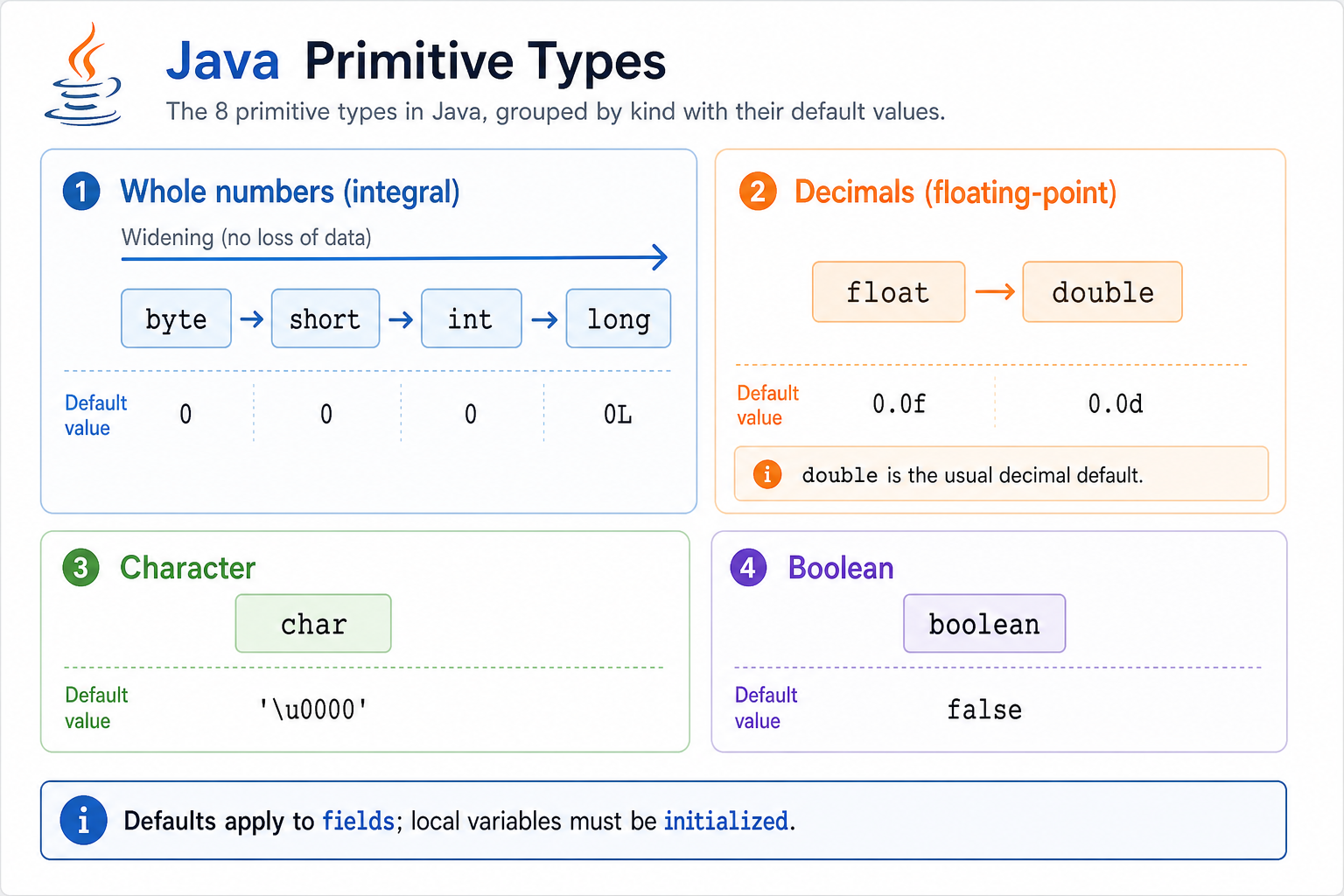
Primitive Defaults
In Java, what is the default value of an int instance variable?
Referential or Non Primitive types
Referential or Non Primitive types
The referential types include Strings, Classes, and Objects. They are called referential types because they refer to objects. Most of the time they are types created by the programmer and not defined by Java except for Strings. The default value of any referential type is null.
Employee employee = new Employee("David Johnson");

String str = "AlgoDaily";
Variable Scope
A local variable is declared inside a method. Where can that local variable be accessed?
Variables
Variables
A variable in Java is a name that is associated with a value that can be changed.
Variables in Java refers to the name of the reserved area in memory. The variable name is a reference to the value stored in memory.
There are 3 types of variables in Java:
- Local variables
- Instance variables
- Static variables
Local variables
Local variables are declared in a method within a class. The scope is limited to the method which means you can't their values and access them outside of the method.
In this example, the instance variable and local variable have the same name. If I had not declared the instance variable and only declared the local variable then the print statement would have thrown an error. Even if they have the same name, you cannot change and access local variables outside the method.
``` java
class Football {
    // instance variable
    public String player = "Lionel Messi";

    public void printName() {
        // local variable
        String player = "Cristiano Ronaldo";

        System.out.println("player");
    }

}

public class Main {
    public static void main(String[] args) {
        Football ball = new Football();

        ball.printName();

        System.out.println(ball.player);
    }

}
```
Instance Variables
Instance Variables
Instance variables are declared inside a class but outside a method, constructor, or block. Each instantiated object of a class has a separate copy of that variable. When you create a new object of a class you create an instance.
Let's look at this Vehicle Class. We have two instance variables vehicleName and numWheels.
public class Vehicle {

    private String vehicleName;

    private int numWheels;
}
If we were to create two Vehicle objects
Vehicle car = new Vehicle();
Vehicle van = new Vehicle();
Then each vehicle would have its own number of wheels and name. So the value stored inside vehicleName and numWheels would vary for different vehicles.
Static Variables
Static variables are also known as class variables because they are associated with the class. They are declared with the static keyword in a class but outside of a method, block or constructor. There would only be one copy of each static variable per class regardless of how many objects are created from it.
As you can see, the var variable above was declared with the keyword static and within class scope. The variable was accessed and modified by the exam and exam2 variables. Notice that once the value of the var variable was changed using exam2, both objects accessing the var variable now had the same value.
```java
class Example {
    public static String
    var = "This is your static variable";
}

public class Main {
    public static void main(String[] args) {
        Example exam = new Example();
        Example exam2 = new Example();

        //Both of these statements will display "This is your static variable"
        System.out.println(exam.var);
        System.out.println(exam2.var);

        //Change the value of static variable usong exam2 object
        exam2.var = " Changed static variable";

        //Both of these statements will display "Changed static variable"
        System.out.println(exam.var);
        System.out.println(exam2.var);
    }
}
```
Variable Scope Map
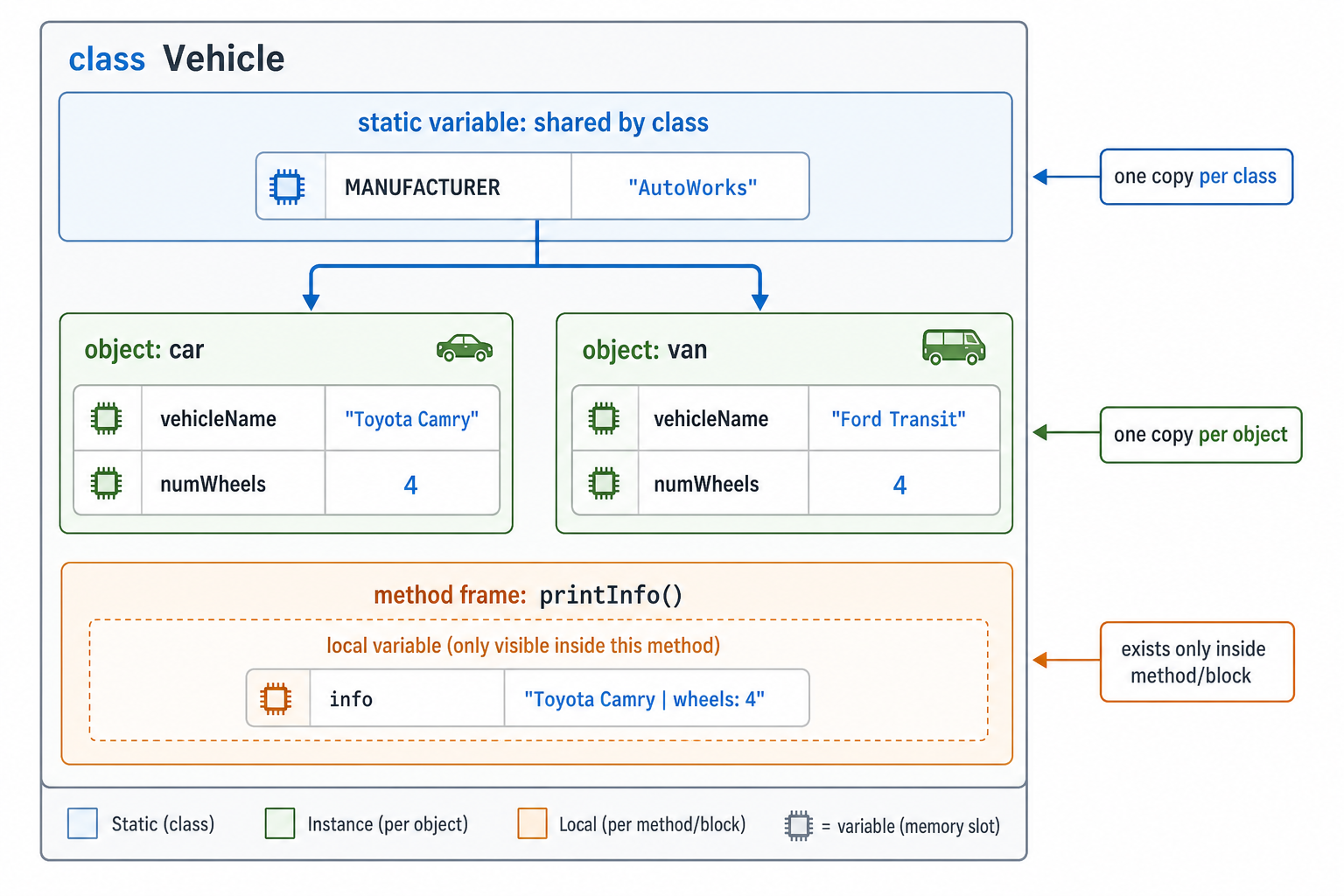
Keep this mental model in mind: where a variable is declared determines who owns it and how long it lives.
Local variables belong to one method call, instance variables belong to one object, and static variables belong to the class itself. This distinction explains most scope, default-value, and object-sharing questions.
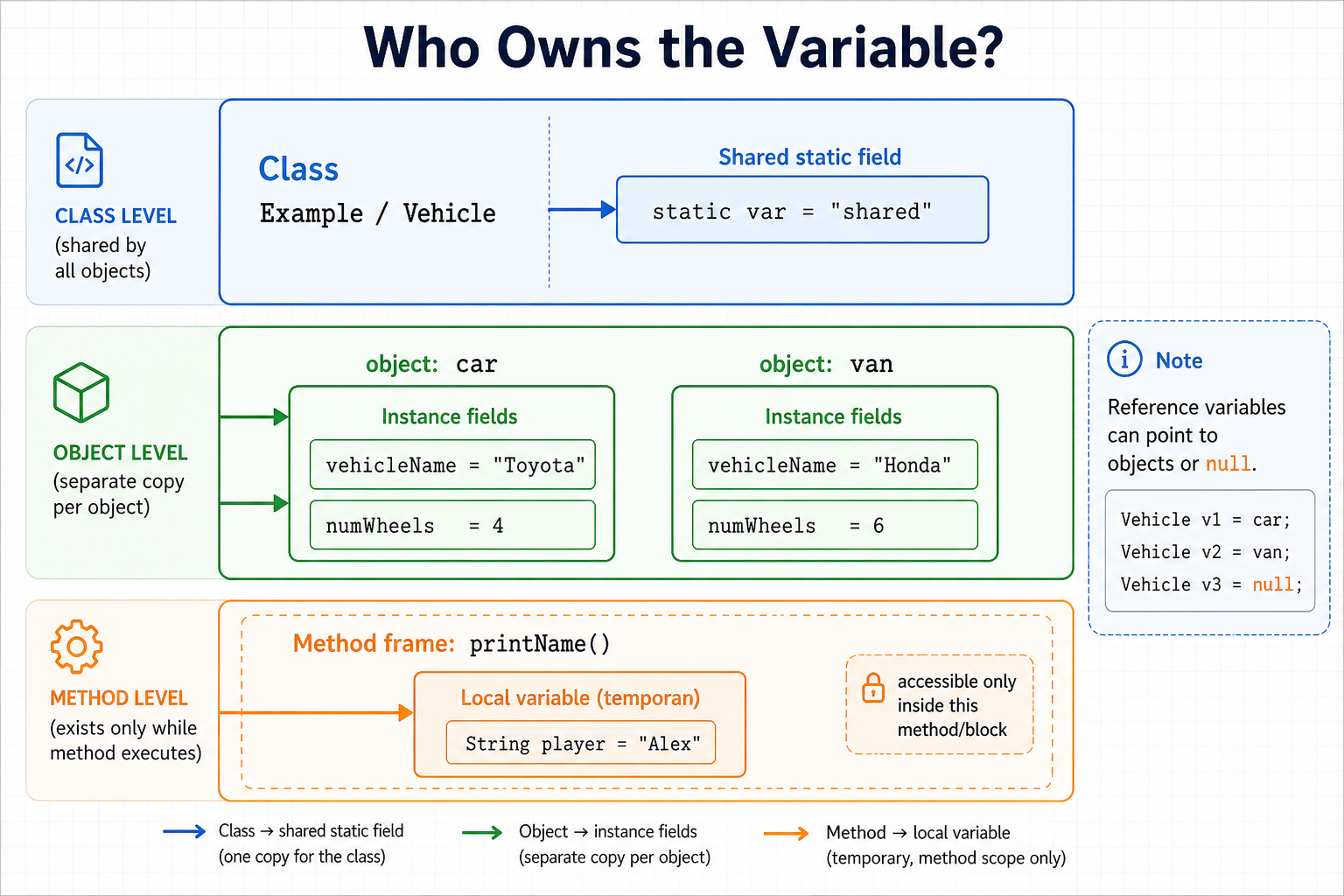
Variable Ownership Map
The easiest way to keep Java variables straight is to ask: who owns this value? A method owns local variables, each object owns its own instance variables, and the class owns static variables.
Use the visual as a quick scope check: if a variable is inside a method, it disappears outside that method; if it is an instance field, each object has a copy; if it is static, all objects share the same value.
Input
User Input
In Java, there are three ways to take in user input:
Using Scanner
import java.util.Scanner;

public class Example {

    public static void main(String[] args) {

        Scanner scan = new Scanner(System.in);

        //Reads a String value from the user
        String str = scan.nextLine();

        //Reads a double value from the user
        double db = scan.nextDouble();

        //Reads a boolean value from the user
        boolean bool = scan.nextBoolean();

        //Reads a float value from the user
        float fl = scan.nextFloat();
    }
}
Using the Console class
import java.io.Console;

public class Example {

    public static void main(String[] args) {

        Console c = System.console();

        System.out.println("What's your favorite language and why is it java?:");

        String n = c.readLine();

        System.out.println(n);


    }

}
Using the BufferedReader class
import java.io.BufferedReader;
import java.io.InputStreamReader;

public class Example {

    public static void main(String[] args) {

        InputStreamReader input = new InputStreamReader(System.in);

        BufferedReader bf = new BufferedReader(input);

        System.out.println("What is your name?");

        String name = bf.readLine();

        System.out.println(name);
    }


}
Basic Program
A Basic Program in Java
A basic program in Java will have at least the following components:
- Classes and Objects
- Variables
- Methods
```java
// Class
class Node {

    // Variables
    int data;
    Node next;

    // Method
    Node() {}

    // Method
    public Node(int data, Node next) {
        this.data = data;
        this.next = next;

    }
}

public class Main {

    public static void main(String[] args) {
        // Object
        Node node = new Node();
        System.out.println(node);
    }

}
```
Compilation
Compiling a Java program
In order to compile a Java program, you must save the program by using the name of the class and .java as the extension.

Then the compiler must be called using the javac command.
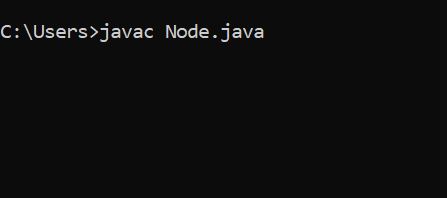
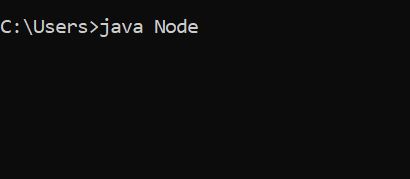
Then the java program is executed using java classname
Iteration
Iterative Statements
Iterative statements are used when you need to keep repeating statements until the condition for termination is not met. These types of statements are normally exhibited in:
1) for loops
For loops are used for definite loops where the number of iterations is known.
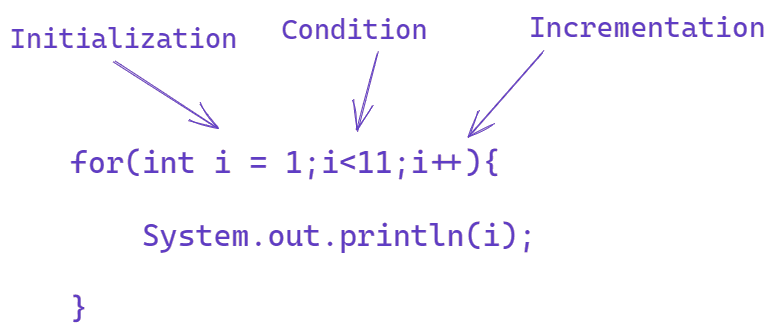
A for loop starts with an initialization followed by a condition and increment/decrement.
Consider a simple for loop that prints numbers from 1 to 10.
The FizzBuzz problem as explained on our AlgoDaily Youtube channel(https://youtu.be/giS2G3TCmWI) is a classic example of using for loops to solve a problem.
public class fizzbuzz {

    public static void main(String[] args) {
        for (int i = 1; i <= 100; i++) {

            if (i % 3 == 0 && i % 5 == 0) {

                System.out.println("FizzBuzz");
            } else if (i % 3 == 0) {

                System.out.println("Fizz");
            } else if (i % 5 == 0) {

                System.out.println("Buzz");

            } else {

                System.out.println(i);
            }

        }
    }
}
In this program, the statements are repeated until the conditions are met. The fizz buzz program details what numbers are divisible by 3, 5, and both 3 and 5. However, as aforementioned, see a more detailed explanation from the AlgoDaily youtube channel.
2) While loops
While loops are used when the number of iterations is not known.
In contrast to for loops, there is no built-in loop control variable.
public class Example {

    public static void main(String[] args) {
        int i = 0;

        while (i < 11) {

            System.out.println(i);
            i++;

        }

    }

}
The above example shows the condition specified within the loop. While the number i is less than 11 then the print statement is continuously executed. The i is used as a built in control variable.
3) Do while loops
- Do while loops follow a similar structure as while loops however the statement is executed first before evaluating the condition.
In the example attached, we are printing the value of the i and incrementing first. Then check the condition in the while looking to see if the number i is less than 11.
``` java
public class Example {

    public static void main(String[] args) {


        int i = 0;

        do {

            System.out.println(i);
            i++;


        }
        while (i < 11);
    }
}
```
Conditionals
Decisive Statements
These statements are used when you need to decide between alternative actions during the execution of a program. They allow you to control the flow of execution depending on the conditions known only during runtime
1) if statements
An if statement is the most simple decision making a statement in Java.
We can use this to decide whether a certain statement or block of statements will be executed or not.
Simply, if a condition is true then the block statement will be executed otherwise it is not.
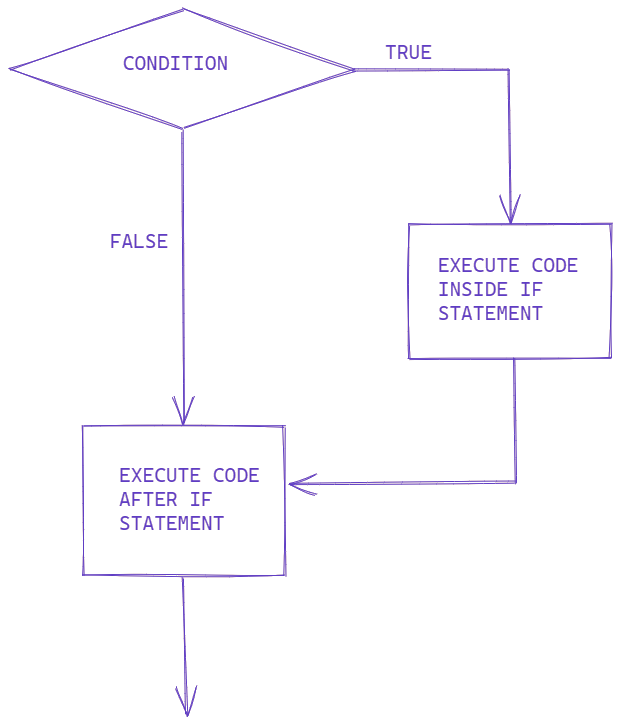
In the example below, we are checking to see the given grade is enough to pass.
public class Example {

    public static void main(String[] args) {
        int grade = 85;

        //condition
        if (grade > 50) {

            System.out.println("You have passed the final exam!");
        }

    }
}
The value of grade is 85. Since 85 is greater than 50, then the condition is true and we print the statement.
2) else/ if else/ statements
Combining an else and an if to make an else if statement creates a whole range of mutually exclusive possibilities.

In the example below, we are checking to see the age given is proper drinking age.
As you can see, the conditions in both the if and else if statements were false, so we automatically executed what is inside the else after checking.
```java
public class Main {

    public static void main(String[] args) {
        int age = 18;

        if (age > 21) {
            System.out.println("You are able to drink");
        } else if (age == 21) {
            System.out.println("Welcome to drinking age!");
        } else {
            System.out.println("Stick to apple juice");
        }

    }
}

```
String Comparison
Which method should usually be used to compare the actual text stored in two Java String objects?
Arrays
Arrays
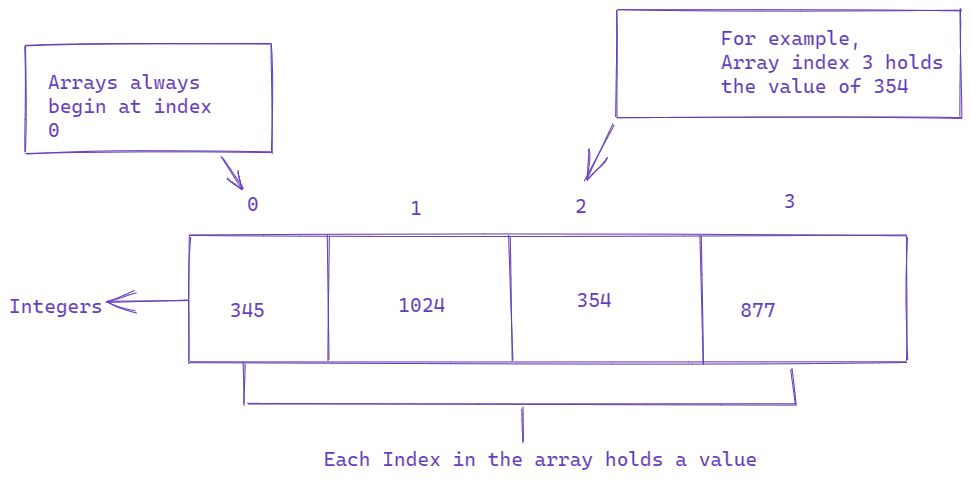
Arrays in Java are the most primitive way of aggregating elements of the same datatypes.
So how does an array work?
String [] lang = {"Java", "C++", "Python"};
Array types are signalized using the brackets []
and created using the curly brackets. Looking at the snippet, you can see that declaring and assigning values to an array in java is different from the way we do with single value variables.
The data type of the array,
Stringis declared followed by square brackets,[], which is the symbol for arrays in java that is used to represent an index in an array.This is followed by the name of the array,
lang.The assignment operator,
=.And finally the values to be stored in the array which is surrounded by a set of curly braces,
{"Java", "C++", "Python"};
We use curly braces to write out a series of related values to be stored in an array in java. However, curly braces are not the only way to store values in an array.
String [] lang = new String[5];

lang[0] = "Java";

lang[1] = "C++";

lang[2] = "Python";
Notice how on the right hand side, we used the keyword new. This keyword is used to create objects in java.
More about arrays
Arrays are very useful when you have a large number of variables and you have to initialize them.
Arrays index starting from 0 which means that if there n numbers present in the array then the index of the last element of the array is n-1.
The size of the array must be initialized by an int value.
Single Dimensional(1-D array)
A Single Dimensional array is a type of linear array in which elements are stored in a continuous row.
Single dimensional arrays have two components: data type of the array(int, char, float, etc) and name(int [] arr or int arr [].
The declaration establishes the variable arr is an array variable but no array actually exists. It simply tells the compiler that the arr variable will hold an array of type integer. To link arr to an actual physical array of integers, we would have to instantiate the array.
//Creating and Initializing an array of size 5

int [] arr; // array declaration

arr = new int [5]; //allocating memory to array

int [] arr = new int [5]; //declaring and instantiating array at the same time


int [] arr2 = new int []{1,2,3,4,5}; //initializing array
The elements in the array allocated by the keyword new will automatically be initialized to zero for number times, null for referential types, and false for boolean types.
Accessing a Specific Element in an Array
As mentioned before, we can access the specific element by its index within square brackets. Let's say we want to print the month May from the example below.
public class Example {
    public static void main(String[] args) {
        String[] months = new String[] {
            "January",
            "February",
            "March",
            "April",
            "May",
            "June",
            "July",
            "August",
            "September",
            "October",
            "November",
            "December"
        };

        System.out.println(months[4]);
    }
}
Since May is at the 4th index, then having months[4]
inside the print, statement would output May.
But what if we wanted to access all the elements of the array? Well, we could use a for loop to traverse all the elements in the array.
for( int i = 0; i<months.length; i++){

  System.out.println(" Month in " + i + "index is " + months[i]);
}
The for loop starts at 0 and ends at months.length-1 since we use i<months.length, which shows that we want to stop at one less than the actual length of the array. If we write i ≤ months.length, then the JVM(Java Virtual Machine) would throw an ArrayOutOfBoundException, which shows that the index of an array is negative or greater than or equal to the length of an array which is known as the illegal index of an array.
Multidimensional or 2-D array is an array where elements are stored in rows and columns.
```java
// Creating a 2d int array
int row = 2;
int col = 2;
int [][] arr = new int [row][col];


// Initializing 2d array

int [][] arr2 = { {1,2}, {2,3}};

```
Strings
Strings
Strings in Java are objects that represent a sequence of char values. A String can be created in two ways:
Using a literal
Using
newkeyword
String str = "Hello World"; //using literal

String website = new String("AlgoDaily"); //using new keyword
Note that the java.lang.String class implements Serializable, Comparable, and CharSequence interfaces. Since the String object is immutable(unable to be changed) in nature Java provides 2 utility classes:
StringBuilder, which is a mutable class that is not thread-safe but is faster and used in single-threaded
StringBuffer, which is a mutable class that is thread-safe and synchronized.
Below are some of the most useful String methods:
```java
String str1 = "Chemistry";

String str2 = "Chemical";

String str3 = str1.equals(str2); //compares the values

str1==str2; //compares the addresses

int len = str.length(); //returns the length of the string

str3 = str1.charAt(0); //returns 1st character

str3 = str1.toUpperCase(); //returns string in all uppercase

str3 = str1.toLowerCase(); //returns string in all lowercase

str3.contains("C"); //check if value in in string

str2.endsWith("+"); //checks if string ends with given suffix

str2.startsWith("C"); //checks if string starts with given prefix

str2.isEmpty(); //checks for empty string

str2.replace("Chem", "Med"); //search and replaces old value(Chem) with new value (Med)

str2.trim(); // trims whitespace


```
Object Oriented Programming
Object-Oriented Programming
Java is an OO language as it is modeled and organized around objects rather than actions and data rather than logic. OOP in java aims to implement real-world entities such as objects, classes, abstractions, inheritance, and so on.
Java classes
A class in Java is a blueprint that includes all your data. A class contains variables and methods that describe the behavior of an object.
class Vehicle {

    //variables
    private int numWheels;
    private String name;

    //methods
    public String getName() {
        return name;
    }

    public void setNumWheels(int numWheels) {
        this.numWheels = numWheels;
    }


}
Objects
An object is an instance of a class that can access your data. The keyword new is used to create the object.
//Declaring and initializing an object
Vehicle v = new Vehicle();
Java Constructors
A constructor is a block of code that initializes a newly created object. It is basically a method but doesn't have any return type and has the same name as it's class. There are two types of constructors in Java:
1) Default Constructor
The default constructor is created by default by the java compiler at class creation if no other constructor is declared in the class. It doesn't contain any parameters which is why it is sometimes referred to as the no-argument constructor.
public class Vehicle {

    //default constructor
    public Vehicle() {}

}

public class Driver {

    public static void main(String[] args) {

        //creating vehicle object using default constructor
        Vehicle vehicle = new Vehicle();
    }

}
2) Overloaded Constructor
The overloaded constructor contains one or more parameters. It is used to provide different values to the distinct objects at the time of their creation.
public class Vehicle {
    int numWheels;
    String color;
    int numDoors;

    //overloaded constructor
    public Vehicle(int numWheels, String color, int numDoors) {

        //keyword this points to current object

        this.numWheels = numWheels;
        this.color = color;
        this.numDoors = numDoors;
    }

    //toString() method used get value of instance variables
    public String toString() {

        String s = "number of wheels" + numWheels +
            "color:" + color + "number of doors:" + numDoors;

        return s;
    }
}
public class Driver {

    public static void main(String[] args) {

        Vehicle car = new Vehicle(4, "red", 4);
        Vehicle truck = new Vehicle(12, "black", 2);

        System.out.println(car.toString());
        System.out.println(truck.toString());
    }

}
The 4 basic principles of Object-Oriented Programming
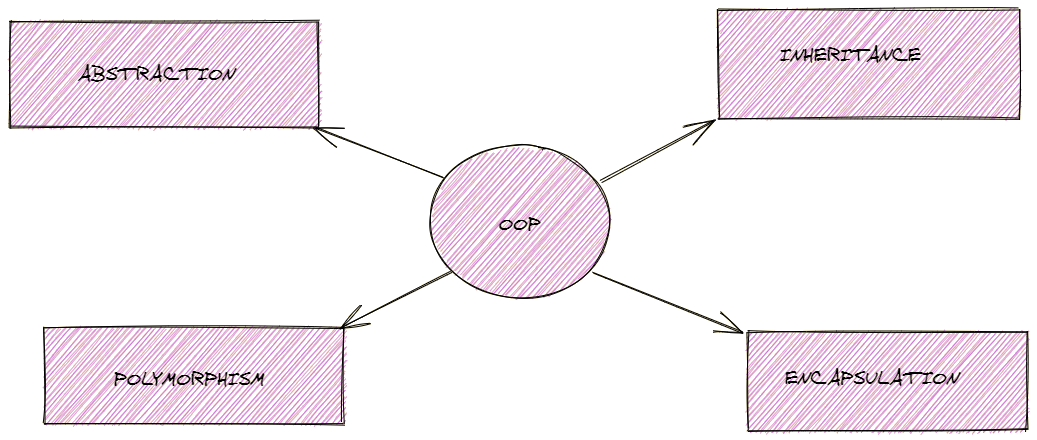
1) Polymorphism is the ability of a variable, function, or object to take multiple forms. It allows you to define one interface or method and have multiple implementations. Polymorphism is characterized by the method overloading and method overriding.
Method Overloading
Method Overloading is the act of having the same function name but differs in number and type of arguments within the same class.
public class Example {

    public int sum(int a, int b) {
        return a + b;

    }

    public int add(int a, int b, int c) {
        return a + b + c;
    }


}
Method Overriding
Method Overriding is the specific implementation of a method in a child class which is already defined in the parent class.
public class Vehicle {

    //Overriden method

    public void drive() {

        System.out.println("Vehicle is driving");

    }
}

public class Car extends Vehicle {

    //Overriden Method

    public void drive() {

        System.out.println("Car is driving");

    }

}
As you can see, the child class Car inherited the drive method from its parent class Vehicle. However, we can change the functionality of the method while keeping the same method signature.
2) Abstraction is a concept of hiding the details and showing only the necessary things to the user. We use an abstract class/Interface to express the intent of the class rather than the actual implementation.
An Abstract class is a class which is declared with an abstract keyword and cannot be instantiated.
public abstract class Example{

  public void display();

  public int sum(int a, int b);

}
An interface is a blueprint that contains static constants and abstract methods.
public Interface VehicleInterface {

    //methods in an interface does not have a body
    public void displayVehicle();
    public boolean isAutomatic();

}

public class Vehicle implements VehicleInterface {

    public void displayVehicle() {

        //The body of displayVehicle goes here

        System.out.println("This is a car");


    }

    public boolean isAutomatic() {

        //The body of isAutomatic goes here

        return true;
    }
}
3) Inheritance
Inheritance is a concept where the properties of one class can be inherited by the other. It helps with reusability and establishes a relationship between different classes. The relationship is established in code using the keyword extends.
public class Person {

    private int pID;
    private String name;

    Person() {
        pID = 4;
        name = "Brian";
    }

    Person(int pID, String name) {

        this.pID = pID;
        this.name = name;
    }

}

public class Student extends Person {

    public void displayName() {

        System.out.println(super.name);
    }


}
In this example, the child class Student inherits attributes from it's parent class, Person. As stated above the relationship is established using the keyword extends. The super keyword in java acts as a reference variable that is used to refer to parent class objects.
The displayName() method would print the value of name that is inherited from the Person class.
4) Encapsulation
Encapsulation is a process of hiding data implementation by restricting access to public methods. The instance variables are kept private and the accessor methods(getters and setters) are made public.
```java
public class Vehicle {

    //private instance variables
    private String name;

    private int numWheels;

    public Vehicle() {}

    public String getName() {

        return name;
    }

    public void setName(String name) {
        this.name = name;
    }

    public int getNumWheels() {

        return numWheels;
    }

    public void setNumWheels(int numWheels) {

        this.numWheels = numWheels;
    }

}

```
One Pager Cheat Sheet
One Pager Cheat Sheet
- Java is a highly efficient,
object-orientedprogramming language developed by James Gosling at Sun Microsystems that is designed for reliability, reusability, and security. - Java offers 8 primitive data types:
byte,short,int,long,float,double,boolean, andcharthat are used to store values of various sizes and types. - Java primitives group into numeric values, characters, and booleans, each with a fixed size and default value.
- - Java primitives fall into four buckets: integer, decimal, character, and boolean; instance fields get default values.
- Primitive instance variables have defaults, and an
intdefaults to0. - Referential types like
Strings,Classes, andObjects, which are created by the programmer, have a default value ofnulland refer to objects. - Local variables are only accessible within the method or block where they are declared.
- Variables in Java are
referencesto memory which are declared in different scopes (Local,Instance,Static) and cannot be accessed beyond their scope. - Instance variables are declared inside classes and have different values for each instantiated object, while static variables are
sharedamong all instances of a class. - Local = method-owned, instance = object-owned, static = class-owned and shared.
- - Local = method-owned, instance = object-owned, static = class-owned and shared.
- In Java, user input can be taken in three ways:
Using Scanner,Consoleclass, andBufferedReaderclass. - A
Javaprogram consists of Classes, Objects, Variables and Methods. - In order to compile a Java program, you must save it as a
.javafile and then call the compiler with thejavaccommand before running it with thejavacommand. - Iterative statements, such as
forandwhileloops, allow us to repeat statements until a certain condition is met, such as in the classic Fizz Buzz problem. -
Decisive Statementsin Java, such asifandelse ifstatements, allow you to control the flow of execution depending on conditions known only during runtime. - Use
equals()to compare string values;==compares object references. - Arrays in Java are the most primitive way of aggregating
elements of the same datatypesand can be declared and initialized either withcurly bracesor thenew keyword. -
Strings in Javaare immutable objects represented by thejava.lang.Stringclass, which implements theSerializable,Comparable, andCharSequenceinterfaces, and Java offers two mutable utility classes:StringBuilderandStringBuffer, with the latter being thread-safe. - Java is an Object-Oriented programming (OOP) language with
classes,objects,constructors, and methods used toimplementthe four basic principles of OOP, namelypolymorphism,abstraction,inheritance, andencapsulation.