Hoisting and Call Stack
Read at your own pace. Code execution, quizzes, progress tracking, and the AI tutor are available in the interactive view with JavaScript enabled.
Description
Understanding Variable Scoping in JavaScript
Let's dig into a fascinating JavaScript example to unravel the mystery of variable scoping.
The Code Snippet
Here's the code we'll be examining:
var numOfBeers = 5;

function getMoreBeers() {
  console.log('I have this many beers: ' + numOfBeers);
  var numOfBeers = 25;
  return numOfBeers;
}

console.log('I now have this many beers: ' + getMoreBeers());
What Do You Expect?
Before running the code, what do you think will be printed to the console? Take a moment to think it over.
Execution Results
Go ahead and execute the code. What do you see?
Your job in the interview is to explain why it runs the way it does.
Step Two
Analyzing Output in JavaScript: The Case of Mysterious Beers
The Code and Its Output
Let's look at the JavaScript code snippet and its output when executed:
var numOfBeers = 5;

function getMoreBeers() {
  console.log('I have this many beers: ' + numOfBeers);

  var numOfBeers = 25;
  return numOfBeers;
}

console.log('I now have this many beers: ' + getMoreBeers());

// Output
// I have this many beers: undefined
// I now have this many beers: 25
Your Initial Guess vs Reality
Upon a first look, you might expect the output to show the number of beers as 5 and then 25. However, the output is quite different. Let's explore why.
```js
var numOfBeers = 5;

function getMoreBeers() {
  console.log('I have this many beers: ' + numOfBeers);

  var numOfBeers = 25;
  return numOfBeers;
}

console.log('I now have this many beers: ' + getMoreBeers());

// I have this many beers: undefined
// I now have this many beers: 25
```
JS Execution
Exploring Call Stack and Variable Hoisting: JS Execution
Console Log Order: The Call Stack in Action
The first thing to notice is the order in which the console log statements appear. The statement "I have this many beers" within the getMoreBeers function is printed before "I now have this many beers."
console.log('I have this many beers: ' + numOfBeers);
Why does this happen? It's all thanks to the call stack, a data structure that keeps track of function calls. The call stack operates based on a stack data structure, which follows a First-In-Last-Out (FILO) principle.
When this line of code runs:
console.log('I now have this many beers: ' + getMoreBeers());
It becomes the first frame on the call stack.
Function Calls and the Call Stack
However, as soon as getMoreBeers() is invoked, it gets pushed onto the top of the call stack, superseding the original console.log statement.
function getMoreBeers() {
  console.log('I have this many beers: ' + numOfBeers);
  var numOfBeers = 25;
  return numOfBeers;
}
Only after getMoreBeers() fully executes, including its log statement, does the original console.log statement get popped off the stack and executed.

Hoisting: The Underlying Phenomenon
Now, let's delve into hoisting, which explains the value undefined in the output. In JavaScript, variable declarations are "hoisted" to the top of their respective scopes but remain uninitialized. This is why the numOfBeers inside getMoreBeers() is undefined during the first console.log.
console.log('I have this many beers: ' + numOfBeers); // Output: undefined
Understanding the mechanics of the call stack and variable hoisting is crucial for both debugging and technical interviews.
Multiple Choice
What is a call stack?
The Output Mystery
The Output Mystery
You've noticed that the output is intriguing. Despite having the variable numOfBeers defined before the function, the console log within the function prints it as undefined.
// Output
// I have this many beers: undefined
// I now have this many beers: 25
The Role of Scoping and Hoisting
This oddity has to do with two core JavaScript concepts: scoping and hoisting.
-
Local vs Global Scope: Even though a variable with the same name exists in the global scope, JavaScript gives priority to the local scope within a function.
var numOfBeers = 5; // Global Scope -
Hoisting in Action: In JavaScript, all variable declarations are "hoisted" to the top of their scope. This means that as soon as the function
getMoreBeers()begins execution, JavaScript hoists the variablenumOfBeersto the top of the function, but it remains uninitialized.function getMoreBeers() { console.log('I have this many beers: ' + numOfBeers); // Local Scope, Hoisted but uninitialized var numOfBeers = 25; // Local Scope, Initialized return numOfBeers; } -
The Undefined Log: When the
console.logstatement withingetMoreBeers()runs, it finds the local, hoisted, but uninitializednumOfBeersand prints it asundefined.console.log('I have this many beers: ' + numOfBeers); // Output: undefined
Global Variable
Global Variable: A Common Misconception
Note that var numOfBeers = 5; is a globally defined variable. Intuitively, one might think that this global variable should be accessible within the getMoreBeers function.
var numOfBeers = 5; // Globally Defined Variable
Hoisting: The Culprit
However, this expectation is thwarted by hoisting. Recall that hoisting moves variable declarations to the top of their current scope during the compilation phase.

var vs const and let
The hoisting behavior is specific to the var keyword, making it distinct from const and let. During the lexical analysis step by JavaScript engines, the var numOfBeers inside getMoreBeers is hoisted to the top of the function's scope, even before the function executes.
function getMoreBeers() {
  // Hoisted but uninitialized
  var numOfBeers;
  console.log('I have this many beers: ' + numOfBeers);  // Output: undefined
  numOfBeers = 25;  // Initialization
  return numOfBeers;
}
Breaking it Down: What Really Happens
So, when getMoreBeers runs, JavaScript's hoisting places a new var numOfBeers; at the top of the function, without initializing it. This local variable shadows the global one, and since it's uninitialized, the log statement shows undefined.
```js
function getMoreBeers() {
  // var numOfBeers;
  console.log('I have this many beers: ' + numOfBeers);

  var numOfBeers = 25;
  return numOfBeers;
}
```
Complexity Of Final Solution
However, JavaScript only hoists declarations, not initializations. So the = 25 part is NOT hoisted alongside, thus numOfBeers is undefined when console.log('I have this many beers: ' + numOfBeers); is first run.
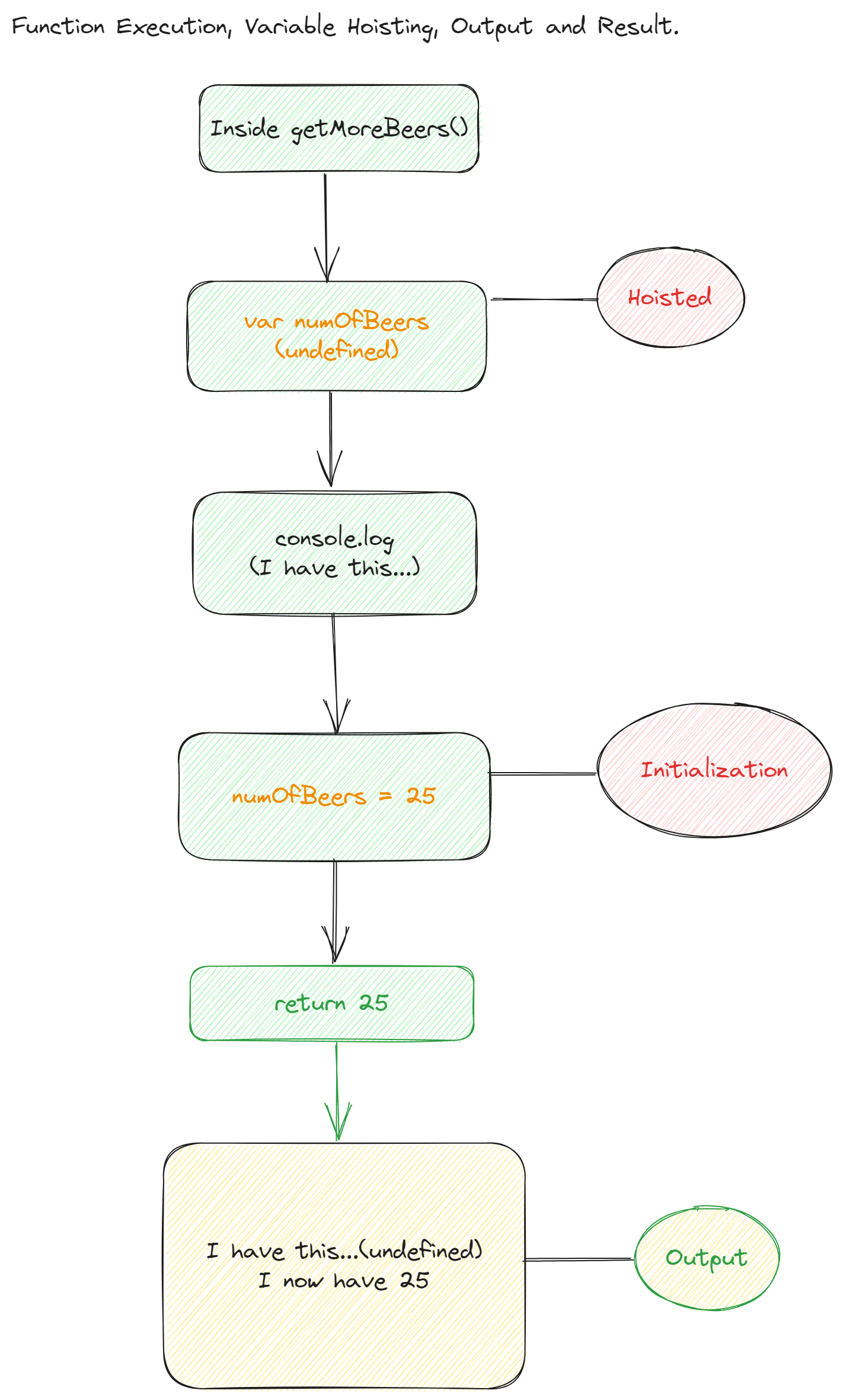
Complexity of Final Solution
O(1) constant time & space complexity, this is a knowledge question!
One Pager Cheat Sheet
One Pager Cheat Sheet
- We can observe that the
getMoreBeers()function overwrites thenumOfBeersvariable, therefore when it is logged25will be printed out, which can be explained by scope. -
Executingthis code willprinttheoutput. - The order of the console log statements is determined by how the
call stackworks, with thegetMoreBeers()function pushing the original statement onto the stack and executing first. - A call stack is a
data structurethat allows a program to keep track of function calls using thestack(first in, last out) data structure. - The
variableis returned as "undefined" in the log despite being clearly defined above the function. - We should
let/constand keep track of variable declarations to avoid unexpected results due tohoisting. - The declarations of variables with the
varkeyword in JavaScript are hoisted, but not the initializations.